AUIG850Bluetooth Wireless Boombox
Musical Electronics Ltd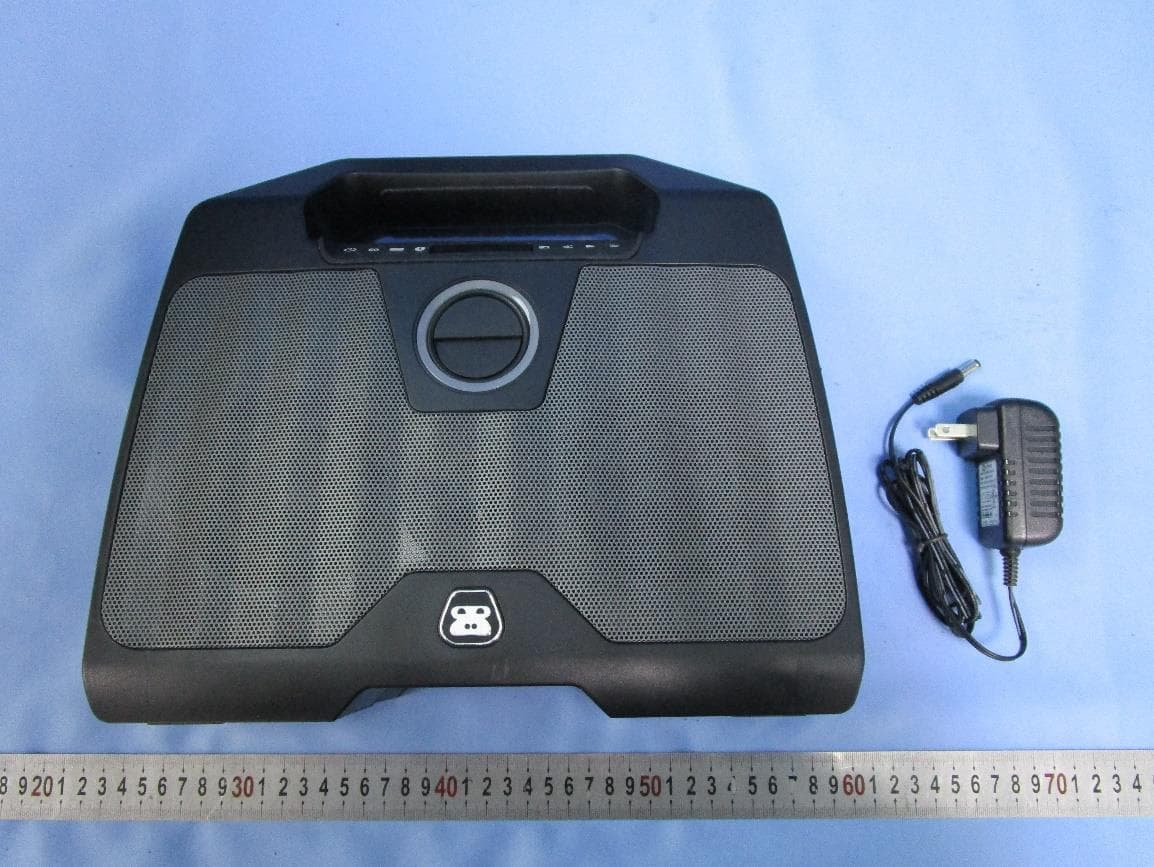
Click to zoom
Application Details
- Equipment Class
- DXX - Part 15 Low Power Communication Device Transmitter
- Date of Grant
- Jan 24, 2021
- Application Purpose
- Original Equipment
- Date of Application
- Jan 24, 2021
- Equipment Note
- Bluetooth Wireless Boombox
- Frequency Range
- 2402.00000000 - 2480.00000000
- Company
- Musical Electronics Ltd
- Country
- Hong Kong
Documents & Files
Document Text
Text extracted from the exhibit documents filed with the FCC. Open a document above to read the original.
Users Manual
DO NOT PRINT THIS PAGE BLUETOOTH WIRELESS BOOMBOX FM Radio DSS Dual Speaker Stereo Rechargeable Battery Bluetooth Wireless G-850 Welcome to G-PROJECT Thanks for purchasing G-BOOM3 and joining G-Project. For more info, please visit our website at www.gprojectgear.com ™ PACKAGE CONTENTS: • G-BOOM3 Bluetooth Wireless Boombox • AC Power Adapter • User Guide BLUETOOTH WIRELESS BOOMBOX SPECIFICATIONS Power Adapter AC Input .................................................................................. 100-240V ~ 50/60Hz Power Adapter DC Output ................................................................................................ 12V 1.5A Output Power ...................................................................................................... 2 x 10W <1% THD Battery .................................................................................... 7.4V, 2000mAh, Rechargeable Li-Ion Battery Recharging Time .................................................................................................... 2.5 hours Battery Playback Time.................................. Up to 8 hours (varies by volume level and audio content) BLUETOOTH: Bluetooth speci cation .............................................................................................................. v5.1 Supported Bluetooth Pro le...................................................................................................... A2DP Range..............................................................................................................33ft (10m) line of sight RADIO: Frequency range (FM) .............................................................................................. 87.5 ~ 108 MHz Speci cations are subject to be updated without notice. LOCATION OF CONTROLS 1. Power ON / OFF Button 2. EQ Button 3. DSS Button 4. Bluetooth PAIR Button 5. LCD Display 6. FM Radio 7. Tune Down Button 8. Play / Radio Preset Button 9. Tune Up Button 16 7 8 92 3 45 BLUETOOTH WIRELESS BOOMBOX 10. LED Ring 11. Volume + Up Button 12. Volume – Down Button 13. LED Charging Indicator 14. DC IN Jack 15. Reset Button 16. LINE-IN Jack 141516 10 12 13 11 POWER SOURCE Connect the supplied AC adapter (DC 12V 1.5A) to the DC IN Jack on the back of G-BOOM3 and plug the other end into a standard wall outlet (100~240V 50-60Hz). NOTES: Disconnect both ends of the AC adapter when not in use. Use only the supplied AC adapter with the following spec: AC In - 100-240V AC, 50/ 60Hz / DC Out - 12V 1.5A RECHARGE BATTERY Connect the supplied AC adapter to the DC IN Jack on the back of G-BOOM3 and plug the other end into a standard wall outlet to being automatically recharging the built-in battery. The red LED charging light on G-BOOM3 will illuminate to indicate charging process and turn off when the battery is fully charged. AC outlet AC adapter WHEN TO RECHARGE BATTERY When G-BOOM3 battery is low, the red LED Charging indicator will begin ashing to warn you to recharge your G-BOOM3 for continued use and enjoyment. • The battery is internal and cannot be replaced • Actual battery life varies with use, settings, and environmental conditions • Rechargeable batteries have a limited number of charge cycles • Charge the rechargeable battery at least biannually NOTES BLUETOOTH WIRELESS BOOMBOX EQUALIZER (EQ) There are 3 EQ presets: EQ1 = (Default) Dynamic: full bass and crisp high frequencies. EQ2 = Deep: Added emphasis on bass and low mids frequencies. EQ3 = Bright: Added emphasis on mids, vocals and high frequencies. Press the EQ Button repeatedly to cycle through them. The LED ring will ash 1, 2 or 3 times when the EQ button is pressed to indicate preset EQ1, EQ2 or EQ3 respectively. CHANGING THE INPUT SOURCE When the G-BOOM3 powers “ON”, the default audio input source is Bluetooth. To switch to Radio, press the FM Radio button once and G-BOOM3 will enter FM Radio mode. NOTE: If inserting audio cable into the Line-In Jack, G-BOOM3 will change to Line-In mode automatically regardless of the current input source. PLAYING THE RADIO 1 With G-BOOM3 powered “ON”, press the FM RADIO button. The current FM station and FM icon will appear on the display. 2 For manual tuning, repeatedly press the TUNE UP or TUNE DOWN button to manually adjust the tuning on the LCD display until the desired station appears. 3 For auto tuning, press and hold the TUNE UP or TUNE DOWN button until the display starts to scan, then release the button. The tuner will search and stop on the next strongest station signal it nds. Repeat this process until the desired station appears on the LCD display. NOTES: G-BOOM3 features a built-in internal FM antenna. For best reception please place the unit close to window or open area to improve reception quality. Keep digital music players or mobile phones away from G-BOOM3 as this may cause interference. Do not place G-BOOM3 near the AC power adapter as this may lead to reception interference. BLUETOOTH WIRELESS BOOMBOX SETTING RADIO PRESETS 1 To preset a radio station to memory, rst follow the previous steps to tune in the desired station. 2 Press and hold the PLAY / RADIO PRESET button to create a preset for the current station. “P” will appear and “##” (the preset number) will blink on the LCD display. 3 Press the TUNE UP or TUNE DOWN button to select a preset number (01- 10). Press the PLAY / RADIO PRESET button again to con rm the setting and the station will be saved into memory. 4 Repeat these steps for up to 10 presets, as desired. 5 To recall a preset station, repeatedly press the PLAY / RADIO PRESET button until the desired preset number appears in the display and the station tunes in. NOTES: Saving a new station preset in the same position as a previously saved station will replace the previously stored station for that preset number. BLUETOOTH OPERATION You can stream audio wirelessly to G-BOOM3 from up to 33’ away using your iPhone, iPad, iPod, Android, laptop, or other A2DP Bluetooth enabled device. 1 …
Text truncated - open the document above for the full version.
External Photos
external photo
ID Label/Location Info
3
Internal Photos
Internal photos
RF Exposure Info
INTERTEK TESTING SERVICES RF Exposure The equipment under test (EUT) is a Bluetooth Wireless Boombox with Bluetooth 5.1 EDR function operating in 2402-2480MHz. The EUT is powered by DC 7.4V by battery which can be charged by DC 12V/1.5A through adapter input. For more detail information pls. refer to the user manual. Bluetooth Version: 5.1 EDR mode Antenna Type: Integral antenna Modulation Type: GFSK, p/4-DQPSK, 8DPSK Antenna Gain: -0.58dBi Max The nominal conducted output power specified: -11.42dBm (+/-2dB) The nominal radiated output power (e.i.r.p) specified: -12dBm (+/-2dB) According to the KDB 447498: The maximun peak radiated emission for the EUT is 85.1dBμV/m at 3m in the frequency 2402MHz The EIRP = [(FS*D) ^2 / 30] mW = -10.1dBm which is within the production variation. The minimum peak radiated emission for the EUT is 82.2dBμV/m at 3m in the frequency 2480MHz The EIRP = [(FS*D) ^2 / 30] mW = -13.0dBm which is within the production variation. The maximun conducted output power specified is -9.42 dBm = 0.11 mW The source- based time-averaging conducted output power = 0.11 * Duty factor mW (where Duty Factor≤1) = 0.11 mW The SAR Exclusion Threshold Level: = 3.0 * (min. test separation distance, mm) / sqrt(freq. in GHz) = 3.0 * 5 / sqrt (2.480) mW = 9.53 mW Since the source-based time-averaging conducted output power is well below the SAR low threshold level, so the EUT is considered to comply with SAR requirement without testing. FCC ID: AUIG850
Test Report
Musical Electronics Limited TEST REPORT SCOPE OF WORK FCC TESTING–G-850 REPORT NUMBER 210107045SZN-001 ISSUE DATE [REVISED DATE] 14 January 2021 [---------------------] PAGES 27 DOCUMENT CONTROL NUMBER FCC ID 249_C © 2017 INTERTEK Intertek Report No.: 210107045SZN-001 This report is for the exclusive use of Intertek's Client and is provided pursuant to the agreement between Intertek and its Client. Intertek's responsibility and liability are limited to the terms and conditions of the agreement. Intertek assumes no liability to any party, other than to the Client in accordance with the agreement, for any loss, expense or damage occasioned by the use of this report. Only the Client is authorized to permit copying or distribution of this report and then only in its entirety. Any use of the Intertek name or one of its marks for the sale or advertisement of the tested material, product or service must first be approved in writing by Intertek. The observations and test results in this report are relevant only to the sample tested. This report by itself does not imply that the material, product, or service is or has ever been under an Intertek certification program. Intertek Testing Services Shenzhen Ltd. Longhua Branch 101, 201, Building B, No. 308 Wuhe Avenue, Zhangkengjing Community, GuanHu Subdistrict, LongHua District, ShenZhen, P.R. China Tel: (86 755) 8601 6288 Fax: (86 755) 8601 6751 Version: 01-November-2017 Page: 1 of 27 FCC ID 249_C Test Report Musical Electronics Limited Application For Certification FCC ID: AUIG850 Bluetooth Wireless Boombox Model: G-850 Brand Name: G-Project 2.4GHz Transceiver Report No.: 210107045SZN-001 We hereby certify that the sample of the above item is considered to comply with the requirements of FCC Part 15, Subpart C for Intentional Radiator, mention 47 CFR [10-1-19] Prepared and Checked by: Approved by: Steven Zhou Engineer Kidd Yang Technical Supervisor Date: 14 January 2021 Intertek Report No.: 210107045SZN-001 Version: 01-November-2017 Page: 2 of 27 FCC ID 249_C Test Report MEASUREMENT/TECHNICAL REPORT This report concerns (check one:) Original Grant X Class II Change Equipment Type: DXX - Part 15 Low Power Communication Device Transmitter Deferred grant requested per 47 CFR 0.457(d)(1)(ii)? Yes No X If yes, defer until: date Company Name agrees to notify the Commission by: date of the intended date of announcement of the product so that the grant can be issued on that date. Transition Rules Request per 15.37? Yes No X If no, assumed Part 15, Subpart C for intentional radiator − the new 47 CFR [10-1-19 Edition] provision. Report prepared by: Steven Zhou Intertek Testing Services Shenzhen Ltd. Longhua Branch 101, 201, Building B, No. 308 Wuhe Avenue, Zhangkengjing Community, GuanHu Subdistrict, LongHua District, ShenZhen, P.R. China Tel / Fax: 86-755-8614 0743/86-755-8601 6661 Intertek Report No.: 210107045SZN-001 Version: 01-November-2017 Page: 3 of 27 FCC ID 249_C Test Report Table of Contents 1.0 Summary of Test Result ................................................................................................. 4 2.0 General Description ...................................................................................................... 5 2.1 Product Description .................................................................................................... 5 2.2 Related Submittal(s) Grants ......................................................................................... 5 2.3 Test Methodology ...................................................................................................... 5 2.4 Test Facility ............................................................................................................... 5 3.0 System Test Configuration ............................................................................................. 6 3.1 Justification ............................................................................................................... 6 3.2 EUT Exercising Software .............................................................................................. 6 3.3 Special Accessories ..................................................................................................... 6 3.4 Equipment Modification .............................................................................................. 6 3.5 Measurement Uncertainty .......................................................................................... 7 3.6 Support Equipment List and Description ........................................................................ 7 4.0 Emission Results ........................................................................................................... 8 4.1 Radiated Test Results .................................................................................................. 8 4.1.1 Field Strength Calculation ......................................................................................... 8 4.1.2 Radiated Emission Configuration Photograph .............................................................. 9 4.1.3 Radiated Emissions .................................................................................................. 9 4.1.4 Transmitter Spurious Emissions ............................................................................... 12 4.2 Conducted Emission Configuration Photograph ............................................................ 16 4.2.1 Conducted Emission ............................................................................................... 16 5.0 Equipment Photographs .............................................................................................. 19 6.0 Product Labelling ........................................................................................................ 19 7.0 Technical Specifications ............................................................................................... 19 8.0 Instructio…
Text truncated - open the document above for the full version.
Test Setup Photos
radiated emission Below 1G Above 1G
Test Setup Photos
conducted emission
Contact Information
Applicant
Richard Leung(VP - Innovation & Technology)
Technical Contact
Intertek Testing Services Shenzhen Ltd. Longhua BrWilliam Chen
[email protected]86-755-8601 6288
101, 201, Building B, No. 308 Wuhe Avenue, Zhangke · Shenzhen · China
Non-Technical Contact
Intertek Testing Services Shenzhen Ltd. Longhua BrWilliam Chen
[email protected]86-755-8601 6288
Test Firm
Intertek Testing Services Shenzhen Ltd. Longhua BrHolly Ou
[email protected]+86 755 86140691
Technical Specifications
| # | Rule Parts | Frequency Range | Power Output |
|---|---|---|---|
| 1 | 15C | 2.40 GHz - 2.48 GHz | - |
Other Applications from Musical Electronics Ltd
AUIG860
Jul 07, 2024G-BOOM4, Bluetooth Wireless Boombox
Equipment Class
DSS - Part 15 Spread Spectrum TransmitterAUI100135464
Jan 21, 2024Cassette Boombox Black
Equipment Class
DSS - Part 15 Spread Spectrum Transmitter
AUINSCBBTCD01-B
Apr 27, 2015CD Boombox with Bluetooth
Equipment Class
DTS - Digital Transmission System
AUIRX-DBT30
Jul 20, 2014Portable Stereo CD System
Equipment Class
DXX - Part 15 Low Power Communication Device Transmitter
AUI3301089T
Jul 16, 2014Wireless Stereo Headphones - Docking Station
Equipment Class
DTS - Digital Transmission System