B94CE190ADPAC WLNB-AN-DP101-G in CRVSB-07BR
HP Inc.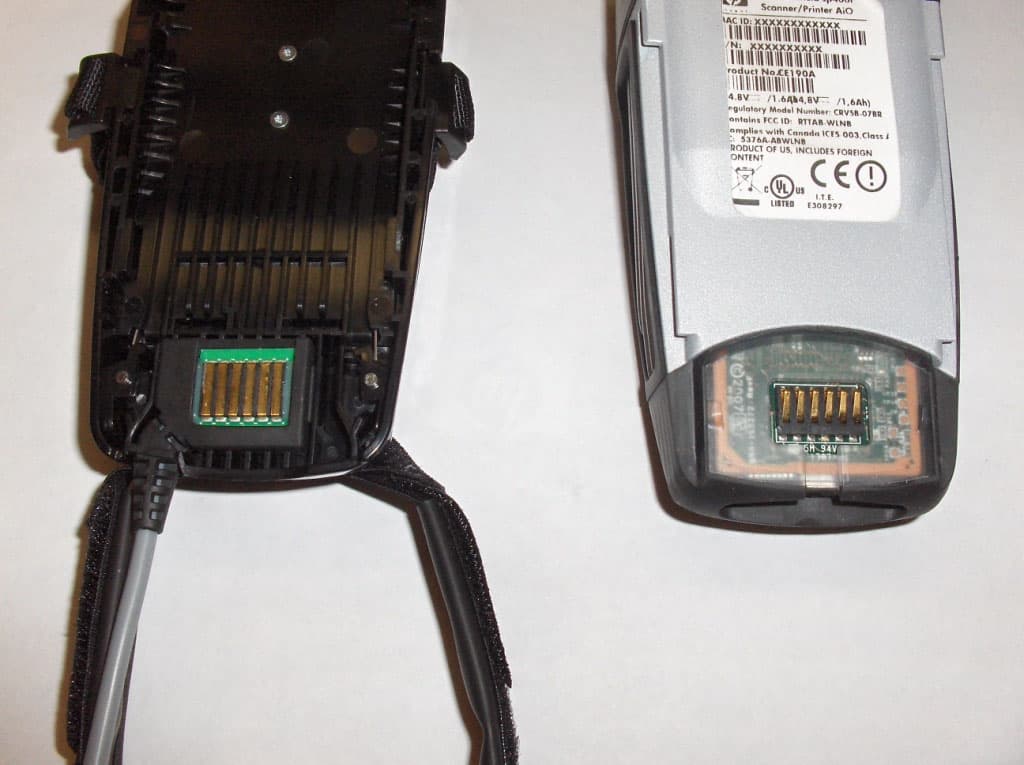
Click to zoom
Application Details
- Equipment Class
- DTS - Digital Transmission System
- Date of Grant
- Jan 14, 2008
- Application Purpose
- Original Equipment
- Date of Application
- Jan 14, 2008
- Equipment Note
- DPAC WLNB-AN-DP101-G in CRVSB-07BR
- Frequency Range
- 2412.00000000 - 2462.00000000
- Company
- HP Inc.
- Country
- United States
Documents & Files
Document Text
Text extracted from the exhibit documents filed with the FCC. Open a document above to read the original.
Users Manual
1 Battery wrist case Bracelet porte-batterie Compartimento de baterías para la muñeca 2 All-in-One Tout-en-un All-in-One HP Handheld sp400 series All-in-One Scanner Printer Quick Start Guide Escáner e impresora All-in-One Guía de inicio rápido Imprimante-scanneur tout-en-un Guide de démarrage rapide e. d.c. a. b. Retirez tout bijou de votre poignet et de votre main. Remove all jewelry from your wrist and hand. Quítese todas las joyas de la muñeca y de la mano. Do not over-tighten straps. Ne serrez pas trop les courroies. No apriete en exceso las cintas. Maintain a relaxed wrist posture and use low force when printing. Gardez votre poignet détendu et ne forcez pas lors de l’impression. Mantenga una postura relajada de la muñeca y aplique poca fuerza al imprimir. Sécurité de la batterie ATTENTION: Risque d’explosion si la batterie est remplacée par une batterie non conforme. • N’utilisez que les batteries HP suivantes : numéro de produit CE 199A ou CE201A.• Défaites-vous des batteries usagées en suivant les instructions contenues dans le System Administrator Guide, disponible en ligne sur le site www.hp.com/ support/handheldsp400aio • N’utilisez que des accessoires, des blocs-batteries et des chargeurs de batteries approuvés par HP et répertoriés par UL. • Seguridad de las baterías PRECAUCION: Existe riesgo de explosión si se instala un tipo incorrecto de batería. • Use sólo las baterías de HP con número de producto CE199A o CE201A.• Elimine las baterías usadas según las instrucciones de la Guía para el administrador del sistema, disponible en línea en www.hp.com/support/ handheldsp400aio • Use solamente los accesorios, baterías y cargadores aprobados por HP y UL.• Battery Safety CAUTION: Risk of explosion if battery is replaced by an incorrect type. • Use only the following HP batteries: product number CE199A or CE201A.• Dispose of used batteries according to the instructions in the System Administrator Guide, available online at www.hp.com/support/handheldsp400aio • Only use HP approved and UL listed accessories, battery packs and battery chargers. • IMPORTANT: If you are using the handle accessory instead of the hand mount, see the instructions that were included with the handle accessory. IMPORTANT: Si vous utilisez l’accessoire à poignée plutôt que celui qui se fi xe sur la main, référez-vous aux instructions qui accompagnent l’accessoire à poignée. IMPORTANTE: Si utiliza un accesorio de mango en lugar del soporte de puño, consulte las instrucciones incluidas en el accesorio. b.a. f. a.b. a. e. d.c. b. c. d. a.b. ON ENCENDIDO ACTIVÉ OFF APAGADO DÉSACTIVÉ 41 2 3 7 6 5 1 Finger strap Bague-courroie Cinta para los dedos 2 Rudder Barre Guía 3 Strap fasteners Attaches-courroies Cierres de las cintas 4 Wrist strap Bracelet-courroie Cinta para la muñeca 5 Power button Interrupteur Botón de encendido y apagado Power light (green) Voyant d’alimentation (vert) Luz de encendido (verde) Tail lights (green or red) Voyants (verts ou rouges) Luz trasera (verdes o rojas) CLEAR button Bouton d’effacement Botón CLEAR (BORRAR) 6 7 8 2 1 3 4 Error light (red) Luz de error (roja) Voyant d’erreur (rouge) Print cartridge light (orange) Luz del cartucho de impresión (naranja) Voyant de cartouche d’impression (orange) Voyant de batterie (orange) Luz de carga de la batería (naranja) Battery light (orange) Wireless light (blue) Luz de sistema inalámbrico (azul) Voyant sans fi l (bleu) CAUTION: Do not submerge this device in water. LED Safety CAUTION: The scanning imager located on this device is classifi ed as a Class 1 LED device according to International Standard IEC 825-1 (EN60825-1). This device is not considered harmful, but the following precautions are recommended: If the unit requires service, contact an authorized HP service center.• Do not attempt to make any adjustment to the LED imaging scanner.• Avoid direct eye exposure to the LED imaging scanner. Be aware that the beam is invisible light and cannot be seen. • Do not attempt to view the LED imaging scanner with any type of optical device.• Ergonomics Safety CAUTION: The HP Handheld sp400 series All-in-One Scanner Printer is designed to scan and print on packages in the package handling environment. • When fi tting the All-in-One, the fi nger strap should remain snug to prevent motion between the hand and the rudder or device. The wrist strap should only be tight enough to maintain light contact between your knuckles and the gel pad. • When fi tting the battery wrist case, tighten the straps until snug but not too tight. Loosen the straps if any tingling or discomfort is noticed in arm or hand. • When scanning and printing, try to relax your hand and minimize wrist motion to prevent fatigue and discomfort. • Use light pressure while printing to reduce force to the hand and improve print quality on different materials. • If you experience discomfort related to using the All-in-One, promptly notify your supervisor and consult a qualifi ed physician and, if available, your company’s health and safety department. • Visual and Audio Feedback Information: The blue Wireless light will blink until the All-in-One connects to the network. When connected, the light will be solid and a tone will be heard. • The green tail lights will turn on when the All-in-One is ready to print and turn off when the print is complete. A tone will be heard. • The orange Print Cartidge light will blink when ink is getting low and the orange Battery light will blink when the battery is getting low. Warning tones will be heard. • If the red tail lights blink continually or remain solid, this may indicate a problem with the All-in-One. See the System Administrator Guide at www.hp.com/support/ handheldsp400aio. • Note: To optimize print quality, try to locate a clean, fl at surface on the package near the barcode, place the nose of the All-in-One on the package at a slight angle so the wheels make contact. Maintain a light downward pressure while you pull the All-in-One in a strai…
Text truncated - open the document above for the full version.
Users Manual
1 HP Handheld sp400 series All-in-One Scanner Printer System Administrator Guide 2 Legal notices (c) Copyright 2007 Hewlett-Packard Development Company, L.P. The information contained herein is subject to change without notice. The only warranties for HP products and services are set forth in the express warranty statements accompanying such products and services. Nothing herein should be construed as constituting an additional warranty. HP shall not be liable for technical or editorial errors or omissions contained herein. Trademark credits Adaptus Imaging Technology is a registered trademark of Hand Held Products, Inc. The Bluetooth word, mark, and logos are owned by the Bluetooth SIG, Inc. Contents 3 Contents 1 Introduction About this guide.................................................................................................................................................... 5 The All-in-One briefly explained ........................................................................................................................... 5 Handle and wireless options ................................................................................................................................ 5 Handle options ................................................................................................................................................ 5 Wireless connectivity ...................................................................................................................................... 5 All-in-One components ......................................................................................................................................... 6 Hand mount components................................................................................................................................ 6 Control panel components .............................................................................................................................. 7 2 Safety information General safety ...................................................................................................................................................... 8 LED safety ............................................................................................................................................................ 8 Battery safety ....................................................................................................................................................... 8 3 Set up the All-in-One Install the battery cable ........................................................................................................................................ 9 Assemble the hand mount or handle accessory .................................................................................................. 9 Install the print cartridge ..................................................................................................................................... 10 Install the battery and fit the wrist case .............................................................................................................. 12 Fit the hand mount ............................................................................................................................................. 14 Connect the battery cable .................................................................................................................................. 16 4 Configure the All-in-One Overview ............................................................................................................................................................ 17 Implement the server application ....................................................................................................................... 17 Configure the All-in-One ..................................................................................................................................... 17 Design a custom print template .......................................................................................................................... 18 5 Operate the All-in-One Turn on the All-in-One ........................................................................................................................................ 19 Scan ................................................................................................................................................................... 20 Scanning tips ................................................................................................................................................ 21 Print .................................................................................................................................................................... 22 Print instructions ........................................................................................................................................... 22 Clear print data ............................................................................................................................................. 23 Turn off the All-in-One ........................................................................................................................................ 24 Remove the All-in-One and wrist case ............................................................................................................... 24 6 Maximize print quality Materials and technique ..................................................................................................................................... 25 Optimal conditions .............................................................................................................................................. 25 7 Ensure optimal comfort Ergonomic recommendations.........................................................................…
Text truncated - open the document above for the full version.
Cover Letter(s)
Authorizationon Behalf of Hewlett-Packard Company For the US Federal Communications Commission Office of Engineering and TechnologyandOther FCC Programs and Offices 1. I, David P. Adams, am Canada/USA Technical Regulations Manager for Hewlett-Packard Company (“Hewlett-Packard”) and Applicant/Grantee Contact of Recordfor Hewlett-Packard together with its subsidiaries and affiliates worldwide (collectively,“HP”) for HP’s dealings with the United States Federal Communications Commission (“”FCC”). I am dulyauthorized by HP to make this Authorization on HP’s behalf. 2. This Authorization will designate the person named below to act on my behalf and HP’s behalf as authorized agent and representative, until further notice, with the additional power to designate one or more third party agents for HP with regard to particular matters and applications. Allacts carried out and requests made by this named representativerelating to any matter before the FCC, including requests for confidentiality,shall have the same effect as mine. Name:Brian Collins Title:RegulatoryEngineer Address:Hewlett-Packard Company 1000 NE Circle Drive Corvallis, OR 9733-4239 Telephone:541-715-6209 Fax:541-715-4982 E-mail:[email protected] 3. Questions about the scope and effect ofthis Authorization should be addressed as follows: David P. Adams Canada/USA Region Technical Regulations Manager 1501 Page Mill Road, MS1229 Palo Alto, CA 94304-1126 650.857.4423 Telephone 650.857.4882 Fax [email protected] 4. I declare under penalty of perjury that the foregoing is true and correct, and that this Authorization was executed atPalo Alto, California, on the date indicated below my signature. ____________________________ Signature David P. Adams Canada/USA Technical Regulations Manager Hewlett-Packard Company December 21, 2007 Date
Cover Letter(s)
Northwest EMC TCB Compliance Opinion Rev. 9/15/03 HEWP0011 Information about the Applicant Grantee (Company Name) Hewlett Packard Company FCC Contact Person David Adams Address 3000 Hanover Street City, State, Zip Palo Alto, CA, 94394 Job Number HEWP0011 Model WLNB-AN-DP101-G in sp400f FCC ID B94CE190A Agent Northwest EMC, Inc. Approval Type Original Equipment Class DTS Digital Transmission System Rule Part 15.247 Overview This application is for an original limited modular approval of an 802.11(b) radio in the Hewlett Packard handheld sp400f All-in-One Scanner Printer. The 802.11(b) radio, M/N: WLNB-AN- DP101-G, has a full modular approval under DPAC Technologies FCC ID: RTTAB-WLNB. Hewlett Packard will be using the 802.11(b) radio in their device with a new integral antenna that satisfies the requirements of 47 CFR 15.203. Emissions testing was performed with the radio in the Scanner Printer model sp400f. The Hewlett Packard FCC ID is B94CE190A. Confidentiality requested for allowed files. Request is properly addressed and referenced. Short term confidentiality requested. Recommendation All items have been resolved and completed to my satisfaction; therefore I recommend this application for approval. Signature Dave Tolman, TCB Committee 12/17/2007
Cover Letter(s)
NORTHWEST EMC, INC. 22975 NW Evergreen Parkway, Suite 400 Hillsboro, OR 97124 December 11, 2007 Dear Application Examiner: On behalf of Hewlett Packard, Northwest EMC Inc is submitting this application for an original limited modular approval of an 802.11(b) radio in their Handheld sp400f All-in- One Scanner Printer. The 802.11(b) radio, M/N: WLNB-AN-DP101-G, has a full modular approval under DPAC Technologies FCC ID: RTTAB-WLNB. Hewlett Packard will be using the 802.11(b) radio in their device with a new integral antenna that satisfies the requirements of 47 CFR 15.203. Emissions testing was performed with the radio in the Scanner Printer. The Hewlett Packard FCC ID is B94CE190A. The HP sp400f All-in-One Scanner Printer device scans barcodes, 802.11(b) transmits and receives, formats labels, and prints labels. It can be used handheld or mounted to the back of hand/fingers; it is not intended for long term operation within 20 centimeters of the head or torso. As such its RF exposure condition is portable handheld. MPE Estimates have been provided for this configuration. Please see the FCC Inquiry Response (Tracking Number 743944) in the RF Exposure for information on this configuration. When installed in the HP device, the radio is battery operated. However, the radio can continue to transmit while the battery is docked in a battery charger. Thus, AC conducted emissions tests were performed per 47 CFR 15.207. Also, the technical reports and exhibits demonstrate compliance with FCC rules 47 CFR 15.247 as a DTS transmitter. Please note that some of the documents refer to Quatech rather than DPAC Technologies. These two companies merged in 2006. DPAC Technologies is the corporate name, and Quatech is an operating subsidiary. In addition, the User Manual refers to an internal Bluetooth radio. This is a separate model and is outside the scope of this application. Your efforts in reviewing this application are greatly appreciated. Best regards, Vicki Albertson Northwest EMC, Inc.
Cover Letter(s)
NORTHWEST EMC, INC. 22975 NW Evergreen Parkway, Suite 400 Hillsboro, OR 97124 January 8, 2007 Dear Application Examiner: Hewlett Packard’s Handheld sp400f All-in-One Scanner Printer with an internal 802.11(b) radio, M/N: WLNB-AN-DP101-G, is seeking limited modular approval under the FCC ID: B94CE190A. The radio meets the requirements for limited modular approval as detailed in FCC Public Notice DA00-1407. Compliance or non-compliance to each of the requirements is described below: 1. “The modular transmitter must have its own RF shielding.” The radio portion of the module is contained in its own RF shielding. Please see the Internal Photos exhibit. 2. “The modular transmitter must have buffered modulation/data inputs.” The transmitter is buffered through the CPU and associated latches on the application processor board per the radio manufacturer. 3. “The modular transmitter must have its own power supply regulation.” The IC contains its own voltage regulation. In case of changes in the supply voltage VCC (for example caused by temperature changes or other effects), the internal voltage will be stabilized. 4. “The modular transmitter must comply with the antenna requirements of Section 15.203 and 15.204(c).” The EUT meets the FCC antenna requirements. Please see Antenna information exhibit and internal photos exhibit. 5. “The modular transmitter must be tested in a stand-alone configuration.” The EUT was not tested in a stand-alone configuration. The radio was tested while installed in the HP sp400f All-in-One Scanner Printer. Therefore, the radio does not comply with the requirements for full modular approval. Thus, Hewlett Packard is seeking limited modular approval. 6. “The modular transmitter must be labeled with its own FCC ID number.” The Scanner Printer will be labeled with its own FCC ID number. Please see the FCC ID label & location exhibit. 7. “The modular transmitter must comply with any specific rule or operating requirements applicable to the transmitter and the manufacturer must provide adequate instructions along with the module to explain any such requirements.” The EUT is compliant with all applicable FCC rules. Detail instructions for maintaining compliance are given in the User Manual Braun SAG v 11 exhibit. 8. “The modular transmitter must comply with any applicable RF exposure requirements.” The EUT is compliant with all applicable RF exposure requirements. Please see the MPE Estimates for a stand-alone device exhibit. Please contact us if you have additional questions. Your attention to this matter is greatly appreciated. Best regards, Vicki Albertson Northwest EMC, Inc.
Operational Description
WP Wireless P.O. Box 517, 19654 Eighth St. East, Sonoma, CA 95476 Phone (707) 996-5201 Fax (707) 996-3380 Date 02/22/06 http://www.wp-wireless.com WPI CONFIDENTIAL REV ID 1.0a © Copyright 2006 1 WPANTFR4022A Preliminary Product Specification For 2.4GHz ISM Band PIFA antenna Customer Approval Signature: _________________________ Date Approved: _____________ Customer Name: Engineering Approval: ____ NJS_______ Date Approved: __02/22/06___ WP Wireless P.O. Box 517, 19654 Eighth St. East, Sonoma, CA 95476 Phone (707) 996-5201 Fax (707) 996-3380 Date 02/22/06 http://www.wp-wireless.com WPI CONFIDENTIAL REV ID 1.0a © Copyright 2006 2 WPANTFR4022A Explanation of Part Number WP ANT FR4 022A (1) (2) (1) Product Series Type: FR4 PIFA Antenna (2) Product Model Number: 2.4GHz ISM band Electrical Properties VSWR (typical data) Item Specification Frequency Range 2.40 – 2.50 GHz Impedance 50Ω VSWR Max: 2.0:1 Typical: 1.5:1 Gain (Peak) 2.0 dBi (Typical) Polarization Linear Radiation Pattern Near omni-directional in the horizontal plane Power handling (max) 1 Watt FR4 Series Antenna 2.4GHz ISM Band WP Wireless P.O. Box 517, 19654 Eighth St. East, Sonoma, CA 95476 Phone (707) 996-5201 Fax (707) 996-3380 Date 02/22/06 http://www.wp-wireless.com WPI CONFIDENTIAL REV ID 1.0a © Copyright 2006 3 WPANTFR4022A Antenna Construction Antenna Dimension L 9.9 ± 0.15 mm - W 3.7 ± 0.15 mm - T 3.8 ± 0.20 mm - P w 3.48 ± 0.10 mm Pad width P 1 1.4 ± 0.10 mm Soldering terminal P 2 1.9 ± 0.10 mm Soldering terminal P 3 2.4 ± 0.15 mm Feed terminal L T W P w P 1 P 2 P 3 WP Wireless P.O. Box 517, 19654 Eighth St. East, Sonoma, CA 95476 Phone (707) 996-5201 Fax (707) 996-3380 Date 02/22/06 http://www.wp-wireless.com WPI CONFIDENTIAL REV ID 1.0a © Copyright 2006 4 WPANTFR4022A Typical Gain Patterns (Measured with ground PCB of 110mm x 10mm) Horizontal Vertical Solder Pattern design
RF Exposure Info
MPE Estimate Antenna Type Antenna Part No. Transmit Frequency Max Peak Conducted Output Power Antenna Gain Minimum Antenna Cable Loss Power Density @ 20 cm General Population Exposure Limit from 1.1310 (MHz)(mW)(dBi)(dB) (mW/cm 2 )(mW/cm 2 ) PIFA WPANTFR4022A 904.8636.8200.0121 FCC ID: B94CE190A Compliance with 47 CFR 15.247(i) “Systems operating under the provisions of this section shall be operated in a manner that ensures that the public is not exposed to radio frequency energy levels in excess of the Commission's guidelines. See § 1.1307(b)(1) of this chapter.” The EUT is a 802.11(b) radio that will be installed in the HP Handheld sp400f All-in-One Scanner Printer. The radio operates in the 2.4 – 2.4836 GHz frequency range. The radio is not intended for long term use within 20 centimeters of the head or torso of a user. The HP Scanner Printer can be used either as a handheld or hand mounted device. As such, the RF Exposure condition will be handheld portable. Please see the attached FCC Inquiry (Tracking Number 743944 ) that verifies that the EUT is not subject to routine environmental evaluation per 47 CFR 2.1091(c). Per 47 CFR 1.1310, the EUT must meet the General Population / Uncontrolled exposure limits listed in Table 1. The radio, when installed in the HP Scanner Printer will only use a single chip antenna, the Wireless Business Unit M/N: WPANTFR4022A PIFA antenna, gain = 2.0 dBi. Per the original grant, the maximum conducted output power was 15.66 dBm (36.8 mW) The MPE estimates are as follows: Table 1 in 47 CFR 1.1310 defines the maximum permissible exposure (MPE) for the general population as 1 mW/cm 2 . The exposure level at a 20 cm distance from the EUT’s transmitting antenna is calculated using the general equation: S = (PG)/4πR 2 Where: S = power density (mW/cm 2 ) P = power input to the antenna (mW) G = numeric power gain relative to an isotropic radiator R = distance to the center of the radiation of the antenna (20 cm = limit for MPE estimates) PG = EIRP Solving for S, the maximum power density 20 cm from the transmitting antenna is summarized in the following table: The power density does not exceed 1 mW/cm 2 at 20 cm; therefore, the exposure condition is compliant with FCC rules. The applicant’s radio, FCC ID: B94CE190A, is compliant with the requirements of 15.247(i). --------- Forwarded message ---------- From: Generic Office of Engineering Technology <[email protected] > Date: Aug 1, 2007 2:14 PM Subject: Response to Inquiry to FCC (Tracking Number 743944) To: [email protected] Inquiry: The attached document describes a WiFi enabled PDA that is only hand-held. There are no provisions for use within 20 cm of the head or torso. The manufacturer would like to have confirmation from the FCC that the device does not require SAR evaluation since it is a hand-held only portable. Response: based on description, handheld-only appear to be appropriate and applicable Do not reply to this message. Please select the Reply to an Inquiry Response link from the OET Inquiry System to add any additional information pertaining to this inquiry.
Test Report
Hewlett-Packard Company Regulatory Model # CRVSB-07BR June 08, 2007 Report No. HEWP0011 Rev 02 Report Prepared By www.nwemc.com 1-888-EMI-CERT © 2007 Northwest EMC, Inc 22975 NW Evergreen Parkway Suite 400 Hillsboro, Oregon 97124 Certificate of Test Issue Date: June 08, 2007 Hewlett-Packard Company Regulatory Model # CRVSB-07BR Emissions Test Description Specification Test Method Pass Fail Radiated Emissions FCC 15.109:2006 Class A ANSI C63.4:2003 Spurious Radiated Emissions FCC 15.247:2006 DTS ANSI C63.4:2003, KDB No. 558074 AC Powerline Conducted Emissions FCC 15.207:2006 ANSI C63.4:2003 Conducted Emissions FCC 107:2006 Class B ANSI C63.4:2003 Modifications made to the product See the Modifications section of this report Test Facility The measurement facility used to collect the data is located at: Northwest EMC, Inc. 22975 NW Evergreen Parkway, Suite 400 Hillsboro, OR 97124 Phone: (503) 844-4066 Fax: 844-3826 This site has been fully described in a report filed with and accepted by the FCC (Federal Communications Commission) and Industry Canada. Approved By: Donald Facteau, IS Manager This report must not be used to claim product certification, approval, or endorsement by NVLAP, NIST, or any agency of the federal government of the United States of America. Product compliance is the responsibility of the client, therefore the tests and equipment modes of operation represented in this report were agreed upon by the client, prior to testing. This Report may only be duplicated in its entirety. The results of this test pertain only to the sample(s) tested, the specific description is noted in each of the individual sections of the test report supporting this certificate of test. Northwest EMC Revision History Revision 05/05/03 Revision Number Description Date Page Number 01 Changed model name 12/12/07 All 02 Corrected attendee name on data sheets. 12/18/07 11, 14, 15, 17-20, 22-27 Northwest EMC Accreditations and Authorizations Revision 03/18/05 FCC: Accredited by NVLAP for performance of FCC radio, digital, and ISM device testing. Our Open Area Test Sites, certification chambers, and conducted measurement facilities have been fully described in reports filed with the FCC and accepted by the FCC in letters maintained in our files. Northwest EMC has been accredited by ANSI to ISO / IEC Guide 65 as a product certifier. We have been designated by the FCC as a Telecommunications Certification Body (TCB). This allows Northwest EMC to certify transmitters to FCC specifications in accordance with 47 CFR 2.960 and 2.962. NVLAP: Northwest EMC, Inc. is accredited under the United States Department of Commerce, National Institute of Standards and Technology, and National Voluntary Laboratory Accreditation Program for satisfactory compliance with the requirements of ISO/IEC 17025 for Testing Laboratories. The NVLAP accreditation encompasses Electromagnetic Compatibility Testing in accordance with the European Union EMC Directive 89/336/EEC, ANSI C63.4, MIL- STD 461E, DO-160D and SAE J1113. Additionally, Northwest EMC is accredited by NVLAP to perform radio testing in accordance with the European Union R&TTE Directive 1999/5/EEC, the requirements of FCC, and the RSS radio standards for Industry Canada. NVLAP LAB CODE 200629-0 NVLAP LAB CODE 200630-0 NVLAP LAB CODE 200676-0 NVLAP LAB CODE 200761-0 Industry Canada: Accredited by NVLAP for performance of Industry Canada RSS and ICES testing. Our Open Area Test Sites and certification chambers comply with RSS 212, Issue 1 (Provisional) and have been filed with Industry Canada and accepted. Northwest EMC has been accredited by ANSI to ISO / IEC Guide 65 as a product certifier. We have been designated by NIST and recognized by Industry Canada as a Certification Body (CB) per the APEC Mutual Recognition Arrangement (MRA). This allows Northwest EMC to certify transmitters to Industry Canada technical requirements. CAB: Designated by NIST and validated by the European Commission as a Conformity Assessment Body (CAB) to conduct tests and approve products to the EMC directive and transmitters to the R&TTE directive, as described in the U.S. - EU Mutual Recognition Agreement. TÜV Product Service: Included in TUV Product Service Group's Listing of Recognized Laboratories. It qualifies in connection with the TUV Certification after Recognition of Agent's Testing Program for the product categories and/or standards shown in TUV's current Listing of CARAT Laboratories, available from TUV. A certificate was issued to represent that this laboratory continues to meet TUV's CARAT Program requirements. Certificate No. USA0604C. TÜV Rheinland: Authorized to carryout EMC tests by order and under supervision of TÜV Rheinland. This authorization is based on "Conditions for EMC-Subcontractors" of November 1992. Northwest EMC Accreditations and Authorizations Revision 03/18/05 NEMKO: Assessed and accredited by NEMKO (Norwegian testing and certification body) for European emissions and immunity testing. As a result of NEMKO's laboratory assessment, they will accept test results from Northwest EMC, Inc. for product certification (Authorization No. ELA 119). Australia/New Zealand: The National Association of Testing Authorities (NATA), Australia has been appointed by the ACA as an acc…
Text truncated - open the document above for the full version.
Contact Information
Applicant
Richard P Tarsio(US Canada Technical Regulations)
Test Firm
Northwest EMC, Inc.Greg Kiemel
Technical Specifications
| # | Rule Parts | Frequency Range | Power Output |
|---|---|---|---|
| 1 | 15C | 2.41 GHz - 2.46 GHz | 36.81 mW |
Other Applications from HP Inc.
B94HNI70CBVN
Aug 14, 2026Model HSN-I70C
Equipment Class
CBE - Citizens Band End User DevicesB94HNQ38C3BEK
Jun 03, 2026Notebook PC
Equipment Class
TNB - Licensed Non-Broadcast Station TransmitterB94HNI65C4BLV
Apr 23, 2026Notebook Computer HSN-I65C-4
Equipment Class
PCB - PCS Licensed TransmitterB94HNI67C4BLV
Apr 23, 2026Notebook Computer HSN-I67C-4
Equipment Class
CBE - Citizens Band End User DevicesB94HNI66C4SPY
Feb 03, 2026Model HSN-I66C-4
Equipment Class
PCB - PCS Licensed Transmitter