B94J6072hp bt1300, Bluetooth � wireless printer adapter
HP Inc.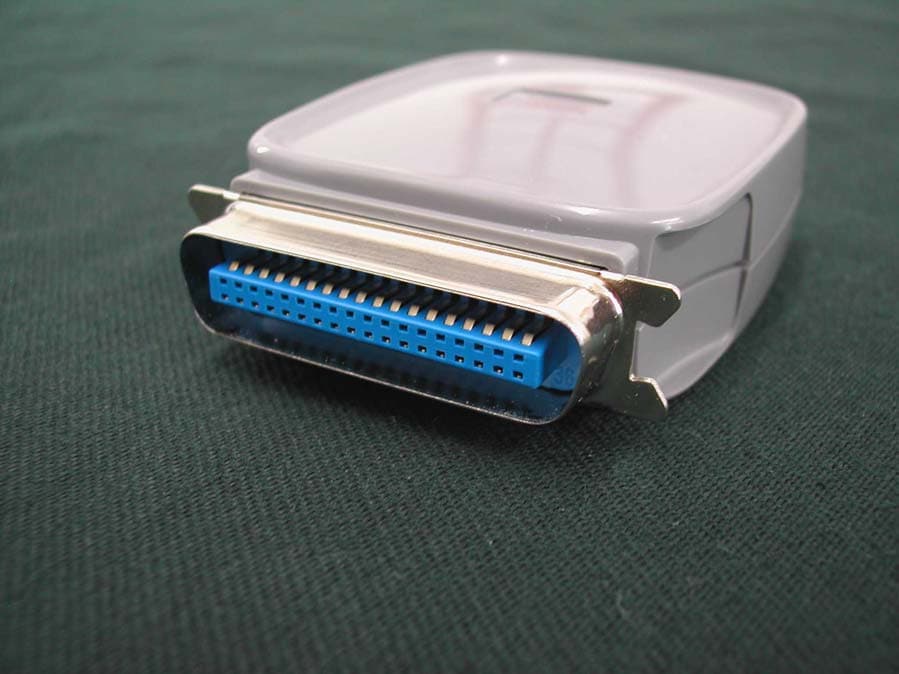
Click to zoom
Application Details
- Equipment Class
- DSS - Part 15 Spread Spectrum Transmitter
- Date of Grant
- Oct 14, 2003
- Application Purpose
- Original Equipment
- Date of Application
- Oct 14, 2003
- Equipment Note
- hp bt1300, Bluetooth � wireless printer adapter
- Frequency Range
- 2402.00000000 - 2480.00000000
- Company
- HP Inc.
- Country
- United States
Documents & Files
Document Text
Text extracted from the exhibit documents filed with the FCC. Open a document above to read the original.
Users Manual
User’s Guide hp bt1300 Bluetooth wireless printer adapter Photo of hp bt1300 © 2003 Copyright Hewlett-Packard Development Company, LP Reproduction, adaptation or translation without prior written permission is prohibited, except as allowed under the copyright laws. The information contained herein is subject to change without notice. Publication Number Online Version 1, October 2003 Applicable Products J6072A Trademark Credits Microsoft ® , MS-DOS ® , Windows ® , Microsoft Windows ® are trademarks or U.S. registered trademarks of Microsoft Corporation. The Bluetooth word mark and logos are owned by the Bluetooth SIG, Inc. and any use of such marks by Hewlett-Packard Company is under license. Other trademarks and trade names are those of their respective owners. JPEG software is copyright 1991-1998, Thomas G. Lane. All Rights Reserved. This software is based in part on the work of the Independent JPEG Group. Warranty The only warranties for HP products and services are set forth in the express warranty statements accompanying such products and services. Nothing herein should be construed as constituting and additional warranty. HP shall not be liable for technical or editorial errors or omissions contained herein. Electromagnetic Specifications For electromagnetic specifications, refer to Appendix C in this User’s Guide. Safety Considerations Prior to the installation and use of this product, review all safety markings and instructions. Instruction Manual Symbol. If the product is marked with this symbol, refer to the product manuals to protect the product from damage. NOTE: Denotes important information set apart from the main text. CAUTION: Denotes a hazard that can damage equipment or data. WARNING: Denotes a hazard that can cause injury. Do not proceed beyond a WARNING or CAUTION notice until you have understood the hazard and have taken appropriate steps. Hewlett-Packard Company 8000 Foothills Boulevard Roseville, CA 95747-5677 U.S.A. ! HP Printer Adapter User’s Guide i Table of Contents Chapter 1 – Introduction Bluetooth Technology Overview .......................................................................................................1-1 HP bt1300 Overview..........................................................................................................................1-1 What’s Included in the Box ...............................................................................................................1-2 Windows System Requirements ........................................................................................................1-3 PDA System Requirements................................................................................................................1-3 About This User’s Guide ...................................................................................................................1-3 Chapter 2 – Hardware Installation Procedures Before You Begin ..............................................................................................................................2-1 Handling Precautions .........................................................................................................................2-1 Printer Adapter Components..............................................................................................................2-1 Installing the Hardware onto the USB or Parallel Port ......................................................................2-2 Verifying Successful Installation .......................................................................................................2-3 Verifying the Connection to the Printer .............................................................................................2-3 Chapter 3 – Printing to your Bluetooth-Enabled Printer Profile Compatibility..........................................................................................................................3-1 How to Set Up and Print from a Compaq Evo Notebook PC ............................................................3-1 Printing the First Job ..........................................................................................................................3-5 Printing Additional Jobs.....................................................................................................................3-7 Printing Requirements for Other Devices ..........................................................................................3-7 Using the hp bt1300 with a Pocket PC ..............................................................................................3-8 Using the hp bt1300 with Bluetooth-Enabled Cellular Phones........................................................3-13 Chapter 4 – Configuring Your Printer Adapter Summary of Configuration Steps.......................................................................................................4-1 Installing the HP Configuration Utility..............................................................................................4-2 Placing the hp bt1300 into Configuration Mode or Firmware Upgrade Mode ..................................4-2 Using the Configuration Utility .........................................................................................................4-3 Chapter 5 – Troubleshooting Verifying Setup ..................................................................................................................................5-1 Verifying Printer Operation ...............................................................................................................5-1 Verifying Bluetooth Communication.................................................................................................5-2 Troubleshooting by Symptom............................................................................................................5-3 Frequently Asked Questions (FAQ) ..........................…
Text truncated - open the document above for the full version.
External Photos
Front of EUT with Cover Back of EUT with Cover Top Back of EUT with Cover Top Side of EUT with Cover
ID Label/Location Info
Blackbeard Label Placement
ID Label/Location Info
J6072A hp bt1300 Bluetooth wireless printer adapter addr: FF:FF:FE:12:34:56 0976 CLASS B DIGITAL APPARATUS COMPLIES WITH ICES-003 APPAREL LA CLASSE BEST CONFORME A LA NMB-003 s/n: USYMTXXXXX Made in USA J6072-60001 FCC ID: B94J6072 IC: 466F-J6072 .06 R 4PL 2.130 + .000 - .010 1.950 + .000 - .010 R SURYA 9-23-03 PRELIMIN A RY THIS DEVICE COMPLIES WITH PART 15 OF THE FCC RULES
Test Report
News Release ORMATION: Tel.: (408) 982-8000 Email: [email protected] - More - News Release ORMATION: Tel.: (408) 982-8000 Email: [email protected] CONTACT INFCONTACT INF Bob Van Steenburgh Zeevo, Inc Bob Van Steenburgh Zeevo, Inc TIVITY r of Bluetooth ons for wireless communications, announced et PC products with Zeevo’s t PC and the HP iPAQ Pocket h performance PAQ Pocket PC where space is constrained and the battery power requirements put stringent demands on the power consumption of the system. SOCs for the forces Zeevo's position as one of the key providers of Bluetooth solutions today” said Gene Jakubowski, Vice President oss the iPAQ Pocket PC family, well as access nables users to s. Mobile printing software shipping with the new models allows customers to take advantage of the integrated Bluetooth capability to wirelessly print e-mail attachments, documents or photos conveniently from the Pocket PC to Bluetooth enabled printers. The TC2001 is the most highly integrated Bluetooth System-on-a-Chip solution available in the market today. All RF components such as filter, balun, and matching network, along with flash memory are integrated into a single chip solution. This high level of integration makes the design extremely simple to use. The “digital-looking” interfaces allow designers to rapidly ZEEVO’S BLUETOOTH SOC TO PROVIDE WIRELESS CONNEC FOR HP iPAQ POCKET PCS SANTA CLARA, CA – June 24, 2003 – Zeevo, Inc., a leading provide System-on-a-Chip (SOC) and module soluti today that its Bluetooth SOC TC2001P has been integrated into HP iPAQ Pock and is being shipped in volume production today. The products shipping TC2001P are the HP iPAQ h2210, the smallest dual slot pocke PC h1940, a slim, value-priced pocket PC. Zeevo’s innovative Bluetooth wireless connectivity solution is ideal for hig systems such as the i "We are very excited about having this opportunity to ship our Bluetooth manufacture of best in the class, HP’s Pocket PC series. This rein of worldwide sales at Zeevo. Integrated Bluetooth wireless capability is offered acr allowing connectivity to Bluetooth notebook PCs, printers and accessories, as to remote data when combined with a Bluetooth enabled phone. Bluetooth e effortlessly synchronize and share data through their own personal area network - More - t demands. The and decoupling The TC2001 is ned for cost sensitive, very low power applications and where space constraints can be severe. # # # in Santa Clara, ems-on-a-chip” rated Bluetooth network integrated on to the single chip solution. Zeevo’s programmable software-based architecture and ease of RF design enables designers to develop products with ease and provides highly accelerated time- m./ develop a complete Bluetooth system solution that meets critical time-to-marke only external components needed are an antenna, crystal, reference resistor, capacitors. Users communicate to the chip via a high-speed UART or USB. desig About Zeevo Zeevo, Inc. is a privately owned fabless semiconductor company based California. The company was founded in 1999 to develop and market “syst solutions for the communications marketplace. Zeevo offers the most integ SOCs with all the RF components such as filter , balun, and matching to-market. For more information, visit Zeevo’s web site at http://www.zeevo.co . Bluetooth is a trademark owned by Bluetooth SIG, Inc. and is used by Zeevo under license. ARM7TDMI is the registered trademark of ARM Limited. “Enabling Pervasive Connectivity”, BlueShark, and BlueDolphin are trademarks owned by Zeevo, Inc. Other trademarks or registered trademarks are owned by their respective registered owners.
Test Report
Zeevo - Customer ProductsPage 1 of 2 file://C:\Documents and Settings\agathright\My Documents\HP...\Zeevo - Customer Products.ht10/6/2003 Customer Produc Zeevo - Customer Products Zeevo offers comprehensive portfolio of BQB qualified Bluetooth System-on-a-Chips (S O BlueStamp module solutions for wireless communications. Zeevo's Bluetooth SOC's com radio, link controller, audio and CPU functionality in a single chip. The modules are base Zeevo’s pre-certified family of Class 2 BlueStamps using Bluetooth SOC. The only exter n component needed is an antenna. Zeevo products significantly reduce BOM costs and d cycle time. DescriptionProductCustomer Adapters RS -232 Cordless Adapter3e-2503e Technologies International Printer Cable Replacement Adapter PCRAAdamya Serial Cable Replacement Adapter SCRAAdamya Serial Bluetooth Adapter with DSUP 9 connector BlueRS+EStollmann Serial Bluetooth Module for integration BlueRS+IStollmann Audio Wireless Stereo Headphone iWISHImpulsesoft Serial Bluetooth Module with voice CODEC BlueRS+AStollmann Keyboard & Mouse (HID) HID profile support for Zeevo TC2001 BlueHID+Stollmann Protocol Stacks Bluetooth Protocol Stack BlueletIVT Corporation Bluetooth Application Profiles BlueSoleilIVT Corporation Bluetooth Application Profiles for Win CE BlueCEIVT Corporation Embedded Bluetooth Software BLUEmagic 3.0Open Interface North America Bluetooth Protocol Stack BluetopiaStonestreet One USB Dongle Active Bluetooth USB Dongle for PC BlueBUS+Stollmann Home / Back to Top / Contacts Zeevo - Customer ProductsPage 2 of 2 file://C:\Documents and Settings\agathright\My Documents\HP...\Zeevo - Customer Products.ht10/6/2003 Terms of use. Zeevo, the Zeevo logo, Enabling Pervasive Connectivity are trademarks of Zeevo, Inc. Bluetooth is a trademark owned by Bluetooth SIG, Inc. and is used by Zeevo under license. © Copyright 1999-2002 Zeevo, Inc. All rights reserved.
Test Report
Page 1 of 68 Report No: FC03-079 HEWLETT PACKARD COMPANY TEST REPORT FOR THE HP BT1300 BLUETOOTH WIRELESS PRINT ADAPTER, J6072A FCC PART 15 SUBPART B SECTIONS 15.107 AND 15.109 CLASS B AND SUBPART C SECTIONS 15.207, 15.209 AND 15.247 COMPLIANCE DATE OF ISSUE: DECEMBER 11, 2003 PREPARED FOR: Hewlett Packard Company 3000 Hanover Street Palo Alto, CA 94304 PREPARED BY: Mary Ellen Clayton CKC Laboratories, Inc. 5473A Clouds Rest Mariposa, CA 95338 W.O. No.: 81119Date of test: August 27 - September 15, 2003 Report No.: FC03-079 This report contains a total of 68 pages and may be reproduced in full only. Partial reproduction may only be done with the written consent of CKC Laboratories, Inc. The results in this report apply only to the items tested, as identified herein. Page 2 of 68 Report No: FC03-079 TABLE OF CONTENTS Administrative Information .........................................................................................................4 Summary of Results .....................................................................................................................5 Conditions for Compliance ..........................................................................................................5 Approvals.....................................................................................................................................5 Equipment Under Test (EUT) Description ..................................................................................6 FCC 15.31(e) Voltage Variation ..................................................................................................6 FCC 15.31(m) Number Of Channels ...........................................................................................6 FCC 15.33(a) Frequency Ranges Tested .....................................................................................6 FCC 15.203 Antenna Requirements ............................................................................................6 FCC 15.205 Restricted Bands......................................................................................................6 Eut Operating Frequency .............................................................................................................6 Equipment Under Test .................................................................................................................7 Peripheral Devices .......................................................................................................................7 Measurement Uncertainty ............................................................................................................7 Report of Measurements ..............................................................................................................8 Table 1: FCC 15.107 Six Highest Conducted Emission Levels .....................................8 Table 2: FCC 15.109 Six Highest Radiated Emission Levels ........................................9 Table 3: FCC 15.109 Six Highest Radiated Emission Levels: > 1 GHz.........................10 Table 4: FCC 15.207 Six Highest Conducted Emission Levels .....................................11 FCC 15.247(a)(1) Number Of Hopping Frequencies .....................................................12 FCC 15.247(a)(1) 20 dB Bandwidth Plots......................................................................13 FCC 15.247(a)(1) Carrier Frequency Separation............................................................16 FCC 15.247(a)(1)(iii) Dwell Time Plots.........................................................................17 Table 5: FCC 15.247(b)(1) Peak Output Power .............................................................21 FCC 15.247(b)(5) MPE Calculations .............................................................................22 Table 6: FCC 15.247(c)/15.209 Highest Radiated Emission Levels: 9 kHz - 30 MHz ..23 Table 7: 15.247(c)/15.209 Six Highest Radiated Emission Levels: 30 Hz - 1 GHz .......24 Table 8: FCC 15.247(c)/15.209 Six Highest Radiated Emission Levels: 1-18 GHz ......25 Table 9: FCC 15.247(c)/15.209 Highest Radiated Emission Levels: 18-26 GHz ..........26 FCC 15.247(c) Bandedge Plots.......................................................................................27 Temperature And Humidity During Testing................................................................................34 EUT Setup....................................................................................................................................34 Correction Factors........................................................................................................................34 Table A: Sample Calculations ........................................................................................34 Test Instrumentation and Analyzer Settings ................................................................................35 Spectrum Analyzer Detector Functions ..........................................................................35 Peak....................................................................................................................35 Quasi-Peak .........................................................................................................35 Average ..............................................................................................................35 EUT Testing.................................................................................................................................36 Mains Conducted Emissions...........................................................................................36 Radiated Emissions.........................................................................................................36 Page 3 of 68 Report No: FC03-079 Appendix A: Test Setup Photographs .........................................................................................…
Text truncated - open the document above for the full version.
Test Setup Photos
PHOTOGRAPH SHOWING MAINS CONDUCTED EMISSIONS Mains Conducted Emissions - Front View PHOTOGRAPH SHOWING MAINS CONDUCTED EMISSIONS Mains Conducted Emissions - Side View PHOTOGRAPH SHOWING RADIATED EMISSIONS Radiated Emissions - Front View PHOTOGRAPH SHOWING RADIATED EMISSIONS Radiated Emissions - Back View
Contact Information
Applicant
Richard P Tarsio(US Canada Technical Regulations)
Technical Contact
CKC Laboratories, Inc.Mary Ellen Clayton
[email protected]209-966-5240
5473-A Clouds Rest · Mariposa, California · United States
Non-Technical Contact
CKC Laboratories, Inc.Mary Ellen Clayton
[email protected]209-966-5240
Test Firm
CKC Laboratories, Inc.Steve Behm
Technical Specifications
| # | Rule Parts | Frequency Range | Power Output |
|---|---|---|---|
| 1 | 15C | 2.40 GHz - 2.48 GHz | 1.50 mW |
Other Applications from HP Inc.
B94HNI70CBVN
Aug 14, 2026Model HSN-I70C
Equipment Class
CBE - Citizens Band End User DevicesB94HNQ38C3BEK
Jun 03, 2026Notebook PC
Equipment Class
TNB - Licensed Non-Broadcast Station TransmitterB94HNI65C4BLV
Apr 23, 2026Notebook Computer HSN-I65C-4
Equipment Class
PCB - PCS Licensed TransmitterB94HNI67C4BLV
Apr 23, 2026Notebook Computer HSN-I67C-4
Equipment Class
CBE - Citizens Band End User DevicesB94HNI66C4SPY
Feb 03, 2026Model HSN-I66C-4
Equipment Class
PCB - PCS Licensed Transmitter