B94RSVLD0504Bluetooth USB Printer adapter
HP Inc.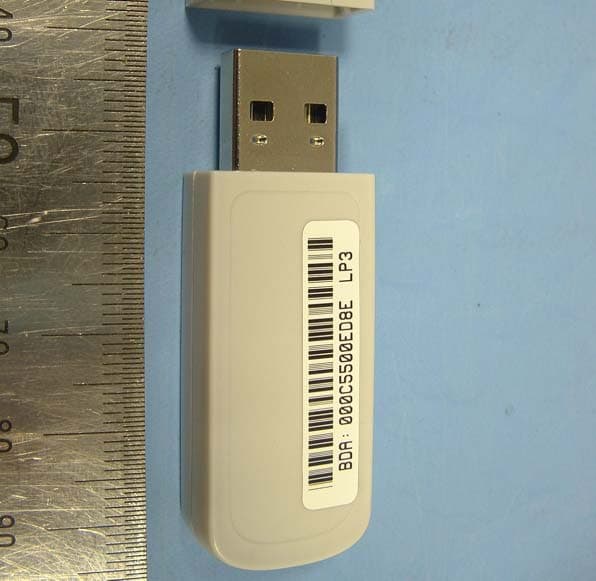
Click to zoom
Application Details
- Equipment Class
- DSS - Part 15 Spread Spectrum Transmitter
- Date of Grant
- Apr 07, 2005
- Application Purpose
- Original Equipment
- Date of Application
- Apr 07, 2005
- Equipment Note
- Bluetooth USB Printer adapter
- Frequency Range
- 2402.00000000 - 2480.00000000
- Company
- HP Inc.
- Country
- United States
Documents & Files
Document Text
Text extracted from the exhibit documents filed with the FCC. Open a document above to read the original.
Users Manual
HP bt400 Bluetooth® Wireless Printer Adapter DRAFT © Copyright 2005 Hewlett-Packard Development Company, L.P. The information contained herein is subject to change without notice. Reproduction, adaptation or translation without prior written permission is prohibited, except as allowed under the copyright laws. Publication Number: Q6399–90101 Bluetooth is a trademark owned by its proprietor and used by Hewlett-Packard Company under license. Windows is a U.S.-registered trademark of Microsoft Corporation. Notice The only warranties for HP products and services are set forth in the express warranty statements accompanying such products and services. Nothing herein should be construed as constituting any additional warranty. HP shall not be liable for technical or editorial errors or omissions contained herein. The Hewlett-Packard Company shall not be liable for incidental or consequential damages in connection with, or arising out of the furnishing, performance, or use of this document and the program material which it describes. NoteRegulatory information can be found in the Technical Information section and the back section of this user guide. Contents 1 Welcome to the HP bt400...........................................3 Bluetooth basics ...........................................................3 Installation and setup ...................................................4 Bluetooth access modes ..............................................5 2 Print from your Bluetooth device..............................9 General printing ............................................................9 Camera phone .............................................................9 PDA ............................................................................10 Camera ......................................................................11 Computer ...................................................................11 3 Troubleshooting........................................................13 4 Technical information...............................................17 Technical specifications .............................................17 Limited warranty statement ........................................18 Customer care ............................................................19 Protecting the environment ........................................19 Regulatory Information ...............................................19 Notice to users in the European Economic Area ........20 1 2HP bt400 Bluetooth® Wireless Printer Adapter 1 Welcome to the HP bt400 The HP bt400 wireless printer adapter uses Bluetooth wireless technology to allow you to print without using a cable. In general, Bluetooth wireless technology is a short- range wireless technology that allows connection between devices without requiring a cable. By using your HP bt400, you can print from your camera phone, PDA, digital camera, or computer to selected HP printers and all in ones. NoteCheck the documentation for your printer to verify the devices you can use to print to it. TipCheck www.hp.com/go/bluetooth for a current list of supported printers and other valuable information concerning your Bluetooth adapter. Bluetooth basics The following concepts will help you use your HP bt400 with your particular printer. Generally, the sending device (camera, PDA, computer, etc.) sends a signal and discovers the nearby Bluetooth printing devices and displays their Bluetooth device names. Then, you simply print or send to that printer name. TipFor most devices, the default settings will allow you to print without making any changes. However, a Bluetooth device may be set to be visible or invisible and may have security settings established. If you have difficulty printing to your printer, consult Bluetooth access modes on page 5. Welcome to the HP bt4003 Bluetooth device name When a sending device discovers the printer, it displays the printer's Bluetooth device name. The printer's default Bluetooth device name can be found and changed in the printer's Bluetooth control panel menu. Installation and setup Follow these instructions to install and set up your HP bt400. More detailed setup instructions can be found in the user guide for your printer. Installing the HP bt400 1. Locate the host USB port on your printer or all-in-one. It will usually be located in the front and is shaped like the USB port on your computer. It may be called a camera or Pictbridge port on your printer. 4HP bt400 Bluetooth® Wireless Printer Adapter 2. Remove the cap from the HP bt400 and insert it into the port. LED behavior The LED on the HP bt400 tells you what is going on. ●Blinking—This is the default state and means the device is installed and has power. ●Rapid blinking—A sending device is “Discovering” the HP bt400. ●On steady—The HP bt400 is receiving data. Bluetooth access modes Access modes determine how easily a Bluetooth sending device can print to a printer. The access modes are defined by the following settings: ●Accessibility ●Security level Welcome to the HP bt4005 Accessibility mode There are two available Accessibility modes for your printer. Follow the instructions in your device user guide to change the Accessibility mode. ●Visible to all (public/shown to all) (default) When the printer's Accessibility setting is set to “Visible to all”, any Bluetooth device within range can discover and use the printer. This is the default setting for your HP device. ●Not visible (private/hidden) When the Accessibility setting is set to “Not visible”, only sending devices that have stored the printer's Bluetooth device address can discover and use the printer. Bluetooth device address Bluetooth devices have a unique device address that cannot be changed. The following are general instructions for finding your printer or all-in-one's Bluetooth device address. Consult the documentation for your printer or all-in-one for specific instructions. 1. Access the control panel menu and select t…
Text truncated - open the document above for the full version.
Cover Letter(s)
Response to TCB Findings 1. 15.31(e) requires 115% of the supply voltage. The report states 105% in multiple spots. Please clarify if this is a typing error. Confirmed that it was a typing error. the equipment was tested at 115% of the supply voltage 2. When conducted power at the antanna port was measured, was the signal used a hopping(modulated) signal or CW signal? Please clarify. The power was measured both in the hopping and CW mode. The result contained in the report was the CW result, as this produced the highest level. The test plots show a CW signal. 3. Please specify the measurement system settings (RBW, VBW) used for radiated emissions with QP detector (below 1GHz) and average and peak detectors (above 1GHz). Please also address the same issue for AC line conducted emissions settings. For radiated emissions below 1 GHz RBW= 100 kHz, testing performed with CISPR16 compliant test receiver with QP detector. Above 1 GHz tests were performed using a spectrum analyser using the following settings: Peak RBW=VBW= 1MHz Average RBW= 1 MHz, VBW = 10 Hz For conducted Emissions RBW= 10 kHz, testing performed with CISPR16 compliant test receiver with QP and Av detectors. Settings as per ANSI C63.4 and Public Notice DA 00-705.
Test Report
Total number of pages : 47 grepbl.doc Ver: g01/10 "4H8409GUS1" KTL EMC Test Report : 4H8409GUS1 Applicant : Hewlett Packard Company Apparatus : BT400 Bluetooth Wireless USB Printer Adapter Authorised by : M Render, EMC and Radio Group Manager Issue Date : 23 rd March 2005 Authorised Copy Number : CD KTL EMC Test Report: 4G8409GUS1 Contents Section 1: Introduction 3 1.1 General 3 1.2 Tests Requested By 4 1.3 Manufacturer 4 1.4 Apparatus Assessed 4 1.5 Test Result Summary 5 1.6 Notes Relating To The Assessment 6 1.7 Deviations from Test Standards 7 Section 2: Measurement Uncertainty 8 2.1 Introduction 8 2.2 Application of Measurement Uncertainty 8 2.3 Measurement Uncertainty Values 8 Section 3: Modifications 9 3.1 Modifications Performed During Assessment 9 Appendix A: Formal Emission Test Results 10 A1 Radiated Electric Field Emissions 11 A2 Power Line Conducted Emissions 14 A3 20 dB Bandwidth and Channel Spacing 16 A4 Conducted carrier power 17 A5 Hopping frequencies 18 A6 Channel Occupancy 19 A7 Radiated Carrier Power (Effective Isotropic Radiated Power) and Maximum Permissible Exposure Calculation 20 Appendix B: Supporting Graphical Data 21 Appendix C: Additional Test and Sample Details 32 Appendix D: Additional Information 38 Appendix E: Photographs and Figures 40 2 KTL EMC Test Report: 4G8409GUS1 Section 1: Introduction 1.1 General This report contains an assessment of an apparatus against Electromagnetic Compatibility Standards based upon tests carried out on samples submitted to the Laboratory. Test performed by: KTL Saxon Way Priory Park West Hull HU13 9PB United Kingdom Telephone: +44 (0) 1482 801801 Fax: +44 (0) 1482 801806 Email: [email protected] Web site: www.ktl.com Tests performed by: K J Anderson, Senior EMC Engineer Report author: As above. This report must not be reproduced except in full without prior written permission from KTL. 3 KTL EMC Test Report: 4G8409GUS1 1.2 Tests Requested By This testing in this report was requested by: Hewlett Packard Company 16399 West Bernardo Drive San Diego California USA 92127 1.3 Manufacturer As above. 1.4 Apparatus Assessed The following apparatus was assessed between 20/03/05 and 23/03/05: BT400 Bluetooth Wireless USB Printer Adapter The above equipment was a USB Bluetooth radio module. 4 KTL EMC Test Report: 4G8409GUS1 1.5 Test Result Summary Full details of test results are contained within Appendix A. The following table summarises the results of the assessment. The statements relating to compliance with the standards below apply ONLY as qualified in the notes and deviations stated in sections 1.6 to 1.7 of this test report. Full details of test results are contained within Appendix A. The following table summarises the results of the assessment. Test Type Regulation Measurement standard Result REFE Title 47 of the CFR: 2004, Part 15 Subpart (c) 15.247 ANSI C63.4: 2003 PASS AC Power conducted emissions Title 47 of the CFR: 2004, Part 15 Subpart (c) 15.207 ANSI C63.4: 2003 PASS 20dB Bandwidth and Channel Spacing Title 47 of the CFR :2004, Part 15 Subpart (c) 15.247(a)(1)(i) Public Notice DA 00-705 March 30, 2000 PASS Conducted Carrier Power Title 47 of the CFR :2004, Part 15 Subpart (c) 15.247(b)(2) Public Notice DA 00-705 March 30, 2000 PASS Hopping Frequencies Title 47 of the CFR :2004, Part 15 Subpart (c) 15.247(a)(1) Public Notice DA 00-705 March 30, 2000 PASS Channel Occupancy Title 47 of the CFR :2004, Part 15 Subpart (c) 15.247(a)(1)(i) Public Notice DA 00-705 March 30, 2000 PASS Abbreviations used in the above table: Mod : Modification CFR : Code of Federal Regulations ANSI : American National Standards Institution REFE : Radiated Electric Field Emissions PLCE : Power Line Conducted Emissions 5 KTL EMC Test Report: 4G8409GUS1 1.6 Notes Relating To The Assessment With regard to this assessment, the following points should be noted: The results contained in this report relate only to the items tested and were obtained in the period between the date of initial receipt of samples and the date of issue of the report. The apparatus was set up and exercised using the configurations, modes of operation and arrangements defined in this report only. Particular operating modes, apparatus monitoring methods and performance criteria required by the standards tested to have been performed except where identified in Section 1.7 of this test report (Deviations from Test Standards). For emissions testing, throughout this test report, “Pass” indicates that the results for the sample as tested were below the specified limit (refer also to Section 2, Measurement Uncertainty). Where relevant, the apparatus was only assessed using the monitoring methods and susceptibility criteria defined in this report. All testing with the exception of testing at the Open Area Test Site was performed under the following environmental conditions: Temperature : 17 to 23 °C Humidity : 45 to 75 % Barometric Pressure : 86 to 106 kPa All dates used in this report are in the format dd/mm/yy. This assessment has been performed in accordance with the requirements of ISO/IEC 17025. KTL Hull is a listed electromagnetic compatibility Conformance Assessment Body (CAB) for EC access to the US market. (Decision No 3/2000 of the Joint Committee established under the Agreement on Mutual Recognition between the European Community and the United States of America. This decision was effective from 16 th January 2001). FCC Facility Registration number (3m semi anechoic chamber) : 90743 6 KTL EMC Test Report: 4G8409GUS1 1.7 Deviations from Test Standards There were no deviations from the standards tested to. 7 KTL EMC Test Report: 4G8409GUS1 Section 2: Measurement Uncertainty 2.1 Introduction The standard ISO/IEC 17025 used for laboratory accreditation requires laboratories to estimate measurement uncertainty using accepted methods of analysis. Where required, the reported expanded uncertainty is based on a standard uncertainty providing a confidence level of approximately 95%. Measureme…
Text truncated - open the document above for the full version.
Contact Information
Applicant
Richard P Tarsio(US Canada Technical Regulations)
Test Firm
KTLJ M Parham
Technical Specifications
| # | Rule Parts | Frequency Range | Power Output |
|---|---|---|---|
| 1 | 15C | 2.40 GHz - 2.48 GHz | 850.00 µW |
Other Applications from HP Inc.
B94HNI70CBVN
Aug 14, 2026Model HSN-I70C
Equipment Class
CBE - Citizens Band End User DevicesB94HNQ38C3BEK
Jun 03, 2026Notebook PC
Equipment Class
TNB - Licensed Non-Broadcast Station TransmitterB94HNI65C4BLV
Apr 23, 2026Notebook Computer HSN-I65C-4
Equipment Class
PCB - PCS Licensed TransmitterB94HNI67C4BLV
Apr 23, 2026Notebook Computer HSN-I67C-4
Equipment Class
CBE - Citizens Band End User DevicesB94HNI66C4SPY
Feb 03, 2026Model HSN-I66C-4
Equipment Class
PCB - PCS Licensed Transmitter