B94SUNB12HP Slate 7
HP Inc.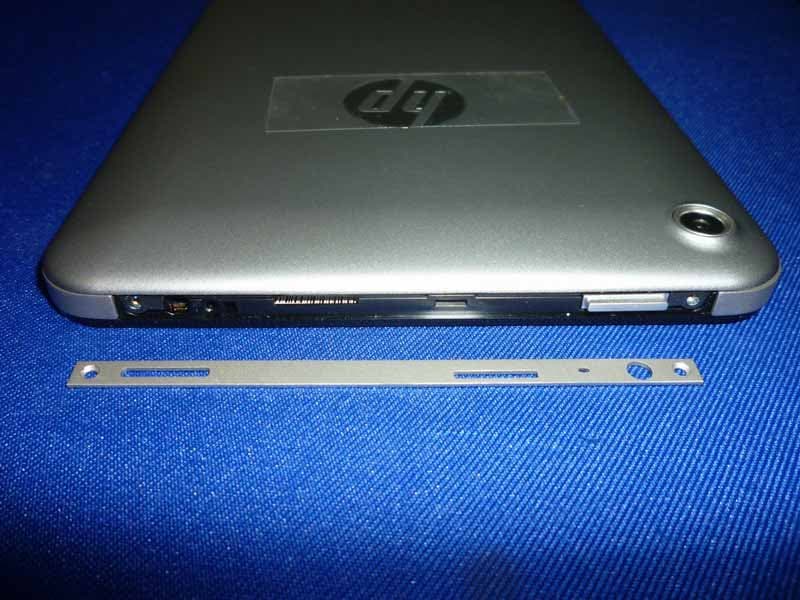
Click to zoom
Application Details
- Equipment Class
- DTS - Digital Transmission System
- Date of Grant
- Mar 25, 2013
- Application Purpose
- Original Equipment
- Date of Application
- Mar 25, 2013
- Equipment Note
- HP Slate 7
- Frequency Range
- 2412.00000000 - 2462.00000000
- Company
- HP Inc.
- Country
- United States
Documents & Files
Document Text
Text extracted from the exhibit documents filed with the FCC. Open a document above to read the original.
Users Manual
Quick Start User Guide Pine_GSG.book Page 1 Friday, February 15, 2013 3:20 PM Pine_GSG.book Page 2 Friday, February 15, 2013 3:20 PM Quick Start1 Contents Contents Getting to know your tablet Top . . . . . . . . . . . . . . . . . . . . . . . . . . . . . . . . . . . . . . . . . . . . . . . . . . . . . . . . . . . . . . . . . . . . . . . . . . 1 Bottom . . . . . . . . . . . . . . . . . . . . . . . . . . . . . . . . . . . . . . . . . . . . . . . . . . . . . . . . . . . . . . . . . . . . . . . 1 Display . . . . . . . . . . . . . . . . . . . . . . . . . . . . . . . . . . . . . . . . . . . . . . . . . . . . . . . . . . . . . . . . . . . . . . . 2 Rear. . . . . . . . . . . . . . . . . . . . . . . . . . . . . . . . . . . . . . . . . . . . . . . . . . . . . . . . . . . . . . . . . . . . . . . . . . 2 Left . . . . . . . . . . . . . . . . . . . . . . . . . . . . . . . . . . . . . . . . . . . . . . . . . . . . . . . . . . . . . . . . . . . . . . . . . . 3 Right . . . . . . . . . . . . . . . . . . . . . . . . . . . . . . . . . . . . . . . . . . . . . . . . . . . . . . . . . . . . . . . . . . . . . . . . . 3 Locating system information . . . . . . . . . . . . . . . . . . . . . . . . . . . . . . . . . . . . . . . . . . . . . . . . . . . . 3 Changing your tablet’s view . . . . . . . . . . . . . . . . . . . . . . . . . . . . . . . . . . . . . . . . . . . . . . . . . . . . . 3 Setting up your tablet Charging the battery . . . . . . . . . . . . . . . . . . . . . . . . . . . . . . . . . . . . . . . . . . . . . . . . . . . . . . . . . . . 5 Turning on the tablet. . . . . . . . . . . . . . . . . . . . . . . . . . . . . . . . . . . . . . . . . . . . . . . . . . . . . . . . . . . 5 Setting up your tablet . . . . . . . . . . . . . . . . . . . . . . . . . . . . . . . . . . . . . . . . . . . . . . . . . . . . . . . . . . 5 Connecting to a wireless network . . . . . . . . . . . . . . . . . . . . . . . . . . . . . . . . . . . . . . . . . . . . . . . . 5 Signing in . . . . . . . . . . . . . . . . . . . . . . . . . . . . . . . . . . . . . . . . . . . . . . . . . . . . . . . . . . . . . . . . . . . . . 6 Unlocking and locking the screen . . . . . . . . . . . . . . . . . . . . . . . . . . . . . . . . . . . . . . . . . . . . . . . . 6 Shutting down the tablet . . . . . . . . . . . . . . . . . . . . . . . . . . . . . . . . . . . . . . . . . . . . . . . . . . . . . . . 6 Using apps Navigating the Home screen . . . . . . . . . . . . . . . . . . . . . . . . . . . . . . . . . . . . . . . . . . . . . . . . . . . . 7 Opening apps . . . . . . . . . . . . . . . . . . . . . . . . . . . . . . . . . . . . . . . . . . . . . . . . . . . . . . . . . . . . . . . . . 7 Returning to the Home screen . . . . . . . . . . . . . . . . . . . . . . . . . . . . . . . . . . . . . . . . . . . . . . . . . . . 7 Displaying all apps . . . . . . . . . . . . . . . . . . . . . . . . . . . . . . . . . . . . . . . . . . . . . . . . . . . . . . . . . . . . . 7 Displaying notifications . . . . . . . . . . . . . . . . . . . . . . . . . . . . . . . . . . . . . . . . . . . . . . . . . . . . . . . . 8 Configuring preferences . . . . . . . . . . . . . . . . . . . . . . . . . . . . . . . . . . . . . . . . . . . . . . . . . . . . . . . . 8 Moving an app . . . . . . . . . . . . . . . . . . . . . . . . . . . . . . . . . . . . . . . . . . . . . . . . . . . . . . . . . . . . . . . . . 8 Organizing the Home screen . . . . . . . . . . . . . . . . . . . . . . . . . . . . . . . . . . . . . . . . . . . . . . . . . . . . 8 Downloading apps from the Play Store . . . . . . . . . . . . . . . . . . . . . . . . . . . . . . . . . . . . . . . . . . . 8 Taking photos . . . . . . . . . . . . . . . . . . . . . . . . . . . . . . . . . . . . . . . . . . . . . . . . . . . . . . . . . . . . . . . . . 8 Viewing photos . . . . . . . . . . . . . . . . . . . . . . . . . . . . . . . . . . . . . . . . . . . . . . . . . . . . . . . . . . . . . . . . 8 Pine_GSG.book Page 1 Friday, February 15, 2013 3:20 PM 2Quick Start Using touch gestures and the on-screen keyboard Using touch screen gestures . . . . . . . . . . . . . . . . . . . . . . . . . . . . . . . . . . . . . . . . . . . . . . . . . . . . 9 Touching. . . . . . . . . . . . . . . . . . . . . . . . . . . . . . . . . . . . . . . . . . . . . . . . . . . 9 Scrolling . . . . . . . . . . . . . . . . . . . . . . . . . . . . . . . . . . . . . . . . . . . . . . . . . . . 9 Pinching/stretching . . . . . . . . . . . . . . . . . . . . . . . . . . . . . . . . . . . . . . . . . . . 9 Using the on-screen keyboard. . . . . . . . . . . . . . . . . . . . . . . . . . . . . . . . . . . . . . . . . . . . . . . . . . 10 Specifications More HP resources Pine_GSG.book Page 2 Friday, February 15, 2013 3:20 PM Quick Start1 Getting to know your tablet To p Bottom ComponentDescription 1Audio-out (headphone) jack Connects optional powered stereo speakers, headphones, earbuds, a headset, or a television audio cable. Å To reduce the risk of personal injury, adjust the volume before using headphones, earbuds, or a headset. For additional safety information, see the Regulatory, Safety and Environmental Notices. ✎ When a device is connected to the jack, the tablet speakers are disabled. 2Internal microphoneRecords audio, automatically filtering out the noise around you and cancelling echoes. 3Micro SD Card ReaderSupports micro SD cards. 4Power button■When the tablet is off, press the button to turn it on. ■When the tablet is on, press and hold the button to turn it off. ComponentDescription 1Speakers (2)Produce sound. 2Micro USB portConnects an optional USB device. Pine_GSG.book Page 1 Friday, February 15, 2013 3:20 PM 2Quick Start Display Rear ComponentDescription 1Webcam (front)Records video, captures still photographs, allows you to video conference and chat online using streaming video. To use the webcam, touch the camera app. 2WLAN antennaSends and receives wireless signals. ComponentDescription 1Webcam (rear)Records video, captures still photographs, and allows video c…
Text truncated - open the document above for the full version.
Cover Letter(s)
Attestation for FCC Declaration of Conformity FCC ID: B94SUNB12 Date: 2013-3-23 Please be notified that we, the undersigned,Hewlett-Packard Company. declare that the product bears the above FCC ID is B94SUNB12 also complying with the requirements of FCC DoC. The test report number for FCC DoC is EM-F1020196 , with is issued by an accredited lab, Audix Technology Corporation, EMC Department located at No. 53-11, Tin-Fu Tsun, Lin-Kou , Taipei Hsien , Taiwan. Which has been accredited in accordance to all of the requirements of 47CFR 2.948(d) and (e) of the FCC rules and KDB349827. Sincerely, Name of authorized signer: David P. Adams Title of authorized signer: Canada/USA Technical Regulations Manager Company Name: Hewlett-Packard Company Tel: 650.857.4423 Fax: 650.857.4882 Web site:www.hp.com E-mail: [email protected]
Cover Letter(s)
3/19/2013 Equipment Autorisation Division Federal Communications Commission 7435 Oakland Mills Road Columbia, MD 21046 FCC ID: B94SUNB12 Product Name: HP Slate 7 Request for Confidentiality Pursuant to Sections 0.457 and 0.459 of the commissions rules, we hereby request that the following documents be held confidential: (List here the documents for which you are seeking confidentiality – for example ...) Schematics Block diagram These materials contain trade secrets and proprietary information and are not customarily released to the public. The public disclosure of this information might be harmful to the company and provide unjustified benefits to our competitors. Dated this 2013-03-20 By: M. Abrishamcar Signature Printed Title: Compliance Manager On behalf of : Hewlett-Packard Company Telephone: 408-617-8903
Cover Letter(s)
Authorizationon Behalf of Hewlett-Packard Company For the US Federal Communications Commission Office of Engineering and TechnologyandOther FCC Programs and Offices 1. I, David P. Adams, am Canada/USA Technical Regulations Manager for Hewlett-Packard Company (“Hewlett-Packard”) and Applicant/Grantee Contact of Recordfor Hewlett-Packard together with its subsidiaries and affiliates worldwide (collectively,“HP”) for HP’s dealings with the United States Federal Communications Commission (“”FCC”). I am dulyauthorized by HP to make this Authorization on HP’s behalf. 2. This Authorization will designate the person named below to act on my behalf and HP’s behalf as authorized agent and representative, until further notice, with the additional power to designate one or more third party agents for HP with regard to particular matters and applications. Allacts carried out and requests made by this named representativerelating to any matter before the FCC, including requests for confidentiality,shallhave the same effect as mine. Name: Masood Abrishamcar Title: Hardware Compliance Lead Address: Hewlett-Packard Company 10955 Tantau Ave. Cupertino, CA 95014-0770 Telephone: 408-447-0571 E-mail: [email protected] 3. Questions about the scope and effect ofthis Authorization should be addressed as follows: David P. Adams Canada/USA Region Technical Regulations Manager 1501 Page Mill Road, MS1222 Palo Alto, CA 94304-1126 650.857.4423 Telephone 650.857.4882 Fax [email protected] 4. I declare under penalty of perjury that the foregoing is true and correct, and that this Authorization was executed atPalo Alto, California, on the date indicated below my signature. ____________________________ Signature David P. Adams Canada/USA Technical Regulations Manager Hewlett-Packard Company 22 September 2008_____________ Date
External Photos
R AUDIX Technology (Shenzhen) Co., Ltd. FCC ID:B94SUNB12 page Audix Technology (Shenzhen) Co., Ltd. Report No. ACS-F13059 13-1 13. PHOTOGRAPH OF EUT Figure 1 General Appearance of the EUT Figure 2 General Appearance of the EUT R AUDIX Technology (Shenzhen) Co., Ltd. FCC ID:B94SUNB12 page Audix Technology (Shenzhen) Co., Ltd. Report No. ACS-F13059 13-2 Figure 3 General Appearance of the EUT Figure 4 General Appearance of the EUT R AUDIX Technology (Shenzhen) Co., Ltd. FCC ID:B94SUNB12 page Audix Technology (Shenzhen) Co., Ltd. Report No. ACS-F13059 13-3 Figure 5 General Appearance of the EUT Figure 6 General Appearance of the EUT R AUDIX Technology (Shenzhen) Co., Ltd. FCC ID:B94SUNB12 page Audix Technology (Shenzhen) Co., Ltd. Report No. ACS-F13059 13-4 Figure 7 General Appearance of the EUT Figure 8 General Appearance of the EUT
ID Label/Location Info
View 1: Left Side View 4: Bottom View 2: Top View 5: Right SideView 6: RearView 6a: Rear / Fly Red Rear Cover BA View 3: Display Side Labels Callout Template Graphic Plan Usage Guide How to use: Graphic Plans note out the most current product information available. They are tied to HP production milestones, which are listed within the file title. Callouts specify certain product elements like color, material, and process. The Graphic Label Plan is also included within the GP. It is added in at the SI milestone and follows the legend shown below. How to edit: Edits from the HP ID Team will be noted out in a red edit layer. These edits should be marked with a numbered delta symbol and correspond to numbered text in the Edits legend, denoting the change. Each GP release will show changes noted out via numbered blue delta symbols. The symbols will correspond with text descriptions in the Updates Legend. ICON: Process = Printed, Backprinted, Chrome Printed, Color = PART NAME: Process = Material = Material Color = Material Finish = Material (GE) # = Surface = Surface Color = Surface Finish = Surface (Paint) # = *notes **notes LED: Process = Material = Plastic Color = Plastic Finish = Backlite = Amber 7_Pine_Tablet_ID_GP_130221 SPEAKER MESH(2X): Material = Nylon Fibre Mesh Color = Match to Midframe/Display Frame Hole of Mesh = 180Mu COVER GLASS: Material = Glass Glass Color = Clear Surface = Polished Backprint Color = Black *Display Opening is Backprint Masked COVER GLASS TRIM: Material = PC + ABS Rubber Color =Matte Black Surface Finish = Smooth TRIM RING: Process = Single Injection Material = PC+ABS Color = Jack Black Surface = Matte Surface Finish = Match to Midframe / Display Frame MICRO USB: Material = Metal Plastic Color = Black REAR COVER: Process = Single Injection Material = PC+ABS Material Color = TBD Finish = Polishing Surface = Soft Touch Paint Paint Color = Pantone 10388C(TBD) REAR COVER: Process = Single Injection Material = PC+ABS Surface = Soft Touch Paint Paint Color = Flyer Red (Pantone TBD) Paint Finish = TBD REAR FACING CAMERA LENS COVER: Material = Glass Color = Clear Transmission Rate: 97.5-99% Surface Finish = Polish Surface = Anti-reflective coating Back Printed Color = Black * Micro chamfer on edge HP LOGO BADGE: Process = Electroforming Material = Metal Surface = High Gloss Color = Silver Pantone 877C Diameter = 25mm * Adhesive is heat activated. ** Follow HP engineering spec Masking area D= 3mm POLISH #8000c(Mirror Effect) LOGO : 0.2mm Sunk into Gray Surface. MT-11000 Micro SD Dummy Card Breakaway WEB CAM OPENING: Process = Clear w/o Backprinted on Glass *Empty Camera active area (D=3.0mm) MIC HOLE: MIDFRAME / DISPLAY FRAME: Process = Stamping Material = Stainless Steel Finish = Polished Surface = Sand Blasting (#180 Glass Sand) Color = Pantone 877C S/N & M/N ICONS: Process = Laser Etched Material = Stainless Steel Font Size = 5pt Font Type = Gotham Book Font Color = Cool Gray 11C Position = 30cm to bottom AUDIO JACK: *ringless type PIN HOLE (2X): * Philips (+) screw inside Screw Type = Torx Screw Size = D 2.5mm Screw Color = Stainless Steel Screw Surface Finish = Smooth MICRO SD CARD COVER: Material = PC+ABS Material Color = Black Material Finish = TBD Surface = Paint Paint Color = Match Midframe / Display Frame VOLUME CONTROL BUTTON: Process = Molded Material = PC+ABS Material Color = Black Material Finish = TBD Surface = Paint Paint Color = Match Midframe / Display Frame POWER BUTTON: Process = Molded Material = PC+ABS Material Color = Black Material Finish = TBD Surface = Paint Paint Color = Match Midframe / Display Frame Paint Finish = Flat Paint BEATS AUDIO TEXT & ICON: Process = Silk Screen Color = PMS 186C / PMS 186C / PMS 877C Position = Center line offset 19mm from bottom line BEATS AUDIO TEXT & ICON: Process = Backprinted Color = Black / Black / PMS 877C Position = Center line offset 19mm from bottom of line POWER BUTTON ICON: Process = Laser Etched Material = Stainless Steel Surface = Match to Midframe ICON Size = 5.5pt VOLUME CONTROL BUTTON ICONS: Process = Laser Etched Material = Stainless Steel Material Color = Match to Midframe/Display Frame SERIAL / PRODUCT NUMBER / PRODUCT NAME: Process = Silkscreen Color = Dark Gray Font = Gotham Book Size = TBD Position = 15mm o set from bottom line *Final Artwork TBD **Final FCC ID & IC Number need to be con rmed by HP Graphic Plan Change Log 7_Pine_Tablet_ID_GP_130221________________________________________ _____CHANGES • S/N & M/N ICONS - Artwork provided in file[7_Pine_Tablet_ID_GP_130221.ai] • TRIM RING - Color = Jack Black • SERIAL / PRODUCT NUMBER / PRODUCT NAME - Artwork provided in file[7_Pine_Tablet_ID_GP_130221.ai] • BEATS AUDIO TEXT & ICON - Artwork provided in file[7_Pine_Tablet_ID_GP_130221.ai] 7_Pine_Tablet_ID_GP_130211________________________________________ _____CHANGES • BEATS AUDIO TEXT & ICON - Artwork change, new beats logo 7_Pine_Tablet_ID_GP_130208________________________________________ _____CHANGES • CMF & ARTWORK DATA - Provided in file[7_Pine_Tablet_ID_GP_130205.ai] • CAD DATA - Provided in file[Pine CAD Files.zip] • MICRO SD CARD COVER - Material = PC+ABS, Material Color = Black, Material Finish = TBD, Surface = Paint, Paint Color = Match Midframe / Display Frame • POWER BUTTON - Process = Molded, Material = PC+ABS, Material Color = Black, Material Finish = TBD, Surface = Paint, Paint Color = Match Midframe / Display Frame, Paint Finish = Flat Paint • PIN HOLE (2X) - Screw Type = Torx, Screw Size = D 2.5mm, Screw Color = Stainless Steel • POWER BUTTON ICON - Surface = Match to Midframe, ICON Size = 5.5pt • MIC HOLE - 2x removed • MIDFRAME / DISPLAY FRAME - Process = Stamping, Material = Stainless Steel, Finish = Polished, Surface = Sand Blasting(#180 Glass Sand), Color = Pantone 877C • S/N ICONS - Process = Laser Etched, Material = Stainless Steel, Font Size = 5pt, Font Type = Gotham, Font Color = Cool Gray 11C, Position = 30cm to bottom • COVER GLASS - Material = Glass • MICRO USB - Mat…
Text truncated - open the document above for the full version.
Internal Photos
R AUDIX Technology (Shenzhen) Co., Ltd. FCC ID:B94SUNB12 page Audix Technology (Shenzhen) Co., Ltd. Report No. ACS-F13059 13-5 Figure 9 Inside of the EUT Figure 10 Inside of the EUT R AUDIX Technology (Shenzhen) Co., Ltd. FCC ID:B94SUNB12 page Audix Technology (Shenzhen) Co., Ltd. Report No. ACS-F13059 13-6 Figure 11 Inside of the EUT Figure 12 Inside of the EUT R AUDIX Technology (Shenzhen) Co., Ltd. FCC ID:B94SUNB12 page Audix Technology (Shenzhen) Co., Ltd. Report No. ACS-F13059 13-7 Figure 13 Inside of the EUT Figure 14 Inside of the EUT R AUDIX Technology (Shenzhen) Co., Ltd. FCC ID:B94SUNB12 page Audix Technology (Shenzhen) Co., Ltd. Report No. ACS-F13059 13-8 Figure 15 Inside of the EUT Figure 16 Inside of the EUT R AUDIX Technology (Shenzhen) Co., Ltd. FCC ID:B94SUNB12 page Audix Technology (Shenzhen) Co., Ltd. Report No. ACS-F13059 13-9 Figure 17 Inside of the EUT Figure18 Inside of the EUT R AUDIX Technology (Shenzhen) Co., Ltd. FCC ID:B94SUNB12 page Audix Technology (Shenzhen) Co., Ltd. Report No. ACS-F13059 13-10 Figure 19 Inside of the EUT Figure 20 Inside of the EUT R AUDIX Technology (Shenzhen) Co., Ltd. FCC ID:B94SUNB12 page Audix Technology (Shenzhen) Co., Ltd. Report No. ACS-F13059 13-11 Figure 21 Inside of the EUT Figure 22 Inside of the EUT R AUDIX Technology (Shenzhen) Co., Ltd. FCC ID:B94SUNB12 page Audix Technology (Shenzhen) Co., Ltd. Report No. ACS-F13059 13-12 Figure 23 Inside of the EUT Figure 24 Inside of the EUT R AUDIX Technology (Shenzhen) Co., Ltd. FCC ID:B94SUNB12 page Audix Technology (Shenzhen) Co., Ltd. Report No. ACS-F13059 13-13 Figure 25 Inside of the EUT Figure 26 Inside of the EUT R AUDIX Technology (Shenzhen) Co., Ltd. FCC ID:B94SUNB12 page Audix Technology (Shenzhen) Co., Ltd. Report No. ACS-F13059 13-14 Figure 27 Inside of the EUT Figure 28 Inside of the EUT R AUDIX Technology (Shenzhen) Co., Ltd. FCC ID:B94SUNB12 page Audix Technology (Shenzhen) Co., Ltd. Report No. ACS-F13059 13-15 Figure 29 Inside of the EUT Figure 30 Battery of the EUT R AUDIX Technology (Shenzhen) Co., Ltd. FCC ID:B94SUNB12 page Audix Technology (Shenzhen) Co., Ltd. Report No. ACS-F13059 13-16 Figure 31 Battery of the EUT Figure 32 Speaker R AUDIX Technology (Shenzhen) Co., Ltd. FCC ID:B94SUNB12 page Audix Technology (Shenzhen) Co., Ltd. Report No. ACS-F13059 13-17 Figure 33 Speaker Figure 34 ANT of the EUT R AUDIX Technology (Shenzhen) Co., Ltd. FCC ID:B94SUNB12 page Audix Technology (Shenzhen) Co., Ltd. Report No. ACS-F13059 13-18 Figure 35 ANT of the EUT Figure 36 Power Adapter R AUDIX Technology (Shenzhen) Co., Ltd. FCC ID:B94SUNB12 page Audix Technology (Shenzhen) Co., Ltd. Report No. ACS-F13059 13-19 Figure 37 Power Adapter Figure 38 Power Adapter
Operational Description
T7H Product Definition V1.4 HW specification Application processor RK3066A Cortex A9 Dual core 1.6Ghz Operating system Android 4.1 (Jelly Bean) Memory DDR3 Supports both 1 & 2GByte, POR support for 1GB Audio Integrated audio, Beats certified Dual speakers with cavity Microphone with echo cancellation Storage eMMC Up to 32G Byte mass storage memory, POR support for 8GB Bluetooth Bluetooth 2.1+EDR Wireless LAN IEEE 802.11b/g/n WWAN Not required Antenna Bluetooth + WIFI Antenna: 2.4G band Display 7” TFT LCD (HFFS technology) 1024 x 600 LVDS interface 24‐bit color depth ≥80/80/80/81 viewing angle Touch‐screen Capacitive touch panel,5 point Camera Front 0.3 MP web camera, fixed focus, ISP t guned Rear 3MP, fixed focus, ISP tuned, no flashlight, shuttle delay 600ms Battery Li‐ion Battery(1S1P) 3620mAh min. (rated 3500 mAh),3.7V Battery Life:>5 hrs 720p video playback tested at 100 nit AC‐Adapter 100~ 240V AC, 50/60Hz(TBD) 5V,2A(charging time < 3hrs when system is off, BC 1.2 compatible) USB charging with detection of different power source:1.AC Adapter 2A; 2.Industry standard USB charger 1A;3.or PC USB port 0.5A) I/O Port DC‐in*1 Audio jack*1( 3.5mm 3‐pole Headphone Jack) Micro USB 2.0*1(USB micro AB Jack ,OTG not required, with USB charging) Card‐reader slot*1: Micro SD Card Reader SD2.0 up to 32G Speaker/MIC Build‐in 2 speakers: 0.5W Internal Microphone support *1 Sensors 3‐axis Accelerometer LED Indicator Not required Key Power button *1(Physical keys) Volume Up*1(Physical keys) Volume Down*1(Physical keys) Keyboard N/A Physical Outline Dimension: <=10.9 mm thickness 197mm x 115.8mm Weight: <=370g with battery. Operation Temperature 0 to +40 deg C Drop Wooden plate, 75cm, 6 faces/1 drops per face, total 6 drops Certification FCC, CE, CB, UL, C‐TICK, google certification (TBC) WiFi log, BQB (TBC) Accessory Adapter data cable Note:The WIFI and Bluetooth use the same antenna and can not transmitting synchronously. SW specification:Android 4.1 Jelly Bean compatibility Rated Average Power: IEEE802.11b/g: 13dBm IEEE802.11n HT20/HT40: 12dBm Bluetooth V2.1+EDR: 3±1dBm
RF Exposure Info
R AUDIX Technology (Shenzhen) Co., Ltd. Audix Technology (Shenzhen) Co., ltd.. Report No. ACS-SF13005 Page 1 of 98 SAR TEST REPORT for Hewlett-Packard Company HP Slate 7 Model No.: SUN-B12 FCC ID : B94SUNB12 Prepared for : Hewlett-Packard Company 1501 Page Mill Road, Palo Alto ,California, United States Prepared By : Audix Technology (Shenzhen) Co., Ltd. No. 6, Ke Feng Rd., 52 Block, Shenzhen Science & Industrial Park, Nantou, Shenzhen, Guangdong, China Tel: (0755) 26639496 Fax: (0755) 26632877 Report Number : ACS-SF13005 Date of Test : Mar.15, 2013 Date of Report : Mar.22, 2013 R AUDIX Technology (Shenzhen) Co., Ltd. Audix Technology (Shenzhen) Co., ltd.. Report No. ACS-SF13005 Page 2 of 98 TABLE OF CONTENTS Description Page Test Report Verification...........................................................................3 1. GENERAL INFORMATION ...................................................................................................... 4 1.1. Description of Device (EUT) ............................................................................................................ 4 2. GENERAL DESCRIPTION ........................................................................................................ 5 2.1. Product Description For EUT ........................................................................................................... 5 2.2. Applied Standards ............................................................................................................................. 5 2.3. Device Category and SAR Limits ..................................................................................................... 5 2.4. Test Conditions ................................................................................................................................. 5 2.5. Exposure Positions Consideration .................................................................................................... 6 2.6. Block Diagram of connection between EUT and simulators ............................................................ 7 2.7. Test Equipment ................................................................................................................................. 7 2.8. Laboratory Environment ................................................................................................................... 9 2.9. Measurement Uncertainty ................................................................................................................. 9 3. MEASURE PROCEDURES ...................................................................................................... 11 3.1. General description of test procedures ............................................................................................ 11 3.2. Position of module in Portable devices ........................................................................................... 12 4. SAR MEASUREMENTS SYSTEM.......................................................................................... 13 4.1. SAR Measurement Set-up ............................................................................................................... 13 4.2. ELI Phantom ................................................................................................................................... 14 4.3. Device Holder for SAM Twin Phantom ......................................................................................... 15 4.4. DASY5 E-field Probe System ......................................................................................................... 16 4.5. E-field Probe Calibration ................................................................................................................ 17 4.6. Scanning procedure ......................................................................................................................... 18 5. DATA STORAGE AND EVALUATION................................................................................. 20 5.1. Data Storage .................................................................................................................................... 20 5.2. Data Evaluation by SEMCAD ........................................................................................................ 20 6. SYSTEM CHECK ...................................................................................................................... 22 7. TEST RESULTS ......................................................................................................................... 23 7.1. Output power (Wifi) ....................................................................................................................... 23 7.2. Output power (BT) .......................................................................................................................... 23 7.3. System Check for Body Tissue simulating liquid ........................................................................... 24 7.4. Test Results ..................................................................................................................................... 25 7.5. Dielectric Performance for Body Tissue simulating liquid ............................................................. 26 8. ANNEX A: SYSTEM CHECK RESULTS .............................................................................. 27 9. ANNEX B: GRAPH RESULTS WITH BANDS OF WATCH .............................................. 31 10. ANNEX C: DASY CABLIBRATION CERTIFICATE .......................................................... 51 11. ANNEX D: TEST SETUP PHOTOS ........................................................................................ 77 12. ANNEX E: PHOTOS OF THE EUT ........................................................................................ 80 R AUDIX Technology (Shenzhen) Co., Ltd. Audix Technology (Shenzhen) Co., ltd.. Report No. ACS-SF13005 Page 4 of 98 1…
Text truncated - open the document above for the full version.
Test Report
R AUDIX Technology (Shenzhen) Co., Ltd. FCC ID:B94SUNB12 Audix Technology (Shenzhen) Co., Ltd. Report No. ACS-F13059 FCC PART 15C TEST REPORT FOR CERTIFICATION On Behalf of Hewlett-Packard Company HP Slate 7 Model Number: SUN-B12 FCC ID: B94SUNB12 Prepared for : Hewlett-Packard Company 1501 Page Mill Road, Palo Alto ,California, United States Prepared By : Audix Technology (Shenzhen) Co., Ltd. No. 6, Ke Feng Rd., 52 Block, Shenzhen Science & Industrial Park, Nantou, Shenzhen, Guangdong, China Tel: (0755) 26639496 Report Number : ACS-F13059 Date of Test : Mar.03~08, 2013 Date of Report : Mar.20, 2013 R AUDIX Technology (Shenzhen) Co., Ltd. FCC ID:B94SUNB12 Audix Technology (Shenzhen) Co., Ltd. Report No. ACS-F13059 TABLE OF CONTENTS Description Page 1. SUMMARY OF STANDARDS AND RESULTS ......................................................... 1-1 1.1. Description of Standards and Results ................................................................................... 1-1 2. GENERAL INFORMATION ......................................................................................... 2-1 2.1. Description of Device (EUT) ............................................................................................... 2-1 2.2. Test Information ................................................................................................................... 2-2 2.3. Block diagram of connection between the EUT and simulators .......................................... 2-3 2.4. Test Facility .......................................................................................................................... 2-4 2.5. Measurement Uncertainty (95% confidence levels, k=2) .................................................... 2-4 3. POWER LINE CONDUCTED EMISSION TEST ....................................................... 3-1 3.1. Test Equipments ................................................................................................................... 3-1 3.2. Block Diagram of Test Setup ............................................................................................... 3-1 3.3. Power Line Conducted Emission Test Limits ...................................................................... 3-1 3.4. Configuration of EUT on Test ............................................................................................. 3-2 3.5. Operating Condition of EUT ................................................................................................ 3-2 3.6. Test Procedure ...................................................................................................................... 3-2 3.7. Power Line Conducted Emission Test Results ..................................................................... 3-2 4. RADI…
Text truncated - open the document above for the full version.
Contact Information
Applicant
Richard P Tarsio(US Canada Technical Regulations)
Technical Contact
Audix Technology (Shenzhen) Co., Ltd.sunny lu No. 6, Ke Feng Rd., 52 Block
[email protected]+86-755-26639496
Shenzhen Science & Industrial Park, Nantou, · Shenzhen · China
Test Firm
Audix Technology (Shenzhen) Co.Smart Tsai
Technical Specifications
| # | Rule Parts | Frequency Range | Power Output |
|---|---|---|---|
| 1 | 15C | 2.41 GHz - 2.46 GHz | 87.00 mW |
Other Applications from HP Inc.
B94HNI70CBVN
Aug 14, 2026Model HSN-I70C
Equipment Class
CBE - Citizens Band End User DevicesB94HNQ38C3BEK
Jun 03, 2026Notebook PC
Equipment Class
TNB - Licensed Non-Broadcast Station TransmitterB94HNI65C4BLV
Apr 23, 2026Notebook Computer HSN-I65C-4
Equipment Class
PCB - PCS Licensed TransmitterB94HNI67C4BLV
Apr 23, 2026Notebook Computer HSN-I67C-4
Equipment Class
CBE - Citizens Band End User DevicesB94HNI66C4SPY
Feb 03, 2026Model HSN-I66C-4
Equipment Class
PCB - PCS Licensed Transmitter