BCE-TREOTreo Headset
GN Audio USA Inc.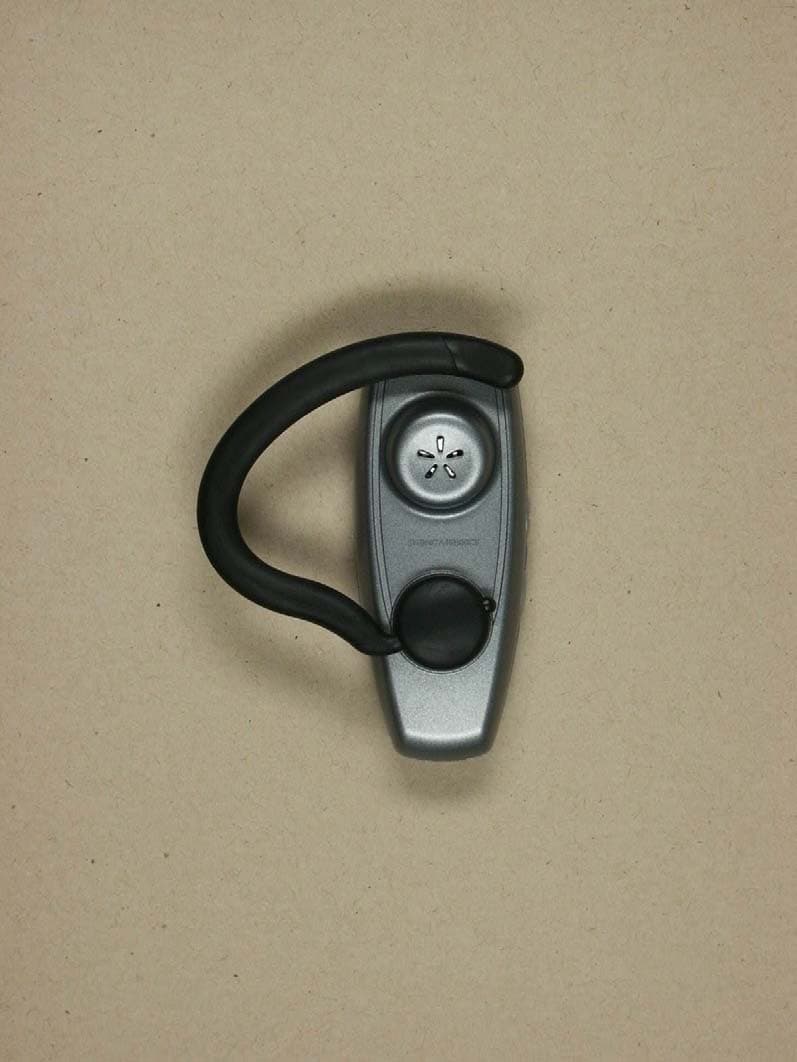
Click to zoom
Application Details
- Equipment Class
- DSS - Part 15 Spread Spectrum Transmitter
- Date of Grant
- Dec 13, 2004
- Application Purpose
- Original Equipment
- Date of Application
- Dec 13, 2004
- Equipment Note
- Treo Headset
- Frequency Range
- 2402.00000000 - 2480.00000000
- Company
- GN Audio USA Inc.
- Country
- United States
Documents & Files
Document Text
Text extracted from the exhibit documents filed with the FCC. Open a document above to read the original.
Users Manual
Treo™ Bluetooth ® Headset by palmOne ProductName™ XX German ProductName™ XX French ProductName™ XX Spanish ProductName™ XX Italian ProductName™ XX Brazilian Portuguese ProductName™ XX Traditional Chinese ProductName™ XX Simplified Chinese ii Table of Contents Charging your headset........................................................................ 2 Pairing with your Bluetooth phone ..................................................... 3 Turning your headset on and off......................................................... 5 Choosing wearing preference ............................................................ 6 Making a call ....................................................................................... 8 Answering a call ................................................................................. 9 Using call waiting.............................................................................. 10 Modes and alerts .............................................................................. 11 Enhanced features............................................................................ 12 Common questions .......................................................................... 12 Caring for your headset .................................................................... 14 Glossary ............................................................................................ 14 Product regulatory information ......................................................... 16 Treo ™ Bluetooth ® Headset1 Thank you for purchasing the Treo ™ Bluetooth ® Headset by palmOne. We hope you will be delighted with its operation. Please read this manual to get started and make the best use of your headset's many features. Using a mobile phone while driving creates a distraction to the driver, and this may increase the likelihood of an accident. When using the phone while driving, keep conversations short and do not make notes or read documents. Before answering calls, consider your circumstances. Pull off the road and park before making or answering calls when driving conditions require—for example, bad weather, high traffic density, presence of children in the car, or difficult junctions or maneuvers. Always follow local laws. What you’ll learn to do in this manual: • Charge your headset and turn it on • Check compatibility and pair with your Bluetooth phone • Choose a wearing preference • Make, answer, and end a call • Use call waiting • Use enhanced features Read the glossary at the end of this document to familiarize yourself with important terms. IMPORTANT [!] NOTE Your headset 2 Treo ™ Bluetooth ® Headset Your headset Charging your headset Your headset uses a rechargeable battery that must be charged fully before you use the headset for the first time. Charge your headset for approximately 2 hours. Keep the following in mind while charging your headset: • Do not attempt to charge the headset with anything other than the AC charger provided. Using another AC charger may damage or destroy the headset. • Removing the charger from the headset during charging will put the headset into standby mode and stop the charging sequence. • The headset cannot be used while charging. Multifunction button with blue indicator light Charging connector Volume control buttons Treo ™ Bluetooth ® Headset3 Pairing with your Bluetooth phone Your headset comes with an AC charger and plugs that are compatible with international outlets. You can use the same charger for both your headset and your Treo™ 650 smartphone, so you do not need to carry two chargers when you travel. 0 You are now ready to pair the headset with your mobile phone. If the headset has already been paired with your phone, then you can begin using it. Pairing with your Bluetooth phone Pairing creates a unique and encrypted wireless link between two devices enabled with Bluetooth wireless technology, such as your Bluetooth phone and Bluetooth headset. Your headset is compatible with most Bluetooth phones that are compliant with the Bluetooth version 1.1 or 1.2 specification. Visit your phone manufacturer’s website to make sure that your phone has Bluetooth capability. 1 Plug the AC charger into an electrical outlet, and then into the headset’s charging connector. 2 Charge for 2 hours, and then remove the AC charger from the headset. NOTE Pairing with your Bluetooth phone 4 Treo ™ Bluetooth ® Headset Pairing with your Treo 650 smartphone 0 1 Make sure the headset is turned off. 2 On the phone, go to Applications and select Bluetooth. 3 Make sure Bluetooth is on. 4 Select Setup Devices, and then select Hands-free Setup. 5 Press and hold the headset multifunction button for 8 seconds until you see a solid blue light. 6 On the phone, select Next. When the phone finds your headset, it displays Treo Headset with a headphone icon next to it. Select Treo Headset, and then select OK. 7 A status message appears telling you that your phone is connecting with your headset. When your phone asks for a passkey, enter 0000 from your keypad, and then press OK. 8 On the confirmation screen, select Done. Treo ™ Bluetooth ® Headset5 Turning your headset on and off Pairing with other Bluetooth phones 0 If pairing is successful, the blue indicator light flashes 10 times rapidly before going back to flashing every 3 seconds. If pairing is unsuccessful, the light remains solid, and you’ll need to reattempt pairing (see steps 3–5 above). Turning your headset on and off To turn your headset on and off, press and hold the multifunction button for 3 to 5 seconds, until you see a burst of four flashes on the blue indicator light. A single tone indicates that the handset has turned on or off. 1 Make sure the headset is turned off. 2 Press and hold the multifunction button for approximately 8 seconds, until you see a solid blue light. Release the button. 3 Set your Bluetooth phone to discover the headset by following your phone’s instruction guide. Typically, the st…
Text truncated - open the document above for the full version.
External Photos
ELECTRONIC TECHNOLOGY SYSTEMS DR.GENZ GMBH ETS Dr. Genz GmbH, GermanyRegistration number: G0M20411-9125-P-15«Registriernummer» Page 1 of 9 Appendix A. Pictures ELECTRONIC TECHNOLOGY SYSTEMS DR.GENZ GMBH ETS Dr. Genz GmbH, GermanyRegistration number: G0M20411-9125-P-15«Registriernummer» Page 2 of 9
Internal Photos
ELECTRONIC TECHNOLOGY SYSTEMS DR.GENZ GMBH ETS Dr. Genz GmbH, GermanyRegistration number: G0M20411-9125-P-15«Registriernummer» Page 3 of 9 ELECTRONIC TECHNOLOGY SYSTEMS DR.GENZ GMBH ETS Dr. Genz GmbH, GermanyRegistration number: G0M20411-9125-P-15«Registriernummer» Page 4 of 9 ELECTRONIC TECHNOLOGY SYSTEMS DR.GENZ GMBH ETS Dr. Genz GmbH, GermanyRegistration number: G0M20411-9125-P-15«Registriernummer» Page 5 of 9
Test Report
ELECTRONIC TECHNOLOGY SYSTEMS DR. GENZ GMBH TEST - REPORT FCC RULES PART 15 / SUBPART C FCC ID: BCE-TREO Test report no.: G0M20411-9125-P-15 ELECTRONIC TECHNOLOGY SYSTEMS STORKOWER STRASSE 38C, D-15526 REICHENWALDE B. BERLIN DR. GENZ GMBH PHONE +49-33631-888 00 FAX +49-33631-888 660 ETS Dr. Genz GmbH, Germany Registration number: G0M20411-9125-P-15 Page 1 of 34 ELECTRONIC TECHNOLOGY SYSTEMS DR.GENZ GMBH TABLE OF CONTENTS 1 General information 1.1 Notes 1.2 Testing laboratory 1.3 Details of approval holder 1.4 Application details 1.5 Test item 1.6 Test standards 2 Technical test 2.1 Summary of test results 2.2 Test environment 2.3 Test equipment utilized 2.4 General Test Procedure 3 Test Results ETS Dr. Genz GmbH, Germany Registration number: G0M20411-9125-P-15 Page 2 of 34 ELECTRONIC TECHNOLOGY SYSTEMS DR.GENZ GMBH 1 General Information 1.1 Notes The purpose of conformity testing is to increase the probability of adherence to the essential requirements or conformity specifications, as appropriate. The complexity of the technical specifications, however, means that full and thorough testing is impractical for both technical and economic reasons. Furthermore, there is no guarantee that a test sample which has Passed all the relevant tests conforms to a specification. Neither is there any guarantee that such a test sample will interwork with other genuinely open systems. The existence of the tests nevertheless provides the confidence that the test sample possesses the qualities as maintained and that is performance generally conforms to representative cases of communications equipment. The test results of this test report relate exclusively to the item tested as specified in 1.5. The test report may only be reproduced or published in full. Reproduction or publication of extracts from the report requires the prior written approval of the ELECTRONIC TECHNOLOGY SYSTEMS DR. GENZ GMBH. Tester: 06.12.2004 N. Kaspar Date ETS-Lab. Name Signature Technical responsibility for area of testing: 06.12.2004 Dr. Genz Date ETS Name Signature ETS Dr. Genz GmbH, Germany Registration number: G0M20411-9125-P-15 Page 3 of 34 ELECTRONIC TECHNOLOGY SYSTEMS DR.GENZ GMBH 1.2 Testing laboratory 1.2.1 Location ELECTRONIC TECHNOLOGY SYSTEM DR. GENZ GMBH (ETS) Storkower Straße 38c D-15526 Reichenwalde b. Berlin Germany Telefon : +49 33631 888 00 Telefax : +49 33631 888 66 1.2.2 Details of accreditation status ACCREDITED TESTING LABORATORY DAR-REGISTRATION NUMBER: TTI-P-G 126/96 ACCREDITED COMPETENT BODY DAR-REGISTRATION NUMBER: BPT-ZE-026/96 FCC FILED TEST LABORATORY REG. NO. 96970 BLUETOOTH QUALIFICATION TEST FACILITY (BQTF) ACCREDITED BY BLUETOOTH QUALIFICATION REVIEW BOARD INDUSTRY CANADA FILED TEST LABORATORY REG. NO. IC 3470 A2LA ACCREDITED Certificate Number 1983-01 1.3 Details of approval holder Name : GN Netcom Street : Metalbuen 66 Town : DK-2750 Ballerup Country : Denmark Telephone : +45 7211 8686 Fax : +45 7211 8689 Contact : Mr. Jørn B. Rasmussen E-mail : [email protected] ETS Dr. Genz GmbH, Germany Registration number: G0M20411-9125-P-15 Page 4 of 34 ELECTRONIC TECHNOLOGY SYSTEMS DR.GENZ GMBH 1.4 Application details Date of receipt of application : 23.11.2004 Date of receipt of test item : 23.11.2004 Date of test : 23.11.2004 – 03.12.2004 1.5 Test item Description of test item : Bluetooth Headset Type identification : Treo Headset Hardware version : Rev 1.0 Software version : 0_1_7_E Serial number : without Photos : See Appendix A Technical data Frequency band : 2.4GHz – 2.4835GHz Frequency ( ch A) : 2402 MHz Frequency (ch B) : 2441 MHz Frequency (ch C) : 2480 MHz Transmitter Vnom Vnom Power (ch A) : Conducted: 0.75 dBm Radiated: 0.98 dBm Power (ch B) : Conducted: 0.56 dBm Radiated: -2.86 dBm Power (ch C) : Conducted: 0.66 dBm Radiated: -4.42 dBm Power supply : 3.7 V DC Operating mode : duplex Type of modulation : FHSS Antenna type : internal planar inverted F type antenna Antenna gain : -1.0 dBi (typ.) +1.0 dBi (max.) ETS Dr. Genz GmbH, Germany Registration number: G0M20411-9125-P-15 Page 5 of 34 ELECTRONIC TECHNOLOGY SYSTEMS DR.GENZ GMBH Host device : none Classification : Fixed Device Mobile Device (Human Body distance > 20cm) Portable Device (Human Body distance < 20cm) Manufacturer: (if applicable) Name : Street : Town : Country : Additional information: The test sample is designed as Bluetooth device. Its pseudorandom hopping scheme, authentication, receiver parameters, synchronization procedure and other parameters are determined by Bluetooth Core Specification. ETS Dr. Genz GmbH, Germany Registration number: G0M20411-9125-P-15 Page 6 of 34 ELECTRONIC TECHNOLOGY SYSTEMS DR.GENZ GMBH 1.6 Test standards Technical standard : FCC RULES PART 15 / SUBPART C § 15.247 2 Technical test 2.1 Summary of test results No deviations from the technical specification(s) were ascertained in the course : of the tests performed. or The deviations as specified in 2.5 were ascertained in the course of the tests performed. 2.2 Test environment Temperature : 25 o C Relative humidity content : 20 ... 75 % Air pressure : 86 ... 103 kPa Details of power supply : 3.7 V DC Extreme conditions parameters: : test voltage - extreme min.: -- V max: -- V ETS Dr. Genz GmbH, Germany Registration number: G0M20411-9125-P-15 Page 7 of 34 ELECTRONIC TECHNOLOGY SYSTEMS DR.GENZ GMBH 2.3 Test equipment utilized No. Test equipment Type Manufacturer ETS 0001 Test receiver ESHS 10 Rohde & Schwarz ETS 0002 Test receiver ESVP Rohde & Schwarz ETS 0003 Test receiver ESVS 10 Rohde & Schwarz ETS 0004 Spectrum and network analyzer FSMS 26 Rohde & Schwarz ETS 0005 Test receiver SMV 11 MEB ETS 0006 Test receiver system SME 12 MEB ETS 0008 Antenna Loop antenna Siemens ETS 0009 Antenna ARA 2 MEB ETS 0010 Antenna Loop antenna MEB ETS 0011 Antenna van Veen/ Frame Rohde & Schwarz ETS 0012 Antenna HK 116 Rohde & Schwarz ETS 0013 Antenna HL 223 Rohde & Schwarz ETS 0014 Antenna HL 025 Rohde & Schwarz ETS 0015 Antenna HL 025 Rohde & Schwarz ETS 0016 Precision ant…
Text truncated - open the document above for the full version.
Test Setup Photos
ELECTRONIC TECHNOLOGY SYSTEMS DR.GENZ GMBH ETS Dr. Genz GmbH, GermanyRegistration number: G0M20411-9125-P-15«Registriernummer» Page 6 of 9 ELECTRONIC TECHNOLOGY SYSTEMS DR.GENZ GMBH ETS Dr. Genz GmbH, GermanyRegistration number: G0M20411-9125-P-15«Registriernummer» Page 7 of 9 ELECTRONIC TECHNOLOGY SYSTEMS DR.GENZ GMBH ETS Dr. Genz GmbH, GermanyRegistration number: G0M20411-9125-P-15«Registriernummer» Page 8 of 9 ELECTRONIC TECHNOLOGY SYSTEMS DR.GENZ GMBH ETS Dr. Genz GmbH, GermanyRegistration number: G0M20411-9125-P-15«Registriernummer» Page 9 of 9
Contact Information
Applicant
Steen Kaiser(Manager, Product Certifications)
Test Firm
Eurofins Product Service GmbHRobert Kschiwan-Kaspar
Technical Specifications
| # | Rule Parts | Frequency Range | Power Output |
|---|---|---|---|
| 1 | 15C | 2.40 GHz - 2.48 GHz | 1.20 mW |
Other Applications from GN Audio USA Inc.
BCE-OTE995
Aug 19, 2026Bluetooth Headset
Equipment Class
DSS - Part 15 Spread Spectrum TransmitterBCE-HSC240W
Aug 07, 2026Bluetooth Headset
Equipment Class
DSS - Part 15 Spread Spectrum TransmitterBCE-HSC260W
Aug 04, 2026Bluetooth Headset
Equipment Class
DTS - Digital Transmission SystemBCE-OTE800
Mar 24, 2026OTE985 Bluetooth Headset
Equipment Class
DTS - Digital Transmission SystemBCE-OTE810
Mar 19, 2026OTE985 Bluetooth Headset
Equipment Class
DSS - Part 15 Spread Spectrum Transmitter