C3K1023Wireless Notebook Optical Mouse
Microsoft Corporation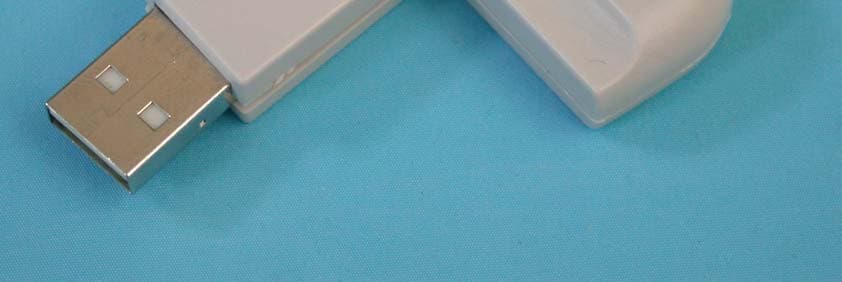
Click to zoom
Application Details
- Equipment Class
- DXX - Part 15 Low Power Communication Device Transmitter
- Date of Grant
- May 25, 2004
- Application Purpose
- Original Equipment
- Date of Application
- May 25, 2004
- Equipment Note
- Wireless Notebook Optical Mouse
- Frequency Range
- 27.14500000 - 27.14500000
- Company
- Microsoft Corporation
- Country
- United States
Documents & Files
Document Text
Text extracted from the exhibit documents filed with the FCC. Open a document above to read the original.
Users Manual
M www.microsoft.com/hardware M 32 0404 Part No. X10-39839 Printed in China Getting Started Microsoft ® Wireless Mouse Products Guia de Introdução Linha de produtos de mouse sem fio da Microsoft ® 快速入門 Microsoft ® Wireless Mouse 產品 用户手册 Microsoft ® Wireless Mouse 产品 Mise en route Souris sans fil Microsoft ® Guida introduttiva Mouse senza fili Microsoft ® Microsoft ® Introducción Dispositivos de mouse inalámbrico Microsoft ® X1039839cvr.indd4/22/04, 5:51 PM1 0404 Part No. X10-39839 Contents Getting Started . . . . . . . . . . . . . . . . . . . . . . . . . . . . . . . . . . . . . . . . . . . . . . . . . . . . .2 Introdução . . . . . . . . . . . . . . . . . . . . . . . . . . . . . . . . . . . . . . . . . . . . . . . . . . . . . . .24 快速入門 . . . . . . . . . . . . . . . . . . . . . . . . . . . . . . . . . . . . . . . . . . . . . . . . . . . . . . . . .46 用户手册 . . . . . . . . . . . . . . . . . . . . . . . . . . . . . . . . . . . . . . . . . . . . . . . . . . . . . . . . .64 Mise en route . . . . . . . . . . . . . . . . . . . . . . . . . . . . . . . . . . . . . . . . . . . . . . . . . . . . .83 Guida introduttiva . . . . . . . . . . . . . . . . . . . . . . . . . . . . . . . . . . . . . . . . . . . . . . . .10 6 . . . . . . . . . . . . . . . . . . . . . . . . . . . . . . . . . . . . . . . . . . . . . . . . . . . . .12 8 Introducción . . . . . . . . . . . . . . . . . . . . . . . . . . . . . . . . . . . . . . . . . . . . . . . . . . . . .14 6 X1039839mnl_toc.indd4/22/04, 6:45 PM1 2 HEALTH WARNING Use of a keyboard or mouse may be linked to serious injuries or disorders. When using a computer, as with many activities, you may experience occasional discomfort in your hands, arms, shoulders, neck, or other parts of your body. However, if you experience symptoms such as persistent or recurring discomfort, pain, throbbing, aching, tingling, numbness, burning sensation, or stiffness, DO NOT IGNORE THESE WARNING SIGNS. PROMPTLY SEE A QUALIFIED HEALTH PROFESSIONAL, even if symptoms occur when you are not working at your computer. Symptoms like these can be associated with painful and sometimes permanently disabling injuries or disorders of the nerves, muscles, tendons, or other parts of the body. These musculoskeletal disorders (MSDs) include carpal tunnel syndrome, tendonitis, tenosynovitis, and other conditions. While researchers are not yet able to answer many questions about MSDs, there is general agreement that many factors may be linked to their occurrence, including: overall health, stress and how one copes with it, medical and physical conditions, and how a person positions and uses his or her body during work and other activities (including use of a keyboard or mouse). The amount of time a person performs an activity may also be a factor. Some guidelines that may help you work more comfortably with your computer and possibly reduce your risk of experiencing an MSD can be found in the “Healthy Computing Guide” section of this “Getting Started” manual. You can also access the “Healthy Computing Guide” at www.microsoft.com/hardware or (in the United States only) by calling 1 (800) 360 7561 to request a CD at no charge. If you have questions about how your own lifestyle, activities, or medical or physical condition may be related to MSDs, see a qualified health professional. Warning To protect against risk of fire, bodily injury, electric shock or damage to the equipment: • Do not immerse any part of this product in water or other liquid. • Do not spray liquid on this product or allow excess liquid to drip inside. • Do not use this product if it has sustained damage, such as a damaged cord or plug. • Disconnect this product or remove its batteries before cleaning. See cleaning instructions later in this manual. Getting Started 2 X1039839mnl_enu.indd4/22/04, 6:45 PM2 3 Welcome Congratulations on your purchase of a Microsoft ® Wireless Mouse. Insert the Batteries Whenever you insert the batteries, always make sure each of them is new. Alkaline batteries provide maximum battery life and are included in the package. 1 Remove the battery compartment cover. 2 Insert the batteries, making sure to properly orient the positive (+) and negative (-) ends as specified by the battery compartment labels. 3 Replace the battery compartment cover. Important • Microsoft Wireless Notebook Optical Mouse requires only one battery. To open the battery compartment, you must press the Microsoft Optical Technology logo button to remove the top cover and insert the battery. • Before boarding any aircraft, remove the batteries from the wireless mouse. The wireless mouse can emit radio frequency (RF) energy, similar to a cellular telephone, whenever batteries are installed and the mouse is activated either by touch or button press. Position the Wireless Mouse and Receiver For optimum performance, the wireless receiver must not be near any items that might cause interference, such as computer monitors, large metal objects, desktop fans, or fluorescent lights. Make sure the distance between the mouse and receiver is within the wireless range specified on the packaging. Important For Microsoft Wireless Notebook Optical Mouse, you must position the antenna so that it is parallel to the surface that the computer is on to achieve optimum performance. 2 X1039839mnl_enu.indd4/22/04, 6:45 PM3 4 Connect the Receiver to the Computer With Universal Serial Bus (USB) simplicity, you can connect the receiver in one simple step. To connect the receiver • With your computer turned on, plug the rectangular USB connector into your computer’s USB port. Test the Mouse Try using the mouse. If it does not work as expected, make sure that you completed the following procedures as specified earlier in these instructions: • Each battery is new and inserted correctly. • The receiver is properly connected to the computer. • The receiver and mouse are properly positioned within their wireless range. If the mouse is still not working, try reconnecting the mo…
Text truncated - open the document above for the full version.
Cover Letter(s)
POWER OF ATTORNEY To whom it may concern: We, the undersigned, Microsoft Corporation hereby authorize Advance Data Technology Corporation (ADT) of Taiwan to act on our behalf in all matters relating to all processes required in the FCC Part 15C approval and any communication needed with the national authority. Any and all acts carried out by ADT on our behalf shall have the same effects as acts of our own. If you have any questions regarding the authorization, please don’t hesitate to contact us. Thank you! Sincerely yours, ------------------------------------------------------------------- Gene Obie EMC/Safety Engineer Tel: +1 425 705-6429 E-mail: [email protected] MICROSOFT CORPORATION Add: ONE MICROSOFT WAY, REDMOND WA 98052-6399, U.S.A. TEL: +1 425 705-6429
Cover Letter(s)
Federal Communications Commission Authorization and Evaluation Division 7435 Oakland Mills Road Columbia, Maryland 21046 To whom it may concern, We, the undersigned, Microsoft Corporation hereby authorize KYE, to act on our behalf, as our agent, in the following matters related to the FCC approval of our products: FCC ID:C3K1023 report submittal, related correspondence, the signing of all documents relating to these matters, and any other lawful activity necessary to obtain such certification. Any act carried out by KYE within the scope of this authorization shall have the same affect as our own. This authorization shall expire on April 20, 2005. Sincerely, Gene Obie EMC/Safety Engineer Microsoft Corporation One Microsoft Way, Redmond WA 98052-6399, U.S.A Tel: +1 425 705-6249
Cover Letter(s)
Federal Communications Commission Authorization and Evaluation Division 7435 Oakland Mills Road Columbia, Maryland 21046 To whom it may concern, We hereby respectfully request that under the provision of 47 CFR 0.459, the documents listed below and attached with this application for certification for FCC ID: C3K1023 be provided with confidential status. • Schematics • Block Diagrams • Bill of Materials Any exhibit / information for which we have requested confidentiality, but which may not be accorded such treatment by the FCC, should be returned to us. The documents listed above contain trade secrets that are treated as confidential by us. Substantial competitive harm to us could result should they be made available to the public. Sincerely, Gene Obie EMC/Safety Engineer Microsoft Corporation One Microsoft Way, Redmond WA 98052-6399, U.S.A Tel: +1 425 705-6249
External Photos
Page 1 CONSTRUCTION PHOTOS OF EUT Page 2 Page 3 Page 4 Page 5 Page 6
ID Label/Location Info
Label Location
ID Label/Location Info
ARTWORK NUMBERDESCRIPTION PROPRIETARY NOTE TOLERENCES DWN./DATE SOFTWAREVERSION DRAWING NUMBERREVISION THE INFORMATION CONTAINEDHEREONIS CONFIDENTIAL, IS SUBMITTEDIN CONFIDENCE,AND IS PROPRIETARY INFORMATIONOFMICROSOFTCORPORA- TION,AND SHALL ONLY BE USED IN THEFURTHERANCEOF,THECONTRACTOF WHICHTHIS DRAWING FORMS A PART,AND SHALL NOT,WITHOUTMICROSOFT CORPORATION'S PRIOR WRITTENAPPROVAL, BE REPRODUCEDORINANYWAY USED IN WHOLEOR IN PARTINCONNECTIONWITH SERVICES OR EQUIPMENT OFFEREDFOR SALE OF FURNISHED TO OTHERS,THEINFORMATIONCONTAINED HEREONMAY NOT BE DISCLOSEDTOATHIRDPARTYWITHOUTCONSENTOF MICROSOFT CORPORATION,ANDTHEN, ONLYPURSUANTTOAMICROSOFT APPROVED NONDISCLOSURE AGREEMENT. UNLESS OTHERWISE SPECIFIED DIMENSIONSARE IN MILLIMETERS ator 8.0 FILE NAME John Silver man 3/19/2004 Wireless Notebook Optical Mouse label N/AN/A Adobe Illustr AWX800061-001_OUTLINE.pdf AWX800061-001 2:1 1:1
Internal Photos
Page 7 Page 8 Page 9 Page 10 Page 11 Page 12 Page 13
Operational Description
FCC ID: C3K1023 Report No.: RF930428L11 Operational Description The transmitter of the EUT (Microsoft ® Wireless Notebook Optical Mouse) is powered by 3V battery. The type of antenna is loop antenna. The output power of this device is very low. Under normal use condition, the transmitter and the receiver are quite close, so high EIRP power is neither necessary nor allowed because of interference.
Test Report
FCC ID: C3K1023 Report No.: RF930428L111Issued: May 6, 2004 FCC TEST REPORT REPORT NO.: RF930428L11 MODEL NO.: 1023 RECEIVED: April 28, 2004 TESTED: April 29 ~ May 1, 2004 APPLICANT: Microsoft Corporation ADDRESS: One Microsoft Way, Redmond, WA 98052- 6399, U.S.A. ISSUED BY: Advance Data Technology Corporation LAB LOCATION: No. 19, Hwa Ya 2nd Rd., Kueishan, Taoyuan, Taiwan, R.O.C. This test report consists of 18 pages in total. It may be duplicated completely for legal use with the approval of the applicant. It should not be reproduced except in full, without the written approval of our laboratory. The client should not use it to claim product endorsement by any government agencies. The test results in the report only apply to the tested sample. FCC ID: C3K1023 Report No.: RF930428L112Issued: May 6, 2004 Table of Contents 1CERTIFICATION..............................................................................................3 2SUMMARY OF TEST RESULTS .....................................................................4 3GENERAL INFORMATION ..............................................................................5 3.1GENERAL DESCRIPTION OF EUT ................................................................5 3.2DESCRIPTION OF TEST MODES ..................................................................6 3.3GENERAL DESCRIPTION OF APPLIED STANDARDS..................................6 3.4DESCRIPTION OF SUPPORT UNITS ............................................................6 3.5CONFIGURATION OF SYSTEM UNDER TEST..............................................6 4TEST PROCEDURE AND RESULT.................................................................7 4.1CONDUCTED EMISSION MEASUREMENT...................................................7 4.2RADIATED EMISSION MEASUREMENT........................................................7 4.2.1 LIMITS OF RADIATED EMISSION MEASUREMENT .....................................7 4.2.2 TEST INSTRUMENT .......................................................................................8 4.2.3 TEST PROCEDURE........................................................................................9 4.2.4 DEVATION FROM TEST STANDARD .............................................................9 4.2.5 TEST SETUP.................................................................................................10 4.2.6 EUT OPERATING CONDITION.....................................................................10 4.2.7 TEST RESULTS (A)....................................................................................... 11 4.2.8 TEST RESULTS (B).......................................................................................13 4.2.9 TEST RESULTS (C) ......................................................................................15 5PHOTOGRAPHS OF THE TEST CONFIGURATION ....................................17 6INFORMATION ON THE TESTING LABORATORIES...................................18 FCC ID: C3K1023 Report No.: RF930428L113Issued: May 6, 2004 1 CERTIFICATION PRODUCT NAME : Microsoft ® Wireless Notebook Optical Mouse BRAND NAME.: Microsoft ® MODEL NO. : 1023 APPLICANT : Microsoft Corporation TESTED : April 29 ~ May 1, 2004 TEST ITEM : ENGINEERING SAMPLE STANDARDS : FCC Part 15, Subpart C (15.227) ANSI C63.4-2001 Canada RSS-210 The above equipment has been tested by Advance Data Technology Corporation, and found compliance with the requirement of the above standards. The test record, data evaluation & Equipment Under Test (EUT) configurations represented herein are true and accurate accounts of the measurements of the sample’s EMC characteristics under the conditions specified in this report. PREPARED BY:, DATE: May 6, 2004 APPROVED BY: Suntee Liu , DATE: May 6, 2004 Cody Chang / Supervisor FCC ID: C3K1023 Report No.: RF930428L114Issued: May 6, 2004 2 SUMMARY OF TEST RESULTS The EUT has been tested according to the following specifications: APPLIED STANDARD: FCC Part 15, Subpart C STANDARD PARAGRAPH TEST TYPERESULTREMARK 15.207Conducted Emission TestPASS Power supply is 1.5Vdc from one battery 15.227Radiated Emission TestPASS Minimum passing margin is –14.78dB at 667.60MHz NOTE: The receiver part to communicate with the EUT has been verified to comply with FCC Part 15, Subpart B, Class B (DoC). The test report can be provided upon request. FCC ID: C3K1023 Report No.: RF930428L115Issued: May 6, 2004 3 GENERAL INFORMATION 3.1 GENERAL DESCRIPTION OF EUT PRODUCT Microsoft ® Wireless Notebook Optical Mouse MODEL NO. 1023 POWER SUPPLY 1.5Vdc from one battery for Mouse MODULATION TYPE FSK CARRIER FREQUENCY OF EACH CHANNEL 27.145MHz BANDWIDTH OF EACH CHANNEL NA NUMBER OF CHANNEL 1 ANTENNA TYPE Loop antenna DATA CABLE NA I/O PORTS NA ASSOCIATED DDVCES NA NOTE: 1. The EUT is the transmitter part of a wireless mouse. 2. Three identical samples were tested at Microsoft’s request. Serial Number (TX) A 1023 L-EV2-09/067 B 1023 L-EV2-13/101 C 1023 L-EV2-06/046 3. Configuration Information: Configuration #:Comments: EV2 phase unit with EMC fixes for formal report Manufacturer Component type Part no.Revision noDescriptionBOM (if known) KYE MouseTransmitter25000159201 STOptical SensorAviatorAASIC11300398000 MicrosoftFirmwareEV2Transmitter KYEReceiverUSB Receiver25000158201 MotorolaMicro-controller MC68HC908JB811300008200 MicrosoftFirmwareV0.16Receiver TCT, ExpressTX PCB6Silver Through Hole10230040200 ExpressRX PCB7Double side10230022200 KYEPCB AssemblyReceiver20000058201 KYEPCB AssemblyTransmitter20000041201 Mouse NYPROSkirtABS - 94HB15110057201 HEIBottom CaseABS - 94HB15110060201 HEIWheelPC - 94HB15110064201 NYPROTop CoverABS - 94HB15110058201 NYPROKey TopABS - 94HB15110059201 NYPROLogo KnobPC - 94HB15110061201 NYPROKnob SupportPC - 94HB15110062201 NYPRODetect SupportPC - 94HB15110063201 NYPROChannel ButtonABS - 94HB15110065201 NYPRODetect HeadPC - 94HB15110066200 NYPRODetect CoverPC - 94HB15110067200 Receiver FCC ID: C3K1023 Report No.: RF930428L116Issued: May 6, 2004 …
Text truncated - open the document above for the full version.
Contact Information
Applicant
Hasnain Syed(SR. DIR EMC/SI&RF COMPLIANCE)
Technical Contact
Advance Data Technology Corp.Ellis Wu
[email protected]+886-3-318-3232
No.19, Hwa Ya 2nd Rd. · Kueishan Taoyuan · Taiwan
Test Firm
Advance Data Technology CorporationStephen Chen
Technical Specifications
| # | Rule Parts | Frequency Range | Power Output |
|---|---|---|---|
| 1 | 15C | 27.145 MHz - 27.145 MHz | - |
Other Applications from Microsoft Corporation
C3K2147
Aug 28, 2026Wireless input device
Equipment Class
DTS - Digital Transmission SystemC3K2148
Aug 12, 2026Portable Computing Device
Equipment Class
DXX - Part 15 Low Power Communication Device TransmitterC3K2149
Aug 12, 2026Portable Computing Device
Equipment Class
DXX - Part 15 Low Power Communication Device TransmitterC3K2152
Aug 11, 2026Wireless Accessory
Equipment Class
DTS - Digital Transmission SystemC3K2150
Aug 06, 2026Portable Computing Device
Equipment Class
DXX - Part 15 Low Power Communication Device Transmitter