C3K1027Microsoft� Wireless Comfort Keyboard 1.0A
Microsoft Corporation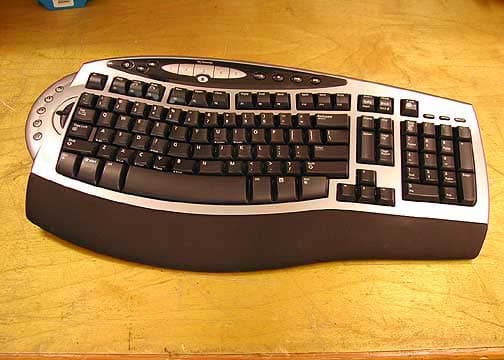
Click to zoom
Application Details
- Equipment Class
- DXX - Part 15 Low Power Communication Device Transmitter
- Date of Grant
- May 05, 2004
- Application Purpose
- Original Equipment
- Date of Application
- May 05, 2004
- Equipment Note
- Microsoft� Wireless Comfort Keyboard 1.0A
- Frequency Range
- 27.09500000 - 27.19500000
- Company
- Microsoft Corporation
- Country
- United States
Documents & Files
Document Text
Text extracted from the exhibit documents filed with the FCC. Open a document above to read the original.
Users Manual
1 Table of Contents Getting Started. . . . . . . . . . . . . . . . . . . . . . . . . . . . . . . . . . . . 2 Mise en route. . . . . . . . . . . . . . . . . . . . . . . . . . . . . . . . . . . . 11 Erste Schritte. . . . . . . . . . . . . . . . . . . . . . . . . . . . . . . . . . . . 21 0404 Part No. X10-42009 X1042009mnl_toc.indd4/1/2004, 12:33 PM1 2 HEALTH WARNING Use of a keyboard or mouse may be linked to serious injuries or disorders. When using a computer, as with many activities, you may experience occasional discomfort in your hands, arms, shoulders, neck, or other parts of your body. However, if you experience symptoms such as persistent or recurring discomfort, pain, throbbing, aching, tingling, numbness, burning sensation, or stiffness, DO NOT IGNORE THESE WARNING SIGNS. PROMPTLY SEE A QUALIFIED HEALTH PROFESSIONAL, even if symptoms occur when you are not working at your computer. Symptoms like these can be associated with painful and sometimes permanently disabling injuries or disorders of the nerves, muscles, tendons, or other parts of the body. These musculoskeletal disorders (MSDs) include carpal tunnel syndrome, tendonitis, tenosynovitis, and other conditions. While researchers are not yet able to answer many questions about MSDs, there is general agreement that many factors may be linked to their occurrence, including: overall health, stress and how one copes with it, medical and physical conditions, and how a person positions and uses his or her body during work and other activities (including use of a keyboard or mouse). The amount of time a person performs an activity may also be a factor. Some guidelines that may help you work more comfortably with your computer and possibly reduce your risk of experiencing an MSD can be found in the “Healthy Computer Guide” installed with this device’s software. If this device did not come with software, see the “Healthy Computing Guide” section of the “Getting Started” manual. You can also access the “Healthy Computing Guide” at www.microsoft.com/hardware or (in the United States only) by calling 1 (800) 360 7561 to request a CD at no charge. If you have questions about how your own lifestyle, activities, or medical or physical condition may be related to MSDs, see a qualified health professional. About Your Rights and Obligations This Microsoft ® wireless desktop set is comprised of a keyboard, mouse, and receiver and is sold as a single unit and may not be separated for use on more than one computer. The software with this product is licensed, not sold. You must either agree to the license contract in the software Setup screen or promptly return the Microsoft wireless desktop set, comprised of the keyboard, mouse, and receiver, along with the software, for a refund, excluding the return costs. After you install the software, you may consult the license and the Limited Warranty for the product at any time by looking in the “Legal Information” section of the software Help files. You may also print copies for your records. Information in this document, including URL and other Internet Web site references, is subject to change without notice. Unless otherwise noted, the example companies, organizations, products, domain names, e-mail addresses, logos, people, places, and events depicted herein are fictitious, and no association with any real company, organization, product, domain name, e-mail address, logo, person, place, or event is intended or should be inferred. Complying with all applicable copyright laws is the responsibility of the user. Without limiting the rights under copyright, no part of this document may be reproduced, stored in or introduced into a retrieval system, or transmitted in any form or by any means (electronic, mechanical, photocopying, recording, or otherwise), or for any purpose, without the express written permission of Microsoft Corporation. Microsoft may have patents, patent applications, trademarks, copyrights, or other intellectual property rights covering subject matter in this document. Except as expressly provided in any written license agreement from Microsoft, the furnishing of this document does not give you any license to these patents, trademarks, copyrights, or other intellectual property. © 1999-2004 Microsoft Corporation. All rights reserved. Microsoft, IntelliMouse, Natural, and Windows are either registered trademarks or trademarks of Microsoft Corporation in the United States and/or other countries. The names of actual companies and products mentioned herein may be the trademarks of their respective owners. Microsoft Corporation grants the purchaser of this product the right to reproduce one (1) copy of the enclosed “Getting Started” printed guide for each Hardware Device you purchased in the package. Getting Started X1042009mnl_enu.indd4/1/2004, 12:33 PM2 3 Welcome Congratulations on your purchase of a Microsoft ® wireless desktop set, which includes a wireless keyboard, wireless mouse, and a dual receiver. Setting up the devices takes a few simple steps, and then you can enjoy the freedom of wireless technology and the convenience of a clutter-free desktop. Important! Install the Software Your Microsoft wireless desktop set includes a CD with IntelliType Pro keyboard software and IntelliPoint mouse software. This software enables the unique features of your wireless devices and provides battery status information. To install IntelliType Pro keyboard software and IntelliPoint mouse software (Windows ® ) 1. Insert the software installation CD into your computer’s CD drive. If the Setup screen does not appear automatically, do the following: • Click the Start button, and then click Run. • Type [drive]:setup. For example, if your CD drive is drive E, type e:setup. 2. On the Setup screen, click Install, and then follow the Setup Wizard instructions on the screen. 3. Restart the computer, if prompted to do so. To install IntelliType Pro keyboard software and IntelliPoint mouse software (Mac OS) I…
Text truncated - open the document above for the full version.
Cover Letter(s)
April 29,2004 Federal Communications Commission Authorization and Evaluation Division 7435 Oakland Mills Road Columbia , Maryland 21046 FCC ID: C3K1027 Pursuant to Sections 0.457 and 0.459 of the Commission’s Rules, the Applicant hereby requests confidential treatment of information accompanying this Application as outlined below: Schematics Block Diagram Bill of Materials The above materials contain trade secrets and proprietary information not customarily released to the public. The public disclosure of these matters might be harmful to the Applicant and provide unjustified benefits to its competitors. The Applicant understands that pursuant to Rule 0.457, disclosure of this Application and all accompanying documentation will not be made before the date of the Grant for this application. Sincerely, Gene R. Obie EMC/Safety Engineer Microsoft Corporation Tel: 425 705 6429 Fax:425 936 7329 e-mail: [email protected]
Cover Letter(s)
Response to E04-000043-1 1. The Keyboard device is not intended to operate in conjuction to other RF devices, it only intended to operate in conjunction to the Receiver, where the Keyboard RF transmission is only one way transmission, which is from Keyboard to Receiver. 3.-5. The test report has been revised and uploaded to satisfy these questions.
External Photos
Top Bottom
ID Label/Location Info
ARTWORK NUMBERDESCRIPTION PROPRIETARY NOTE TOLERENCES DWN./DATE SOFTWAREVERSION DRAWING NUMBERREVISION THE INFORMATION CONTAINEDHEREONIS CONFIDENTIAL, IS SUBMITTEDIN CONFIDENCE,AND IS PROPRIETARY INFORMATIONOFMICROSOFTCORPORA- TION,AND SHALL ONLY BE USED IN THEFURTHERANCEOF,THECONTRACTOF WHICHTHIS DRAWING FORMS A PART,AND SHALL NOT,WITHOUTMICROSOFT CORPORATION'S PRIOR WRITTENAPPROVAL, BE REPRODUCEDORINANYWAY USED IN WHOLEOR IN PARTINCONNECTIONWITH SERVICES OR EQUIPMENT OFFEREDFOR SALE OF FURNISHED TO OTHERS,THEINFORMATIONCONTAINED HEREONMAY NOT BE DISCLOSEDTOATHIRDPARTYWITHOUTCONSENTOF MICROSOFT CORPORATION,ANDTHEN, ONLYPURSUANTTOAMICROSOFT APPROVED NONDISCLOSURE AGREEMENT. UNLESS OTHERWISE SPECIFIED DIMENSIONSARE IN MILLIMETERS ator 8.0 FILE NAME John Silver man 4/13/2004 N/AN/A Adobe Illustr AWX8000135-001.ai AWX8000135-001 Ver tigo Keyboard Label 1:1
Internal Photos
Top Cover Off Upper Membrane Top Upper Membrane Bottom Lower Membrane Top Lower Membrane Bottom PCB Component Side PCB Solder Side
Operational Description
Expository Statement Grantee: Microsoft® Corporation Model: Microsoft ® Wireless Desktop Comfort Keyboard 1.0A Model No. : 1027 Option : USB and PS/2, flat keyboard KEYBOARD TRANSMITTER: The Microsoft ® Wireless Desktop Comfort Keyboard is a computer input devices typically used for data input, conventional cursor control, numerical keypad, internet and multimedia control, and the Zoom Slider can be used for controlling the zoom-in and zoom-out of a file or an image. When a user presses a key on the keyboard or slide the Zoom-slider, the circuitry within the keyboard detects this key switch closure and translates it into a form usable by the host computer. The keyboard controller operates from a 8MHz clock speed derived from a 8MHz ceramic resonator. The controller takes its power from 2 (two) AA batteries and reads key stroke through a number of scan outputs and sense inputs. The scan outputs are connected to a Mylar sheet with conductive ink going from the scan output to the key switches. A separate Mylar sheet goes from the key switches to the sense inputs. When a key switch is pressed, conductive ink traces on the two Mylar sheets are connected, and a given scan output is connected to a given sense input. The controller detects which key is pressed, and sends the appropriate RF codes to the receiver via a wireless 27MHz FSK data transmission through the transmitter circuit board. The keyboard controller also connected to an EEPROM to store the information to bind with the receiver and low voltage detector circuit to warn user when batteries is in low power condition. The transmitter operates on either one of the 2 channels: 27.095 MHz or 27.195 MHz and channel selection is accomplished by pressing the ‘Connect Channel’ button located underneath the keyboard. The transmitter uses Frequency Shift Keying (FSK) modulation, and consists of a crystal-controlled FSK modulator and an output driver. The crystal-controller modulator uses a 27.095 and 27.195MHz crystal. The radiated electric field of the transmitter is less than 52dBuV/m at 3 meters. To save the batteries, the controller switches ON the transmitter only in the active state of the keyboard. The active state continues about 5 milliseconds after the last movement or button press and release; then the keyboard goes in the sleep from active state. The controller will resume from the sleep state to active state after receiving a signal from the interrupt driven I/O lines (sense lines) while a key is pressed or the Zoom-Slider is activated. The keyboard uses a double-sided printed circuit board for keyboard microprocessor controller, voltage detectors, EEPROM and the transmitter RF circuitry. The printed circuit board hosts the keyboard microcontroller and the 27MHz RF transmitter with the antenna matching circuitry. The printed circuit board also interfaces to and hosts the battery connector, the keyboard matrix as well as Zoom-slider connectors, and the antenna connector. A wired loop antenna which surrounded the whole keyboard is connected to the printed circuit board. The Keyboard complies with Microsoft ® and IBM® PS/2 specification, USB 2.0 and USB HID Specification. Where there is a discrepancy, the Microsoft ® Specification is used.
Test Report
Page 1 of 34 Report No.: FC04-029 NMB TECHNOLOGIES CORP. TEST REPORT FOR THE MICROSOFT® WIRELESS COMFORT KEYBOARD 1.0A, MODEL 1027 FCC PART 15 SUBPART C SECTIONS 15.215 & 15.227 COMPLIANCE DATE OF ISSUE: MAY 6, 2004 PREPARED FOR: NMB Technologies Corp. 9730 Independence Avenue Chatsworth, CA 91311 PREPARED BY: Mary Ellen Clayton CKC Laboratories, Inc. 5473A Clouds Rest Mariposa, CA 95338 P.O. No.:PQ19559 W.O. No.:81934 Date of test:March 31 – May 6, 2004 Report No.: FC04-029 This report contains a total of 34 pages and may be reproduced in full only. Partial reproduction may only be done with the written consent of CKC Laboratories, Inc. The results in this report apply only to the items tested, as identified herein. Page 2 of 34 Report No.: FC04-029 TABLE OF CONTENTS Administrative Information..............................................................................................3 Summary of Results.........................................................................................................4 Conditions for Compliance..............................................................................................4 Approvals.........................................................................................................................4 FCC 15.31(e) Voltage Variation......................................................................................5 FCC 15.31(m) Number Of Channels...............................................................................5 FCC 15.33(a) Frequency Ranges Tested.........................................................................5 FCC 15.203 Antenna Requirements................................................................................5 FCC 15.215 Additional Provisions to the General Radiated Emission Limitations........5 Eut Operating Frequency.................................................................................................5 Temperature And Humidity During Testing....................................................................5 Equipment Under Test (EUT) Description......................................................................6 Equipment Under Test.....................................................................................................6 Peripheral Devices...........................................................................................................6 Report of Measurements..................................................................................................7 Table 1: Fundamental Emission Levels...............................................................7 Table 2: FCC 15.227(b) Six Highest Radiated Emission Levels.........................8 FCC 15.215(c)/RSS 210 20 dB Bandwidth.........................................................9 EUT Setup........................................................................................................................15 Correction Factors............................................................................................................15 Table A: Sample Calculations..............................................................................15 Test Instrumentation and Analyzer Settings....................................................................15 Spectrum Analyzer Detector Functions...............................................................16 Peak..........................................................................................................16 Quasi-Peak...............................................................................................16 Average....................................................................................................16 EUT Testing.....................................................................................................................17 Radiated Emissions..............................................................................................17 Appendix A: Test Setup Photographs..............................................................................18 Photograph Showing Radiated Emissions...........................................................19 Photograph Showing Radiated Emissions...........................................................20 Appendix B: Test Equipment List...................................................................................21 Appendix C: Measurement Data Sheets..........................................................................22 Page 3 of 34 Report No.: FC04-029 ADMINISTRATIVE INFORMATION DATE OF TEST:March 31 – May 6, 2004 DATE OF RECEIPT:March 31, 2004 PURPOSE OF TEST:To demonstrate the compliance of the Microsoft® Wireless Comfort Keyboard 1.0A, Model 1027 with the requirements for FCC Part 15 Subpart C Sections 15.215 & 15.227 devices. TEST METHOD:ANSI C63.4 (1992) MANUFACTURER:NMB/Minebea Thai Ltd. 1, Moo 7, Phaholyothin Road, Km.51 Tambon Chiang Rak Noi, Amphoe Bang Pa-In Ayutthaya Province 13180 Thailand REPRESENTATIVE:Jamin Pandana TEST LOCATION:CKC Laboratories, Inc. 110 Olinda Place Brea, CA 92621 Page 4 of 34 Report No.: FC04-029 SUMMARY OF RESULTS As received, the NMB Technologies Corp. Microsoft® Wireless Comfort Keyboard 1.0A, Model 1027 was found to be fully compliant with the following standards and specifications: FCC Standard FCC Section Canadian Standard Canadian Section Test Description 47CFR15.215(c)RSS 2105.9.199% Emissions Bandwidth Requirement 47CFR15.227(a)RSS 2108.6.1Carrier Output Limitation 47CFR15.227(b)RSS 2108.6.1Spurious Emissions Limitation ANSI C63.4 (1992)ANSI C63.4 (1992)Test Method 100638IC 3172-DSite File No. CONDITIONS FOR COMPLIANCE No modifications to the EUT were necessary to comply. Conducted emissions not required for this device. APPROVALS Steve Behm, Director of Engineering Services QUALITY ASSURANCE:TEST PERSONNEL: Joyce Walker, Quality Assurance Administrative Manager Stuart Yamamoto, EMC Engineer Page 5 of 34 Report No.: FC04-029 FC…
Text truncated - open the document above for the full version.
Test Setup Photos
PHOTOGRAPH SHOWING RADIATED EMISSIONS Radiated Emissions - Front View PHOTOGRAPH SHOWING RADIATED EMISSIONS Radiated Emissions - Back View
Contact Information
Applicant
Hasnain Syed(SR. DIR EMC/SI&RF COMPLIANCE)
Technical Contact
CKC Laboratories, Inc.Mary Ellen Clayton
[email protected]209-966-5240
5473A Clouds Rest · Mariposa, California · United States
Non-Technical Contact
CKC Laboratories, Inc.Mary Ellen Clayton
[email protected]209-966-5240
Test Firm
CKC Laboratories, Inc.Steve Behm
Technical Specifications
| # | Rule Parts | Frequency Range | Power Output |
|---|---|---|---|
| 1 | 15C | 27.095 MHz - 27.195 MHz | - |
Other Applications from Microsoft Corporation
C3K2147
Aug 28, 2026Wireless input device
Equipment Class
DTS - Digital Transmission SystemC3K2148
Aug 12, 2026Portable Computing Device
Equipment Class
DXX - Part 15 Low Power Communication Device TransmitterC3K2149
Aug 12, 2026Portable Computing Device
Equipment Class
DXX - Part 15 Low Power Communication Device TransmitterC3K2152
Aug 11, 2026Wireless Accessory
Equipment Class
DTS - Digital Transmission SystemC3K2150
Aug 06, 2026Portable Computing Device
Equipment Class
DXX - Part 15 Low Power Communication Device Transmitter