C3K1045MICROSOFT� WIRELESS KEYBOARD
Microsoft Corporation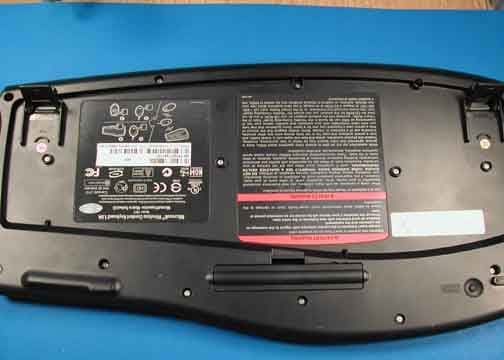
Click to zoom
Application Details
- Equipment Class
- DXX - Part 15 Low Power Communication Device Transmitter
- Date of Grant
- Jun 14, 2005
- Application Purpose
- Original Equipment
- Date of Application
- Jun 14, 2005
- Equipment Note
- MICROSOFT� WIRELESS KEYBOARD
- Frequency Range
- 27.09500000 - 27.19500000
- Company
- Microsoft Corporation
- Country
- United States
Documents & Files
Document Text
Text extracted from the exhibit documents filed with the FCC. Open a document above to read the original.
Users Manual
M www.microsoft.com M 1 2 3 0405 Part No. X11-11992 Getting Started Microsoft ® Wireless Optical Desktop 5000 X1111992cvr.indd 14/13/2005 1:28:24 PM HEALTH WARNING Use of a keyboard or mouse may be linked to serious injuries or disorders. When using a computer, as with many activities, you may experience occasional discomfort in your hands, arms, shoulders, neck, or other parts of your body. However, if you experience symptoms such as persistent or recurring discomfort, pain, throbbing, aching, tingling, numbness, burning sensation, or stiffness, DO NOT IGNORE THESE WARNING SIGNS. PROMPTLY SEE A QUALIFIED HEALTH PROFESSIONAL, even if symptoms occur when you are not working at your computer. Symptoms like these can be associated with painful and sometimes permanently disabling injuries or disorders of the nerves, muscles, tendons, or other parts of the body. These musculoskeletal disorders (MSDs) include carpal tunnel syndrome, tendonitis, tenosynovitis, and other conditions. While researchers are not yet able to answer many questions about MSDs, there is general agreement that many factors may be linked to their occurrence, including: overall health, stress and how one copes with it, medical and physical conditions, and how a person positions and uses his or her body during work and other activities (including use of a keyboard or mouse). The amount of time a person performs an activity may also be a factor. Some guidelines that may help you work more comfortably with your computer and possibly reduce your risk of experiencing an MSD can be found in the “Healthy Computing Guide” installed with this device’s software. If this device did not come with software, see the “Healthy Computing Guide” section of the “Getting Started” manual. You can also access the “Healthy Computing Guide” at www.microsoft.com/hardware or (in the United States only) by calling 1 (800) 360-7561 to request a CD at no charge. If you have questions about how your own lifestyle, activities, or medical or physical condition may be related to MSDs, see a qualified health professional. Warning To protect against risk of fire, bodily injury, electric shock or damage to the equipment: • Do not immerse any part of this product in water or other liquid. • Do not spray liquid on this product or allow excess liquid to drip inside. • Do not use this product if it has sustained any type of damage. • Disconnect this product or remove its batteries before cleaning. About Your Rights and Obligations This Microsoft ® wireless desktop set is comprised of a keyboard, mouse, and receiver and is sold as a single unit and may not be separated for use on more than one computer. The software with this product is licensed, not sold. You must either agree to the license contract in the software Setup screen or promptly return the Microsoft wireless desktop set, comprised of the keyboard, mouse, and receiver, along with the software, for a refund, excluding the return costs. After you install the software, you may consult the license and the Limited Warranty for the product at any time by looking in the “Legal Information” section of the software Help files. You may also print copies for your records. X1111992bdy.indd 14/13/2005 1:23:29 PM 1 Welcome Congratulations on your purchase of Microsoft ® Wireless Optical Desktop 5000, which includes: 123 456 1 Wireless keyboard 2 Wireless mouse 3 Shared receiver 4 Batteries for the wireless keyboard and mouse 5 Two CDs, one with IntelliType Pro keyboard software and IntelliPoint mouse software and one with Microsoft Digital Image Standard 2006 software 6 Two manuals, this Getting Started manual and the Microsoft Digital Image Standard User’s Manual Important ● Check the system requirements (located on the packaging) to make sure that your system is compatible. ● Completing software Setup requires a keyboard or mouse. If you don’t have a keyboard or mouse connected, you can install the software (Steps 1 and 2) after you have completed Steps 3 through 6 and your Microsoft wireless keyboard and mouse are working. 0405 Part No. X11-11992 X1111992bdy.indd 14/13/2005 1:23:36 PM 2 1 Install IntelliType Pro and IntelliPoint Software After installing IntelliType Pro and IntelliPoint software, you can use the unique features of your wireless keyboard and mouse, such as the zoom slider. To install IntelliType Pro and IntelliPoint software 1 Insert the software CD into your computer’s CD drive. If the Setup screen doesn’t appear automatically, do the following: ● Click Start, and then click Run . ● Type [drive] :setup. For example, if your CD drive is drive E, type e:setup . 2 On the Setup screen, click Install, and then follow the Setup Wizard instructions on the screen. Restart the computer, if prompted to do so. 2 Install Digital Image Standard 2006 Software Digital Image Standard 2006 software will help you enhance, organize, find, and share your photos. You must install Digital Image Standard 2006 for the keyboard PhotoCenter to work. To install Digital Image Standard 2006 software 1 Insert the software CD into your computer’s CD drive. If the Setup screen doesn’t appear automatically, do the following: ● Click Start, and then click Run . ● Type [drive] :setup. For example, if your CD drive is drive E, type e:setup . 2 On the Setup screen, click Next, and then follow the Installation Wizard instructions on the screen. Restart the computer, if prompted to do so. 3 Insert the Batteries The keyboard and mouse each require batteries, which are included in the package. Whenever you insert batteries in the keyboard or mouse, always make sure that both batteries are new. Alkaline batteries provide maximum battery life. To insert the batteries 1 Turn the device upside-down, and then remove the battery compartment cover. 2 Insert the new batteries, making sure to properly orient the positive (+) and negative (–) ends as specified by the battery compartment labels. X1111992bdy.indd 24/13/2005 1:23:38 PM 3 4 Position…
Text truncated - open the document above for the full version.
Cover Letter(s)
April 1 st , 2005 Federal Communications Commission Authorization and Evaluation Division 7435 Oakland Mills Road Columbia , Maryland 21046 Subject: Confidentiality request regarding application for certification of FCC ID: C3K1045 TO WHOM IT MAY CONCERN Pursuant to Sections 0.457 and 0.459 of the Commission’s Rules, the Applicant hereby requests confidential treatment of information accompanying this Application as outlined below: Schematics Block Diagram Parts List Operational Description The above materials contain trade secrets and proprietary information not customarily released to the public. The public disclosure of these matters might be harmful to the Applicant and provide unjustified benefits to its competitors. The Applicant understands that pursuant to Rule 0.457, disclosure of this Application and all accompanying documentation will not be made before the date of the Grant for this application. Sincerely, Gene R. Obie EMC/Safety Engineer Microsoft Corporation TEL: (425) 705-6429 FAX: (425) 705-7329 E-mail: [email protected] Microsoft Corporation is an equal opportunity employer.
Cover Letter(s)
April 1 st , 2005 Federal Communications Commission Authorization and Evaluation Division 7435 Oakland Mills Road Columbia , Maryland 21046 Subject: Temporary confidentiality request regarding application for certification of FCC ID: C3K1045 TO WHOM IT MAY CONCERN Pursuant to DA 04-1705 of the Commission’s public notice, we request temporary confidential treatment for the following information until 45 days after the Grant Date of Equipment Authorization in order to ensure sensitive business information remains confidential until the actual marketing of the device: External Photos Internal Photos Test Setup Photos Block Diagram Schematics User’s Manual Parts List Operational Description Sincerely, Gene R. Obie EMC/Safety Engineer Microsoft Corporation TEL: (425) 705-6429 FAX: (425) 705-7329 E-mail: [email protected] Microsoft Corporation is an equal opportunity employer.
Cover Letter(s)
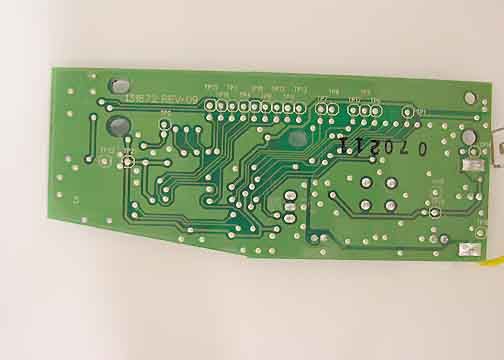
Response to E05-000158-1 1. A new general agreement has been uploaded. 2. RSS-212 is correct. 3. A revised test report has been uploaded. 4. The test method has been changed in the test report. 5. Please change the 731 form to show an equipment class of DXX. 6. The test report now includes bandedge plots. 7. A photo of the wiring side of the board has been uploaded.
External Photos
SUBMITTAL PHOTOGRAPH Top SUBMITTAL PHOTOGRAPH Bottom SUBMITTAL PHOTOGRAPH Bottom Front Left
ID Label/Location Info
ARTWORK NUMBERDESCRIPTION PROPRIETARY NOTE TOLERENCES DWN./DATE SOFTWAREVERSION DRAWING NUMBERREVISION THE INFO RMATION CONTAINED HEREON IS CONFIDENTIAL, IS SUBMITTEDIN CONFIDENCE,AND IS PROPRIETARY INFORMATIONOFMICROSOFTCORPORA- TION,AND SHALL ONLY BE USED IN THEFURTHERANCEOF,THE CONTRACTOF WHICHTHIS DRAWING FORMS A PART,AND SHALL NOT, WITHOUTMICROSOFT CORPORATION'S PRIOR WRITTENAPPROVAL, BE REPRODUCEDORINANYWAY USED IN WHOLEOR IN PARTIN CONNECTION WITH SERVICES OR EQUIPMENT OFFEREDFOR SALE OF FURNISHED TO OTHERS,THE INFORMATIONCONTAINED HER EONMAY NOT BE DISCLOSEDTOATHIRDPARTY WITHOUT CONSENTOF MICROSOFT CORPORATION,AND THEN, ONLY PURSUANTTOAMICROSOFT APPROVED NONDISCLOSURE AGREEMENT. UNLESS OTHERWISE SPECIFIED DIMENSIONSARE IN MILLIMETERS FILE NAME 1 inch x 1 inch reference John Silverman4/12/2005 N/AA Adobe Illustrator 11.0 AW802635-001_OUTLINE.pdf AW802635-001 1:1 ARTWORK,LABEL,PRODUCT,KYBD,WRLS OPTICAL DESKTOP 5000 OUTLINE DOES NOT PRINT W 105mm X H 106mm
Internal Photos
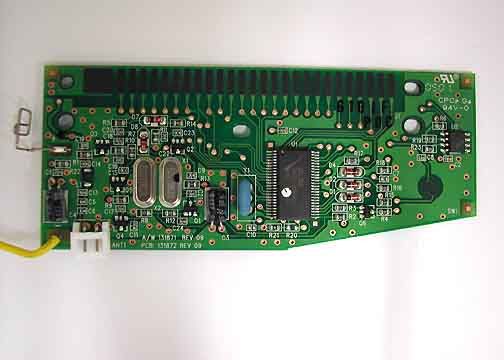
Page 1 of 5 Report No.: ETS05-025A SUBMITTAL PHOTOGRAPH Cover Removed Page 2 of 5 Report No.: ETS05-025A SUBMITTAL PHOTOGRAPH Left Traces Both Layers Page 3 of 5 Report No.: ETS05-025A SUBMITTAL PHOTOGRAPH Bottom Trace Top Page 4 of 5 Report No.: ETS05-025A SUBMITTAL PHOTOGRAPH Bottom Trace Bottom Page 5 of 5 Report No.: ETS05-025A SUBMITTAL PHOTOGRAPH PCB Bottom
Test Report
Page 1 of 52 Report No.: FC05-016A ADDENDUM TO MICROSOFT® CORPORATION TEST REPORT FC05-016 FOR THE MICROSOFT® WIRELESS PHOTO KEYBOARD MICROSOFT® WIRELESS COMFORT KEYBOARD, 1045 MICROSOFT® MODEL 1045 FCC PART 15 SUBPART C SECTIONS 15.207, 15.209, 15.227 AND RSS-210 COMPLIANCE DATE OF ISSUE: MAY 26, 2005 PREPARED FOR: Microsoft Corporation One Microsoft Way Redmond, WA 98052-6399 PREPARED BY: Mary Ellen Clayton CKC Laboratories, Inc. 5046 Sierra Pines Drive Mariposa, CA 95338 P.O. No.: PQ20765 W.O. No.: 83332 Date of test: March 22 - April 6, 2005 Report No.: FC05-016A This report contains a total of 52 pages and may be reproduced in full only. Partial reproduction may only be done with the written consent of CKC Laboratories, Inc. The results in this report apply only to the items tested, as identified herein. Page 2 of 52 Report No.: FC05-016A TABLE OF CONTENTS Administrative Information .................................................................................................. 3 FCC to Canada Standard Correlation Matrix........................................................................ 4 Conditions for Compliance ................................................................................................... 4 Approvals .............................................................................................................................. 4 FCC 15.33(a) Frequency Ranges Tested .............................................................................. 5 FCC 15.35 Analyzer Bandwidth Settings ............................................................................. 5 FCC 15.203 Antenna Requirements ..................................................................................... 5 FCC 15.205 Restricted Bands............................................................................................... 5 Eut Operating Frequency ...................................................................................................... 5 Temperature And Humidity During Testing......................................................................... 5 Equipment Under Test (EUT) Description ........................................................................... 6 Equipment Under Test .......................................................................................................... 6 Peripheral Devices ................................................................................................................ 6 Report of Measurements ....................................................................................................... 7 Table 1: Six Highest Conducted Emission Levels .................................................. 7 Table 2: FCC 15.227(a) Six Highest Radiated Emission Levels ............................. 8 Table 3: FCC 15.209/15.227(b) Six Highest Radiated Emission Levels ................. 9 FCC 15.227(b) Band Edge Plots .............................................................................. 10 FCC 2.1055(a) and (d) Frequency Stability and Voltage Variation......................... 16 RSS-210 20dB Bandwidth Plots .............................................................................. 17 EUT Setup............................................................................................................................. 23 Correction Factors................................................................................................................. 23 Table A: Sample Calculations .................................................................................. 23 Test Instrumentation and Analyzer Settings ......................................................................... 24 Spectrum Analyzer Detector Functions.................................................................... 24 Peak.............................................................................................................. 24 Quasi-Peak ................................................................................................... 24 Average ........................................................................................................ 24 EUT Testing.......................................................................................................................... 25 Mains Conducted Emissions .................................................................................... 25 Radiated Emissions .................................................................................................. 25 Appendix A: Test Setup Photographs................................................................................... 26 Photograph Showing Mains Conducted Emissions.................................................. 27 Photograph Showing Mains Conducted Emissions.................................................. 28 Photograph Showing Temperature Testing .............................................................. 29 Photograph Showing Fundamental Emissions ......................................................... 30 Photograph Showing Fundamental Emissions ......................................................... 31 Photograph Showing Spurious Emissions................................................................ 32 Photograph Showing Spurious Emissions................................................................ 33 Photograph Showing Radiated Emissions................................................................ 34 Photograph Showing Radiated Emissions................................................................ 35 Appendix B: Test Equipment List ........................................................................................ 37 Appendix C: Measurement Data Sheets ............................................................................... 39 Page 3 of 52 Report No.: FC05-016A ADMINISTRATIVE INFORMATION DATE OF TEST: March 22 - April 6, 2005 DATE OF RECEIPT: March 22, 2005 MANUFACTURER: NMB/ Minebea T…
Text truncated - open the document above for the full version.
Test Setup Photos
PHOTOGRAPH SHOWING MAINS CONDUCTED EMISSIONS Mains Conducted Emissions - Front View PHOTOGRAPH SHOWING MAINS CONDUCTED EMISSIONS Mains Conducted Emissions - Back View PHOTOGRAPH SHOWING TEMPERATURE TESTING PHOTOGRAPH SHOWING FUNDAMENTAL EMISSIONS Fundamental Emissions - Front View PHOTOGRAPH SHOWING FUNDAMENTAL EMISSIONS Fundamental Emissions - Back View PHOTOGRAPH SHOWING SPURIOUS EMISSIONS Spurious Emissions - Front View PHOTOGRAPH SHOWING SPURIOUS EMISSIONS Spurious Emissions - Back View PHOTOGRAPH SHOWING RADIATED EMISSIONS Radiated Emissions - Front View PHOTOGRAPH SHOWING RADIATED EMISSIONS Radiated Emissions - Back View RSS-210 20dB BANDWIDTH
Contact Information
Applicant
Hasnain Syed(SR. DIR EMC/SI&RF COMPLIANCE)
Technical Contact
CKC Laboratories, Inc.Mary Ellen Clayton
[email protected]800-500-4362
5473-A Clouds Rest · Mariposa, California · United States
Non-Technical Contact
CKC Laboratories, Inc.Mary Ellen Clayton
[email protected]800-500-4362
Test Firm
CKC Laboratories, Inc.Steve Behm
Technical Specifications
| # | Rule Parts | Frequency Range | Power Output |
|---|---|---|---|
| 1 | 15C | 27.095 MHz - 27.195 MHz | - |
Other Applications from Microsoft Corporation
C3K2147
Aug 28, 2026Wireless input device
Equipment Class
DTS - Digital Transmission SystemC3K2148
Aug 12, 2026Portable Computing Device
Equipment Class
DXX - Part 15 Low Power Communication Device TransmitterC3K2149
Aug 12, 2026Portable Computing Device
Equipment Class
DXX - Part 15 Low Power Communication Device TransmitterC3K2152
Aug 11, 2026Wireless Accessory
Equipment Class
DTS - Digital Transmission SystemC3K2150
Aug 06, 2026Portable Computing Device
Equipment Class
DXX - Part 15 Low Power Communication Device Transmitter