C3K1398Wireless N Networking Adaptor
Microsoft Corporation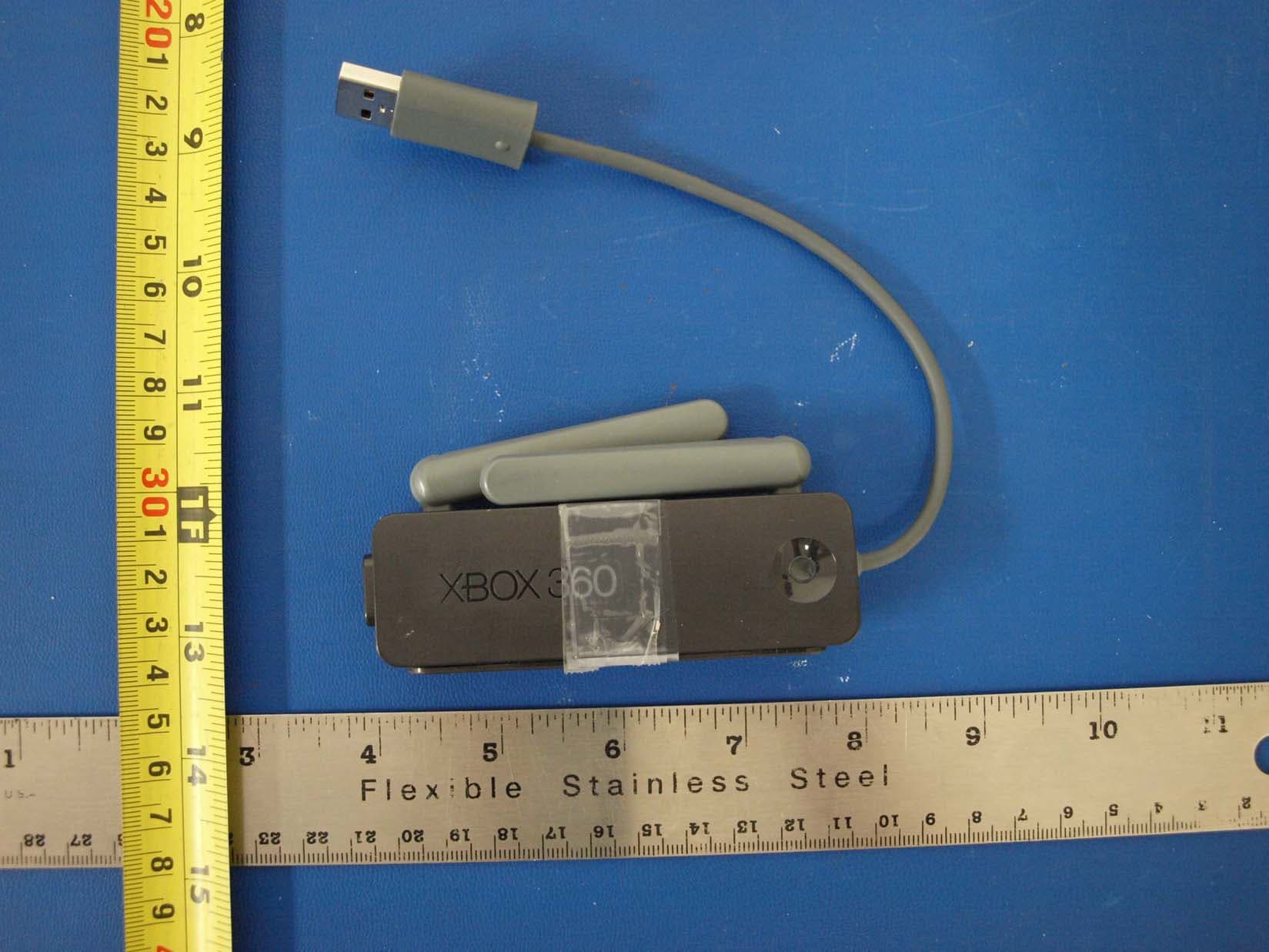
Click to zoom
Application Details
- Equipment Class
- NII - Unlicensed National Information Infrastructure TX
- Date of Grant
- Sep 13, 2009
- Application Purpose
- Original Equipment
- Date of Application
- Sep 13, 2009
- Equipment Note
- Wireless N Networking Adaptor
- Frequency Range
- 5510.00000000 - 5670.00000000
- Company
- Microsoft Corporation
- Country
- United States
Documents & Files
Document Text
Text extracted from the exhibit documents filed with the FCC. Open a document above to read the original.
Users Manual
1 Wireless NetWorkiNg AdApter AdAptAteur réseAu sANs fil AdAptAdor de red iNAlámbrico english 3 english 20 français 38 español english 3 thanks for choosing the Xbox 360® Wireless Networking Adapter. the Xbox 360 Wireless Networking Adapter lets you play head-to-head wirelessly—on Xbox li Ve®, or on your home network. it is for use exclusively with the Xbox 360 video game and entertainment system. Your wireless networking adapter features: • Dual-band 5-GHz and 2.4-GHz operation. • 802.11a/b/g/n wireless home network compatibility. • Radio collaboration with Xbox 360 Wireless controllers for worry- free integration. Note • To use the Xbox 360 Wireless Networking Adapter with Xbox liVe, you must have a high-speed internet connection (cable or dsl). • Not all Internet service providers (isps) allow you to share a high- speed connection between multiple devices. make sure you check with your ISP first. • To further enhance your Xbox 360 wireless experience, consider also using the Xbox 360 Wireless controller and the Xbox 360 universal media remote, sold separately. english Xbox 360 Wireless Networking Adapter 4 english ! WARNING before using this product, read this manual and the Xbox 360 console instructions for important safety and health information. keep all manuals for future reference. for replacement manuals, go to www.xbox.com/support or call Xbox customer support (see “if You Need More Help”). the limited warranty covering this product is contained in the Xbox 360 console instructions and is available online at www.xbox.com/support. this product is for use with Nrtl- Listed (UL, CSA, ETL, etc.), and/or IEC/EN 60950 compliant (CE marked) information technology equipment. No serviceable parts included. insTAll The DRiVeR insert the included Wireless Networking Adapter disc into your console. then follow the instructions for setting up your console to work with your wireless networking adapter. ATTAch The ADApTeR To YouR console Your wireless networking adapter attaches directly to the back of your console. To attach your adapter: 1 press the tabs on the adapter into the two slots on the back of the console. 2 plug the usb connector into the usb port next to the adapter. disconnect any cable plugged in to the ethernet port. 3 flip up both antennas. english 5 Note the antennas are designed to swivel on only one axis. do not swivel the antennas in any direction other than parallel with the adapter. Do not use to lift console do not use the Xbox 360 Wireless Networking Adapter or its antennas to lift the console. they could break and the console could fall. seT up The ADApTeR AWAY FRoM YouR console radio interference from nearby devices can cause network connectivity problems when the adapter is attached to the console. in this case, connectivity might be improved if you set up the adapter away from the console using a usb extension cable (sold separately). To set up the adapter away from your console: 1 flip up both antennas. 2 swivel both adapter feet out at a right angle to the adapter. 6 english 3 plug the networking adapter cable into one end of the usb extension cable. 4 plug the other end of the usb extension cable into the usb port on the back of the console. 5 set the adapter on its feet in a location that provides the best connectivity with your network. in some cases, rotating the adapter or changing the antenna orientation can further improve connectivity. seT up A neW WiReless hoMe neTWoRK Home wireless networks are also called infrastructure networks. in an infrastructure network, a wireless access point, wireless gateway, or wireless router distributes your internet connection to your wireless home computer and devices. With a wireless networking adapter, your console becomes one of the wireless devices on your home network. english 7 if you don’t have a home wireless network yet, you’ll want to make a few decisions before you set one up. Specifically, you’ll need to decide on the wireless standard you’ll use, the network hardware you’ll need, and your network security. PC Wireless Access Poi nt Cable/DSL Modem Internet 8 english Wireless network Basics Your wireless networking adapter communicates by radio transmission. radio waves travel in all directions, and can be transmitted through walls and floors. However, a radio signal weakens rapidly as it travels through stone and brick. metal objects, such as refrigerators and mirrors, reflect radio signals, interfering with straight-path communication. this product is restricted to indoor use only to reduce any potential for harmful interference with licensed operation in the 5.15- to 5.25-GHz frequency range. choose a Wireless network standard the Xbox 360 Wireless Networking Adapter conforms to all four current wireless network standards (802.11a, 802.11b, 802.11g, and 802.11n), and so works with networking devices that support any of these standards. 802.11 is a series of radio communication standards developed by the institute of electrical and electronics engineers (ieee) for wireless local area networks. the main features that distinguish these standards are connection speed and radio frequency band. ! cAutIoN english 9 standard connection speed Frequency band 802.11afaster5 GHz 802.11bfast2.4 GHz 802.11gfaster2.4 GHz 802.11nfastest 2.4 GHz/5 GHz When selecting your wireless network, keep a few guidelines in mind: 1 The 5-GHz standards (802.11a and 802.11n) are less susceptible to interference from common devices such as 2.4-GHz cordless telephones, cell phones, and microwave ovens. Also, because of the popularity of 2.4-GHz networks, a 5-GHz network is less likely to experience interference from neighboring wireless networks. 2 An 802.11n network is compatible with all four 802.11 standards, and an 802.11g network is compatible with both 802.11g and 802.11b devices. However, any 802.11b devices operating on your 802.11n/g network will slow it down. if you have a dual-band (2.4-GHz and 5-GHz) access point or router, t…
Text truncated - open the document above for the full version.
Cover Letter(s)
Microsoft Corporation is an equal opportunity employer. Subject: Authorized signatories January 7, 2009 Federal Communications Commission Authorization and Evaluation Division 7435 Oakland Mills Road Columbia, Maryland 21046 A G E N C Y A U T H O R I Z A T I O N L E T T E R To whom it may concern, We, the undersigned, Microsoft® Corporation hereby authorize the following, to act on our behalf, as our agent, in all matters relating to all processes required according to FCC Part 15C for Microsoft® Corporation products (Grantee Code:C3K): Michael Boucher San Chen Ted Eckert Pam Galvan Albert Huang Bill Huang Daniel Lamanuzzi Joel Lachance Brad Sybouts Kitty Tam Eugene Wong If you have any questions regarding the authorization, please don’t hesitate to contact me. Sincerely, Stephen M. Stegner E &D Compliance Manager, EMC and Safety Microsoft Corporation TEL: (425) 706-2697 FAX: (425) 936-7329 E-mail: [email protected]
Cover Letter(s)
47173 Benicia Street, Fremont CA 94538 Tel: 510-771-1000, Fax: 510-661-0888 Federal Communication Commissions 7435 Oakland Mills Road Columbia MD 21046 Subject: Request to supersede previous submitted files Ref: Applicant: Microsoft Corp. FCC ID: C3K1398 Grant date: Sept.14, 2009 To Whom It May Concern: Compliance Certification Services (CCS) is the TCB issued the grant for above application. CCS is requesting FCC to supersede two files that previously uploaded. FCC ID label format – uploaded on Sept 14, 2009 FCC ID label location – uploaded on Sept 14, 2009 Previously uploaded FCC ID label format contains detail product name of the device and FCC ID label location contains external photos of the device. Product name and external photos are confidential information of applicant until the product is officially announced to general public. CCS has uploaded replaced FCC ID label format and FCC ID label location Best Regards Mike Kuo / CEO Compliance Certification Services Sept.15, 2009
ID Label/Location Info
FCC ID label location FCC ID label location
Test Setup Photos
REPORT NO: 09U12610-2A DATE: SEPTEMBER 9, 2009 FCC ID: C3K1398 IC: 3048A-1398 Page 227 of 231 COMPLIANCE CERTIFICATION SERVICES FORM NO: CCSUP4701C 47173 BENICIA STREET, FREMONT, CA 94538, USA TEL: (510) 771-1000 FAX: (510) 661-0888 This report shall not be reproduced except in full, without the written approval of CCS. 12. SETUP PHOTOS ANTENNA PORT CONDUCTED RF MEASUREMENT SETUP ANTENNA PORT CONDUCTED PHOTO REPORT NO: 09U12610-2A DATE: SEPTEMBER 9, 2009 FCC ID: C3K1398 IC: 3048A-1398 Page 228 of 231 COMPLIANCE CERTIFICATION SERVICES FORM NO: CCSUP4701C 47173 BENICIA STREET, FREMONT, CA 94538, USA TEL: (510) 771-1000 FAX: (510) 661-0888 This report shall not be reproduced except in full, without the written approval of CCS. RADIATED RF MEASUREMENT SETUP RADIATED FRONT PHOTO RADIATED BACK PHOTO REPORT NO: 09U12610-2A DATE: SEPTEMBER 9, 2009 FCC ID: C3K1398 IC: 3048A-1398 Page 229 of 231 COMPLIANCE CERTIFICATION SERVICES FORM NO: CCSUP4701C 47173 BENICIA STREET, FREMONT, CA 94538, USA TEL: (510) 771-1000 FAX: (510) 661-0888 This report shall not be reproduced except in full, without the written approval of CCS. POWERLINE CONDUCTED EMISSIONS MEASUREMENT SETUP LINE CONDUCTED FRONT PHOTO LINE CONDUCTED BACK PHOTO REPORT NO: 09U12610-2A DATE: SEPTEMBER 9, 2009 FCC ID: C3K1398 IC: 3048A-1398 Page 230 of 231 COMPLIANCE CERTIFICATION SERVICES FORM NO: CCSUP4701C 47173 BENICIA STREET, FREMONT, CA 94538, USA TEL: (510) 771-1000 FAX: (510) 661-0888 This report shall not be reproduced except in full, without the written approval of CCS. DYNAMIC FREQUENCY SELECTION DFS PHOTO (FRONT) DFS PHOTO (SIDE) REPORT NO: 09U12610-2A DATE: SEPTEMBER 9, 2009 FCC ID: C3K1398 IC: 3048A-1398 Page 231 of 231 COMPLIANCE CERTIFICATION SERVICES FORM NO: CCSUP4701C 47173 BENICIA STREET, FREMONT, CA 94538, USA TEL: (510) 771-1000 FAX: (510) 661-0888 This report shall not be reproduced except in full, without the written approval of CCS. END OF REPORT DFS PHOTO (MASTER DEVICE)
Contact Information
Applicant
Hasnain Syed(SR. DIR EMC/SI&RF COMPLIANCE)
Technical Contact
COMPLIANCE CERTIFICATION SERVICESThu Chan
[email protected](510) 771-1000
47173 Benicia Street · Fremont, California · United States
Non-Technical Contact
COMPLIANCE CERTIFICATION SERVICESThu Chan
[email protected](510) 771-1000
Test Firm
Compliance Certification ServicesThu Chan
Technical Specifications
| # | Rule Parts | Frequency Range | Power Output |
|---|---|---|---|
| 9 | 15E | 5.51 GHz - 5.67 GHz | 50.23 mW |
Other Applications from Microsoft Corporation
C3K2147
Aug 28, 2026Wireless input device
Equipment Class
DTS - Digital Transmission SystemC3K2148
Aug 12, 2026Portable Computing Device
Equipment Class
DXX - Part 15 Low Power Communication Device TransmitterC3K2149
Aug 12, 2026Portable Computing Device
Equipment Class
DXX - Part 15 Low Power Communication Device TransmitterC3K2152
Aug 11, 2026Wireless Accessory
Equipment Class
DTS - Digital Transmission SystemC3K2150
Aug 06, 2026Portable Computing Device
Equipment Class
DXX - Part 15 Low Power Communication Device Transmitter