C3K16191619
Microsoft Corporation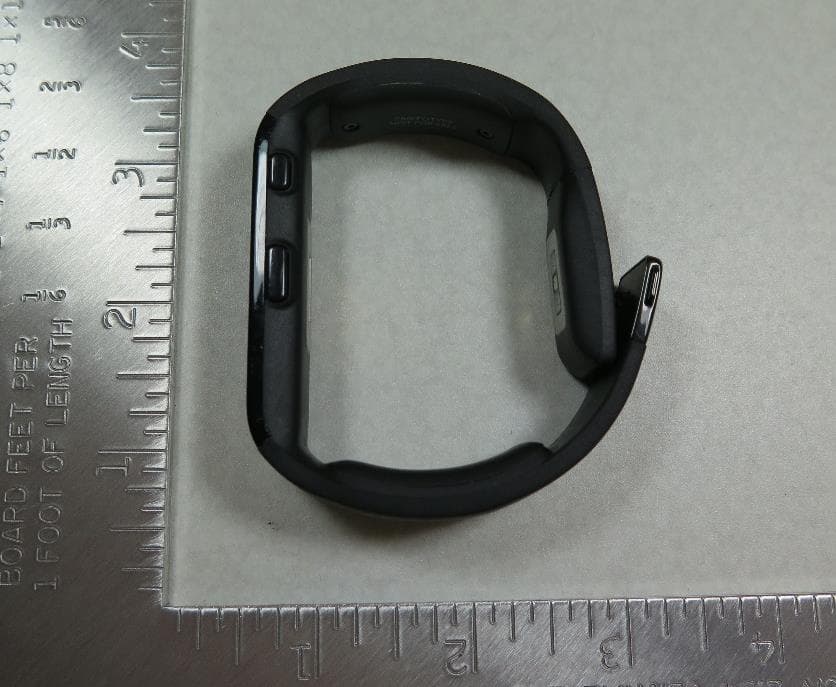
Click to zoom
Application Details
- Equipment Class
- DTS - Digital Transmission System
- Date of Grant
- Oct 20, 2014
- Application Purpose
- Original Equipment
- Date of Application
- Oct 12, 2014
- Equipment Note
- 1619
- Frequency Range
- 2402.00000000 - 2480.00000000
- Company
- Microsoft Corporation
- Country
- United States
Documents & Files
Document Text
Text extracted from the exhibit documents filed with the FCC. Open a document above to read the original.
Users Manual
Quick Start Guide X195899102QSG.indd 110/16/2014 10:56:54 PM To get started, you’ll need to wake your Microsoft Band by connecting it to a standard USB port. *USB power adapter not included. Getting Started To wake your band and begin charging: Connect the magnetic end of the USB charging cable to the charging port on your band. Clean the charging contacts with a dry cloth before each future charge to prevent corrosion and skin irritation. Connect the USB end of the cable to a standard USB port or USB power adapter. Only use standard USB AC power adapters with your band.* Your band’s screen should activate automatically. 1 2 3 X195899102QSG.indd 210/16/2014 10:56:54 PM 1 23 X195899102QSG.indd 310/16/2014 10:56:54 PM You will need to pair your band with your smartphone. The Microsoft Health app is available for Windows Phone, Android™ and iPhone ® . For a full list of supported devices, visit www.microsoft.com/band/ compatibility Get the Microsoft Health App 1. On your smartphone browser, visit: microsoft.com/band/ setup 2. Follow the instructions to install the Microsoft Health app on your smartphone. 3. Launch the Microsoft Health app and follow the on-screen instructions to pair your smartphone with your band. X195899102QSG.indd 410/16/2014 10:56:54 PM X195899102QSG.indd 510/16/2014 10:56:55 PM You can wear your band on the inside or outside of either wrist; it’s your choice. The biometric sensors are designed to measure your heart rate in either orientation. Wearing Your Microsoft Band To fi t your band: Place your band around your wrist. Align the top of the clasp with the corresponding adjustment slot. To adjust the fi t of the band, depress both clasp tabs while adjusting the clasp position. Release the tabs to secure the clasp. Your band should be snug and comfortable. A loose fi t may cause inaccurate biometric readings. If your skin becomes irritated, stop using your Microsoft Band. Consult your doctor if irritation persists. 1 2 X195899102QSG.indd 610/16/2014 10:56:55 PM 1 2 X195899102QSG.indd 710/16/2014 10:56:55 PM To turn your band on: 1. Press and hold the Power Button. 2. If your band was previously off, a vibration alert indicates your band is starting up. 3. After the display illuminates, use the touch screen to interact with your band. Using the touchscreen: 1. Tap on an item to select it. 2. Swipe horizontally to scroll through lists. Microsoft Band Controls To turn your band off: 1. Press and hold the Power Button. 2. Tap the Ye s button to the right. Your band will vibrate to indicate shutdown. To turn your band’s display on or off: 1. Press the Power Button. X195899102QSG.indd 810/16/2014 10:56:55 PM Touchscreen Power Button Action Button X195899102QSG.indd 910/16/2014 10:56:55 PM To view your biometric activity: 1. From the Start Strip, tap the ME Tile. 2. Swipe right to view biometric data screens. 3. Press the Action Button to change how the ME Tile looks. To track your exercise: 1. From the Start Strip, tap the Run Tile or Workout Tile. 2. Press the Action Button to start your run or workout. 3. Double-press the Action Button to cycle data views. 4. To end your run or workout, press the Action Button, then tap End. Quick Tips To track your sleep: 1. From the start strip, tap the Sleep Tile. 2. Press the Action Button to start your sleep session. 3. Press the Action Button again to pause/resume/stop. 4. To end your sleep, press the Action Button, then End. Status Bar X195899102QSG.indd 1010/16/2014 10:56:55 PM Start Strip ME Tile Status Bar Workout Tile Run Tile Sleep Tile X195899102QSG.indd 1110/16/2014 10:56:55 PM © 2014 Microsoft. Microsoft, the Microsoft logo and Windows are trademarks of the Microsoft group of companies. iPhone is a registered trademark of Apple Inc. iOS is a trademark or registered trademark of Cisco in the U.S. and other countries and is used under license. Android is a trademark of Google Inc. The Android robot is reproduced or modified from work created and shared by Google and used according to terms described in the Creative Commons 3.0 Attribution License. The Bluetooth® word mark and logos are registered trademarks owned by Bluetooth SIG, Inc. and any use of such marks by Microsoft is under license. Other trademarks and trade names are those of their respective owners. For the complete Microsoft Band product guide, visit: www.microsoft.com/band/productguide For answers to common questions, troubleshooting steps, and Microsoft Band Customer Support contact information, visit: www.microsoft.com/band/support Refer to the product guide for important safety and health information. Need Further Assistance? X19-58991-02 X195899102QSG.indd 1210/16/2014 10:56:55 PM
Users Manual
SAFETY & WARRANTY GUIDE X195898902MNL.indd 110/16/2014 10:57:29 PM Microsoft Band Product Guide IMPORTANT SAFETY AND WARRANTY INFORMATION This symbol identifies safety and health messages in this Product Guide and other product manuals. Read this guide for important safety and health information for the Microsoft ® device that you have purchased. WARNING: Failure to properly set up, use, and care for this product can increase the risk of serious injury or death, or damage to the device or devices. Read this guide and keep all printed guides for future reference. For replacement guides, go to: www.microsoft.com/band/support. AGREEMENT TO MICROSOFT BAND LIMITED WARRANTY AND SOFTWARE LICENSE TERMS You must accept the Limited Warranty at http://microsoft.com/band/warranty and the Microsoft Band software license terms at http://microsoft.com/band/slt to use your Microsoft Band device and/or accessories. By using the Microsoft Band device or accessories, you agree to be bound by these terms. Please read them. If you do not accept them, do not use your Microsoft Band device or accessories. Return the Microsoft Band device or accessories to Microsoft or your retailer for a refund. WARNING: Do Not Attempt Repairs Do not attempt to take apart, open, service, or modify the product, accessories, or power supply. Doing so could present the risk of electric shock or other hazard. Any evidence of any attempt to open and/ or modify this device, including any peeling, puncturing, or removal of any of the labels, will void the Limited Warranty. WARNING: NOT A Medical Device This device is not a medical device. It should not be used to diagnose, treat or prevent any disease or medical condition. Doing so could lead to injury or death. X195898902MNL.indd 210/16/2014 10:57:29 PM WARNING: Battery Safety This device contains a built-in battery, improper use of which may result in fire or explosion. To reduce the risk of fire or explosion, do not heat, open, puncture, mutilate, or dispose of the product in fire. Do not leave the device in direct sunlight, such as on the dash of a car in the summer, for an extended period of time. Do not recharge your device near a fire or in extremely hot conditions. The battery in this device is not user replaceable and should only be replaced by Microsoft or a Microsoft Authorized Service Provider. For additional details, visit: www.microsoft.com/band/support. WARNING: If Used Near Water This device is intended for indoor/outdoor use in the presence of rain, snow or brief splashes of water but is not waterproof. To avoid damaging this device, do not submerge it or expose it to excessive rain or moisture. To reduce the risk of fire or shock, do not attempt to charge it in rain or excessive moisture conditions. WARNING: Wireless Devices Follow instructions to avoid interference problems. Turn off your device in any location where posted notices instruct you to do so. In an aircraft, turn off your device whenever instructed to do so by airline staff, or prior to packing your device in luggage. Please consult airline staff about using it in flight. WARNING: To reduce the risk of serious injury related to exercise, take the following precautions before use: Do not overexert yourself. Use of Microsoft Band device may involve varying amounts of physical activity. Consult a doctor before using the device if you have any medical condition or issue that affects your ability to safely perform physical activities, or if you: • are or may be pregnant • have heart, respiratory, back, joint, or other orthopedic conditions • have high blood pressure • have difficulty with physical exercise • have been instructed to restrict physical activity X195898902MNL.indd 310/16/2014 10:57:29 PM WARNING: Elevated Heart Rate Elevating your heart rate above medically prescribed levels can be dangerous, and cause permanent injury or death Your Microsoft Band is designed to gather biometric and exercise data based on your heart rate. Do not elevate your heart rate above the physician recommended levels. If you have any questions or doubts about safe heart-rates, consult your physician. TAKE BREAKS PERIODICALLY Stop and rest if your muscles or joints become tired or sore. If you experience excessive fatigue, nausea, shortness of breath, chest tightness, dizziness, discomfort, or pain, STOP EXCERCISING IMMEDIATELY and consult a doctor. WARNING: Proper Hydration Keep hydrated while exercising to avoid serious health risks. Exercise can cause dehydration, which can result in serious health problems, injury, and even death. Make sure that you stay properly hydrated during any exercise activity. WARNING: Personal Medical Devices Radio-frequency emissions from electronic equipment can negatively affect the operation of other electronic equipment, causing them to malfunction. Although the device is designed, tested, and manufactured to comply with regulations governing radio frequency emission in the United States, the wireless transmitters and electrical circuits in the device may cause interference in other electronic equipment. Always take the following precautions: PERSONS WITH PACEMAKERS • The Health Industry Manufacturers Association recommends that a minimum separation of 6 inches (15 cm) be maintained between a wireless device and a pacemaker to avoid potential interference with the pacemaker. • Wireless devices should not be carried in a breast pocket. • If you have any reason to suspect that interference is occurring, turn the device off immediately. OTHER MEDICAL DEVICES If you use any other personal medical device, contact the medical device manufacturer or your physician to determine whether it is appropriate for you to use other electronic devices near your medical device. X195898902MNL.indd 410/16/2014 10:57:29 PM WARNING: Proper Fit Your Microsoft Band should only be worn in accordance with the instructions in the Quick Start Guide included in the box. Your Microsoft Band should be adjusted for a sn…
Text truncated - open the document above for the full version.
Cover Letter(s)
Microsoft Corporation is an equal opportunity employer. Subject: Authorized signatories October 23, 2013 Federal Communications Commission Authorization and Evaluation Division 7435 Oakland Mills Road Columbia, Maryland 21046 A G E N C Y A U T H O R I Z A T I O N L E T T E R F O R M I C R O S O F T E M P L O Y E E S To whom it may concern, We, the undersigned, Microsoft® Corporation hereby authorize the following, to act on our behalf, as our agent, in all matters relating to all processes required according to FCC Part 15 for Microsoft® Corporation products (Grantee Code:C3K): Hasnain Syed Brad Sybouts Kitty Tam Anindita Mitra David Johnson Michael Boucher Pamela Galvan Sajay Jose Jennifer Liu Elaine Reeves Jojo Malliyakal Wei Sun Zachary Gray Daniel Salinas Shoaib Khan Johnny Deng Robert Towne Chip Schulman Eugene Wong Bill Huang Albert Huang Tim Calland Joy Alegria Ellis Lee Angus McGill If you have any questions regarding the authorization, please don’t hesitate to contact me. Sincerely, Stephen M. Stegner Compliance Engineer Microsoft Corporation
Cover Letter(s)
Microsoft Corporation is an equal opportunity employer. September 22, 2014 Federal Communications Commission Authorization and Evaluation Division 7435 Oakland Mills Road Columbia, Maryland 21046 Subject: Request for Confidentiality (Long term and short term) FCC ID: C3K1619 TO WHOM IT MAY CONCERN Pursuant to Sections 0.457 and 0.459 of the Commission’s Rules, the Applicant hereby requests the Commission to withhold the following attachments as confidential documents from public disclosure indefinitely: Block Diagram Schematics Operational Description The above materials contain trade secrets and proprietary information not customarily released to the public. The public disclosure of these matters might be harmful to the Applicant and provide unjustified benefits to its competitors. The Applicant understands that pursuant to Rule 0.457, disclosure of this Application and all accompanying documentation will not be made before the date of the Grant for this application. In addition to the above mentioned documents, pursuant to DA 04-1705 of the Commission’s public notice, we request short- term confidential treatment for the following information until April 12, 2015 in order to ensure sensitive business information remains confidential until the actual marketing of the device: • External Photos • Test Setup Photos • User’s Manual • Internal Photos Sincerely, _____________________________ Brad Sybouts Compliance Engineer, Microsoft Corp.
External Photos
Microsoft Corporation is an equal opportunity employer. Model: 1619 FCC ID: C3K1619 External Photos: Small Size sample- Microsoft Corporation is an equal opportunity employer. Microsoft Corporation is an equal opportunity employer. Microsoft Corporation is an equal opportunity employer. Medium Size sample- Microsoft Corporation is an equal opportunity employer. Microsoft Corporation is an equal opportunity employer. Microsoft Corporation is an equal opportunity employer. Large Size sample- Microsoft Corporation is an equal opportunity employer. Microsoft Corporation is an equal opportunity employer.
ID Label/Location Info
Microsoft Corporation is an equal opportunity employer. Label Placement – Label content for model number 1619 is permanently affixed to the bottom/inside surface of the device. FCC ID: C3K1619
Internal Photos
Microsoft Corporation is an equal opportunity employer. Model: 1619 FCC ID: C3K1619 Internal Photos: Display: Microsoft Corporation is an equal opportunity employer. Microsoft Corporation is an equal opportunity employer. Battery Microsoft Corporation is an equal opportunity employer. Radio Board Microsoft Corporation is an equal opportunity employer. Microsoft Corporation is an equal opportunity employer. Microsoft Corporation is an equal opportunity employer. BT and GPS Antennas Small Size Medium Size Microsoft Corporation is an equal opportunity employer. Large Size
RF Exposure Info
Report V2.0 RF Exposure Evaluation Report For MODEL NO. 1619 FCC ID: C3K1619 Test Report No. R-TR53-MPE-2 Issue Date: September 26, 2014 FCC CFR47 Part 2.1093 Prepared by Microsoft EMC Laboratory 17760 NE 67th Ct, Redmond WA, 98052, U.S.A. 425-421-9799 [email protected] TESTING CERT #3472.01 Test Report#: R-TR53-MPE-2 Issued: 9/26/2014 Page 2 of 8 Microsoft EMC Laboratory 1 Record of Revisions Revision Date Section Page(s) Summary of Changes Author/Revised By: 1.0 9/25/2014 All All First Version Jennifer Liu 2.0 9/26/2014 6.2 7 Corrected calculation. Jennifer Liu Test Report#: R-TR53-MPE-2 Issued: 9/26/2014 Page 3 of 8 Microsoft EMC Laboratory Table of Contents 1 Record of Revisions ........................................................................................................................... 2 2 Product Description ............................................................................................................................ 5 3 Deviations from Standards................................................................................................................ 5 4 Facilities and Accreditations ............................................................................................................. 5 4.1 Test Facility ................................................................................................................................. 5 4.2 Accreditations ............................................................................................................................. 5 4.3 Test Configurations .................................................................................................................... 5 5 Conducted Output Power Measurements ...................................................................................... 6 5.1 Test Method ................................................................................................................................ 6 5.2 Test Equipment List ....................................................................................................................... 6 5.3 Test Results ................................................................................................................................ 6 Bluetooth Test Results ...................................................................................................... 6 Bluetooth LE Test Results ................................................................................................ 6 6 SAR Test Exclusion ........................................................................................................................... 7 6.1 SAR Test Exclusion Criteria ..................................................................................................... 7 6.2 SAR Test Exclusion Evaluation................................................................................................ 7 Test Report#: R-TR53-MPE-2 Issued: 9/26/2014 Page 4 of 8 Microsoft EMC Laboratory Test Report Attestation Microsoft Corporation Model: 1619 FCC ID: C3K1619 Applicable Standards Specification Test Result FCC CFR47 Rule Parts 2.1093 Complies Microsoft EMC Laboratory attests that the product model identified in this report has been tested to and meets the requirements identified in the above standards. The test results in this report solely pertains to the specific sample tested, under the conditions and operating modes as provided by the customer. All indications of Pass/Fail in this report are opinions expressed by the Microsoft EMC Laboratory based on interpretations and/or observations of test result on the tested sample only. This report shall not be used to claim product certification, approval, or endorsement by A2LA or any agency of any Government. Reproduction, duplication or publication of extracts from this test report requires prior written approval of Microsoft EMC Laboratory. Written By: Jennifer Liu Reviewed/Issued By: Sajay Jose Radio Compliance Test Engineer EMC/RF Compliance Lab Manager Test Report#: R-TR53-MPE-2 Issued: 9/26/2014 Page 5 of 8 Microsoft EMC Laboratory 2 Product Description Company Name: Microsoft Corporation Address: One Microsoft Way City, State, Zip: Redmond, WA 98052-6399 Customer Contact: Brad Sybouts Functional Description of the EUT: Mobile Wireless Device Model: 1619 FCC ID: C3K1619 Radio Description: BT, BT LE (2402- 2480 MHz) Modulation: GFSK, π/4-DQPSK and 8DPSK EUT Classification: FHSS, DTS Equipment Design State: EV5 Equipment Condition: Good RF Exposure Conditions: Extremity Exposure, Body Exposure 3 Deviations from Standards None. 4 Facilities and Accreditations 4.1 Test Facility All test facilities used to collect the test data are located at Microsoft EMC Laboratory, 17760 NE 67 th Ct, Redmond WA, 98052, USA 4.2 Accreditations The lab is established and follows procedures as outlined in IEC/ISO 17025 and A2LA accreditation requirements. A2LA Accredited Testing Certificate Number: 3472.01 FCC Registration Number: US1141 4.3 Test Configurations Test Software Details: BT Compliance Tool, Version 1.0.17 for controlling and operating BT/BTLE radio functionality. Modes of Operation and Channel Details: BT: Channels 0-78 (2402 - 2480 MHz) BTLE: Channels 0-39 (2402 – 2480MHz) Test Report#: R-TR53-MPE-2 Issued: 9/26/2014 Page 6 of 8 Microsoft EMC Laboratory 5 Conducted Output Power Measurements 5.1 Test Method Fig.1. Test Setup for Antenna port conducted measurements 5.2 Test Equipment List Manufacturer Description Model # Asset # Calibration Due Agilent Spectrum Analyzer N9030A RF-011 6/6/2015 5.3 Test Results Bluetooth Test Results Bluetooth LE Test Results Frequency (MHz) Mode Channel No. Peak Power (dBm) Peak Power (W) Average Power (dBm) Average Power (W) 2402 LE 0 0.723 0.0012 0.514 0.0011 2440 LE 19 1.555 0.0014 1.361 0.0014 2480 LE 39 1.658 0.0015 1.437 0.0014 Test Report#: R-TR53-MPE-2 Issued: 9/26/2014 Page 7 of 8 Microsoft EMC Laboratory 6 SAR Test Exclusion 6.1 SA…
Text truncated - open the document above for the full version.
Test Report
Report V2.0 RADIO TEST REPORT For MODEL NO. 1619 FCC ID: C3K1619 Test Report No. R-TR53-FCCBTLE-1 Issue Date: 09/23/2014 FCC CFR47 Part 15 Subpart C Prepared by Microsoft EMC Laboratory 17760 NE 67th Ct, Redmond WA, 98052, U.S.A. 425-421-9799 [email protected] TESTING CERT #3472.01 Test Report#: R-TR53-FCCBTLE-1 Issued: 09/23/2014 Page 2 of 58 Microsoft EMC Laboratory 1 Record of Revisions Revision Date Section Page(s) Summary of Changes Author/Revised By: 1.0 09/23/2014 All All First Version Jennifer Liu Test Report#: R-TR53-FCCBTLE-1 Issued: 09/23/2014 Page 3 of 58 Microsoft EMC Laboratory Table of Contents 1 Record of Revisions ............................................................................................................................... 2 2 Deviations from Standards.................................................................................................................... 6 3 Facilities and Accreditations ................................................................................................................. 6 3.1 Test Facility ................................................................................................................................... 6 3.2 Accreditations ............................................................................................................................... 6 3.3 Test Equipment ............................................................................................................................. 6 4 Measurement Uncertainty .................................................................................................................... 6 5 Product Description .............................................................................................................................. 7 5.1 Test Configurations ....................................................................................................................... 7 5.2 Environmental Conditions ............................................................................................................ 8 5.3 Antenna Requirements ................................................................................................................. 8 5.4 Equipment Modifications .............................................................................................................. 8 6 Test Results Summary ........................................................................................................................... 9 7 Test Equipment List ............................................................................................................................. 10 8 Test Site Description ........................................................................................................................... 11 8.1 Radiated Emissions Test Site ....................................................................................................... 11 8.2 Conducted Emissions Test Site ................................................................................................... 11 8.3 Antenna port conducted measurements .................................................................................... 11 8.4 Test Setup Diagrams ................................................................................................................... 11 9 Test Results- Conducted ..................................................................................................................... 14 9.1 6-dB Bandwidth........................................................................................................................... 14 Test Requirement:............................................................................................................... 14 Test Method: ....................................................................................................................... 14 Limits: .................................................................................................................................. 14 Test Results: ........................................................................................................................ 14 Test Data: ............................................................................................................................ 15 9.2 Output Power .............................................................................................................................. 17 Test Requirement:............................................................................................................... 17 Test Method: ....................................................................................................................... 17 Limits: .................................................................................................................................. 17 Test Results: ........................................................................................................................ 17 Test Report#: R-TR53-FCCBTLE-1 Issued: 09/23/2014 Page 4 of 58 Microsoft EMC Laboratory Test Data: ............................................................................................................................ 18 9.3 Peak Power Density .................................................................................................................... 21 Test Requirement:............................................................................................................... 21 Test Method: ....................................................................................................................... 21 Limits: .................................................................................................................................. 21 Test Results: ........................................................................................................................ 21 Test Data: ....................…
Text truncated - open the document above for the full version.
Test Report
Report V2.0 RADIO TEST REPORT For MODEL NO. 1619 FCC ID: C3K1619 Test Report No. R-TR53-FCCBT-1 Issue Date: 09/23/2014 FCC CFR47 Part 15 Subpart C Prepared by Microsoft EMC Laboratory 17760 NE 67th Ct, Redmond WA, 98052, U.S.A. 425-421-9799 [email protected] TESTING CERT #3472.01 Test Report#: R-TR53-FCCBT-1 Issued: 09/23/2014 Page 2 of 72 Microsoft EMC Laboratory 1 Record of Revisions Revision Date Section Page(s) Summary of Changes Author/Revised By: 1.0 09/23/2014 All All First Version Jennifer Liu Test Report#: R-TR53-FCCBT-1 Issued: 09/23/2014 Page 3 of 72 Microsoft EMC Laboratory Table of Contents 1 Record of Revisions ................................................................................................................................ 2 2 Deviations from Standards ..................................................................................................................... 7 3 Facilities and Accreditations ................................................................................................................... 7 3.1 Test Facility ................................................................................................................................. 7 3.2 Accreditations ............................................................................................................................. 7 3.3 Test Equipment ........................................................................................................................... 7 4 Measurement Uncertainty ..................................................................................................................... 7 5 Product Description ................................................................................................................................ 8 5.1 Test Configurations ....................................................................................................................... 8 5.2 Environmental Conditions ............................................................................................................ 8 5.3 Antenna Requirements ................................................................................................................. 9 5.4 Equipment Modifications .............................................................................................................. 9 6 Test Results Summary .......................................................................................................................... 10 7 Test Equipment List .............................................................................................................................. 11 8 Test Site Description ............................................................................................................................. 12 8.1 Radiated Emissions Test Site ................................................................................................ 12 8.2 Conducted Emissions Test Site ............................................................................................. 12 8.3 Antenna port conducted measurements ............................................................................... 12 8.4 Test Setup Diagrams ............................................................................................................... 12 9 Test Results- Conducted ..................…
Text truncated - open the document above for the full version.
Contact Information
Applicant
Hasnain Syed(SR. DIR EMC/SI&RF COMPLIANCE)
Test Firm
Microsoft EMC LaboratoryJames Wooten
[email protected]4257068002
Technical Specifications
| # | Rule Parts | Frequency Range | Power Output |
|---|---|---|---|
| 1 | 15C | 2.40 GHz - 2.48 GHz | 1.50 mW |
Other Applications from Microsoft Corporation
C3K2147
Aug 28, 2026Wireless input device
Equipment Class
DTS - Digital Transmission SystemC3K2148
Aug 12, 2026Portable Computing Device
Equipment Class
DXX - Part 15 Low Power Communication Device TransmitterC3K2149
Aug 12, 2026Portable Computing Device
Equipment Class
DXX - Part 15 Low Power Communication Device TransmitterC3K2152
Aug 11, 2026Wireless Accessory
Equipment Class
DTS - Digital Transmission SystemC3K2150
Aug 06, 2026Portable Computing Device
Equipment Class
DXX - Part 15 Low Power Communication Device Transmitter