C3K1899Portable Computing Device
Microsoft Corporation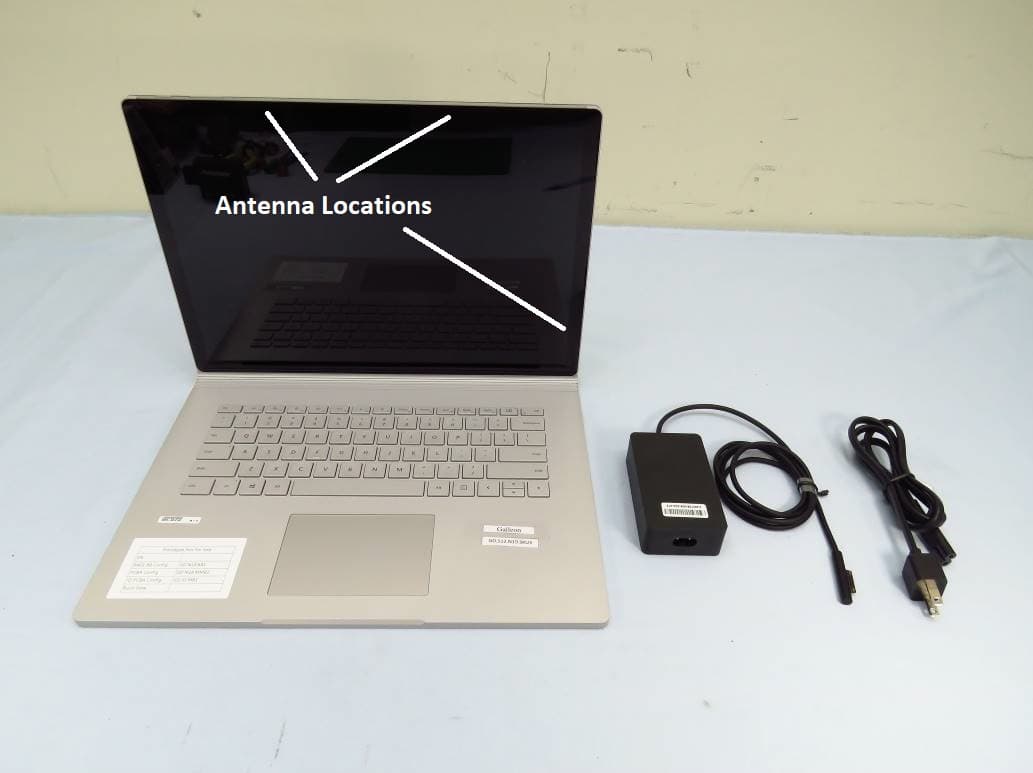
Click to zoom
Application Details
- Equipment Class
- NII - Unlicensed National Information Infrastructure TX
- Date of Grant
- Apr 26, 2020
- Application Purpose
- Original Equipment
- Date of Application
- Apr 16, 2020
- Equipment Note
- Portable Computing Device
- Frequency Range
- 5745.00000000 - 5825.00000000
- Company
- Microsoft Corporation
- Country
- United States
Documents & Files
Document Text
Text extracted from the exhibit documents filed with the FCC. Open a document above to read the original.
Users Manual
CYAN MAGENTAYELLOWBLACK X22-19879-02_BKT.indd 119/03/2020 05:26 USB-C Surface Connect port Port Surface Connect Puerto Surface Connect 1 2 3 4 7 8 95 6 Volume Volume Volumen Power button Bouton d’alimentation Botón de encendido Rear-facing camera Caméra arrière Cámara trasera USB 3.0 SD™ card reader Lecteur de carte SD™ Lector de tarjetas SD™ Windows Hello camera Caméra Windows Hello Cámara de Windows Hello Front-facing camera Caméra à l’avant Cámara frontal Headphone jack Prise de casque Conexión de auriculares Detach key Détachez la clé Tecla de separación 11 10 X22-19879-02_BKT.indd 219/03/2020 05:26 1 2 8 6 7 11 4 10 5 3 9 X22-19879-02_BKT.indd 319/03/2020 05:26 Press the Detach key to detach the tablet from the keyboard. You can also select this icon in the bottom right corner of the screen when Windows is running. Appuyez sur la touche Détacher pour détacher la tablette du clavier. Vous pouvez également sélectionner cette icône dans le coin inférieur droit de l’écran lorsque Windows est en cours d’exécution. Presione la tecla de separación para separar la tableta del teclado. También puedes seleccionar este icono en la esquina inferior derecha de la pantalla cuando Windows esté en ejecución. X22-19879-02_BKT.indd 419/03/2020 05:26 Additional Surface Connect charging port for tablet Port de chargement Surface Connect supplémentaire pour la tablette Puerto de carga adicional de Surface Connect para tableta X22-19879-02_BKT.indd 519/03/2020 05:26 Use Surface Book as a laptop, tablet, or portable studio. Utilisez le Surface Book comme ordinateur portable, tablette ou studio portable. Usa Surface Book como portátil, tableta o estudio portátil. Pen sold separately • Stylet vendu séparément • El lápiz se vende por separado X22-19879-02_BKT.indd 619/03/2020 05:26 1. Plug in your Surface Book. 2. Press the power button. 3. Windows will guide you through the setup process. Choose your language preference then connect to Wi-Fi. 4. Sign in with a Microsoft account. If you already have a Microsoft account, use it to sign in and you’ll be able to sync your settings and content across multiple devices. If you need to set one up, remember that you can use any email address. For more information on the benefits of using a Microsoft account with Surface, visit microsoft.com/account. For help with setup or troubleshooting, visit support.microsoft.com. Getting started English X22-19879-02_BKT.indd 719/03/2020 05:26 Windows Hello If you haven’t already, set up Windows Hello using the integrated camera in your Surface Book. 1. Select the Start button, then select Settings . 2. Go to Accounts > Sign-in Options. 3. Under Manage how you sign in to your device, select Windows Hello Face > Set up, and then follow the instructions. To troubleshoot or learn more Visit aka.ms/SurfaceBookHelp to learn more about your Surface Book. If you’d like to learn more about Windows, visit aka.ms/WindowsHelp. To learn more about the accessibility features of your Surface Book, go to the online user guide at aka.ms/Windows-Accessibility. X22-19879-02_BKT.indd 819/03/2020 05:26 Battery health All rechargeable batteries wear out with time. To maintain your battery health and performance, follow these tips: • Once a month, let your battery drain below half way before charging it. • Avoid having your device plugged in 24/7. • Store your device in a cool and dry environment. • If you plan to store your device for a long time, charge the battery to 50% every six months. X22-19879-02_BKT.indd 919/03/2020 05:26 Important safety information Read the detailed safety information for your Surface device at aka.ms/surface-safety or in the Surface app. To open the Surface app, select the Start button, enter Surface in the search box, then select Surface app. • Opening and/or repairing your device can present electric shock, device damage, fire, and personal injury risks, and other hazards. Microsoft recommends that you seek professional assistance for device repairs, and that you use caution if undertaking do-it-yourself repairs. • Do not expose your device to rain, snow or other types of moisture. Do not use your device near water or in a damp or excessively humid location (e.g., near a shower, bath tub, sink, or swimming pool, or in a damp basement). • Always select and use an appropriate AC power supply for your device. We recommend you use genuine Microsoft power supply units and AC power cords. A genuine Microsoft power supply unit was provided with your device. • Use only AC power provided by a standard (mains) wall outlet. Do not use non-standard power sources, such as generators or inverters, even if the voltage and frequency appear acceptable. • Do not overload your wall outlet, extension cord, power strip, or other electrical receptacle. • For devices with folding or removable AC adapter prongs, see the Surface app or aka.ms/surface-safety for more information regarding use. • Avoid prolonged skin contact with the DC connector when the PSU is plugged into a power source because it may cause discomfort or injury. • Arrange all cables and cords so that people and pets are not likely to trip over or accidentally pull on them as they move around or walk through the area. Do not allow children to play with cables and cords. X22-19879-02_BKT.indd 1019/03/2020 05:26 • Protect cords from being pinched or sharply bent, particularly where they connect to a wall power (mains) outlet, the power supply unit, and your device. • If a power cord becomes warm, frayed, cracked or damaged in any way, stop using it immediately. • For devices equipped with power cords with removable prongs and a universal power supply, make sure the prong assembly is properly configured for the power outlet and fully seated into the power supply before plugging the AC power supply into a power (mains) outlet. • Improper use of your device’s battery may result in fire or explosion. Do not heat, open, puncture, mutilate, or dispose of your device or its battery in f…
Text truncated - open the document above for the full version.
Users Manual
Regulatory information This device is not intended for use in machinery, medical or industrial applications. Any changes or modifications not expressly approved by Microsoft could void the user’s authority to operate this device. This product is for use with NRTL Listed (UL, CSA, ETL, etc.), and/or IEC/EN 60950-1 or IEC/EN 62368-1 compliant (CE marked) Information Technology equipment. No serviceable parts included. This device is rated as a commercial product for operation at +32ºF (+0ºC) to +95ºF (+35ºC). Disposal of waste batteries and Electrical & Electronic Equipment This symbol on the product or its batteries or its packaging means that this product and any batteries it contains must not be disposed of with your household waste. Instead, it is your responsibility to hand this over to an applicable collection point for the recycling of batteries and electrical and electronic equipment. This separate collection and recycling will help to conserve natural resources and prevent potential negative consequences for human health and the environment due to the possible presence of hazardous substances in batteries and electrical and electronic equipment, which could be caused by inappropriate disposal. For more information about where to drop off your batteries and electrical and electronic waste, please contact your local city/municipality office, your household waste disposal service, or the shop where you purchased this product. Contact [email protected] for additional information on WEEE and waste batteries. Rechargeable products contain a Lithium-ion Battery. For customers in the United States and Canada Supplier’s Declaration of Conformity Models: 1725, 1769, 1782, 1793, 1795, 1796, 1807, 1813, 1824, 1825, 1832, 1834, 1835, 1853, 1864, 1866, 1867, 1868, 1872, 1873, 1876, 1899, 1900, 1901, 1905, 1907, 1908, 1909, 1926, 1927, 1937 Responsible party: Microsoft Corporation, One Microsoft Way, Redmond, WA 98052, USA. Email: [email protected] This Class B digital apparatus complies with Part 15 of the U.S. Federal Communications Commission (FCC) rules, Innovation, Science and Economic Development Canada (ISED) license- exempt RSS standards. Operation is subject to the following two conditions: (1) this device may not cause interference, and (2) this device must accept any interference received, including interference that may cause undesired operation. Any changes or modifications to this device not expressly approved by Microsoft could void the user’s authority to operate the device. Radio and TV interference regulations Microsoft hardware device(s) can radiate radio frequency (RF) energy. If not installed and used in strict accordance with the instructions given in the printed documentation and/or onscreen help files, the device may cause harmful interference with other radio-communications devices (for example AM/FM radios, televisions, baby monitors, cordless phones, etc.). There is, however, no guarantee that RF interference will not occur in a particular installation. To determine if your hardware device is causing interference to other radio-communications devices, turn off and unplug the device from any external power source. If the interference stops, it was probably caused by the device. If this hardware device does cause interference, try the following measures to correct it: Relocate the antenna of the other radio-communications device (for example AM/FM Radios, televisions, baby monitors, cordless phones, etc) until the interference stops. Move the hardware device farther away from the radio or TV, or move it to one side or the other of the radio or TV. Plug the device into a different power outlet so that the hardware device and radio or TV are on different circuits controlled by different circuit breakers or fuses. If necessary, ask your device dealer or an experienced radio-TV technician for more suggestions. For more information about interference issues, go to the FCC Web site at: https://www.fcc.gov/cgb/consumerfacts/interference.html. You can also call the FCC at 1‑888‑CALL‑FCC to request Interference and Telephone Interference fact sheets. CAN ICES-3 (B)/NMB-3(B) Exposure to Radio Frequency (RF) Energy This device contains radio transmitters and has been designed, manufactured and tested to meet the Federal Communications Commission (FCC), Innovation, Science and Economic Development (ISED) Canada and European guidelines for RF exposure and Specific Absorption Rate. Model 1793, 1796, 1807, 1824, 1825, 1832, 1866, 1876, 1899, 1900, 1901, 1926, 1927: To ensure that your exposure to RF energy generated by the radio transmitters does not exceed the exposure limits set forth by these guidelines, orient the device such that the display side is not directly in contact with your body, such as lying display side down on your lap or upper body. Model 1707: This device should be installed and operated with minimum distance of 20cm between the radiator and your body. Product SAR information is available at sar.microsoft.com. Additional information about RF safety can be found on the links below: FCC website at https://www.fcc.gov/general/radio-frequency-safety-0 ISED website at https://www.ic.gc.ca/eic/site/smt-gst.nsf/eng/sf01904.html This device operation in the band 5150‑5250 MHz is only for indoor use to reduce the potential for harmful interference to co‑channel mobile satellite systems. Users are advised that high‑power radars are allocated as primary users (i.e. priority users) of the bands 5250‑5350 MHz and 5650‑5850 MHz and that these radars could cause interference and/or damage to LE‑LAN devices. Notices Information and views expressed in this document, including URL and other Internet Web site references, may change without notice. This document does not provide you with any legal rights to any intellectual property in any Microsoft product. You may copy and use this document for your internal, reference purposes. © 2020 Microsoft Corporation. Surface and Wind…
Text truncated - open the document above for the full version.
Cover Letter(s)
Microsoft Corporation is an equal opportunity employer. 4/6/2020 Federal Communications Commission 7435 Oakland Mills Road Columbia MD 21046 Subject: Request for Confidentiality for FCC ID: C3K1899 To Whom It May Concern: Pursuant t o the provisions of th e Commission’s rules 47 CFR sections 0.457(d) and 0.459, we are requesting the Commission to withhold the following attachments as confidential document from public disclosure indefinitely. •Operational Description •KDB inquiry and attachment •Schematics •Block Diagram The above-mentioned documents contain detailed system and equipment descriptions that are considered as proprietary information in the operation of the equipment. Public disclosure of the above documents might be harmful to our company and would give competitors an unfair advantage in the market. In additional to above mentioned documents, pursuant to Public Notice DA 04-1705 of the Commission’s policy, in order to comply with the marketing regulations in 47 CFR §2.803 and the importation rules in 47 CFR §2.1204, while ensuring that business sensitive information remains confidential until the actual marketing of newly authorized devices, we are requesting the commission to grant short-term confidentiality on the following attachments until October 10, 2020. •Test Setup Photos •Internal photos •External photos •User Manual Microsoft Corporation is an equal opportunity employer. We understand that all measurement test reports, FCC ID label format and correspondence during certification review process cannot be granted as confidential documents and the information will be available for public review once the grant of equipment authorization is issued. Sincerely, Chaitrali Limaye Compliance Engineer, Microsoft Corporation.
Cover Letter(s)
Microsoft Corporation is an equal opportunity employer. 4/3/2020 Federal Communications Commission 7435 Oakland Mills Road Columbia MD 21046 To whom it may concern: I, the undersigned, hereby authorize American Certification Body, Inc. to act on our behalf in all manners relating to application for equipment authorization, including signing of all documents relating to these matters. Any and all acts carried out by American Certification Body, Inc. on our behalf shall have the same effect as acts of our own. I, the undersigned, hereby certify that we are not subject to a denial of federal benefits, that includes FCC benefits, pursuant to Section 5301 of the Anti-Drug Abuse Act of 1988, 21 U.S.C. 853(a). I also declare that the information provided to the FCC is true and correct to the best of our knowledge (47 CFR 2.911(d)) and we have been informed of the grantee responsibilities (47 CFR 2.909) with regard to certified equipment. In authorizing American Certification Body, Inc. as our representative, we still recognize that we are responsible to: a)Comply with the relevant provisions of the certification program; b)Make all necessary arrangements for the conduct of the evaluation, including provision for examining documentation and access to all areas, records (including internal audit reports) and personnel for the purposes of evaluation (e.g. testing, inspection, assessment, surveillance, reassessment) and resolution of complaints; c)Make claims regarding certification only in respect of the scope for which certification has been granted; Microsoft Corporation is an equal opportunity employer. e)Not use our product certification in such a manner as to bring the Certification Division into disrepute and not make any statement regarding our product certification which the Certification Division may consider misleading or unauthorized; f)Upon suspension or cancellation of certification, discontinue use of all advertising matter that contains any reference thereto and return any certification documents as required by the Certification Division; g)Use certification only to indicate that products are certified as being in conformity with specified standards; h)Endeavor to ensure that no certificate nor report nor any part thereof is used in a misleading manner; i)Ensure that any reference to our product certification in communication media such as documents, brochures or advertising, complies with the requirements of the Certification Division; j)Keep a record of all complaints made known to us relating to the product’s compliance with requirements of the relevant standard and to make these records available to the when requested; k)Take appropriate action with respect to such complaints and any deficiencies found in products or services that affect compliance with the requirements for certification; l)Document the actions taken. This authorization is valid until further written notice from the applicant. Sincerely, Chaitrali Limaye Compliance Engineer, Microsoft Corporation
Cover Letter(s)
Microsoft Corporation is an equal opportunity employer. Subject: Authorized signatories February 26, 2019 Federal Communications Commission Authorization and Evaluation Division 7435 Oakland Mills Road Columbia, Maryland 21046 AGENCY AUTHORIZATION LETTER FOR MICROSOFT EMPLOYEES To whom it may concern, I, the undersigned hereby authorize the following, to act on my behalf, as the agent(s), in all matters relating to all processes for FCC equipment authorization for Microsoft® Corporation (Grantee Code: C3K). Hasnain Syed Anindita Mitra David Johnson Michael Boucher Kyle Chen Chaitrali Limaye Wei Sun Zachary Gray Daniel Salinas Vishwas Varadanahalli Narayan Albert Huang Mengni Yin Choon Sian Ooi Nisha Nandakumar If you have any questions regarding the authorization, please don’t hesitate to contact me. Sincerely, Hasnain Syed Sr. Director, EMC/SI & RF Compliance Microsoft Corporation Email: [email protected]
External Photos
Page 1 Model 1899 Top view Right view Page 2 Left view Rear view Page 3 Wifi/BT Antennas Accessory Radio Antenna Model 1899 is the top (display part) of the sy stem. Keyboard has a separate model number.
ID Label/Location Info
Microsoft Corporation is an equal opportunity employer. A. Information to be displayed 1. The information that will be displayed on the e-label and information that will remain in the user manual is shown below: Information on E- label In Manual FCC ID number Yes DoC logo No 15.19 statement (“This device complies with part 15 of the FCC Rules. Operation is subject to the following two conditions: (1) This device may not cause harmful interference, and (2) this device must accept any interference received, including interference that may cause undesired operation.”) Yes Class A / B Digital Device user manual statements 1 Yes DoC declaration 1 Yes Caution to the user that changes, or modifications not expressly approved by the party responsible for compliance could void the user's authority to operate the equipment 1 Yes Describe any other FCC regulatory information included in e-label 1 Image of the e-label is provided below: . Model 1899, CAN ICES-3 (B)/NMB-3(B), FCC ID: C3K1899, IC: 3048A-1899, Contains FCC ID: C3K1957 as Change of ID to FCC ID: PD9AX201D2, Contains IC: 3048A-1957. This device complies with part 15 of the FCC Rules. Operation is subject to the following two conditions: (1) This device may not cause harmful interference, and (2) this device must accept any interference received, including interference that may cause undesired operation. undesired operation Microsoft Corporation is an equal opportunity employer. B. Access to the required information on the e-label 1. Users can access the information in no more than three steps in a device’s menu. The actual steps are: •Launch the app -> Select Safety, Regulatory and Warranty Info tab -> Select Regulatory information tab No special access codes or permissions are required to go through the above steps beyond entering a user-defined password to protect against unauthorized access to the device. 2.The information is stored on the device, no special accessories or supplemental plug-ins (e.g., a SIM/USIM card) are required to access the information. 3.Users are provided specific instructions on how to access the information. The information is provided in the Quick Start Guide page 11. Image is provided below. Recycling and regulatory information You can find important recycling and regulatory information about your device online at aka.ms/device-regulatory or in Device app using the following steps: Open the Device app, select Safety, regulatory, and warranty info tab, and select Regulatory information tab. C.Labeling for Importation and Purchasing Products utilizing e-labels are required to have a physical label on the product at the time of importation, marketing and sales. For devices imported in bulk and not packaged individually, a removable adhesive label or, for devices in protective bags, a label on the bags is acceptable for this purpose. Any removable label shall be of a type intended to survive normal shipping and handling and must only be removed by the customer after purchase. For devices imported already in individual packages ready for sale, the information may alternatively be provided on the package. It shall contain: 1. The FCC ID and/or the DoC logo (if applicable); and 2. Any other information required by specific rule to be provided on the surface of the product unless such information is permitted to be included in the User’s manual or other packaging inserts. Microsoft Corporation is an equal opportunity employer. Where is the label located? The label is located on the device. Is the label removable? No, the label i s not removable. What information will be on the label? Information On Package/Product? IC Certification number Yes Model identification number (model number) Yes RSS GEN or other mandatory user information required to be on the surface of the device Yes Provide sample of information to be displayed embedded in this document or as a separate document. D. Other considerations 1. The above information must be programmed by the responsible party and the information must be secured in such a manner that third parties cannot modify it. The user cannot modify information and the information is pre-programmed by the grantee. 2. All the applicable regulatory information required on the packaging or user instructions must be provided according to the rules even if it is displayed electronically. All other information is provided in the user manual. Microsoft Corporation is an equal opportunity employer. Chaitrali Limaye Compliance Engineer, Microsoft Corporation.
Internal Photos
Page 1 Display removed Model 1899 ( Modular Tx antenna) (Modular Tx antenna) EUT Page 2 Modular Tx - :i)i $X[ $QWeQQa Modular Tx - :i)i 0aiQ $QWeQQa Isolation Element EUT Accessory Antenna Page 3 WiFi/BT Module (Model 1957) EUT Accessory Radio Mod ule Page 4 Motherboard with shield cans removed Motherboard with radio shield cans intact
RF Exposure Info
SAR Test Report Report Format Version 5.0.0 Page No. : 1 of 66 Report No. : SF191231C17 R1 Issued Date : Mar. 18, 2020 Cancels and replaces the report no.: SF191231C17 dated on Feb. 07, 2020 SAR Test Report Report No. : SF191231C17 R1 Applicant : Microsoft Corporation Address : One Microsoft Way Redmond, WA 98052-6399, U.S.A Product : Portable Computing Device FCC ID : C3K1899 (Contains Wi-Fi module FCC ID : C3K1957) Brand : Microsoft Model No. : 1899 (Contains Wi-Fi module model no. : 1957) Standards : FCC 47 CFR Part 2 (2.1093), IEEE C95.1:1992, IEEE Std 1528:2013 KDB 865664 D01 v01r04, KDB 865664 D02 v01r02 KDB 248227 D01 v02r02, KDB 447498 D01 v06, KDB 616217 D04 v01r02 Sample Received Date : Dec. 31, 2019 Date of Testing : Jan. 14, 2020 ~ Feb. 27, 2020 Lab Address : No. 47-2, 14th Ling, Chia Pau Vil., Lin Kou Dist., New Taipei City, Taiwan Test Location : No. 19, Hwa Ya 2nd Rd., Wen Hwa Vil., Kwei Shan Dist., Taoyuan City, Taiwan CERTIFICATION: The above equipment have been tested by Bureau Veritas Consumer Products Services (H.K.) Ltd., Taoyuan Branch–Lin Kou Laboratories, and found compliance with the requirement of the above standards. The test record, data evaluation & Equipment Under Test (EUT) configurations represented herein are true and accurate accounts of the measurements of the sample’s SAR characteristics under the conditions specified in this report. It should not be reproduced except in full, without the written approval of our laboratory. The client should not use it to claim product certification, approval, or endorsement by TAF or any government agencies. This report is for host model no. 1899 that contains WiFi/BT radio model no. 1957 and Accessory Radio. Prepared By : Shelly Hsueh / Specialist Approved By : Gordon Lin / Manager FCC Accredited No.: TW0003 This report is for your exclusive use. Any copying or replication of this report to or for any other person or entity, or use of our name or trademark, is permitted only with our prior written permission. This report sets forth our findings solely with respect to the test samples identified herein. The results set forth in this report are not indicative or representative of the quality or characteristics of the lot from which a test sample was taken or any similar or identical product unless specifically and expressly noted. Our report includes all of the tests requested by you and the results thereof based upon the information that you provided to us. You have 60 days from date of issuance of this report to notify us of any material error or omission caused by our negligence, provided, however, that such notice shall be in writing and shall specifically address the issue you wish to raise. A failure to raise such issue within the prescribed time shall constitute your unqualified acceptance of the completeness of this report, the tests conducted and the correctness of the report contents. Unless specific mention, the uncertainty of measurement has been explicitly taken into account to declare the compliance or non-compliance to the specification. SAR Test Report Report Format Version 5.0.0 Page No. : 2 of 66 Report No. : SF191231C17 R1 Issued Date : Mar. 18, 2020 Cancels and replaces the report no.: SF191231C17 dated on Feb. 07, 2020 Table of Contents Release Control Record ............................................................................................................................................................... 3 1. Summary of Maximum SAR Value ....................................................................................................................................... 4 2. Description of Equipment Under Test ................................................................................................................................. 5 3. SAR Measurement System ................................................................................................................................................... 6 3.1 Definition of Specific Absorption Rate (SAR) ............................................................................................................... 6 3.2 SPEAG DASY6 System ............................................................................................................................................... 6 3.2.1 Robot ............................................................................................................................................................... 7 3.2.2 Probes ............................................................................................................................................................. 8 3.2.3 Data Acquisition Electronics (DAE) .................................................................................................................. 8 3.2.4 Phantoms ......................................................................................................................................................... 8 3.2.5 Device Holder .................................................................................................................................................. 9 3.2.6 System Validation Dipoles ............................................................................................................................. 10 3.2.7 Power Source ................................................................................................................................................ 10 3.2.8 Tissue Simulating Liquids .............................................................................................................................. 11 3.3 SAR System Verification ............................................................................................................................................ 13 3.4 SAR Measurement Procedure ................................................................................................................................... 14 3.4.1 Ar…
Text truncated - open the document above for the full version.
RF Exposure Info
SAR Test Report Report Format Version 5.0.0 Issued Date : Mar. 18, 2020 Report No. : SF191231C17 R1 Cancels and replaces the report no.: SF191231C17 dated on Feb. 07, 2020 Appendix A. SAR Plots of System Verification The plots for system verification with largest deviation for each SAR system combination are shown as follows. Test Laboratory: Bureau Veritas ADT SAR/HAC Testing Lab Date: 2020/01/15 System Check_H2450_200115 DUT: Dipole 2450 MHz; Type: D2450V2; SN: 737 Communication System: CW; Frequency: 2450 MHz;Duty Cycle: 1:1 Medium: H19T27N3_0115 Medium parameters used: f = 2450 MHz; σ = 1.869 S/m; ε r = 39.087; ρ = 1000 kg/m 3 Ambient Temperature:23.8 °C ; Liquid Temperature:23.1 °C DASY5 Configuration: - Probe: EX3DV4 - SN3650; ConvF(7.63, 7.63, 7.63); Calibrated: 2019/05/20 - Sensor-Surface: 1.4mm (Mechanical Surface Detection) - Electronics: DAE4 Sn861; Calibrated: 2019/05/08 - Phantom: ELI Phantom_1043; Type: QDOVA; - Measurement SW: DASY52, Version 52.10 (3); SEMCAD X Version 14.6.13 (7474) Pin=50mW/Area Scan (81x81x1): Interpolated grid: dx=1.200 mm, dy=1.200 mm Maximum value of SAR (interpolated) = 4.08 W/kg Pin=50mW/Zoom Scan (7x7x7)/Cube 0: Measurement grid: dx=5mm, dy=5mm, d…
Text truncated - open the document above for the full version.
Contact Information
Applicant
Hasnain Syed(SR. DIR EMC/SI&RF COMPLIANCE)
Test Firm
Bureau Veritas CPS(H.K.) Ltd., Taoyuan BranchLiu Ken
Technical Specifications
| # | Rule Parts | Frequency Range | Power Output |
|---|---|---|---|
| 2 | 15E | 5.75 GHz - 5.83 GHz | 900.00 µW |
Other Applications from Microsoft Corporation
C3K2147
Aug 28, 2026Wireless input device
Equipment Class
DTS - Digital Transmission SystemC3K2148
Aug 12, 2026Portable Computing Device
Equipment Class
DXX - Part 15 Low Power Communication Device TransmitterC3K2149
Aug 12, 2026Portable Computing Device
Equipment Class
DXX - Part 15 Low Power Communication Device TransmitterC3K2152
Aug 11, 2026Wireless Accessory
Equipment Class
DTS - Digital Transmission SystemC3K2150
Aug 06, 2026Portable Computing Device
Equipment Class
DXX - Part 15 Low Power Communication Device Transmitter