C3KKB9Wireless Keyboard
Microsoft Corporation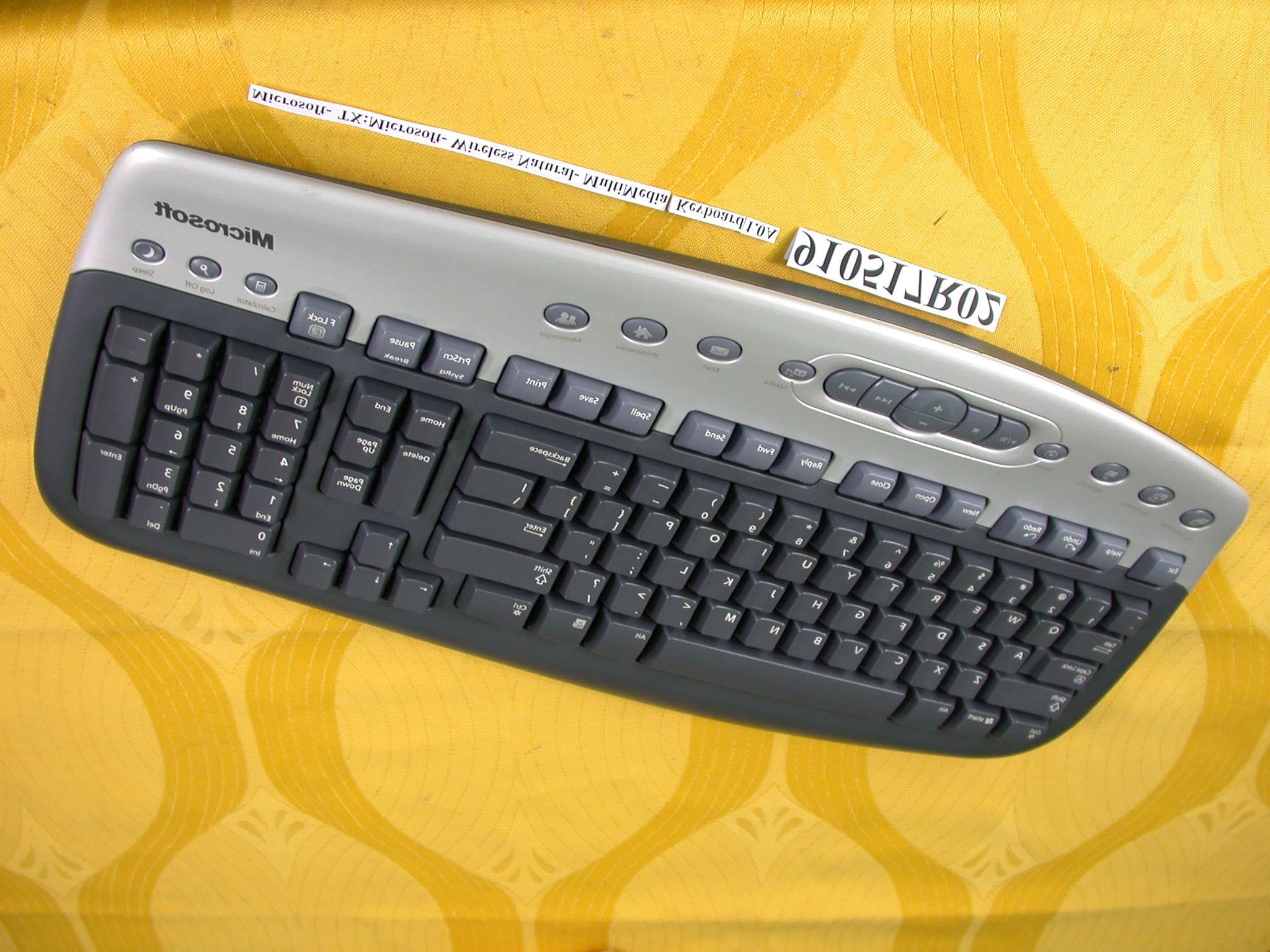
Click to zoom
Application Details
- Equipment Class
- DXX - Part 15 Low Power Communication Device Transmitter
- Date of Grant
- Jul 04, 2002
- Application Purpose
- Original Equipment
- Date of Application
- Jul 04, 2002
- Equipment Note
- Wireless Keyboard
- Frequency Range
- 27.09500000 - 27.19500000
- Company
- Microsoft Corporation
- Country
- United States
Documents & Files
Document Text
Text extracted from the exhibit documents filed with the FCC. Open a document above to read the original.
Users Manual
M www.microsoft.com/keyboard www.microsoft.com/mouse Getting Started MicrMicr MicrMicr Micr osofosof osofosof osof t Wt W t Wt W t W irir irir ir eless Suiteless Suit eless Suiteless Suit eless Suit eses eses es Xxx-xxxxx_Cvr_Ret_Wireless_Suites.p653/6/2002, 9:56 AM1 HealtHealt HealtHealt Healt h Wh W h Wh W h W arar arar ar ningning ningning ning Use of a keyboard or pointing device may be linked to serious injuries or disorders. When using a computer, as with many activities, you may experience occasional discomfort in your hands, arms, shoul- ders, neck, or other parts of your body. However, if you experience symptoms such as persistent or recurring discomfort, pain, throbbing, aching, tingling, numbness, burning sensation, or stiffness, DO NOT IGNORE THESE WARNING SIGNS. PROMPTLY SEE A QUALIFIED HEALTH PROFESSIONAL, even if symptoms occur when you are not working at your com- puter. Symptoms such as these can be associated with painful and sometimes permanently disabling injuries or disorders of the nerves, muscles, tendons, or other parts of the body. These musculoskeletal disorders (MSDs) include carpal tun- nel syndrome, tendonitis, tenosynovitis, and other conditions. While researchers are not yet able to answer many questions about MSDs, there is general agreement that many factors may be linked to their occurrence, including: medical and physical conditions, stress and how one copes with it, overall health, and how a person positions and uses his or her body during work and other activities (including use of a keyboard or pointing device). Some studies suggest that the amount of time a person uses a keyboard may also be a factor. Some guidelines that may help you work more comfortably with your computer and possibly reduce your risk of experiencing an MSD can be found in the “Healthy Computing Guide” topic of the User’s Guide provided with each software program on your CD-ROM. If you do not have the CD-ROM for this product, you can access the “Healthy Computing Guide” at http://www.microsoft.com/hardware/, or (in the United States only) call 1-800-360-7561 to request a CD-ROM at no charge. If you have questions about how your own lifestyle, activities, or medical or physical condition may be related to MSDs, see a qualified health professional. AA AA A bout Ybout Y bout Ybout Y bout Y our Rights and Obligour Rights and Oblig our Rights and Obligour Rights and Oblig our Rights and Oblig ationsations ationsations ations This Microsoft ® wireless suite is comprised of a keyboard, mouse, and receiver and is sold as a single unit and may not be separated for use on more than one computer. The software with this product is licensed, not sold. You must either agree to the license contract in the software Setup screens or promptly return the Microsoft wireless suite, comprised of the keyboard, mouse, and receiver, along with the software, for a refund, excluding the return costs. After you install the software, you may consult the license and the Limited Warranty for the product at any time by looking in the “Legal Information” section of the software User’s Guides. You may also print copies for your records. Information in this document, including URL and other Internet Web site references, is subject to change without notice. Unless otherwise noted, the example companies, organizations, products, domain names, e-mail addresses, logos, people, places and events depicted herein are fictitious, and no association with any real company, organization, product, domain name, e-mail address, logo, person, place or event is intended or should be inferred. Complying with all applicable copyright laws is the responsibility of the user. Without limiting the rights under copyright, no part of this document may be reproduced, stored in or introduced into a retrieval system, or transmitted in any form or by any means (electronic, mechanical, photocopying, recording, or otherwise), or for any purpose, without the express written permission of Microsoft Corporation. Microsoft may have patents, patent applications, trademarks, copyrights, or other intellectual property rights covering subject matter in this document. Except as expressly provided in any written license agreement from Microsoft, the furnishing of this document does not give you any license to these patents, trademarks, copyrights, or other intellectual property. Microsoft Corporation grants the purchaser of this product the right to reproduce one (1) copy of this “Getting Started” printed guide for each Hardware Suite you purchased in the package. ©2002 Microsoft Corporation. All rights reserved. Microsoft, IntelliMouse, Natural, and Windows are either registered trademarks or trademarks of Microsoft Corporation in the United States and/or other countries. The names of actual companies and products mentioned herein may be the trademarks of their respective owners. Xxx-xxxxx_Cvr_Ret_Wireless_Suites.p653/6/2002, 9:56 AM2 1 Welcome Congratulations on your purchase of a Microsoft ® wireless suite—which includes a wireless keyboard, wireless mouse, and a dual receiver. Setting up the devices takes a few simple steps, and then you can enjoy the freedom of wireless technology and the convenience of a clutter-free desktop. Important! Install the Software Your Microsoft wireless suite includes a CD-ROM with IntelliType Pro keyboard software and IntelliPoint mouse software. This software enables the unique features of your wireless devices and provides battery status information. Note If you do not already have a mouse, you can connect the receiver (step 5) before software installation so you can use your mouse during Setup. To install IntelliType Pro keyboard software and IntelliPoint mouse software 1Insert the software installation CD-ROM into the computer’s CD-ROM drive. If the Setup screen does not appear automatically, do the following: •Click the Start button, and then click Run. •Type [drive]:setup. For example, if your CD-ROM drive is dri…
Text truncated - open the document above for the full version.
Cover Letter(s)
American Telecommunications Certification Body Inc. 6731 Whittier Ave, McLean, VA 22101 July 5, 2002 RE: Microsoft Corporation FCC ID: C3KKB9 After a review of the submitted information, I have a few comments on the above referenced Application. 1) The Users Manual Contains the following information: Regulatory Information This device complies with part 15 of the FCC Rules and Industry Canada RSS-210. Operation is subject to the following two conditions: (1) This device may not cause harmful interference, and (2) this device must accept any interference received, including interference that may cause undesired operation. a) Tested to comply with FCC standards. For home and office use. Model number: Wireless Optical Desktop receiver (all models), FCC IDs C3KKB9 and C3KMS9; Wireless Optical Desktop Pro receiver (all models), FCC IDs C3KKB10 and C3KMS9. This paragraph sounds like the FCC ID's are also being applied to the receiver portion of the device. Are the receivers labeled with the FCC ID Number? The receivers should be labeled only with the proper FCC DoC Labeling (Logo, etc.) and NOT with the FCC ID number. The FCC ID number is applicable only to the keyboard portion. Please adjust the information above so that it is not misleading. 2) The test reports states that 3 samples were provided. It is not clear why 3 samples were tested. Please explain. Timothy R. Johnson Examining Engineer mailto: [email protected] The items indicated above must be submitted before processing can continue on the above referenced application. Failure to provide the requested information may result in application termination. Correspondence should be considered part of the permanent submission and may be viewed from the Internet after a Grant of Equipment Authorization is issued. Please do not respond to this correspondence using the email reply button. In order for your response to be processed expeditiously, you must submit your documents through the AmericanTCB.com website. Also, please note that partial responses increase processing time and should not be submitted. Any questions about the content of this correspondence should be directed to the sender.
External Photos
Page 1 ANNEX PHOTOGRAPHS OF EUT Page 2
ID Label/Location Info
FCC ID Label Location
ID Label/Location Info
Artwork NUMBERDESCRIPTIONPROPRIETARY NOTETOLERENCES DWN./DATE SOFTWARE VERSION DRAWING NUMBERREVISION THE INFORMATION CONTAINED HEREON IS CONFIDENTIAL, IS SUBMITTED IN CONFIDENCE, AND IS PROPRIETARY INFORMATION OF MICROSOFT CORPORA- TION, AND SHALL ONLY BE USED IN THE FURTHERANCE OF, THE CONTRACT OF WHICH THIS DRAWING FORMS A PART, AND SHALL NOT, WITHOUT MICROSOFT CORPORATION'S PRIOR WRITTEN APPROVAL, BE REPRODUCED OR IN ANY WAY USED IN WHOLE OR IN PART IN CONNECTION WITH SERVICES OR EQUIPMENT OFFERED FOR SALE OF FURNISHED TO OTHERS, THE INFORMATION CONTAINED HEREON MAY NOT BE DISCLOSED TO A THIRD PARTY WITHOUT CONSENT OF MICROSOFT CORPORATION, AND THEN, ONLY PURSUANT TO A MICROSOFT APPROVED NONDISCLOSURE AGREEMENT. Artwork, Product Label, MS Wireless Optical Dsktp Keybd AWX01-03810-01 Gerald Olive 4/18/2002 Paper UNLESS OTHERWISE SPECIFIED DIMENSIONS ARE IN MILLIMETERS Adobe Illustrator 7.0 INDUSTRIAL DESIGN FILE NAME AWX01-03812-01.ai Scale 1:1 OUTline does not print Canada 210 560 0 LIS T E D AC C E S S O R Y ITE 78CJ FCC ID: C3KKB9 This de vic e co m plie s wit h pa r t 15 of the FCC Ru les . O p er ati o n is s ubj ect to t he f ollo wing conditio ns : (1 ) This de vice ma y n o t ca u se har m ful in ter f ere n ce , and (2) this de vic e m ust ac cept an y inte rf erence receiv ed, including int er f er enc e tha t ma y cause undes ired o pe r ation. E01 107 (L) X 106 (W) 3V 100mA Microsoft Corporation - Made in China (S) Microsoft Wireless MultiMedia Keyboard 1.0A
Internal Photos
Page 3 Page 4
Internal Photos
Page 5 Page 6 Page 7 Page 8
Operational Description
FCC ID: C3KKB9 ADT No.910517R02 Operational Description The transmitter of the EUT (Wireless Keyboard) is powered by 3V Battery. The transmitter use Wire Antenna. The output power of this device is very low. Under normal use condition, the transmitter and the receiver are quite close, so high EIRP power is neither necessary nor allowed because of interference.
Test Report
FCC ID: C3KKB9 Report No.: RF910517R02 1 Issued: June 27, 2002 FCC TEST REPORT REPORT NO.: RF910517R02 MODEL NO.: Microsoft ® Wireless MultiMedia Keyboard 1.0A RECEIVED: June 12, 2002 TESTED: June 14 ~ June 18, 2002 APPLICANT:MICROSOFT CORPORATION ADDRESS: ONE MICROSOFT WAY, REDMOND, WA 98052-6399, U.S.A. ISSUED BY:Advance Data Technology Corporation LAB LOCATION:47 14th Lin, Chia Pau Tsuen, Linkou Hsiang, Taipei, Taiwan, R.O.C. This test report consists of 18 pages in total. It may be duplicated completely for legal use with the approval of the applicant. It should not be reproduced except in full, without the written approval of our laboratory. The client should not use it to claim product endorsement by NVLAP or any U.S. government agencies. The test results in the report only apply to the tested sample. Lab Code: 200102-0 0528 ILAC MRA FCC ID: C3KKB9 Report No.: RF910517R02 2 Issued: June 27, 2002 Table of Contents 1CERTIFICATION..............................................................................................3 2SUMMARY OF TEST RESULTS .....................................................................4 3GENERAL INFORMATION..............................................................................5 3.1GENERAL DESCRIPTION OF EUT ................................................................5 3.2DESCRIPTION OF TEST MODES ..................................................................6 3.3GENERAL DESCRIPTION OF APPLIED STANDARDS .................................6 3.4DESCRIPTION OF SUPPORT UNITS ............................................................6 4TEST PROCEDURE AND RESULT ................................................................7 4.1CONDUCTED EMISSION MEASUREMENT...................................................7 4.2RADIATED EMISSION MEASUREMENT........................................................7 4.2.1 LIMITS OF RADIATED EMISSION MEASUREMENT .....................................7 4.2.2 TEST INSTRUMENT .......................................................................................8 4.2.3 TEST PROCEDURE........................................................................................9 4.2.4 TEST SETUP.................................................................................................10 4.2.5 EUT OPERATING CONDITION.....................................................................10 4.2.6 TEST RESULT (A) ......................................................................................... 11 4.2.7 TEST RESULT (B) .........................................................................................13 4.2.8 TEST RESULT (C).........................................................................................15 5PHOTOGRAPHS OF THE TEST CONFIGURATION ....................................17 6INFORMATION ON THE TESTING LABORATORIES ..................................18 FCC ID: C3KKB9 Report No.: RF910517R02 3 Issued: June 27, 2002 1 CERTIFICATION PRODUCT : Wireless Keyboard BRAND NAME : Microsoft ® MODEL NO : Microsoft ® Wireless MultiMedia Keyboard 1.0A APPLICANT : MICROSOFT CORPORATION STANDARDS : 47 CFR Part 15, Subpart C (15.227) ANSI C63.4-1992, Canada RSS 210 We, Advance Data Technology Corporation, hereby certify that three samples of the designation have been tested in our facility from June 14 to June 18, 2002. The test record, data evaluation and Equipment Under Test (EUT) configurations represented herein are true and accurate accounts of the measurements of the sample's EMC characteristics under the conditions herein specified. FCC ID: C3KKB9 Report No.: RF910517R02 4 Issued: June 27, 2002 2 SUMMARY OF TEST RESULTS The EUT has been tested according to the following specifications: APPLIED STANDARD: 47 CFR Part 15, Subpart C STANDARD PARAGRAPH TEST TYPERESULTREMARK 15.207 Conducted Emission TestN/A Power supply is 3VDC from batteries 15.227 Radiated Emission TestPASS Minimum passing margin is –16.20dBuV at 216.80MHz NOTE: The receiver part to communicate with the EUT has been verified to comply with FCC Part 15, Subpart B, Class B (DoC). The test report can be provided upon request. FCC ID: C3KKB9 Report No.: RF910517R02 5 Issued: June 27, 2002 3 GENERAL INFORMATION 3.1 GENERAL DESCRIPTION OF EUT PRODUCTWireless Keyboard MODEL NO.Microsoft ® Wireless MultiMedia Keyboard 1.0A POWER SUPPLY3VDC from battery MODULATION TYPEFSK CARRIER FREQUENCY OF EACH CHANNEL 27.095MHz, 27.195MHz BANDWIDTH OF EACH CHANNEL NA NUMBER OF CHANNEL2 ANTENNA TYPEwire antenna DATA CABLENA I/O PORTSNA ASSOCIATED DEVICESNA NOTE: 1. The EUT is the transmitter part of a Wireless Keyboard. 2. Three identical samples were tested at Microsoft’s request, the serial numbers are DVT1#268(L), DVT1#038(L) and DVT1#051(L). 3. For more detailed features description of the EUT, please refer to the manufacturer's specifications or the User's Manual. FCC ID: C3KKB9 Report No.: RF910517R02 6 Issued: June 27, 2002 3.2 DESCRIPTION OF TEST MODES Two channels were provided in this EUT. ChannelFrequencyChannelFrequency 127.095MHz227.195MHz NOTE: Test result (A) is for sample serial number DVT1#268(L), test result (B) is for sample DVT1#038(L) and test result (C) is for sample DVT1#051(L). 3.3 GENERAL DESCRIPTION OF APPLIED STANDARDS The EUT is the transmitter part of a Wireless Keyboard. According to the specifications of the manufacturer, it must comply with the requirements of the following standards: FCC CFR 47 Part 15, Subpart C (15.227) ANSI C63.4-1992, Canada RSS 210 All tests have been performed and recorded as per the above standards. 3.4 DESCRIPTION OF SUPPORT UNITS NA FCC ID: C3KKB9 Report No.: RF910517R02 7 Issued: June 27, 2002 4 TEST PROCEDURE AND RESULT 4.1 CONDUCTED EMISSION MEASUREMENT NA 4.2 RADIATED EMISSION MEASUREMENT 4.2.1 LIMITS OF RADIATED EMISSION MEASUREMENT According to 15.227 the field strength of emissions from intentional radiators operated under these frequencies bands shall not exceed the following: Fundamental Frequency (…
Text truncated - open the document above for the full version.
Test Setup Photos
FCC ID: C3KKB9 Report No.: RF910517R02 17 Issued: June 27, 2002 5 PHOTOGRAPHS OF THE TEST CONFIGURATION RADIATED EMISSION TEST
Contact Information
Applicant
Hasnain Syed(SR. DIR EMC/SI&RF COMPLIANCE)
Technical Contact
Advance Data Technology CorporationAlan Lane
[email protected]+886-3-327-0910
13-1, Lane 19, WenShan 3rd., St. · Taoyuan · Taiwan
Non-Technical Contact
Advance Data Technology CorporationAlan Lane
[email protected]+886-3-327-0910
Test Firm
Bureau Veritas CPS (H.K.) Ltd. Taoyuan BranchTommy Wu
Technical Specifications
| # | Rule Parts | Frequency Range | Power Output |
|---|---|---|---|
| 1 | 15C | 27.095 MHz - 27.195 MHz | - |
Other Applications from Microsoft Corporation
C3K2147
Aug 28, 2026Wireless input device
Equipment Class
DTS - Digital Transmission SystemC3K2148
Aug 12, 2026Portable Computing Device
Equipment Class
DXX - Part 15 Low Power Communication Device TransmitterC3K2149
Aug 12, 2026Portable Computing Device
Equipment Class
DXX - Part 15 Low Power Communication Device TransmitterC3K2152
Aug 11, 2026Wireless Accessory
Equipment Class
DTS - Digital Transmission SystemC3K2150
Aug 06, 2026Portable Computing Device
Equipment Class
DXX - Part 15 Low Power Communication Device Transmitter