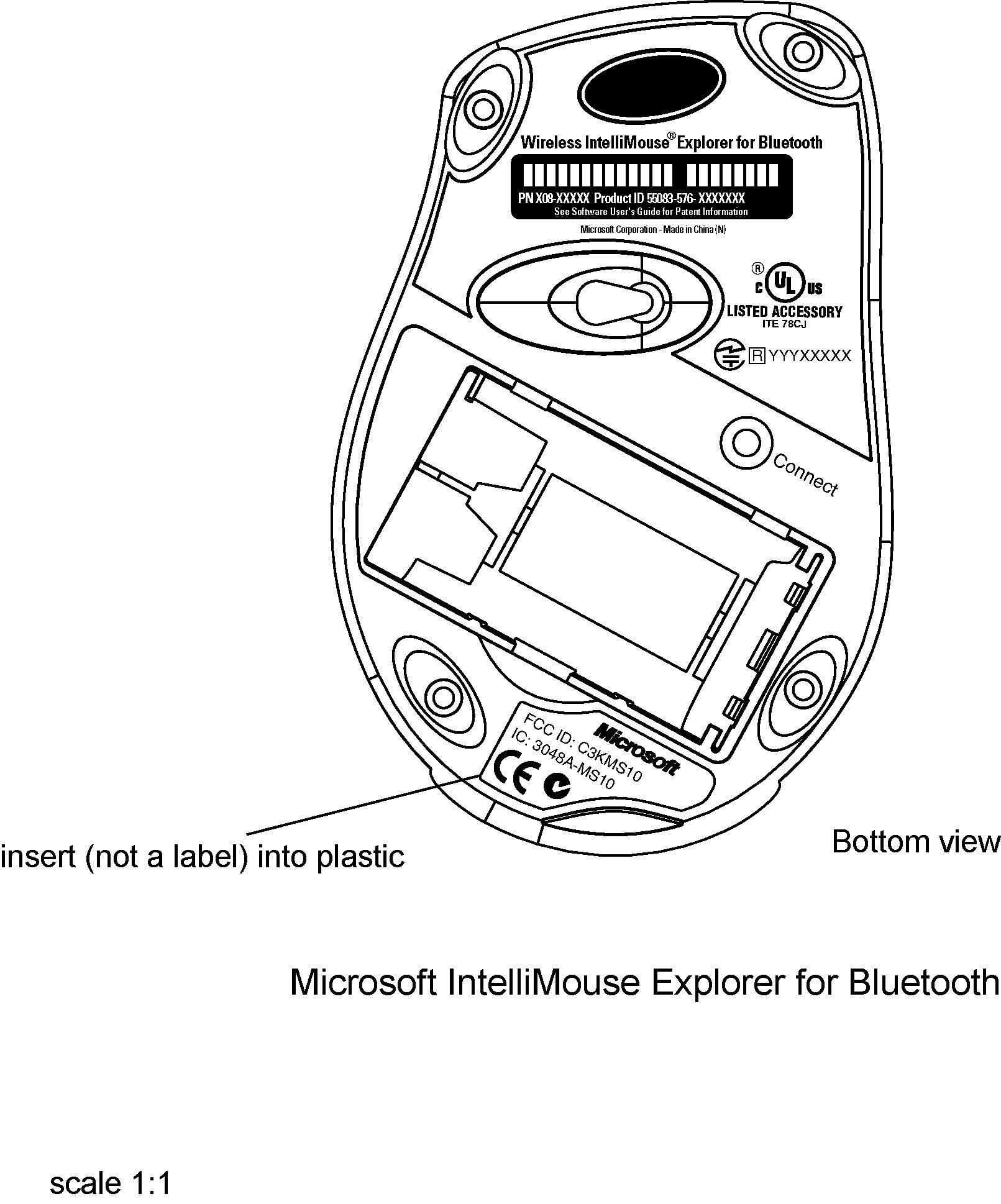
C3KMS10Wireless Bluetooth Mouse
Microsoft Corporation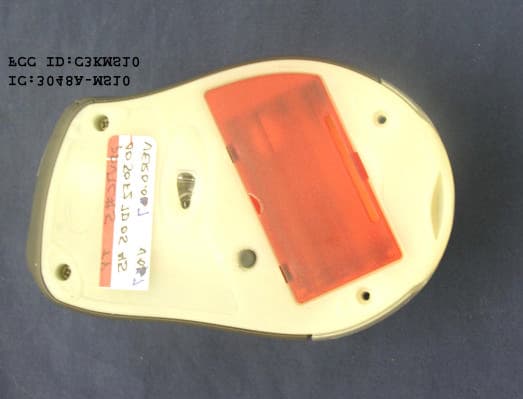
Click to zoom
Application Details
- Equipment Class
- DSS - Part 15 Spread Spectrum Transmitter
- Date of Grant
- Aug 07, 2002
- Application Purpose
- Original Equipment
- Date of Application
- Aug 07, 2002
- Equipment Note
- Wireless Bluetooth Mouse
- Frequency Range
- 2402.00000000 - 2480.00000000
- Company
- Microsoft Corporation
- Country
- United States
Documents & Files
Document Text
Text extracted from the exhibit documents filed with the FCC. Open a document above to read the original.
Users Manual
M www.microsoft.com/keyboard Microsoft ® Keyboard and Mouse Suites with Bluetooth ™ Wireless Technology Getting Started Health Warning Use of a keyboard or pointing device may be linked to serious injuries or disorders. When using a computer, as with many activities, you may experience occasional discomfort in your hands, arms, shoul- ders, neck, or other parts of your body. However, if you experience symptoms such as persistent or recurring discomfort, pain, throbbing, aching, tingling, numbness, burning sensation, or stiffness, DO NOT IGNORE THESE WARNING SIGNS. PROMPTLY SEE A QUALIFIED HEALTH PROFESSIONAL, even if symptoms occur when you are not working at your com- puter. Symptoms such as these can be associated with painful and sometimes permanently disabling injuries or disorders of the nerves, muscles, tendons, or other parts of the body. These musculoskeletal disorders (MSDs) include carpal tun- nel syndrome, tendonitis, tenosynovitis, and other conditions. While researchers are not yet able to answer many questions about MSDs, there is general agreement that many factors may be linked to their occurrence, including: medical and physical conditions, stress and how one copes with it, overall health, and how a person positions and uses his or her body during work and other activities (including use of a keyboard or pointing device). Some studies suggest that the amount of time a person uses a keyboard may also be a factor. Some guidelines that may help you work more comfortably with your computer and possibly reduce your risk of experiencing an MSD can be found in the “Healthy Computing Guide” topic of the User’s Guide provided with each software program on your CD-ROM. If you do not have the CD-ROM for this product, you can access the “Healthy Computing Guide” at http://www.microsoft.com/hardware/, or (in the United States only) call 1-800-360-7561 to request a CD-ROM at no charge. If you have questions about how your own lifestyle, activities, or medical or physical condition may be related to MSDs, see a qualified health professional. About Your Rights and Obligations This Microsoft ® wireless suite is comprised of a keyboard, mouse, and receiver and is sold as a single unit and may not be separated for use on more than one computer. The software with this product is licensed, not sold. You must either agree to the license contract in the software Setup screens or promptly return the Microsoft wireless suite, comprised of the keyboard, mouse, and receiver, along with the software, for a refund, excluding the return costs. After you install the software, you may consult the license and the Limited Warranty for the product at any time by looking in the “Legal Information” section of the software User’s Guides. You may also print a copy for your records. Information in this document, including URL and other Internet Web site references, is subject to change without notice. Unless otherwise noted, the example companies, organizations, products, domain names, e-mail addresses, logos, people, places and events depicted herein are fictitious, and no association with any real company, organization, product, domain name, e-mail address, logo, person, place or event is intended or should be inferred. Complying with all applicable copyright laws is the responsibility of the user. Without limiting the rights under copyright, no part of this document may be reproduced, stored in or introduced into a retrieval system, or transmitted in any form or by any means (electronic, mechanical, photocopying, recording, or otherwise), or for any purpose, without the express written permission of Microsoft Corporation. Microsoft may have patents, patent applications, trademarks, copyrights, or other intellectual property rights covering subject matter in this document. Except as expressly provided in any written license agreement from Microsoft, the furnishing of this document does not give you any license to these patents, trademarks, copyrights, or other intellectual property. Microsoft Corporation grants the purchaser of this product the right to reproduce one (1) copy of this “Getting Started” printed guide for each Hardware Suite you purchased in the package. ©2002 Microsoft Corporation. All rights reserved. Microsoft, IntelliMouse, Natural, and Windows are either registered trademarks or trademarks of Microsoft Corporation in the United States and/or other countries. The names of actual companies and products mentioned herein may be the trademarks of their respective owners. 1 Welcome Congratulations on your purchase of a Microsoft ® keyboard and mouse suite with Bluetooth™ wireless technology. This complete desktop solution includes a wireless keyboard, a wireless mouse, and a Wireless Transceiver. Setting up the devices takes a few simple steps, and then you can enjoy the freedom of Bluetooth wireless technology and the convenience of a clutter-free desktop. Run the Setup Wizard First The Setup Wizard installs the required software and helps you set up your Bluetooth devices. Important •You must leave your current keyboard and mouse connected in order to complete Setup. •Make sure you run the installation CD-ROM that has the same software language as your operating system. To run the Setup Wizard 1Insert the software installation CD-ROM that contains your operating system language into the computer’s CD-ROM drive. If the Setup screen does not appear automatically, do the following: •Click the Start button, and then click Run. •Type [drive]:setup. For example, if your CD-ROM drive is drive E, type e:setup 2Click Install Microsoft IntelliType Pro to begin the keyboard software installation. Follow the Setup Wizard instructions on the screen. Depending on the Bluetooth software components your system requires, you may be prompted to restart your computer during software installation. 3After IntelliType Pro software is installed and the computer is restarted (if necessary), the Setup Wizard will auto…
Text truncated - open the document above for the full version.
Cover Letter(s)
Microsoft Corporation Tel: 425 882 8080 One Microsoft Way Fax: 425 936 7329 Redmond, WA 98052-6399 http://www.microsoft.com/ August 8, 2002 Federal Communications Commission Authorization and Evaluation Division 7435 Oakland Mills Road Columbia, Maryland 21046 To whom it may concern, We hereby respectfully request that under the provision of 47 CFR 0.459, the documents listed below and attached with this application for certification for FCC ID: C3KKB11, C3KMS10 and C3KTR1 be provided with confidential status. • Schematics • Block Diagrams • Bill of Materials Any exhibit / information for which we have requested confidentiality, but which may not be accorded such treatment by the FCC, should be returned to us. The documents listed above contain trade secrets that are treated as confidential by us. Substantial competitive harm to us could result should they be made available to the public. Sincerely, Stephen Stegner EMC/Safety Engineer Microsoft Corporation
Cover Letter(s)
American Telecommunications Certification Body Inc. 6731 Whittier Ave, McLean, VA 22101 August 8, 2002 RE: Microsoft Corporation FCC ID: C3KMS10 After a review of the submitted information, I have a few comments on the above referenced Application. 1) Please provide : a) a clearer or higher resolution photograph of the back of the main board. b) a photograph of the back of the Bluetooth module. 2) Regarding the Transmitter Schematics, please provide one of the following: a) A schematic of the RF portion (Bluetooth Module). b) Alternatively, if the radio is a modular component from a different manufacturer, you may instead provide a parts list that shows the Bluetooth Module as a part from a different manufacturer. If the parts list is provided, please be sure to let us know if confidentiality is requested on it and update the confidentiality letter if necessary. 3) Assuming the keyboard, mouse, and transceiver are all classified as mobile devices for RF exposure purposes, the users manual should contain the following RF exposure information or similar: " The antenna(s) used for this transmitter must be installed to provide a separation distance of at least 20 cm from all persons and must not be co-located or operating in conjunction with any other antenna or transmitter." 4) The horn antenna in section 8.1 of the radiated test report appeared to be out of calibration during the test. Please comment. 5) Please confirm the VBW settings used for the peak radiated emissions > 1 GHz. 6) In the Antenna Conducted report, please explain section 5.3 where it mentions the devices was attached to a computer via a 1.5 meter length USB cable. I thought the device did not contain any cables and was considered stand-alone. Please explain. 7) FYI, the table 6.1.3 of the Antenna Conducted report contains an incorrect data. Timothy R. Johnson Examining Engineer mailto: [email protected] The items indicated above must be submitted before processing can continue on the above referenced application. Failure to provide the requested information may result in application termination. Correspondence should be considered part of the permanent submission and may be viewed from the Internet after a Grant of Equipment Authorization is issued. Please do not respond to this correspondence using the email reply button. In order for your response to be processed expeditiously, you must submit your documents through the AmericanTCB.com website. Also, please note that partial responses increase processing time and should not be submitted. Any questions about the content of this correspondence should be directed to the sender.
Cover Letter(s)
Dt Associates PO Box 1644 Mariposa, CA Phone: 209 966-2145 Email: [email protected] CONSULTING SERVICES FOR REGULATORY APPROVALS – STANDARDS APPLICATION – COMMERCIAL •• INDUSTRIAL •• MEDICAL EMC •• Dt Associates – PO Box 1644, Mariposa, CA 95338 – phone: (209) 966-2145 email: [email protected] August 8, 2002 Dear Tim The following is a reponse to ATCBrequest for information on the Cyan Mouse FCC ID C3KMS10 1) Please provide : a) a clearer or higher resolution photograph of the back of the main board. Response: I have provided the master layout drawing for the main board. I have also requested a clear photograph for the bottom of the main board. b) a photograph of the back of the Bluetooth module. Response: I have provided the master layout drawing for the Bluetooth component, Please accept this in lieu of de-soldering the modular Bluetooth component. 2) Regarding the Transmitter Schematics, please provide one of the following: a) A schematic of the RF portion (Bluetooth Module). b) Alternatively, if the radio is a modular component from a different manufacturer, you may instead provide a parts list that shows the Bluetooth Module as a part from a different manufacturer. If the parts list is provided, please be sure to let us know if confidentiality is requested on it and update the confidentiality letter if necessary. Response: Please note that the Bluetooth ‘modular’ section is treated as a component in this system. The schematics of the ‘transmitter’ show this modular component as it is used in the system with input and output information. This is in the same manner as other chips or components are shown. Please note that the master layout mask shows the Bluetooth board-component part number. While Parts Lists are not required for Part 15 devices, please accept this as meeting your request for verification that this is a component of the EUT. An excert of the BOM showing the Bluetooth Module as an OEM component has been emailed to you. You should have this now. 3) Assuming the keyboard, mouse, and transceiver are all classified as mobile devices for RF exposure purposes, the users manual should contain the following RF exposure information or similar: “The antenna(s) used for this transmitter must be installed to provide a separation distance of at least 20 cm from all persons and must not be co-located or operating in conjunction with any other antenna or transmitter." CONSULTING SERVICES FOR REGULATORY APPROVALS – STANDARDS APPLICATION – COMMERCIAL •• INDUSTRIAL •• MEDICAL EMC •• Dt Associates – PO Box 1644, Mariposa, CA 95338 – phone: (209) 966-2145 email: [email protected] Response: RF exposure statement. I have provided a copy of the email between Microsoft and the FCC on rf exposure statements for these devices. Please accept this email as evidence that the suggested or similar wording that appears in the manuals is appropriate. Please note that the FCC has stated that no specific caution language is mandated. As such, any reasonable wording with the intent of cautioning or giving instructions to the user about rf exposure should be deemed appropriate. Because of the response of the FCC and since the MPE calculations show the device compliant at less than 0.3cm we request that accept the wording as provided and as ‘defacto’ approved by the FCC in their email response. 4) The horn antenna in section 8.1 of the radiated test report appeared to be out of calibration during the test. Please comment. Response: The Horn antenna in section 8.1 of the radiated test report that was used for measurements between 1-18GHz was the EMCO 1-18 GHz Horn Antenna 3115 9205- 3882 listed on line 6 which has a cal due date of 10/21/2002. The other antenna was not used during compliance testing. 5) Please confirm the VBW settings used for the peak radiated emissions > 1 GHz. Response: The VBW settings used for the peak radiated emissions was equal to or greater than the Res BW as required in the test method. 6) In the Antenna Conducted report, please explain section 5.3 where it mentions the devices was attached to a computer via a 1.5 meter length USB cable. I thought the device did not contain any cables and was considered stand-alone. Please explain. Response: The EUT is the Bluetooth mouse itself, not the Bluetooth modular component contained within the mouse. While the antenna-conducted measurements were done on the rf modular section, the cable mentioned is the mouse cable which was connected to a computer during testing. If you have any further questins please do not hesitate to contact me. Sincerely, Dennis Ward Consultant Dt Associates PO Box 1644 Mariposa, CA 95538
External Photos
Exhibit 5 External Photos C3KMS10 Intellimouse
Internal Photos
CAM350 PRO V 7.0 : Fri May 10 13:51:22 2002 - (Untitled) : Topcop CAM350 PRO V 7.0 : Fri May 10 13:51:22 2002 - (Untitled) : ground CAM350 PRO V 7.0 : Fri May 10 13:51:23 2002 - (Untitled) : power CAM350 PRO V 7.0 : Fri May 10 13:51:23 2002 - (Untitled) : botcop CAM350 PRO V 7.0 : Fri May 10 13:51:24 2002 - (Untitled) : topmask CAM350 PRO V 7.0 : Fri May 10 13:51:24 2002 - (Untitled) : botmask CAM350 PRO V 7.0 : Fri May 10 13:51:24 2002 - (Untitled) : toppaste CAM350 PRO V 7.0 : Fri May 10 13:51:24 2002 - (Untitled) : topsilk CAM350 PRO V 7.0 : Fri May 10 13:51:24 2002 - (Untitled) : board CAM350 PRO V 7.0 : Fri May 10 13:51:25 2002 - (Untitled) : topassy CAM350 PRO V 7.0 : Fri May 10 13:51:25 2002 - (Untitled) : PinFunctions
Internal Photos
Exhibit 7 Internal photos C3KMS10 Intellimouse
Operational Description
BlueCore 2-External Product Data Sheet TM BC212015-ds-001b Product Data Sheet Pre-Production Information Single Chip Bluetooth System Pre-Production Information Data Sheet BC212013A (UART only version) BC212015A (USB and UART version) October 2001 BlueCore2-External is a single chip radio and baseband IC for Bluetooth 2.4GHz radios implemented in CMOS technology. When used with external ROM containing the CSR Bluetooth software stack, it provides a fully compliant Bluetooth system for data and voice communications. General Description Figure 1:BlueCore2-External System Architecture RAM DSP μP I/O 2.4 GHz Radio XTAL SPI UART/USB PIO PCM 8Mbit FLASH ROM RF IN RF OUT BlueCore 2-External TM Applications The design is optimised to require few external RF components to facilitate rapid design of the application printed circuit board and therefore the fastest possible time to market and lowest overall cost. Included in the device are autocalibration and built-in- self-test (BIST) routines to simplify development, type approval and production test. All hardware and device firmware is fully compliant with the Bluetooth specification. Device Features Low power 1.8V operation Small footprint in 96-Ball VFBGA Package (6x6mm) Fully qualified Bluetooth component 0.18μm CMOS technology Full speed class 2 Bluetooth operation with full 7 slave piconet support Support for 8Mbit external Flash Minimum external components Operates over full industrial temperature range (-40 ≤≤ T ≤≤ 105∞C) PC Notebooks Cellular Handsets Cordless Headsets Personal Digital Assistants (PDAs) Computer Accessories (Compact Flash, PCMCIA and SD cards) BlueCore 2-External Product Data Sheet TM BC212015-ds-001b Product Data Sheet Pre-Production Information Radio No external trimming is required in production Operation with common TX/RX terminals simplifies external matching circuitry and eliminates external antenna switch Extensive built-in-self-test minimises end product final test time Full RF reference designs are available Transmitter Up to +4dBm RF transmit power with level control from the on-chip 6-bit DAC over a dynamic range greater than 30dB Supports Class 2 and Class 3 radios without the need for an external power amplifier or TX/RX switch Receiver Integrated channel filters Synthesiser Fully integrated synthesiser: no external VCO varactor diode or resonator Compatible with crystals between 8 and 32MHz (in multiples of 250kHz), or an external clock Physical Interfaces Synchronous serial interface up to 4Mbaud for software debugging Full speed USB interface supports OHCI and UHCI compliant with USB v1.1 Bluetooth Stack Running on Internal Microcontroller CSRís Bluetooth Protocol Stack runs on-chip in a variety of configurations: Standard HCI (UART or USB) Digital demodulator for better sensitivity and co- channel rejection Fully embedded to RFCOMM, thus reducing host CPU load UART interface with programmable baud rate up to 1.5Mbaud Key Features Supports Class 1 radios with an external power amplifier provided by a power control terminal controlled by an internal 8-bit voltage DAC and by control of an external RF TX/RX switch Digitised RSSI available in real time over the HCI Fast AGC for enhanced dynamic range Synchronous bidirectional serial programmable audio interface Optional I 2 C compatible interface Stand-alone single chip (no host) including virtual machine (VM) programming environment, for instance for headsets and PC peripherals More information on the CSR Bluetooth Software Stack and software development tools is available in separate documentation from CSR. Baseband and Software 32Kbyte on-chip RAM allows full speed Bluetooth data transfer, mixed voice and data, plus full 7 slave piconet operation Trancoders for A-law, μ-law and linear voice from host and A-law, μ-law and CVSD voice over air Dedicated logic for forward error correction, header error control, access code correlation, demodulation, cyclic redundancy check, encryption bitstream generation, whitening and transmit pulse shaping External 8Mbit Flash ROM for complete system solution and application flexibility Auxiliary Features Crystal oscillator with built-in digital trimming Power management includes digital shut down and wake up commands and an integrated low power oscillator for ultra-low Park/Sniff/Hold mode power consumption Package Options 96-Ball VFBGA 8x8x1.0mm 0.65mm Pitch Page 2 of 21 Key Features 96-Ball VFBGA 6x6x1.0mm 0.5mm Pitch Device can be used with an external master oscillator and provides a ëclock request signalí to control external clock source BlueCore 2-External Product Data Sheet TM BC212015-ds-001b Product Data Sheet Pre-Production Information Microcontroller Interrupt controller Event timer RISC micro-controller Programmable I/O PIO[5]/USB_DETACHPIO[6]/CLK_REQ PIO[7]/RAM_CSB PIO[2]/USB_PULL_UP PIO[3]/USB_WAKE_UPPIO[4]/USB_ON VSS_MEM VSS_PADS VSS_CORE Baseband and Logic UART_TXUART_RXUART_RTSUART_CTSSPI_CSBSPI_CLKSPI_MOSISPI_MISOUSB_D+USB_D- Synchronous Serial Interface USB UART Memory management unit Burst mode controller RAM Memory mapped control/ status Physical layer DSP hardware engine RESET VDD_ANA XTAL_OUT XTAL_IN VDD_VCO Clock generation VDD_RADIO RSSI PIO(0)/RXEN RF_IN TX_A TX_B PIO[1] / TXEN PA LNA IQ DEMOD RF synthesiser /N/N+1 Tune LOOP_FILTER ADC Demodulator VSS_ANA VSS_RADIO +45 -45 RF ReceiverRF Transmitter IQ MOD AUX_DAC RF Synthesiser Fref External Memory Driver CSBA[18:0]D[15:0]WEBREBPCM_OUTPCM_INPCM_SYNC Audio PCM Interface VDD_PADS VDD_MEM VDD_CORE AUX DAC VSS_VCO AIO[0] AIO[1] AIO[2] 19 VSS_PIO 16 PCM_CLK DAC TEST_EN PIO[8]PIO[9]PIO[10]PIO[11] VDD_PIO Figure 2:BlueCore2-External Device Diagram Device Diagram Page 3 of 21 Device Diagram BlueCore 2-External Product Data Sheet TM BC212015-ds-001b Product Data Sheet Pre-Production Information LOOP_FILTER PIO[0] / RXEN VDD_PIO VSS_PIO PIO[5] / USB DETACH SPI_CSBSPI_MOSI USB_D-USB_D+ VDD_COREVSS_COREVDD_PADSVSS_PADS PIO[4] / USB_ON PIO[3] / USB_WAKE _UP SPI_…
Text truncated - open the document above for the full version.
RF Exposure Info
From: "Kurt Fischer" <[email protected]> To: "dward" <[email protected]> Cc: "Jean Chin" <[email protected]>; "Diana Eberhard" <[email protected]> Subject: FW: manual requirements for a Bluetooth device with respect toRF safety Date: Monday, July 29, 2002 4:11 PM -----Original Message----- From: Stephen Stegner [mailto:[email protected]] Sent: Mon 7/29/2002 4:07 PM To: Kurt Fischer Cc: Kevin Marquess; Diana Eberhard; [email protected] Subject: FW: manual requirements for a Bluetooth device with respect toRF safety Forwarding response from the FCC. Stephen Stegner EMC/Safety Engineer Microsoft Corporation (425) 706-2697 -----Original Message----- From: Tim Harrington [mailto:[email protected]] Sent: Monday, July 29, 2002 2:54 PM To: Stephen Stegner Cc: Rfsafety Subject: Re: manual requirements for a Bluetooth device with respect toRF safety FCC rules are not explicit regarding documentation required to accompany products. In evaluating reports submitted for documentation of routine RF exposure compliance, we consider various aspects to determine the level of cautions or warnings required. Review items may include reported SAR or MPE levels relative to limit, device size, shape, normal use patterns, antenna location, accessories, etc. We cannot suggest generic manual statements because it depends on final product configurations. Usually we request that RF exposure info is placed in a conspicuous location of applicable manuals, indicating to responsible parties, end-users etc., that the listed procedures, requirements, or caution statements are included for satisfying FCC RF exposure requirements and/or to meet FCC RF exposure limits. For handheld-only devices, limit for hand SAR is 4 mW/g averaged in 10g. Using the rule of thumb that SAR~P, for all P transferred into 10g then 4 mW/g requires 40 mW; similarly for body-worn devices with limit 1.6 mW/g in 1g needs 1.6mW (no radiation into air). >>> "Stephen Stegner" <[email protected]> 07/29/02 02:28PM >>> Hi, Using the guidelines of OET 65 supplement C and the FCC CFR 47 regulations I have determined the following information below is necessary with respect to the RF exposure safety requirements for our low power Bluetooth devices (mouse, keyboard and USB adapter that connects to a PC). [I've also included all of the necessary information for the EMC portion for FCC but have not shown here for clarity.] I'm e-mailing to confirm if I have included all of the necessary information with respect to the FCC RF exposure information. Could you please reply to my e-mail? Thank you, Stephen Stegner EMC/Safety Engineer Microsoft Corporation (425) 706-2697 [Information in manual below] Note: Any changes or modifications not expressly approved by Microsoft could void the user's authority to operate the device. FCC Declaration of Conformity for RF Exposure The radio module has been evaluated under FCC Bulletin OET 65C and found compliant to the requirements as set forth in CFR 47 Sections 2.1091, 2.1093, and 15.247 (b) (4) addressing RF Exposure from radio frequency devices. RF Technical specifications RF output power: +4dBm (maximum) Protocol: Bluetooth standard compliant Frequency Range: 2.4 - 2.4835GHz Type of Modulation: FSK Signal Type: Frequency Hopping Spread Spectrum (FHSS)
RF Exposure Info
S= power density P= power input to the antenna G= power gain of the antenna in the direction of 2 interest relative to an isotropic radiator R= distance to the center of radiation of the antenna Pi Choose ENTER Occupational/Controlled -(BTS) General Population/Uncontrolled -(CPE) Tx Frequency: 2402.00 (MHz) Maximum Peak Power at Antenna Input Terminal: -0.74 (dBm) Antenna gain (typical)+9dB for 8-element array: -0.10 (dBi) S=1.00 (mW/cm^2) P=0.84 (mW) G=0.98 (numeric) R =0.26(cm) OET Bulletin 65, Edition 97-01 Prediction of MPE Limit Equation used The antenna(s) used for this transmitter is an integral non-changeable part of the Keyboard. The calculated values of MPE for this device shows that MPE is safe to within 0.1 inches of the antenna. 4 R PG S ==
Test Report
Exhibit 11 OATS Radiated Emissions Test Report - Exhibit 11 Radiated Emissions_test report To Whom It May Concern: Hyper Corporation is an A2LA accredited laboratory for Antenna Conducted test methods. For radiated emissions however, Hyper Corp has contracted Compliance Certification Services (561F Monterey Road, Morgan Hill, CA 95037-9001 - CCS) to perform OATS radiated measurements between 30 to 1000MHz. Hyper has contracted Stratest Labs (1533 California Circle Milpitas, CA 95035) for testing between 1000 to 25000MHz. Stratest and CCS are FCC registered Test Facilities. CCS is the test lab of record used on the 731 form. EMC Test Report Hyper Corp. No.: 0205005 Date July 31, 2002 Rev 004 “Wireless that Works” SM 1279 Quarry Lane • Suite B, Pleasanton, CA 94566-8499 USA Phone: +1.925.462.9105 Fax: +1.925.280.7751 EMC Test Report Prepared for: Microsoft Corporation One Microsoft Way Redmond, WA 98052-6399 Phone: +1.425.703.0383 Fax: +1.425.936.7329 This document may not be reproduced without written consent from Hyper Corporation. Extracts are never permitted. After written consent from Hyper Corporation, the document must be reproduced in its entirety. Bluetooth is a Trademark owned by Bluetooth SIG, Inc. and licensed to Hyper Corp. Hyper Corp is a BLUETOOTH Qualification Test Facility (BQTF) for RF Conformance Testing and an Associate Member of the SIG Certificate Number 1708-1 Hyper Corp is an Accredited Laboratory by The American Association For Laboratory Accreditation (A2LA) to ISO/IEC 17025-for the scope of BLUETOOTH Testing. QCD0004 EMC Test Report Hyper Corp. No.: 0205005 Date July 31, 2002 Rev 004 Signature Page The below listed Hyper Corporation Personnel takes responsibility for the contents of this Test Report. Signatures Test Engineer(s): Original signed William Elliott 07.22.02 Date Reviewed by Technical Manager: Original signed Kevin Marquess 07.22.02 Date QCD0004 page 2 of 23 EMC Test Report Hyper Corp. No.: 0205005 Date July 31, 2002 Rev 004 1. List of Revisions Version Date Author(s) Description 001 July 22, 2002 Elliott, William Initial Version 002 July 23, 2002 Jean Chin Editorial Change 003 July 24, 2002 Jean Chin Adding RSS210 IC Specification 004 July 31, 2002 Jean Chin Adding Restricted Band Measurement Result QCD0004 page 3 of 23 EMC Test Report Hyper Corp. No.: 0205005 Date July 31, 2002 Rev 004 TABLE OF CONTENTS Signature Page.................................................................................................................2 1. List of Revisions........................................................................................................3 2. Disclaimer Notice......................................................................................................5 3. Reproduction Clause.................................................................................................5 4. Description of Test Item............................................................................................5 5. Test Summary...........................................................................................................6 5.1 Summary of Test Results................................................................................6 6. Documentation of test device....................................................................................6 7. General and Special Conditions................................................................................6 8. Equipment and Cable Configurations / Test Setup...................................................7 8.1 Measuring Equipment and Calibration Information.........................................7 8.2 Test Setup Block Diagram 1- 18 GHz.............................................................8 8.3 Test Setup Block Diagram 30 MHz - 1GHz.....................................................9 8.4 Test Setup Photos.........................................................................................11 9. General Testing Information....................................................................................14 9.1 Test Facility...................................................................................................14 9.2 Test Environment..........................................................................................14 10. Test Procedure........................................................................................................15 10.1 Measurement Procedure (1-18 GHz)............................................................15 10.1.1 System Characterizations / EUT Maximum Power Output Verification15 10.1.2 EUT Testing Procedure 1-18GHz.........................................................16 10.1.3 Measurement Procedure / Results (18-25 GHz)..................................16 10.1.4 …
Text truncated - open the document above for the full version.
Contact Information
Applicant
Hasnain Syed(SR. DIR EMC/SI&RF COMPLIANCE)
Technical Contact
Hyper CorporationDennis Ward
[email protected]209-966-2145
1379 Quarry Lane, Suite B · Pleasanton, California · United States
Non-Technical Contact
Hyper CorporationDennis Ward
[email protected]209-966-2145
Test Firm
Compliance Certification Services IncSteve Cheng
Technical Specifications
| # | Rule Parts | Frequency Range | Power Output |
|---|---|---|---|
| 1 | 15C | 2.40 GHz - 2.48 GHz | 840.00 µW |
Other Applications from Microsoft Corporation
C3K2147
Aug 28, 2026Wireless input device
Equipment Class
DTS - Digital Transmission SystemC3K2148
Aug 12, 2026Portable Computing Device
Equipment Class
DXX - Part 15 Low Power Communication Device TransmitterC3K2149
Aug 12, 2026Portable Computing Device
Equipment Class
DXX - Part 15 Low Power Communication Device TransmitterC3K2152
Aug 11, 2026Wireless Accessory
Equipment Class
DTS - Digital Transmission SystemC3K2150
Aug 06, 2026Portable Computing Device
Equipment Class
DXX - Part 15 Low Power Communication Device Transmitter