DYK00AJ12Printer
Ing C Olivetti & Co SpA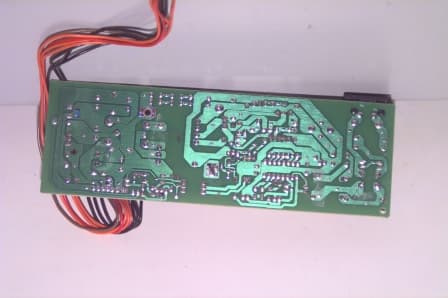
Click to zoom
Application Details
- Equipment Class
- JBP - Part 15 Class B Computing Device Peripheral
- Date of Grant
- Nov 15, 2000
- Application Purpose
- Original Equipment
- Date of Application
- Sep 21, 2000
- Equipment Note
- Printer
- Company
- Ing C Olivetti & Co SpA
- Country
- Italy
Documents & Files
Document Text
Text extracted from the exhibit documents filed with the FCC. Open a document above to read the original.
Users Manual
User's Manual Ink Jet Colour Printer Artjet 12 Contentsiii Contents Introducing the Printer . . . . . . . . . . . . . . . . . . . . . . . . . . . . . . . . . . . . . . . . . . 1 Parts of the Printer . . . . . . . . . . . . . . . . . . . . . . . . . . . . . . . . . . . . . . . . . . . . . 1 Switching on and off of the Printer . . . . . . . . . . . . . . . . . . . . . . . . . . . . . . . . . 2 The Operator's Panel . . . . . . . . . . . . . . . . . . . . . . . . . . . . . . . . . . . . . . . . . . . 3 Printer statuses . . . . . . . . . . . . . . . . . . . . . . . . . . . . . . . . . . . . . . . . . . . . . 3 Button Functions . . . . . . . . . . . . . . . . . . . . . . . . . . . . . . . . . . . . . . . . . . . . 4 Printer Software . . . . . . . . . . . . . . . . . . . . . . . . . . . . . . . . . . . . . . . . . . . . . . . . 5 The Printer Monitor . . . . . . . . . . . . . . . . . . . . . . . . . . . . . . . . . . . . . . . . . . . . 6 Opening the Printer Monitor . . . . . . . . . . . . . . . . . . . . . . . . . . . . . . . . . . . . 7 Printer Properties . . . . . . . . . . . . . . . . . . . . . . . . . . . . . . . . . . . . . . . . . . . . . . 7 Opening Printer Properties . . . . . . . . . . . . . . . . . . . . . . . . . . . . . . . . . . . . . 8 Spool Manager for Windows 3.1/3.11 . . . . . . . . . . . . . . . . . . . . . . . . . . . . . . 9 Opening the Spool Manager . . . . . . . . . . . . . . . . . . . . . . . . . . . . . . . . . . . 9 On-line Help Guides . . . . . . . . . . . . . . . . . . . . . . . . . . . . . . . . . . . . . . . . . . 10 Accessing the on line help guide for the print driver . . . . . . . . . . . . . . . . . 10 Accessing the Troubleshooting on line help guide . . . . . . . . . . . . . . . . . . 12 The Print Head . . . . . . . . . . . . . . . . . . . . . . . . . . . . . . . . . . . . . . . . . . . . . . . . 13 Replacing the Print Head . . . . . . . . . . . . . . . . . . . . . . . . . . . . . . . . . . . . . . . 14 Completing Print Head Installation . . . . . . . . . . . . . . . . . . . . . . . . . . . . . . 16 Print Head Alignment . . . . . . . . . . . . . . . . . . . . . . . . . . . . . . . . . . . . . . . . . . 17 Print Head Care and Preservation . . . . . . . . . . . . . . . . . . . . . . . . . . . . . . . . 18 Cleaning the Print Head . . . . . . . . . . . . . . . . . . . . . . . . . . . . . . . . . . . . . . . . 18 Cleaning the Print Head Nozzles . . . . . . . . . . . . . . . . . . . . . . . . . . . . . . . 19 Manually Cleaning Print Head Nozzles and Electrical Contacts . . . . . . . 20 Cleaning the Print Head Carriage Electrical Contacts . . . . . . . . . . . . . . . 21 Print Test from Printer Monitor . . . . . . . . . . . . . . . . . . . . . . . . . . . . . . . . . . . 22 Printing on Common Paper . . . . . . . . . . . . . . . . . . . . . . . . . . . . . . . . . . . . . . 23 Loading the Paper . . . . . . . . . . . . . . . . . . . . . . . . . . . . . . . . . . . . . . . . . . . . 23 Loading the Paper in the Automatic Feeder . . . . . . . . . . . . . . . . . . . . . . . 23 Printer Settings . . . . . . . . . . . . . . . . . . . . . . . . . . . . . . . . . . . . . . . . . . . . . 24 Loading the Paper in the Manual Feeder . . . . . . . . . . . . . . . . . . . . . . . . . 25 ivContents Printing on Other Supports . . . . . . . . . . . . . . . . . . . . . . . . . . . . . . . . . . . . . . 26 Printing on Photographic Paper . . . . . . . . . . . . . . . . . . . . . . . . . . . . . . . . . . 27 Printing on Transparent Paper . . . . . . . . . . . . . . . . . . . . . . . . . . . . . . . . . . 28 Printing on Coated Paper . . . . . . . . . . . . . . . . . . . . . . . . . . . . . . . . . . . . . . 29 Printing on Glossy Paper . . . . . . . . . . . . . . . . . . . . . . . . . . . . . . . . . . . . . . . 30 Printing on Tee Shirt Transfers . . . . . . . . . . . . . . . . . . . . . . . . . . . . . . . . . . 31 Printing Envelopes . . . . . . . . . . . . . . . . . . . . . . . . . . . . . . . . . . . . . . . . . . . . 32 Printing Cards . . . . . . . . . . . . . . . . . . . . . . . . . . . . . . . . . . . . . . . . . . . . . . . 33 Printing on Customised Paper Sizes . . . . . . . . . . . . . . . . . . . . . . . . . . . . . . 34 Printing on Banners . . . . . . . . . . . . . . . . . . . . . . . . . . . . . . . . . . . . . . . . . . . 35 Consumables . . . . . . . . . . . . . . . . . . . . . . . . . . . . . . . . . . . . . . . . . . . . . . . . . 37 Print Heads . . . . . . . . . . . . . . . . . . . . . . . . . . . . . . . . . . . . . . . . . . . . . . . 37 Print Supports . . . . . . . . . . . . . . . . . . . . . . . . . . . . . . . . . . . . . . . . . . . . . 37 Technical Specifications . . . . . . . . . . . . . . . . . . . . . . . . . . . . . . . . . . . . . . . . 38 Introducing the Printer1 Introducing the Printer Your machine is a colour inkjet printer for high quality graphic and text printing. It can print on individual sheets, envelopes, labels, cards, glossy paper, coated paper, photographic paper, transparencies, banners and transfers for tee-shirts. Parts of the Printer The figure below shows the front parts of the printer. A. Paper support : it supports the paper and any other materials loaded into the automatic sheet feeder. B. Side paper guide : aligns sheets according to their width. C. Automatic feeder : inserts paper and special print supports. D. Operator panel button : see Button Functions section. E. Indicator LED on the operator's panel : indicates printer status (see Printer Statuses section). F. Front door : allows access inside the machine to replace the print head or remove paper jams. G. Paper outlet : after documents are printed. B A C D E F G 2Introducing the Printer The following figure shows the parts that can be accessed from the rear of the printer. H. Manual feeder : allows to insert special print supports or a single sheet into the machine. I. Power cord connector : allows to connect the printer to mains power supply. J. Parallel communication port : allows connec…
Text truncated - open the document above for the full version.
Users Manual
User's Manual Ink Jet Colour Printer Artjet 12 Contentsiii Contents Introducing the Printer . . . . . . . . . . . . . . . . . . . . . . . . . . . . . . . . . . . . . . . . . . 1 Parts of the Printer . . . . . . . . . . . . . . . . . . . . . . . . . . . . . . . . . . . . . . . . . . . . . 1 Switching on and off of the Printer . . . . . . . . . . . . . . . . . . . . . . . . . . . . . . . . . 2 The Operator's Panel . . . . . . . . . . . . . . . . . . . . . . . . . . . . . . . . . . . . . . . . . . . 3 Printer statuses . . . . . . . . . . . . . . . . . . . . . . . . . . . . . . . . . . . . . . . . . . . . . 3 Button Functions . . . . . . . . . . . . . . . . . . . . . . . . . . . . . . . . . . . . . . . . . . . . 4 Printer Software . . . . . . . . . . . . . . . . . . . . . . . . . . . . . . . . . . . . . . . . . . . . . . . . 5 The Printer Monitor . . . . . . . . . . . . . . . . . . . . . . . . . . . . . . . . . . . . . . . . . . . . 6 Opening the Printer Monitor . . . . . . . . . . . . . . . . . . . . . . . . . . . . . . . . . . . . 7 Printer Properties . . . . . . . . . . . . . . . . . . . . . . . . . . . . . . . . . . . . . . . . . . . . . . 7 Opening Printer Properties . . . . . . . . . . . . . . . . . . . . . . . . . . . . . . . . . . . . . 8 Spool Manager for Windows 3.1/3.11 . . . . . . . . . . . . . . . . . . . . . . . . . . . . . . 9 Opening the Spool Manager . . . . . . . . . . . . . . . . . . . . . . . . . . . . . . . . . . . 9 On-line Help Guides . . . . . . . . . . . . . . . . . . . . . . . . . . . . . . . . . . . . . . . . . . 10 Accessing the on line help guide for the print driver . . . . . . . . . . . . . . . . . 10 Accessing the Troubleshooting on line help guide . . . . . . . . . . . . . . . . . . 12 The Print Head . . . . . . . . . . . . . . . . . . . . . . . . . . . . . . . . . . . . . . . . . . . . . . . . 13 Replacing the Print Head . . . . . . . . . . . . . . . . . . . . . . . . . . . . . . . . . . . . . . . 14 Completing Print Head Installation . . . . . . . . . . . . . . . . . . . . . . . . . . . . . . 16 Print Head Alignment . . . . . . . . . . . . . . . . . . . . . . . . . . . . . . . . . . . . . . . . . . 17 Print Head Care and Preservation . . . . . . . . . . . . . . . . . . . . . . . . . . . . . . . . 18 Cleaning the Print Head . . . . . . . . . . . . . . . . . . . . . . . . . . . . . . . . . . . . . . . . 18 Cleaning the Print Head Nozzles . . . . . . . . . . . . . . . . . . . . . . . . . . . . . . . 19 Manually Cleaning Print Head Nozzles and Electrical Contacts . . . . . . . 20 Cleaning the Print Head Carriage Electrical Contacts . . . . . . . . . . . . . . . 21 Print Test from Printer Monitor . . . . . . . . . . . . . . . . . . . . . . . . . . . . . . . . . . . 22 Printing on Common Paper . . . . . . . . . . . . . . . . . . . . . . . . . . . . . . . . . . . . . . 23 Loading the Paper . . . . . . . . . . . . . . . . . . . . . . . . . . . . . . . . . . . . . . . . . . . . 23 Loading the Paper in the Automatic Feeder . . . . . . . . . . . . . . . . . . . . . . . 23 Printer Settings . . . . . . . . . . . . . . . . . . . . . . . . . . . . . . . . . . . . . . . . . . . . . 24 Loading the Paper in the Manual Feeder . . . . . . . . . . . . . . . . . . . . . . . . . 25 ivContents Printing on Other Supports . . . . . . . . . . . . . . . . . . . . . . . . . . . . . . . . . . . . . . 26 Printing on Photographic Paper . . . . . . . . . . . . . . . . . . . . . . . . . . . . . . . . . . 27 Printing on Transparent Paper . . . . . . . . . . . . . . . . . . . . . . . . . . . . . . . . . . 28 Printing on Coated Paper . . . . . . . . . . . . . . . . . . . . . . . . . . . . . . . . . . . . . . 29 Printing on Glossy Paper . . . . . . . . . . . . . . . . . . . . . . . . . . . . . . . . . . . . . . . 30 Printing on Tee Shirt Transfers . . . . . . . . . . . . . . . . . . . . . . . . . . . . . . . . . . 31 Printing Envelopes . . . . . . . . . . . . . . . . . . . . . . . . . . . . . . . . . . . . . . . . . . . . 32 Printing Cards . . . . . . . . . . . . . . . . . . . . . . . . . . . . . . . . . . . . . . . . . . . . . . . 33 Printing on Customised Paper Sizes . . . . . . . . . . . . . . . . . . . . . . . . . . . . . . 34 Printing on Banners . . . . . . . . . . . . . . . . . . . . . . . . . . . . . . . . . . . . . . . . . . . 35 Consumables . . . . . . . . . . . . . . . . . . . . . . . . . . . . . . . . . . . . . . . . . . . . . . . . . 37 Print Heads . . . . . . . . . . . . . . . . . . . . . . . . . . . . . . . . . . . . . . . . . . . . . . . 37 Print Supports . . . . . . . . . . . . . . . . . . . . . . . . . . . . . . . . . . . . . . . . . . . . . 37 Technical Specifications . . . . . . . . . . . . . . . . . . . . . . . . . . . . . . . . . . . . . . . . 38 Introducing the Printer1 Introducing the Printer Your machine is a colour inkjet printer for high quality graphic and text printing. It can print on individual sheets, envelopes, labels, cards, glossy paper, coated paper, photographic paper, transparencies, banners and transfers for tee-shirts. Parts of the Printer The figure below shows the front parts of the printer. A. Paper support : it supports the paper and any other materials loaded into the automatic sheet feeder. B. Side paper guide : aligns sheets according to their width. C. Automatic feeder : inserts paper and special print supports. D. Operator panel button : see Button Functions section. E. Indicator LED on the operator's panel : indicates printer status (see Printer Statuses section). F. Front door : allows access inside the machine to replace the print head or remove paper jams. G. Paper outlet : after documents are printed. B A C D E F G 2Introducing the Printer The following figure shows the parts that can be accessed from the rear of the printer. H. Manual feeder : allows to insert special print supports or a single sheet into the machine. I. Power cord connector : allows to connect the printer to mains power supply. J. Parallel communication port : allows connec…
Text truncated - open the document above for the full version.
Block Diagram
BLOCK DIAGRAM POWER SUPPLY PAPER MOTOR DRIVER +5V +11V +24V 20 MHz CARRIAGE MOTOR DRIVER EEPROM ASIC BLACK OR CENTRONICS COLOR & HEAD DRIVER DRAM PAPER/HOMING CPU SENSOR FLASH CARRIAGE (for debug) CONSOLE USB 6 MHz DRIVER
ID Label/Location Info
ID Label Figure 2.1 FCC ID Label Figure 2.2 Location of Label on EUT
Internal Photos
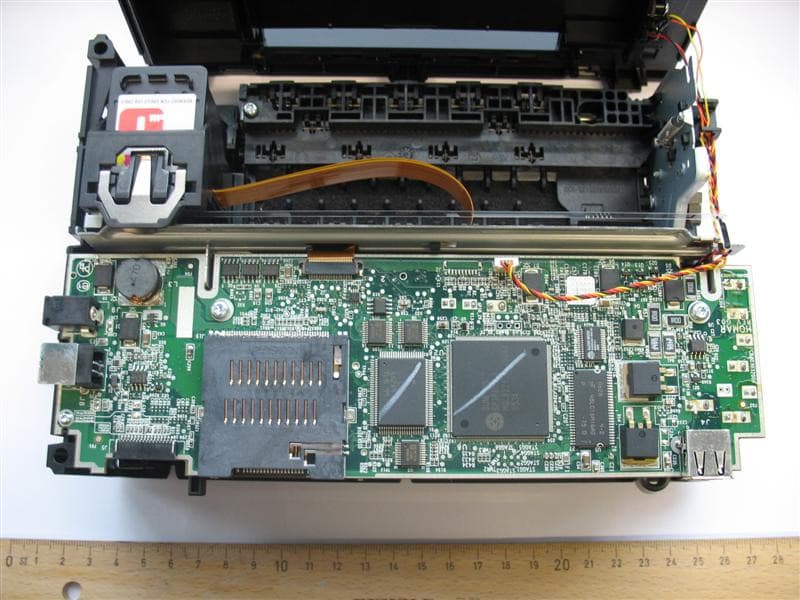
INTERNAL PHOTOS Fig. 8.4 Internal view with upper cover removed (without paper feeder) Fig. 8.5 Power Supply Unit P.W.A. - Components side Fig. 8.6 Power Supply Unit P.W.A. - Foil side Fig. 8.7 Controller Board - Components side Fig. 8.8 Controller Board - Components side (with additional metal shield) Fig. 8.9 Controller Board - Foil side
Test Report
Test Report No. RD2000/156 FCC ID: DYK00AJ12 Date July 19th, 2000 TÜV QSL 1/18 MEASUREMENT/TECHNICAL REPORT OLIVETTI PRINTER FCC ID: DYK00AJ12 July 19th, 2000 This report concerns (check one): Original grant __X__ Class II change____ Equipment type: PRINTER (ex.: computer, printer, modem, etc.) Deferred grant request per 47 CFR 0.457(d)(1)(ii)? yes _____ no __X__ If yes, defer until: ______________ date Company Name agrees to notify the Commission by ______________ date of the intended date of announcement of the product so that the grant can be issued on that date. Report prepared by: P.Antonio VELO Giuseppe MECCHIA TÜV QSL srl Via Montalenghe 12 10010 Scarmagno ( TO ) Italy Phone : 0125 - 525441 Phone : 0125 – 525440 Fax : 0125 – 525499 Test Report No. RD2000/156 FCC ID: DYK00AJ12 Date July 19th, 2000 TÜV QSL 2/18 Table of Contents Page 1GENERAL INFORMATION ...................................................... 3 1.1 Product Description ...................................................... 3 1.2 Related Submittal(s)/Grant(s) ........................................ 3 1.3 Tested System Details................................................... 4 1.4 Test Methodology.......................................................... 5 1.5 Test Facility................................................................... 5 2PRODUCT LABELING.............................................................. 6 Figure 2.1 FCC ID Label...................................................... 6 Figure 2.2 Location of the Label on EUT.............................. 7 3SYSTEM TEST CONFIGURATION........................................... 8 3.1 Justification ................................................................... 8 3.2 EUT Exercise Software .................................................. 8 3.3 Special Accessories....................................................... 9 3.4 Equipment Modifications................................................ 9 3.5 Configuration of the Tested System ............................... 10 Figure 3.1 Configuration of the Tested System ..................... 10 4BLOCK DIAGRAM(S) OF THE EUT.. ........................................ 11 4.1 Block Diagram Description.............................................. 11 Figure 4.1 Block Diagram of the EUT................................... 12 5CONDUCTED AND RADIATED MEASUREMENT PHOTOS...... 13 6CONDUCTED EMISSION DATA............................................... 14 7RADIATED EMISSION DATA.................................................... 15 7.2 Field Strength Calculation ............................................. 16 8PHOTOS OF TESTED EUT...................................................... 17 User Manual................................................................................... 18 Test Report No. RD2000/156 FCC ID: DYK00AJ12 Date July 19th, 2000 TÜV QSL 3/18 1 GENERAL INFORMATION 1.1 Product Description The EUT is a desk-top bubble ink-jet printer intended to be connected to Personal Computers in a system configuration: two interface ports are provided (parallel and USB). It is equipped with a printing head that can be fitted alternatively with color or black ink- cartidges being capable of driving one or the other according to the instructions received from the Computer. It is supplied by a Switched Mode Power Supply Unit and includes a Controller (Printed Wiring Board with standard electronic components) and a printing unit driven by dc stepping motors. 1.2 Related Submittal(s)/Grant(s) None Test Report No. RD2000/156 FCC ID: DYK00AJ12 Date July 19th, 2000 TÜV QSL 4/18 1.3 Tested System Details The FCC IDs for all equipment, plus descriptions of all cables used in the tested system (including inserted cards, which have grants) are: Model & Serial No. FCC IDDescriptionCable Descriptions ----------------------------------------------------------------------------------------------------------- Artjet 12 ( 1 ) s/n EMC-2000-0351 DYK00AJ12Printer, parallel and USB I/F Shielded parallel cable Shielded USB cable Unshielded pow er cord Acer TravelMate 517 s/n 9145C01Q0I- 94400122K Declaration of Conformity Personal Computer Unshielded power cord Shielded signal cables Delta Electronics mod. ADP-60JB s/n DND9939132283 NoneAC adapterUnshielded power cords HP 7440A s/n 2539A94878 BSD8537440Plotter, serial I/FShielded serial cable Unshielded power cord (1) EUT submitted for grant. Test Report No. RD2000/156 FCC ID: DYK00AJ12 Date July 19th, 2000 TÜV QSL 5/18 1.4 Test Methodology Both conducted and radiated testing were performed according to the ANSI C63.4-1992 test procedures . Radiated testing was performed at an antenna to EUT distance of 3 meters. 1.5 Test Facility TÜV QSL test site No. 2 The open area test site and conducted measurement facility used to collect the radiated data are located at Via Montalenghe 12, Scarmagno, Italy. This site has been fully described in a report dated May 4, 2000 submitted to your office, and accepted in a letter dated May 30, 2000 (registration Number: 90860) Test equipment list: Test receiverRohde & Schwarz ESH3s/n 881364/012 LISNSchwarzbeck NNLA8120s/n 8120399 Test receiverRohde & Schwarz ESVPs/n 879783/029 Biconical antennaEMCO 3110s/n 1735 Log-periodic antenna EMCO 3146 s/n 3678 Test Report No. RD2000/156 FCC ID: DYK00AJ12 Date July 19th, 2000 TÜV QSL 6/18 2 PRODUCT LABELING Figure 2.1 FCC ID Label See file: ID Label. doc Test Report No. RD2000/156 FCC ID: DYK00AJ12 Date July 19th, 2000 TÜV QSL 7/18 Figure 2.2 Location of Label on EUT See file: ID Label. doc Test Report No. RD2000/156 FCC ID: DYK00AJ12 Date July 19th, 2000 TÜV QSL 8/18 3 SYSTEM TEST CONFIGURATION 3.1 Justification The printer was configured for testing in a typical fashion (as a customer would normally use it). It was connected to the parallel and to USB port of a personal computer and operated in standard mode. Two tests have been run: - 1. With parallel port selected and - 2. With USB port selected Data attached to t…
Text truncated - open the document above for the full version.
Test Setup Photos
TEST SETUP PHOTOS
Contact Information
Applicant
C. Garbasso
39 125-527308Fax: 39 125 529840
Test Firm
TUV ItaliaGiuseppe Mecchia
Technical Specifications
| # | Rule Parts | Frequency Range | Power Output |
|---|---|---|---|
| 1 | 15B | - | - |
Other Applications from Ing C Olivetti & Co SpA
DYKMYWAYPLUS06
May 02, 2007BT Printer
Equipment Class
DSS - Part 15 Spread Spectrum Transmitter
DYK98XP32
Jul 08, 1999JBP - Part 15 Class B Computing Device Peripheral
Equipment Class
JBP - Part 15 Class B Computing Device Peripheral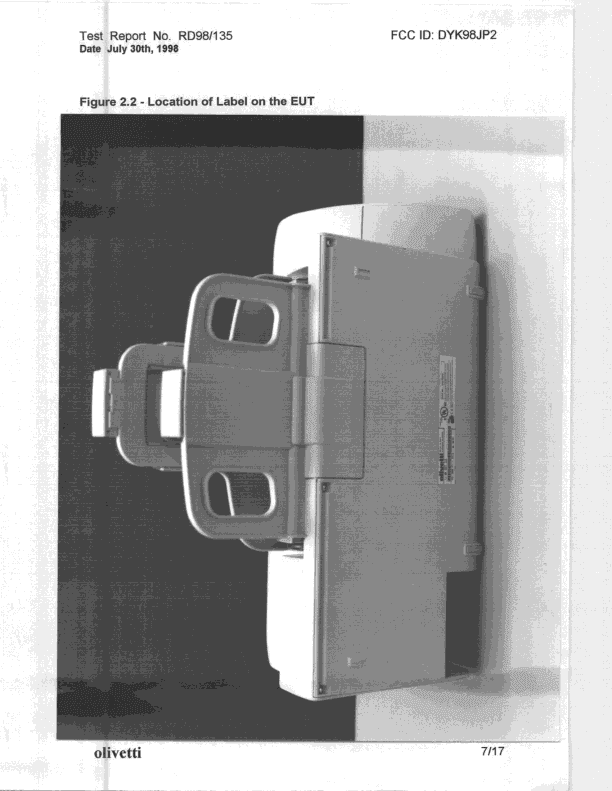
DYK98JP2
Dec 29, 1998JBP - Part 15 Class B Computing Device Peripheral
Equipment Class
JBP - Part 15 Class B Computing Device Peripheral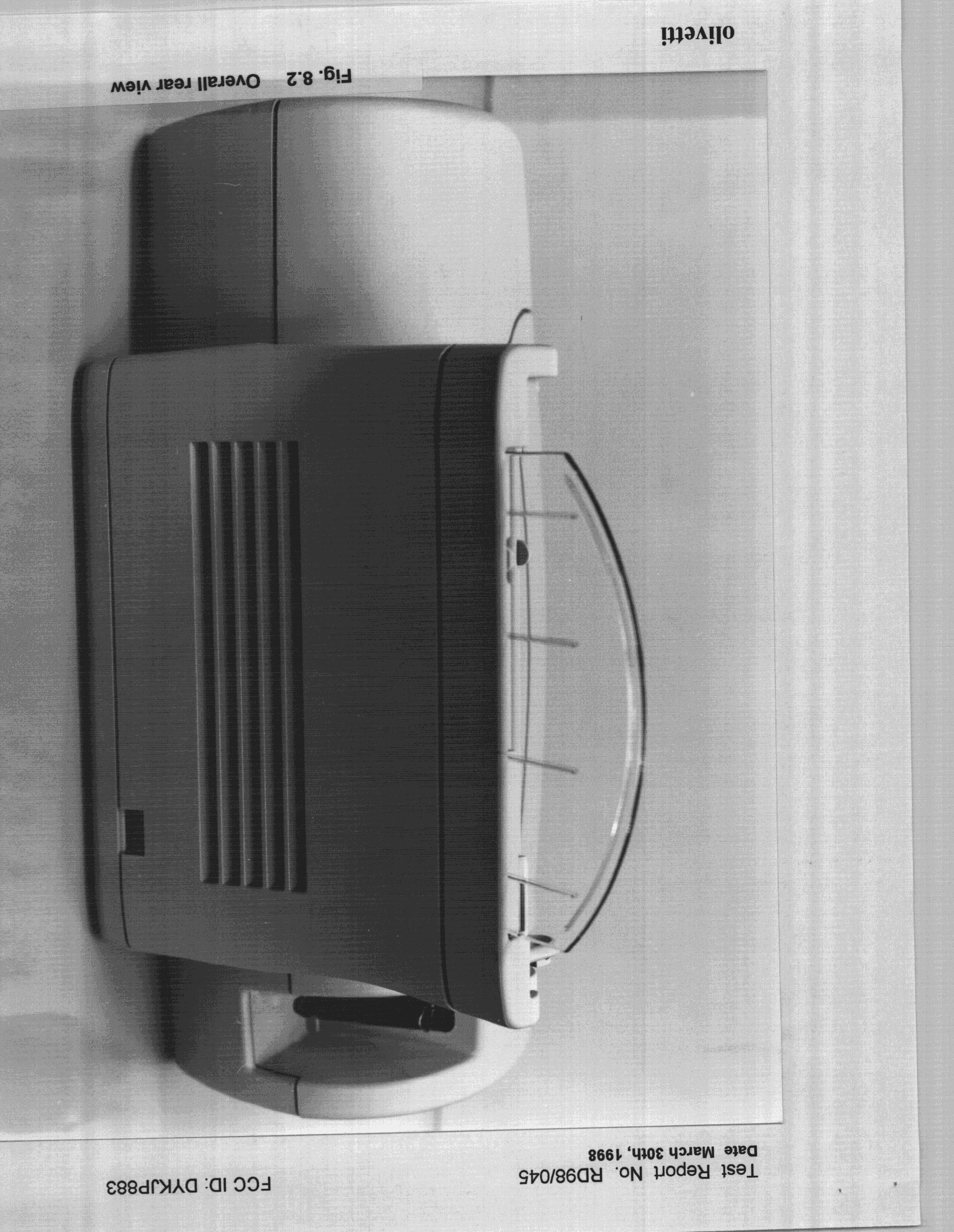
DYKJP883
Jul 30, 1998Bubble Jet Printer
Equipment Class
JBP - Part 15 Class B Computing Device PeripheralDYKJP190
Jun 12, 1997JBP - Part 15 Class B Computing Device Peripheral
Equipment Class
JBP - Part 15 Class B Computing Device Peripheral