E8HVGP-BMS20Bluetooth Laser Mouse
Chicony Electronics Co Ltd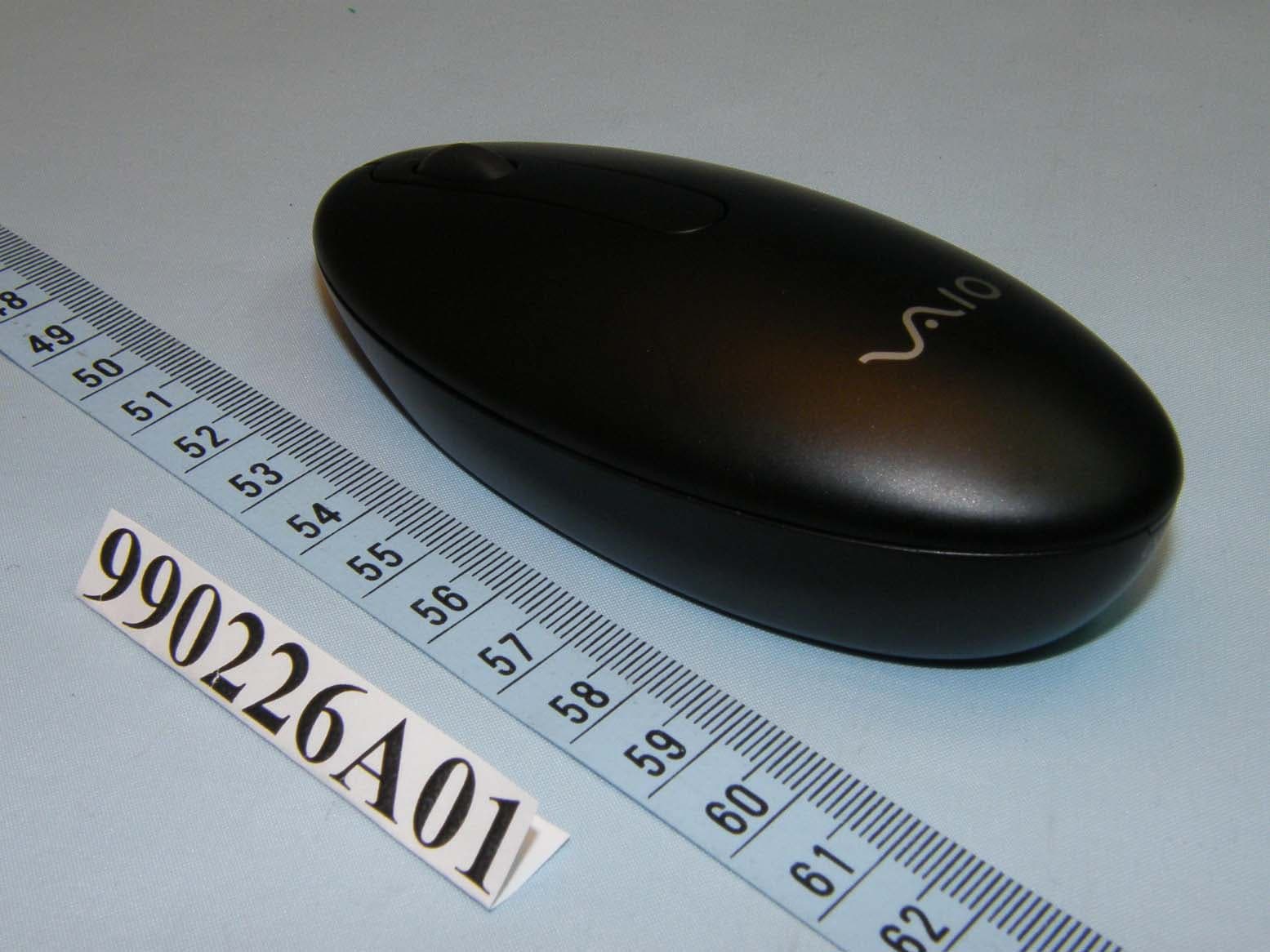
Click to zoom
Application Details
- Equipment Class
- DSS - Part 15 Spread Spectrum Transmitter
- Date of Grant
- Mar 17, 2010
- Application Purpose
- Original Equipment
- Date of Application
- Mar 17, 2010
- Equipment Note
- Bluetooth Laser Mouse
- Frequency Range
- 2402.00000000 - 2480.00000000
- Company
- Chicony Electronics Co Ltd
- Country
- Taiwan
Documents & Files
Document Text
Text extracted from the exhibit documents filed with the FCC. Open a document above to read the original.
Users Manual
Before Use This product is a laser mouse equipped with Bluetooth technology. It can be used with IBM PC/AT compatible computers pre-installed with the Windows 7, Windows Vista or Windows XP (SP2 and after) operating system and integrated built-in Bluetooth functionality (as of October 2009). Depending on the personal computer or version of software you are using, the mouse may not operate by function correctly. Consult your nearest Sony dealer about proper operating environments and information about Sony VAIO and Bluetooth compatibility. Notes •Operation cannot be guaranteed for all computers meeting the above system requirements. •Operation is not guaranteed for home-built computers, whitebox PCs, and computers with an upgraded OS or multiboot system environment. Part names Inserting Batteries into the Mouse 1Set the power switch located on the bottom of the mouse to OFF. 2Open the battery compartment cover and insert the two supplied LR6 (size AA) batteries with the correct + - orientation. 3Close the battery compartment cover. z Hint Under normal operating conditions, a set of alkaline batteries lasts about three months*. When cursor movement becomes sluggish and the communication distance between the mouse and your personal computer decreases, check the low battery lamp on the mouse. When not using the mouse, set the power switch to OFF. This will make the batteries last longer. * This estimate is based on five hours of use per day, five days per week. These could be different depending on the usage environment. Replacing the batteries The low battery lamp flashing red indicates that the battery life is running low. Replace the batteries when this occurs. Enabling Communication between the Mouse and Your Personal Computer Use the Bluetooth software installed on your personal computer to enable communication between the mouse and your personal computer. Note Activate the Bluetooth software on your personal computer. Operation of the Bluetooth software may vary depending on your personal computer. For details, refer to the manuals provided with your personal computer. The setup instructions are based on your operating system. If your computer is pre-installed with Windows 7, go directly to the instructions in Case A. If your computer is pre-installed with Windows XP, go directly to the instructions in Case D. If your computer is pre-installed with Windows Vista, follow these steps (In certain situations, you may be directed to the instructions in Case B, Case C or Case D): 1Click (Start), then “Control Panel.” 2Click the “Hardware and Sound” icon. 3If the “Bluetooth Devices” icon is in the “Hardware and Sound” window: Go to step 4. If the “Bluetooth Devices” icon is not visible in the “Hardware and Sound” window: Close the “Control Panel” and go to Case D. 4Click the “Bluetooth Devices” icon, and verify the contents of the window displayed. Note If you switch to Classic View, double-click the “Bluetooth Devices” icon. 5Review the Bluetooth Devices windows shown here. If you see window 1, go to the instructions in Case B. If you see window 2, go to the instructions in Case C. Window 1 Window 2 Case A 1Click (Start), then click “Devices and Printers.” 2Set the power switch located on the bottom of the mouse to ON. 3Press the CONNECT button on the bottom of the mouse. 4Click “Add a device” in the “Devices and Printers” window. 5In the device list, select “VGP-BMS20,” and click “Next.” z Hint If the “Select a pairing option” window is displayed, select “Pair without using a code,” and click “Next.” 6Click “Close” in the “Add a device” window. 7Move the mouse. If the pointer displayed on your screen moves appropriately, the connection is complete. Case B 1Set the power switch located on the bottom of the mouse to ON. 2Press the CONNECT button on the bottom of the mouse. The low battery lamp flashes green. 3On the “Bluetooth Devices” window, click the “Add Wireless Device” icon. English WARNING To reduce the risk of fire or electric shock, do not expose the unit to rain or moisture. Owner’s Record The model number and the serial number are located inside the battery compartment of the mouse. Record the serial number in the space provided below. Refer to this number whenever you call your Sony dealer regarding this product. Model No. VGP-BMS20 Serial No. ____________________ Caution Do not look directly into the lens. The laser light may cause eye injury. To prevent battery fluid leaks and damage, observe the following precautions: •Insert the batteries with the correct +/– orientation. •Do not charge dry cell batteries. •Do not mix old and new batteries, or batteries of a different type. •If the mouse has not been used for a long time, remove the batteries. • If a battery fluid leak occurs, carefully wipe the battery compartment, and insert new batteries. •To prevent accidental operation, be careful not to press any buttons when replacing the batteries. If any solid object or liquid falls onto the mouse, set the power to off and have it checked by qualified personnel before continuing its use. Do not place the mouse in a location where it is: •On an unstable surface •In very humid areas or where there is no ventilation •Subject to excessive dust •Subject to direct sunlight or extreme heat •Extremely cold If the mouse is brought directly from a cold to a warm location or is placed in a very damp room, moisture may condense on the inside of the mouse. If this occurs, the mouse may not work properly. In this case, wait about 30 minutes for the moisture to evaporate. If the mouse does not work properly after one hour, consult your nearest Sony dealer. For customers in the U.S.A. The following FCC statement applies only to the version of this model manufactured for sale in the USA. Other versions may not comply with FCC technical regulations. This equipment has been tested and found to comply with the limits for a Class B digital device, pursuant to Part 15 of the FCC Rules. These limits are des…
Text truncated - open the document above for the full version.
External Photos
Page: 1 Page: 2
ID Label/Location Info
FCC ID: E8HVGP-BMS20 FCC LABEL LOCATION The label will be permanently affixed at a conspicuous location on the device. Cover has hinge which attached to the mouse body and can't be removed when it is at open position Label
Internal Photos
Page: 3 Page: 4 Page: 5 Page: 6 Page: 7
Operational Description
FCC ID: E8HVGP-BMS20 Report No.: RF990226A01 Operational Description The device is a Frequency Hopping device with 79 hopping frequencies. The antenna type is Printed Antenna and there is no antenna connector used. The EUT is a unit that contains a Bluetooth radio module. Bluetooth is a short-range wireless technology operating in the 2.4GHz band. It enables devices to have the ability to form networks and exchange information. The other instruction, please have a look at the user’s manual.
RF Exposure Info
Report No: SA990226A01 1 Report Format Version 3.0.1 RF EXPOSURE REPORT REPORT NO.: SA990226A01 MODEL NO.: VGP-BMS20 ACCORDING: FCC Guidelines for Human Exposure IEEE C95.1 APPLICANT : Chicony Electronics Co., Ltd. ADDRESS : No. 25, Wu-Gong 6th Rd., Wu Ku Industrial Park, Taipei Hsien, Taiwan, R.O.C. ISSUED BY : Bureau Veritas Consumer Products Services (H.K.) Ltd., Taoyuan Branch LAB ADDRESS : No. 47, 14th Ling, Chia Pau Tsuen, Lin Kou Hsiang, Taipei Hsien, 244 Taiwan Report No: SA990226A01 2 Report Format Version 3.0.1 Conclusion No Evaluation Required if power is below this threshold: F(GHz) mW Low 2.402 High 2.480 24.58 Maximum measured transmitter power: Pout (dBm) Pout (mW) Conducted Power -1.9 0.6 EIRP Power -2.6 0.5 *Note: The antenna is Printed antenna with -0.79dBi gain Threshold for no SAR evaluation is 24.58mW Transmitter power is 0.6mW Conclusion: No SAR evaluation required since Transmitter Pout is below FCC threshold ---END---
Test Report
Report No.: RF990226A01 1 Report Format Version 3.0.1 FCC TEST REPORT REPORT NO.: RF990226A01 MODEL NO.: VGP-BMS20 RECEIVED: March 1, 2010 TESTED: March 2 ~ 5, 2010 ISSUED: March 8, 2010 APPLICANT: Chicony Electronics Co., Ltd. ADDRESS: No. 25, Wu-Gong 6th Rd., Wu Ku Industrial Park, Taipei Hsien, Taiwan, R.O.C. ISSUED BY: Bureau Veritas Consumer Products Services (H.K.) Ltd., Taoyuan Branch LAB LOCATION: No. 47, 14th Ling, Chia Pau Tsuen, Lin Kou Hsiang, Taipei Hsien, 244 Taiwan This test report consists of 41 pages in total. It may be duplicated completely for legal use with the approval of the applicant. It should not be reproduced except in full, without the written approval of our laboratory. The client should not use it to claim product endorsement by TAF or any government agencies. The test results in the report only apply to the tested sample. Report No.: RF990226A01 2 Report Format Version 3.0.1 TABLE OF CONTENTS 1. CERTIFICATION........................................................................................4 2. SUMMARY OF TEST RESULTS...............................................................5 2.1 MEASUREMENT UNCERTAINTY.............................................................6 3. GENERAL INFORMATION........................................................................7 3.1 GENERAL DESCRIPTION OF EUT..........................................................7 3.2 DESCRIPTION OF TEST MODES............................................................8 3.2.1 CONFIGURATION OF SYSTEM UNDER TEST........................................8 3.2.2 TEST MODE APPLICABILITY AND TESTED CHANNEL DETAIL.............9 3.3.3 GENERAL DESCRIPTION OF APPLIED STANDARDS..........................10 3.3.4 DESCRIPTION OF SUPPORT UNITS.....................................................10 4. TEST TYPES AND RESULTS..................................................................11 4.1 CONDUCTED EMISSION MEASUREMENT...........................................11 4.2 RADIATED EMISSION MEASUREMENT................................................11 4.2.1 LIMITS OF RADIATED EMISSION MEASUREMENT.............................11 4.2.2 TEST INSTRUMENTS.............................................................................12 4.2.3 TEST PROCEDURES.............................................................................13 4.2.4 DEVIATION FROM TEST STANDARD....................................................13 4.2.5 TEST SETUP...........................................................................................14 4.2.6 EUT OPERATING CONDITIONS.............................................................14 4.2.7 TEST RESULTS......................................................................................15 4.3 NUMBER OF HOPPING FREQUENCY USED........................................20 4.3.1 LIMIT OF HOPPING FREQUENCY USED..............................................20 4.3.2 TEST INSTRUMENTS.............................................................................20 4.3.3 TEST PROCEDURES.............................................................................20 4.3.4 DEVIATION FROM TEST STANDARD....................................................21 4.3.5 TEST SETUP...........................................................................................21 4.3.6 TEST RESULTS......................................................................................21 4.4 DWELL TIME ON EACH CHANNEL........................................................23 4.4.1 LIMIT OF DWELL TIME USED................................................................23 4.4.2 TEST INSTRUMENTS.............................................................................23 4.4.3 TEST PROCEDURES.............................................................................23 4.4.4 DEVIATION FROM TEST STANDARD....................................................23 4.4.5 TEST SETUP...........................................................................................24 4.4.6 TEST RESULTS......................................................................................24 4.5 CHANNEL BANDWIDTH.........................................................................27 4.5.1 LIMITS OF CHANNEL BANDWIDTH.......................................................27 4.5.2 TEST INSTRUMENTS.............................................................................27 4.5.3 TEST PROCEDURE................................................................................27 4.5.4 DEVIATION FROM TEST STANDARD....................................................28 4.5.5 TEST SETUP...........................................................................................28 4.5.6 EUT OPERATING CONDITION...............................................................28 4.5.7 TEST RESULTS......................................................................................29 Report No.: RF990226A01 3 Report Format Version 3.0.1 4.6 HOPPING CHANNEL SEPARATION.......................................................30 4.6.1 LIMIT OF HOPPING CHANNEL SEPARATION.......................................30 4.6.2 TEST INSTRUMENTS.............................................................................30 4.6.3 TEST PROCEDURES.............................................................................30 4.6.4 DEVIATION FROM TEST STANDARD....................................................30 4.6.5 TEST SETUP...........................................................................................30 4.6.6 TEST RESULTS......................................................................................31 4.7 MAXIMUM PEAK OUTPUT POWER.......................................................32 4.7.1 LIMITS OF MAXIMUM PEAK OUTPUT POWER MEASUREMENT........32 4.7.2 TEST INSTRUMENTS.............................................................................32 4.7.3 TEST PROCEDURES..........................................................................…
Text truncated - open the document above for the full version.
Test Setup Photos
1 PHOTOGRAPHS OF THE TEST CONFIGURATION RADIATED EMISSION TEST
Contact Information
Applicant
T. S. Chen(Manager)
Technical Contact
Bureau Veritas CPS (H.K.) Ltd. Taoyuan BranchGary Chang
[email protected]886-3-3183232
No. 19, Hwa Ya 2nd Rd., Kwei Shan Hsiang · Taoyuan Hsien · Taiwan
Non-Technical Contact
Bureau Veritas CPS (H.K.) Ltd. Taoyuan BranchZoe Chang
[email protected]886-3-3183232
Test Firm
Bureau Veritas CPS (H.K.) Ltd. Taoyuan BranchRichard Chen
Technical Specifications
| # | Rule Parts | Frequency Range | Power Output |
|---|---|---|---|
| 1 | 15C | 2.40 GHz - 2.48 GHz | 1.00 mW |
Other Applications from Chicony Electronics Co Ltd
E8HWBS23B5LUB
Sep 19, 2023USI Rechargeable Active Pen
Equipment Class
DXX - Part 15 Low Power Communication Device Transmitter
E8HRG-2308
Sep 19, 2023Dongle
Equipment Class
DXX - Part 15 Low Power Communication Device Transmitter
E8HMG-2308
Sep 19, 2023Gaming Mouse
Equipment Class
DXX - Part 15 Low Power Communication Device Transmitter
E8HKC-2227
Feb 01, 2023Gaming Keyboard
Equipment Class
DTS - Digital Transmission System
E8HTPA-C002P
Aug 09, 2021HP Wireless Rechargeable USI Pen
Equipment Class
DXX - Part 15 Low Power Communication Device Transmitter