EF400189Edge Remote Keypad with 2.4G and 5G WiFi
Nice North America LLC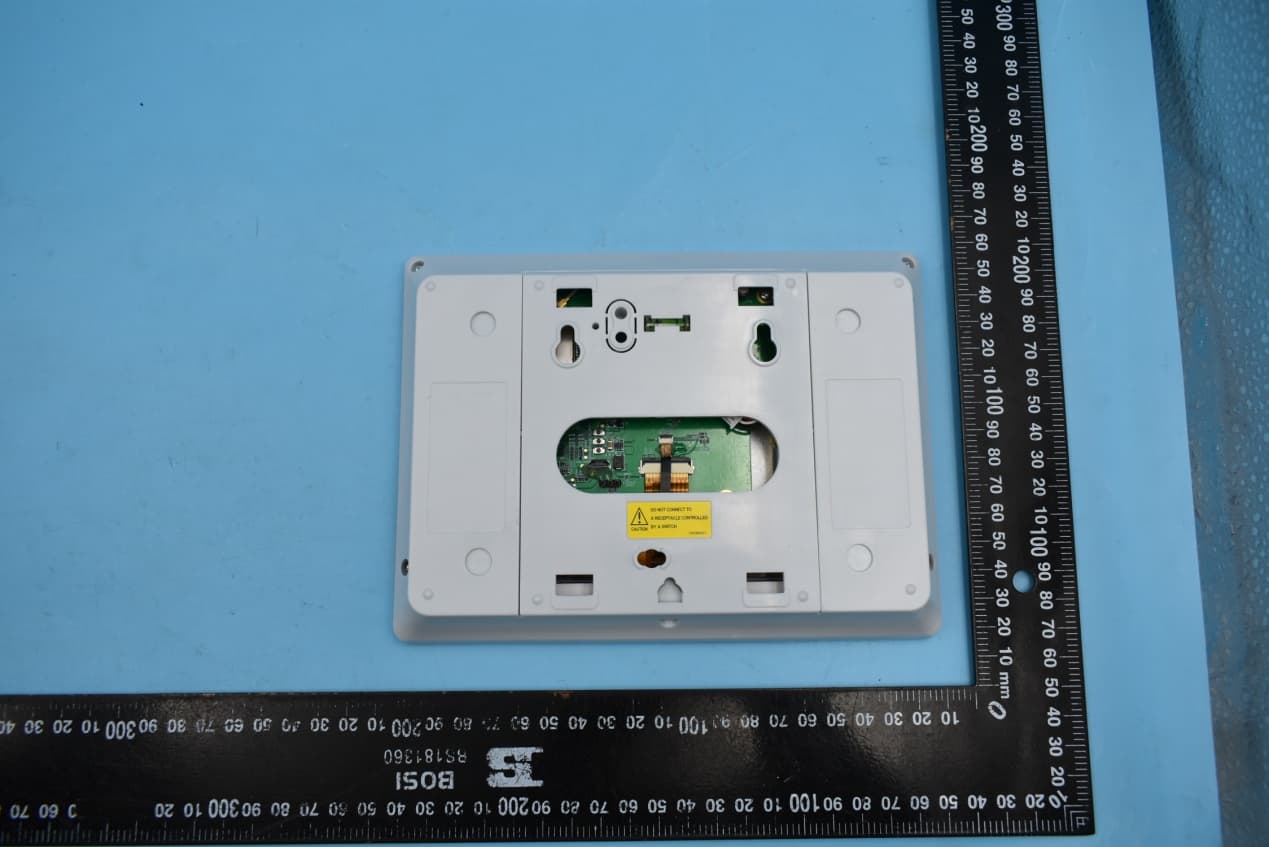
Click to zoom
Application Details
- Equipment Class
- NII - Unlicensed National Information Infrastructure TX
- Date of Grant
- Jul 16, 2020
- Application Purpose
- Original Equipment
- Date of Application
- Jul 16, 2020
- Equipment Note
- Edge Remote Keypad with 2.4G and 5G WiFi
- Frequency Range
- 5745.00000000 - 5825.00000000
- Company
- Nice North America LLC
- Country
- United States
Documents & Files
Document Text
Text extracted from the exhibit documents filed with the FCC. Open a document above to read the original.
Users Manual
2GIG ® EDGE Security & Smart Home System 2GIG-EDG-RK | Edge Remote Keypad 10030219 Rev-X3 | Proprietary & Confidential Copyright © 2020 Nortek Security & Control LLC10030219 Rev-X3 PRINTER’S INSTRUCTIONS: INSTALL INSTRUCTIONS, 2GIG-EDG-RK - P/N: 10030219 Rev-X3 - INK: BLACK - MATERIAL: 20 LB MEAD BOND - SIZE: 8.500” X 11.000” - TOLERANCE: ± .125” - SCALE: 1-1 - SIDE 1 OF 2 Introduction The Remote Keypad (2GIG-EDG-RK) is a wall-mounted, full-color, touch screen interface that provides all of the same easy-to-use keypad functions available on the Control Panel. It is designed for indoor use only and gives users the ability to arm and disarm the system, see the status of sensor zones, and control Smart Home devices. Choose the Location for the 2GIG EDGE Panel’s Backplate Before mounting the backplate, choose a location. Work with the end user to determine the best location. Always choose an indoor location protected from temperature extremes. Recommended Tools and Equipment To install the system, these tools and equipment are recommended: ➣2-Conductor Power Wire (if connecting power supply to the panel’s terminal block) ➣Drywall Saw (or equivalent) ➣Screwdrivers ➣Sta ple Gun ➣Wire Stripper Choose the Wall Location To choose a wall location: ➣Al ways choose a location that is above ground and centrally located. Do NOT install the Panel below ground level, because wireless range may be impaired. ➣Do NOT connect the P anel to a light switch-controlled outlet. ➣Avoid choosing a loca tion that can be easily viewed from doors or windows. ➣Avoid choosing a loca tion that is within reach of small children. ➣Avoid choosing a loca tion in direct sunlight. 1.Align Backplate for Hole Locations Remove the backplate from the panel by backing out the top and bottom screws until you feel resistance. Once removed, create mounting holes and cut a slot in the dry wall for the AC power cord. 2.Mount the Backplate to a Wall Use the four (4) wall anchors and screws (supplied). NOTE: The Wall Anchor is the wall tamper and MUST be anchored to work. 4.Connect the Power Wires (Terminal Block) Locate a wall outlet for the plug-in power supply, but do NOT connect the power supply to the outlet at this time. IMPORTANT: Never connect the plug-in power supply to a switch- controlled outlet. Do not over-tighten the terminal block’s contact screws. Power (Terminal) Battery Backup Terminal Power (Barrell) LEVELNOT LEVEL Wall Tamper Illustration displays both types of power connection: 2 - conductor power wires and Barrel Connector Back Plate Attached to Wall Secure with Fastener STANDARD DECORA 5.Connect Power (Barrel Connector) The Barrel connector is an alternate method for connecting the AC power supply to the Panel. WARNING!! Do NOT plug the power supply into the outlet at this time. 6.Connect Backup Battery Align pins, then carefully insert the battery cable. 7.Hang the EDGE Remote Panel Place the backplate over the lower lip on the back of the chassis, and flip the EDGE panel upward and push until it clicks into place. Secure the back plate by tightening the top and bottom screws. 8.Install Retaining Wall Bracket and Connect the AC Power Supply For compliance with ANSI/NFPA 70: National Electric Code in the United States, you must install the power supply retaining bracket (not required in Canada). FCC ID:EF400189 IC:1078A-00189 2GIG ® EDGE Security & Smart Home System 2GIG-EDG-RK | Edge Remote Keypad 10030219 Rev-X3 | Proprietary & Confidential Copyright © 2020 Nortek Security & Control LLC10030219 Rev-X3 After power up, the Edge Remote Keypad will display a message on the screen. Press NEXT to continue. If not connected already, connect your EDGE Panel and EDGE Remote Keypad to a Wireless Network. After the Keypad has connected to the chosen WiFi network, you’ll be prompted to press PAIR on the Main Panel. One the primary panel, navigate to the Installer Toolbox (See the 2GIG Edge Security & Smart Home Installation & Programming Guide). 1. Ta p Panel Programming ( ). 2. Ta p Keypads ( ). 3. Tap an available Keypad#, then tap the adjacent Keypad Used setting (or EDIT KEYPAD). Ta p Enabled. 1. Ta p Device ID. 2. Ta p PAIR KEYPAD. Press the back button () repeatedly to return to the Home Screen. The panels are now paired, both displaying the Home Screen. Pair the Edge Remote Keypad After mounting and powering the Edge Remote Keypad, it will need to be setup and paired with the EDGE Control Panel. The Edge Remote Keypad pairs through a network connection to the Control Panel. The network connection can be through Access Point capability directly to the EDGE Control Panel, or through a local wireless Wi-Fi network, or through a direct wired connection to the local network router (if the Ethernet module is installed). NOTE: Up to four SP1 Touch Screens can be paired with a EDGE Control Panel. Follow these steps and refer to “Programming Sensors & Peripherals” in the 2GIG EDGE Security & Automation System Installation & Programming Guide: Limited Warranty This Nortek Security & Control LLC product is warranted against defects in material and workmanship for one (1) year. This warranty extends only to wholesale customers who buy direct from Nortek or through Nortek’s normal distribution channels. Nortek Security & Control LLC does not warrant this product to consumers. Consumers should inquire from their selling dealer as to the nature of the dealer’s warranty, if any. There are no obligations or liabilities on the part of Nortek Security & Control LLC for consequential damages arising out of or in connection with use or performance of this product or other indirect damages with respect to loss of property, revenue, or profit, or cost of removal, installation, or re-installation. All implied warranties, including implied warranties for merchantability and implied warranties for fitness, are valid only until the warranty expires. This Nortek Security & Control LLC Warranty is in lieu of all other warranties express or implie…
Text truncated - open the document above for the full version.
Cover Letter(s)
Access Control | Security & Home Automation | Health & Wellness | Home Technology 5919 Sea Otter Place, Suite 100, Carlsbad CA 92010 800.421.1587 www.nortekcontrol.com Date:2020/06/30 To: Federal Communications Commission, Authorization & Evaluation Division, 7435 Oakland Mills Road, Columbia, MD 21046 Re: Request of Confidentiality for FCC ID: EF400189 To Whom it may concern: Pursuant to sections 0.457 and 0.459 of Commission’s Rules(CFR 47), and Section 552(b)(4) of the Freedom of Information Act, Nortek Security & Control LLC hereby requests confidentiality and treatment of certain information accompanying this application. The materials contain trade secrets and proprietary information not customarily released to the public. The public disclosure of these matters might be harmful to the Applicant and provide unjustified benefits to its competitors. We are also hereby request Short-Term Confidentiality for 180 days after the grant as outlined in Public Notice DA04-1705. This provision will give Nortek Security & Control LLC temporary confidentiality of commercially sensitive information prior to product release. The requested Permanent and Short-Term Confidential exhibits are listed as follows: PERMANENT AND SHORT-TERM CONFIDENTIAL LIST Exhibit Description PERMANENT 1 Block Diagram 2 Operational Description 3 Schematics 4 BOM SHORT-TERM 5 External Photos 6 Internal Photos 7 Test-Setup Photos 8 User Manual The Applicant understands that pursuant to Rule 0.457, disclosure of this application and all accompanying documentations, where applicable, will not be made public before the date of the Grant for this application. Signatory: Contact name:Horsen Ma Title:Senior Manager,Hardware Engineering Tel:+86 755 2751 1888 ext 8106 Email:[email protected] Company name :Nortek Security & Control LLC
Cover Letter(s)
Access Control | Security & Home Automation | Health & Wellness | Home Technology 1950 Camino Vida Roble Suite 150 Carlsbad CA 92008 800.421.1587 www.nortekcontrol.com 5/13/2020 Federal Communications Commission 445 12th Street, SW Washington, DC 20554 This is a letter of authorization to accept Horsen Ma of Nortek Security & Control LLC, to sign documentation on my behalf, make representations on my behalf, and to receive and exchange data in connection with FCC certification of all Nortek Security & Control LLC products on my behalf. If you have any questions or need additional information, please feel free to give me a call at (760) 438-7179 Sincerely, Josh Hansen Engineering Manager, Regulatory & Compliance
Cover Letter(s)
Access Control | Security & Home Automation | Health & Wellness | Home Technology 5919 Sea Otter Place, Suite 100, Carlsbad CA 92010 800.421.1587 www.nortekcontrol.com Date: 2020/06/30 To: Federal Communications Commission, Authorization & Evaluation Division, 7435 Oakland Mills Road, Columbia, MD 21046 To Whom It May Concern: The Nortek Security & Control LLC the undersigned, hereby authorizes Mrs. Wendy Zhan from Shenzhen Morlab Communications Technology Co., Ltd., to act on the behalf of the Nortek Security & Control LLC solely in matters relating to the application for an FCC equipment authorization for FCC ID:EF400189 including the signing of documents in connection with this Application. Necessary acts carried out Shenzhen Morlab Communications Technology Co., Ltd. on our behalf of the Nortek Security & Control LLC in connection with the Application shall have the same effect as acts of the Nortek Security & Control LLC also hereby certify that no party to this application is subject to a denial of benefits, including FCC benefits, pursuant to Section 5301 of the Anti-Drug Abuse Act of 1988, 21 U.S.C. 862. Thank you for your attention to this matter. Yours Sincerely, Signatory: Contact name:Horsen Ma Title:Sr. Manager, Hardware Engineering Tel: +86 755 2751 1888 ext 8106 Email:[email protected] Company name :Nortek Security & Control LLC
Cover Letter(s)
Access Control | Security & Home Automation | Health & Wellness | Home Technology 5919 Sea Otter Place, Suite 100, Carlsbad CA 92010 800.421.1587 www.nortekcontrol.com Declaration To whom it may concern: We have declared below featured for FCC equipment authorization, Device FCC ID: EF400189 Don't operate on Channels 12 and 13. US 2.4G channel 12-13 and Country code selection are disabled through proprietary software and are not user changeable Should you have any questions, please feel free to contact me. Date:2020/6/30 Signature : Contact name:Horsen Ma Title:Sr. Manager, Hardware Engineering Company name :Nortek Security & Control LLC
Cover Letter(s)
Access Control | Security & Home Automation | Health & Wellness | Home Technology 5919 Sea Otter Place, Suite 100, Carlsbad CA 92010 800.421.1587 www.nortekcontrol.com UNII Declaration Letter We have declared below featured for FCC equipment authorization, device FCC ID: EF400189 (1) DFS Device -- Master, Client with Radar detection capability , Client without radar detection capability, N/A (2) Active / Passive Scanning , adhoc mode access point capability Frequency Band (MHz) Active Scanning (the device can transmit a probe (beacon)) passive scanning (where the device is can listen only with no probes) Ad Hoc Mode capability Access point capability 2412 – 2462 MHz Yes, No Yes, No Yes, No Yes, No 2422 – 2452 MHz Yes, No Yes, No Yes, No Yes, No 5745 – 5825 MHz Yes, No Yes, No Yes, No Yes, No 5755 – 5795 MHz Yes, No Yes, No Yes, No Yes, No 5180 – 5240 MHz Yes, No Yes, No Yes, No Yes, No 5190 – 5230 MHz Yes, No Yes, No Yes, No Yes, No 5260 – 5320 MHz Yes, No Yes, No Yes, No Yes, No 5270 – 5310 MHz Yes, No Yes, No Yes, No Yes, No 5500 – 5700 MHz Yes, No Yes, No Yes, No Yes, No 5510 – 5670 MHz Yes, No Yes, No Yes, No Yes, No (3) Country code selection ability - Yes , No If no, pls explain how was implemented : Country is selected as US by default and user can not change the country code. (4) Meet 15.202 requirement - Yes , No , pls check below : A master device is defined as a device operating in a mode in which it has the capability to transmit without receiving an enabling signal. In this mode it is able to select a channel and initiate a network by sending enabling signals to other devices A client device is defined as a device operating in a mode in which the transmissions of the device are under control of the master. A device in client mode is not able to initiate a network. (5) For client devices that have software configuration control to operate in different modes (active scanning in some and passive scanning in others) in different bands (devices with multiple equipment classes or those that operate on non-DFS frequencies) or modular devices which configure the modes of operations through software, the application must provide software and operations description on how the software and / or hardware is implemented to ensure that proper operations modes can not be modified by end user or an installer. Apply , No Apply , (If apply , pls help to provide explanation on how it was implement (By hardware or software , and how software was controlled) The device configuration can not be modified by user as program is not exposed to user by any means. Hardware does not allow USB connection for user which is must to change the configuration. If you have any questions, please feel free to contact me at the address shown below. Yours sincerely, Contact name:Horsen Ma Tel:+86 755 2751 1888 ext 8106 Email:[email protected] Company name :Nortek Security & Control LLC
Cover Letter(s)
Access Control | Security & Home Automation | Health & Wellness | Home Technology 5919 Sea Otter Place, Suite 100, Carlsbad CA 92010 800.421.1587 www.nortekcontrol.com SOFTWARE SECURITY INFORMATION FCC ID: EF400189 Pursuant to: FCC Part 15E 15.407(I) and KDB 594280 D02 UNII Device Security v01r03. The information within this section is to show compliance against the SW Security Requirements laid out within KDB 594280 D02 U-NII Device Security v01r03. The information below describes how to maintain the overall security measures and systems so that only: 1. Authenticated software is loaded and operating on the device. 2. The device is not easily modified to operate with RF parameters outside of the authorization. SOFTWARE SECURITY DESCRIPTION Requirement Answer General Description 1. Describe how any software/firmware updates for elements than can affect the device’s RF parameters will be obtained, downloaded, validated and installed. For software that is accessed through manufacturer’s website or device’s management system, describe the different levels of security as appropriate. The factory firmware is produced by Grantee and it is delivered to the factory via a secured channel. The factory loads the firmware to the device on the production line with specialized tools not available to consumers. After setting up the device by the user for the first use all firmware upgrades are automatically delivered from Grantee’s secure SW repository via a secure upgrade channel(encrypted and digitally signed) that prevents any tampering. The user cannot install any firmware not authorized by Grantee. 2. Describe the RF parameters that are modified by any software/firmware without any hardware changes. Are these parameters in some way limited such that any other software/firmware changes will not allow the device to exceed the authorized RF characteristics? Radio parameters are fixed at time of production as required by the FCC certification. Any future software/firmware release is verified by the Grantee before release. If required, Grantee will follow FCC permissive change procedure. 3. Describe in detail the authentication protocols that are in place to ensure that the source of the RF-related software/firmware is valid. Describe in detail how the RF-related software is protected against modification. Yes, software/firmware is digitally signed and encrypted using proprietary handshaking, authorization and provisioning protocols. 4. Describe in detail any encryption methods used to support the use of legitimate RF-related software/firmware. Yes, see answers to #1 and #3. 5. For a device that can be configured as a master and client (with active or passive scanning), explain how the device ensures compliance for each mode? In particular if the device acts as master in some band of operation and client in another; how is compliance ensured in each band of operation? This device only supports Client mode, please refer to test report for compliance ensured in each band of operation. Access Control | Security & Home Automation | Health & Wellness | Home Technology 5919 Sea Otter Place, Suite 100, Carlsbad CA 92010 800.421.1587 www.nortekcontrol.com Requirement Answer Third Party Access Control 1. Explain if any third parties have the capability to operate a U.S./Canada -sold device on any other regulatory domain, frequencies, or in any manner that may allow the device to operate in violation of the device’s authorization if activated in the U.S./Canada. Only Grantee can release or make changes to the software/firmware using proprietary secure protocols 2. Describe, if the device permits third-party software or firmware installation, what mechanisms are provided by the manufacturer to permit integration of such functions while ensuring that the RF parameters of the device cannot be operated outside its authorization for operation in the U.S./Canada. In the description include what controls and/or agreements are in place with providers of third-party functionality to ensure the devices’ underlying RF parameters are unchanged and how the manufacturer verifies the functionality. No, refer to the answers #1, 2, and 3 under General Description 3. For Certified Transmitter modular devices, describe how the module grantee ensures that host manufacturers fully comply with these software security requirements for U- NII devices. If the module is controlled through driver software loaded in the host, describe how the drivers are controlled and managed such that the modular transmitter RF parameters are not modified outside the grant of authorization. Not applicable, this device is not a modular. This section is required for devices which have a “User Interface” (UI) to configure the device in a manner that may impact the operational parameter. The operation description must address if the device supports any of the country code configurations or peer-peer mode communications discussed in KDB 594280 D01. Access Control | Security & Home Automation | Health & Wellness | Home Technology 5919 Sea Otter Place, Suite 100, Carlsbad CA 92010 800.421.1587 www.nortekcontrol.com SOFTWARE CONFIGURATION DESCRIPTION Requirement Answer USER CONFIGURATION GUIDE 1. Describe the user configurations permitted through the UI. If different levels of access are permitted for professional installers, system integrators or end-users, describe the differences. Only the End user configuration is permitted. 1. The radio parameters are not accessible through a UI to any operating party. 2. End users are only able to enter a UI that allows connection to an established AP network and WPS configuration. a) What parameters are viewable and configurable by different parties? None that affects compliance b) What parameters are accessible or modifiable by the professional installer or system integrators? None that affects compliance (1) Are the parameters in some way limited, so that the installers will not enter parameters that exceed those author…
Text truncated - open the document above for the full version.
External Photos
FCC ID:EF400189 IC:1078A-00189 External Photos 1. EUT front view 2. EUT rear view 3. EUT left side view 4. EUT right side view 5. EUT top view 6. EUT bottom view
ID Label/Location Info
1. Label 2. Label location
Internal Photos
FCC ID:EF400189 IC:1078A-00189 Internal Photos 1. EUT uncover view 2. Antenna view WIFI Antenna
RF Exposure Info
NOTE: This document is issued by MORLAB, the test report shall not be reproduced except in full without prior written permission of the company. The test results apply only to the particular sample(s) tested and to the specific tests carried out which is available on request for validation and information confirmed at our website. MORLAB SHENZHEN MORLAB COMMUNICATIONS TECHNOLOGY Co., Ltd. FL1-3, Building A, FeiYang Science Park, No.8 LongChang Road, Block67, BaoAn District, ShenZhen , GuangDong Province, P. R. China Tel: 86-755-36698555 Fax: 86-755-36698525 Http://www.morlab.cn E-mail: [email protected] Page 1 of 9 REPORT No.:SZ20050353S01 RF EXPOSURE EVALUATION REPORT APPLICANT : Nortek Security & Control LLC PRODUCT NAME : Edge Remote Keypad MODEL NAME : 2GIG-EDG-RK BRAND NAME : 2GIG FCC ID : EF400189 STANDARD(S) : 47CFR 2.1091 KDB 447498 RECEIPT DATE : 2020-06-16 TEST DATE : 2020-06-18 to 2020-06-29 ISSUE DATE : 2020-07-07 Edited by: Chen Bilian (Rapporteur) Approved by: Peng Huarui (Supervisor) MORLAB SHENZHEN MORLAB COMMUNICATIONS TECHNOLOGY Co., Ltd. FL1-3, Building A, FeiYang Science Park, No.8 LongChang Road, Block67, BaoAn District, ShenZhen , GuangDong Province, P. R. China Tel: 86-755-36698555 Fax: 86-755-36698525 Http://www.morlab.cn E-mail: [email protected] REPORT No.:SZ20050353S01 Page 2of 9 DIRECTORY 1. Technical Information ∙∙∙∙∙∙∙∙∙∙∙∙∙∙∙∙∙∙∙∙∙∙∙∙∙∙∙∙∙∙∙∙∙∙∙∙∙∙∙∙∙∙∙∙∙∙∙∙∙∙∙∙∙∙∙∙∙∙∙∙∙∙∙∙∙∙∙∙∙∙∙∙∙∙∙∙∙∙∙∙∙∙∙∙∙∙∙∙∙∙∙∙∙∙∙∙∙∙∙∙∙∙∙∙ 3 1.1 Applicant and Manufacturer Information ∙∙∙∙∙∙∙∙∙∙∙∙∙∙∙∙∙∙∙∙∙∙∙∙∙∙∙∙∙∙∙∙∙∙∙∙∙∙∙∙∙∙∙∙∙∙∙∙∙∙∙∙∙∙∙∙∙∙∙∙∙∙∙∙∙∙∙∙∙ 3 1.2 Equipment under Test (EUT) Description ∙∙∙∙∙∙∙∙∙∙∙∙∙∙∙∙∙∙∙∙∙∙∙∙∙∙∙∙∙∙∙∙∙∙∙∙∙∙∙∙∙∙∙∙∙∙∙∙∙∙∙∙∙∙∙∙∙∙∙∙∙∙∙∙∙∙∙∙ 3 1.3 Applied Reference Documents ∙∙∙∙∙∙∙∙∙∙∙∙∙∙∙∙∙∙∙∙∙∙∙∙∙∙∙∙∙∙∙∙∙∙∙∙∙∙∙∙∙∙∙∙∙∙∙∙∙∙∙∙∙∙∙∙∙∙∙∙∙∙∙∙∙∙∙∙∙∙∙∙∙∙∙∙∙∙∙∙∙∙∙∙∙ 4 2. Device Category and RF Exposure Limit ∙∙∙∙∙∙∙∙∙∙∙∙∙∙∙∙∙∙∙∙∙∙∙∙∙∙∙∙∙∙∙∙∙∙∙∙∙∙∙∙∙∙∙∙∙∙∙∙∙∙∙∙∙∙∙∙∙∙∙∙∙∙∙∙∙∙∙∙∙∙∙∙ 5 3. RF Output Power ∙∙∙∙∙∙∙∙∙∙∙∙∙∙∙∙∙∙∙∙∙∙∙∙∙∙∙∙∙∙∙∙∙∙∙∙∙∙∙∙∙∙∙∙∙∙∙∙∙∙∙∙∙∙∙∙∙∙∙∙∙∙∙∙∙∙∙∙∙∙∙∙∙∙∙∙∙∙∙∙∙∙∙∙∙∙∙∙∙∙∙∙∙∙∙∙∙∙∙∙∙∙∙∙∙∙∙∙∙∙∙∙ 6 4. RF Exposure Evaluation ∙∙∙∙∙∙∙∙∙∙∙∙∙∙∙∙∙∙∙∙∙∙∙∙∙∙∙∙∙∙∙∙∙∙∙∙∙∙∙∙∙∙∙∙∙∙∙∙∙∙∙∙∙∙∙∙∙∙∙∙∙∙∙∙∙∙∙∙∙∙∙∙∙∙∙∙∙∙∙∙∙∙∙∙∙∙∙∙∙∙∙∙∙∙∙∙∙∙∙ 8 Annex A General Information ∙∙∙∙∙∙∙∙∙∙∙∙∙∙∙∙∙∙∙∙∙∙∙∙∙∙∙∙∙∙∙∙∙∙∙∙∙∙∙∙∙∙∙∙∙∙∙∙∙∙∙∙∙∙∙∙∙∙∙∙∙∙∙∙∙∙∙∙∙∙∙∙∙∙∙∙∙∙∙∙∙∙∙∙∙∙∙∙∙∙∙∙∙∙∙∙∙ 9 Change History Version Date Reason of Changed 1.0 2020-07-07 Original MORLAB SHENZHEN MORLAB COMMUNICATIONS TECHNOLOGY Co., Ltd. FL1-3, Building A, FeiYang Science Park, No.8 LongChang Road, Block67, BaoAn District, ShenZhen , GuangDong Province, P. R. China Tel: 86-755-36698555 Fax: 86-755-36698525 Http://www.morlab.cn E-mail: [email protected] REPORT No.:SZ20050353S01 Page 3of 9 1. Technical Information Note: Provide by applicant. 1.1 Applicant and Manufacturer Information Applicant: Nortek Security & Control LLC Applicant Address: 5919 Sea Otter Place, Carlsbad, CA 92010, United States Manufacturer: Flextronics Electronics Technology (Shenzhen) Co., Ltd Manufacturer Address: 89 Yong Fu Road, Tong Fu Yu Industrial Park, Fu Yong Town, Bao An District, Shenzhen, Guangdong, 518103, China 1.2 Equipment under Test (EUT) Description Product Name: Edge Remote Keypad Serial No: (N/A, marked #1 by test site) Hardware Version: 2GIG-EDG-RK Software Version: 20200426. 002457 Frequency Bands: WLAN 2.4GHz: 2412 MHz ~ 2462 MHz WLAN 5.2GHz: 5180 MHz ~ 5240 MHz WLAN 5.8GHz: 5745 MHz ~ 5825 MHz Modulation Mode: 802.11b: DSSS 802.11a/g/n-HT20/HT40: OFDM Antenna Type: FPC Antenna Antenna Gain: WLAN 2.4GHz: 2.1dBi WLAN 5GHz: 3.4dBi MORLAB SHENZHEN MORLAB COMMUNICATIONS TECHNOLOGY Co., Ltd. FL1-3, Building A, FeiYang Science Park, No.8 LongChang Road, Block67, BaoAn District, ShenZhen , GuangDong Province, P. R. China Tel: 86-755-36698555 Fax: 86-755-36698525 Http://www.morlab.cn E-mail: [email protected] REPORT No.:SZ20050353S01 Page 4of 9 1.3 Applied Reference Documents Leading reference documents for testing: No. Identity Document Title Method determination /Remark 1 47 CFR§2.1091 Radio Frequency Radiation Exposure Evaluation: mobile devices No deviation 2 KDB 447498 D01v06 General RF Exposure Guidance No deviation Note 1: Additions to, deviation, or exclusions from the method shall be judged in the "method determination" column of add, deviate or exclude from the specific method shall be explained in the "Remark" of the above table. MORLAB SHENZHEN MORLAB COMMUNICATIONS TECHNOLOGY Co., Ltd. FL1-3, Building A, FeiYang Science Park, No.8 LongChang Road, Block67, BaoAn District, ShenZhen , GuangDong Province, P. R. China Tel: 86-755-36698555 Fax: 86-755-36698525 Http://www.morlab.cn E-mail: [email protected] REPORT No.:SZ20050353S01 Page 5of 9 2. Device Category and RF Exposure Limit Per user manual, Based on 47CFR 2.1091, this device belongs to mobile device category with General Population/Uncontrolled exposure. Mobile Devices: 47CFR 2.1091(b) For purposes of this section, a mobile device is defined as a transmitting device designed to be used in other than fixed locations and to generally be used in such a way that a separation distance of at least 20 centimeters is normally maintained between the transmitter's radiating structure(s) and the body of the user or nearby persons. In this context, the term “fixed location” means that the device is physically secured at one location and is not able to be easily moved to another location. Transmitting devices designed to be used by consumers or workers that can be easily re-located, such as wireless devices associated with a personal computer, are considered to be mobile devices if they meet the 20 centimeter separation requirement. General Population/Uncontrolled Exposure: The general population/uncontrolled exposure limits are applicable to situations in which the general public may be exposed or in which persons who are exposed as a consequence of their employment may not be made fully aware of the potential for exposure or cannot exercise control over their exposure. Members …
Text truncated - open the document above for the full version.
Test Report
NOTE: This document is issued by MORLAB, the test report shall not be reproduced except in full without prior written permission of the company. The test results apply only to the particular sample(s) tested and to the specific tests carried out which is available on request for validation and information confirmed at our website. MORLAB SHENZHEN MORLAB COMMUNICATIONS TECHNOLOGY Co., Ltd. FL1-3, Building A, FeiYang Science Park, No.8 LongChang Road, Block67, BaoAn District, ShenZhen , GuangDong Province, P. R. China Tel: 86-755-36698555 Fax: 86-755-36698525 Http://www.morlab.cn E-mail: [email protected] Page 1 of 81 REPORT No.:SZ20050353W02 TEST REPORT APPLICANT : Nortek Security & Control LLC PRODUCT NAME : Edge Remote Keypad MODEL NAME : 2GIG-EDG-RK BRAND NAME : 2GIG FCC ID : EF400189 STANDARD(S) : 47 CFR Part 15 Subpart E RECEIPT DATE : 2020-06-16 TEST DATE : 2020-06-18 to 2020-06-29 ISSUE DATE : 2020-07-14 Edited by: Chen Bilian (Rapporteur) Approved by: Peng Huarui ( Supervisor ) MORLAB SHENZHEN MORLAB COMMUNICATIONS TECHNOLOGY Co., Ltd. FL1-3, Building A, FeiYang Science Park, No.8 LongChang Road, Block67, BaoAn District, ShenZhen , GuangDong Province, P. R. China Tel: 86-755-36698555 Fax: 86-755-36698525 Http://www.morlab.cn E-mail: [email protected] Page 2 of 81 REPORT No.:SZ20050353W02 DIRECTORY 1. Technical Information ꞏꞏꞏꞏꞏꞏꞏꞏꞏꞏꞏꞏꞏꞏꞏꞏꞏꞏꞏꞏꞏꞏꞏꞏꞏꞏꞏꞏꞏꞏꞏꞏꞏꞏꞏꞏꞏꞏꞏꞏꞏꞏꞏꞏꞏꞏꞏꞏꞏꞏꞏꞏꞏꞏꞏꞏꞏꞏꞏꞏꞏꞏꞏꞏꞏꞏꞏꞏꞏꞏꞏꞏꞏꞏꞏꞏꞏꞏꞏꞏꞏꞏꞏ 3 1.1. Applicant and Manufacturer Information ꞏꞏꞏꞏꞏꞏꞏꞏꞏꞏꞏꞏꞏꞏꞏꞏꞏꞏꞏꞏꞏꞏꞏꞏꞏꞏꞏꞏꞏꞏꞏꞏꞏꞏꞏꞏꞏꞏꞏꞏꞏꞏꞏꞏꞏꞏꞏꞏꞏꞏꞏꞏꞏꞏꞏ 3 1.2. Equipment Under Test (EUT) Description ꞏꞏꞏꞏꞏꞏꞏꞏꞏꞏꞏꞏꞏꞏꞏꞏꞏꞏꞏꞏꞏꞏꞏꞏꞏꞏꞏꞏꞏꞏꞏꞏꞏꞏꞏꞏꞏꞏꞏꞏꞏꞏꞏꞏꞏꞏꞏꞏꞏꞏꞏꞏꞏꞏ 3 1.3. Modulation Type and Data Rate of EUT ꞏꞏꞏꞏꞏꞏꞏꞏꞏꞏꞏꞏꞏꞏꞏꞏꞏꞏꞏꞏꞏꞏꞏꞏꞏꞏꞏꞏꞏꞏꞏꞏꞏꞏꞏꞏꞏꞏꞏꞏꞏꞏꞏꞏꞏꞏꞏꞏꞏꞏꞏꞏꞏꞏꞏꞏꞏ 4 1.4. The Channel Number and Frequency ꞏꞏꞏꞏꞏꞏꞏꞏꞏꞏꞏꞏꞏꞏꞏꞏꞏꞏꞏꞏꞏꞏꞏꞏꞏꞏꞏꞏꞏꞏꞏꞏꞏꞏꞏꞏꞏꞏꞏꞏꞏꞏꞏꞏꞏꞏꞏꞏꞏꞏꞏꞏꞏꞏꞏꞏꞏꞏꞏ 5 1.5. Test Standards and Results ꞏꞏꞏꞏꞏꞏꞏꞏꞏꞏꞏꞏꞏꞏꞏꞏꞏꞏꞏꞏꞏꞏꞏꞏꞏꞏꞏꞏꞏꞏꞏꞏꞏꞏꞏꞏꞏꞏꞏꞏꞏꞏꞏꞏꞏꞏꞏꞏꞏꞏꞏꞏꞏꞏꞏꞏꞏꞏꞏꞏꞏꞏꞏꞏꞏꞏꞏꞏꞏꞏꞏꞏ 6 1.6. Environmental Conditions ꞏꞏꞏꞏꞏꞏꞏꞏꞏꞏꞏꞏꞏꞏꞏꞏꞏꞏꞏꞏꞏꞏꞏꞏꞏꞏꞏꞏꞏꞏꞏꞏꞏꞏꞏꞏꞏꞏꞏꞏꞏꞏꞏꞏꞏꞏꞏꞏꞏꞏꞏꞏꞏꞏꞏꞏꞏꞏꞏꞏꞏꞏꞏꞏꞏꞏꞏꞏꞏꞏꞏꞏꞏꞏ 7 2. 47 CFR Part 15E Requirements ꞏꞏꞏꞏꞏꞏꞏꞏꞏꞏꞏꞏꞏꞏꞏꞏꞏꞏꞏꞏꞏꞏꞏꞏꞏꞏꞏꞏꞏꞏꞏꞏꞏꞏꞏꞏꞏꞏꞏꞏꞏꞏꞏꞏꞏꞏꞏꞏꞏꞏꞏꞏꞏꞏꞏꞏꞏꞏꞏꞏꞏꞏꞏꞏꞏꞏꞏꞏꞏꞏ 8 2.1. Antenna Requirement ꞏꞏꞏꞏꞏꞏꞏꞏꞏꞏꞏꞏꞏꞏꞏꞏꞏꞏꞏꞏꞏꞏꞏꞏꞏꞏꞏꞏꞏꞏꞏꞏꞏꞏꞏꞏꞏꞏꞏꞏꞏꞏꞏꞏꞏꞏꞏꞏꞏꞏꞏꞏꞏꞏꞏꞏꞏꞏꞏꞏꞏꞏꞏꞏꞏꞏꞏꞏꞏꞏꞏꞏꞏꞏꞏꞏꞏꞏꞏꞏ 8 2.2. Duty Cycle of the Test Signal ꞏꞏꞏꞏꞏꞏꞏꞏꞏꞏꞏꞏꞏꞏꞏꞏꞏꞏꞏꞏꞏꞏꞏꞏꞏꞏꞏꞏꞏꞏꞏꞏꞏꞏꞏꞏꞏꞏꞏꞏꞏꞏꞏꞏꞏꞏꞏꞏꞏꞏꞏꞏꞏꞏꞏꞏꞏꞏꞏꞏꞏꞏꞏꞏꞏꞏꞏꞏꞏꞏꞏ 9 2.3. Maximum Conducted Output Power ꞏꞏꞏꞏꞏꞏꞏꞏꞏꞏꞏꞏꞏꞏꞏꞏꞏꞏꞏꞏꞏꞏꞏꞏꞏꞏꞏꞏꞏꞏꞏꞏꞏꞏꞏꞏꞏꞏꞏꞏꞏꞏꞏꞏꞏꞏꞏꞏꞏꞏꞏꞏꞏꞏꞏꞏꞏꞏꞏꞏ 12 2.4. Emission Bandwidth ꞏꞏꞏꞏꞏꞏꞏꞏꞏꞏꞏꞏꞏꞏꞏꞏꞏꞏꞏꞏꞏꞏꞏꞏꞏꞏꞏꞏꞏꞏꞏꞏꞏꞏꞏꞏꞏꞏꞏꞏꞏꞏꞏꞏꞏꞏꞏꞏꞏꞏꞏꞏꞏꞏꞏꞏꞏꞏꞏꞏꞏꞏꞏꞏꞏꞏꞏꞏꞏꞏꞏꞏꞏꞏꞏꞏꞏꞏꞏꞏꞏ 14 2.5. Peak Power spectral density ꞏꞏꞏꞏꞏꞏꞏꞏꞏꞏꞏꞏꞏꞏꞏꞏꞏꞏꞏꞏꞏꞏꞏꞏꞏꞏꞏꞏꞏꞏꞏꞏꞏꞏꞏꞏꞏꞏꞏꞏꞏꞏꞏꞏꞏꞏꞏꞏꞏꞏꞏꞏꞏꞏꞏꞏꞏꞏꞏꞏꞏꞏꞏꞏꞏꞏꞏꞏꞏꞏ 26 2.6. Frequency Stability ꞏꞏꞏꞏꞏꞏꞏꞏꞏꞏꞏꞏꞏꞏꞏꞏꞏꞏꞏꞏꞏꞏꞏꞏꞏꞏꞏꞏꞏꞏꞏꞏꞏꞏꞏꞏꞏꞏꞏꞏꞏꞏꞏꞏꞏꞏꞏꞏꞏꞏꞏꞏꞏꞏꞏꞏꞏꞏꞏꞏꞏꞏꞏꞏꞏꞏꞏꞏꞏꞏꞏꞏꞏꞏꞏꞏꞏꞏꞏꞏꞏꞏꞏ 38 2.7. Conducted Emission ꞏꞏꞏꞏꞏꞏꞏꞏꞏꞏꞏꞏꞏꞏꞏꞏꞏꞏꞏꞏꞏꞏꞏꞏꞏꞏꞏꞏꞏꞏꞏꞏꞏꞏꞏꞏꞏꞏꞏꞏꞏꞏꞏꞏꞏꞏꞏꞏꞏꞏꞏꞏꞏꞏꞏꞏꞏꞏꞏꞏꞏꞏꞏꞏꞏꞏꞏꞏꞏꞏꞏꞏꞏꞏꞏꞏꞏꞏꞏꞏꞏ 40 2.8. Restricted Frequency Bands ꞏꞏꞏꞏꞏꞏꞏꞏꞏꞏꞏꞏꞏꞏꞏꞏꞏꞏꞏꞏꞏꞏꞏꞏꞏꞏꞏꞏꞏꞏꞏꞏꞏꞏꞏꞏꞏꞏꞏꞏꞏꞏꞏꞏꞏꞏꞏꞏꞏꞏꞏꞏꞏꞏꞏꞏꞏꞏꞏꞏꞏꞏꞏꞏꞏꞏꞏꞏꞏꞏ 44 2.9. Radiated Emission ꞏꞏꞏꞏꞏꞏꞏꞏꞏꞏꞏꞏꞏꞏꞏꞏꞏꞏꞏꞏꞏꞏꞏꞏꞏꞏꞏꞏꞏꞏꞏꞏꞏꞏꞏꞏꞏꞏꞏꞏꞏꞏꞏꞏꞏꞏꞏꞏꞏꞏꞏꞏꞏꞏꞏꞏꞏꞏꞏꞏꞏꞏꞏꞏꞏꞏꞏꞏꞏꞏꞏꞏꞏꞏꞏꞏꞏꞏꞏꞏꞏꞏꞏꞏ 57 Annex A Test Uncertainty ꞏꞏꞏꞏꞏꞏꞏꞏꞏꞏꞏꞏꞏꞏꞏꞏꞏꞏꞏꞏꞏꞏꞏꞏꞏꞏꞏꞏꞏꞏꞏꞏꞏꞏꞏꞏꞏꞏꞏꞏꞏꞏꞏꞏꞏꞏꞏꞏꞏꞏꞏꞏꞏꞏꞏꞏꞏꞏꞏꞏꞏꞏꞏꞏꞏꞏꞏꞏꞏꞏꞏꞏꞏꞏꞏꞏꞏꞏꞏꞏ 78 Annex B Testing Laboratory Information ꞏꞏꞏꞏꞏꞏꞏꞏꞏꞏꞏꞏꞏꞏꞏꞏꞏꞏꞏꞏꞏꞏꞏꞏꞏꞏꞏꞏꞏꞏꞏꞏꞏꞏꞏꞏꞏꞏꞏꞏꞏꞏꞏꞏꞏꞏꞏꞏꞏꞏꞏꞏꞏꞏꞏꞏꞏꞏꞏ 79 Change History Version Date Reason for change 1.0 2020-07-14 First edition MORLAB SHENZHEN MORLAB COMMUNICATIONS TECHNOLOGY Co., Ltd. FL1-3, Building A, FeiYang Science Park, No.8 LongChang Road, Block67, BaoAn District, ShenZhen , GuangDong Province, P. R. China Tel: 86-755-36698555 Fax: 86-755-36698525 Http://www.morlab.cn E-mail: [email protected] Page 3 of 81 REPORT No.:SZ20050353W02 1. Technical Information Note: Provide by applicant. 1.1. Applicant and Manufacturer Information Applicant: Nortek Security & Control LLC Applicant Address: 5919 Sea Otter Place, Carlsbad, CA 92010, United States Manufacturer: Flextronics Electronics Technology (Shenzhen) Co., Ltd Manufacturer Address: 89 Yong Fu Road, Tong Fu Yu Industrial Park, Fu Yong Town, Bao An District, Shenzhen, Guangdong, 518103, China 1.2. Equipment Under Test (EUT) Description Product Name: Edge Remote Keypad…
Text truncated - open the document above for the full version.
Contact Information
Applicant
Josh Hansen(Engineering Manager, Regulatory & Compliance)
Test Firm
Shenzhen Morlab Communications Technology Co. Ltd.Mr. Su Feng
[email protected]+86 755 36698566
Technical Specifications
| # | Rule Parts | Frequency Range | Power Output |
|---|---|---|---|
| 2 | 15E | 5.75 GHz - 5.83 GHz | 32.00 mW |
Other Applications from Nice North America LLC
EF400267
May 19, 2026Edge II Security Panel
Equipment Class
DSS - Part 15 Spread Spectrum TransmitterEF400266
Mar 12, 2026Wireless KVM Extender TX+RX
Equipment Class
NII - Unlicensed National Information Infrastructure TXEF400265
Mar 12, 2026Wireless KVM Extender TX+RX
Equipment Class
NII - Unlicensed National Information Infrastructure TXEF4-FGS223US
Dec 18, 2025DoubleDimmer-Control
Equipment Class
DXX - Part 15 Low Power Communication Device TransmitterEF400247
Jul 01, 2024Digital Transmitter
Equipment Class
DSS - Part 15 Spread Spectrum Transmitter