ENXKBBT3023BigBlu KinderBoard
Chester Creek Technologies, Inc.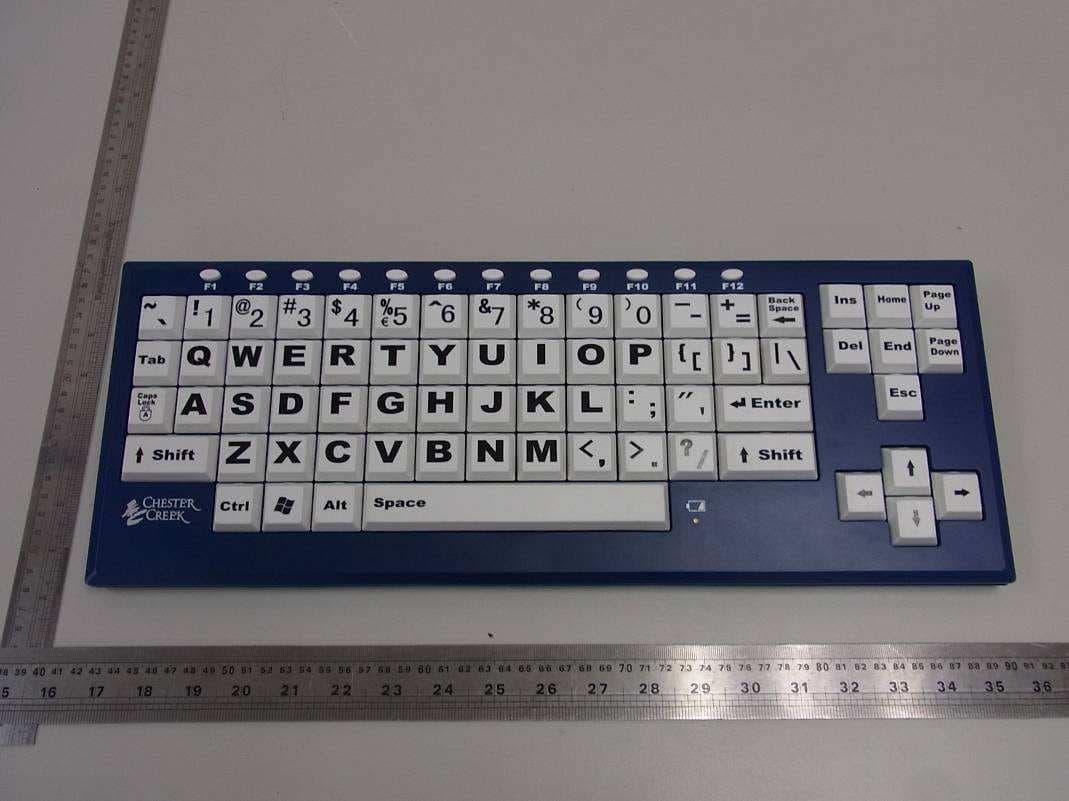
Click to zoom
Application Details
- Equipment Class
- DSS - Part 15 Spread Spectrum Transmitter
- Date of Grant
- Dec 22, 2012
- Application Purpose
- Original Equipment
- Date of Application
- Dec 22, 2012
- Equipment Note
- BigBlu KinderBoard
- Frequency Range
- 2402.00000000 - 2480.00000000
- Country
- United States
Documents & Files
Document Text
Text extracted from the exhibit documents filed with the FCC. Open a document above to read the original.
Users Manual
User's User's User's User's Manual Manual Manual Manual BigBlu BigBlu BigBlu BigBlu VisionBoard VisionBoard VisionBoard VisionBoard/ / / / BigBlu BigBlu BigBlu BigBlu KinderBoard KinderBoard KinderBoard KinderBoard Tousethis deviceproperly, pleasereadthis manual before inst alla tion. System System System Systemrequirements: requirements: requirements: requirements: PC running Windows 2000/XP/VISTA/7/8 Will operate on an Apple co mputer running OS 10 or newer Bluetooth: Bluetooth: Bluetooth: Bluetooth: �Bluetooth 3.0+EDR co mplia nt �Bluetooth co mpatible with V3.0, V2.1, V2.0, V1.2, V1.1 st andard �Operation scope<10 meters �Bluetooth profilesupport :HID HID HID HID �Fr equencyrange: 2.401-2.408GHz (2.4GHz ISM se gment) �Power consumption: worki ng : 5mA , st andby : 0.03mA Additi onal Additi onal Additi onal Additi onalinformation: information: information: information: 1. Operational dist anceca n be affected by the work environment. 2. Typica l usagewillprovide you with 60 – 90 days of battery lif e.The batteries willhave a longer or shorter lif e depending on yourke yboard use . 3. If the ke yboard st opsfunct ioning,replacethe batteries. 4. Disposeof batteries properly. This deviceco mplie s with part 15 of the FCC rules. Operation is su bject to the follo wing two co nditions: (1) This devicemay not causeharmful interferenceand (2) This devicemust accept any interference rec eived incl uding interferencethat may causeundesi red operation. Cheste r Cr eekTechnologies, In c. Arrowhead Place 205West 2 nd Str eet, Suite130 Duluth , MN 55802 218-722-1837 www.c heste rcreek.c om FCC Caution: Changes or modifications not expressly approved by the part responsible for compliance could void the user's authority to operate the equipment. Installing Installing Installing Installingbatteries batteries batteries batteriesin in in in th e th e th e th e keyboar d: keyboar d: keyboar d: keyboar d: The BigBlu Visi onB oar d / BigBlu Kinde rBoa rd use two AAA si ze bat teries. Fo r best per formance , use alka lin e bat teries. 1. Remove the two phillips- hea d retaining scr ews and se t asi de. 2. Remove the batte ry co mpar tment co ver by slid ing it in the direct ion indica ted by the arro w. 3. Inse rt two new AAA si ze d bat teries. Corre ct batte ry place ment is indica ted in the bat tery co mpar tment. 4. Afte r the bat t eries are inst alle d, ca refully repl ace the bat tery co ver and se cu re in place wit h the two scr ews. Low Low Low Lowbattery battery battery battery al er t: al er t: al er t: al er t: When the indi ca tor light nex t to the sp ace bar beg ins to flash (Red lig ht), it is time to repl ace the ke yboar d's bat teries. Pair Pair Pair Pair th e th e th e th e Bluetooth Bluetooth Bluetooth BluetoothKey board: Key board: Key board: Key board: 1. Turn the pow er on.The pow er swit ch is loca ted und erneath the ke yboar d. The Blue LED light nex t to the Spa ce Bar will blin k oncewhen you swit ch on the ke yboar d. 2. Press the pai r butto n loca ted nex t to the pow er swit ch to put the ke yboar d into “pai ring st atus”. The Blue LEDlig ht will blin k unt il the ke yboar d is pai red. If pairing is unsu cce ssf ul, the Blue LEDlig ht will go out afte r 2 minutes, press the pairing butto n again to return to “pai ring st atus”. 3. Turn on the Bluet oot h se rvice on your iPad , iPhone, Notebook, or other Bluet oot h ena bled device (re fer to your dev ice use r manua l). Afte r your dev ice disco vers“ “ “ “ KB08-BT”, it will ask you to ke y-in an aut horization code ; the codewill be shown on scr een . Ent er the codeusi ng your Chest er Creek Bluet oot h ke yboar d. 4. The Blue LED lig ht will st op blin ki ng afte r co mpleting the pai ring proce dure. 5. Your Chest er Creek Bluet oot h Keyboar d is now read y to use . Pairing Pairing Pairing Pairingwith with with with another another another anotherdev ice: dev ice: dev ice: dev ice: �Disconnect from the cu rrentBluetooth dev ice (re fer to your dev ice use r manua l). � Toconn ect to another iPad/ iPhone/Notebook , follo w the inst ruct ions abo ve. Adjusting Adjusting Adjusting Adjusting th e th e th e th e angle angle angle angle of of of of your you r your yourkeyboar d: keyboar d: keyboar d: keyboar d: There are two feet on the bot tom of the ke yboar d that ca n be flippedup or dow n to give you the most co mfortable posi tion for ke yboar d use . Pow er Switch Pai r But ton Pow er Switch det ail
Cover Letter(s)
Innovative specialty keyboards and mice for all ages and abrlities. Conf identialitv Letter Date: Aug. 23, 2012 Subject: Conlidentiality Request for FCC lD: EXXIggIlqgL Pursuant to FCC 47 CRF 0.457(d) and 0.,+59 and lC RSP-100, Section 10, the applicant requests that a part of the subject FCC/IC applicalion be held confidential. Type ol Contkbntiality neq./€6tedExhibit L) SnOn I enn I PemanentBlock Diagrcms I shoft Term I Permanentlntemal Photos L l Jnoft retm I Permanent Opention Desciption/Theory of Opention L,J SnOn I etm I Permanent Part LisvTune- U p P t@ed u rc L l Snon I elm I Pe,manentSchematics v) Snon I etm D PetmanentUser's Manual Chester Creek Technologies, Inc has spent substantial effort in developing this product and it is one ot the first of its kind in industry. Having the subject infomation easily available to "competition" would negate the advantage they have achieved by developing this product. Not protecting the details d the design will result in financial hardship. Permanent Conlidentiality: The applicant requests the exhibits listed above as permanently contidential be permanently withheld lrom public review due to malerials that contain trade secrets and proprietary information not customarily released to the public. Short-Term Contidentiality: The applicant requests the exhibits selected abo\re as short term contidential be withheld trom public view lor a period ol ((sp€cifo nuftber ofdars not !o exe€d 180D days lrom the date of the Grant of Equipment Authorization and prior to marketing. This is to avoid premature release ot sensitive information prior to markeiing or release of the product to the public. Applicant is also aware that they are responsible to notity TUV Rheinland in the event information regarding the product or the product is made available to the public. TUV Rheinland will then release the documents listed above for public disclosure pursuant to Blll-.lzuDljqNq! jeClA!4:fZQg Sincerely, By: (Signature/Manager) 205 West 2"" Slreet, Suite 130. Duluth. 888-214-5450 Jack Kosmach (Print name) MN 55802. www.chestercreek-com Arrowhead Pla
External Photos
Page 1 of 1 Type Designation: BBK Report Number: 17027667 001 Fig. 1: External view Fig. 2: External view
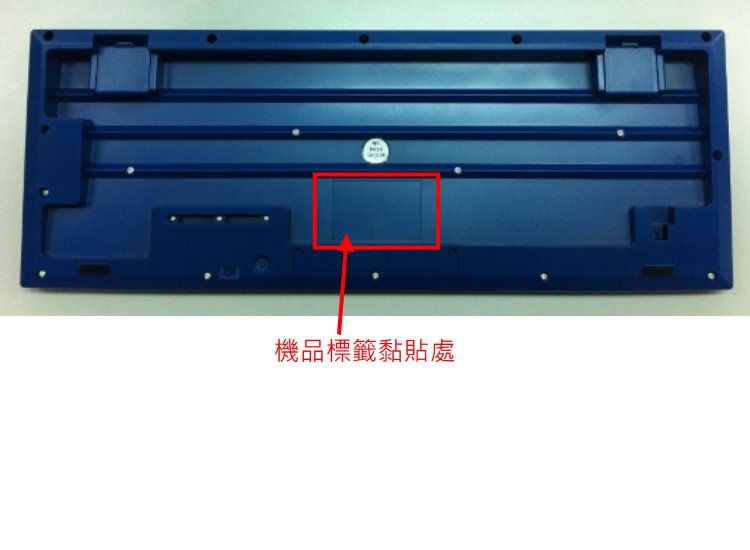
ID Label/Location Info
R R
Internal Photos
Page 1 of 2 Type Designation: BBK Report Number: 17027667 001 Fig. 1: Internal view Fig. 2: Internal view Page 2 of 2 Type Designation: BBK Report Number: 17027667 001 Fig. 3: Internal view
RF Exposure Info
Produkte Products Prüfbericht - Nr.: Test Report No. 17027667 001 Seite 36 von 39 Page 36 of 39 6. Safety Human exposure 6.1 Radio Frequency Exposure Compliance 6.1.1 Electromagnetic Fields RESULT: Passed Test standard : FCC KDB Publication 447498 Since maximum peak output power of the transmitter is <60/f(GHz)mW, i.e. 2.81mW<25(=60/2.4)mW, hence the EUT is exclueded from SAR evaluation according to FCC KDB publication 447498 D01: Mobile Portable RF Exposure.
Test Report
Produkte Products Prüfbericht - Nr.: Test Report No. 17027667 001 Seite 2 von 39 Page 2 of 39 TEST SUMMARY 5.1.1 ANTENNA REQUIREMENT RESULT: Passed 5.1.2 PEAK OUTPUT POWER RESULT: Passed 5.1.3 20DB BANDWIDTH RESULT: Passed 5.1.4 CONDUCTED SPURIOUS EMISSIONS MEASURED IN 100KHZ BANDWIDTH RESULT: Passed 5.1.5 SPURIOUS EMISSION RESULT: Passed 5.1.6 FREQUENCY SEPARATION RESULT: Passed 5.1.7 NUMBER OF HOPPING FREQUENCY RESULT: Passed 5.1.8 TIME OF OCCUPANCY RESULT: Passed 6.1.1 ELECTROMAGNETIC FIELDS RESULT: Passed Produkte Products Prüfbericht - Nr.: Test Report No. 17027667 001 Seite 3 von 39 Page 3 of 39 Contents 1. GENERAL REMARKS......................................................................................................... 4 1.1 COMPLEMENTARY MATERIALS.......................................................................................... 4 2. TEST SITES...................................................................................................................... 4 2.1 TEST FACILITIES............................................................................................................... 4 2.2 LIST OF TEST AND MEASUREMENT INSTRUMENTS............................................................... 5 2.3 TRACEABILITY.................................................................................................................. 6 2.4 CALIBRATION................................................................................................................... 6 2.5 MEASUREMENT UNCERTAINTY........................................................................................... 6 2.6 LOCATION OF ORIGINAL DATA........................................................................................... 6 2.7 STATUS OF FACILITY USED FOR TESTING........................................................................... 6 3. GENERAL PRODUCT INFORMATION.................................................................................... 7 3.1 PRODUCT FUNCTION AND INTENDED USE........................................................................... 7 3.2 RATINGS AND SYSTEM DETAILS........................................................................................ 7 3.3 INDEPENDENT OPERATION MODES.................................................................................... 8 3.4 NOISE GENERATING AND NOISE SUPPRESSING PARTS....................................................... 9 3.5 SUBMITTED DOCUMENTS.................................................................................................. 9 4. TEST SET-UP AND OPERATION MODES............................................................................ 10 4.1 PRINCIPLE OF CONFIGURATION SELECTION...................................................................... 10 4.2 TEST OPERATION AND TEST SOFTWARE.......................................................................... 10 4.3 SPECIAL ACCESSORIES AND AUXILIARY EQUIPMENT........................................................ 10 4.4 COUNTERMEASURES TO ACHIEVE EMC COMPLIANCE....................................................... 10 4.5 TEST SETUP DIAGRAM.................................................................................................... 11 5. TEST RESULTS............................................................................................................... 13 5.1 TRANSMITTER REQUIREMENT & TEST SUITES.................................................................. 13 5.1.1 Antenna Requirement ................................................................................................................13 5.1.2 Peak Output Power ....................................................................................................................14 5.1.3 20dB Bandwidth .........................................................................................................................15 5.1.4 Conducted spurious emissions measured in 100kHz Bandwidth ..............................................19 5.1.5 Spurious Emission .....................................................................................................................28 5.1.6 Frequency Separation................................................................................................................29 5.1.7 Number of hopping frequency....................................................................................................32 5.1.8 Time of Occupancy ....................................................................................................................34 6. SAFETY HUMAN EXPOSURE............................................................................................. 36 6.1 RADIO FREQUENCY EXPOSURE COMPLIANCE................................................................... 36 6.1.1 Electromagnetic Fields ...............................................................................................................36 7. PHOTOGRAPHS OF THE TEST SET-UP.............................................................................. 37 8. LIST OF TABLES............................................................................................................. 39 9. LIST OF PHOTOGRAPHS.................................................................................................. 39 Produkte Products Prüfbericht - Nr.: Test Report No. 17027667 001 Seite 4 von 39 Page 4 of 39 1. General Remarks 1.1 Complementary Materials All attachments are integral parts of this test report. This applies especially to the following appendix: Appendix 1: Test Result 2. Test Sites 2.1 Test Facilities Shenzhen Accurate Technology Co., Ltd. F1, Bldg. A, Changyuan New Meterial Port, Keyuan Rd., Science & Industry Park Nanshan District, Shenzhen 518057, P.R. China FCC Registration No.: 752051 The tests at the test site have been conducted under the supervision of a TÜV engineer. Produkte Products Prüfbericht - Nr.: Test Report No. 17027667 001 Seite 5 vo…
Text truncated - open the document above for the full version.
Test Setup Photos
Produkte Products Prüfbericht - Nr.: Test Report No. 17027667 001 Seite 37 von 39 Page 37 of 39 7. Photographs of the Test Set-Up Photograph 1: Set-up for Spurious Emissions (9kHz-30MHz) Photograph 2: Set-up for Spurious Emissions (30MHz-1GHz) Produkte Products Prüfbericht - Nr.: Test Report No. 17027667 001 Seite 38 von 39 Page 38 of 39 Photograph 3: Set-up for Spurious Emissions (1GHz-18GHz) Photograph 4: Set-up for Spurious Emissions (18GHz-26GHz)
Contact Information
Applicant
Jack Kosmach
Test Firm
Accurate Technology Co., Ltd.Sean Liu
Technical Specifications
| # | Rule Parts | Frequency Range | Power Output |
|---|---|---|---|
| 1 | 15C | 2.40 GHz - 2.48 GHz | 2.81 mW |
Other Applications from Chester Creek Technologies, Inc.

ENXKB3023
Jul 17, 2012Keyboard of 2.4GKeyboard+Optical Mouse Combo
Equipment Class
DXX - Part 15 Low Power Communication Device Transmitter
ENXMS3023
Jul 11, 2012Mouse of 2.4GKeyboard+Optical Mouse Combo
Equipment Class
DXX - Part 15 Low Power Communication Device Transmitter