ESXWC603Bluetooth Speaker
Guangzhou Panyu Juda Car Audio Equipment Co.,Ltd.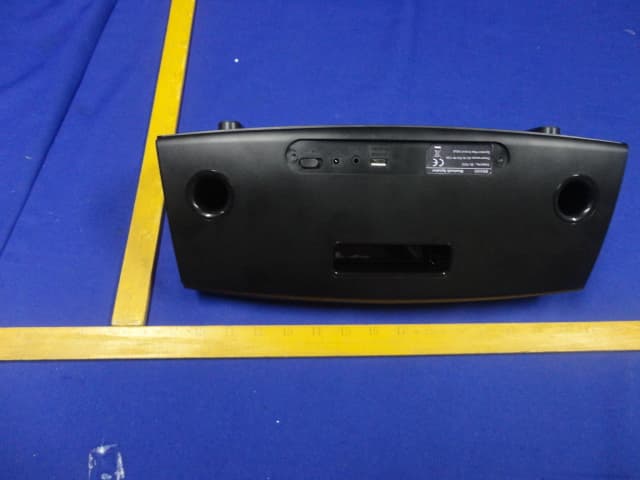
Click to zoom
Application Details
- Equipment Class
- DSS - Part 15 Spread Spectrum Transmitter
- Date of Grant
- Aug 13, 2014
- Application Purpose
- Original Equipment
- Date of Application
- Aug 13, 2014
- Equipment Note
- Bluetooth Speaker
- Frequency Range
- 2402.00000000 - 2480.00000000
- Country
- China
Documents & Files
Document Text
Text extracted from the exhibit documents filed with the FCC. Open a document above to read the original.
Users Manual
USER MANUAL WC 603 Classroom Bluetooth Speaker Features .....................................................................................................................2 For your Attention.....................................................................................................3-4 Panel.......................................................................................................................5-6 Connections...............................................................................................................7 Trouble shooting.........................................................................................................8 Specifications.............................................................................................................9 Contents Contents -1- Features -2- Thanks for your purchase of our product. Please read through this manual before making connections and operating this product. Retain this manual for future reference. Bluetooth playback AUX input Package Contents: User manual Us er m an ua l DC adaptor IMPORTANT NOTES For Your Attention Please read through this manual before making connections and operating this product. Retain this manual for future reference. Don't open the cabinet of this unit. No user-serviceable parts inside. Refer servicing to qualified personnel only. Switch off the unit when you don't use it. Switch off the unit and disconnect it from the AC power supply when it is not being used for a long time. Don't install the unit in a place exposed to heating sources or direct sunshine. Don't install the unit in a place exposed to moisture or rain. The apparatus shall not be exposed to dripping or splashing and any object filled with liquids, such as vases shall not be placed on it. Install the unit on a horizontal, flat and firm surface with good ventilation. Never block the vents which will cause malfunction resulted from overheating. Use a soft and clean rag to clean the outside of the unit . Never clean it with chemicals or detergent. This book is only a guide for user's operation, not a criterion for configuration. Only use attachments/accessories specified by the manufacturer. Where the mains plug is used as the detachable device, the detachable device shall remain readily operable. -3- For Your Attention -4- Panel -5- 1. VOLUME+/- 2. STANDBY/SOURCE SELECT 3. PLAY/PAUSE 4. PREVIOUS/NEXT (Note: All the button on the front panel are touch keys) 5. STANDBY (red indicator) 6. BLUETOOTH (blinking blue indicates pairing,solid blue indicates connected) 7. AUX IN (yellow indicator) Press to turn up/down the volume; Press to Press to temporarily pause a playback; press it again to resume the playback; Press to return to the previous track or skip to the next track; switch on the unit; Press repeatedly to select a signal source between Bluetooth or AUX input mode; FRONT PANEL: 1 2 3 4 5 6 7 Panel -6- 1. USB CHARGE PORT (5V) (Note: Use the USB cable (not included)to connect the USB and charge device.The charge port cannot charge battery in standby mode. There is no connection with the speaker after 10~15 minutes (no AUX input, USB charge or bluetooth connection), the speaker will turn to standby mode automatically and the red indicator light will illuminate. Press [PLAY/PAUSE] to wake up the speaker. The speaker will turn to auto standby mode after about 10~15 minutes. The unit cannot play music via USB charging port . 2. AUX INPUT 3. DC IN (10V) 4. POWER ON/OFF 1 2 3 REAR PANEL: 4 Connections -7- AUX IN This unit has an audio input terminal. Use the audio cable(not included) to connect the input terminal AUX IN on the rear panel of this player, press [SOURCE ] button on the front panel to switch to the AUX IN mode, the indicator on the front panel indicates in yellow that the player has been switched to AUX IN mode. SELECT Bluetooth Connection The model of the unit is WC 603,press [SOURCE SELECT] button on the front panel to switch to the corresponding signal source, use your mobile phone to search the bluetooth signal of the unit, then input the password 0000, the unit will synchronize to play songs on your mobile phone while they connected successfully. Disconnect the bluetooth on the mobile phone to switch off the bluetooth connect. In bluetooth mode,[PLAY/PAUSE],[NEXT], [PREVIOUS], [VOLUME+/-] etc. are also active. Once the bluetooth is connected to your audio device successfully for the first time, you can power off the player then power on. The speaker will reconnect automatically.Press [PLAY/PAUSE] to resume the playback. Note:Bluetooth connection range is 30 feet. The model WC 603 in your device was not deleted. Bluetooth Model:WC 603 -8- Troubleshooting Before resorting to maintenance service, please kindly check by yourself with the following chart. Sound There is no sound or the sound is distorted. The volume is set to the minimum level. Turn up the volume. SymptomCause(s) Remedy The buttons on the unit do not work. Switch off and unplug the unit. Then connect the plug to the power supply and switch it on again. The unit is being interfered with static electricity etc. The DC power cord is not connected to the power supply or is not connected to a power supply securely. Please check that the DC power cord is connected securely. No Power Audio device is not connected to the unit. Connect audio device via Bluetooth or Aux in. 5WX2 -9- Specifications Power supply DC 10V 1.5A Working environment Temperature -10~+35 Relative humidity 5%~90% Speaker output (Max) Power consumption 15W
Cover Letter(s)
SCS-F18: Project and Product Certification Representative Authorization Letter Page 1 of 3 Rev 4.0 775 Montague Expressway Milpitas, CA 95035 Tel: 408-526-1188 Fax: 408-526-1088 Email: [email protected] Project and Product Certification Representative Authorization Letter Revision History Reason for Amendment (current / obsolete) From To Approved Date Initial Release (obsolete) 1.0 1.0 Nov-14-2006 Revised wording (obsolete) 1.0 2.0 Sept–25-2007 Updated company template (obsolete) 2.0 3.0 Jan-31-2012 Updated letter information (current) 3.0 4.0 May-23-2014 SCS-F18: Project and Product Certification Representative Authorization Letter Page 2 of 3 Rev 4.0 Guangzhou Panyu Juda Car Audio Equipment Co.,Ltd. 2014.08.11 To: SIEMIC, INC. 775 Montague Expressway, Milpitas, CA 95035 USA Dear Sir/Madam, Re: Product Certification Representative Authorization Letter We, _____ Guangzhou Panyu Juda Car Audio Equipment Co.,Ltd.____hereby authorize SIEMIC, Inc. to act as a Certification Body for certifying for the following project(s): Product description: Bluetooth Speaker model name: WC 603 Additional Model: MI-SPB8M-101, MI-SPB9M-101 FCC ID: ESXWC603 Sincerely, Client’s signature Client’s name / title :Liao. xiaofei / Quality Director Contact information / address :Vtrek Dewei Industrial Garden,Shibei Industrial Road, Dashi Town, Panyu Borough, Guangzhou , Guangdong, China SCS-F18: Project and Product Certification Representative Authorization Letter Page 3 of 3 Rev 4.0 Guangzhou Panyu Juda Car Audio Equipment Co.,Ltd. 2014.08.11 To: SIEMIC, Inc. 775 Montague Expressway, Milpitas, CA 95035 USA Dear Sir/Madam, Re: Project and Product Certification Representative Authorization Letter We, ___ Guangzhou Panyu Juda Car Audio Equipment Co.,Ltd. _hereby authorize SIEMIC, Inc. to act as Certification Body for certifying for the following project(s): Product description: Bluetooth Speaker model name: WC 603 Additional Model: MI-SPB8M-101, MI-SPB9M-101 FCC ID: ESXWC603 We affirm that between SIEMIC, Inc. and __ Guangzhou Panyu Juda Car Audio Equipment Co.,Ltd.. _, any difference in understanding, including test plan, measurement methods, applicable standards and relevant procedures and processes have been resolved prior to commencement of testing activities. Sincerely, Client’s signature Client’s name / title :Liao. xiaofei /Quality Director Contact information / address :Vtrek Dewei Industrial Garden,Shibei Industrial Road, Dashi Town, Panyu Borough, Guangzhou , Guangdong , China
Cover Letter(s)
SCS-F19: Confidentiality Request Letter Page 1 of 2 Rev 3.0 775 Montague Expressway Milpitas, CA 95035 Tel: 408-526-1188 Fax: 408-526-1088 Email: [email protected] Confidentiality Request Letter Revision History Reason for Amendment (current / obsolete) From To Approved Date Initial Release (obsolete) 1.0 1.0 Nov-14-2006 Adding CFR 2.459 (obsolete) 1.0 2.0 August – 11 - 2008 Updated company template & Added text box (current) 2.0 3.0 Jan-31-2012 SCS-F19: Confidentiality Request Letter Page 2 of 2 Rev 3.0 Guangzhou Panyu Juda Car Audio Equipment Co.,Ltd. 2014/08/11 To: Federal Communications Commission Authorization and Evaluation Division 7435 Oakland Mills Road Columbia, MD Subject: Permanent Confidentiality Request for FCC ID: ESXWC603 We hereby request confidential treatment of information accompanying this application as outlined below: - Block Diagram - Schematics - Operational Description The above materials contain trade secrets and proprietary information not customarily released to the public. The public disclosure of these materials may be harmful to the applicant and provide unjustified benefits to its competitors. The applicant understands that pursuant to Section 0.457 & 0.459 of the Rules, disclosure of this application and all accompanying documentation will not be made before the date of the Grant for this application. Sincerely, Client’s signature : Client’s name / title : Liao. xiaofei / Quality Director Contact information / address: Vtrek Dewei Industrial Garden,Shibei Industrial Road, Dashi Town, Panyu Borough, Guangzhou , Guangdong , China
Cover Letter(s)
Guangzhou Panyu Juda Car Audio Equipment Co.,Ltd.Inc. **************************************************************************** I, the undersigned, hereby confirm that any of our production units bearing the following models numbers are said to be identical in cosmetics, materials, PCB layout, electrical, mechanical, and physical design, including software/firmware . The just the shell and Trade Name,the PCB boards inside are identical. The “MI-SPB8M-101” and “MI-SPB9M-101” apply to Trade Name “MERKURY”; The “WC 603” apply to Trade Name"VTREK". FCC ID:ESXWC603 1) Model No.: WC 603 2) Model No.: MI-SPB8M-101 I3) Model No.: MI-SPB9M-101 Client’s signature: Client’s name / title: Contact information / address: Vtrek Dewei Industrial Garden,Shibei Industrial Road, Dashi Town, Panyu Borough, Guangzhou , Guangdong , China ****************************************************************************
External Photos
FCC ID:ESXWC603 EST Technology Co.,Ltd Report No. ESTE-R1408002 Page 98 of 109 13. PHOTOS OF EUT External Photos M/N: WC 603 FCC ID:ESXWC603 EST Technology Co.,Ltd Report No. ESTE-R1408002 Page 99 of 109 External Photos M/N: WC 603 FCC ID:ESXWC603 EST Technology Co.,Ltd Report No. ESTE-R1408002 Page 100 of 109 External Photos M/N: WC 603 FCC ID:ESXWC603 EST Technology Co.,Ltd Report No. ESTE-R1408002 Page 101 of 109 External Photos M/N: MI-SPB9M-101 FCC ID:ESXWC603 EST Technology Co.,Ltd Report No. ESTE-R1408002 Page 102 of 109 External Photos M/N: MI-SPB9M-101 FCC ID:ESXWC603 EST Technology Co.,Ltd Report No. ESTE-R1408002 Page 103 of 109 External Photos M/N: MI-SPB9M-101
Internal Photos
FCC ID:ESXWC603 EST Technology Co.,Ltd Report No. ESTE-R1408002 Page 104 of 109 Internal Photos M/N: WC 603 FCC ID:ESXWC603 EST Technology Co.,Ltd Report No. ESTE-R1408002 Page 105 of 109 Internal Photos M/N: WC 603 Bluetooth Antenna FCC ID:ESXWC603 EST Technology Co.,Ltd Report No. ESTE-R1408002 Page 106 of 109 Internal Photos M/N: WC 603 FCC ID:ESXWC603 EST Technology Co.,Ltd Report No. ESTE-R1408002 Page 107 of 109 Internal Photos M/N: WC 603 FCC ID:ESXWC603 EST Technology Co.,Ltd Report No. ESTE-R1408002 Page 108 of 109 Internal Photos M/N: WC 603 FCC ID:ESXWC603 EST Technology Co.,Ltd Report No. ESTE-R1408002 Page 109 of 109 Adapter Photos
RF Exposure Info
FCC ID: ESXWC603 EST Technology Co.,Ltd Report No. ESTE-R1408003 Page 1 of 3 FCC 47 CFR MPE REPORT Guangzhou Panyu Juda Car Audio Equipment Co.,Ltd. Bluetooth Speaker Model Number: WC 603 Additional Model: MI-SPB8M-101, MI-SPB9M-101 FCC ID: ESXWC603 Prepared for : Guangzhou Panyu Juda Car Audio Equipment Co.,Ltd. Vtrek Dewei Industrial Garden,Shibei Industrial Road, Dashi Town, Panyu Borough, Guangzhou , Guangdong , China Prepared By : EST Technology Co., Ltd. Santun(guantai Road), Houjie Town, DongGuan City, GuangDong, China. Tel: 86-769-83081888-808 Report Number: ESTE-R1408003 Date of Test : July 28,2014~ Aug 11, 2014 Date of Report : Aug 12, 2014 FCC ID: ESXWC603 EST Technology Co.,Ltd Report No. ESTE-R1408003 Page 2 of 3 Maximum Permissible Exposure 1、Applicable Standard Systems operating under the provisions of this section shall be operated in a manner that ensures that the public is not exposed to radio frequency energy level in excess limit for maximum permissible exposure. In accordance with 47 CFR FCC Part 2 Subpart J, section 2.1091 this device has been defined as a mobile device whereby a distance of 0.2m normally can be maintained between the user and the device. (a)、Limits for Occupational / Controlled Exposure Frequency Range (MHz) Electric Field Strength E) (V/m) Magnetic Field Strength (H) (A/m) Power Density (S) (mW/cm2) Averaging Times︱E︱ 2 , ︱H︱2 or S (minutes) 0.3-3.0 614 1.63 (100)* 6 3.0-30 1842/f 4.89/f (900/f)* 6 30-300 61.4 0.163 1.0 6 300-1500 F/300 6 1500-10000 5 6 (b)、Limits for General Population / Uncontrolled Exposure Frequency Range (MHz) Electric Field Strength E) (V/m) Magnetic Field Strength (H) (A/m) Power Density (S) (mW/cm2) Averaging Times︱E︱ 2 , ︱H︱2 or S (minutes) 0.3-1.34 614 1.63 (100)* 30 1.34-30 824/f 2.19/f (180/f)* 30 30-300 27.5 0.073 0.2 30 300-1500 F/1500 30 1500-10000 1.o 30 Note: f=frequency in MHz; *Plane-wave equivalent power density 2、MPE Calculation Method E (V/m) = (30*P*G) 0.5/d Power Density: Pd (W/m2) = E2/377 E = Electric Field (V/m) P = Peak RF output Power (W) G = EUT Antenna numeric gain (numeric) d = Separation distance between radiator and human body (m) The formula can be changed to Pd = (30*P*G) / (377*d2) From the peak EUT RF output power, the minimum mobile separation distance, d=0.2m, as well as the gain of the used antenna, the RF power density can be obtained FCC ID: ESXWC603 EST Technology Co.,Ltd Report No. ESTE-R1408003 Page 3 of 3 3、Calculated Result and Limit Antenna gain Model Frequency (MHz) Peak output power (dBm) Peak output power (mW) (dBi) (Linear) Power Density (S) (mW/cm2) Limited of Power Density (S) (mW/cm2) Test Result 2402 1.532 1.4230 1.00 0.00028 1 Compiles 2441 2.618 1.8270 1.00 0.00036 1 Compiles GFSK 2480 2.673 1.8510 1.00 0.00037 1 Compiles 2402 0.179 1.0420 1.00 0.00021 1 Compiles 2441 1.346 1.3630 1.00 0.00027 1 Compiles 8-DPSK 2480 2.337 1.7130 1.00 0.00034 1 Compiles
Test Report
FCC ID: ESXWC603 EST Technology Co.,Ltd Report No.ESTE-R1408004 Page 1 of 109 FCC PART 15C TEST REPORT FOR CERTIFICATION On Behalf of Guangzhou Panyu Juda Car Audio Equipment Co.,Ltd. Bluetooth Speaker Model Number: WC 603 Additional Model: MI-SPB8M-101, MI-SPB9M-101 FCC ID: ESXWC603 Prepared for : Guangzhou Panyu Juda Car Audio Equipment Co.,Ltd. Vtrek Dewei Industrial Garden,Shibei Industrial Road, Dashi Town, Panyu Borough, Guangzhou , Guangdong , China Prepared By : EST Technology Co., Ltd. Santun(guantai Road), Houjie Town, DongGuan City, GuangDong, China. Tel: 86-769-83081888-808 Report Number: ESTE-R1408002 Date of Test : July 28,2014~ Aug 11, 2014 Date of Report : Aug 12, 2014 FCC ID: ESXWC603 EST Technology Co.,Ltd Report No.ESTE-R1408004 Page 2 of 109 TABLE OF CONTENTS Description Page TEST REPORT VERIFICATION.........................................................................................................................3 1. GENERAL INFORMATION.................................................................................................................5 1.1. Description of Device (EUT) ........................................................................................................... 5 2. SUMMARY OF TEST.........................................................................................................................6 2.1. Summary of test result...................................................................................................................... 6 2.2. Test Facilities ................................................................................................................................... 7 2.3. Assistant equipment used for test ..................................................................................................... 8 2.4. Block Diagram ................................................................................................................................. 8 2.5. Test mode ......................................................................................................................................... 9 2.6. Channel List for Bluetooth ............................................................................................................... 9 2.7. Test Equipment............................................................................................................................... 10 3. MAXIMUM PEAK OUTPUT POWER.................................................................................................11 3.1. Limit ............................................................................................................................................... 11 3.2. Test Procedure ................................................................................................................................ 11 3.3. Test Result ...................................................................................................................................... 11 3.4. Test Data ........................................................................................................................................ 12 4. 20 DB BANDWIDTH.......................................................................................................................16 4.1. Limit ............................................................................................................................................... 16 4.2. Test Procedure ................................................................................................................................ 16 4.3. Test Result ...................................................................................................................................... 16 4.4. Test Data ........................................................................................................................................ 17 5. CARRIER FREQUENCY SEPARATION..............................................................................................21 5.1. Limit ............................................................................................................................................... 21 5.2. Test Procedure ................................................................................................................................ 21 5.3. Test Result ...................................................................................................................................... 21 5.4. Test Data ........................................................................................................................................ 22 6. NUMBER OF HOPPING CHANNEL..................................................................................................26 6.1. Limit ............................................................................................................................................... 26 6.2. Test Procedure ................................................................................................................................ 26 6.3. Test Result ...................................................................................................................................... 26 6.4. Test Data ........................................................................................................................................ 27 7. DWELL TIME.................................................................................................................................29 7.1. Limit ............................................................................................................................................... 29 7.2. Test Result ...................................................................................................................................... 29 7.3. Test Data ...................................................................................................…
Text truncated - open the document above for the full version.
Test Setup Photos
FCC ID:ESXWC603 EST Technology Co.,Ltd Report No. ESTE-R1408002 Page 95 of 109 12. TEST SETUP PHOTO Conducted Test FCC ID:ESXWC603 EST Technology Co.,Ltd Report No. ESTE-R1408002 Page 96 of 109 Radiated Test (30-1000 MHz) FCC ID:ESXWC603 EST Technology Co.,Ltd Report No. ESTE-R1408002 Page 97 of 109 Radiated Test (1000-25000 MHz)
Contact Information
Applicant
Xiaofei Liao
Test Firm
EST Technology Co.,LtdIceman Hu
[email protected]86-769-83081888
Technical Specifications
| # | Rule Parts | Frequency Range | Power Output |
|---|---|---|---|
| 1 | 15C | 2.40 GHz - 2.48 GHz | 1.85 mW |
Other Applications from Guangzhou Panyu Juda Car Audio Equipment Co.,Ltd.
ESX-BMAX30
Apr 30, 2026WIRELESS SPEAKER SYSTEM
Equipment Class
DSS - Part 15 Spread Spectrum TransmitterESX-BMAX5
Jul 23, 2024WIRELESS SPEAKER SYSTEM
Equipment Class
DSS - Part 15 Spread Spectrum TransmitterESX-BMAX10
Jul 22, 2024WIRELESS SPEAKER SYSTEM
Equipment Class
DSS - Part 15 Spread Spectrum Transmitter
ESX-TMAX45
Jul 15, 2023WIRELESS SPEAKER SYSTEM
Equipment Class
DSS - Part 15 Spread Spectrum Transmitter
ESXHP100
Aug 03, 2022Party Speaker
Equipment Class
DSS - Part 15 Spread Spectrum Transmitter