EW780-5681-005.8 GHz Corded/Cordless Answering System
VTech Telecommunications Ltd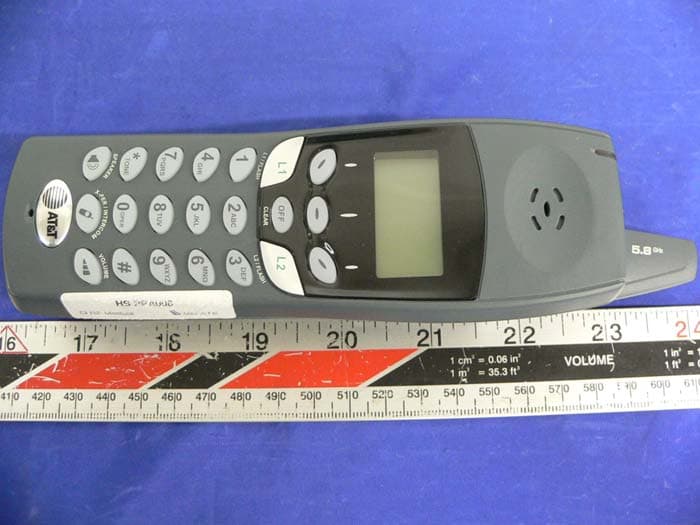
Click to zoom
Application Details
- Equipment Class
- DSS - Part 15 Spread Spectrum Transmitter
- Date of Grant
- Jul 19, 2005
- Application Purpose
- Original Equipment
- Date of Application
- May 01, 2005
- Equipment Note
- 5.8 GHz Corded/Cordless Answering System
- Frequency Range
- 5744.73600000 - 5825.95200000
- Company
- VTech Telecommunications Ltd
- Country
- Hong Kong
Documents & Files
Document Text
Text extracted from the exhibit documents filed with the FCC. Open a document above to read the original.
Users Manual
IMPORTANT PRODUCT INFORMATION Safety Information This symbol is to alert you to important operating or servicing instructions that may appear in this user’s manual. Always follow basic safety precautions when using this product to reduce the risk of injury, fire, or electric shock. 1 Read and understand all instructions in the user’s manual. Observe all markings on the product. 2 Avoid using a telephone during a thunderstorm. There may be a slight chance of electric shock from lightning. 3 Do not use a telephone in the vicinity of a gas leak. If you suspect a gas leak, report it immediately, but use a telephone away from the area where gas is leaking. If this product is a cordless model, make sure the base is also away from the area. 4 Do not use this product near water, or when you are wet. For example, do not use it in a wet basement or shower, or next to a swimming pool, bathtub, kitchen sink, or laundry tub. Do not use liquids or aerosol sprays for cleaning. If the product comes in contact with any liquids, unplug any line or power cord immediately. Do not plug the product back in until it has dried thoroughly. 5 Install this product in a protected location where no one can trip over any line or power cords. Protect cords from damage or abrasion. 6 If this product does not operate normally, read “In Case of Difficulty” in the user’s manual. If you cannot solve the problem, or if the product is damaged, refer to the Limited Warranty. Do not open this product except as may be directed in your user’s manual. Opening the product or reassembling it incorrectly may expose you to hazardous voltages or other risks. Part 1 (Continued) © 2001 Advanced American Telephones. All Rights Reserved. AT&T and the Globe Design are trademarks of AT&T Corp., licensed to Advanced American Telephones. 91-005229-080-000.qxd 4/8/05 12:10 PM Page 1 2 7 If this product has user-replaceable batteries, replace batteries only as described in your user’s manual. Do not burn or puncture batteries — they contain caustic chemicals. 8 If this product has a three-prong (grounding) plug or a polarized plug with one wide prong, it may not fit in non-polarized outlets. Do not defeat the purpose of these plugs. If they do not fit in your outlet, the outlet should be replaced by an electrician. CAUTION:Use only the power adapter provided with this product. To obtain a replacement, call 1 800 222–3111. SAVE THESE INSTRUCTIONS Especially About Cordless Telephones Privacy: The same features that make a cordless phone convenient create some limitations. Telephone calls are transmitted between the base and the handset by radio waves, so there is a possibility that your cordless phone conversations could be intercepted by radio receiving equipment within range of the cordless handset. For this reason, you should not think of cordless phone conversations as being as private as those on corded phones. Electrical Power:The base unit of this cordless telephone must be connected to a working electrical outlet. The electrical outlet should not be controlled by a wall switch. Calls cannot be made from the handset if the base unit is unplugged or switched off, or if the electrical power is interrupted. Potential TV Interference:Some cordless telephones operate at frequencies that may cause interference to TVs and VCRs. To minimize or prevent such interference, do not place the base unit of the cordless telephone near or on top of a TV or VCR. If interference is experienced, moving the cordless telephone farther away from the TV or VCR will often reduce or eliminate the interference. (Applies to 25-channel cordless phones only.) Rechargeable Batteries:This product contains either Nickel- Cadmium or Nickel-Metal Hydride rechargeable batteries. Exercise care in handling batteries in order not to short the battery with conducting material such as rings, bracelets, and keys. The battery or conductor may overheat and cause harm. Observe proper polarity between the battery and the battery charger. 91-005229-080-000.qxd 4/8/05 12:10 PM Page 2 3 Nickel-Cadmium Rechargeable Batteries:Must be recycled or disposed of properly. Do not dispose of in household garbage. Do not burn or puncture. Like other batteries of this type, if burned or punctured, they could release caustic material which could cause injury. The RBRC ™ Seal means that the manufacturer is voluntarily participating in an industry program to collect and recycle Nickel-Cadmium rechargeable batteries when taken out of service within the United States. These batteries may be taken to a participating local retailer of replacement batteries or recycling center. Or you may call 1 800 8BATTERY for locations accepting spent Nickel-Cadmium Batteries. Nickel-Metal Hydride Rechargeable Batteries:Dispose of these batteries in a safe manner. Do not burn or puncture. Like other batteries of this type, if burned or punctured, they could release caustic material which could cause injury. Precautions for Users of Implanted Cardiac Pacemakers Cardiac Pacemakers (applies only to 900 MHz Digital Cordless Telephones): Wireless Technology Research, LLC (WTR), an independent research entity, led a multidisciplinary evaluation of the interference between portable wireless telephones and implanted cardiac pacemakers. Supported by the U.S. Food and Drug Administration, WTR had recommended to physicians that: PACEMAKER PATIENTS • Should keep wireless phones at least six inches from the pacemaker • Should NOTplace wireless phones directly over the pacemaker, such as in a breast pocket, when it is turned ON • Should use the wireless phone at the ear opposite the pacemaker WTR’s evaluation did not identify any risk to bystanders with pacemakers from other persons using wireless phones. 91-005229-080-000.qxd 4/8/05 12:10 PM Page 3 4 Especially About Telephone Answering Systems Two-Way Recording:This unit does not sound warning beeps to let the other party know that the call is being recorded. To ensure that you are…
Text truncated - open the document above for the full version.
Users Manual
User Manual (Part 2) 5.8 GHz Corded/Cordless Answering System EP5962 with Caller ID & Call Waiting 91-000302-010-000_EP5962Englishmanual_r0Mar1605.qxd 3/16/2005 5:19 PM Page 1 Copyright © 2005 Advanced American Telephones. All Rights Reserved. AT&T and the Globe Design are trademarks of AT&T Corp., licensed to Advanced American Telephones. STOP! See page 8 for easy instructions You must install and charge the battery before using the telephone For customer service or product information, visit our web site at www.telephones.att.com or call 1-800-222-3111 Please also read Important Product Information Enclosed in product package Handset 1Handset 2Handset 3 Add new handsets to make your phone more versatile (see page 36) Your telephone can accommodate up to eight cordless handsets. You can add new handsets (sold separately) at any time. Up to four handsets at a time can be used. The handset provided with your telephone is automaticallyregistered as Handset 1. Additional handsets will be assigned numbers in the order they are registered (2, 3, 4, etc.) up to a maximum of eight handsets. 91-000302-010-000_EP5962Englishmanual_r0Mar1605.qxd 3/16/2005 5:19 PM Page 2 1 Table of contents User Manual (Part 2) 5.8 GHz Corded/Cordless Answering System EP5962 Getting Started Quick reference ...................................2 Parts checklist .......................................4 Before you begin ..................................5 Telephone base installation................6 Battery & charger installation............8 Belt clip & accessories.........................9 Telephone Operation Basic handset operation ...................10 Basic base operation .........................11 Options during calls ..........................12 Intercom calls & conference calls...13 Handset settings.................................14 Base settings........................................15 Phonebooks Handset and base phonebooks.......16 New phonebook entries ..................17 Phonebook search .............................18 To dial, edit or delete a listing ........19 Caller ID Logs How Caller ID works .......................20 To review your call log ...................21 To dial a call log entry ......................22 Voice messages with Caller ID .......23 Answering System Operation Answering system operation ..........24 Day and time announcements ........25 Outgoing announcements................26 Message playback ...............................27 Answering mode ................................28 Number of rings before answer.....29 Audible message alert .......................30 Recording and playing memos ........31 Change security code .......................32 Remote access....................................33 Appendix Display screen status icons..............34 Alert tones & indicator lights..........35 Adding new handsets ........................36 Charging spare batteries ..................37 In case of difficulty .............................38 INDEX..................................................40 Technical specifications ....................42 Spare remote access card................43 91-000302-010-000_EP5962Englishmanual_r0Mar1605.qxd 3/16/2005 5:20 PM Page 1 2 Getting Started Off/Clear During a call, press to hang up. While using menus, press to cancel an operation, back up to the previous menu, or exit the menu display. Quick reference guide Speaker Press to activate handset speaker- phone. Press again to switch normal handset use (earpiece). Softkeys Press a softkey to select a menu item displayed just above the key. L1/Flash, L2/Flash Press L1to make or answer a call on line 1. Press L2to make or answer a call on line 2. During a call, press to receive an incoming call, if Call Waiting is activated (see page 12). Volume Press to adjust listening volume. Handset Xfer/Intercom Press to transfer a call or initiate an intercom conversation (see pages 10 & 13). Redial Log (See page 10) Phonebook (See page 16) Screen menus HANDSET 1 RDLMEM MENU Menus Main Menu Play New MSG ......See page 24 Call History ............See page 20 Mailboxes................See page 24 Handset Settings ........See menu Register ..................See page 36 Handset Settings Ringers ..................See page 14 Low Batt Tone ........See page 14 Range Tone ............See page 14 Keypad Tone ..........See page 14 Contrast ..................See page 14 Enhanced Mode......See page 14 Rename ..................See page 14 Item 1Item 2Item 3 91-000302-010-000_EP5962Englishmanual_r0Mar1605.qxd 3/16/2005 5:20 PM Page 2 Answering system controls(see pages 24-33) ON/OFF..................Press, then select mailbox to turn on or off (L1 or L2) RECORD................Press to record a memo or outgoing announcement DELETE..................Press to delete message currently playing MAILBOX LINE 1....Press to play or stop playing Mailbox 1 messages MAILBOX LINE 2....Press to play or stop playing Mailbox 2 messages REPEAT..................Press to repeat; press twice to hear previous message SKIP........................Press to hear next message 3 Getting Started Quick reference guide Telephone function keys(see pages 11-15) SOFTKEYS............Press to select menu item displayed just above the key CLEAR....................Press to exit current menu or clear an entry INTERCOM/ TRANSFER............Press to begin intercom call or transfer external call MUTE......................Press to silence microphone; press again to resume FLASH....................During a call, press to receive an incoming call, if Call Waiting is activated VOLUME................Press to adjust speakerphone listening volume HEADSET..............Press to activate headset L1............................Press, then lift handset to make or answer a call on line 1 L2............................Press, then lift handset to make or answer a call on line 2 SPEAKERPHONE..Press to turn speakerphone on or off (begin or end a call) Base/Speakerphone Answering system control…
Text truncated - open the document above for the full version.
Users Manual
25 Answering System Operation Day and time announcements To set day and time Before playing each message, the answering system announces the day and time the message was received. Before using the answering system, you should follow the steps at left to set the day and time, so messages are dated correctly. To set the day, scroll to a day of the week, then click SET. Scroll to the correct day, then click OK. To set the time, scroll to the current time setting, then click SET. Use the dial pad to enter four digits (08:15), then press 2 for “AM” or 7for “PM”). Press SAVE when time is entered correctly. RDLMEMMENU MAILBOXES CALL HISTORY ^V OK Select MAILBOXES MAILBOX 2 MAILBOX 1 MAILBOX 1 SETUP MAILBOX 2 SETUP ^V OK Select mailbox to modify SUNDAY # OF RINGS: 4 12:00AM AUD ALERT OFF ^V SET Select and modify day & time 91-000302-010-000_EP5962Englishmanual_r0Mar1605.qxd 3/16/2005 5:20 PM Page 25 26 Answering System Operation Outgoing announcements Outgoing announcements are the messages callers hear when calls are answered by the answering system. The phone is pre-programmed with an announcement that answers calls with “Hello. Please leave a message after the tone.”You can use this announcement, or replace it with a recording of your own voice. To record your outgoing announcement Follow the steps at left to select RECORD NEW OGA, then press OK. At the screen prompt, begin speaking. Speak facing the telephone base from about 9 inches away. Press STOPwhen you are finished to hear the message you just recorded. You can record an announcement up to 4 minutes long. Announcements less than 3 seconds long will not be recorded. Shortcut (base only): Press and hold RECORD, then press MAILBOX LINE1/LINE2to record an outgoing announcement for the selected line. To review or delete your announcement Follow the steps at left to select LISTEN TO OGAor DELETE OGA. If you delete your outgoing announce- ment, calls will be answered with the pre-programmed announcement described above. MAILBOXES CALL HISTORY ^V OK Select MAILBOXES MAILBOX 2 MAILBOX 1 MAILBOX 1 SETUP MAILBOX 2 SETUP ^V OK Select mailbox to modify REVIEW/CHNG OGA ANSWER + RECORD SEC. CODE: 5000 # OF RINGS: 2 ^V SET Select REVIEW/CHNG OGA DELETE OGA LISTEN TO OGA RECORD NEW OGA ^V OK Select RECORD NEW OGA Speak into microphone Microphone 91-000302-010-000_EP5962Englishmanual_r0Mar1605.qxd 3/16/2005 5:21 PM Page 26 27 Answering System Operation Message playback At the base, press a mailbox button to hear messages. At the handset, select MAILBOXES, then choose a mailbox. If you have new messages waiting, you will hear only the new messages (oldest first). If there are no new messages, the system will play back all messages (oldest first). NOTE: Only one station (handset or base) can access the answering system at a time. Announcements • During playback, the memo or message number, NEWor OLD, date & time and its length will be dis- played on screen (with Caller ID information if avail- able). • Before each message, you will hear the day and time it was received. • After the last message, you will see “End of mailbox 1 or 2 Messages!” on the screen. If the system has less than 5 minutes of recording time left, you will hear time remaining. Options during playback • Press VOLUMEbutton to adjust speaker volume. • Press REPEATor BACKto repeat message currently playing. Press twice to hear previous message. • Press DELETEor ERASEto delete message being played back. • Press MENUfor more options: • Press 5to pause or resume playback. • Press 6to skip to next message. • Press CLEARor any mailbox button to stop playback. To delete all messages To delete all messages, press DELETEat the base while the phone is idle. Select a mailbox, then press ERASEto confirm. Base: Press mailbox button CHRIS THOMPSON NEW MSG 1OF 4 888-883-2445 11:29 A Oct4 14s BACKERASEMENU PLAY (1) PAUSE/RESUME (5) SKIP (6) ^V OK “Sunday, 12 am...” MAILBOXES CALL HISTORY ^V OK Handset: Select MAILBOXES MAILBOX 2 MAILBOX 1 MAILBOX 1 SETUP MAILBOX 2 SETUP ^V OK Select mailbox Hear previous message Delete message Numbers following commands are keyboard shortcuts (i.e., press 6 to skip) 91-000302-010-000_EP5962Englishmanual_r0Mar1605.qxd 3/16/2005 5:21 PM Page 27 28 Answering System Operation Answering mode In Answer + Record mode, callers are asked to leave a message. In Answer Only mode, callers hear an announcement but cannot leave messages. This option is useful, for example, to notify callers that you will be away for an extended period and request that they call back after a certain date. To select answering mode Follow the steps at left to select the answering mode for each mailbox. Use the ^Vbuttons to highlight a selection, then press OK. Answer Only announcement When Answer Only is turned on, calls are answered with a pre-recorded announcement that says “We’re sorry, messages to this number cannot be accepted.” You can use this announcement, or replace it with a recording of your own voice. After turning on the Announce Only feature, follow the steps on page 26 to record your announcement. Callers will hear this announcement only when the Announce Only feature is turned on. Otherwise they will hear the standard announcement asking them to leave a message. MAILBOXES CALL HISTORY ^V OK Select MAILBOXES MAILBOX 2 MAILBOX 1 MAILBOX 1 SETUP MAILBOX 2 SETUP ^V OK Select mailbox to modify REVIEW/CHNG OGA ANSWER + RECORD SEC. CODE: 5000 # OF RINGS: 2 ^V SET Select current answer mode SET TO L1MAILBOX IS ANSWER + RECORD ANSWER ONLY ^V OK Choose desired answer mode 91-000302-010-000_EP5962Englishmanual_r0Mar1605.qxd 3/16/2005 5:21 PM Page 28 29 Answering System Operation Number of rings before answer At this menu you can select how the answering system answers incoming calls. Press the -or +buttons to select one of four options: • Answer calls after 2rings • Answer calls after 4rings (default) • Answer calls after 6rings •Toll Saver(system answers after 2 rings if you have new messages, and …
Text truncated - open the document above for the full version.
Users Manual
I M P O RTANT PRODUCT INFORMAT I O N S a fety Info r m a t i o n This symbol is to alert you to important operating or servicing instructions that may appear in this user’s manual. Always follow basic safety precautions when using this product to reduce the risk of injury, fire, or electric shock. 1Read and understand all instructions in the user’s manual. Observe all markings on the product. 2Avoid using a telephone during a thunderstorm. There may be a slight chance of electric shock from lightning. 3Do not use a telephone in the vicinity of a gas leak. If you suspect a gas leak, report it immediately, but use a telephone away from the area where gas is leaking. If this product is a cordless model, make sure the base is also away from the area. 4Do not use this product near water, or when you are wet. For example, do not use it in a wet basement or shower, or next to a swimming pool, bathtub, kitchen sink, or laundry tub. Do not use liquids or aerosol sprays for cleaning. If the product comes in contact with any liquids, unplug any line or power cord immediately. Do not plug the product back in until it has dried thoroughly. 5Install this product in a protected location where no one can trip over any line or power cords. Protect cords from damage or abrasion. 6If this product does not operate normally, read “In Case of Difficulty” in the user’s manual. If you cannot solve the problem, or if the product is damaged, refer to the Limited Warranty. Do not open this product except as may be directed in your user’s manual. Opening the product or reassembling it incorrectly may expose you to hazardous voltages or other risks. Part1 ( C o n t i n u e d ) © 2001 Advanced American Telephones. All Rights Reserved. AT&T and the Globe Design are trademarks of AT&TCorp., licensed to Advanced American Telephones. 91-005229-090-000.ATT2320.RO.qxd 2005.6.17 11:40 AM Page 1 2 7If this product has user-replaceable batteries, replace batteries only as described in your user’s manual. D o not burn or puncture batteries — they contain caustic c h e m i c a l s . 8If this product has a three-prong (grounding)plug or a polarized plug with one wide prong, it may not fit in non-polarized outlets. Do not defeat the purpose of these plugs. If they do not fit in your outlet, the outlet should be replaced by an electrician. C A U T I O N :Use only the power adapter provided with this product. To obtain a replacement, call 1 800 222–3111. S AV ET H E S EI N S T RU C T I O N S E s p e c i a l ly About Cordless Te l e p h o n e s Privacy: The same features that make a cordless phone convenient create some limitations. Telephone calls are transmitted between the base and the handset by radio waves, so there is a possibility that your cordless phone conversations could be intercepted by radio receiving equipment within range of the cordless handset. For this reason, you should not think of cordless phone conversations as being as private as those on corded phones. Electrical Power:The base unit of this cordless telephone must be connected to a working electrical outlet. The electrical outlet should not be controlled by a wall switch. C a l l s cannot be made from the handset if the base unit is unplugged or switched off, or if the electrical power is i n t e r r u p t e d . P o t e n t i a lT VI n t e r f e r e n c e :Some cordless telephones operate at frequencies that may cause interference to TVs and VCRs. To minimize or prevent such interference, do not place the base unit of the cordless telephone near or on top of a TV or VCR. If interference is experienced, moving the cordless telephone farther away from the TV or VCR will often reduce or eliminate the interference. (Applies to 25-channel cordless phones only.) Rechargeable Batteries:This product contains either Nickel- Cadmium or Nickel-Metal Hydride rechargeable batteries. Exercise care in handling batteries in order not to short the battery with conducting material such as rings, bracelets, and keys. The battery or conductor may overheat and cause harm. Observe proper polarity between the battery and the battery c h a r g e r . 91-005229-090-000.ATT2320.RO.qxd 2005.6.17 11:40 AM Page 2 3 Nickel-Cadmium Rechargeable Batteries:Must be recycled or disposed of properly. Do not dispose of in household garbage. Do not burn or puncture. Like other batteries of this type, if burned or punctured, they could release caustic material which could cause injury. The RBRC ™ Seal means that the manufacturer is voluntarily participating in an industry program to collect and recycle Nickel-Cadmium rechargeable batteries when taken out of service within the United States. These batteries may be taken to a participating local retailer of replacement batteries or recycling center. Or you may call 18 0 08BATTERY for locations accepting spent Nickel-Cadmium Batteries. Nickel-Metal Hydride Rechargeable Batteries:D i s p o s e of these batteries in a safe manner. Do not burn or puncture. Like other batteries of this type, if burned or punctured, they could release caustic material which could cause injury. P recautions for Users of Implanted Cardiac Pa c e m a ke r s Cardiac Pacemakers (applies only to 900 MHz Digital Cordless Telephones): Wireless Technology Research, LLC (WTR), an independent research entity, led a multidisciplinary evaluation of the interference between portable wireless telephones and implanted cardiac pacemakers. Supported by the U.S. Food and Drug Administration, WTR had recommended to physicians that: PACEMAKER PATIENTS •Should keep wireless phones at least six inches from the p a c e m a k e r •Should N O Tplace wireless phones directly over the pacemaker, such as in a breast pocket, when it is turned ON •Should use the wireless phone at the ear opposite the p a c e m a k e r WTR’s evaluation did not identify any risk to bystanders with pacemakers from other persons using wireless phones. 91-005229-090-000.ATT2320.RO.qxd 2005.6.17 11:40 AM Page 3 4 E s p e c i…
Text truncated - open the document above for the full version.
Cover Letter(s)
April 18, 2005 Equipment Authorization Division Federal Communications Commission 7435 Oakland Mills Road Columbia, MD 21046 FCC ID: EW780-5681-00 Product Name: AT&T EP5962 and AT&T EP590-2 Request for Confidentiality Pursuant to Sections 0.457 and 0.459 of the commissions rules, we hereby request that the following documents (list no# 1 to 5) be held confidential: (1) Theory of Operation (2) Wireless System Description (3) Schematics (4) Block Diagrams (5) Part List (BOM) We also request that the FCC mark the below documents (list no# 6 to 8) as "Temporary Confidential" as outlined in Public Notice DA 04-1705, dated June 15, 2004. This provision will give Vtech temporary confidentiality prior to product launch. (6) External Photos (7) Internal Photos (8) Users Manual These materials contain trade secrets and proprietary information and are not customarily released to the public. The public disclosure of this information might be harmful to the company and provide unjustified benefits to our competitors. Dated this 18th Day of April 2 0 05 By: Joseph Poon Signature Printed Title: Regulatory Compliance Manager On behalf of : VTech Engineering Canada Ltd. Telephone: (604) 273-5131
External Photos
EXHIBIT C - EUT EXTERNAL PHOTOGRAPHS Base - Top View Base - Bottom View Power Supply – Top View Power Supply – Bottom View Handset – Chassis Front View Handset – Chassis Rear View
Internal Photos
EXHIBIT C - EUT INTERNAL PHOTOGRAPHS Base – Chassis Cover off View Base - Main Board Component View Base – Main Board Solder View Base - Transmitter View Base– LCD Keypad Board Component View Base– LCD Keypad Board Solder View Handset – Chassis Cover off View Handset – Main Board Component View Handset – Main Board Solder View Handset – TX View
RF Exposure Info
Radio Frequency Exposure Information For AT&T EP5962 5.8 GHz Cordless Telephone Note: This information is for AT&T EP5962 handset (FCC ID : EW780-5681-00) Normal Mode Operation : (1) Max. Output Power – 295.8 mW (24.71 dBm) (2) Duty cycle – 820us / 10ms = 8.2 % (single-slot transmission) The average effective output power is : 295.8 mW x 8.2% = 24.26 mW Enhanced Mode Operation : (1) Max. Output Power – 295.8 mW (24.71 dBm) (2) Duty cycle – 820us / 10ms x 2 = 16.4 % (2-slot transmission – the worst case) Under the worst situation with interference or near out-of-range, dual slot diversity gives the max. duty cycle on the handset Tx (ie. 8.2% x2 or 16.4%) Hence, taking the max. output power & max. duty cycle, the (max.) average effective output power is : 295.8 mW x 16.4 % = 48.51 mW Conclusion : The (max.) average effective output power is lower than the 50mW threshold level. Hence, there is no RF exposure concerns on this handset. Plot #1 – showing each transmission frame is 10ms. Ref 30 dBmAtt 55 dB RBW 3 MHz VBW 10 MHz CLRWR A TRG Center 5.744736 GHz1.5 ms/ SWT 15 ms SGL *1 PK -70 -60 -50 -40 -30 -20 -10 0 10 20 30 1 Marker 1 [T1 ] -24.99 dBm -43.269231 μs 2 Delta 2 [T1 ] 1.26 dB 10.024038 ms Date: 14.JUL.2005 09:58:47 Plot #2 – showing the approximate duration of 1-slot transmission is 865 us. Ref 30 dBmAtt 55 dB RBW 3 MHz VBW 10 MHz CLRWR A TRG Center 5.744736 GHz1.5 ms/ SWT 15 ms SGL *1 PK -70 -60 -50 -40 -30 -20 -10 0 10 20 30 1 Marker 1 [T1 ] -24.99 dBm -43.269231 μs 2 Delta 2 [T1 ] -0.06 dB 865.384615 μs Date: 14.JUL.2005 10:01:16 Plot #3 – showing the actual 1-slot timing in expanded view (818.9us) Ref 30 dBmAtt 55 dB RBW 3 MHz VBW 10 MHz CLRWR A TRG Center 5.744736 GHz100 μs/ SWT 1 ms SGL *1 PK -70 -60 -50 -40 -30 -20 -10 0 10 20 30 1 Marker 1 [T1 ] -25.33 dBm -1.602564 μs 2 Delta 2 [T1 ] -0.63 dB 818.910256 μs Date: 14.JUL.2005 10:02:19
Test Report
Note: This test report is specially limited to the above client company and product model only. It may not be duplicated without prior written consent of Bay Area Compliance Laboratory Corporation. This report must not be used by the client to claim product certification, approval, or endorsement by NVLAP, NIST or any agency of the U.S. Government. FCC PART 15.247 EMI MEASUREMENT AND TEST REPORT For VTech Telecommunications Ltd. 23/F Tai Ping Industrial Center Block 1 57 Ting Kok Road, Tai Po NT, Hong Kong FCC ID: EW780-5681-00 This Report Concerns: Original Report Equipment Type: 5.8 GHz Corded/Cordless Answering System Test Engineer: Snell Leong Report No.: R0503172 Report Date: 2005-04-27 Reviewed By: Daniel Deng Prepared By: Bay Area Compliance Laboratory Corporation (BACL) 230 Commercial Street Sunnyvale, CA 94085 Tel: (408) 732-9162 Fax: (408) 732 9164 VTech Telecommunications Ltd. FCC ID: EW780-5681-00 Report # R0503172RptRpt Page 2 of 61 FCC Part 15.247 Test Report TABLE OF CONTENTS GENERAL INFORMATION.......................................................................................................................................4 PRODUCT DESCRIPTION FOR EQUIPMENT UNDER TEST (EUT) ....................................................................................4 OBJECTIVE...................................................................................................................................................................4 RELATED SUBMITTAL(S)/GRANT(S).............................................................................................................................4 TEST METHODOLOGY..................................................................................................................................................4 TEST FACILITY.............................................................................................................................................................4 SYSTEM TEST CONFIGURATION ..........................................................................................................................5 JUSTIFICATION.............................................................................................................................................................5 SPECIAL ACCESSORIES.............................................................................................…
Text truncated - open the document above for the full version.
Contact Information
Applicant
Michael Tsui(Approbation Supervisor)
Technical Contact
BACLRichard Lee
[email protected]408-732-9162
230 Commercial Street · Sunnyvale, California · United States
Non-Technical Contact
BACLAgnes Fu
[email protected]408-732-9162
Test Firm
Bay Area Compliance LaboratoryJohn Chan
Technical Specifications
| # | Rule Parts | Frequency Range | Power Output |
|---|---|---|---|
| 2 | 15C | 5.74 GHz - 5.83 GHz | 296.00 mW |
Other Applications from VTech Telecommunications Ltd

EW780-2531-01
Sep 12, 2024Video Baby Monitor
Equipment Class
DSS - Part 15 Spread Spectrum Transmitter
EW780-2531-00
Sep 12, 2024Video Baby Monitor
Equipment Class
DXX - Part 15 Low Power Communication Device Transmitter
EW780-2792-00A
Sep 09, 2024Video Baby Monitor
Equipment Class
DSS - Part 15 Spread Spectrum Transmitter
EW780-H0HQ-13
Aug 20, 2024SIP cordless hotel phone
Equipment Class
PUB - Part 15 Unlicensed PCS Base Station
EW780-2365-00A
Aug 19, 2024Video Baby Monitor
Equipment Class
DSS - Part 15 Spread Spectrum Transmitter