FPJPD-ID100HHKB Studio
PFU Limited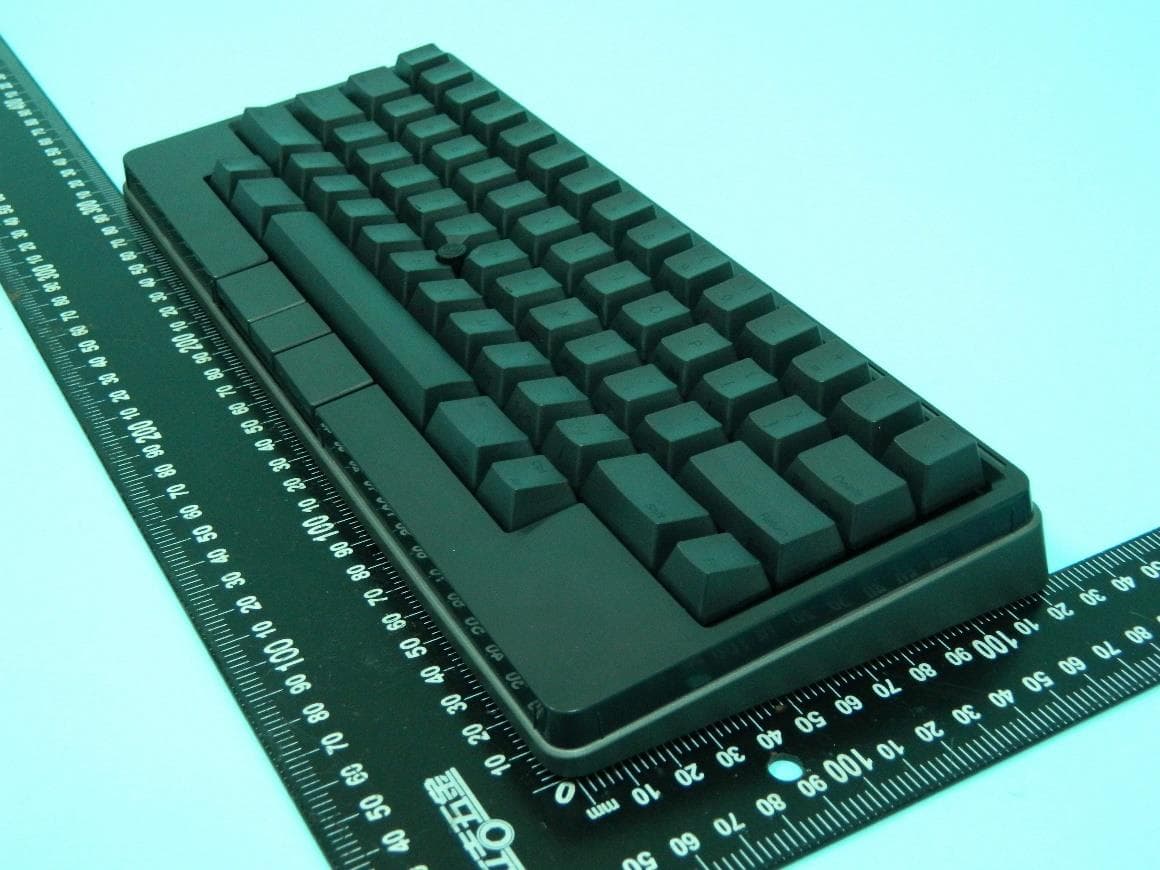
Click to zoom
Application Details
- Equipment Class
- DTS - Digital Transmission System
- Date of Grant
- Jul 20, 2023
- Application Purpose
- Original Equipment
- Date of Application
- Jul 20, 2023
- Equipment Note
- HHKB Studio
- Frequency Range
- 2402.00000000 - 2480.00000000
- Company
- PFU Limited
- Country
- Japan
Documents & Files
Document Text
Text extracted from the exhibit documents filed with the FCC. Open a document above to read the original.
Users Manual
Using the Pointing Stick/Mouse Keys Mouse Key Center Button Mouse Key Right ButtonMouse Key Left Button Pointing Stick Moving the Cursor Scrolling Mouse Key Center Button Move the pointing stick with your fi ngertip. Move the pointing stick with your fi ngertip while holding down the mouse key center button. The mouse key left/right buttons function as the left/right buttons on an ordinary mouse. The mouse key center button functions as the [Fn2] key. This button is also used to change the movements of the pointing stick and gesture pads. For details, refer to the User's Guide (online manual) for this product. Using the Gesture Pads You can switch windows, scroll, and perform other operations intuitively by sliding the gesture pads with your fi ngers. The gesture pads are made up of four pads (two on the front side of the keyboard, one on the right side, and one on the left side) having the following functions. Down Up 2 3 1 4 Switching between Windows Up and down arrow keys (ˤ/˥) Scrolling Gesture Pads Left and right arrow keys (ˣ/ˢ) For details about how to use the gesture pads, refer to the User's Guide (online manual) for this product. Thank you for purchasing Happy Hacking Keyboard Studio (US Layout). Make sure that you read and understand "Safety Precautions" (separate document) before using the keyboard. Make sure that all items shown below are included in the package. Keyboard Size AA Alkaline Dry Battery ×4 (For Checking Operation) USB Type-C CablePointing Stick Cap ×4 (For Replacement) Getting Started (This Manual) Lists of LED Indications and Key Combinations Safety Precautions If you fi nd that an item is missing or defective, contact the distributor/dealer where you purchased this product (→refer to "Safety Precautions" (separate document) for contact information for inquiries). Introduction 1 2 1 1 Slide the cover on the base of the keyboard in the direction of ① and lift it up in the direction of ② to remove 2 Insert four batteries (size AA) negative side fi rst, then reattach the cover Close the cover fi rmly. Insert four batteries, checking that the positive and negative terminals are placed correctly. 3 ONON Turn on the power by sliding the power switch on the back of the keyboard to the right (it will turn green) Preparation 1 1 Fn Q Press Fn + Q and wait for the leftmost LED indicator to blink quickly in blue (pairing mode) To exit the pairing mode, press Fn + X . 2 Enable Bluetooth on the device you want to connect the keyboard to and select "HHKB-Studio1" from the connection names displayed 3 xxxxxx 1 2 3 4 5 6 7 8 9 0 On this product, enter the displayed number for pairing [Connected] is displayed for "HHKB-Studio1" and the connection is established. The LED indicator will then turn off . When the [Keyboard Setup Assistant] window appears for macOS, click [Continue] and follow the instructions in the window. When [Select the Keyboard Type] is displayed, select [ANSI (United States and others)]. Connection is now complete. When connecting for the second and subsequent times, simply turning on this product will establish a connection automatically. To register (pair) an additional Bluetooth device, refer to "Using Multiple Devices by Switching between Them" in "Changing the Main Keyboard Settings" on the reverse side. For details on each OS, see here https://happyhackingkb.com/manual/studio/ug-us/en/ug/ topic/connect_bluetooth.html Connecting (Pairing) for the fi rst time 2 Using with USB (Wired) Connection Wired connection is also available when you connect this product to a device with the USB Type-C cable. 1 Connect this product to a device with the attached USB Type-C cable This does not consume battery power (except for self- discharge). Remove the batteries if you will not use them for a long time. 2 ONON Turn on the power by sliding the power switch on the back of the keyboard to the right (it will turn green) During the connection process, the LED indicator lights all light up in blue. They will turn off after the connection is established. When the [Keyboard Setup Assistant] window appears for macOS, click [Continue] and follow the instructions in the window. When [Select the Keyboard Type] is displayed, select [ANSI (United States and others)]. Connection is now complete. You can use the keyboard as soon as the connection to a device is established. Using Keys ■Inputting characters printed on the front side of the key tops To input characters (special keys) printed on the front side of the key tops such as F1 to F12, PgUp (Page Up), Caps, and the arrow keys (cursor), press the applicable key while holding down Fn . ■Changing the key layout for your OS The profi le (key layout) for Windows ® will be applied automatically when the keyboard is connected for the fi rst time. To use the keyboard on macOS/iOS/iPad OS, switch to an appropriate profi le (→ refer to "Changing the Main Keyboard Settings" on the reverse side). Special key assignment for the Windows ® profi le Windows Windows Alt Alt Special key assignment for the macOS profi le Command Command Option Option Getting Started *P3PX-E031-01EN* For more convenient ways to use the keyboard and change the main settings, see the reverse side If key operations do not work when connected via USB If Bluetooth is connected or was connected last, simply connecting the USB cable will not switch the keyboard to USB connection. To switch to USB connection, connect the USB cable and press Fn + Control + 0 . Confi guring power saving If this product is left unused for 30 minutes, it will automatically enter power saving mode and disconnect from Bluetooth. To reestablish the connection, press Return . Power saving mode will not be activated when connected via USB. You can change the power saving setting in accordance with your intended use using the DIP switch on the base of the keyboard (→ refer to "Changing the Main Keyboard Settings" on the reverse side). Fn+ • Copying of the contents of this document in whole or in …
Text truncated - open the document above for the full version.
Users Manual
安全上のご注意 Safety Precautions このたびは、本製品をお買い上げいただき、誠にありがとうございます。 本書では、本製品を安全に正しくお使いいただくための重要な情報を記載しています。本 製品をお使いになる前に、本書、取扱説明書をよくお読みになり、正しく安全にご使用く ださいますようお願いいたします。また、本製品をご使用中にいつでも参照できるよう大切 に保管してください。 ハイセイフティ用途での使用について 本製品は、一般事務用、パーソナル用、家庭用、通常の産業用等の一般的用途を想定 して設計・製造されているものであり、原子力施設における核反応制御、航空機自動飛 行制御、航空交通管制、大量輸送システムにおける運行制御、生命維持のための医療 用機器、兵器システムにおけるミサイル発射制御など、極めて高度な安全性が要求され、 仮に当該安全性が確保されない場合、直接生命・身体に多雨する重大な危険性を伴う 用途(以下「ハイセイフティ用途」という)に使用されるよう設計・製造されたものでは ありません。お客様は、当該ハイセイフティ用途に要する安全性を確保する措置を施す ことなく、本製品を使用しないでください。お客様がハイセイフティ用途に本製品を使 用したことにより発生する損害につきましては、お客様または第三者からのいかなる請求 または損害賠償に対しても当社は一切その責任を負いません。 Bluetooth は、Bluetooth SIG,Inc. の登録商標です。 その他の社名、製品名は、一般に各社の商標または登録商標です。 株式会社PFU © PFU Limited 20232023年8月 P3PX-E081-01XA 警告表示 本書では、本製品を安全に、かつ正しくお使いいただき、お客様やほかの人々に加えられる おそれのある危害や損害を未然に防止するために、以下のような表示をしています。 この表示は、取り扱いを誤った場合、死亡または重傷を負う危険が生じ ることが想定される内容です。 この表示は、取り扱いを誤った場合、死亡または重傷を負う可能性が想 定される内容です。 この表示は、取り扱いを誤った場合、軽傷を負う可能性または物的損害 が発生する可能性が想定される内容です。 三角で示した記号は、警告、注意を促す事項であることを告げるものです。 記号の中には、具体的な警告内容を示す絵が描かれています。 丸に斜線で示した記号は、してはいけない行為(禁止行為)であること を告げるものです。記号の中やその脇には、具体的な指示内容を表す絵 が描かれている場合もあります。 黑塗りの丸に白抜きで示した記号は、必ず従っていただく内容であること を告げるものです。記号の中には、具体的な指示内容を表す絵が描かれ ている場合もあります。 安全にお使いいただくために 本製品に関する重要な警告事項は以下のとおりです。 本製品を安全にご使用いただくために、以下の記載事項を必ずお守りください。 水、海水、飲料水などの液体で濡らさないでください。電池の発熱、破裂、発火 の原因となります。 高温になる場所(火のそば、暖房器具のそば、直射日光の当たる場所、炎天下の 車内など)や低温になる場所、または標高が高く気圧が低い場所で、キーボードや 電池を使用、保管、放置しないでください。電池の液漏れ、発熱、破裂、発火の 原因となります。 キーボードや電池を燃やしたり、火の中に投げ込まないでください。電池の発熱、 破裂、発火の原因となります。 キーボードや電池に釘を刺したり、ハンマーでたたいたり、踏みつけたり、強い衝 撃を与えたり、機械で押しつぶしたり、切断したりしないでください。電池の発熱、 破裂、発火の原因となります。 電子レンジなどの加熱調理機器や高圧容器に入れたり、電磁調理器(IH調理器) の上に置いたりしないでください。電池の発熱、破裂、発火の原因となります。 保護機能を無効にする可能性がある、誤った種類の電池(例えば、一部の種類のリ チウム電池)を使用しないでください。発熱、破裂、発火の原因となります。 電池の液体が漏れた場合は、顔や手に触れないようにしてください。失明や皮膚に 傷害を起こす原因となります。 万一、液体などが目や口に入った場合や、皮膚や衣類に付着した場合は、すぐにき れいな水で洗い流してください。 また、目や口に入った場合は、洗浄後直ちに医師の診断を受けてください。 以下のような場合には、直ちに電源をオフにし使用を中止してください。電池は発 熱などの異常がないことを確認したあと、やけどに注意したうえでキーボードから取 り出してください。ケーブル使用時はケーブルをキーボードから抜いてください。 そのまま使用すると、火災・感電の原因となります。 • キーボードを落下させた場合 • キーボードから発煙したり、キーボードの外側が異常に熱くなった場合 • 異常な音がする、異臭がする場合 • キーボード内部に異物(水やコーヒーなどの液体、クリップなどの金属片など) が入った場合 • そのほか、故障かな?と思った場合 電池の液体が漏れたり、異臭がする場合は、直ちに使用を中止し、火気などの引 火の危険性から遠ざけてください。電池が破裂、発火する原因となります。 キーボードを分解したり、改造したりしないでください。 また、キーボードをご自身で分解した場合は保証の対象外となり、分解によって発 生するどのような損害に対しても当社では一切責任を負いかねます。 本キーボードは国内専用です。海外では使用しないでください。 以下のような高温、多湿の場所や換気が悪くほこりの多い場所には、キーボードを 設置しないでください。高温によってカバーなどが過熱、変形、溶解する原因となっ たり、漏電や火災の原因となることがあります。通気性、換気性の良い場所で使用 してください。 • ストーブやヒーターなどの発熱器具に近い場所、揮発性可燃物やカーテンなど の燃えやすいものに近い場所 • 台所などの油煙が発生しやすい場所 • 風呂場、シャワー室、プールなどの水場 • 直射日光の当たる場所、炎天下の車内、暖房機の近くなど、高温になる場所 本製品や周辺機器のケーブル類の配線にご注意ください。 ケーブルに足を引っかけ転倒したり、本製品や周辺機器が落ちたり、倒れたりして、 けがや故障の原因となります。また、お子様が容易にケーブルに触れないようにし てください。 誤って首に巻きつけると窒息の原因となります。 キーボードを移動する場合は、キーボードに接続されているケーブルを外したあと に行ってください。 また、作業は足元に十分注意して行ってください。 ケーブルを接続したままキーボードを移動させると、ケーブルが傷つき、火災や感電、 けがの原因となります。 自動車を運転中に、キーボードを使用しないでください。安全走行を損ない、事故 の原因となります。 清掃などの目的でエアスプレーおよびアルコールなどを含むスプレーは使用しない でください。 スプレーから噴射される強い空気によって、ほこりなどがキーボード内部に侵入し、 故障やキーボードの異常の原因となることがあります。また、静電気などによるスパー ク(火花)により引火するおそれがあります。 電波利用が制限されている場所(医療施設など)では、その場所の指示に従い、 使用しないでください。電子機器や医療用機器、植え込み型医療機器(心臓ペー スメーカーなど)に影響をおよぼす場合があります。これは電波利用機器としての 一般的な特性であり、キーボード特有の特性ではありません。 キーボードのどの部分も机から突き出さないように設置してください。 また、キーボードが傾かないように、振動の少ない、平らな場所に置いてください。 落ちたり、倒れたりしてけがの原因となることがあります。 小さいお子様の手が届く所に設置しないでください。けがの原因となります。 キーボードの上に重いものを置いたり、キーボードの上で作業したりしないでくださ い。故障やけがの原因となります。 強い磁界やノイズ発生源から離して設置してください。 また、静電気を避け、床材や設置する机には静電気を発生させない材質のものを 選んでください。 静電気によって、キーボードが誤動作することがあります。 キーボードとコンピューター、またはモバイル機器は、できるだけ見通しのきく場所 に設置することを推奨します。電波を遮るような障害物(壁や金属性の板など)が あると、通信ができなくなったり、通信速度が遅くなったりすることがあります。 寒い部屋から急に暖かい部屋に移動させると、キーボードが結露することがありま す。 そのまま使用すると、入力不良の原因となりますので、暖かい部屋に1〜2時間放 置して、内部が乾いてから使用してください。 雨天や降雪時に屋外へ持ち出す場合は、濡らさないように注意してください。 万一キーボードが濡れた場合は、拭き取るか時間をおいて乾いてから使用してくだ さい。 使用上のご注意 本製品として提供されるマニュアル、キーボード本体は、お客様側の責任で使用してください。 本製品のご使用によって発生する損害やデータの損失については、当社では一切責任を負い かねます。また、本製品の障害の保証範囲は、どんな場合も本製品の代金としてお客様が支 払った金額を超えることはありません。あらかじめご了承ください。 ■ 本製品の海外への持ち出しについて 本製品は、日本国内専用ですので、日本国内でご使用ください。 海外における使用に関しては、当社は一切その責任を負いません。 ■ 電池の使用について • 小さいお子様の手が届かない場所で保管してください。 • 電池のプラス(+)とマイナス(-)を逆にして使用しないでください。 • 電池に熱を加えないでください。また分解したり水中に投入したりしないでくださ い。 • 本製品を⻑期間使用しない場合は、電池を取り出しておいてください。液漏れや 故障の原因となります。 • 古い電池と新しい電池を組み合わせて使用しないでください。また、異なる種類 の電池(マンガン電池とアルカリ電池など)を組み合わせて使用しないでください。 • 古くなったり電力が弱くなったりした電池は使用を中止し、お住まいの地域の条例 および法令に従って処分してください。 ■Bluetooth通信の速度について 通信速度は、規格上の通信速度の表記であり、実際の通信速度を示すものではありま せん。実際の通信速度は、お客様がキーボードを使用する環境によって異なります。 また、以下の使用環境の場合は、通信ができなくなったり、通信速度が遅くなったり します。 • キーボードとコンピューター/モバイル機器の距離が極端に離れている。 • 電波の干渉が発生するような機器(電子レンジなど)の近くでキーボードを使用す る。 各種規格 電波障害自主規制について この装置は、クラス B 機器です。この装置は、住宅環境で使用することを目的としてい ますが、この装置がラジオやテレビジョン受信機に近接して使用されると、受信障害を 引き起こすことがあります。 本書、取扱説明書に従って正しい取り扱いをしてください。 VCCI-B 電波法について 本製品は、販売地域の法令、規則に準拠するように設計された無線機能を搭載した装 置です。本製品を分解したり、内部の回路などを改造して使用しないでください。販売 地域の法令、規則によって、お客様が罰せられることがあります。また、分解や改造によっ て発生するどのような損害に対しても当社では一切責任を負いかねます。 メンテナンス キーボードの修理はお客様自身で行わないでください。 ご自身で分解した場合は保証の対象外となり、分解によって発生するどのような損害に対 しても当社では一切責任を負いかねます。修理が必要な場合は、キーボードを購入された 販社/販売店または株式会社 PFU イメージング サービス&サポートセンターに連絡してく ださい。 株式会社 PFU イメージング サービス&サポートセンターについては、「故障・修理・お問い 合わせ」を参照してください。 リサイクル ■ 使用済製品の廃棄とリサイクルについてのお願い • 個人でご購入のお客様が本製品(付属品を含む)を廃棄する場合は、地方自治体 の条例等に従って適切に処理してください。 • 法人、企業のお客様が本製品(付属品を含む)を廃棄する場合は、産業廃棄物扱 いで適切に処理してください。 故障・修理・お問い合わせ 当社では、お客様に安心してキーボードをお使いいただけるよう、万全のサポート体制を 整えています。必要なときにその都度ご利用いただけるスポットサービスにより、お客様を 強力にバックアップいたします。 センドバック 良品交換 良品交換費(実費) 送料:発送元負担 キーボードは部品交換による修理ではなく、良品との交換による対応とさせていただきます。 お買い上げのキーボードと同等相当の製品による交換となる場合もございますのでご了承 願います。 故障・修理、および各種お問い合わせ 受付窓口 株式会社PFU イメージング サービス&サポートセンター https://www.pfu.ricoh.com/imaging/contact.html 詳細については、当社ホームページでご確認いただくか、または株式会社 PFU イメージン グ サービス&サポートセンターまでお問い合わせください。 重要 • 本製品の修理はお客様自身で行わないでください。 • 本製品の保証条件は「保証書」をご覧ください。 • 本製品のサポート期間は製造中止後5年間です。 お願い • 本書を無断で他に転載しないようお願いいたします。 • 本書の内容は、予告なく変更することがあります。 Printed in China ฯৄॽ ྒྷި הࣞճऀPFU *P3PX-E081-01XA* "Safety Precautions" is on the back of this sheet. Happy Hacking Keyboard Studioシリーズ 13 4 5 6 7 8 本書は本書記載の内容で装置の無償良品交換を行うことをお約束するものです。 保証期間中に装置に故障が生じた場合には、故障品に本書を添えて「故障・修理・お問い 合わせ」に記載の問い合…
Text truncated - open the document above for the full version.
External Photos
PHOTOGRAPHS OF EUT EP332307 Sporton International Inc. Page No. : 1 of 14 Report Template No.: SE Ver 1.0_EP Issued Date : 18/Jul/2023 Report Version : 01 PHOTOGRAPHS OF EUT EP332307 Sporton International Inc. Page No. : 13 of 14 Report Template No.: SE Ver 1.0_EP Issued Date : 18/Jul/2023 Report Version : 01 USB Type C Cable PHOTOGRAPHS OF EUT EP332307 Sporton International Inc. Page No. : 14 of 14 Report Template No.: SE Ver 1.0_EP Issued Date : 18/Jul/2023 Report Version : 01 ______________THE END______________
ID Label/Location Info
PA03840B005 CRWT000001 A0 202305 PO 业务 PFU Product Name HHKB Studio-PM HHKB Studio-PM HHKB Studio-PM PFU 成品料號 98-G81-JP02-500S 98-G81-US02-501S 98-G81-US02-500S 型名 PD-ID120B PD-ID100B - Layout JPN(J) JPN(E) US(E) PFU Part Number PA03840-B013 PA03840-B003 PA03840-B005 Serial NO. CRYT000001~CRYT999999 CRVT000001~CRVT999999 CRWT000001~CRWT999999 REV. A0 A0 A0 DATE YYYY-MM YYYY-MM YYYY-MM REGULATORY MODE PD-ID120 PD-ID100 PD-ID100 貼紙料號 78-100-0159-103S 78-100-0159-104S 78-100-0159-105S 最後6碼 需跳號 PA03840B005 CRWT000001 A0 202305 依照實際生產年月 YYYY-MM 最後6碼,需跳號 最後6碼 需跳號 最後6碼 需跳號 QR Code 內容 PDID100 98-G81-US02-500S A0 CRWT000001 4行 PDID100 98-G81-US02-500S A0 CRWT000001 PFU REGULATORY MODE 同 SER.NO 容 最後6碼 需跳號 iONE 成品料號 PFU Serial NO. 版本 QR Code 內容規則 FONT: Open Sans Size: 7pt to align 注意這幾行要對齊 PFU Produc�on Label Diecut 20230717 SIZE:175*20mm / 材質 : 75 # 消銀龍 印刷 : 銀底黑字 K=100 表面處理 : S MatTetoron#25 背膠:網紋膠 粘性 : 1kg/25mm min(90度剥离测试规格)
Internal Photos
PHOTOGRAPHS OF EUT EP332307 Sporton International Inc. Page No. : 3 of 14 Report Template No.: SE Ver 1.0_EP Issued Date : 18/Jul/2023 Report Version : 01 PHOTOGRAPHS OF EUT EP332307 Sporton International Inc. Page No. : 4 of 14 Report Template No.: SE Ver 1.0_EP Issued Date : 18/Jul/2023 Report Version : 01 PHOTOGRAPHS OF EUT EP332307 Sporton International Inc. Page No. : 5 of 14 Report Template No.: SE Ver 1.0_EP Issued Date : 18/Jul/2023 Report Version : 01 PHOTOGRAPHS OF EUT EP332307 Sporton International Inc. Page No. : 6 of 14 Report Template No.: SE Ver 1.0_EP Issued Date : 18/Jul/2023 Report Version : 01 PHOTOGRAPHS OF EUT EP332307 Sporton International Inc. Page No. : 7 of 14 Report Template No.: SE Ver 1.0_EP Issued Date : 18/Jul/2023 Report Version : 01 PHOTOGRAPHS OF EUT EP332307 Sporton International Inc. Page No. : 8 of 14 Report Template No.: SE Ver 1.0_EP Issued Date : 18/Jul/2023 Report Version : 01 PHOTOGRAPHS OF EUT EP332307 Sporton International Inc. Page No. : 9 of 14 Report Template No.: SE Ver 1.0_EP Issued Date : 18/Jul/2023 Report Version : 01 PHOTOGRAPHS OF EUT EP332307 Sporton International Inc. Page No. : 10 of 14 Report Template No.: SE Ver 1.0_EP Issued Date : 18/Jul/2023 Report Version : 01 PHOTOGRAPHS OF EUT EP332307 Sporton International Inc. Page No. : 11 of 14 Report Template No.: SE Ver 1.0_EP Issued Date : 18/Jul/2023 Report Version : 01
RF Exposure Info
RF Exposure Evaluation Report Report No. : FA332307 TEL : 886-3-327-3456 Page Number : 1 of 5 FAX : 886-3-327-0973 Issued Date : Jul. 20, 2023 Report Template No.: HE1-A3 Ver5.0 Report Version : 02 FCC ID: FPJPD-ID100 RF Exposure Evaluation Report FCC ID : FPJPD-ID100 Equipment : HHKB Studio Brand Name : HHKB Model Name : PD-ID100 Applicant : PFU LIMITED Nu 98-2 Unoke, Kahoku-shi, Ishikawa 929-1192, Japan Manufacturer : Dong Guan Ione Electronic Co.,Ltd. Building 3 No.76,Huangjiang Yongjun 2nd Road,Huangjiang Town,Dongguan City,Guangdong Province, P.R.China Standard : 47 CFR FCC Part 2 Subpart J, section 2.1093 The product was received on Mar. 23, 2023, and testing was started from Apr. 07, 2023 and completed on Apr. 07, 2023. We, SPORTON INTERNATIONAL INC. Hsinhua Laboratory, would like to declare that the tested sample has been evaluated in accordance with the procedures given in KDB 447498 D04 Interim General RF Exposure Guidance v01 and shown compliance with the applicable technical standards. The test results in this report apply exclusively to the tested model / sample. Without written approval of SPORTON INTERNATIONAL INC. Hsinhua Laboratory, the test report shall not be reproduced except in full. ___________________________________________ Approved by: Jackson Tsai SPORTON INTERNATIONAL INC. Hsinhua Laboratory No.52, Huaya 1st Rd., Guishan Dist., Taoyuan City 333411, Taiwan (R.O.C.) RF Exposure Evaluation Report Report No. : FA332307 TEL : 886-3-327-3456 Page Number : 2 of 5 FAX : 886-3-327-0973 Issued Date : Jul. 20, 2023 Report Template No.: HE1-A3 Ver5.0 Report Version : 02 FCC ID: FPJPD-ID100 Table of Contents History of This Test Report ........................................................................................................................................ 3 1. General Description............................................................................................................................................... 4 1.1. EUT General Information .................................................................................................................................................................... 4 1.2. Testing Location Information ............................................................................................................................................................... 4 2. RF Exposure Evaluation ....................................................................................................................................... 5 2.1. Applicable Standard ............................................................................................................................................................................ 5 2.2. SAR evaluation ................................................................................................................................................................................... 5 Photographs of EUT V01 RF Exposure Evaluation Report Report No. : FA332307 TEL : 886-3-327-3456 Page Number : 3 of 5 FAX : 886-3-327-0973 Issued Date : Jul. 20, 2023 Report Template No.: HE1-A3 Ver5.0 Report Version : 02 FCC ID: FPJPD-ID100 History of This Test Report Report No. Version Description Issued Date FA332307 01 Initial issue of report Jul. 14, 2023 FA332307 02 Revise Typo (This report is the latest version replacing for the report issued on Jul. 14, 2023) Jul. 20, 2023 Reviewed by: Barry Hsiao Report Producer: Ann Hou RF Exposure Evaluation Report Report No. : FA332307 TEL : 886-3-327-3456 Page Number : 4 of 5 FAX : 886-3-327-0973 Issued Date : Jul. 20, 2023 Report Template No.: HE1-A3 Ver5.0 Report Version : 02 FCC ID: FPJPD-ID100 1. General Description 1.1. EUT General Information RF General Information Evaluation Mode Frequency Range (MHz) Operating Frequency (MHz) Modulation Type Bluetooth 2400-2483.5 2402-2480 LE: DSSS (GFSK) 1.2. Testing Location Information Test Lab.:Sporton International Inc. Hsinhua Laboratory Hsinhua ADD: No.52, Huaya 1st Rd., Guishan Dist., Taoyuan City 333411, Taiwan (R.O.C.) (TAF: 3785) TEL: 886-3-327-3456 FAX: 886-3-327-0973 Test site Designation No. TW3785 with FCC. Wen 33rd.St. ADD: No.14-1, Ln. 19, Wen 33rd St., Guishan Dist., Taoyuan City 333010, Taiwan (R.O.C.) (TAF: 3785) TEL: 886-3-318-0787 FAX: 886-3-318-0287 Test site Designation No. TW0008 with FCC. RF Exposure Evaluation Report Report No. : FA332307 TEL : 886-3-327-3456 Page Number : 5 of 5 FAX : 886-3-327-0973 Issued Date : Jul. 20, 2023 Report Template No.: HE1-A3 Ver5.0 Report Version : 02 FCC ID: FPJPD-ID100 2. RF Exposure Evaluation 2.1. Applicable Standard In accordance with FCC 47 CFR part 2 (2.1093) this device has been defined as a portable device which is defined as a transmitting device designed to be used so that the radiating structure(s) of the device is/are within 20 centimeters of the body of the user. Portable devices must be evaluated using the specified in FCC 47 CFR part 2 (2.1093) and ANSI/IEEE C95.1-1992, and had been tested in accordance with the measurement methods and procedures specified in IEEE 1528-2003. 2.2. SAR evaluation 1. Per KDB 447498 D04 Interim General RF Exposure Guidance v01, Option (A): §1.1307(b)(3)(i)(A): Available maximum time-averaged power is no more than 1 mW. Mode DG (dBi) Power (dBm) Tolerance (dB) Tune-up Power (mW) Distance (cm) Option TL Pth (mW) 2.4G;BT-LE -0.30 -9.28 0.50 0.1324 0.50 A 1.000 2. Per KDB 447498 D04 Interim General RF Exposure Guidance v01 exclusion thresholds is 0.1324 < 1.000, RF exposure evaluation is not required. ─────THE END────
Test Report
FCC Radio Test Report Report No. : FR332307AL TEL : 886-3-3273456 Page Number : 1 of 22 FAX : 886-3-3270973 Issued Date : Jul. 14, 2023 Report Template No.: HE1-C10 Ver4.3 Report Version : 01 FCC ID: FPJPD-ID100 FCC Radio Test Report FCC ID : FPJPD-ID100 Equipment : HHKB Studio Brand Name : HHKB Model Name : PD-ID100 Applicant : PFU LIMITED Nu 98-2 Unoke, Kahoku-shi, Ishikawa 929-1192, Japan Manufacturer : Dong Guan Ione Electronic Co.,Ltd. Building 3 No.76,Huangjiang Yongjun 2nd Road,Huangjiang Town,Dongguan City,Guangdong Province, P.R.China Standard : 47 CFR FCC Part 15.247 The product was received on Mar. 23, 2023, and testing was started from Apr. 07, 2023 and completed on Apr. 10, 2023. We, SPORTON INTERNATIONAL INC. Hsinhua Laboratory, would like to declare that the tested sample has been evaluated in accordance with the procedures given in ANSI C63.10-2013 and shown compliance with the applicable technical standards. The test results in this report apply exclusively to the tested model / sample. Without written approval of SPORTON INTERNATIONAL INC. Hsinhua Laboratory, the test report shall not be reproduced except in full. ___________________________________________ Approved by: Jackson Tsai __________________________________________ SDoC by: XXXXX SPORTON INTERNATIONAL INC. Hsinhua Laboratory No.52, Huaya 1st Rd., Guishan Dist., Taoyuan City 333411, Taiwan (R.O.C.) FCC Radio Test Report Report No. : FR332307AL TEL : 886-3-3273456 Page Number : 2 of 22 FAX : 886-3-3270973 Issued Date : Jul. 14, 2023 Report Template No.: HE1-C10 Ver4.3 Report Version : 01 FCC ID: FPJPD-ID100 Table of Contents HISTORY OF THIS TEST REPORT .................................................................................................................. 3 SUMMARY OF TEST RESULT ......................................................................................................................... 4 1 GENERAL DESCRIPTION .................................................................................................................... 5 1.1 Information .............................................................................................................................................. 5 1.2 Testing Applied Standards ..................................................................................................................... 6 1.3 Testing Location Information .................................................................................................................. 6 1.4 Measurement Uncertainty ...................................................................................................................... 6 2 TEST CONFIGURATION OF EUT......................................................................................................... 7 2.1 Test Channel Mode ................................................................................................................................ 7 2.2 The Worst Case Measurement Configuration ........................................................................................ 8 2.3 Accessories ............................................................................................................................................ 9 2.4 Support Equipment ................................................................................................................................. 9 2.5 Test Setup Diagram ............................................................................................................................. 10 3 TRANSMITTER TEST RESULT .......................................................................................................... 11 3.1 AC Power-line Conducted Emissions .................................................................................................. 11 3.2 DTS Bandwidth..................................................................................................................................... 13 3.3 Maximum Conducted Output Power .................................................................................................... 14 3.4 Power Spectral Density ........................................................................................................................ 16 3.5 Emissions in Non-restricted Frequency Bands .................................................................................... 17 3.6 Emissions in Restricted Frequency Bands ........................................................................................... 18 4 TEST EQUIPMENT AND CALIBRATION DATA ................................................................................ 22 APPENDIX A. TEST RESULTS OF AC POWER-LINE CONDUCTED EMISSIONS APPENDIX B. TEST RESULTS OF DTS BANDWIDTH APPENDIX C. TEST RESULTS OF MAXIMUM CONDUCTED OUTPUT POWER APPENDIX D. TEST RESULTS OF POWER SPECTRAL DENSITY APPENDIX E. TEST RESULTS OF EMISSIONS IN NON-RESTRICTED FREQUENCY BANDS APPENDIX F. TEST RESULTS OF EMISSIONS IN RESTRICTED FREQUENCY BANDS APPENDIX G. TEST PHOTOS PHOTOGRAPHS OF EUT V01 FCC Radio Test Report Report No. : FR332307AL TEL : 886-3-3273456 Page Number : 3 of 22 FAX : 886-3-3270973 Issued Date : Jul. 14, 2023 Report Template No.: HE1-C10 Ver4.3 Report Version : 01 FCC ID: FPJPD-ID100 History of this test report Report No. Version Description Issued Date FR332307AL 01 Initial issue of report Jul. 14, 2023 FCC Radio Test Report Report No. : FR332307AL TEL : 886-3-3273456 Page Number : 4 of 22 FAX : 886-3-3270973 Issued Date : Jul. 14, 2023 Report Template No.: HE1-C10 Ver4.3 Report Version : 01 FCC ID: FPJPD-ID100 Summary of Test Result Report Clause Ref.Std. Clause Test Items Result (PASS/FAIL) Remark 1.1.2 15.203 Antenna Requirement PASS - 3.1 15.207 AC Power-line Conducted Emissions PASS - 3.2 15.247(a) DTS Bandwidth PASS - 3.3 15.247(b) Maximum Conducted Output Power PASS - 3.4 15.247(e) Power Spectral Density PASS - 3.5 15.247(d) Emissions in Non-restricted Frequency Bands PASS…
Text truncated - open the document above for the full version.
Test Setup Photos
Test Photos Appendix G Sporton International Inc. Page No. : G1 of G4 1. Photographs of Conducted Emissions Test Configuration Front view Side view Test Photos Appendix G Sporton International Inc. Page No. : G2 of G4 Under table view Test Photos Appendix G Sporton International Inc. Page No. : G3 of G4 2. Photographs of Radiated Emissions Test Configuration For radiated emissions 30MHz~1GHz Front view Rear view Test Photos Appendix G Sporton International Inc. Page No. : G4 of G4 For radiated emissions above 1GHz Front view Rear view ─────THE END─────
Contact Information
Applicant
Yoshiro Kawamoto(Manager)
Test Firm
Sporton International Inc. Hsinhua LaboratoryAlex Chen
Technical Specifications
| # | Rule Parts | Frequency Range | Power Output |
|---|---|---|---|
| 1 | 15C | 2.40 GHz - 2.48 GHz | 120.00 µW |
Other Applications from PFU Limited
FPJ4YSM6004P
Mar 15, 1987JBP - Part 15 Class B Computing Device Peripheral
Equipment Class
JBP - Part 15 Class B Computing Device Peripheral