FSU200BTMULTIMEDIA SPEAKER SYSTEMS
KYE SYSTEMS CORP.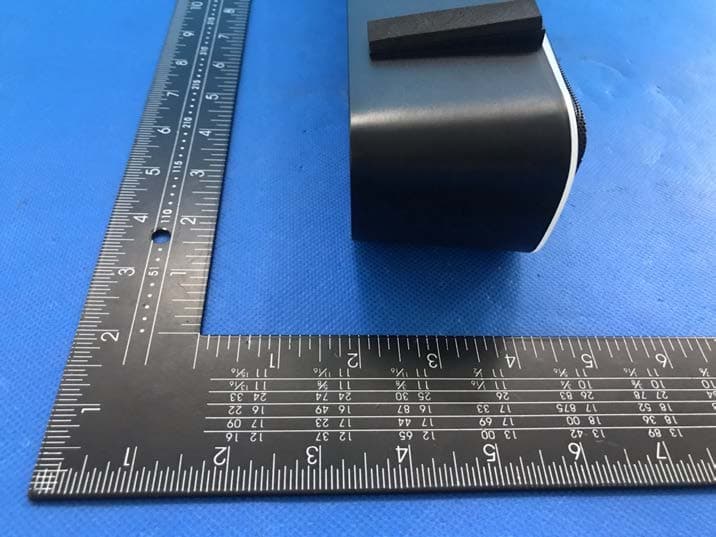
Click to zoom
Application Details
- Equipment Class
- DSS - Part 15 Spread Spectrum Transmitter
- Date of Grant
- Jun 12, 2022
- Application Purpose
- Original Equipment
- Date of Application
- Jun 12, 2022
- Equipment Note
- MULTIMEDIA SPEAKER SYSTEMS
- Frequency Range
- 2402.00000000 - 2480.00000000
- Company
- KYE SYSTEMS CORP.
- Country
- Taiwan
Documents & Files
Document Text
Text extracted from the exhibit documents filed with the FCC. Open a document above to read the original.
Users Manual
English Operation Description 1. The USB power plug of speaker is plugged in. 2. Turn on the power and enter the LINE function by default. The red LED is always on. At this time, the audio cable can be inserted into the audio device to play music. 3. Short press button on the remote control to enter the Bluetooth status, and the blue LEDs will flash alternately. At this time, you can pair the Bluetooth device. After the pairing is successful, there will make a notification sound. The blue LED is always on. At this time, the audio device can play music. 4. Short press button on the remote control to stop playing music, click again to resume playback. Short press on the remote control, increase the volume, press twice consecutively to go to the previous song, long press button on the remote control to increase the volume, and the speaker sounds louder. Short press on the remote control, the volume decreases, press twice consecutively to go to the next track, long press button on the remote control to decrease the volume, and the speaker sound is reduced. 5. Pairing: In the Bluetooth status, long press button on the remote control for 3 seconds. When the speaker will make a notification sound, it indicates that the current pairing device is released and the pairing mode is entered. The blue LED flash alternately. At this time, Bluetooth device pairing can be performed. 6. After press button on the remote control to enter the Bluetooth mode. If there is a paired device, it will return to the paired device. If there is no paired device, it will enter the pairing mode. 7. In pairing mode, search for Bluetooth pairing device 3 times, and it will automatically turn off if there is no signal for 5 minutes in Bluetooth mode. 8. Turn off: Long press the button for 3 seconds to turn off power and the LED. 9. After restarting, the volume level will automatically return to the middle value, and the last volume level will not be remembered. English Button Function Status Function Button Operation Description 1 Turn off Turn on Short press the button The red LED is on when the USB power cord of speaker is plugged in, and enters LINE mode Power on Bluetooth Short press button Blue LED flash alternately and enter pairing status. The blue LED is always on. Power on Line Short press button When the speaker will make a notification sound, it indicates that the current LINE mode is entered. The red LED always on. Power on Turn off Long press the button for 3 seconds Turn off power and LED. 2 Bluetooth / Line Increase Volume Short press button Long press button Short press the button to increase volume. Long press the button to increase volume continuously. 3 Bluetooth / Line Decrease Volume Shot press button Long press button Short press the button to decrease volume Long press the button to decrease volume continuously. 4 Bluetooth Previous Tra ck Press twice button Press twice button consecutively to go to the previous track English Status Function Button Operation Description 5 Bluetooth Nex t Tra ck Press twice button Press twice button consecutively to go to the next track 6 Play music Pause Short press button Short press button to stop playing music, click again to resume playback. Line Mute Short press button Short press the button enters to mute status. Press it again, the music unmute. 7 Bluetooth PA I R Long press the button for 3 seconds Long press the button for 3 seconds. When the speaker will make a notification sound, it indicates that the current pairing device is released and the pairing mode is entered. The blue LED flash alternately. At this time, Bluetooth device pairing can be performed. 8 RGB lighting touch control Switch between ten lighting modes Touch RGB lighting button can switch between ten lighting mode. English FCC warning: This device complies with part 15 of the FCC Rules. Operation is subject to the following two conditions: (1) This device may not cause harmful interference, and (2) this device must accept any interference received, including interference that may cause undesired operation. A ny Changes or modifications not expressly approved by the party responsible for compliance could void the user's authority to operate the equipment. N ote: This equipment has been tested and found to comply with the limits for a Class B digital device, pursuant to part 15 of the FCC Rules. These limits are designed to provide reasonable protection against harmful interference in a residential installation. This equipment generates uses and can radiate radio frequency energy and, if not installed and used in accordance with the instructions, may cause harmful interference to radio communications. However, there is no guarantee that interference will not occur in a particular installation. If this equipment does cause harmful interference to radio or television reception, which can be determined by turning the equipment off and on, the user is encouraged to try to correct the interference by one or more of the following measures: -Reorient or relocate the receiving antenna. -ncrease the separation between the equipment and receiver. -Connect the equipment into an outlet on a circuit different from that to which the receiver is connected. -Consult the dealer or an experienced radio/TV technician for help. The device has been evaluated to meet general RF exposure requirement. The device can be used in portable exposure condition without restriction.
Cover Letter(s)
Declaration on model difference We the undersigned hereby confirm that any of our production units bearing the following model numbers are identical in circuitry and electrical, mechanical and physical construction; The difference is only in model names and appearance. FCC ID: FSU200BT Production nameTrade nameModel no. MULTIMEDIA SPEAKER SYSTEMS GeniusUSB SoundBar 200BT SP-XXXXXXX, USB SP-HF380BT, USB SoundBar XXXXX, USB SoundBar XXXXX XX, USB SoundBar RGB BT, USB SoundBar XXX XX, USB SoundBar XXXX XX, XXX XXXXXXXX XXXX, XXX XXXXXXXX XXXXX(X can be 0-9 & A-Z and blank) Confirmed by KYE SYSTEMS CORP. Signature:Date:2022/06/8 Name:Ricky Chen Title:Section Supervisor
Cover Letter(s)
KYESYSTEMSCORP. Authorization Company:KYESYSTEMSCORP. Address:No.492,Sec.5,ChongxinRd.,SanchongDist.,NewTaipeiCity24160, Taiwan(R.O.C.) ProductName:MULTIMEDIASPEAKERSYSTEMS ModelNumber(s):USBSoundBar200BT SP-XXXXXXX,USBSP-HF380BT,USBSoundBarXXXXX,USBSoundBarXXXXX XX,USBSoundBarRGBBT,USBSoundBarXXXXX,USBSoundBarXXXXXX, XXXXXXXXXXXXXXX,XXXXXXXXXXXXXXXX(Xcanbe0-9&A-Zandblank) ProductDescription:MULTIMEDIASPEAKERSYSTEMS WeauthorizeMiCOMLabsInc.,575BoulderCourt,Pleasanton,California94566,USA, toactonourbehalfonallmattersconcerningthecertificationofabovenamed equipment. WedeclarethatMiCOMLabsInc.isallowedtoforwardallinformationrelatedtothe approvalandcertificationofequipmenttotheregulatoryagenciesasrequiredandto discussanyissuesconcerningtheapprovalapplication.Anyandallactscarriedoutby MiCOMLabsonourbehalfshallhavethesameeffectasactsofourown. Signature:Date:2022/06/8 Name:RickyChen Title:SectionSupervisor Company:KYESYSTEMSCORP.
Cover Letter(s)
KYESYSTEMSCORP. OfficeofEngineeringTechnology FederalCommunicationsCommission 7435OaklandMillsRoad Columbia,MD21046 USA Date:2022/06/8 Subject;RequestforConfidentiality FCCID:FSU200BT ToWhomItMayConcern, PursuanttotheprovisionsoftheCommission’srulesTitle47Sections§0.457and§0.459,we arerequestingtheCommissiontowithholdthefollowingattachment(s)asconfidential documentsfrompublicdisclosureindefinitely. Thesedocumentscontaindetailedsystemandequipmentdescriptionsandareconsideredas proprietaryinformationinoperationoftheequipment.Thepublicdisclosureofthesedocuments mightbeharmfultoourcompanyandwouldgivecompetitorsanunfairadvantageinthemarket. SchematicDiagram BlockDiagram OperationalDescription Inadditionaltoabovementioneddocuments,inordertocomplywiththemarketingregulations inTitle47CFR§2.803andtheimportationrulesinTitle47CFR§2.1204,whileensuringthat businesssensitiveinformationremainsconfidentialuntiltheactualmarketingofnewly authorizeddevices,werequestShortTermConfidentialityofthefollowingattachment(s); UserManual For45days,pursuanttoPublicNoticeDA04-1705. OR For180dayspursuanttoKDB726920D01. Itisourunderstandingthatallmeasurementtestreports,FCCIDlabelformatand correspondenceduringthecertificationreviewprocesscannotbegrantedasconfidential documentsandthisinformationwillbeavailableforpublicreviewoncethegrantofequipment authorizationisissued. Sincerely, Signature: Name:RickyChen Title:SectionSupervisor
External Photos
EUT EXTERNAL PHOTOGRAPHS EUT View 1 EUT View 2 EUT View 3 EUT View 4 EUT View 5 EUT View 6 ----------------The end----------------
ID Label/Location Info
MULTIMEDIA SPEAKER SYSTEMS FCC ID: FSU200BT
Internal Photos
EUT INTERNAL PHOTOGRAPHS EUT Housing and Board View 1 EUT Housing and Board View 2 EUT Housing and Board View 3 EUT Housing and Board View 4 EUT Housing and Board View 5 EUT Housing and Board View 6 Antenna EUT Housing and Board View 7 ----------------The end----------------
RF Exposure Info
FCC ID: FSU200BT RF exposure evaluation According to § 15.247(i), §1.1307(b)(3)(i)(A) and KDB447498, systems operating under the provisions of this section shall be operated in a manner that ensures that the public is not exposed to radio frequency energy level in excess of the commission’s guidance. Blanket 1 mW Blanket Exemption The 1 mW Blanket Exemption of §1.1307(b)(3)(i)(A) applies for single fixed, mobile, and portable RF sources with av ailable maximum time-averaged power of no more than 1 mW, regardless of separation distance. The 1-mW blanket exemption applies at separation distances less than 0.5 cm, including where there is no separation. This exemption shall not be used in conjunction with other exemption criteria other than those for multiple RF sources in paragraph §1.1307(b)(3)(ii)(A). The 1-mW exemption is independent of service type and covers the full range of 100 kHz to 100 GHz, but it shall not be used in conjunction with other exemption criteria or in devices with higher-power transmitters operating in the same time-averaging period. Exposure from such higher-power transmitters would invalidate the underlying assumption that exposure from the lower-power transmitter is t he only contributor to SAR in the relevant volume of tissue. 1-mW Test Exemption Per §1.1307(b)(3)(i)(A), a single RF source is exempt RF device (from the requirement to show data demonstrating compliance to RF exposure limits, as previously mentioned) if t he available maximum time-averaged power is no more than 1 mW, regardless of separation distance. This exemption applies to all operating configurations and exposure conditions, for the frequency range 100 kHz to 100 GHz, regardless of fixed, mobile, or portable device exposure conditions. This is a standalone exemption, and it cannot be applied in conjunction with any other test exemption. Antenna Gain (dBi) : -0.58dBi Transmit Power Max(dBm) EIRP Power (mW ) Limits (mW ) -0.670.86 1 Conclusion: The maximum power is less than 1 mW, which meets the standard exemption requirements.
Test Report
No.:BCTC/RF-EMC-007 Page: 1 of 80 Edition:A.4 TEST REPORT Shenzhen BCTC Testing Co., Ltd. Report No.: BCTC2204261191E Applicant: KYE SYSTEMS CORP. Product Name: MULTIMEDIA SPEAKER SYSTEMS Model/Type Reference: USB SoundBar 200BT Tested Date: 2022-04-20 to 2022-05-06 Issued Date: 2022-06-09 Report No.:BCTC2204261191E No.:BCTC/RF-EMC-007 Page: 2 of 80 Edition:A.4 FCC ID: FSU200BT The test report is effective only with both signature and specialized stamp. This result(s) shown in this report refer only to the sample(s) tested. Without written approval of Shenzhen BCTC Testing Co., Ltd, this report can’t be reproduced except in full. The tested sample(s) and the sample information are provided by the client. Product Name: MULTIMEDIA SPEAKER SYSTEMS Trademark: Genius Model/Type Reference: USB SoundBar 200BT SP-XXXXXXX, USB SP-HF380BT, USB SoundBar XXXXX, USB SoundBar XXXXX XX, USB SoundBar RGB BT, USB SoundBar XXX XX, USB SoundBar XXXX XX, XXX XXXXXXXX XXXX, XXX XXXXXXXX XXXXX(X can be 0-9 & A-Z and blank) Prepared For: KYE SYSTEMS CORP. Address: No. 492, Sec. 5, Chongxin Rd., Sanchong Dist., New Taipei City 24160, Taiwan (R.O.C.) Manufacturer: DONGGUAN IWIN ELECTRONICS CO., LTD. Address: No.3, Si Hai Road, Si Hai Industry Zone, Shan Xia Village, Heng Li Town, Dong Guan City, Guang Dong Province, China Prepared By: Shenzhen BCTC Testing Co., Ltd. Address: 1-2/F., Building B, Pengzhou Industrial Park, No.158, Fuyuan 1st Road, Tangwei, Fuhai Subdistrict, Bao'an District, Shenzhen, Guangdong, China Sample Received Date: 2022-04-16 Sample Tested Date: 2022-04-20 to 2022-05-06 Issue Date: 2022-06-09 Report No.: BCTC2204261191E Test Standards FCC Part15.247 ANSI C63.10-2013 Test Results PASS Remark: This is Bluetooth Classic radio test report. Tested by: Approved by: Brave Zeng/ Project Handler Zero Zhou/Reviewer Report No.:BCTC2204261191E No.:BCTC/RF-EMC-007 Page: 3 of 80 Edition:A.4 Table of Content Test Report Declaration Page 1. Version .................................................................................................................. 5 2. Test Summary ....................................................................................................... 6 3. Measurement Uncertainty ..................................................................................... 7 4. Product Information and Test Setup ...................................................................... 8 4.1 Product Information ............................................................................................... 8 4.2 Test Setup Configuration ...................................................................................... 8 4.3 Support Equipment ............................................................................................... 9 4.4 Channel List .......................................................................................................... 9 4.5 Test Mode ........................................................................................................... 10 4.6 Table Of Parameters Of Text Software Setting ................................................... 10 5. Test Facility And Test Instrument Used ............................................................... 11 5.1 Test Facility ......................................................................................................... 11 5.2 Test Instrument Used .......................................................................................... 11 6. Conducted Emissions .......................................................................................... 13 6.1 Block Diagram Of Test Setup .............................................................................. 13 6.2 Limit .................................................................................................................... 13 6.3 Test procedure .................................................................................................... 13 6.4 EUT operating Conditions ................................................................................... 13 6.5 Test Result .......................................................................................................... 14 7. Radiated emissions ............................................................................................. 16 7.1 Block Diagram Of Test Setup .............................................................................. 16 7.2 Limit .................................................................................................................... 17 7.3 Test procedure .................................................................................................... 18 7.4 EUT operating Conditions ................................................................................... 19 7.5 Test Result .......................................................................................................... 20 8. Radiated Band Emission Measurement and Restricted Bands of Operation ...... 24 8.1 Block Diagram Of Test Setup .............................................................................. 24 8.2 Limit .................................................................................................................... 24 8.3 Test procedure .................................................................................................... 25 8.4 EUT operating Conditions ................................................................................... 25 8.5 Test Result .......................................................................................................... 26 9. Spurious RF Conducted Emissions ..................................................................... 27 9.1 Block Diagram Of Test Setup .............................................................................. 27 9.2 Limit .................................................................................................................... 27 9.3 …
Text truncated - open the document above for the full version.
Test Setup Photos
TEST SETUP PHOTOGRAPHS 1.1. Photos of Conducted Emission Measurement 1.2. Photos of Radiation Emission Measurement Spurious Emission Test Setup (Below 1GHz) Spurious Emission Test Setup (Above 1GHz) ----------------The end----------------
Contact Information
Applicant
Ricky Chen(Section Supervisor)
Technical Contact
Test Firm
Shenzhen BCTC Testing Co., Ltd.Sally He
[email protected]15999690624
Technical Specifications
| # | Rule Parts | Frequency Range | Power Output |
|---|---|---|---|
| 1 | 15C | 2.40 GHz - 2.48 GHz | 857.00 µW |
Other Applications from KYE SYSTEMS CORP.

FSUGG0AM
Aug 20, 2026Wireless Speaker
Equipment Class
DSS - Part 15 Spread Spectrum Transmitter
FSUGKZI2
May 23, 2026Wireless Keyboard
Equipment Class
DXX - Part 15 Low Power Communication Device TransmitterFSUGMZN6
Apr 20, 2026Wireless Mouse
Equipment Class
DTS - Digital Transmission SystemFSUGMZN4
Apr 03, 2026Wireless Mouse
Equipment Class
DXX - Part 15 Low Power Communication Device TransmitterFSUGMZN7
Apr 01, 2026Wireless Mouse
Equipment Class
DTS - Digital Transmission System