FSUGG00A5Multimedia Speaker
KYE SYSTEMS CORP.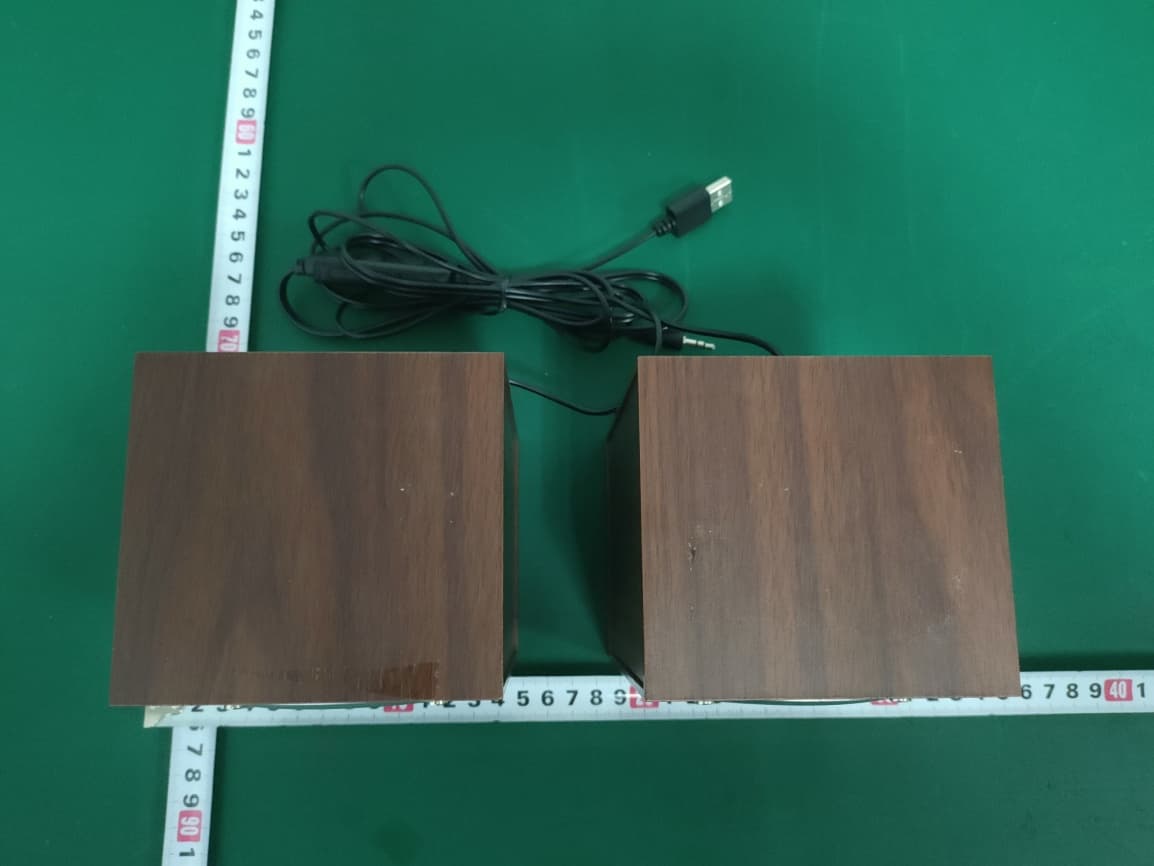
Click to zoom
Application Details
- Equipment Class
- DSS - Part 15 Spread Spectrum Transmitter
- Date of Grant
- Mar 04, 2020
- Application Purpose
- Original Equipment
- Date of Application
- Mar 04, 2020
- Equipment Note
- Multimedia Speaker
- Frequency Range
- 2402.00000000 - 2480.00000000
- Company
- KYE SYSTEMS CORP.
- Country
- Taiwan
Documents & Files
Document Text
Text extracted from the exhibit documents filed with the FCC. Open a document above to read the original.
Users Manual
4. A�er press bu�on on the remote control to enter the Bluet ooth mode. If ther e is a paired device, it will ret urn to the pai red device. If ther e is no pai red device, it will enter the pai ring mode. 5. : In the Bluetooth stat us, long press bu�on on the remote control for 3 seconds. When the speaker will make a no�fica�on sound, it indicat es that the current pairing device is rel eased and the pai ring mode is entered. The blue and red LE Ds flas h al ter nat el y. At this �me, Bluetooth device pairing can be performed. 6. : Two speaker s ar e power ed on. Enter the Bluet ooth mode, set one as the master speaker , and the other as the slave sp eaker . The slave speaker must be in the stat e without any equipment connected, and the master speaker is unlimited. There are connected devices and no connected devices. Long press the key on the main speaker for 3 seconds. At this �me, the main speaker will make a no�fica�on sound, and the two speaker s can be connected. When the slave speaker is connected to the main speaker, the slave speaker will emit two beeps, indica�ng that the connec�on is successful. A�er the speaker s ar e connected, if the main speaker s have connected devices and the two speaker s have blue LE Ds on, the master speaker s can control the slav e speakers and play. If ther e is no equipment connected to the main speaker, the blue and green LE Ds of the two speaker s will flas h al ter nat el y. At this �me, the main speaker must be connected to audio equipment. The main speaker is connected to audio equipment. The two speaker s have blue LE Ds on. The main speaker can control the slave speakers and can also play. Turn off TWS Func�on: Long press key on the main speaker for more than 3 seconds. A�er a no�fica�on sound from the speaker , the blue and red LE Ds on the secondary speaker flas h al ter nat el y, indica�ng that the TWS func�on is disabled. 7. Pairing, TWS, previous song, next song these func�ons only work under Bluet ooth stat us. 8. A�er power on, short press bu�on on the remote control to enter the Bluetooth mode, short press the bu�on on the remote control to enter the LI NE mode. 9. : (If the TWS has been pai red, please rel ease the TWS func�on first, the reset func�on can work normally .) In the Bluet ooth stat us, press and hold the and keys for 3 seconds, there will make a no�fica�on sound, which means that al l memories have been cleared and the Bluet ooth stat e is enter ed. The red LE D flas hes and you can pair the Bluet ooth device. 10. Turn off: Unplug the power supply and the LED is off. 1 Turn off Turn on The red LED is on when the USB power code of speaker is plugged in, and enter s LI NE mode by def ault. The red LED is on when you turn on, and enters LI NE mode. Power on Bluet ooth Short press bu�on Blue and red LEDs flas h al ter nat el y and enter pai ring stat us. Power on Li ne Short press bu�on Red LE D al ways on, enter s to LI NE mode. Power on Turn off Unplug power LE D turn off 2 Bluet ooth / Li ne Increase Volume Short press the bu�on Long press the bu�on Short press the bu�on to increase volume. Long press the to increase volume con�nuously. 3 Bluet ooth / Li ne Decrease Volume Short press the bu�on Long press the bu�on Short press the bu�on to increase volume. Long press the to increase volume con�nuously. 4 Bluet ooth Previous Track Double-click bu�on quickly Enter to previous track 5 Bluet ooth Next Track Double-click bu�on quickly Enter to next track 6 Pl ay music Pause Short press the bu�on Short press bu�on to stop playing music, click agai n to resume playback. Li ne Mute Short press the bu�on Short press the bu�on enter s to mute stat us. Pr ess it agai n, the music unmute. 7 Bluet ooth PAI R Long press bu�on for 3 seconds When the speaker will make a no�fica�on sound, it means that the current pai ring device is canceled; the blue and red LEDs flas h al ter nat el y, enter s the pai ring stat us. Bluet ooth Reset Long press and hold the and keys for 3 seconds (If the TWS has been pai red, please rel ease the TWS func�on first, the reset func�on can work normally.) In the Bluet ooth s tat us, press and hold the and keys for 3 seconds, there will make a no�fica�on sound, which means that al l memories have been cleared and the Bluet ooth stat e is enter ed. The red LED flas hes and you can pai r the Bluet ooth device. 8 Bluet ooth TWS Long press key for 3 seconds Long press key for 3 seconds. A�er a no�fica�on sound from the speaker, the LE D flas h al ter nat el y, enter s TWS pai ring status. Long press key on the main speaker for more than 3 seconds. A�er a no�fica�on sound from the speaker, the blue and red LE Ds on the secondary speaker flas h al ter nat el y, indica�ng that the TWS func�on is disabled. FCC STATEMENT 1.This device complies with Part 15 of the FCC Rules. Operation is subject to the follo wing two conditio ns: (1)This device may not cause harmful interference,and (2)This device must accept any int erference received, including interference that may cause undesired operation. 2.any Cha nges or modifications not expressly approved by the party responsible for compliance could voi d th e user's authority to operate the equipment. NOTE: This equipment has been tested and found to comply with the limits for a Class B digit al device, pursuant to Part 15 of the FCC Rules. T hese limits are designed to provide reasonable protection against harmful interference in a residentia l installatio n. This equipment generates uses and can radiate radio frequency energy and, if not installed and used in accordance with th e instructions, may cause harmful interference to ra di o communications . However, there is no guarantee that interference will not occur in a particular installation. If this equipment does cause harmful interference to radio or television reception, which can be determined by turning the equipment off and on, the user is enco uraged to try to correct the int erference by one or more of the fol…
Text truncated - open the document above for the full version.
Attestation Statements
KYE SYSTEMS CORP. I, the signer, Ricky Chen The difference between these models is the model number. And the others are same. Item Name :Multimedia Speaker Model Number: SP-HF280 BT Additional Model: SP-Q180BT, SoundBar100BT, SP-HFXXX XX, SP-QXXX XX X Can be any one number or character (such as 0 to 9, or A to Z, or other special character”-”, ect) FCC ID: FSUGG00A5 <Signature> Name: Ricky Chen Title: Section Supervisor Company: KYE SYSTEMS CORP.
External Photos
External Photos M/N: SP-HF280 BT External Photos M/N: SP-HF280 BT External Photos M/N: SP-HF280 BT External Photos M/N: SP-HF280 BT External Photos M/N: SP-HF280 BT
ID Label/Location Info
Label
ID Label/Location Info
尺寸:43.5X25.5mm 材質:材質:50#消銀龍 尺寸:43X25+/-0.2mm,4R=1.3mm 43mm 25mm MULTIMEDIA SPEAKER SYSTEMS MODEL NO : SP-HF280 BT MADE IN CHINAhttp://www.geniusnet.com FCC ID: FSUGG00A5 This device complies with Part 15 of the FCC Rules. Operation is subject to the following two conditions: (1) this device may not cause harmful interference, and (2) this device must accept any interference received, including interference that may cause undesired operation. POWER SOURCE:DC 5V 0.5A KYE SYSTEMS CORP.
Internal Photos
Internal Photos M/N: SP-HF280 BT Internal Photos M/N: SP-HF280 BT Internal Photos M/N: SP-HF280 BT
RF Exposure Info
FCC ID: FSUGG00A5 EST Technology Co. ,Ltd Report No. ESTE-R2001094 Page 1 of 5 FCC 47 CFR MPE REPORT KYE SYSTEMS CORP. Multimedia Speaker Model Number: SP-HF280 BT Additional Model: SP-Q180BT, SoundBar100BT, SP-HFXXX XX, SP-QXXX XX (X can be 0-9 & A-Z) FCC ID: FSUGG00A5 Prepared for: KYE SYSTEMS CORP. No. 492, Sec. 5,Chongxin Rd., Sanchong Dist.,New Taipei City 24160, Taiwan (R.O.C.) Prepared By: EST Technology Co., Ltd. Chilingxiang, Qishantou, Santun, Houjie, Dongguan, Guangdong, China Tel: 86-769-83081888-808 Report Number: ESTE-R2001094 Date of Test: Nov. 22, 2019, -Jan. 09, 2020 Date of Report: Jan. 10, 2020 FCC ID: FSUGG00A5 EST Technology Co. ,Ltd Report No. ESTE-R2001094 Page 2 of 5 Maximum Permissible Exposure 1. Applicable Standards Systems operating under the provisions of this section shall be operated in a manner that ensures that the public is not exposed to radio frequency energy level in excess limit for maximum permissible exposure. In accordance with 47 CFR FCC Part 2 Subpart J, section 2.1091 this device has been defined as a mobile device whereby a distance of 0.2m normally can be maintained between the user and the device. 1.1. Limits for Maximum Permissible Exposure (MPE) (a) Limits for Occupational/Controlled Exposure Frequency Range (MHz) Electric Field Strength (E) (V/m) Magnetic Field Strength (H) (A/m) Power Density (S) (mW/cm 2 ) Averaging Times ︱E︱ 2 ,︱H︱ 2 or S (minutes) 0.3-3.0 614 1.63 (100)* 6 3.0-30 1842/f 4.89/f (900/f)* 6 30-300 61.4 0.163 1.0 6 300-1500 F/300 6 1500-10000 5 6 (b) Limits for General Population / Uncontrolled Exposure Frequency Range (MHz) Electric Field Strength (E) (V/m) Magnetic Field Strength (H) (A/m) Power Density (S) (mW/cm 2 ) Averaging Times ︱E︱ 2 ,︱H︱ 2 or S (minutes) 0.3-1.34 614 1.63 (100)* 30 1.34-30 824/f 2.19/f (180/f)* 30 30-300 27.5 0.073 0.2 30 300-1500 F/1500 30 1500-10000 1.o 30 Note: f=frequency in MHz; *Plane-wave equivalent power density FCC ID: FSUGG00A5 EST Technology Co. ,Ltd Report No. ESTE-R2001094 Page 3 of 5 1.2. MPE Calculation Method E (V/m) = d G×P×30 Power Density: Pd (W/m 2 ) = 377 E 2 E = Electric Field (V/m) P = Peak RF output Power (W) G = EUT Antenna numeric gain (numeric) d = Separation distance between radiator and human body (m) The formula can be changed to Pd = 2 d×377 G×P×30 From the peak EUT RF output power, the minimum mobile separation distance, d=0.2m, as well as the gain of the used antenna, the RF power density can be obtained FCC ID: FSUGG00A5 EST Technology Co. ,Ltd Report No. ESTE-R2001094 Page 4 of 5 2. Conducted Power Result Mode Frequency (MHz) Peak output power (dBm) Peak output power (mW) Target power (dBm) Antenna gain (dBi) (Linear) GFSK 2402 1.62 1.452 1 ±1 -0.58 0.875 2441 1.47 1.403 1±1 -0.58 0.875 2480 1.28 1.343 1±1 -0.580 0.875 π /4-DQPSK 2402 2.13 1.633 2 ±1 -0.580 0.875 2441 2.06 1.607 2±1 -0.580 0.875 2480 1.91 1.552 1±1 -0.580 0.875 FCC ID: FSUGG00A5 EST Technology Co. ,Ltd Report No. ESTE-R2001094 Page 5 of 5 3. Calculated Result and Limit Mode Target power (dBm) Antenna gain Power Density (S) (mW/cm 2 ) Limited of Power Density (S) (mW/cm 2 ) Test Result (dBi) (Linear) GFSK 2 -0.5800.8750.00028 1 Compiles π/4-DQPSK 3 -0.5800.8750.00035 1 Compiles End of Test Report
Test Report
FCC ID: FSUGG00A5 EST Technology Co., Ltd Report No.ESTE-R2001093 Page 1 of 76 FCC PART 15C TEST REPORT FOR CERTIFICATION On Behalf of KYE SYSTEMS CORP. Multimedia Speaker Model Number: SP-HF280 BT Additional Model: SP-Q180BT, SoundBar100BT, SP-HFXXX XX, SP-QXXX XX (X can be 0-9 & A-Z) FCC ID: FSUGG00A5 Prepared for: KYE SYSTEMS CORP. No. 492, Sec. 5,Chongxin Rd., Sanchong Dist.,New Taipei City 24160, Taiwan (R.O.C.) Prepared By: EST Technology Co., Ltd. Chilingxiang, Qishantou, Santun, Houjie, Dongguan, Guangdong, China Tel: 86-769-83081888-808 Report Number: ESTE-R2001093 Date of Test: Nov. 22, 2019~Jan. 09, 2020 Date of Report: Jan. 10, 2020 FCC ID: FSUGG00A5 EST Technology Co., Ltd Report No.ESTE-R2001093 Page 2 of 76 TABLE OF CONTENTS Description Page TEST REPORT VERIFICATION ........................................................................................................................ 3 1. GENERAL INFORMATION ................................................................................................................. 5 1.1. Description of Device (EUT) ........................................................................................................... 5 1.2. Antenna Information ........................................................................................................................ 5 2. SUMMARY OF TEST ......................................................................................................................... 6 2.1. Summary of test result ...................................................................................................................... 6 2.2. Test Facilities .................................................................................................................................... 7 2.3. Measurement uncertainty ................................................................................................................. 8 2.4. Assistant equipment used for test ..................................................................................................... 8 2.5. Block Diagram .................................................................................................................................. 8 2.6. Test mode ......................................................................................................................................... 9 2.7. Channel List .................................................................................................................................... 10 2.8. Power Setting of Test Software ...................................................................................................... 10 2.9. Test Equipmen ................................................................................................................................ 11 3. MAXIMUM PEAK OUTPUT POWER ................................................................................................. 12 3.1. Limit ............................................................................................................................................... 12 3.2. Test Setup ....................................................................................................................................... 12 3.3. Spectrum Analyzer Setting ............................................................................................................. 12 3.4. Test Procedure ................................................................................................................................ 12 3.5. Test Result ...................................................................................................................................... 13 4. 20 DB BANDWIDTH ...................................................................................................................... 18 4.1. Limit ............................................................................................................................................... 18 4.2. Test Setup ....................................................................................................................................... 18 4.3. Spectrum Analyzer Setting ............................................................................................................. 18 4.4. Test Procedure ................................................................................................................................ 18 4.5. Test Result ...................................................................................................................................... 19 5. CARRIER FREQUENCY SEPARATION .............................................................................................. 24 5.1. Limit ............................................................................................................................................... 24 5.2. Test Setup ....................................................................................................................................... 24 5.3. Spectrum Analyzer Setting ............................................................................................................. 24 5.4. Test Procedure ................................................................................................................................ 24 5.5. Test Result ...................................................................................................................................... 25 6. NUMBER OF HOPPING CHANNEL .................................................................................................. 30 6.1. Limit ............................................................................................................................................... 30 6.2. Test Setup ....................................................................................................................................... 30 6.3. Spectrum Analyzer Setti…
Text truncated - open the document above for the full version.
Test Setup Photos
Radiated Test: Below 1GHz Radiated Test: Above 1GHz Conducted Te s t :
Contact Information
Applicant
Ricky Chen(Section Supervisor)
Test Firm
EST Technology Co., Ltd.Iceman Hu
[email protected]+86 0769-83081888
Technical Specifications
| # | Rule Parts | Frequency Range | Power Output |
|---|---|---|---|
| 1 | 15C | 2.40 GHz - 2.48 GHz | 1.63 mW |
Other Applications from KYE SYSTEMS CORP.

FSUGG0AM
Aug 20, 2026Wireless Speaker
Equipment Class
DSS - Part 15 Spread Spectrum Transmitter
FSUGKZI2
May 23, 2026Wireless Keyboard
Equipment Class
DXX - Part 15 Low Power Communication Device TransmitterFSUGMZN6
Apr 20, 2026Wireless Mouse
Equipment Class
DTS - Digital Transmission SystemFSUGMZN4
Apr 03, 2026Wireless Mouse
Equipment Class
DXX - Part 15 Low Power Communication Device TransmitterFSUGMZN7
Apr 01, 2026Wireless Mouse
Equipment Class
DTS - Digital Transmission System