FSUGKZGIWireless Keyboard
KYE SYSTEMS CORP.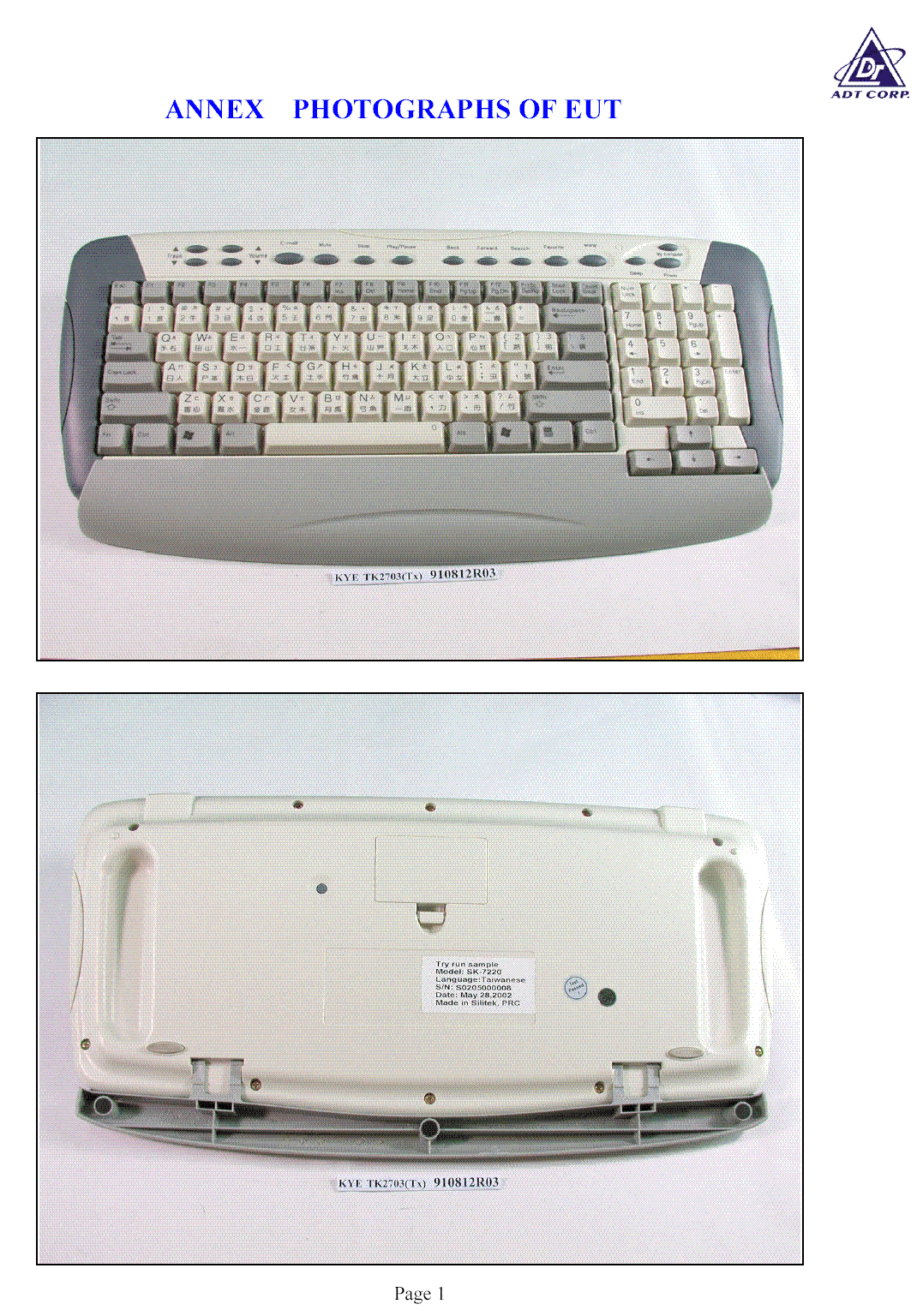
Click to zoom
Application Details
- Equipment Class
- DXX - Part 15 Low Power Communication Device Transmitter
- Date of Grant
- Nov 10, 2002
- Application Purpose
- Original Equipment
- Date of Application
- Nov 10, 2002
- Equipment Note
- Wireless Keyboard
- Frequency Range
- 26.96000000 - 27.28000000
- Company
- KYE SYSTEMS CORP.
- Country
- Taiwan
Documents & Files
Document Text
Text extracted from the exhibit documents filed with the FCC. Open a document above to read the original.
Users Manual
RF Wheel Keyboard and Mouse Note! Before installing or removing the keyboard / mouse to or from your computer, always remember to turn off your computer. Installing or removing the mouse when your computer is running will cause permanent damage to the mouse or your computer. Install the Battery 1. Remove the battery compartment covers on the RF keyboard/mouse. 2. Insert batteries into the battery compartment. Pay attention to the polarity. 3. Replace the covers to the RF keyboard/mouse. Connect the Receiver The RF receiver is compatible with the PC 99 Spec. If you have a computer with the PC 99 Spec, simply plug the receiver into the corresponding PS/2 port. For your convenience, the receiver connector has a small icon on it. The color of the mouse port is green. Also refer to your main board manual for the location of the PS/2 port. Setting up the ID Channel Press the ID channel button on the receiver, then press the ID channel button on the bottom of the keyboard/mouse. Install the Software 1. Turn on your computer and start Windows. 2. Insert the CD-ROM into your CD-ROM drive. 3. Follow the on-screen instructions. 4. If Autorun is not enabled, select Run from the Start Menu on the Taskbar. Next type d:\setup.exe, where d: is the designation of the CD-ROM drive. Troubleshooting § If the RF keyboard and mouse does not operate correctly after installation: ÿ The batteries have not been installed in your RF keyboard and mouse or have been installed incorrectly. ÿ The batteries are weak. ÿ The RF receiver has been connected to your computer incorrectly. ÿ The ID channel setting of the RF receiver and mouse are not identical. § When the cursor does not move properly: ÿ The RF receiver and keyboard/mouse are placed at an improper distance. Keep the RF receiver away from the mouse, keyboard, monitor, computer, and any other electrical devices by at least 20cm (about 8 inches). ÿ Do not use your RF keyboard and mouse on a metal surface. Use a pad to prevent the ID channel from any interference. § How long is the average life of a battery? ÿ The surface on which you use the mouse can significantly affect battery life. Lighter surfaces extend battery life, darker ones shorten it. Bright mat (pad) surfaces (not glossy ones) are recommended. LIMITATION OF LIABILITY. THE WARRANTIES SET FORTH IN THIS AGREEMENT REPLACE ALL OTHER WARRANTIES. KYE EXPRESSLY DISCLAIMS ALL OTHER WARRANTIES. INCLUDING. BUT NOT LIMITED TO, THE IMPLIED WARRANTIES OF MERCHANTABILITY AND FITNESS FOR A PARTICULAR PURPOSE AND NONINFRINGEMENT OF THIRD-PARTY RIGHTS WITH RESPECT TO THE DOCUMENTATION, SOFTWARE. AND HARDWARE. NO KYE DEALER. AGENT. OR EMPLOYEE IS AUTHORIZED TO MAKE ANY MODIFICATION, EXTENSION. OR ADDITION TO THIS WARRANTY. IN NO EVENT WILL KYE OR ITS SUPPLIERS BE LIABLE FOR ANY COSTS OF PROCUREMENT OF SUBSTITUTE PRODUCTS OR SERVICES, LOST PROFITS, LOSS OF INFORMATION OR DATA, OR ANY OTHER SPECIAL, INDIRECT. CONSEQUENTIAL, OR INCIDENTAL DAMAGES ARISING IN ANY WAY OUT OF THE SALE OF, USE OF. OR INABILITY TO USE ANY KYE PRODUCT OR SERVICE, EVEN IF KYE HAS BEEN ADVISED OF THE POSSIBILITY OF SUCH DAMAGES. IN NO CASE SHALL KYE’S LIABILITY EXCEED THE ACTUAL MONEY PAID FOR THE PRODUCTS AT ISSUE. Because some jurisdictions do not allow the limitation of implied warranties or liability for incidental, consequential, special, or indirect damages, the above limitation may not always apply. The above limitations will not apply in case of personal injury where and to the extent that applicable law requires such liability. FCC Compliance and Advisory Statement. THIS DEVICE COMPLIES WITH PART 15 OF THE FCC RULES. OPERATION IS SUBJECT TO THE FOLLOWING TWO CONDITIONS: (1) THIS DEVICE MAY NOT CAUSE HARMFUL INTERFERENCE, AND (2) THIS DEVICE MUST ACCEPT ANY INTERFERENCE RECEIVED, INCLUDING INTERFERENCE THAT MAY CAUSE UNDESIRED OPERATION. This equipment has been tested and found to comply with the limits for a Class B digital device, pursuant to Part 15 of the FCC Rules. These limits are designed to provide reasonable protection against harmful interference in a residential installation. This equipment generates, uses, and can radiate radio frequency energy and. if not installed or used in accordance with the instructions, may cause harmful interference to radio communications. However, there is no guarantee that interference will not occur in a particular installation. If this equipment does cause harmful interference to radio or television reception, which can be determined by turning the equipment off and on, the user is encouraged to try to correct the interference by one or more of the following measures: 1) reorient or relocate the receiving antenna; 2) increase the separation between the equipment and the receiver; 3) connect the equipment to an outlet on a circuit different from that to which the receiver is connected; 4) consult the dealer or an experienced radio/TV technician for help. Any changes or modifications not expressly approved by the party responsible for compliance could void the user’s authority to operate the equipment. Where shielded interface cables have been provided with the product or specified additional components or accessories elsewhere defined to be used with the installation of the product, they must be used in order to ensure compliance with FCC regulations. Canadian DOC Statement. This digital device does not exceed the Class B limits for radio noise emissions from digital apparatus specified in the interference-causing equipment standard entitled iDigital Apparatus,i ICES-003 of the Department of Communications. Cet appareil numErique respecte les limites bruits radioElectriques applicables aux appareils numEriques de Classe B prescrites dans la norme sur Ie matEriel brouilleur: iAppareils NumEriques,i NMB-003 EdictEe par Ie MinistEre des Communications. This device complies with RSS-210 of Industry and Science Canada. Operation is subject to the following two conditionsi 1) this device may not cause in…
Text truncated - open the document above for the full version.
Cover Letter(s)
KYE SYSTEMS CORP. No. 492, Sec. 5, Chung Hsin Rd., San Chung, Taipei Hsien, 241, Taiwan, R.O.C. Tel: 866-2-29956645 Fax: 866-2-29956649 Federal Communications Commission Authorization and Evaluation Division Confidentiality Request regarding application for certification of FCC ID: (FSUGKZGI). Pursuant to Sections 0.457 and 0.459 of the Commission’s Rules, we hereby request confidential treatment of information accompanying this application as outlined below: Block Diagrams Schematic BOM The above materials contain trade secrets and proprietary information not customarily released to the public. The public disclosure of these materials may be harmful to the applicant and provide unjustified benefits to its competitors. The applicant understands that pursuant to Section 0.457 of the Rules, disclosure of this application and all accompanying documentation will not be made before the date of the Grant for this application. Sincerely, (signature) Scotte Tsou (printed name)
Operational Description
TK2703 RF Keyboard Specification 1. Electronic Specification TK2703 Wireless is located in the wireless multimedia keyboard. RF Link Carrier Channel : 27.145MHz mode Shared channel for keyboard Distance Keyboard: 2 Meters ; It is based on wooden table and open site. The receiver should be out of your computer and monitor for more than 20 cm. Bandwidth 10KHz±1kHz Broadcast mode Single way Modulation FSK Channel Separation 50KHz ID code 256 sets ID code Transmitter l Keyboard Features keypad The 99-keytop of keyboard with 16 hot keys Power 3.0V , AA*2 Voltage range 2.4V~3.2V Current Consumption Run mode: 7mA ; Sleep mode: 13uA Channel One Channel Suspend Timeout Keystroke wakeup Peak power level <80dBuV Low Battery 2.4±0.5V approximate ID Button Tack switch Keyboard Hardware Installation 1. Always turn off your computer you connected or disconnect your keyboard. 2. Plug the keyboard connector firmly into the AT/PS2 port on the computer. 3. Turn on your PC. Software Installation 1. Make sure the keyboard is connected to the computer. 2. Put the Setup disk (or CD) into the disk drive. 3. From Windows95/98,click on Start/Run . 4. Specify the disk drive and type setup. For example, type e:\setup if you are using drive E. 5. Follow the instructions on the screen to finish the software installation. Internet & Multimedia hot keys 1. Track rewind: Previous track of audio or video CD’s 2. Play & Pause: Play and Pause of audio or video CD’s 3. Stop: Stop play of audio or video CD’s 4. Track forward: Next track of audio or video CD’s 5. Power : Turn system off into power mode 6. Vol.-&+: decrease or increase volume 7. Mute: Mute volume 8. Favorite : open my favorite mode 9. E-mail: Open mail folder 10. Back: See last page when viewing the Internet 11. www: Open browser in Netscape or IE 12. Forward: Go to next page when viewing the Internet 13. Sleep: Turn system into sleep mode
Contact Information
Applicant
Ricky Chen(Section Supervisor)
Test Firm
Bureau Veritas CPS (H.K.) Ltd. Taoyuan BranchTommy Wu
Technical Specifications
| # | Rule Parts | Frequency Range | Power Output |
|---|---|---|---|
| 1 | 15C | 26.96 MHz - 27.28 MHz | - |
Other Applications from KYE SYSTEMS CORP.

FSUGG0AM
Aug 20, 2026Wireless Speaker
Equipment Class
DSS - Part 15 Spread Spectrum Transmitter
FSUGKZI2
May 23, 2026Wireless Keyboard
Equipment Class
DXX - Part 15 Low Power Communication Device TransmitterFSUGMZN6
Apr 20, 2026Wireless Mouse
Equipment Class
DTS - Digital Transmission SystemFSUGMZN4
Apr 03, 2026Wireless Mouse
Equipment Class
DXX - Part 15 Low Power Communication Device TransmitterFSUGMZN7
Apr 01, 2026Wireless Mouse
Equipment Class
DTS - Digital Transmission System