FSUGKZGWSlimStar R610/K
KYE SYSTEMS CORP.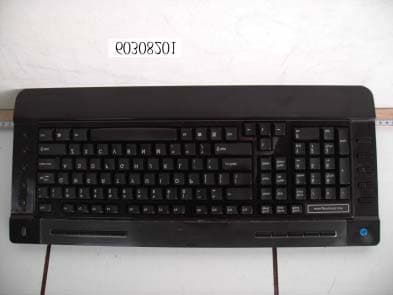
Click to zoom
Application Details
- Equipment Class
- DXX - Part 15 Low Power Communication Device Transmitter
- Date of Grant
- Apr 23, 2006
- Application Purpose
- Original Equipment
- Date of Application
- Apr 23, 2006
- Equipment Note
- SlimStar R610/K
- Frequency Range
- 27.14500000 - 27.14500000
- Company
- KYE SYSTEMS CORP.
- Country
- Taiwan
Documents & Files
Document Text
Text extracted from the exhibit documents filed with the FCC. Open a document above to read the original.
Users Manual
ENGLISH 1 Hardware Installation 1. Install two rechargeable AA batteries into the mouse and two AAA batteries into the keyboard. 2. Plug in your USB receiver to a USB port of your PC. 3. Turn on your PC. Software Installation 1. Place your CD driver in your PC drive for software installation 2. Follow the instruction on the screen to finish the software installation Replace Batteries When your mouse or keyboard does not work properly, then the batteries have lost their charge, so please replace them. (Warning: please do not mix or use different types of batteries at the same time) ENGLISH 2 ID Channel Setting The channel ID is factory preset. The green LED (data transmission indicator) will be lit constantly when the wireless device is in normal operation. In case your wireless devices do not work, please reset the ID channel by: 1. Press the connect button on the receiver and the light will be blinking for connection. 2. Press the connect buttons of the keyboard and mouse within 20 seconds. 3. To confirm the connection of the wireless devices, the LED light will be lit constantly for approximately three seconds and will turn off after being connected. Charger and charging usage 1. The charger device can be used to recharge both AA and AAA batteries; two batteries must be charged simultaneously. 2. Make sure that only rechargeable batteries (NiMH~ Nickle-Metal-Hydride) batteries are used and placed in the correct position. 3. For safety, the charger features a recognition function for alkaline batteries placed and/or when the batteries are not placed in the correct polarity direction; resulting in charger’s LED Light to blink between green and red to indicate a warning. ENGLISH 3 4. The LED will be red in charging mode and Green when batteries are fully charged. 5. The Hub on the charger is designed for a dongle receiver or other USB accessories (such as mouse, flash memory stick). Warning (Trouble shooting) 1. Please do not use the wireless optical mouse on a surface that is made of glass, iron, black velvet or a desk that is made of metal, as they will reduce the operational distance of the keyboard and mouse. 2. The wireless desktop set provides 256 ID codes, and it selects the ID # for your wireless devices. You can only set up one wireless desktop at a time. When you have another 27Mhz wireless desktop set within 10 square meters, there may be interference between the wireless devices. 3. The wireless mouse uses an IR sensor and no light will be shown just like an ordinary optical mouse. ENGLISH 4 4. You need to place two AA or AAA rechargeable batteries simultaneously in the charger for it to charge correctly. 5. Please do not mix or use different types of batteries in the battery charger such as Li-ion, NiCd, Alkaline, etc. 6. The charging current of the charger is approximately 210mA; please connect the charger device directly to a PC or a safe power device (HUB device with power adaptor). Keyboard hot key definition 1. Scrolling button: Show the applications opened on windows desktop. 2. Instant Com: Activate internet conversational tools such MSN messenger, ICQ, Windows messenger, Skype, etc 3. Copy: Activate copy function 4. Paste: Activate paste function 5. Save: Activate save function 6. Print: Print function 7. WWW: Open browser in Netscape or IE 8. Refresh: Refresh the Internet pages 9. Stop: Stop your display of Netscape or IE page 10. My favorite: Activate my favorite function 11. Mail: Activate email feature 12. Word: Open office Word feature ENGLISH 5 13. Excel: Open office Excel feature 14. Power point: Open Power Point feature 15. Calculator: activate Calculator function 16. Sleep: Turn the system into Sleep mode 17. Media player: Activate Media Player function 18. Stop media: Stop playing music or video sources 19. Mute: Remove sound 20. Previous Track: Go back to previous track 21. Next Track: Go to next track 22. Volume Down: Decrease volume level 23. Volume Up: Increase volume level 24. Play/Pause: Play/Pause the music or video sources. ENGLISH 6 Notes on Battery Usage When you use the battery, carefully read and strictly observe the Safety Instructions and the notes described below: Different battery types and surrounding temperatures may affect the battery performance. Avoid using batteries in extremely cold environments as low temperatures can shorten the battery life and reduce wireless device performance. If you are using the new rechargeable battery or rechargeable battery that has not been used for an extended period of time (batteries that pass the expiry date are exceptions) might affect the number of pictures that can be taken. Therefore, to maximize their performance and lifetime, we recommend that you fully charge the batteries and discharge them for at least one complete cycle before use. The battery may feel warm when using the wireless device for an extended period of time or using the flash continuously. This is normal and not a malfunction. The wireless device may feel warm when being used continuously or for an extended period of time. This is normal and not a malfunction. If you will not be using the batteries for an extended period of time, remove them from the wireless device to prevent leakage or corrosion. Always keep the terminals in a clean state. Never use manganese batteries. Risk of explosion if battery is replaced by an incorrect type. Dispose of used batteries according to the instructions. This device complies with part 15 of the FCC rules. Operation is subject to the following two conditions. (1)This device may not cause harmful interference, and (2)This device must accept any interference received, including interference that may cause undesired operation. Per FCC 15.21, you are cautioned that changes or modifications not expressly approved by the part responsible for compliance could void the user’s authority to operate the equipment.
External Photos
Compliance Certification Services Inc. Report No.: 60308201 Date of Issue: April 19, 2006 Page 1 Total Page: 4 Rev. 00 PHOTOGRAPHS OF EUT
ID Label/Location Info
FCC ID LABEL FORMAT AND LOCATION KYE SYSTEMS CORP. FCC ID: FSUGKZGW FCC ID: FSUGKZGW This device complies with part 15 of the FCC Rules. Operation is subject to the following two conditions: (1) This device may not cause harmful interference, and (2) this device must accept any interference received, including interference that may cause undesired operation. FCC ID LABEL AREA
Internal Photos
Compliance Certification Services Inc. Report No.: 60308201 Date of Issue: April 19, 2006 Page 2 Rev. 00 Compliance Certification Services Inc. Report No.: 60308201 Date of Issue: April 19, 2006 Page 3 Rev. 00 Compliance Certification Services Inc. Report No.: 60308201 Date of Issue: April 19, 2006 Page 4 Rev. 00
Test Report
Compliance Certification Services Inc. Report No.: 60308201-RP1 FCC ID: FSUGKZGW Date of Issue: April 19, 2006 Page 1 Total Page: 18 Rev. 00 FCC CFR 47 PART 15 SUBPART C TEST REPORT For KYE SYSTEMS CORP. SlimStar R610/K Model: GK-050014/K Trade Name: Genius Issued to KYE SYSTEMS CORP. No. 492, Sec. 5, Chung Hsin Rd., San Chung, Taipei Hsien, 241, Taiwan, R.O.C. Issued by Compliance Certification Services Inc. Hsintien Lab. No. 165, Chunghsen Road, Hsintien City Taipei Hsien, Taiwan TEL: (02) 2217-0894 FAX: (02) 2217-1029 Note: This report shall not be reproduced except in full, without the written approval of Compliance Certification Services Inc. This document may be altered or revised by Compliance Certification Services Inc. personnel only, and shall be noted in the revision section of the document. Compliance Certification Services Inc. Report No.: 60308201-RP1 FCC ID: FSUGKZGW Date of Issue: April 19, 2006 Page 2 Rev. 00 TABLE OF CONTENTS 1. TEST RESULT CERTIFICATION ............................................................................................. 3 2. EUT DESCRIPTION ..................................................................................................................... 4 3. TEST METHODOLOGY.............................................................................................................. 5 3.1 EUT CONFIGURATION ............................................................................................................ 5 3.2 EUT EXERCISE ........................................................................................................................ 5 3.3 GENERAL TEST PROCEDURES ............................................................................................... 5 3.4 FCC PART 15.205 RESTRICTED BANDS OF OPERATIONS......................................... 6 3.5 DESCRIPTION OF TEST MODES .............................................................................................. 6 4. INSTRUMENT CALIBRATION ................................................................................................. 7 5. FACILITIES AND ACCREDITATIONS.................................................................................... 7 5.1 FACILITIES ............................................................................................................................. 7 5.2 EQUIPMENT ............................................................................................................................ 7 5.3 LABORATORY ACCREDITATIONS AND LISTINGS .................................................................. 7 5.4 TABLE PF ACCREDITATIONS AND LISTINGS ......................................................................... 8 6. SETUP OF EQUIPMENT UNDER TEST................................................................................... 9 6.1 SETUP CONFIGURATION OF EUT ........................................................................................... 9 6.2 SUPPORT EQUIPMENT ............................................................................................................ 9 7. FCC PART 15.227 REQUIREMENTS ...................................................................................... 10 7.1 26 D B BANDWIDTH .............................................................................................................. 10 7.2 RADIATED EMISSIONS .......................................................................................................... 12 7.3 POWERLINE CONDUCTED EMISSIONS ................................................................................. 17 8. APPENDIX I - PHOTOGRAPHS OF TEST SETUP ............................................................... 18 Compliance Certification Services Inc. Report No.: 60308201-RP1 FCC ID: FSUGKZGW Date of Issue: April 19, 2006 Page 3 Rev. 00 1. TEST RESULT CERTIFICATION Applicant: KYE SYSTEMS CORP. No. 492, Sec. 5, Chung Hsin Rd., San Chung, Taipei Hsien, 241, Taiwan, R.O.C. Equipment Under Test: SlimStar R610/K Tr a d e Na m e : Genius Model: GK-050014/K Model Difference: See Item 2 of this report Report Number: 60308201-RP1 Date of Test: March 14, 2006 ~ April 04, 2006 APPLICABLE STANDARDS STANDARD TEST RESULT FCC Part 15 Subpart C No non-compliance noted The above equipment was tested by Compliance Certification Services Inc. The test data, data evaluation, test procedures, and equipment configurations shown in this report were made in accordance with the procedures given in ANSI C63.4 (2003) and the energy emitted by the sample EUT tested as described in this report is in compliance with conducted and radiated emission limits of FCC Rules Part 15.227. The test results of this report relate only to the tested sample identified in this report. Approved by: Reviewed by: Compliance Certification Services Inc. Report No.: 60308201-RP1 FCC ID: FSUGKZGW Date of Issue: April 19, 2006 Page 4 Rev. 00 2. EUT DESCRIPTION Product SlimStar R610/K Trade Name Genius Model GK-050014/K Power Supply 3VDC From Battery AAA size X 2 pcs. Operate Frequency 27.145MHz Transmit Power 61dBuV Modulation Technique Frequency Shift Keying (FSK) Number of Channels 1 Channel Operating Mode Simplex Antenna Designation Internal loop, which is built in EUT Note: The product is a composite system which includes Transmitter and Receiver. This submittal(s) (test report) is intended for FCC ID: FSUGKZGW filing to comply with Section 15.227 of the FCC Part 15 Subpart C Rules. The composite system (digital device) is compliance with Subpart B is authorized under a DoC procedure. Compliance Certification Services Inc. Report No.: 60308201-RP1 FCC ID: FSUGKZGW Date of Issue: April 19, 2006 Page 5 Rev. 00 3. TEST METHODOLOGY The tests documented in this report were performed in accordance with ANSI C63.4 and FCC CFR 47 Part 15 Subpart C. 3.1 EUT CONFIGURATION The EUT configuration for testing is installed on RF field strength measurement to meet the Commissions requirement and operating i…
Text truncated - open the document above for the full version.
Test Setup Photos
Compliance Certification Services Inc. Report No.: 60308201-RP1 FCC ID: FSUGKZGW Date of Issue: April 19, 2006 Page 18 Rev. 00 8. APPENDIX I - PHOTOGRAPHS OF TEST SETUP RADIATED EMISSIONS TEST
Contact Information
Applicant
Ricky Chen(Section Supervisor)
Test Firm
Compliance Certification Services Inc.Kurt Chen
Technical Specifications
| # | Rule Parts | Frequency Range | Power Output |
|---|---|---|---|
| 1 | 15C | 27.145 MHz - 27.145 MHz | - |
Other Applications from KYE SYSTEMS CORP.

FSUGG0AM
Aug 20, 2026Wireless Speaker
Equipment Class
DSS - Part 15 Spread Spectrum Transmitter
FSUGKZI2
May 23, 2026Wireless Keyboard
Equipment Class
DXX - Part 15 Low Power Communication Device TransmitterFSUGMZN6
Apr 20, 2026Wireless Mouse
Equipment Class
DTS - Digital Transmission SystemFSUGMZN4
Apr 03, 2026Wireless Mouse
Equipment Class
DXX - Part 15 Low Power Communication Device TransmitterFSUGMZN7
Apr 01, 2026Wireless Mouse
Equipment Class
DTS - Digital Transmission System