FSUGKZGYSlimStar 820 Solargizer
KYE SYSTEMS CORP.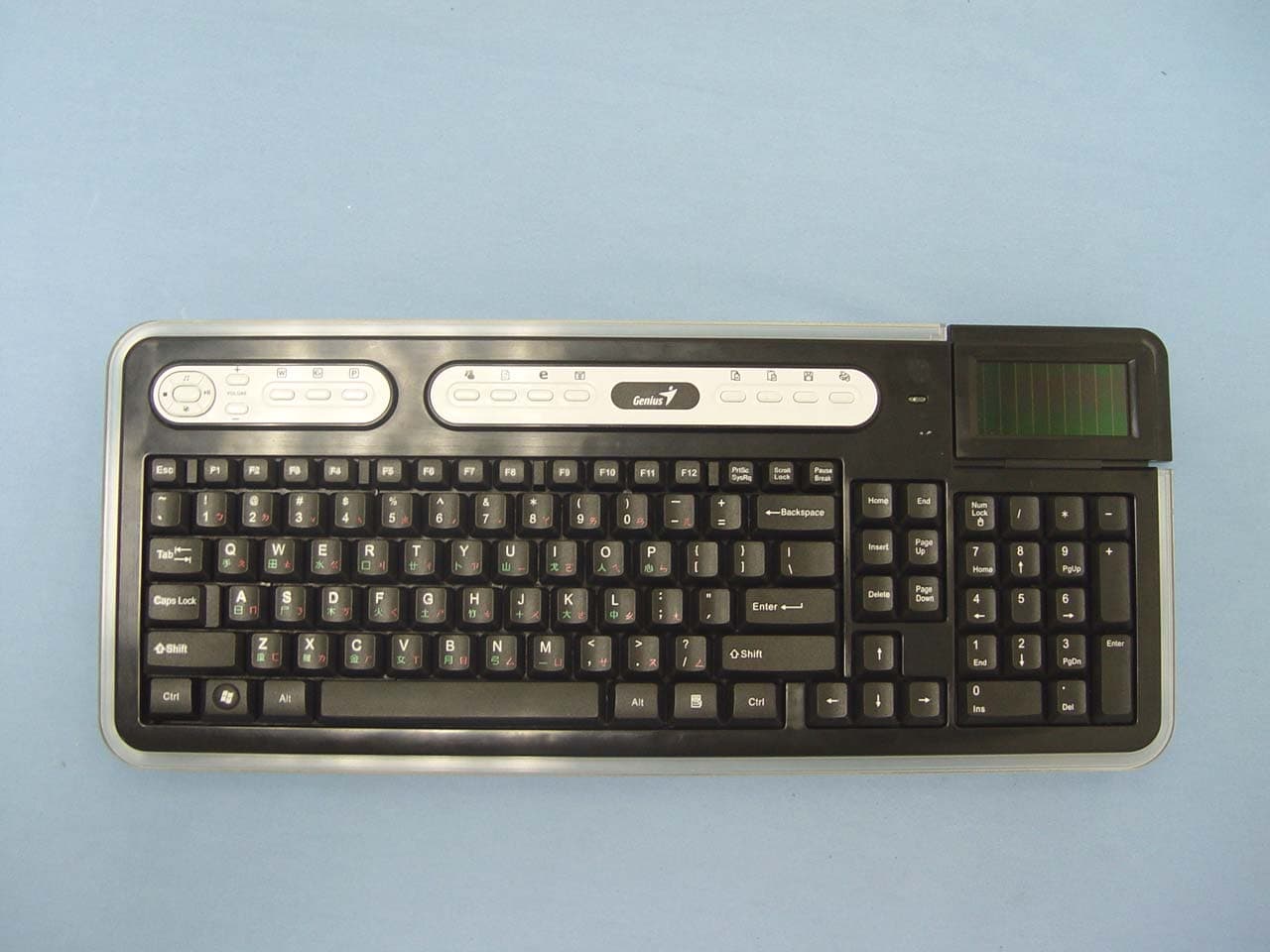
Click to zoom
Application Details
- Equipment Class
- DXT - Part 15 Low Power Transceiver, Rx Verified
- Date of Grant
- Jan 11, 2007
- Application Purpose
- Original Equipment
- Date of Application
- Jan 11, 2007
- Equipment Note
- SlimStar 820 Solargizer
- Frequency Range
- 2402.00000000 - 2480.00000000
- Company
- KYE SYSTEMS CORP.
- Country
- Taiwan
Documents & Files
Document Text
Text extracted from the exhibit documents filed with the FCC. Open a document above to read the original.
Users Manual
English -1- Introduction SlimStar 820 Solargizer is a keyboard kit designed to comply with green environment by transforming solar energy into wireless keyboard operation and using power saving technology on the mouse to reduce the frequent replacement of batteries. Hardware Installation 1. Connect the dongle receiver to a USB port of your PC. 2. Connect the enclosed USB cable charger to your PC and keyboard to charge the keyboard before you begin operation. 3. Insert two AA batteries each into the keyboard (Optional when start up with USB charger) and mouse; making sure that the polarity is correct. 4. Make sure the power switch is set to ON. Important: 1. Please start up the keyboard with the USB cable charger. 2. When fully charged and working under an environment with no light absorption, the capacitors embedded within the keyboard will supply enough power for continuous operation for approximately five hours. English -2- 3. The batteries enclosed are used for back up power ONLY, when working under a limited or no light source environment. (You can auto switch to battery supply (ON/OFF switch) when capacitors are do not have enough power) 4. When using the USB cable charger, the LED light on the keyboard will be ON; and OFF when fully charged. It takes approximately 10 minutes to get the capacitors charged. 5. Although the mouse has been granted eye safety certification, we strongly suggest you avoid direct eye contact with the laser lens. Software Installation 1. Make sure that the mouse and keyboard are connected to the PC properly 2. Put the CD driver into the disc drive 3. Follow the instructions on the screen to complete the software installation Replacing batteries The mouse is equipped with a low battery indicator, batteries at low charge result in a constant lit LED when using the mouse, so you need to replace the batteries immediately. English -3- ID Channel Setting The channel ID is factory preset. The green LED (data transmission indicator) will be lit constantly when the wireless device is in normal operation. In case your wireless devices do not work, please reset the ID channel by: 1. Press the connect button on the receiver and the LED will be blinking for connection. 2. Press the connect button of the wireless device once within 20 seconds and observe if the LED light on the receiver has gone off. If yes, it means the wireless device is ready for use. Warning (Trouble shooting) 1. In case the wireless device was not connected when you set the ID channel setting, check if you have installed the batteries with the positive (+) and negative (-) polarity in the correct position, then repeat the ID channel setting again. 2. For optimum performance, please make sure that the distance between the wireless device and the dongle receiver does not exceed 10M. Cleaning on keyboard’s solar device 1. To clean the solar bezel, please use only silk or cotton materials and gently wipe this area. English -4- Security Function Setting: 1. After you install the software driver, please click the mouse icon on the task bar and select “Mouse”. 2. Click “Settings” when the Mouse Properties appears up and click “Security Options”. 3. Choose a picture from your images to display when the computer is locked. Also set your password to unlock the computer. Then, press “OK”, and the security setting will be finished. 4. If you want to start the security function, just press “ ”, and the picture you set pop up to hide the screen. For security, the mouse and keyboard won’t work. English -5- 5. If you want to unlock this function, just press “”again, and install your password. Mouse Factory Setting Button Assignments 1. Left Button: Provides traditional mouse functions like click, double click and drag. 2. Right Button: You can assign this button to frequently used keyboard and mouse functions in addition to features like Easy Jump, Auto-Panning, Zoom, etc. 3. Magic-Roller: Press the “Magic-Roller” to surf the Internet and Windows documents. Horizontal Scroll: Press the roller to the left and the cursor scrolls to the left; press the roller to the right and the cursor scrolls to the right. 4. Security: Lock your screen, mouse and keyboard unless you install the password. 5. Power indicator: If your battery power is low, the LED will brighten. English -6- Keyboard Features 1. Media Player: Activate Media Player function 2. Stop: Stop playing music or video sources 3. Mute: Remove sound 4. Play/Pause: Play/Pause the music or video sources 5. Volume Up: Increase volume level 6. Volume Down: Decrease volume level 7. Word: Open office Word feature 8. Excel: Open office Excel feature 9. Power point: Open Power Point feature 10. MSN: Activate Internet conversational tools such MSN messenger, ICQ, Windows messenger, Skype, etc 11. Refresh: Refresh the Internet pages 12. Internet Explorer: Open browser in Netscape or IE 13. Mail: Activate email feature English -7- 14. Copy: Activate copy function 15. Paste: Activate paste function 16. Save: Activate save function 17. Print: Activate Print function Notes on Battery Usage: Different battery types and surrounding temperatures may affect the battery performance. Avoid using batteries in extremely cold environments as low temperatures can shorten the battery life and reduce wireless device performance. If you are using the new rechargeable battery or rechargeable battery that has not been used for an extended period of time (batteries that pass the expiry date are exceptions) might affect the number of pictures that can be taken. Therefore, to maximize their performance and lifetime, we recommend that you fully charge the batteries and discharge them for at least one complete cycle before use. The battery may feel warm when using the wireless device for an extended period of time or using the flash continuously. This is normal and not a malfunction. The wireless device may feel warm when being used continuously or for an extended period of time. This is…
Text truncated - open the document above for the full version.
External Photos
Compliance Certification Services Inc. Report No.: 61115216 Date of Issue: December 27, 2006 Page 1 Total Page: 9 Rev. 00 EXTERNAL PHOTOGRAPHS OF EUT Compliance Certification Services Inc. Report No.: 61115216 Date of Issue: December 27, 2006 Page 2 Rev.00 Compliance Certification Services Inc. Report No.: 61115216 Date of Issue: December 27, 2006 Page 3 Rev.00
ID Label/Location Info
B DESCRIPTION 3 2 GRADE 1 DIMENSIONAL TOLERANCE DC CHANGE BY 0~50.03 31~100 21~30 ANGULAR DATE 0.20 101~ 0.01 0.30 6~200.05 0.10 DIM E ANGLE'S 0.100.05 0.20 0.40 0.30 0.10 0.50 0.30 0.05 0.40 0.10 0.20 3RD. GRADE 3GRADE 2 UNITS GF CHECKED BY: DRAWN BY: APPROVED BY: MM IH QUANTITY TREATMENT SCALE SURFACE MATERIAL PART No. DWG No. MODEL TITLE BDCEFGHI J 5 4 3 2 J 背铭版 JME-5210R 69.20 mm 37.20 mm R1.60 R7.60 注: 1.银底黑字. 2.材质:25#消银龙+150PVC+上光+背胶(0.1~~0.15T) 0.1 0 . 1 Model No:GK-060004/K Product Name: SlimStar 820 Solargizer Rating:3V 50mA Max ---
Internal Photos
Compliance Certification Services Inc. Report No.: 61115216 Date of Issue: December 27, 2006 Page 4 Rev.00 INTERNAL PHOTOGRAPHS OF EUT Compliance Certification Services Inc. Report No.: 61115216 Date of Issue: December 27, 2006 Page 5 Rev.00 Compliance Certification Services Inc. Report No.: 61115216 Date of Issue: December 27, 2006 Page 6 Rev.00 Compliance Certification Services Inc. Report No.: 61115216 Date of Issue: December 27, 2006 Page 7 Rev.00 Compliance Certification Services Inc. Report No.: 61115216 Date of Issue: December 27, 2006 Page 8 Rev.00 Compliance Certification Services Inc. Report No.: 61115216 Date of Issue: December 27, 2006 Page 9 Rev.00
Parts List/Tune Up Info
Antenna Spec Antenna Type: PCB Antenna Gain: -3 dBi
Test Report
Compliance Certification Services Inc. Report No.: 61115216-RP1 FCC ID: FSUGKZGY Date of Issue: December 22, 2006 Note: This report shall not be reproduced except in full, without the written approval of Compliance Certification Services Inc. This document may be altered or revised by Compliance Certification Services Inc. personnel only, and shall be noted in the revision section of the document. Page 1 Total Page: 27 Rev. 00 FCC 47 CFR PART 15 Subpart C TEST REPORT For SlimStar 820 Solargizer Model: GK-060004/K Tr a d e Na me : G e n ius Issued to KYE SYSTEMS CORP. No.492, Sec.5, Chung Hsin Rd., San Chung, Taipei Hsien, 24160, Taiwan, R.O.C. Issued by Compliance Certification Services Inc. No. 81-1, Lane 210, Bade Rd. 2, Luchu Hsiang, Taoyuan Hsien, (338) Taiwan, R.O.C. http://www.ccsemc.com.tw [email protected] Compliance Certification Services Inc. Report No.: 61115216-RP1 FCC ID: FSUGKZGY Date of Issue: December 22, 2006 Page 2 Rev. 00 TABLE OF CONTENTS 1. TEST RESULT CERTIFICATION................................................................................................................ 3 2. EUT DESCRIPTION...................................................................................................................................... 4 3. TEST METHODOLOGY ............................................................................................................................... 5 3.1 EUT CONFIGURATION................................................................................................................. 5 3.2 EUT EXERCISE............................................................................................................................. 5 3.3 GENERAL TEST PROCEDURES...................................................................................................... 5 3.4 FCC PART 15.205 RESTRICTED BANDS OF OPERATIONS................................................. 6 3.5 DESCRIPTION OF TEST MODES.................................................................................................... 6 4. INSTRUMENT CALIBRATION................................................................................................................... 7 4.1 MEASURING INSTRUMENT CALIBRATION............................................................................... 7 4.2 MEASUREMENT EQUIPMENT USED.................................................................................. 7 5. FACILITIES AND ACCREDITATIONS ...................................................................................................... 8 5.1 FACILITIES .................................................................................................................................. 8 5.2 EQUIPMENT................................................................................................................................. 8 5.3 TABLE OF ACCREDITATIONS AND LISTINGS................................................................................ 9 6. SETUP OF EQUIPMENT UNDER TEST ...................................................................................................10 6.1 SETUP CONFIGURATION OF EUT................................................................................................ 10 6.2 SUPPORT EQUIPMENT ........................................................................................................ 10 7. FCC PART 15.249 REQUIREMENTS ........................................................................................................ 11 7.1 BAND EDGES MEASUREMENT ......................................................................................... 11 7.2 SPURIOUS EMISSION .......................................................................................................... 16 7.3 POWERLINE CONDUCTED EMISSIONS........................................................................... 23 APPENDIX 1 PHOTOGRAPHS OF TEST SETUP............................................................................................26 Compliance Certification Services Inc. Report No.: 61115216-RP1 FCC ID: FSUGKZGY Date of Issue: December 22, 2006 Page 4 Rev. 00 2. EUT DESCRIPTION Product SlimStar 820 Solargizer Trade Name Genius Model Number GK-060004/K Model Discrepancy N/A Power Supply 1. Solar Energy 2. Rechargeable Battery: AA *2 (DC 3V) 3. Vdc from host device via USB cable. Frequency Range 2402MHz, 2405MHz, 2408MHz, 2411MHz, 2425MHz, 2428MHz, 2431MHz, 2434MHz, 2448MHz, 2451MHz, 2454MHz, 2457MHz, 2471MHz, 2474MHz, 2477MHz, 2480MHz Modulation Technique GFSK Number of Channels 16 Channels Antenna Specification Gain: -3 dBi Antenna Designation PCB Antenna Remark: 1. The sample selected for test was production product and was provided by manufacturer. 2. This submittal(s) (test report) is intended for FCC ID: FSUGKZGY filing to comply with Section 15.107 & 15.109 and Section 15.207, 15.209, 15.249. Compliance Certification Services Inc. Report No.: 61115216-RP1 FCC ID: FSUGKZGY Date of Issue: December 22, 2006 Page 5 Rev. 00 3. TEST METHODOLOGY The tests documented in this report were performed in accordance with ANSI C63.4 and FCC CFR 47 2.1046, 2.1047, 2.1049, 2.1051, 2.1053, 2.1055, 2.1057, 15.207, 15.209 and 15.249. 3.1 EUT CONFIGURATION The EUT configuration for testing is installed on RF field strength measurement to meet the Commissions requirement and operating in a manner that intends to maximize its emission characteristics in a continuous normal application. 3.2 EUT EXERCISE The EUT was operated in the engineering mode to fix the TX frequency that was for the purpose of the measurements. According to its specifications, the EUT must comply with the requirements of the Section 15.107 and 15.109 under the FCC Rules Part 15 Subpart B and Section 15.207, 15.209,15.249 under the FCC Rules Part 15 Subpart C. 3.3 GENERAL TEST PROCEDURES Conducted Emissions The EUT is placed on the turntable, which is 0.8 m above ground plane. According to the requirements in S…
Text truncated - open the document above for the full version.
Test Setup Photos
Compliance Certification Services Inc. Report No.: 61115216-RP1 FCC ID: FSUGKZGY Date of Issue: December 22, 2006 Page 26 Rev. 00 APPENDIX 1 PHOTOGRAPHS OF TEST SETUP Radiated Emission Set up Photos Compliance Certification Services Inc. Report No.: 61115216-RP1 FCC ID: FSUGKZGY Date of Issue: December 22, 2006 Page 27 Rev. 00 Powerline Conducted Emissions Setup Photos
Contact Information
Applicant
Ricky Chen(Section Supervisor)
Test Firm
Compliance Certification Services Inc.Harris Lai
Technical Specifications
| # | Rule Parts | Frequency Range | Power Output |
|---|---|---|---|
| 1 | 15C | 2.40 GHz - 2.48 GHz | - |
Other Applications from KYE SYSTEMS CORP.

FSUGG0AM
Aug 20, 2026Wireless Speaker
Equipment Class
DSS - Part 15 Spread Spectrum Transmitter
FSUGKZI2
May 23, 2026Wireless Keyboard
Equipment Class
DXX - Part 15 Low Power Communication Device TransmitterFSUGMZN6
Apr 20, 2026Wireless Mouse
Equipment Class
DTS - Digital Transmission SystemFSUGMZN4
Apr 03, 2026Wireless Mouse
Equipment Class
DXX - Part 15 Low Power Communication Device TransmitterFSUGMZN7
Apr 01, 2026Wireless Mouse
Equipment Class
DTS - Digital Transmission System