FSUGKZHGWireless Keyboard
KYE SYSTEMS CORP.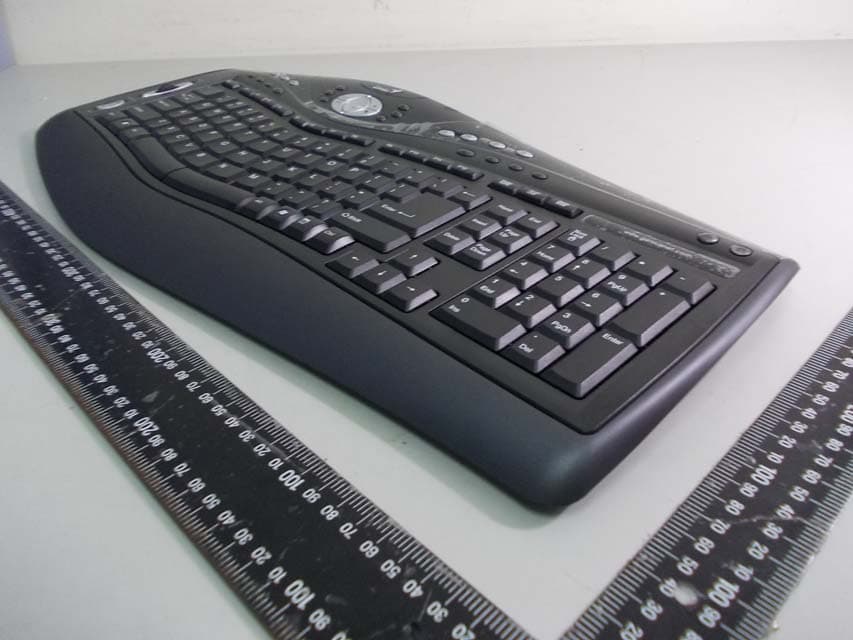
Click to zoom
Application Details
- Equipment Class
- DXX - Part 15 Low Power Communication Device Transmitter
- Date of Grant
- Feb 22, 2012
- Application Purpose
- Original Equipment
- Date of Application
- Feb 22, 2012
- Equipment Note
- Wireless Keyboard
- Frequency Range
- 2402.00000000 - 2480.00000000
- Company
- KYE SYSTEMS CORP.
- Country
- Taiwan
Documents & Files
Document Text
Text extracted from the exhibit documents filed with the FCC. Open a document above to read the original.
Users Manual
ENGLISH 1 Hardware Installation 1. Install one AA battery into the mouse and two AA batteries into the keyboard. 2. Plug in your USB receiver to a USB port of your PC. Software Installation 1. Place your CD driver in your PC drive for software installation. 2. Follow the instruction on the screen to finish the software installation. ID Channel Setting and connection: After you install the receiver: Wait about 5-10 seconds and the connection will be executed and the kit will be ready for use. Replace Batteries If the mouse or keyboard does not work properly, then the batteries have lost their charge, so you need to replace them. Warning: do not mix or use different types of batteries at the same time. ENGLISH 2 Keyboard hot key definition 1) Zoom In Enlarge the ratio of office documents or pictures Zoom out Decrease the ratio of office documents or pictures 2) Page up Scroll up the current page Scrolling Open current applications Page Down Scroll down the current page 3) Copy Activate copy function Cut Activate cut function Save Activate save function Print Activate print function ENGLISH 3 Word Access to Word file Excel Access to Excel file Power Point Access to Power Point file 4) My computer Open My computer path My document Access to My document file My picture Access to My picture file 5) Media Media player Activate Media Player Play/Pause Play/Pause music or video sources Previous Track Back to Previous track Volume Up Increase volume Volume Down Decrease volume Next Track Go to next track Mute Toggle off /on Stop Stop play of audio/video sources 6) Flip For quick preview of all opened windows in one easy view Desktop Easy access to Windows desktop view Smart Search Easy to search your request in the web site 7) Internet Open browser in Netscape or IE Search Open Internet Explorer search panel ENGLISH 4 Refresh Update the information on an active Internet page Stop Stop loading or refresh a web page My Blog Activate MSN space or setup blog web site by users Add to my favorite Add a web site to Internet Explorer favorite panel My Favorite Open Internet Explorer favorite panel Mail Active a default email program 8) Calculator Access to calculator function Lock Activate the security lock function Mouse Button Assignments 1. Previous Page: Go to last page of Internet Explorer 2. Next Page: Go to last page of Internet Explorer 3. Left Button: Provides traditional mouse functions like click double click and drag. 4. Magic-Roller: Press the “Magic-Roller” to surf the Internet and Windows documents. 5. Right Button: Provides traditional mouse click functions. 6. Flying Scroll: Press and hold to move vertically or horizontally for 4-way scrolling. 7. DPI adjustment: Default is 1600 dpi, press once for 800 dpi. Quick red flashing is 1600 dpi and slow red flashing is 800 dpi. Notes on Battery Usage When you use the battery, carefully read and strictly observe the Safety Instructions and the notes described below: Different battery types and surrounding temperatures may affect the battery performance. Avoid using batteries in extremely cold environments as low temperatures can shorten the battery life and reduce wireless device performance. If you are using a new rechargeable battery or rechargeable battery that has not ENGLISH 5 been used for an extended period of time (batteries that pass the expiry date are exceptions) it might affect the period of time you can use this device. Therefore, to maximize their performance and lifetime, we recommend that you fully charge the batteries and discharge them for at least one complete cycle before use. The battery may feel warm when using the wireless device for an extended period of time. This is normal and not a malfunction. The wireless device may feel warm when being used continuously or for an extended period of time. This is normal and not a malfunction. If you will not be using the batteries for an extended period of time, remove them from the wireless device to prevent leakage or corrosion. Always keep the terminals in a clean state. Risk of explosion if battery is replaced by an incorrect type. Dispose of used batteries according to the instructions. Note: Changes or modifications not expressly approved by the party responsible for compliance could void the user's authority to operate the equipment. (15.21) This device complies with part 15 of the FCC Rules. Operation is subject to the following two conditions: (1) This device may not cause harmful interference, and (2) this device must accept any interference received, including interference that may cause undesired operation.(15.19(a)(3)) FEDERAL COMMUNICATIONS COMMISSION INTERFERENCE STATEMENT This equipment has been tested and found to comply with the limits for a Class B digital device, pursuant to Part 15 of the FCC Rules. These limits are designed to provide reasonable protection against harmful interference in a residential installation. This equipment generates, uses and can radiate radio frequency energy and, if not installed and used in accordance with the instructions, may cause harmful interference to radio communications. However, there is no guarantee that interference will not ENGLISH 6 occur in a particular installation. If this equipment does cause harmful interference to radio or television reception, which can be determined by turning the equipment off and on, the user is encouraged to try to correct the interference by one or more of the following measures: – Reorient or relocate the receiving antenna. – Increase the separation between the equipment and receiver. – Connect the equipment into an outlet on a circuit different from that to which the receiver is connected. – Consult the dealer or an experienced radio/TV technician for help. CAUTION: Any changes or modifications not expressly approved by the party responsible for compliance could void the user's authority to operate the equipment.
Cover Letter(s)
Request for Confidentiality To: Federal Communications Commission Authorization and Evaluation Division Subject: Confidentiality Request regarding application for certification of FCC ID: FSUGKZHG Dear Madam or Sir: Pursuant to Sections 0.457 and 0.459 of the Commission’s Rules, we hereby request confidential treatment of information accompanying this application as outlined below: Block diagram - FSUGKZHG Block Diagram.pdf Operational description - FSUGKZHG Operation Description.pdf Schematic Diagram- FSUGKZHG Schematics.pdf The above materials contain trade secrets and proprietary information not customarily released to the public. The public disclosure of these materials may be harmful to the applicant and provide unjustified benefits to its competitors. The applicant understands that pursuant to Section 0.457 of the Rules, disclosure of this application and all accompanying documentation will not be made before the date of the Grant for this application. Sincerely, Ming Huang Lee
Cover Letter(s)
DOC Letter Feb. 10, 2012 Federal Communications Commission Authorization and Evaluation Division Dear Regulatory Authority, We, the undersigned, hereby declare that FCC Part 15B Declaration of Conformity procedures will be applied to the digital device portion of the following product: Product: Ergo Media 8000 Model: GK-110007/K FCC Part 15B DoC report number: F1D2309 This Device complies with Part 15B DoC of the FCC rules, operation is subject to the following two conditions. This device may not cause harmful interference and, This device must accept any interference received, Including interference that may cause undesired operation TEST LABORATORY Global Certification Corp. No. 146, Shiang Charng Rd., Sec. 2, Hsi Chih, Taipei Hsien 221, Taiwan, R.O.C. Accredited Lab. Assigned under FCC number: TW1030 Sincerely,
External Photos
Global Certification Corp. PHOTO OF EUT PHOTOS OF EUT Report No.: 1D2309 01 Front view of EUT 02 Rear view of EUT
ID Label/Location Info
NOTE:1.Tolerance=+0-0.5mm 2.材質:銅版紙,背面背膠,上光 3.厚度:150P 4.圓角=2.0Rx4 5.白底印黑 符合RoHS標準 +0-0.5 mm 1 1 DRAW APPD. Drawing NO. TITLE : MATERIAL : TOLERANCES: mm UNIT : CHKD. MODEL: DR:No . REVISIONS DESCRIPTION/ECN No: DATA SCALE: 1:1 Part No . : KKB-EM8000 FCC 貼紙 KKB-EM8000 KKB-EM800 FCC貼紙 銅版紙 150P 2.00 REV. 3 9 . 5 3 9 . 5 79.5 mm KPH1B1H 12040651100 FCC ID: FSUGKZHG M/N:GK-110007/K ErgoMedia 8000 Rating:3V100mA(Max) 8 . 0 m m KPH1B1H KM41004B7603 This device complies with Part 15 of the FCC Rules. Operation is subject to the following two conditions: (1) this device may not cause harmful interference, and (2) this device must accept any interference received, including interference that may cause undesired operation. KYE Systems Corp. www.geniusnet.com 20120206
ID Label/Location Info
Label location
Internal Photos
Report No.: 1D2309 03 INSITE Port of EUT 04 Front view of PCB 1 Report No.: 1D2309 05 Rear view of PCB 1 06 Front view of PCB 2 Report No.: 1D2309 07 Rear view of PCB 2 08 Front view of dongle Report No.: 1D2309 09 Rear view of dongle
Test Report
Global Certification Corp. Date of Issue: Jan. 11, 2011 Report No: F1D2309 Page1/30 FCC 47 CFR PART 15 SUBPART C TEST REPORT FOR Product Name: Ergo Media 8000 Model : GK-110007/K Trade Name: Genius Issued to KYE SYSTEMS CORP. No.492, Sec.5, Chung Hsin Rd., San Chung Dist., New Taipei City, 24160, Taiwan, R.O.C. Issued by Global Certification Corp. EMC Test Site Xizhi Office and Lab No.146, Sec. 2, Xiangzhang Rd., Xizhi Dist., New Taipei City 221, Taiwan (R.O.C.) Note: This test refers exclusively to the test presented test model and sample. This report shall not be reproduced except in full, without the written approval of Global Certification Corporation. This document may be altered or revised by Global Certification Corporation. Personnel only, and shall be noted in the revision section of the document. Global Certification Corp. Date of Issue: Jan. 11, 2011 Report No: F1D2309 Page2/30 TABLE OF CONTENTS ----------------------------------------------------------------------------------------------------- 2 1. GENERAL INFORMATION -------------------------------------------------------------------------------------------------------- 3 1.1 DESCRIPTION OF THE TESTED SAMPLES----------------------------------------------------------------------------------------------- 4 2. TEST METHODOLOGY ------------------------------------------------------------------------------------------------------------- 5 2.1 GENERAL TEST PROCEDURES --------------------------------------------------------------------------------------------------- 5 2.2 FCC PART 15.205 RESTRICTED BANDS OF OPERATIONS ----------------------------------------------------------------- 6 2.3 DESCRIPTION OF TEST MODES -------------------------------------------------------------------------------------------------- 6 2.4 DESCRIPTION OF THE SUPPORT EQUIPMENTS ----------------------------------------------------------------------------- 7 3. TEST AND MEASUREMENT EQUIPMENT ----------------------------------------------------------------------------------- 9 3.1 CALIBRATION----------------------------------------------------------------------------------------------------------------------- 9 3.2 EQUIPMENT-------------------------------------------------------------------------------------------------------------------------- 9 4. SECTION 15.249 REQUIREMENTS (FUNDAMENTAL/ HARMONICS) ----------------------------------------------10 4.1 TEST SETUP------------------------------------------------------------------------------------------------------------------------10 4.2 LIMIT-------------------------------------------------------------------------------------------------------------------------------10 4.3 RESULT: PASSED --------------------------------------------------------------------------------------------------------------10 4.4 TEST DATA: ------------------------------------------------------------------------------------------------------------------------10 5. SECTION 15.205 REQUIREMENTS (BAND EDGE)-------------------------------------------------------------------------20 5.1 TEST SETUP------------------------------------------------------------------------------------------------------------------------20 5.2 LIMIT-------------------------------------------------------------------------------------------------------------------------------20 5.3 RESULT: PASSED --------------------------------------------------------------------------------------------------------------21 5.4 TEST DATA: ------------------------------------------------------------------------------------------------------------------------21 6. SECTION 15.209 REQUIREMENTS (GENERAL RADIATED EMISSION) -------------------------------------------26 6.1 TEST SETUP------------------------------------------------------------------------------------------------------------------------26 6.2 LIMIT-------------------------------------------------------------------------------------------------------------------------------27 6.3 TEST PROCEDURE-----------------------------------------------------------------------------------------------------------------28 6.4 RESULT: PASSED ----------------------------------------------------------------------------------------------------------------28 6.5 TEST DATA: ------------------------------------------------------------------------------------------------------------------------29 7. SECTION 15.207 REQUIREMENTS (POWERLINE CONDUCTED EMISSIONS) ----------------------------------31 APPENDIX 1 PHOTOS OF TEST CONFIGURATION APPENDIX 3 PHOTOS OF EUT Global Certification Corp. Date of Issue: Jan. 11, 2011 Report No: F1D2309 Page3/30 1. GENERAL INFORMATION Applicant :KYE SYSTEMS CORP. Address :No.492, Sec.5, Chung Hsin Rd., San Chung Dist., New Taipei City, 24160, Taiwan, R.O.C. Manufacturer :KYE SYSTEMS CORP. Address :No.492, Sec.5, Chung Hsin Rd., San Chung Dist., New Taipei City, 24160, Taiwan, R.O.C. EUT :Ergo Media 8000 Model Name :GK-110007/K Model Differences :N/A Is here with confirmed to comply with the requirements set out in the FCC Rules and Regulations Part 15 Subpart C and the measurement procedures were according to ANSI C63.4-2003. The said equipment in the configuration described in this report shows the maximum emission levels emanating from equipment are within the compliance requirements. FCC part 15 subpart C Receipt Date : 12/22/2011 Final Test Date : 01/11/2012 Taipei, Taiwan Jan. 11, 2012 Alex Chou / Manager (Place) (Date) (Signature) Designation Number: TW1030 Global Certification Corp. Date of Issue: Jan. 11, 2011 Report No: F1D2309 Page4/30 1.1 DESCRIPTION OF THE TESTED SAMPLES EUT Name : Ergo Media 8000 Model Number : GK-110007/K FCC ID : FSUGKZHG Receipt Date : 12/22/2011 Input Voltage : 2.4Vdc Power From Inside Outside Adaptor BATTERY AC Power Source DC Power Source Support Unit PC Operate Frequency : Refer to the channel list as described below Modulation Technique : GFSK Number of Channels : 79 Channe…
Text truncated - open the document above for the full version.
Test Setup Photos
Global Certification Corp. Appendix 1 PHOTOS OF TEST CONFIGURATION Global Certification Corp. Report No. : F1D2309 Appendix 1 : 1 of 1
Contact Information
Applicant
Ricky Chen(Section Supervisor)
Test Firm
Global Certification Corp.Alex Chou
Technical Specifications
| # | Rule Parts | Frequency Range | Power Output |
|---|---|---|---|
| 1 | 15C | 2.40 GHz - 2.48 GHz | - |
Other Applications from KYE SYSTEMS CORP.

FSUGG0AM
Aug 20, 2026Wireless Speaker
Equipment Class
DSS - Part 15 Spread Spectrum Transmitter
FSUGKZI2
May 23, 2026Wireless Keyboard
Equipment Class
DXX - Part 15 Low Power Communication Device TransmitterFSUGMZN6
Apr 20, 2026Wireless Mouse
Equipment Class
DTS - Digital Transmission SystemFSUGMZN4
Apr 03, 2026Wireless Mouse
Equipment Class
DXX - Part 15 Low Power Communication Device TransmitterFSUGMZN7
Apr 01, 2026Wireless Mouse
Equipment Class
DTS - Digital Transmission System