FSUGMZHBWIRELESS MOUSE
KYE SYSTEMS CORP.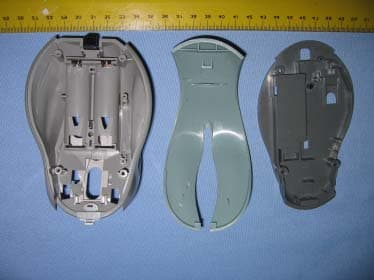
Click to zoom
Application Details
- Equipment Class
- DXX - Part 15 Low Power Communication Device Transmitter
- Date of Grant
- Nov 10, 2005
- Application Purpose
- Original Equipment
- Date of Application
- Nov 10, 2005
- Equipment Note
- WIRELESS MOUSE
- Frequency Range
- 27.04500000 - 27.04500000
- Company
- KYE SYSTEMS CORP.
- Country
- Taiwan
Documents & Files
Document Text
Text extracted from the exhibit documents filed with the FCC. Open a document above to read the original.
Users Manual
Hardware Installation 1.You can connect the receiver to a USB port of a PC 2.Install one AA battery in the mouse. 3.Turn on your computer. 4.After you open Windows, please press the button on the receiver first and then press the button under the mouse for channel setting. Important: Remember do not put the batteries in the wrong direction, use the same types of batteries. Also, keep all drinks away! If any spill occurs on the receiver, unplug the USB connector first and clean the receiver immediately. Please switch the button to "off" under the mouse once you don't use it for a long time, and remove the batteries if you do not use this device for at least two weeks. Warning: (Troubleshooting) 1.Please do not use Wireless optical mouse on a desk which is made of glass, mir - ror, iron, or black velvet. Also, a flat surface is necessary or the Optical Sensor will error easily. When you use Wireless optical mouse on a desk that is made of metal, try using a pad and reduce the receiving distance. 1 ENGLISH 2.Before the first installation is completed (channel setting ready), the mouse will not work in DOS. 3.The Wireless optical mouse channel provides 256 ID-codes, and it automatically selects the ID # for your mouse. You can only set up one Wireless optical mouse at a time. But if you have additional Wireless optical mouse sets in an area of 10 square meters, more interference will occur between the receiver and your mouse. 4.If you feel the mouse does not move smooth as usual, then the batteries have lost their charge, so please replace them. 5.The Wireless optical mouse with radio frequency gives you free movement and an enjoyable experience. For optimal performance, place the receiver at least 8 inches (about 20 cm) away from the mouse and other electrical devices, such as the computer, monitor, and etc. Software Installation 1. Make sure the mouse is connected to the computer. 2. Put the Setup disk (or CD) into the disk drive. 3. Follow the instructions on the screen to finish the software installation. Factory Setting 2 Button Assignments The Button Assignment feature lets you work in a more efficient way because you can assign the most fre - quently used commands in Windows to the mouse but - tons. Magic-RollerPress the “Magic-Roller” to surf the Internet and Windows documents Horizontal Scroll Press the roller to the left and the cursor scrolls to the left; press the roller to the right and the cursor scrolls to the right. Left ButtonProvides traditional mouse functions such as click, double click and drag. Right ButtonYou can assign this button frequently used keyboard and mouse func - tions in addition to features like EasyJump, Auto-Panning, Zoom, etc. Roller ButtonYou can assign this button frequently used keyboard and mouse func- tions in addition to features like EasyJump, Auto-Panning, Zoom, etc. 3 FCC Compliance and Advisory Statement This device complies with Part 15 of the FCC rules. Operation is subject to the following two conditions: 1) this device may not cause harmful interference, and 2) this device must accept any interference received, including interference that may cause undesired operation. The equipment has been certified to comply with the limits for a Class B computing device pursuant to Part 15 of the FCC Rules. These limits are designed to provide reasonable protection against harmful interference in a residential installation. This equipment generates, uses, and can radiate radio frequency energy and, if not installed or used in accordance with the instructions, may cause harmful interference to radio communications. However, there is no guarantee that interference will not occur in a particular installation. If this equipment does cause harmful interference to radio or television reception, which can be determined by switching the equipment off and on. The user can try to correct the interference by the following measures: 1. Reorient or relocate the receiving antenna. 2. Increase the separation between the equipment and receiver. 3. Connect the equipment to an outlet on a circuit different from that to which the receiver is connected. 4. Consult the dealer or and experience radio/TV technician for help. Changes or modification not expressly approved by the party responsible for compliance could void the user’s authority to operate the equipment.
External Photos
Spectrum Research & Testing Lab., Inc. No. 101-10, Ling 8, Shan-Tong Li, Chung-Li City, Taoyuan, Taiwan, R.O.C. Photo Page: 1 of 1 PHOTOS OF EUT Spectrum Research & Testing Lab., Inc. No. 101-10, Ling 8, Shan-Tong Li, Chung-Li City, Taoyuan, Taiwan, R.O.C. Photo Page: 2 of 2 PHOTOS OF EUT
ID Label/Location Info
Sample of FCC ID Label The device is so small that the 2 parts warning statement does not have to go on the device. It will be really hard to read. We remove the 2 parts statement from the device since we already have it in the manual. Label Location
Internal Photos
Spectrum Research & Testing Lab., Inc. No. 101-10, Ling 8, Shan-Tong Li, Chung-Li City, Taoyuan, Taiwan, R.O.C. Photo Page: 1 of 1 PHOTOS OF EUT Spectrum Research & Testing Lab., Inc. No. 101-10, Ling 8, Shan-Tong Li, Chung-Li City, Taoyuan, Taiwan, R.O.C. Photo Page: 2 of 2 PHOTOS OF EUT Spectrum Research & Testing Lab., Inc. No. 101-10, Ling 8, Shan-Tong Li, Chung-Li City, Taoyuan, Taiwan, R.O.C. Photo Page: 3 of 3 Spectrum Research & Testing Lab., Inc. No. 101-10, Ling 8, Shan-Tong Li, Chung-Li City, Taoyuan, Taiwan, R.O.C. Photo Page: 4 of 4 PHOTOS OF EUT Spectrum Research & Testing Lab., Inc. No. 101-10, Ling 8, Shan-Tong Li, Chung-Li City, Taoyuan, Taiwan, R.O.C. Photo Page: 5 of 5
Operational Description
FCC ID:FSUGMZHB Operational Description of equipment The EUT is an excellent tool for mobile professionals, Install a AA battery in the mouse and connect the receiver to a USB port of a PC an turn on your computer. PRODUCT Wireless Keyboard, Mouse and Receiver MODEL NO. GK-05006/K, GK-05005U/T, GK-05006/R POWER REQUIREMENTS DC3V(Keyboard), DC3V(Mouse), DC5V(RX) FREQUENCY BAND 27MHz(GK-05006/K)(KB), 27MHz(GK-05005U/T) (Mouse) CARRIER FREQUENCY 27.145MHz(GK-05006/K)(KB), 27.045MHz(GK-05005U/T)(Mouse) CHANNEL BANDWIDTH 10KHz(GK-05006/K)(KB), 10KHz(GK-05005U/T)(Mouse), RF OUTPUT POWER 63dBμV MODULATION TYPE FSK(GK-05006/K)(KB), FSK(GK-05005U/T)(Mouse), DUTY CYCLE 50%(GK-05006/K)(KB), 50% FSK(GK-05005U/T)(Mouse), NUMBER OF CHANNEL 1(KB),1(Mouse),2(RX) MODE OF OPERATION Simplex ANTENNA TYPE Loop Antenna
Schematics
55 44 33 22 11 D D C C B B A A Rev:1New PCB USBCON Date:2004-12-9修改 J1 規格 R3 , R6 拿掉 C8 改成 0603 C12,C19 改成 0805 Rev:3Date:2005-5-5Date:2005-5-23Add L3 CKT:21010018101 2 ErgoMedia R7000 B 11 Thursday, August 04, 2005 TitleSize Document Number Rev Date: Sheet of KBO_RF_DATA I2C_SCL DATA_LED I2C_SCL KBO_RF_DATA I2C_SDA I2C_SDA DATA_LED MOS_RF_DATA RF_VCC VDD RF_GND RF_GND RF_VCC_IN RF_GND RF_GND RF_VCC VDD RF_GND RF_GND RF_GND RF_GND VDD VCC RF_GND RF_GND RF_GND C9 10uF 0805 C150.01uF R710 C17 33pF C2 47PF SW1 R8 47K C4 22uF 1206 C1433pF C22 0.1uF C180.01uF R11K L3 0603Bead C6 2.2uF 0805 R2 750 Y1 12MHz Q12N3906 1 2 3 C7 10uF 0805 C16 10uF 0805 R9330 C110.01uF R121.3K R11 10 R5 47K C50.1uF R4 10K C10 6.8nF R10 10 U2 CY7C63743 SSOP 1234 24232221 5 20 161514119101213 P0.0P0.1P0.2P0.3P0.4P0.5P0.6P0.7P1.0P1.1 D+/Sclk D-/Sdata Vcc Vreg Vss Vpp Xtl_In Xtl_Out U393C46 78 1234 56 NCVCC CS SK D1 DO GNDNC C19 10uF 0805 J1 1234 R14 33 C1 18PF C12 10uF 0805 C13 6.8nF R13 33 C20330pF C80.01uF U1 TRF7900 123456789 1011121314 1516171819202122232425262728 ANT_IN1AGNDVPOS1VCCVPOS2VDIGXTAL_INXTAL_OUTVNEG_DIGVNEG_LO1VNEG_LO1VPOS_LO1SDACLK OUT_1 OUT_2 SCL VNEG_LO2 VPOS_LO2VPOS_LO2 WNEG_2 LF_1LF_2 VNEG_1VNEG_2 MDR VNEG_1 ANT_IN2 L1 0 L20 LED1DATA_LED 1 2 C210.1uF
Schematics
S3APP S4V- J9 LEFT CON 4 3 2 1 S2V+ 側板電路 VCC_USB J3 MINI USB CON 1 2 3 J1 VCC CON 1 2 GND VCC_USBGND J2 GND CON 1 2 USB連接板電路 VBAT VBAT GND VREG VBAT_ON U1 PAN301BSI-208 1 2 3 4 5 6 7 8 9 10 11 12 13 14 15 16 17 18 19 20 VSS_LED LED OSCOUT OSCIN NC VSS VSS VDD VREFA VREFBY A YB XA XB NC NC NC SCLK SDIO PD D2 S1ID ANT-1 ANT-1 2 C20 0.1uF 1 R13 150 SDIO SCLK D5 1N4001 D CK_RF_DATA_ID S5POWER C24 47u GND S GND J12 CON2 1 2 D CK_RF_DATA_ID J5 CON8A 1 2 3 4 5 6 7 8 Q7 SI2301 VCC VREG G Y116MHZ D1SENSOR LED L2 220UH 1 2 R12 120 U3 ELM9318BA 1 2 3 V S S LXOUT SCLK G VBAT_ON ANT1_5358273 3 S VCC C23 47u C17 10uF C18 0.1uF SDIO VCC 3 C19 1uF VREG 下板電路 VCC C8 NC R21 47K S11 TL_B R24 1K S7M_B R2 5.6K C25 47u VREG R_B Q3 3904 BAT_OFF X1 27.042MHz SDIO VCC VCC R28680 3 VCC R3 47K SCLK C27 20P R27 1210 2 C29 0.1u N_CHECK GND OSC2 R_B J6 CON4 1 2 3 4 VBAT NET00000 R5 12 C6 R290 R8 47K P_CHECK CK_RF_DATA ANT1_5358237 GND Z1 TR_B C2 6800P 2 BAT S8R_B VREG OSC1 TL_B VRF C15 47P CS GND C34 150P R17 56 SDIO ANT1 Battery Charge APP D4 LED L_B VCC_USB M_B N_CHECK GND-1 NC OPTION V- DO_RF_POWER2 M_B SDIO C5 6800P RF PART RESET C21 1uf C35 100P Q2 3906 OSC2 Q6 NC VRF TR_B NC NC C10 20P G P_CHECK Q4 3904. 3 C E DI_RF_POWER1 CK_RF_DATA_ID DO_RF_POWER2 R1 47K V+ S9P_CHECK J8 CON2 1 2 C11 7P RESET A L P S A B C EC1 Encoder Z2 V- D9 SS14/SMA GND C33 NC V+ BAT_OFF C12 SCLK VCC VCC_U SB R6 68K L_B BAT_LED C16 NC R16 47K S D VCC_USB 3 SCLK VCC L1 1000nH CK_RF_DATA_ID VCC BAT_LED 2 R4 5.6K R11 180 S12 TR _B 1 G GND Z2 Y2 4M C31 0.1U 1 GND R19 47K C28 20P R9 5.6K U2Voltage Regulators 1 23 V S S VIVO APP R22 47K VBAT VCC U5 MDT10P72 1 2 3 4 5 6 7 8 9 10 11 12 13 14 28 27 26 25 24 23 22 21 20 19 18 17 16 15 /MCLR PA0/AIC0 PA1/AIC1 PA2/AIC2 PA3/AIC3/Vref PA4/RTCC PA5/SS/AIC4 VSS OSC1/CLKIN OSC2/CLKOUT PC0/T1OSO/T1CK1 PC1/T1OSI PC2/CCP PC3/SCK PB7 PB6 PB5 PB4 PB3 PB2 PB1 PB0/INT VDD VSS PC7 PC6 PC5/ SDO PC4/SDI J10 CON8A 12 34 56 78 Q9 SI2301 DI_RF_POWER1 C22 1uf C14 470P 2 DO_RF_POWER2 VBAT_IN VREG Q8A2SA1020 S6L_B B S10 N_CHECK S R14 NC R26 1K V- DI_RF_POWER1 R20 47K Q1 3906 C13 20P VBAT_IN C3 30P R18 47K R23 47K D Q5 3904 C1 6800P C7 1500P C30 NC C32 NC ANT1 ANTENNA CK_RF_DATA_ID VBAT C4 7P R30 1K GND VCC C26 0.1uF U4 93C46 81 2 3 4 6 5 7 VCCCS CK DI DO NC GND DC J9 CON2 1 2 C9 12P TL_B R25 47K R7 12 CK_RF_DATA_ID R150 Z1 VCC OSC1 J11 CON2 1 2 DO_RF_POWER2 1 上板電路
Test Report
Spectrum Research & Testing Lab., Inc. No. 101-10, Ling 8, Shan-Tong Li, Chung-Li City, Taoyuan, Taiwan, R.O.C. TEST REPORT Reference No.:A05082401 Report No.:FCCA05082401 FCC ID:FSUGMZHB Page:1 of 21 Date:Sep. 31, 2005 FCC ID:FSUGMZHB Lab Code: 200099-0 Product Name: Wireless Mouse and Receiver Model No.: Receiver:GK-05006/R,Mouse:GK-05005U/T Applicant: KYE SYSTEMS CORP. No. 492, Sec. 5, Chung Hsin Rd., San Chung, Taipei Hsien, 241, Taiwan, R.O.C. Date of Receipt: Aug. 24, 2005 Finished date of Test: Sep. 26, 2005 Applicable Standards: 47 CFR Part 15, Subpart C ANSI C63.4:2003 We, Spectrum Research & Testing Laboratory Inc. , hereby certify that one sample of the above was tested in our laboratory with positive results according to the above-mentioned standards. The records in the report are an accurate account of the results. Details of the results are given in the subsequent pages of this report. Spectrum Research & Testing Lab., Inc. No. 101-10, Ling 8, Shan-Tong Li, Chung-Li City, Taoyuan, Taiwan, R.O.C. TEST REPORT Reference No.:A05082401 Report No.:FCCA05082401 FCC ID:FSUGMZHB Page:2 of 21 Date: Sep. 31, 2005 FCC ID:FSUGMZHB Table of Contents 1. DOCUMENT POLICY AND TEST STATEMENT................................................ 3 1.1 DOCUMENT POLICY ........................................................................................ 3 1.2 TEST STATEMENT............................................................................................ 3 1.3 EUT MODIFICATION ......................................................................................... 3 2. DESCRIPTION OF EUT AND TEST MODE ...................................................... 4 2.1 GENERAL DESCRIPTION OF EUT .................................................................. 4 2.2 DESCRIPTION OF EUT INTERNAL DEVICE.................................................... 4 2.3 DESCRIPTION OF TEST MODE ....................................................................... 4 2.4 DESCRIPTION OF SUPPORT UNIT ................................................................. 5 3. DESCRIPTION OF APPLIED STANDARDS ...................................................... 5 4. CONDUCTED EMISSION TEST ........................................................................ 6 4.1 CONDUCTED EMISSION LIMIT........................................................................ 6 4.2 TEST EQUIPMENT............................................................................................ 6 4.3 TEST SETUP..................................................................................................... 7 4.4 TEST PROCEDURE .......................................................................................... 7 4.5 EUT OPERATING CONDITION ......................................................................... 7 4.6 TEST RESULT ................................................................................................... 8 5. RADIATED EMISSION TEST ........................................................................... 10 5.1 RADIATED EMISSION LIMIT............................................................................10 5.2 TEST EQUIPMENT...........................................................................................11 5.3 TEST SET-UP...................................................................................................12 5.4 TEST PROCEDURE .........................................................................................13 5.5 EUT OPERATING CONDITION ........................................................................13 5.6 RADIATED EMISSION TEST RESULT.............................................................14 6. BANDWIDTH TEST ............................................................................................17 6.1 TEST EQUIPMENT .............................................................................................17 6.2 TEST SET-UP...................................................................................................17 6.3 TEST PROCEDURE .........................................................................................17 6.4 EUT OPERATING CONDITION ........................................................................17 6.5 TEST RESULT ..................................................................................................18 7. PHOTOS OF TESTING.................................................................................... 19 8. TERMS OF ABRIVATION................................................................................. 21 Spectrum Research & Testing Lab., Inc. No. 101-10, Ling 8, Shan-Tong Li, Chung-Li City, Taoyuan, Taiwan, R.O.C. TEST REPORT Reference No.:A05082401 Report No.:FCCA05082401 FCC ID:FSUGMZHB Page:3 of 21 Date: Sep. 31, 2005 FCC ID:FSUGMZHB 1. DOCUMENT POLICY AND TEST STATEMENT 1.1 DOCUMENT POLICY - The report shall not be reproduced except in full, without the written approval of SRT Lab, Inc. - The report must not be used by the applicant to claim that the product is endorsed by NVLAP, TÜV, NEMKO and SRT. - The NVLAP logo applies only to the applicable standards specified in this report. 1.2 TEST STATEMENT - The test results in the report apply only to the unit tested by SRT Lab. - There was no deviation from the requirements of test standards during the test. - AC power source, 120 Vac/60 Hz, was used during the test. 1.3 EUT MODIFICATION - No modification in SRT Lab. Spectrum Research & Testing Lab., Inc. No. 101-10, Ling 8, Shan-Tong Li, Chung-Li City, Taoyuan, Taiwan, R.O.C. TEST REPORT Reference No.:A05082401 Report No.:FCCA05082401 FCC ID:FSUGMZHB Page:4 of 21 Date: Sep. 31, 2005 FCC ID:FSUGMZHB 2. DESCRIPTION OF EUT AND TEST MODE 2.1 GENERAL DESCRIPTION OF EUT PRODUCT Wireless Mouse and Receiver MODEL NO. Receiver:GK-05006/R,Mouse:GK-05005U/T POWER REQUIREMENTS +3V DC FREQUENCY BAND 27MHz CARRIER FREQUENCY 27.045 MHz NUMBER OF CHANNEL 1 RATED RF OUTPUT POWER 63dB V MODULATION TYPE FSK …
Text truncated - open the document above for the full version.
Test Setup Photos
Spectrum Research & Testing Lab., Inc. No. 101-10, Ling 8, Shan-Tong Li, Chung-Li City, Taoyuan, Taiwan, R.O.C. TEST REPORT Reference No.:A05082401 Report No.:FCCA05082401 Page:21 of 27 Date:Sep. 1, 2005 FCC ID:FSUGMZHB 7. PHOTOS OF TESTING - Conducted emission (Link) Spectrum Research & Testing Lab., Inc. No. 101-10, Ling 8, Shan-Tong Li, Chung-Li City, Taoyuan, Taiwan, R.O.C. TEST REPORT Reference No.:A05082401 Report No.:FCCA05082401 Page:22 of 27 Date:Sep. 1, 2005 FCC ID:FSUGMZHB - Conducted emission (Charge) Spectrum Research & Testing Lab., Inc. No. 101-10, Ling 8, Shan-Tong Li, Chung-Li City, Taoyuan, Taiwan, R.O.C. TEST REPORT Reference No.:A05082401 Report No.:FCCA05082401 Page:23 of 27 Date:Sep. 1, 2005 FCC ID:FSUGMZHB - Radiated emission (TX) Spectrum Research & Testing Lab., Inc. No. 101-10, Ling 8, Shan-Tong Li, Chung-Li City, Taoyuan, Taiwan, R.O.C. TEST REPORT Reference No.:A05082401 Report No.:FCCA05082401 Page:25 of 27 Date:Sep. 1, 2005 FCC ID:FSUGMZHB - Radiated test (RX)(Link) Spectrum Research & Testing Lab., Inc. No. 101-10, Ling 8, Shan-Tong Li, Chung-Li City, Taoyuan, Taiwan, R.O.C. TEST REPORT Reference No.:A05082401 Report No.:FCCA05082401 Page:26 of 27 Date:Sep. 1, 2005 FCC ID:FSUGMZHB - Radiated test (RX)(Charge)
Contact Information
Applicant
Ricky Chen(Section Supervisor)
Test Firm
Spectrum Research & Testing Laboratory, Inc.Cheng Ho
Technical Specifications
| # | Rule Parts | Frequency Range | Power Output |
|---|---|---|---|
| 1 | 15C | 27.045 MHz - 27.045 MHz | - |
Other Applications from KYE SYSTEMS CORP.

FSUGG0AM
Aug 20, 2026Wireless Speaker
Equipment Class
DSS - Part 15 Spread Spectrum Transmitter
FSUGKZI2
May 23, 2026Wireless Keyboard
Equipment Class
DXX - Part 15 Low Power Communication Device TransmitterFSUGMZN6
Apr 20, 2026Wireless Mouse
Equipment Class
DTS - Digital Transmission SystemFSUGMZN4
Apr 03, 2026Wireless Mouse
Equipment Class
DXX - Part 15 Low Power Communication Device TransmitterFSUGMZN7
Apr 01, 2026Wireless Mouse
Equipment Class
DTS - Digital Transmission System