FSUGMZHMWIRELESS MOUSE
KYE SYSTEMS CORP.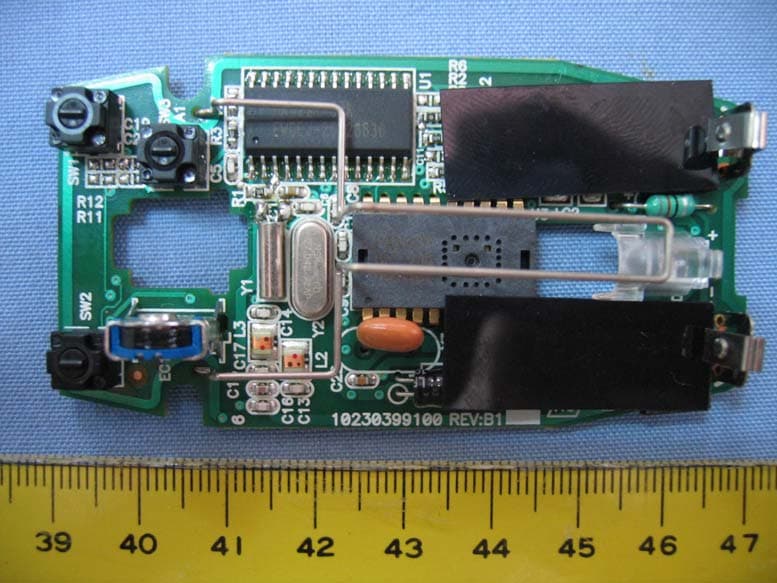
Click to zoom
Application Details
- Equipment Class
- DXX - Part 15 Low Power Communication Device Transmitter
- Date of Grant
- Sep 24, 2006
- Application Purpose
- Original Equipment
- Date of Application
- Sep 24, 2006
- Equipment Note
- WIRELESS MOUSE
- Frequency Range
- 27.04200000 - 27.04200000
- Company
- KYE SYSTEMS CORP.
- Country
- Taiwan
Documents & Files
Document Text
Text extracted from the exhibit documents filed with the FCC. Open a document above to read the original.
Users Manual
Hardware Installation 1.You can connect the receiver to a USB port of a PC 2.Install two AAA batteries in the mouse. 3. Turn on your computer. 4.After you open Windows, please press the button on the receiver first and then press the button under the mouse for channel setting. Important: Remember do not put the batteries in the wrong direction, use the same types of batteries. Also, keep all drinks away! If any spill occurs on the receiver, unplug the USB connector first and clean the receiver immediately. Please switch the button to "off" under the mouse once you don't use it for a long time, and remove the batteries if you do not use this device for at least two weeks. Warning: (Troubleshooting) 1.Please do not use Wireless Mini Navigator on a desk which is made of glass, mirror, iron, or black velvet. Also, a flat surface is necessary or the Optical Sen - sor will error easily. When you use Wireless Mini Navigator on a desk that is made of metal, try using a pad and reduce the receiving distance. 2.Before the first installation is completed (channel setting ready), the mouse will not work in DOS. 3.The Wireless Mini Navigator channel provides 256 ID-codes, and it automati - cally selects the ID # for your mouse. You can only set up one Wireless Mini Navigator at a time. But if you have additional Wireless Mini Navigator sets in an area of 10 square meters, more interference will occur between the receiver and your mouse. 1 ENGLISH 4.If you feel the mouse does not move smooth as usual, then the batteries have lost their charge, so please replace them. 5.The Wireless Mini Navigator with radio frequency gives you free movement and an enjoyable experience. For optimal performance, place the receiver at least 8 inches (about 20 cm) away from the mouse and other electrical devices, such as the computer, monitor, and etc. Software Installation 1. Make sure the mouse is connected to the computer. 2. Put the Setup disk (or CD) into the disk drive. 3. Follow the instructions on the screen to finish the software installation. Factory Setting Button Assignments The Button Assignment feature lets you work in a more efficient way because you can assign the most frequently used commands in Windows to the mouse buttons. Magic-RollerPress the “Magic-Roller” to surf the Internet and Windows docu - ments 2 Changing the Faceplate Left ButtonProvides traditional mouse functions such as click, double click and drag. Right ButtonYou can assign this button frequently used keyboard and mouse functions in addition to features like EasyJump, Auto-Panning, Zoom, etc. Roller ButtonYou can assign this button frequently used keyboard and mouse functions in addition to features like EasyJump, Auto-Panning, Zoom, etc. MouseMate Software Features Browsing SpeedYou can adjust the brows - ing speed when you surf the Internet or Windows docu - ments. Browsing Direction Move the “Magic-Roller” forward and the screen will browse to the top of the document. Move it in reverse and the document will go in the opposite direction Button FindAutomatically positions the cursor on the default button, usually the OK button, when the dialog box appears on your screen. TrailsThis option makes it easier to find the cursor when using an LCD monitor. This option cannot be used if your monitor does not support it. LoopWhen you move the cursor to the top (or bottom) of the screen, it will automatically move the cursor to the bot - tom (or top) of the screen. Mouse SpeedThis function lets you adjust the speed at which the pointer moves across the screen. Double Click Speed Use this function to set the double click speed of the mouse. Swap Left/RightSelect this option if you want to have the mouse operate with the right mouse button as the primary button. Pointers FoldersThis lets you change the shape of the cursor. 3 ENGLISH Office 97 Mode Only supports Microsoft Office along with some new ap - plications. Features include zoom, scrolling and Auto- scrolling features. It’s similar to Microsoft’s Intelli- Mouse. Genius ModeSupports all applications that use scrollbars, including Of - fice, with zoom, Auto-panning, and scrolling functions. AboutClick here to open the Genius Homepage “www.geniusnet.com.tw” OrientationThis function lets you set the angle when you move the mouse upward. It gives you a more comfortable angle when holding the mouse. This function works best with a portable trackball. EasyJump “EasyJump” now has two working modes: Office Easy - Jump mode and Traditional EasyJump mode. “Office EasyJump” lets you use eight commonly used applications and 16 Cyber functions more easily and quickly. Once you press the button you assigned, “Office Easy- Jump” will be displayed on a Frisbee. Note that the func- tions are only available in the applications they belong to. Click this application button to show the mouse control panel. You can check or modify the mouse properties. Click this function and the pan icon appears. You can move the mouse in any direction in a document or a spreadsheet. The farther you move the pointer from the pan icon, the faster you can pan in that direction. Click this function and Office EasyJump Frisbee will always be on the screen and the button will change to. Click it again to cancel this effect. This is a programmable application button. Press the right button on this icon and a dialog box will display for you to select an executable program. Click on this button to launch your specific application. Click this function to implement the “replace” function in the current application. Click on this application to launch Microsoft Word. Click this function to perform the “cut” function in Word. Click this function to implement the “paste” function in Word. 4 Click on this application to launch Microsoft Excel. Click this function to implement the “select all” function in Excel. Click this function to perform the “undo” function in Excel. Click on this application to launch Microsoft PowerPoint. Click this fu…
Text truncated - open the document above for the full version.
Cover Letter(s)
2012/01/12 SUBJECT: CONFIDENTIALLITY REQUEST REGARDING FCCID: FSUGMZHM REFERENCE: FCCID: FSUGMZHM Granted 25 Sep. 2006 To Whom It May Concern, Pursuant to Sections 0.457 and 0.459 of the commission’s Rules and our marketing department requirements. We hereby request confidentiality treatment of information accompanying this FCC ID as outlined below; Long Term: Block Diagram.pdf Schematic diagram.pdf The above material contains trade secrets and proprietary information not customarily released to the public. The public disclosure of these materials may be harmful to the applicant and provide unjustified benefits to its competitors. We are aware that these documents have been public on the FCC Website since 25 Sep. 2006. The reason that this was not requested originally was that SRT made a mistake and we made a mistake in that we did not check on their work. Sincerely, M.H.Lee
ID Label/Location Info
Sample of FCC ID Label The device is so small that the 2 parts warning statement does not have to go on the device. It will be really hard to read. We remove the 2 parts statement from the device since we already have it in the manual. This device complies with Part 15 of the FCC rules, operation is subject to the following two conditions. (1) This device may not cause harmful interference and, (2) This device must accept any interference received, including interference that may cause undesired operation . FCC ID :FSUGMZHM
Internal Photos
Spectrum Research & Testing Lab., Inc. No. 101-10, Ling 8, Shan-Tong Li, Chung-Li City, Taoyuan, Taiwan, R.O.C. Photo Page: 2 of 4 PHOTOS OF EUT-TOP IN Spectrum Research & Testing Lab., Inc. No. 101-10, Ling 8, Shan-Tong Li, Chung-Li City, Taoyuan, Taiwan, R.O.C. Photo Page: 4 of 4 PHOTOS OF EUT-PCB
Operational Description
FCC ID: FSUGMZHM Operational Description of the equipment This device complies with Part 15 of the FCC rules, operation is subject to the following two conditions. 1 This device may not cause harmful interference and, 2 This device must accept any interference received, including interference that may cause undesired operation . The EUT is an excellent tool for mobile professionals. PRODUCT Wireless Mouse MODEL NO. GM-04015U/T POWER SUPPLY 3Vdc from battery (1.5V x 2) CABLE N/A CARRIER FREQUENCY 27.042 MHz NUMBER OF CHANNEL 1 RATED RF OUTPUT POWER 13dBm MODULATION TYPE FSK BIT RATE OF TRANSMISSION 4 kbps SENSOR TYPE PAN301BSI 800DPI ANTENNA TYPE Loop antenna NOTE : For more detailed features, please refer to the manufacturer’s specification or User’s Manual.
Test Report
Spectrum Research & Testing Lab., Inc. No. 101-10, Ling 8, Shan-Tong Li, Chung-Li City, Taoyuan, Taiwan, R.O.C. TEST REPORT Reference No.:A06080807 Report No.:FCCA06080807 FCC ID:FSUGMZHM Page:2 of 20 Date: Sep. 10, 2006 FCC ID:FSUGMZHM Table of Contents 1. DOCUMENT POLICY AND TEST STATEMENT ................................................ 3 1.1 DOCUMENT POLICY ........................................................................................ 3 1.2 TEST STATEMENT ............................................................................................ 3 1.3 EUT MODIFICATION ......................................................................................... 3 2. DESCRIPTION OF EUT AND TEST MODE....................................................... 4 2.1 GENERAL DESCRIPTION OF EUT................................................................... 4 2.2 DESCRIPTION OF EUT INTERNAL DEVICE.................................................... 4 2.3 DESCRIPTION OF TEST MODE ....................................................................... 4 2.4 DESCRIPTION OF SUPPORT UNIT ................................................................. 5 3. DESCRIPTION OF APPLIED STANDARDS ...................................................... 5 4. CONDUCTED EMISSION TEST ........................................................................ 6 4.1 CONDUCTED EMISSION LIMIT........................................................................ 6 4.2 TEST EQUIPMENT............................................................................................ 6 4.3 TEST SETUP..................................................................................................... 7 4.4 TEST PROCEDURE .......................................................................................... 7 4.5 EUT OPERATING CONDITION ......................................................................... 7 4.6 TEST RESULT ................................................................................................... 8 -5. RADIATED EMISSION TEST............................................................................ 9 5.1 RADIATED EMISSION LIMIT............................................................................. 9 5.2 TEST EQUIPMENT...........................................................................................10 5.3 TEST SET-UP ...................................................................................................11 5.4 TEST PROCEDURE .........................................................................................12 5.5 EUT OPERATING CONDITION ........................................................................12 5.6 RADIATED EMISSION TEST RESULT .............................................................13 6. PHOTOS OF TESTING .................................................................................... 16 7. TERMS OF ABBREVIATION............................................................................ 20 Spectrum Research & Testing Lab., Inc. No. 101-10, Ling 8, Shan-Tong Li, Chung-Li City, Taoyuan, Taiwan, R.O.C. TEST REPORT Reference No.:A06080807 Report No.:FCCA06080807 FCC ID:FSUGMZHM Page:3 of 20 Date: Sep. 10, 2006 FCC ID:FSUGMZHM 1. DOCUMENT POLICY AND TEST STATEMENT 1.1 DOCUMENT POLICY - The report shall not be reproduced except in full, without the written approval of SRT Lab, Inc. - The report must not be used by the applicant to claim that the product is endorsed by NVLAP, TÜV, NEMKO and SRT. - The NVLAP logo applies only to the applicable standards specified in this report. 1.2 TEST STATEMENT - The test results in the report apply only to the unit tested by SRT Lab. - There was no deviation from the requirements of test standards during the test. - Power source, 3 Vdc(for EUT) and 120 Vac/60 Hz(for support units), was used during the test. 1.3 EUT MODIFICATION - No modification in SRT Lab. Spectrum Research & Testing Lab., Inc. No. 101-10, Ling 8, Shan-Tong Li, Chung-Li City, Taoyuan, Taiwan, R.O.C. TEST REPORT Reference No.:A06080807 Report No.:FCCA06080807 FCC ID:FSUGMZHM Page:4 of 20 Date: Sep. 10, 2006 FCC ID:FSUGMZHM 2. DESCRIPTION OF EUT AND TEST MODE 2.1 GENERAL DESCRIPTION OF EUT PRODUCT Wireless Mouse MODEL NO. GM-04015U/T POWER SUPPLY 3Vdc from battery (1.5V x 2) CABLE N/A CARRIER FREQUENCY 27.042 MHz NUMBER OF CHANNEL 1 RATED RF OUTPUT POWER 13dBm MODULATION TYPE FSK BIT RATE OF TRANSMISSION 4 kbps SENSOR TYPE PAN301BSI 800DPI ANTENNA TYPE Loop antenna NOTE : For more detailed features, please refer to the manufacturer’s specification or User’s Manual. 2.2 DESCRIPTION OF EUT INTERNAL DEVICE DEVICE BRAND / MAKERMODEL # FCC ID/DOC REMARK N/A 2.3 DESCRIPTION OF TEST MODE N/A (It is only applicable to more than one test mode.) Spectrum Research & Testing Lab., Inc. No. 101-10, Ling 8, Shan-Tong Li, Chung-Li City, Taoyuan, Taiwan, R.O.C. TEST REPORT Reference No.:A06080807 Report No.:FCCA06080807 FCC ID:FSUGMZHM Page:5 of 20 Date: Sep. 10, 2006 FCC ID:FSUGMZHM 2.4 DESCRIPTION OF SUPPORT UNIT The EUT was configured by the requirement of ANSI C63.4:2003 and CISPR22:2003. All interface ports were connected to the appropriate support units via specific cables. The support units and cables are listed below. NO DEVICE BRAND MODEL # FCC ID/DOCCABLE 1 PRINTER EPSON STYLUS C20SX N/A 1.5m unshielded power cord 1.5m shielded data cable 2 1394 HDD TeraSys F12-UF N/A 1.5m unshielded data cable 3 NOTEBOOK Compaq Presario B2000 N/A 1.8m unshielded power cord 4 RECEIVER Genius GM-04015U/R N/A N/A 5 MONITOR SANGSUNG 700IFT N/A 1.8m unshielded power cord 1.5m shielded data cable 6 KEYBOARD ACER 6511-UV N/A 1.5m unshielded data cable NOTE : For the actual test configuration, please refer to the photos of testing. 3. DESCRIPTION OF APPLIED STANDARDS The EUT is a kind of wireless product and to be connected with a PC system for normal use. According to the specifications provided by the applicant, it must comply with the requirements of the followi…
Text truncated - open the document above for the full version.
Test Setup Photos
Spectrum Research & Testing Lab., Inc. No. 101-10, Ling 8, Shan-Tong Li, Chung-Li City, Taoyuan, Taiwan, R.O.C. TEST REPORT Reference No.:A06080807 Report No.:FCCA06080807 FCC ID:FSUGMZHM Page:16 of 20 Date: Sep. 10, 2006 FCC ID:FSUGMZHM 6. PHOTOS OF TESTING - Conducted test Spectrum Research & Testing Lab., Inc. No. 101-10, Ling 8, Shan-Tong Li, Chung-Li City, Taoyuan, Taiwan, R.O.C. TEST REPORT Reference No.:A06080807 Report No.:FCCA06080807 FCC ID:FSUGMZHM Page:17 of 20 Date: Sep. 10, 2006 FCC ID:FSUGMZHM - Radiated test (Link) Spectrum Research & Testing Lab., Inc. No. 101-10, Ling 8, Shan-Tong Li, Chung-Li City, Taoyuan, Taiwan, R.O.C. TEST REPORT Reference No.:A06080807 Report No.:FCCA06080807 FCC ID:FSUGMZHM Page:18 of 20 Date: Sep. 10, 2006 FCC ID:FSUGMZHM - Radiated test - TX (3K-30M) Spectrum Research & Testing Lab., Inc. No. 101-10, Ling 8, Shan-Tong Li, Chung-Li City, Taoyuan, Taiwan, R.O.C. TEST REPORT Reference No.:A06080807 Report No.:FCCA06080807 FCC ID:FSUGMZHM Page:19 of 20 Date: Sep. 10, 2006 FCC ID:FSUGMZHM - Radiated test - TX (30M-1G)
Contact Information
Applicant
Ricky Chen(Section Supervisor)
Test Firm
Spectrum Research & Testing Laboratory, Inc.Cheng Ho
Technical Specifications
| # | Rule Parts | Frequency Range | Power Output |
|---|---|---|---|
| 1 | 15C | 27.042 MHz - 27.042 MHz | - |
Other Applications from KYE SYSTEMS CORP.

FSUGG0AM
Aug 20, 2026Wireless Speaker
Equipment Class
DSS - Part 15 Spread Spectrum Transmitter
FSUGKZI2
May 23, 2026Wireless Keyboard
Equipment Class
DXX - Part 15 Low Power Communication Device TransmitterFSUGMZN6
Apr 20, 2026Wireless Mouse
Equipment Class
DTS - Digital Transmission SystemFSUGMZN4
Apr 03, 2026Wireless Mouse
Equipment Class
DXX - Part 15 Low Power Communication Device TransmitterFSUGMZN7
Apr 01, 2026Wireless Mouse
Equipment Class
DTS - Digital Transmission System