FSUGMZHQWIRELESS MOUSE
KYE SYSTEMS CORP.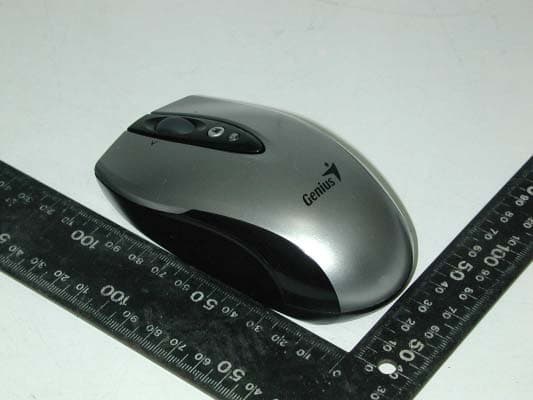
Click to zoom
Application Details
- Equipment Class
- DXX - Part 15 Low Power Communication Device Transmitter
- Date of Grant
- Jan 29, 2007
- Application Purpose
- Original Equipment
- Date of Application
- Jan 29, 2007
- Equipment Note
- WIRELESS MOUSE
- Frequency Range
- 27.04500000 - 27.04500000
- Company
- KYE SYSTEMS CORP.
- Country
- Taiwan
Documents & Files
Document Text
Text extracted from the exhibit documents filed with the FCC. Open a document above to read the original.
Users Manual
ENGLISH 1 Hardware Installation 1. Install two AA batteries each into the mouse and keyboard. 2. Plug in your USB receiver to a USB port of your PC. 3. Turn on your PC. Software Installation 1. Place your CD driver in your PC drive for software installation 2. Follow the instruction on the screen to finish the software installation Replace Batteries When mouse or keyboard does not work properly, then the batteries have lost their charge, so please replace them. (Warning: please do not mix or use different types of batteries at the same time) ENGLISH 2 ID Channel Setting The channel ID is factory preset. The green LED (data transmission indicator) will be lit constantly when the wireless device is in normal operation. In case your wireless devices do not work, please reset the ID channel by: 1. Press the connect button on the receiver and the LED will be blinking for connection. 2. Press the connect button of the wireless device once within 20 seconds and observe if the LED light on the receiver has gone off. If yes, it means the wireless device is ready for use. Security Function Setting: 1. After you install software driver, please click the mouse icon on the task bar and select “Mouse”. 2. Click “Settings” when the Mouse Properties appears up and click “Security Options”. 3. Choose a picture from your images to display when the computer ENGLISH 3 is locked. Also set your password for unlock computer. Then, press “OK”, and the security setting will be finished. 4. If you want to start the security function, just press “ ”, and the picture you set pop up to hide the screen. For security, the mouse and keyboard won’t work. 5. If you want to unlock this function, just press ”again, and install your password. “ Warning (Trouble shooting) 1. The wireless desktop set provides 256 ID codes, and it selects the ID # for your wireless devices. You can only set up one wireless desktop at a time. When you have another 27Mhz wireless desktop set within 10 square meters, there may be interference between the wireless devices. ENGLISH 4 2. Although that the mouse has granted the eye safety certification, it is strongly suggested that a direct eye contact with the laser lens should be avoid. 3. To use MSN and Lock function, it requires software to be installed. 4. To re-program for other media programs, software installation is required. Mouse Factory Setting Button Assignments 1. Left Button: Provides traditional mouse functions like click, double click and drag. 2. Right Button: You can assign this button to frequently used keyboard and mouse functions in addition to features like Easy Jump, Auto-Panning, Zoom, etc. 3. Magic-Roller: Press the “Magic-Roller” to surf the Internet and Windows documents. ENGLISH 5 Horizontal Scroll: Press the roller to the left and the cursor scrolls to the left; press the roller to the right and the cursor scrolls to the right. 4. Security: Lock your screen, mouse and keyboard unless you install the password. 5. Power indicator: If your battery power is low, the LED will brighten. Keyboard hot key definition 1. My Computer: Activate My Computer function 2. Mail: Activate email feature 3. WWW: Open browser in Netscape or IE 4. My favorite: Activate my favorite function 5. MSN: Activate internet conversational tools such MSN messenger, ICQ, Windows messenger, Skype, etc 6. Lock: Activate the security lock function 7. Calculator: activate Calculator function 8. Media player: Activate Media Player function 9. Volume Up: Increase volume ENGLISH 6 10. Stop: Stop playing music or video sources 11. Volume Down: Decrease volume level 12. Play/Pause: Play/Pause the music or video sources. Notes on Battery Usage When you use the battery, carefully read and strictly observe the Safety Instructions and the notes described below: Different battery types and surrounding temperatures may affect the battery performance. Avoid using batteries in extremely cold environments as low temperatures can shorten the battery life and reduce wireless device performance. If you are using the new rechargeable battery or rechargeable battery that has not been used for an extended period of time (batteries that pass the expiry date are exceptions) might affect the number of pictures that can be taken. Therefore, to maximize their performance and lifetime, we recommend that you fully charge the batteries and discharge them for at least one complete cycle before use. The battery may feel warm when using the wireless device for an extended period of time or using the flash continuously. This is normal and not a malfunction. The wireless device may feel warm when being used continuously or for an extended period of time. This is normal and not a malfunction. If you will not be using the batteries for an extended period of time, remove them from the wireless device to prevent leakage or corrosion. Always keep the terminals in a clean state. Never use manganese batteries. Risk of explosion if battery is replaced by an incorrect type. Dispose of used batteries according to the instructions. ENGLISH 7 THIS DEVICE COMPLIES WITH PART 15 OF THE FCC RULES. OPERATION IS SUBJECT TO THE FOLLOWING TWO CONDITIONS: (1) THIS DEVICE MAY NOT CAUSE HARMFUL INTERFERENCE, AND (2) THIS DEVICE MUST ACCEPT ANY INTERFERENCE RECEIVED, INCLUDING INTERFERENCE THAT MAY CAUSE UNDESIRED OPERATION. NOTE: THE MANUFACTURER IS NOT ESPONSIBLE FOR ANY RADIO OR TV INTERFERENCE CAUSED BY UNAUTHORIZED MODIFICATIONS TO THIS EQUIPMENT. SUCH MODIFICATIONS COULD VOID THE USER'S AUTHORITY TO OPERATE THE EQUIPMENT.
Cover Letter(s)
2012/01/12 SUBJECT: CONFIDENTIALLITY REQUEST REGARDING FCCID: FSUGMZHQ REFERENCE: FCCID: FSUGMZHQ Granted 30 Jan. 2007 To Whom It May Concern, Pursuant to Sections 0.457 and 0.459 of the commission’s Rules and our marketing department requirements. We hereby request confidentiality treatment of information accompanying this FCC ID as outlined below; Long Term: Block Diagram.pdf Schematic diagram.pdf The above material contains trade secrets and proprietary information not customarily released to the public. The public disclosure of these materials may be harmful to the applicant and provide unjustified benefits to its competitors. We are aware that these documents have been public on the FCC Website since 30 Jan. 2007. The reason that this was not requested originally was that SRT made a mistake and we made a mistake in that we did not check on their work. Sincerely, M.H.Lee
External Photos
HomeTek Technology Inc. FB6A009 Appendix B : PHOTO OF EUT Front View of EUT Rear View of EUT 1 of 4
Internal Photos
HomeTek Technology Inc. FB6A009 Appendix B : PHOTO OF EUT 2 of 4 Inside View of EUT Case Inside View of EUT HomeTek Technology Inc. FB6A009 Appendix B : PHOTO OF EUT Solder Side of Main Board 1 3 of 4 Component Side of Main Board 1 HomeTek Technology Inc. FB6A009 Appendix B : PHOTO OF EUT Solder Side of Main Board 2 4 of 4 Component Side of Main Board 2
Operational Description
Operational description of GM-060037/T, GK-060012/T, GK-060012/R This Unit is a wireless optical mouse. The frequency is 27.045MHz. Operating process: 1. Insert 2AA batteries in compartment on the bottom of the mouse. 2. Insert USB plug on receiving device into USB port on computer. 3. Press button on receiver and red light will blink on and off for a few seconds. Immediately turn mouse over, hold near receiver, press connect button on the bottom of the mouse and release it while light is blinking on receiver. Devices will search for and find one another. 4. Let the mouse work continually. Power Requirement: This unit input is 2 AA batteries. Operated is DC3.3V. Operating principle The wireless mouse reflects using the light to the work floor illumination to IC ADNS7050 in carries on the transformation, Responds the mouse under active status X direction and the Y direction path. MDT10P72 unceasingly will change the light signal will transform the electrical signal, IC outward outputs SCLK (clock signal) and SDIO (X direction and Y direction synthesis serial data signal) in the time base vibration foundation the signal. This IC by exterior time base vibrates (76.8KHz), RF vibrates (27.042MHz), the pressed key signal input, the hoop type coded signal input, the supply voltage examination and the low voltage demonstrated the pulse signal output and internal power source operate the oscillating circuit, the synchronized code electric circuit (to code signal), pulse electric circuits and so on processing electric circuit, signal modulation compose. When mouse works, after the arteries control the electric circuit the SKIO signal or the pressed key, the coded signal and the synchronization coded signal and the SCLK signal carry on serial processing. Carries on FSK in the tone circuit (frequency-shift keying modulation) modulate the center frequency is 27.045MHz RF signal from the antenna radiation to space. The receiver is composed by one kind of frequency-modulation reception electric circuit and the pulse control circuit and E 2 PROM. The external signal carries on the enlargement after the antenna receive, Delivers the frequency modulation to demodulate electric circuit MC3361 16 th foot RF input end, Carries on the mixing enlargement in the electric circuit, Outputs 455KHz from 3 th foot the intermediate frequency, the 455KHz intermediate frequency carries on the supersonic amplification after 5 th foot inputs in the electric circuit, Places after the intermediate frequency signal to output the demodulation signal after warning frequency electric circuit processing by 9 th feet, Q1 will demodulate the signal further to place inputs to the IC static dry electric circuit, The signal will enlarge which with the aid of the static dry electric circuit will carry on the reshaping to complete the entire signal the demodulation duty. Demodulates the signal is a comprehensive serial pulse signal, Embody SCLK signal, SKIO signal and synchronization coded signal. Delivers this to the pulse control circuit, the control circuit enters these signals separation processing; If the synchronization coded signal may lock the transmitter which transmits, And stores up this signal in E 2 PROM.
Test Report
HomeTek Technology Inc. FCC TEST REPORT FOR APPLICANT : KYE SYSTEMS CORP. ADDRESS : No. 492, Sec. 5, Chung Hsin Rd., San Chung, Taipei Hsien, 241, Taiwan, R.O.C. EUT : Wireless Mouse MODEL NO. : GM-060037/T, GK-060012/T, GK-060012/R FCC ID : FSUGMZHQ Under Part 15, SUBPART B AND SUBPART C CLASS B Certification MEASUREMENT PROCEDURE USED FCC RULES AND FCC / ANSI C63.4-2003 PREPARED BY : HomeTek Technology Inc. No. 67-9, Shir Men Road, Tu Cheng City, Taipei Hsien. Taiwan Report # : FB6A009 ADDRESS: No. 67-9, Shir Men Road, Tu Cheng City, Taipei Hsien, Taiwan PHONE : 886-2-22608375 FAX : 886-2-22748013 E - mail: [email protected] HomeTek Technology Inc. FCC ID : FSUGMZHQ FB6A009 Page : 1 of 15 TABLE OF CONTENTS.................................................................................................................................. 1 GENERAL INFORMATION ................................................................................................................................... 2 MODIFICATION LIST............................................................................................................................................ 3 CONDUCTED POWER LINE TEST...................................................................................................................... 4 1 TEST PROCEDURE ..................................................................................................................................... 4 2 RESULT OF CONDUCTED EMISSION TEST ............................................................................................. 4 RADIATED EMISSION TEST (3M)....................................................................................................................... 5 1 TEST INSTRUMENTS & FACILITIES ........................................................................................................ 5 2 EUT OPERATING CONDITION.................................................................................................................. 6 3 TEST SETUP ................................................................................................................................................ 7 4 CONFIGURATION OF THE EUT................................................................................................................. 9 5 TEST PROCEDURE ....................................................................................................................................10 6 LIMIT OF RADIATED EMISSION CLASS B ..............................................................................................11 7 RESULT OF RADIATED EMISSION TEST ................................................................................................12 8EMISSION BAND MEASUREMENT....................................................................................................................14 PHOTO OF FCC ID LABEL ..................................................................................................................................15 APPENDIX A PHOTOS OF TEST CONFIGURATION APPENDIX B PHOTOS OF EUT APPENDIX C PLOT OF OCCUPIED BANDWIDTH HomeTek Technology Inc. FCC ID : FSUGMZHQ FB6A009 Page : 2 of 15 GENERAL INFORMATION 1 APPLICANT : KYE SYSTEMS CORP. 2 ADDRESS : No. 492, Sec. 5, Chung Hsin Rd., San Chung, Taipei Hsien, 241, Taiwan, R.O.C. 3 MANUFACTURER : KYE SYSTEMS CORP. 4 ADDRESS : No. 492, Sec. 5, Chung Hsin Rd., San Chung, Taipei Hsien, 241, Taiwan, R.O.C. 5 DESCRIPTION OF EUT : EUT : Wireless Mouse FCC ID : FSUGMZHQ Model Number : GM-060037/T, GK-060012/T, GK-060012/R Serial # : N/A 6 FEATURES OF EUT : 6.1 Frequency Band: 27MHz. 6.2 Carrier Frequency: 27.045MHz. 6.3 Modulation Type: FSK. HomeTek Technology Inc. FCC ID : FSUGMZHQ FB6A009 Page : 3 of 15 MODIFICATION LIST THE FOLLOWING ACCESSORIES WERE ADDED TO THE EUT DURING TESTING : NO MODIFICATION BY HOMETEK TECHNOLOGY INC. HomeTek Technology Inc. FCC ID : FSUGMZHQ FB6A009 Page : 4 of 15 CONDUCTED POWER LINE TEST 1 TEST PROCEDURE According to ANSI C63.4 – 2003. 2 RESULT OF CONDUCTED EMISSION TEST N/A(Conducted Power Line Test is not applicable to this EUT (Model : GM-060037/T, GK-060012/R). HomeTek Technology Inc. FCC ID : FSUGMZHQ FB6A009 Page : 5 of 15 RADIATED EMISSION TEST (3M) 1 TEST INSTRUMENTS & FACILITIES The following test Instruments was used during the radiated emission test : Item Instruments /facilities Specification Manufacturer Model # / S/N# Date of Cal. 1 OPEN AREA TEST SITE ; OATS 3 JUL/2006 2 EMI TEST RECEIVER 20Hz ~ 26.5GHz ROHDE & SCHWARZ ESMI 845442/006 FEB/2006 3 PRE- AMPLIFIER 9KHz ~ 3000MHzADVANTEST BB525C 90081001 OCT/2006 4 ANTENNA (LOOP) 10KHz ~ 30MHz ZHINAN ZN30900A NOV/2005 5 Horn Antenna1G ~ 18GHz BJXIBAO 040506 OCT/2006 6 Attenuation 50Ω/6dB JYE BAO FAT-N (M-F) 001 JUL/2006 7 Cable 10m SUHNER RG214/U OS3-003 DEC/2005 8 Cable 14m BELDEN 9913 OS3-001 DEC/2005 9 EMI 32 (software) N/A AUDIX 19991013-0923 N/A Note : Items 1 ~ 8 were calibrated within period of 1 year. HomeTek Technology Inc. FCC ID : FSUGMZHQ FB6A009 Page : 6 of 15 2 EUT OPERATING CONDITION 2.1 Configure the EUT according to the ANSI C63.4 - 2003. 2.2 The frequency of the EUT is 27.045 MHz (Model No.: GM-060037/T). 2.3 The radiated emission in the frequency range from 30 MHz - 1000 MHz was test in a horizontal and vertical polarization at HomeTek Lab’s open site III. 2.4 The crystal frequency of the EUT is 12 MHz (For Model No.: GK-060012/R); the crystal frequencies of the EUT are 4 MHz and 27.042 MHz (Model No.: GM-060037/T). 2.5 Provided by 2AA battery to Mouse. Connect receiver to USB port of Person computer. 2.6 Turn on all the power of EUT and peripheral. 2.7 The EUT was operated in its normal operating mode for the purpose of the measurements. 2.8 The receiving antenna polarized horizontally was varied from 1 to 4 meters and the wooden turntable was rotated through 360 degrees to obtain the highest reading on the ESMI test receiver or on the display of the spectrum anal…
Text truncated - open the document above for the full version.
Test Report
HomeTek Technology Inc. FB6A009 Appendix C PLOT OF OCCUPIED BANDWIDTH HomeTek Technology Inc. FB6A009 27.045 MHz (Model No.: GM-060037/T)
Test Setup Photos
HomeTek Technology Inc. FB6A009 Appendix A : Front View PHOTO OF RADIATED EMISSION TEST 3 of 3
Contact Information
Applicant
Ricky Chen(Section Supervisor)
Test Firm
Home Tek Technology Inc.Grant Huang
Technical Specifications
| # | Rule Parts | Frequency Range | Power Output |
|---|---|---|---|
| 1 | 15C | 27.045 MHz - 27.045 MHz | - |
Other Applications from KYE SYSTEMS CORP.

FSUGG0AM
Aug 20, 2026Wireless Speaker
Equipment Class
DSS - Part 15 Spread Spectrum Transmitter
FSUGKZI2
May 23, 2026Wireless Keyboard
Equipment Class
DXX - Part 15 Low Power Communication Device TransmitterFSUGMZN6
Apr 20, 2026Wireless Mouse
Equipment Class
DTS - Digital Transmission SystemFSUGMZN4
Apr 03, 2026Wireless Mouse
Equipment Class
DXX - Part 15 Low Power Communication Device TransmitterFSUGMZN7
Apr 01, 2026Wireless Mouse
Equipment Class
DTS - Digital Transmission System