FSUGMZICTraveler T925 Laser
KYE SYSTEMS CORP.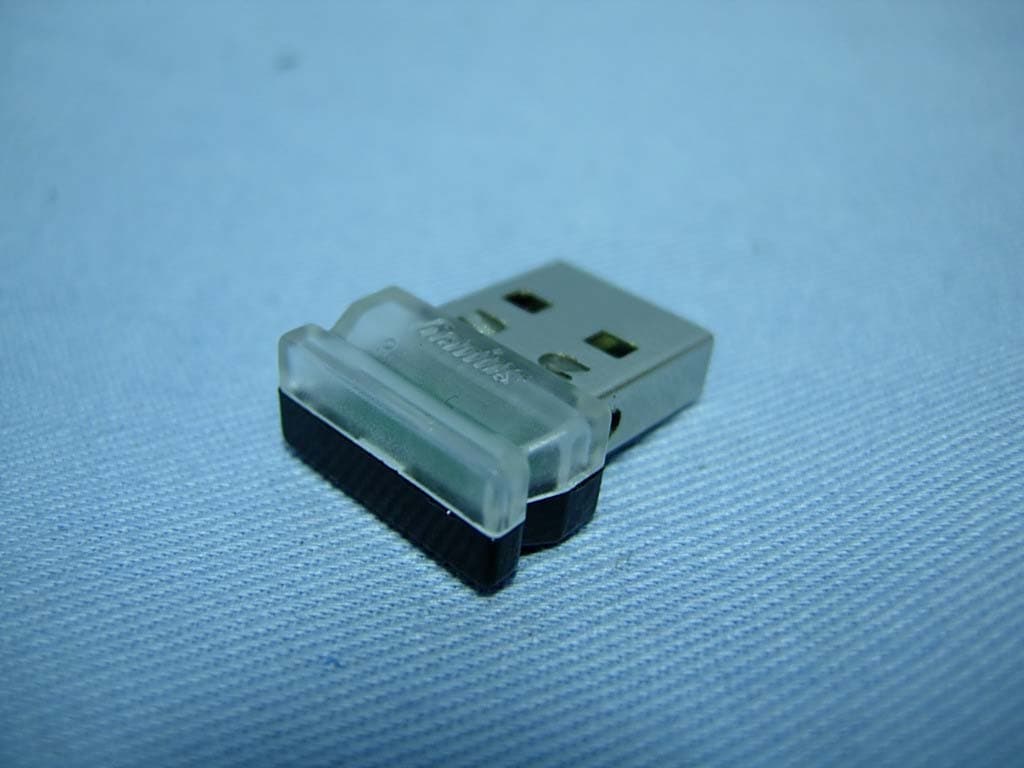
Click to zoom
Application Details
- Equipment Class
- DXX - Part 15 Low Power Communication Device Transmitter
- Date of Grant
- Apr 14, 2008
- Application Purpose
- Original Equipment
- Date of Application
- Apr 12, 2008
- Equipment Note
- Traveler T925 Laser
- Frequency Range
- 2402.00000000 - 2480.00000000
- Company
- KYE SYSTEMS CORP.
- Country
- Taiwan
Documents & Files
Document Text
Text extracted from the exhibit documents filed with the FCC. Open a document above to read the original.
Users Manual
ENGLISH 1 Hardware Installation 1. You can connect the receiver to a USB port of a PC. 2. Install two AA batteries in the mouse. 3. Turn on your computer. The mouse can now work. Software Installation 1. Make sure the mouse is connected to the computer. 2. Put the CD driver into the CD drive. 3. Follow the instructions on the screen to finish the software installation. Warning: (Troubleshooting) 1. Please do not use wireless laser mouse on a desk, which is made of glass or mirror. 2. The wireless laser mouse automatically selects the channel for your mouse. 3. If you feel the mouse does not move smooth as usual, please check the battery indicator on the mouse. If the batteries have lost their charge, replace them. Remember do not put the batteries in the wrong direction. Note:Class 1 Laser Product. Passed eye-safety regulation.(IEC 60825-1) ENGLISH 2 Button Assignments 1. Press the side button as indicated and gently slide your finger over the crystal sensing area of the OptoWheel to activate the turbo scroll function and release the side button to disable. 2. Left Button: Provides traditional mouse functions such as click, double click and drag. 3. 8 way scroll function or Middle button: Gently slide your finger over the OptoWheel to scroll in eight different directions to surf the Internet and Windows documents or press the OptoWheel down to activate the middle button function. Flip 3D button: Provides fast access to all opened windows in one easy view. 4. Right button: Provides traditional mouse click function Note: Adjust dpi resolution Press left and right button together for three seconds, the resolution will switch from 1600 to 800 dpi. Press both buttons again for three seconds and it will revert to 1600 dpi. The LED flash is shorter for 800 dpi. FEDERAL COMMUNICATIONS COMMISSION INTERFERENCE STATEMENT This equipment has been tested and found to comply with the limits for a Class B digital device, pursuant to Part 15 of the FCC Rules. These limits are designed to provide reasonable protection against harmful interference in a residential installation. This equipment generates, uses and can radiate radio frequency energy and, if not installed and used in accordance with the instructions, may cause harmful interference to radio communications. However, there is no guarantee that interference will not occur in a particular installation. If this equipment does cause harmful interference to radio or television reception, which can be determined by turning the equipment off and on, the user is encouraged to try to correct the interference by one or more of the following measures: – Reorient or relocate the receiving antenna. – Increase the separation between the equipment and receiver. – Connect the equipment into an outlet on a circuit different from that to which the receiver is connected. – Consult the dealer or an experienced radio/TV technician for help. CAUTION: Any changes or modifications not expressly approved by the party responsible for compliance could void the user's authority to operate the equipment. This device complies with Part 15 of the FCC Rules. Operation is subject to the following two conditions: (1) This device may not cause harmful interference and (2) This device must accept any interference received, including interference that may cause undesired operation.
Attestation Statements
KYE SYSTEMS CORP. (Genius) No. 492, Sec. 5, Chung Hsin Rd., San Chung, Taipei Hsien, 24160, Taiwan, R. O. C. TEL No: 886-2-2995-6645#3399 FAX No.: 886-2-2278-9520 Attestation for FCC Declaration of Conformity FCC ID: FSUGMZIC Data: Apr. 01, 2008 Please be notified that we, the undersigned, KYE SYSTEMS CORP. (Genius), declares that the product which bears the above FCC ID is also compliant with the FCC requirements for DoC. The test report number supporting the DoC is DOCTR0001. Testing in regards to this report was done by QuieTek Corporation, located at 2F, No.345, Xinhu 2nd Rd., Neihu District,Taipei City 114,Taiwan,R.O.C. which has been accredited in accordance to all of the requirements of 47CFR 2.948 (d) and (e) of the FCC rules and KDB349827. Sincerely, Ming Huang Lee / Section Supervisor KYE SYSTEMS CORP. (Genius) Tel: 886-2-2995-6645#3399 Fax: 886-2-2278-9520 Email: [email protected]
External Photos
Report No.: 082058R-RFUSP07V01-A Page : 1 of 6 Version:1.0 Attachment 2 : EUT Detailed Photographs (1) EUT Photo (2) EUT Photo
ID Label/Location Info
KYE SYSTEMS CORP. (Genius) FCC ID.: FSUGMZIC No. 492, Sec. 5, Chung Hsin Rd., San Chung, Taipei Hsien, 24160, Taiwan, R. O. C..Tel : 886-2-2995-6645#3399 FCC ID Label The FCC ID and DoC Label will be placed on the equipment as shown in the photograph below.
Internal Photos
Report No.: 082058R-RFUSP07V01-A Page : 2 of 6 Version:1.0 (3) EUT Photo (4) EUT Photo Report No.: 082058R-RFUSP07V01-A Page : 3 of 6 Version:1.0 (5) EUT Photo (6) EUT Photo RF Antenna Report No.: 082058R-RFUSP07V01-A Page : 4 of 6 Version:1.0 (7) EUT Photo (8) EUT Photo Report No.: 082058R-RFUSP07V01-A Page : 5 of 6 Version:1.0 (9) EUT Photo (10) EUT Photo Report No.: 082058R-RFUSP07V01-A Page : 6 of 6 Version:1.0 (11) EUT Photo (12) EUT Photo
Operational Description
Report No. 082058R-RFUSP07V01-A Page: 5 of 30 Version:1.0 1.2. Operational Description The EUT is 2.4GHz Wireless Dongle Receiver built-in 2.4GHz transceiver. The operation frequency is from 2402 MHz to 2480MHz with GFSK modulation. The signal will be transmitted through 2.4 GHz RF signal from the Printed on PCB antenna. DC 5V(via USB) shall be provided for EUT operation.
Test Report
Report No. 082058R-RFUSP07V01-A Page: 1 of 30 Version:1.0 Test Report Product Name Traveler T925 Laser Model No. GM-070013/R FCC ID FSUGMZIC Applicant KYE SYSTEMS CORP. (Genius) Address No. 492, Sec. 5, Chung Hsin Rd., San Chung, Taipei Hsien, 24160, Taiwan, R. O. C. Date of Receipt Jan. 31 , 2008 Issued Date Mar. 17, 2008 Report No. 082058R-RFUSP07V01-A Version V1.0 The test results relate only to the samples tested. The test report shall not be reproduced except in full without the written approval of QuieTek Corporation. This report must not be used to claim product endorsement by NVLAP any agency of the U.S. Government Report No. 082058R-RFUSP07V01-A Page: 2 of 30 Version:1.0 Test Report Certification Issued Date: Mar. 17, 2008 Report No.: 082058R-RFUSP07V01-A Test results relate only to the samples tested. The test report shall not be reproduced except in full without the written approval of QuieTek Corporation. This report must not be used to claim product endorsement by NVLAP any agency of the U.S. Government Product Name Traveler T925 Laser Applicant KYE SYSTEMS CORP. (Genius) Address No. 492, Sec. 5, Chung Hsin Rd., San Chung, Taipei Hsien, 24160, Taiwan, R. O. C. Manufacturer KYE SYSTEMS CORP. (Genius) Model No. GM-070013/R Rated Voltage AC 120V/60Hz Working Voltage DC 5V (Power by PC) Trade Name Genius Applicable Standard FCC CFR Title 47 Part 15 Subpart C: 2007 ANSI C63.4: 2003 Test Result Complied Documented By : ( Adm. Specialist / Leven Huang) Tested By : ( Engineer / Molin Huang) Approved By : ( Deputy Manager / Vincent Lin) Report No. 082058R-RFUSP07V01-A Page: 3 of 30 Version:1.0 TABLE OF CONTENTS Description Page 1. GENERAL INFORMATION .....................................................................................................4 1.1. EUT Description............................................................................................................................4 1.2. Operational Description ................................................................................................................5 1.3. Tested System Datails....................................................................................................................6 1.4. Configuration of Test System ........................................................................................................6 1.5. EUT Exercise Software .................................................................................................................6 1.6. Test Facility ...................................................................................................................................7 2. Conducted Emission....................................................................................................................8 2.1. Test Equipment..............................................................................................................................8 2.2. Test Setup ......................................................................................................................................8 2.3. Limits ............................................................................................................................................8 2.4. Test Procedure ...............................................................................................................................9 2.5. Uncertainty ....................................................................................................................................9 2.6. Test Result of Conducted Emission.............................................................................................10 3. Radiated Emission .....................................................................................................................12 3.1. Test Equipment............................................................................................................................12 3.2. Test Setup ....................................................................................................................................13 3.3. Limits ..........................................................................................................................................13 3.4. Test Procedure .............................................................................................................................14 3.5. Uncertainty ..................................................................................................................................14 3.6. Test Result of Radiated Emission................................................................................................15 4. Band Edge ..................................................................................................................................22 4.1. Test Equipment............................................................................................................................22 4.2. Test Setup ....................................................................................................................................22 4.3. Limits ..........................................................................................................................................23 4.4. Test Procedure .............................................................................................................................23 4.5. Uncertainty ..................................................................................................................................23 4.6. Test Result of Band Edge ............................................................................................................24 5. EMI Reduction Method During Compliance Testing ............................................................28 Attachment 1: EUT Test Photographs Attachment 2: EUT Detailed Photographs Report No. 082058R-RFUSP07V01-A Page: 4 of 30 Version:1.0 1. GENERAL INFOR…
Text truncated - open the document above for the full version.
Test Setup Photos
Report No.: 082058R-RFUSP07V01-A Page : 1 of 3 Version:1.0 Attachment 1: EUT Test Setup Photographs Front View of Conducted Test Back View of Conducted Test Report No.: 082058R-RFUSP07V01-A Page : 2 of 3 Version:1.0 Front View of Radiated Test Back View of Radiated Test Report No.: 082058R-RFUSP07V01-A Page : 3 of 3 Version:1.0 Front View of Radiated Test (Horn) Back View of Radiated Test (Horn)
Contact Information
Applicant
Ricky Chen(Section Supervisor)
Technical Contact
QuieTek CorporationEmily Chen
[email protected]886-2-8792-6808
2F, No.345, Xinhu 2nd Rd., Neihu District, · Taipei · Taiwan
Test Firm
DEKRA Testing and Certification Co., Ltd.Sky Hsu
Technical Specifications
| # | Rule Parts | Frequency Range | Power Output |
|---|---|---|---|
| 1 | 15C | 2.40 GHz - 2.48 GHz | - |
Other Applications from KYE SYSTEMS CORP.

FSUGG0AM
Aug 20, 2026Wireless Speaker
Equipment Class
DSS - Part 15 Spread Spectrum Transmitter
FSUGKZI2
May 23, 2026Wireless Keyboard
Equipment Class
DXX - Part 15 Low Power Communication Device TransmitterFSUGMZN6
Apr 20, 2026Wireless Mouse
Equipment Class
DTS - Digital Transmission SystemFSUGMZN4
Apr 03, 2026Wireless Mouse
Equipment Class
DXX - Part 15 Low Power Communication Device TransmitterFSUGMZN7
Apr 01, 2026Wireless Mouse
Equipment Class
DTS - Digital Transmission System