FSUGMZJ9PEN MOUSE
KYE SYSTEMS CORP.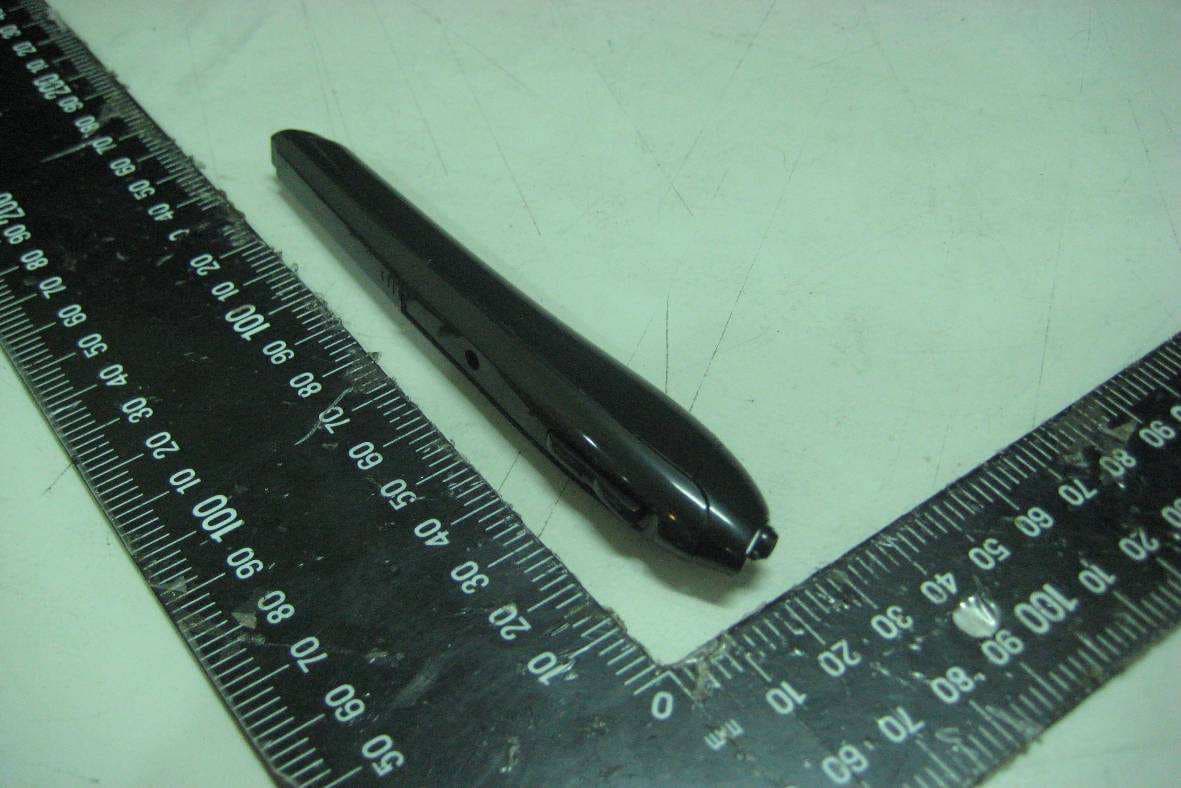
Click to zoom
Application Details
- Equipment Class
- DXX - Part 15 Low Power Communication Device Transmitter
- Date of Grant
- Nov 02, 2010
- Application Purpose
- Original Equipment
- Date of Application
- Nov 01, 2010
- Equipment Note
- PEN MOUSE
- Frequency Range
- 2402.00000000 - 2478.00000000
- Company
- KYE SYSTEMS CORP.
- Country
- Taiwan
Documents & Files
Document Text
Text extracted from the exhibit documents filed with the FCC. Open a document above to read the original.
Users Manual
English 1 Hardware Installation Note: Supports Windows 7/Vista/XP Connect the receiver to a USB port of a PC. 1. Install one AAA battery into the pen battery compartment. 2. The connection between the receiver and the Pen Mouse is auto-searched and connected. Software Installation 1. Place the CD driver into your CD/DVD-ROM. 2. Follow the screen instructions to complete the software installation. 3. Restart your PC. Adjust your Pen Mouse holding posture: 1. Open the software UI by double clicking on the icon. 2. The UI has four independent holding postures, just select the posture that suits you the best. 3. Press OK to exit the UI and the setting is complete. Button Settings 1. Cursor Sensor - Left Button: The Pen Mouse uses an optical sensor to control the cursor and press down for left button functions. 2. Press Right Button for right button functions. 3. Scroll Button: Press the button and move the Pen Mouse vertically to enable the scroll function. Horizontal scrolling is available if the driver has been installed. English 2 Dpi Adjustment” Pen Mouse is dpi (400/800/1200 dpi) adjustable. Press the Pen Mouse down and press the right button simultaneously for five seconds and the current dpi level will be displayed on the bottom right hand side of your screen. The default setting is 800 dpi. Press the Pen Mouse down and right button again for five seconds to change the dpi. Warning: (Troubleshooting) 1. Do not use the Pen mouse on a desk which is made of glass or mirror. 2. The connection of the wireless device is factory preset, so when you plug the USB receiver into any USB port, the connection between the micro receiver and the pen mouse will be established automatically. 3. In case your PC did not install the hardware successfully, remove the micro receiver from the USB port and go Human Interface Devices under Device Manager to remove the pen mouse, then plug in the micro receiver to a USB port again. 4. If you feel the pen mouse does not move smooth as usual, check the pen battery. You may need to replace it. Make sure it is put back in the correct direction. 5. If Pen Mouse enters sleep mode, just press any button to wake it up. Check the red optical light and it is ready to use. Note: Changes or modifications not expressly approved by the party responsible for compliance could void the user's authority to operate the equipment. (15.21) This device complies with part 15 of the FCC Rules. Operation is subject to the following two conditions: (1) This device may not cause harmful interference, and (2) this device must accept any interference received, including interference that may cause undesired operation.(15.19(a)(3))
Cover Letter(s)
KYE SYSTEMS CORP. October 14, 2010 Federal Communications Commission Authorization and Evaluation Division Dear Regulatory Authority, We, the undersigned, hereby declare that FCC Part 15B Declaration of Conformity procedures will be applied to the digital device portion of the following product: Type: Pen mouse Model: GM-100005/T FCC Part 15B DoC report number: F092907 This Device complies with Part 15B DoC of the FCC rules, operation is subject to the following two conditions. This device may not cause harmful interference and, This device must accept any interference received, Including interference that may cause undesired operation TEST LABORATORY Global Certification Corp. No. 146, Shiang Charng Rd., Sec. 2, Hsi Chih, Taipei Hsien 221, Taiwan, R.O.C. Accredited Lab. Assigned under FCC number: TW1030 Sincerely, Ping Chun Lee, Engineer KYE SYSTEMS CORP.
External Photos
Global Certification Corp. PHOTO OF EUT PHOTOS OF EUT Global Certification Corp. Report No. : 092907 PHOTO OF EUT Front View of EUT Rear View of EUT
ID Label/Location Info
Label location
Internal Photos
Global Certification Corp. Report No. : 092907 PHOTO OF EUT Inside View Global Certification Corp. Report No. : 092907 PHOTO OF EUT Front View of Main Board 1 Rear View of Main Board 1 Global Certification Corp. Report No. : 092907 PHOTO OF EUT Front View of Main Board 2 Rear View of Main Board 2
Test Report
Global Certification Corp. Date of Issue: Oct. 07,2010 Report No:F092907 Page1/30 FCC 47 CFR PART 15 SUBPART C TEST REPORT FOR Product Name: Pen mouse Model : GM-100005/T Trade Name: Genius Issued to KYE SYSTEMS CORP. No.492,Sec.5, Chung Hsin Rd., San Chung, Taipei Hsien, 24160, Taiwan, R.O.C. Issued by Global Certification Corp. EMI Test Site Sansia Lab NO.34-3,Zihhe Rd.,Sansia Township,Taipei County 237, Taiwan ,R.O.C. EMC Test Site Sijhih office and Lab No. 146. Sec.2. Siangjhang Rd. Sijhih City. Taipei County 221, Taiwan(R.O.C.) Note: This test refers exclusively to the test presented test model and sample. This report shall not be reproduced except in full, without the written approval of Global Certification Corporation. This document may be altered or revised by Global Certification Corporation. Personnel only, and shall be noted in the revision section of the document. Global Certification Corp. Date of Issue: Oct. 07,2010 Report No:F092907 Page2/30 TABLE OF CONTENTS ----------------------------------------------------------------------------------------------------- 2 1. GENERAL INFORMATION -------------------------------------------------------------------------------------------------------- 3 1.1 DESCRIPTION OF THE TESTED SAMPLES----------------------------------------------------------------------------------------------- 4 2. TEST METHODOLOGY ------------------------------------------------------------------------------------------------------------- 5 2.1 GENERAL TEST PROCEDURES --------------------------------------------------------------------------------------------------- 5 2.2 FCC PART 15.205 RESTRICTED BANDS OF OPERATIONS ----------------------------------------------------------------- 5 2.3 DESCRIPTION OF TEST MODES -------------------------------------------------------------------------------------------------- 6 2.4 DESCRIPTION OF THE SUPPORT EQUIPMENTS ----------------------------------------------------------------------------- 7 3. TEST AND MEASUREMENT EQUIPMENT ----------------------------------------------------------------------------------- 9 3.1 CALIBRATION----------------------------------------------------------------------------------------------------------------------- 9 3.2 EQUIPMENT-------------------------------------------------------------------------------------------------------------------------- 9 4. SECTION 15.249 REQUIREMENTS (FUNDAMENTAL/ HARMONICS) ----------------------------------------------11 4.1 TEST SETUP------------------------------------------------------------------------------------------------------------------------11 4.2 LIMIT-------------------------------------------------------------------------------------------------------------------------------11 4.3 RESULT: PASSED --------------------------------------------------------------------------------------------------------------11 4.4 TEST DATA: ------------------------------------------------------------------------------------------------------------------------11 5. SECTION 15.205 REQUIREMENTS (BAND EDGE)-------------------------------------------------------------------------20 5.1 TEST SETUP------------------------------------------------------------------------------------------------------------------------20 5.2 LIMIT-------------------------------------------------------------------------------------------------------------------------------20 5.3 RESULT: PASSED --------------------------------------------------------------------------------------------------------------21 5.4 TEST DATA: ------------------------------------------------------------------------------------------------------------------------21 6. SECTION 15.209 REQUIREMENTS (GENERAL RADIATED EMISSION) -------------------------------------------25 6.1 TEST SETUP------------------------------------------------------------------------------------------------------------------------25 6.2 LIMIT-------------------------------------------------------------------------------------------------------------------------------26 6.3 TEST PROCEDURE-----------------------------------------------------------------------------------------------------------------27 6.4 RESULT: PASSED ----------------------------------------------------------------------------------------------------------------27 6.5 TEST DATA: ------------------------------------------------------------------------------------------------------------------------28 7. SECTION 15.207 REQUIREMENTS (POWERLINE CONDUCTED EMISSIONS) ----------------------------------30 APPENDIX 1 PHOTOS OF TEST CONFIGURATION APPENDIX 3 PHOTOS OF EUT Global Certification Corp. Date of Issue: Oct. 07,2010 Report No:F092907 Page3/30 1. GENERAL INFORMATION Applicant :KYE SYSTEMS CORP. Address :No.492,Sec.5, Chung Hsin Rd., San Chung, Taipei Hsien, 24160, Taiwan, R.O.C. Manufacturer :KYE SYSTEMS CORP. Address :No.492,Sec.5, Chung Hsin Rd., San Chung, Taipei Hsien, 24160, Taiwan, R.O.C. EUT : Pen mouse Model Name :GM-100005/T Model Differences :N/A Is here with confirmed to comply with the requirements set out in the FCC Rules and Regulations Part 15 Subpart C and the measurement procedures were according to ANSI C63.4-2003. The said equipment in the configuration described in this report shows the maximum emission levels emanating from equipment are within the compliance requirements. FCC part 15 subpart C Receipt Date : 09/29/2010 Final Test Date : 10/07/2010 Taipei, Taiwan Oct. 07, 2010 Alex Chou / Manager (Place) (Date) (Signature) Designation Number: TW1030 Global Certification Corp. Date of Issue: Oct. 07,2010 Report No:F092907 Page4/30 1.1 DESCRIPTION OF THE TESTED SAMPLES EUT Name : Pen mouse Model Number : GM-100005/T FCC ID : FSUGMZJ9 Input Voltage : 1.5Vdc Power From Inside Outside Adaptor BATTERY AC Power Source DC Power Source Support Unit PC Operate Frequency : Refer to the channel list as described below Modulation Technique : GFSK Number of Channels : …
Text truncated - open the document above for the full version.
Test Setup Photos
Global Certification Corp. Appendix 1 PHOTOS OF TEST CONFIGURATION Global Certification Corp. Report No. : F092907 Appendix 1 : 1 of 1
Contact Information
Applicant
Ricky Chen(Section Supervisor)
Test Firm
Global Certification Corp.Alex Chou
Technical Specifications
| # | Rule Parts | Frequency Range | Power Output |
|---|---|---|---|
| 1 | 15C | 2.40 GHz - 2.48 GHz | - |
Other Applications from KYE SYSTEMS CORP.

FSUGG0AM
Aug 20, 2026Wireless Speaker
Equipment Class
DSS - Part 15 Spread Spectrum Transmitter
FSUGKZI2
May 23, 2026Wireless Keyboard
Equipment Class
DXX - Part 15 Low Power Communication Device TransmitterFSUGMZN6
Apr 20, 2026Wireless Mouse
Equipment Class
DTS - Digital Transmission SystemFSUGMZN4
Apr 03, 2026Wireless Mouse
Equipment Class
DXX - Part 15 Low Power Communication Device TransmitterFSUGMZN7
Apr 01, 2026Wireless Mouse
Equipment Class
DTS - Digital Transmission System