FSUGMZJHMOUSEPEN
KYE SYSTEMS CORP.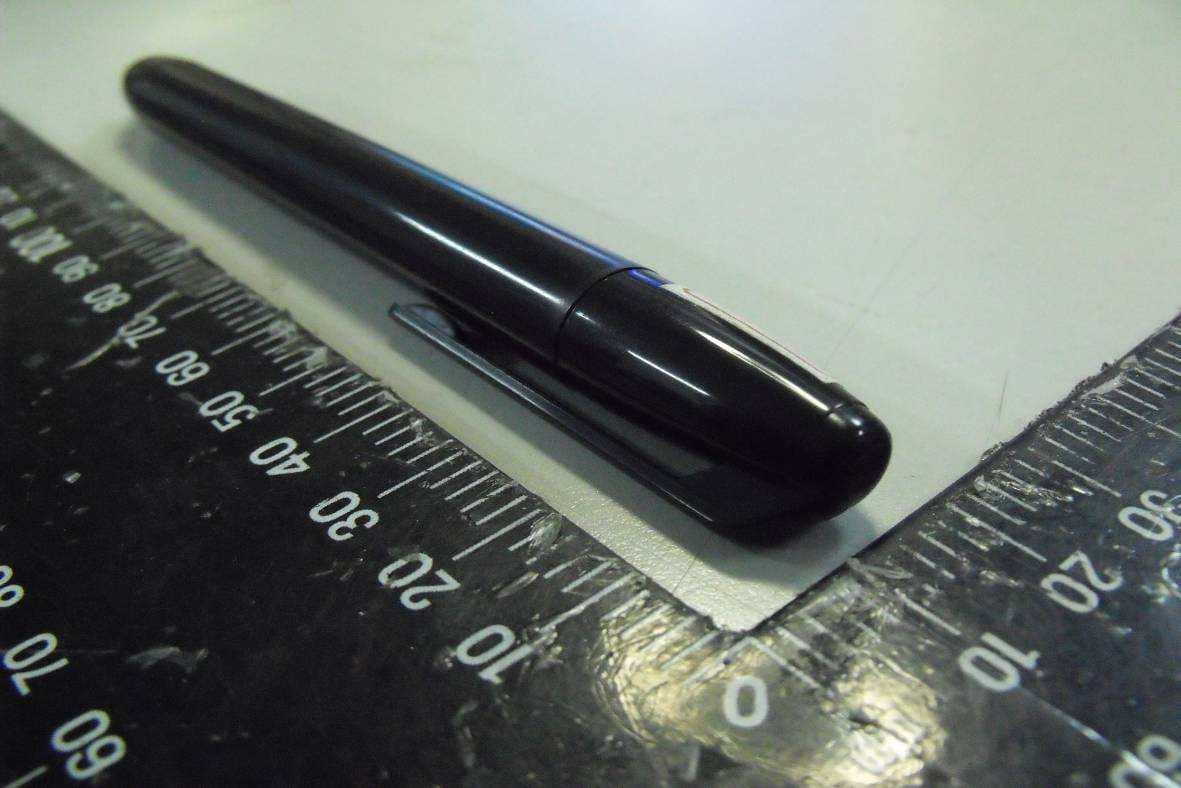
Click to zoom
Application Details
- Equipment Class
- DCD - Part 15 Low Power Transmitter Below 1705 kHz
- Date of Grant
- Mar 03, 2011
- Application Purpose
- Original Equipment
- Date of Application
- Mar 01, 2011
- Equipment Note
- MOUSEPEN
- Frequency Range
- 0.27500000 - 0.27500000
- Company
- KYE SYSTEMS CORP.
- Country
- Taiwan
Documents & Files
Document Text
Text extracted from the exhibit documents filed with the FCC. Open a document above to read the original.
Users Manual
ENGLISH 1 GE N I U S GR A P H I C TA B L E T Q U I C K I N S T A L L A T I O N G U I D E CA UTIO N : P LE AS E INS E RT T HE D RIV E R CD IN TO Y OUR CO MP UT E R FI RS T A N D THE N FO LLO W TH E INS TR UC TIONS TO COMP LE TE Y O UR S E TU P P ROCE S S . I N T R O D U C T I O N D R I V E R I N S TA L L AT I O N Windows: 1. Insert the driver disc into your computer’s CD-ROM drive. When prompted, select “Driver Setup”, and press OK to install driver. Note: In most systems, the Setup Wizard will start automatically. If Automatic Setup does not begin, start the Setup program manually by selecting “Start/Run”, type "E:\setup", where “E:” represents the location of the CD-ROM drive, then press “Enter”. Note: In certain cases, Windows might ask for your permission because it cannot recognize the driver you are downloading. If this occurs, select “Continue Anyway” and continue to install. 2. Please insert the driver CD into your computer first and then follow the instructions to complete your setup process. Macintosh: 1. Insert the driver disc into your computer’s CD-ROM drive. 2. Check to see if the “Genius Tablet” is shown on the screen. Double click the icon then follow the instruction. 3. Enter your administrator name and password to process the next step till it’s finished. Note: For more information, refer to the MAC user manual on the driver disc. CAUTION: ONCE THE INSTALLATION HAS BEEN COMPLETED, REBOOT YOUR MACINTOSH BEFORE PLUGGING THE DEVICE INTO YOUR COMPUTER. H A R D WA R E I N S TA L L AT I O N CAUTION: MAKE SURE THAT YOU HAVE INSTALLED THE DRIVER SOFTWARE (SEE ABOVE) INTO YOUR COMPUTER BEFORE INSTALLING THE HARDWARE. 1. Plug the Graphic Tablet USB cable into your computer’s USB port (located on the computer, display, or keyboard). The Graphic Tablet’s LED light will indicate the operational status, and your computer screen will display a “found new hardware” message. 1. Working area 2. Button 2 3. Button 1 4. Pen tip ENGLISH 2 Figure 1 Tablet Plate components V E R I F Y I N G T H E I N S TA L L AT I O N To ensure that everything has been installed properly, please follow the procedures below. Check the User’s manual on the CD-ROM for more information. VERIFYING HARDWARE AND DRIVER FUNCTIONS The LED light on the Tablet Plate is the main indicator for hardware operation. The light normally stays off, and will come on and off in response to various conditions. Watch the status of the Tablet Plate LED light as you go through these steps. None of the tests, except the last two, require the tablet driver to be installed. 1. For the cordless pen (stylus) or the wireless mouse , tap on any surface or press the left button of the mouse to “wake it up”, in case the pen or the mouse has gone to "sleep" after it is not used for a few minutes. 2. As soon as the Tablet Plate receives power, the LED light will come on briefly, and will normally stay off. 3. When the working area (Plate) detects the presence of the pen, the LED light will flash slowly. This happens when the pen tip is directly above the working area of the tablet plate and is low enough. 4. When you press a button on the body of the pen or the mouse, the LED light will come on. 5. When you press the pen tip against the tablet plate anywhere in the working area, the light will also come on. 6. If the tablet driver has been properly installed, a small tablet icon () will appear in system Task Bar area, normally at the lower right corner of the screen. 7. With the tablet driver properly installed, moving the pen tip or the mouse over the working area will cause the cursor on the screen to move accordingly. TO C H A N G E T H E P E N T I P 1. Place the Pen tip into the tip remover. 2. Simply pull the Pen up, and then insert a new tip. Note: Pliers (not included in package) may also be used to remove the pen tip. To replace the Tablet Pen battery: Note: Changes or modifications not expressly approved by the party responsible for compliance could void the user's authority to operate the equipment. (15.21) This device complies with part 15 of the FCC Rules. Operation is subject to the following two conditions: (1) This device may not cause harmful interference, and (2) this device must accept any interference received, including interference that may cause undesired operation.(15.19(a)(3)) (1) Twist the pen cap. (2) Pull the pen cap to open it. (3) Put one AAA battery into the pen. (4) Twist the pen cap back on the pen.
Cover Letter(s)
DOC Letter Feb. 16, 2011 Federal Communications Commission Authorization and Evaluation Division Dear Regulatory Authority, We, the undersigned, hereby declare that FCC Part 15B Declaration of Conformity procedures will be applied to the digital device portion of the following product: Type: MousePen Model: GT-100006/P, GT-100007/P FCC Part 15B DoC report number: F0D2902 This Device complies with Part 15B DoC of the FCC rules, operation is subject to the following two conditions. This device may not cause harmful interference and, This device must accept any interference received, Including interference that may cause undesired operation TEST LABORATORY Global Certification Corp. No. 146, Shiang Charng Rd., Sec. 2, Hsi Chih, Taipei Hsien 221, Taiwan, R.O.C. Accredited Lab. Assigned under FCC number: TW1030 Sincerely,
Cover Letter(s)
Confidentiality Requiring Letter Applicant Name: KYE Systems Corp. Address: No.492,Sec.5, Chung Hsin Rd., San Chung, Taipei Hsien, Taiwan R.O.C. Date: Feb./ 09/ 2011 To: Federal Communications Commission Authorization and Evaluation Division FCCID: FSUGMZJH Confidentiality Request Pursuant to Sections 0.457 and 0.459 of the Commission’s Rules, the Applicant hereby requests confidential treatment of information accompanying this Applicant as outlined below: 1. Schematics.................................GT-100006P, GT-100007P SCHEMATIC 2. Block Diagram...........................GT-100006P, GT-100007P BLOCK DIAGRAM 3. Operational Description..................GT-100006P, GT-100007P OPERATION DESCRIPTION The above materials contain trade secrets and proprietary information not customarily Released to the public. The public disclosure of these matters might be harmful to the Applicant and provide unjustified benefits to its competitors. The Applicant understood that pursuant to rule 0.457, disclosure of this Applicant and all accompanying documentation will not be made before the date of ths Grant for this application. Sincerely, Ming Huang Lee(Typed) ___________________________________________________
External Photos
Global Certification Corp. PHOTO OF EUT PHOTOS OF EUT Global Certification Corp. Report No. : 0D2902 PHOTO OF EUT Front view of EUT Rear view of EUT
ID Label/Location Info
Label location
Internal Photos
Global Certification Corp. PHOTO OF EUT PHOTOS OF EUT Global Certification Corp. Report No. : 0D2902 PHOTO OF EUT Inside View of EUT Global Certification Corp. Report No. : 0D2902 PHOTO OF EUT Component Side of Main Board Solder Side of Main Board
Test Report
Global Certification Corp. Date of Issue:Mar.01.,2011 Report No:F0D2902 Page1/28 FCC 47 CFR PART 15 SUBPART C TEST REPORT FOR Product Name: MousePen Model : GT-100006/P, GT-100007/P Trade Name: Genius Issued to KYE SYSTEMS CORP. No.492, Sec. 5, Chongxin Rd. Sanchong Dist., New Taipei City 24160 Taiwan (R.O.C.) Issued by Global Certification Corp. EMC Test Site Sijhih office and Lab No. 146. Sec.2. Siangjhang Rd. Sijhih City. Taipei County 221, Taiwan(R.O.C.) Note: This test refers exclusively to the test presented test model and sample. This report shall not be reproduced except in full, without the written approval of Global Certification Corporation. This document may be altered or revised by Global Certification Corporation. Personnel only, and shall be noted in the revision section of the document. Global Certification Corp. Date of Issue:Mar.01.,2011 Report No:F0D2902 Page2/28 TABLE OF CONTENTS ----------------------------------------------------------------------------------------------------- 2 1. GENERAL INFORMATION -------------------------------------------------------------------------------------------------------- 3 1.1 DESCRIPTION OF THE TESTED SAMPLES----------------------------------------------------------------------------------------------- 4 2. TEST METHODOLOGY ------------------------------------------------------------------------------------------------------------- 5 2.1 GENERAL TEST PROCEDURES --------------------------------------------------------------------------------------------------- 5 2.2 FCC PART 15.205 RESTRICTED BANDS OF OPERATIONS ----------------------------------------------------------------- 5 2.3 DESCRIPTION OF TEST MODES -------------------------------------------------------------------------------------------------- 6 2.4 DESCRIPTION OF THE SUPPORT EQUIPMENTS ----------------------------------------------------------------------------- 7 3. TEST AND MEASUREMENT EQUIPMENT ----------------------------------------------------------------------------------- 9 3.1 CALIBRATION----------------------------------------------------------------------------------------------------------------------- 9 3.2 EQUIPMENT-------------------------------------------------------------------------------------------------------------------------- 9 4. SECTION 15.209 REQUIREMENTS FOR 275kHZ (FUNDAMENTAL/ HARMONICS) ----------------------------10 4.1 TEST SETUP------------------------------------------------------------------------------------------------------------------------10 4.2 LIMIT-------------------------------------------------------------------------------------------------------------------------------11 4.3 TEST PROCEDURE-----------------------------------------------------------------------------------------------------------------12 4.4 RESULT: PASSED ----------------------------------------------------------------------------------------------------------------12 4.5 TEST DATA: ------------------------------------------------------------------------------------------------------------------------12 5. 20dB BANKWIDTH ------------------------------------------------------------------------------------------------------------------20 5.1 TEST SETUP------------------------------------------------------------------------------------------------------------------------20 5.2 TEST PROCEDURE-----------------------------------------------------------------------------------------------------------------20 5.3 TEST DATA: ------------------------------------------------------------------------------------------------------------------------20 6. SECTION 15.209 REQUIREMENTS (GENERAL RADIATED EMISSION) -------------------------------------------21 6.1 TEST SETUP------------------------------------------------------------------------------------------------------------------------21 6.2 LIMIT-------------------------------------------------------------------------------------------------------------------------------22 6.3 TEST PROCEDURE-----------------------------------------------------------------------------------------------------------------23 6.4 TEST SPECIFICATION--------------------------------------------------------------------------------------------------------------23 6.5 RESULT: PASSED ----------------------------------------------------------------------------------------------------------------23 6.6 TEST DATA: ------------------------------------------------------------------------------------------------------------------------24 7. SECTION 15.207 REQUIREMENTS (POWERLINE CONDUCTED EMISSIONS) ----------------------------------27 7.1 TEST SETUP------------------------------------------------------------------------------------------------------------------------27 7.2 TEST SETUP------------------------------------------------------------------------------------------------------------------------27 7.3 LIMIT-------------------------------------------------------------------------------------------------------------------------------27 7.4 TEST PROCEDURE-----------------------------------------------------------------------------------------------------------------27 7.5 TEST SPECIFICATION--------------------------------------------------------------------------------------------------------------28 7.6 RESULT: NOT AVAILABLE, BECAUSE THE EUT IS POWERED BY THE BATTERY. ------------------------------------------28 7.7 TEST DATA: N/A ------------------------------------------------------------------------------------------------------------------28 APPENDIX 1 PHOTOS OF TEST CONFIGURATION APPENDIX 3 PHOTOS OF EUT Global Certification Corp. Date of Issue:Mar.01.,2011 Report No:F0D2902 Page3/28 1. GENERAL INFORMATION Applicant :KYE SYSTEMS CORP. Address :No.492, Sec. 5, Chongxin Rd. Sanchong Dist., New Taipei City 24160 Taiwan (R.O.C.) Manufacturer :KYE SYSTEMS CORP. Address :No.492, Sec. 5, Chongxin Rd. Sanchong Dist., New Taipei City 24160 Taiwan (R.O.…
Text truncated - open the document above for the full version.
Test Setup Photos
Global Certification Corp. Appendix 1 PHOTOS OF TEST CONFIGURATION Global Certification Corp. Report No. : F0D2902 Horizontal Polarization and the EUT (9KHz~30MHz) Horizontal Polarization and the EUT (30MHz~1GHz)
Contact Information
Applicant
Ricky Chen(Section Supervisor)
Test Firm
Global Certification Corp.Alex Chou
Technical Specifications
| # | Rule Parts | Frequency Range | Power Output |
|---|---|---|---|
| 1 | 15C | 0.275 MHz - 0.275 MHz | - |
Other Applications from KYE SYSTEMS CORP.

FSUGG0AM
Aug 20, 2026Wireless Speaker
Equipment Class
DSS - Part 15 Spread Spectrum Transmitter
FSUGKZI2
May 23, 2026Wireless Keyboard
Equipment Class
DXX - Part 15 Low Power Communication Device TransmitterFSUGMZN6
Apr 20, 2026Wireless Mouse
Equipment Class
DTS - Digital Transmission SystemFSUGMZN4
Apr 03, 2026Wireless Mouse
Equipment Class
DXX - Part 15 Low Power Communication Device TransmitterFSUGMZN7
Apr 01, 2026Wireless Mouse
Equipment Class
DTS - Digital Transmission System