FSUGMZK7WIRELESS MOUSE
KYE SYSTEMS CORP.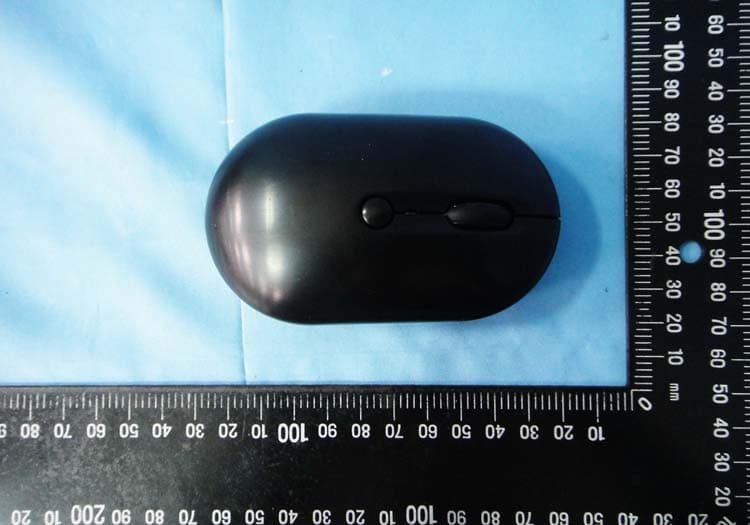
Click to zoom
Application Details
- Equipment Class
- DXX - Part 15 Low Power Communication Device Transmitter
- Date of Grant
- Oct 30, 2012
- Application Purpose
- Original Equipment
- Date of Application
- Oct 24, 2012
- Equipment Note
- WIRELESS MOUSE
- Frequency Range
- 2402.00000000 - 2480.00000000
- Company
- KYE SYSTEMS CORP.
- Country
- Taiwan
Documents & Files
Document Text
Text extracted from the exhibit documents filed with the FCC. Open a document above to read the original.
Users Manual
English -1- Hardware Installation Note: Supports Windows 8/7/Vista/XP 1. Connect the Micro USB charging cable to the mouse to any PC USB port to charge the capacitor. 2. In charging mode, the red LED light will be on and will turn off when charged. 3. Connect the receiver to a USB port of a PC. 4. Make sure that you have switched on the power switch underneath the mouse. Remark: It takes around five minutes to charge up the capacitor and you can use the mouse for about four hours. Actual performance varies according to the conditions. Mouse Button Assignments 1. Left Button: Provides traditional mouse functions like click, double click and drag. 2. Magic-Roller: Press the “Magic-Roller” to surf the Internet and Windows documents. 3. Right Button: Provides traditional mouse click functions. 4. DPI adjustment: Default is 1600 dpi, press once for 800 dpi. Quick red flashing is 1600 dpi and slow red flashing is 800 dpi. Note: Download the programmable driver from our website: www.geniusnet.com Capacitor low indication If the LED is flashing, then the capacitor level is low, you need to recharge the mouse immediately. Micro USB charging cable storage When you aren’t using the Micro USB charging cable, you can put it inside the mouse. English -2- Warning: (Troubleshooting) 1. Do not use the wireless optical/laser mouse on a desk which is made of glass or mirror. 2. The connection of the wireless device is factory preset, so when you plug the USB receiver into any USB port, the connection between the micro receiver and the mouse will be established automatically. 3. In case your PC did not install the hardware successfully, remove the micro receiver from the USB port and go Human Interface Devices under Device Manager to remove the mouse, then plug in the micro receiver to a USB port again. 4. Keep the mouse away from heat in order to prevent damage to the capacitor. Note: Changes or modifications not expressly approved by the party responsible for compliance could void the user's authority to operate the equipment. (15.21) This device complies with part 15 of the FCC Rules. Operation is subject to the following two conditions: (1) This device may not cause harmful interference, and (2) this device must accept any interference received, including interference that may cause undesired operation.(15.19(a)(3)) FEDERAL COMMUNICATIONS COMMISSION INTERFERENCE STATEMENT This equipment has been tested and found to comply with the limits for a Class B digital device, pursuant to Part 15 of the FCC Rules. These limits are designed to provide reasonable protection against harmful interference in a residential installation. This equipment generates, uses and can radiate radio frequency energy and, if not installed and used in accordance with the instructions, may cause harmful interference to radio communications. However, there is no guarantee that interference will not occur in a particular installation. If this equipment does cause harmful interference to radio or television reception, which can be determined by turning the equipment off and on, the user is encouraged to try to correct the interference by one or more of the following measures: English -3- – Reorient or relocate the receiving antenna. – Increase the separation between the equipment and receiver. – Connect the equipment into an outlet on a circuit different from that to which the receiver is connected. – Consult the dealer or an experienced radio/TV technician for help. CAUTION: Any changes or modifications not expressly approved by the party responsible for compliance could void the user's authority to operate the equipment.
Cover Letter(s)
DOC Letter Sep. 12, 2012 Federal Communications Commission Authorization and Evaluation Division Dear Regulatory Authority, We, the undersigned, hereby declare that FCC Part 15B Declaration of Conformity procedures will be applied to the digital device portion of the following product: Product: USB Dongle Model: GM-090028/R This Device complies with Part 15B DoC of the FCC rules, operation is subject to the following two conditions. This device may not cause harmful interference and, This device must accept any interference received, Including interference that may cause undesired operation Sincerely,
Cover Letter(s)
Request for Confidentiality To: Federal Communications Commission Authorization and Evaluation Division Subject: Confidentiality Request regarding application for certification of FCC ID: FSUGMZK7 Dear Madam or Sir: Pursuant to Sections 0.457 and 0.459 of the Commission’s Rules, we hereby request confidential treatment of information accompanying this application as outlined below: Block diagram –FSUGMZK7 Block Diagram.pdf Operational description - FSUGMZK7 Operation Description.pdf Schematic Diagram- FSUGMZK7 Schematics Diagram.pdf The above materials contain trade secrets and proprietary information not customarily released to the public. The public disclosure of these materials may be harmful to the applicant and provide unjustified benefits to its competitors. The applicant understands that pursuant to Section 0.457 of the Rules, disclosure of this application and all accompanying documentation will not be made before the date of the Grant for this application. Sincerely, Ming Huang Lee Company Name: KYE Systems Corp. Address: No. 492, Sec. 5, Chongxin Rd., Sanchong Dist., New Taipei City 24160, Taiwan (R.O.C.) TEL: 886-2-29956645 FAX: 886-2-29955302 E-mail: [email protected]
External Photos
1 of 4 External Photos Model Number: GM-120011/T FCC ID: FSUGMZK7 2 of 4 EUT Photo 1 ) EUT Photo 2 ) 3 of 4 EUT Photo 3 ) EUT Photo 4 ) 4 of 4 EUT Photo 5 )
ID Label/Location Info
Label location
Internal Photos
1 of 5 Internal Photos Model Number: GM-120011/T FCC ID: FSUGMZK7 2 of 5 EUT Photo 1 ) EUT Photo 2 ) 3 of 5 EUT Photo 3 ) EUT Photo 4 ) 4 of 5 EUT Photo 5 ) EUT Photo 6 ) ANT 5 of 5 EUT Photo 7 ) EUT Photo 8 )
Test Report
FCC 47 CFR PART 15 SUBPART C Product Type : NX-ECO Applicant : KYE SYSTEMS CORP. Address : No.492, Sec.5, Chung Hsin Rd., San Chung Dist., New Taipei City, 24160, Taiwan, R.O.C. Trade Name : Genius Model Number : GM-120011/T Test Specification : FCC 47 CFR PART 15 SUBPART C: Oct., 2011 ANSI C63.4-2009 Application Purpose : Original Receive Date : Oct. 05, 2012 Test Period : Oct. 10 ~ Oct. 15, 2012 Issue Date : Oct. 19, 2012 Issue by A Test Lab Techno Corp. No. 140-1, Changan Street, Bade City, Taoyuan County 334, Taiwan R.O.C. Te l:+886-3-2710188 / Fax:+886-3-2710190 T aiwan Accreditation Foundation accreditation number: 1330 Note: This report shall not be reproduced except in full, without the written approval of A Test Lab Techno Corp. This document may be altered or revised by A Test Lab Techno Corp. personnel only, and shall be noted in the revision section of the document. The client should not use it to claim product endorsement by TAF, or any government agencies. The test results in the report only apply to the tested sample. A Test Lab Techno Corp. Report Number: 1210FR15 1 of 36 Revision History Rev. Issue Date Revisions Revised By 00 Oct. 19, 2012 Initial Issue A Test Lab Techno Corp. Report Number: 1210FR15 2 of 36 Verification of Compliance Issued Date: 10/19/2012 Product Type : NX-ECO Applicant : KYE SYSTEMS CORP. Address : No.492, Sec.5, Chung Hsin Rd., San Chung Dist., New Taipei City, 24160, Taiwan, R.O.C. Trade Name : Genius Model Number : GM-120011/T FCC ID : FSUGMZK7 EUT Rated Voltage : DC 2.7V, 6mA Test Voltage : DC 2.7V Applicable Standard : FCC 47 CFR PART 15 SUBPART C: Oct., 2011 ANSI C63.4-2009 Test Result : Complied Application Purpose : Original Performing Lab. : A Test Lab Techno Corp. No. 140-1, Changan Street, Bade City, Taoyuan County 334, Taiwan R.O.C. Te l:+886-3-2710188 / Fax:+886-3-2710190 T aiwan Accreditation Foundation accreditation number: 1330 http://www.atl-lab.com.tw/e-index.htm The above equipment was tested by A Test Lab Techno Corp. The test data, data evaluation, test procedures, and equipment configurations shown in this report were made in accordance with the procedures given in ANSI C63.4: 2009 and the energy emitted by the sample tested as described in this report is in compliance with the requirements of FCC Rules Part 15.207, 15.209, 15.247 . The test results of this report relate only to the tested sample identified in this report. Approved By : Reviewed By : (Manager) (Murphy Wang) (Testing Engineer) (Fly Lu) A Test Lab Techno Corp. Report Number: 1210FR15 3 of 36 TABLE OF CONTENTS 1 General Information ....................................................................................................................................... 5 1.1. Summary of Test Result ...................................................................................................................... 5 1.2. Measurement Uncertainty ................................................................................................................... 5 2 EUT Description ............................................................................................................................................. 6 3 Test Methodology .......................................................................................................................................... 7 3.1. Mode of Operation .............................................................................................................................. 7 3.2. EUT Exercise Software....................................................................................................................... 7 3.3. Configuration of Test System Details .................................................................................................. 7 3.4. Test Site Environment ......................................................................................................................... 8 4 Conducted Emission Measurement ............................................................................................................. 9 4.1. Limit..................................................................................................................................................... 9 4.2. Test Instruments .................................................................................................................................. 9 4.3. Test Setup ........................................................................................................................................... 9 4.4. Test Procedure .................................................................................................................................. 10 4.5. Test Result .........................................................................................................................................11 5 Radiated Interference Measurement .......................................................................................................... 13 5.1. Limit................................................................................................................................................... 13 5.2. Test Instruments ................................................................................................................................ 14 5.3. Setup ................................................................................................................................................. 15 5.4. Test Procedure .................................................................................................................................. 16 5.5. Test Result ........................................................................................................................................ 18 6 Band Edges Measurement .......................................................................................................................... 27 6.1. Limit........................…
Text truncated - open the document above for the full version.
Test Setup Photos
Part 15C Test Setup Photographs Conducted Emissions Test Configuration: Front View Rear View A Test Lab Techno Corp. Report Number: 1210DR15 1 of 3 Radiated Emissions Test Configuration: Below 1GHz _ Front View Below 1GHz _ Rear View A Test Lab Techno Corp. Report Number: 1210DR15 2 of 3 Above 1GHz _ Front View Above 1GHz _ Rear View A Test Lab Techno Corp. Report Number: 1210DR15 3 of 3
Contact Information
Applicant
Ricky Chen(Section Supervisor)
Test Firm
Eurofins E&E Wireless Taiwan Co., LtdFly LU
Technical Specifications
| # | Rule Parts | Frequency Range | Power Output |
|---|---|---|---|
| 1 | 15C | 2.40 GHz - 2.48 GHz | - |
Other Applications from KYE SYSTEMS CORP.

FSUGG0AM
Aug 20, 2026Wireless Speaker
Equipment Class
DSS - Part 15 Spread Spectrum Transmitter
FSUGKZI2
May 23, 2026Wireless Keyboard
Equipment Class
DXX - Part 15 Low Power Communication Device TransmitterFSUGMZN6
Apr 20, 2026Wireless Mouse
Equipment Class
DTS - Digital Transmission SystemFSUGMZN4
Apr 03, 2026Wireless Mouse
Equipment Class
DXX - Part 15 Low Power Communication Device TransmitterFSUGMZN7
Apr 01, 2026Wireless Mouse
Equipment Class
DTS - Digital Transmission System