FSUGMZL12.4GHz Blue LED Wireless Optical Mouse W30
KYE SYSTEMS CORP.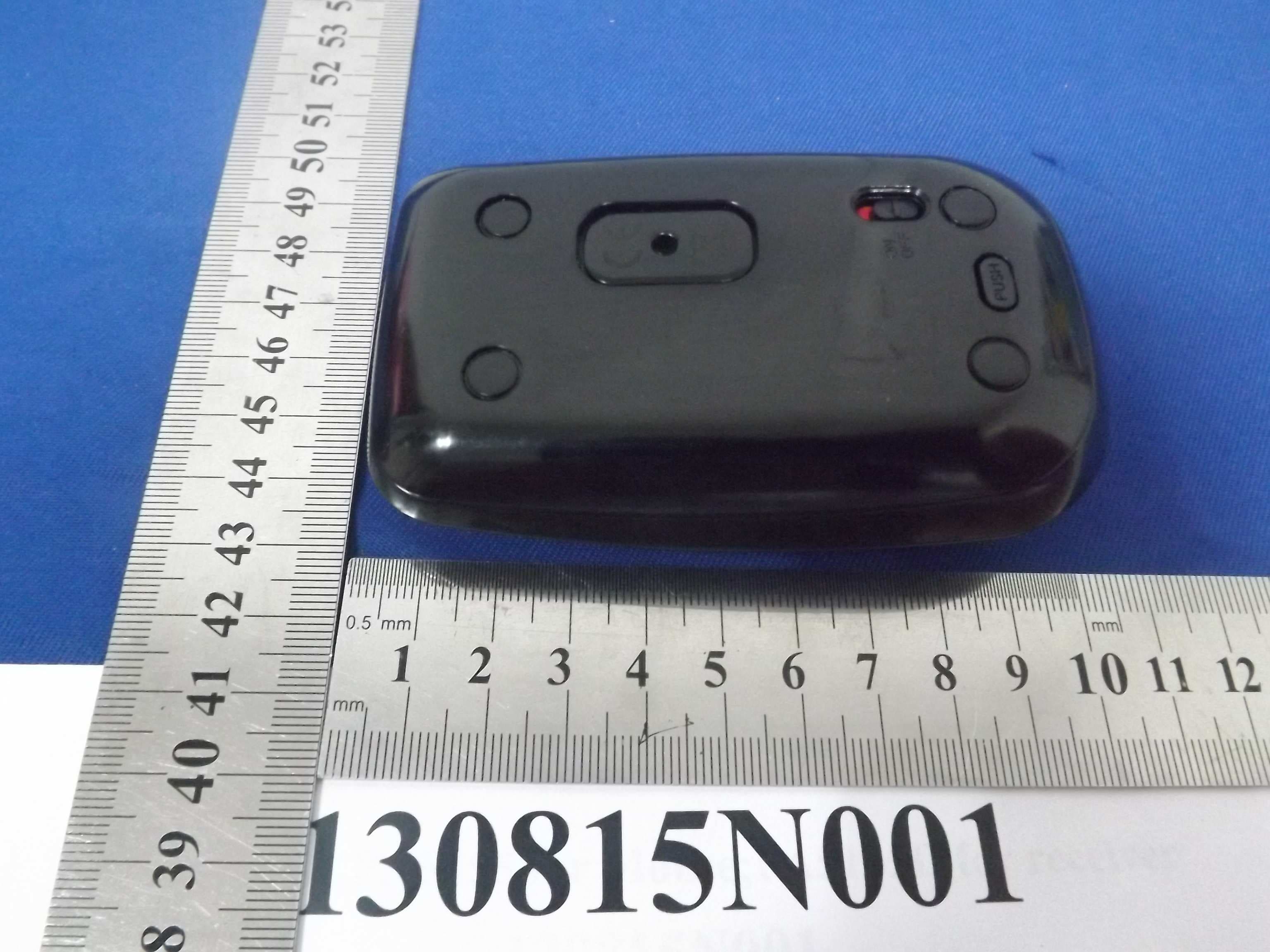
Click to zoom
Application Details
- Equipment Class
- DXX - Part 15 Low Power Communication Device Transmitter
- Date of Grant
- Jan 16, 2014
- Application Purpose
- Original Equipment
- Date of Application
- Jan 16, 2014
- Equipment Note
- 2.4GHz Blue LED Wireless Optical Mouse W30
- Frequency Range
- 2402.00000000 - 2480.00000000
- Company
- KYE SYSTEMS CORP.
- Country
- Taiwan
Documents & Files
Document Text
Text extracted from the exhibit documents filed with the FCC. Open a document above to read the original.
Users Manual
Quick Star Guide 2.4GHz Blue LED Wireless Optical Mouse W30 Model: PA5155* (Where * is 0-9, A-Z, - or blank for marketing purpose) Important Safety Instructions To protect against risk of fire, bodily injury, electric shock or damage to the equipment: ■ Do not immerse any part of this product in water or other liquid. ■ Do not spray liquid on this product or allow excess liquid to drip inside. ■ Do not use this product if it has sustained any type of damage. ■ Disconnect this product before cleaning. This guide is copyrighted by Toshiba Corporation with all rights reserved. Under the copyright laws, this guide cannot be reproduced in any form without the prior written permission of Toshiba. No patent liability is assumed, however, with respect to the use of the information contained herein. ©2013 by Toshiba Corporation. All rights reserved. Disclaimer Information in this document is subject to change without notice. The manufacturer does not make any representations or warranties (implied or otherwise) regarding the accuracy and completeness of this document and shall in no event be liable for any loss of profit or any commercial damage, including but not limited to special, incidental, consequential, or other damage. July 2013, Rev1.0 Trademarks Microsoft, Windows and Windows vista are either registered trademarks or trademarks of Microsoft Corporation in the United States and/or other countries. Other trademarks or brand names mentioned herein are trademarks or registered trademarks of their respective companies. Introduction Thank you for purchasing the Toshiba Wireless Optical Mouse W30. Check to make sure you have all of the following items: ■ Quick Start Guide (this document) and a Warranty Leaflet ■ Toshiba Wireless Optical Mouse W30 with Nano receiver ■ One AA batteries Toshiba Wireless Optical Mouse W30 Quick Tour The following figures show the components of the top and underside of the mouse. DO NOT direct the optical sensor light at anyone's eyes. System Requirements ■ Microsoft ® Windows ® XP, Windows Vista ® , Windows ® 7 , Windows ® 8 ■ Mac OS 10.x or above ■ USB port Setting up the Mouse Installing the Batteries 1. Open the battery cover. 2. Remove the Nano receiver from the mouse. 3. Insert the batteries into the battery compartment as shown. 4. Replace the battery cover. Toshiba Wireless Optical Mouse W30 Establishing a Connection between the Mouse and the Computer 1 Plug the Nano receiver into an available USB port on your computer. 2 Slide the Power switch upward to the ON position. 3 The battery indicator light on the top of the mouse will glow red for approximately three seconds. When the light turns off, the mouse is ready for use. NOTE The mouse will enter sleep mode after a period of time to conserve power. Move the mouse or click the button to wake it up. Low Battery Warning Replace batteries when the battery indicator light flashes red for five seconds. Troubleshooting Problem Solution(s) Mouse does not work make sure you have installed the mouse correctly. Make sure the Nano receiver is plugged into an available USB port on your computer. Make sure the mouse has been detected properly by the operating system. Refer to your computer documentation for the correct port configuration. Connection failed. Disconnect the Nano receiver from the USB port on your computer, and then re-connect it. If the mouse does not work after ten seconds, press the Connect button on the bottom of the mouse to pair the mouse and the computer. 1. Do not use the wireless optical mouse on a desk which is made of clear glass or mirror. 2. If you feel the mouse does not move smooth as usual, it is possible the batteries have lost their charge so you need to replace them. Remember to put the batteries in the correct direction. 3. The connection of the wireless device is factory preset, so when you plug the USB receiver into any USB port, the connection between the micro receiver and the mouse will be established automatically. 4. In case your laptop or PC did not install the hardware successfully, remove the micro receiver from the USB port and go Human Interface Devices under Device Manager to remove the mouse then plug in the micro receiver to a USB port again. Toshiba Wireless Optical Mouse W30 Specification* Item Description Model number W30 Buttons Left, Right, Scroll wheel Interface USB Power requirements Operating: 1.5V/35 mA Stand-by: 1.5V/1.29 mA Sleeping: 1.5V/0.45 mA Dimensions (D x W x H) 98.10 x 58.06 x 28.00 mm Weight g Wave length 465~470 nm Velocity 30 inches/sec Acceleration 10 g Optical sensor 3200 times/sec Resolution 1600 DPI Frequency band 2.4 GHz (2.402~2.480 GHz) RF power 2 dBm RF distance 6 m (open space 10 m) Operating humidity 10%~90% (55 ± 2°C) Operating temperature 0~40°C (32~104°F) Storage temperature -20~60°C (-4~140°F) *Specifications are subject to change without further notice. FCC Caution This equipment has been tested and found to comply with the limits for a Class B digital device, pursuant to Part 15 of the FCC Rules. These limits are designed to provide reasonable protection against harmful interference in a residential installation. This equipment generates uses and can radiate radio frequency energy and, if not installed and used in accordance with the instructions, may cause harmful interference to radio communications. However, there is no guarantee that interference will not occur in a particular installation. If this equipment does cause harmful interference to radio or television reception, which can be determined by turning the equipment off and on, the user is encouraged to try to correct the interference by one of the following measures: - Reorient or relocate the receiving antenna. - Increase the separation between the equipment and receiver. - Connect the equipment into an outlet on a circuit different from that to which the receiver is connected. - Consult the dealer or an experienced radio/TV technician for help. This device complies with P…
Text truncated - open the document above for the full version.
Attestation Statements
Declaration Letter FCC ID: FSUGMZL1 Product Name: 2.4GHz Blue LED Wireless Optical Mouse W30 Model: PA5155 We, KYE SYSTEMS CORP., hereby declare that the he battery will not be installed when the product is marketed so that end-user will see where the label is located. Signature: Printed Name: P.C. Lee Date: Jan 17,2014
Cover Letter(s)
KYE SYSTEMS CORP. Date: Jan 9,2014 Federal Communications Commission Authorization and Evaluation Division FCC ID: FSUGMZL1 Confidentiality Request Pursuant to Sections 0.457 and 0.459 of the Commission’s Rules, the Applicant hereby requests confidential treatment of information accompanying this application as outlined below: 1. Block diagram 2. Schematics 3. Operation Description The above materials contain trade secrets and proprietary information not customarily released to the public. The public disclosure of these matters might to harmful to the applicant and provide unjustified benefits to its competitors. The applicant understands that pursuant to Rule 0.457, disclosure of this application and all accompanying documentation will not be made before the date of the grant for this application. Sincerely, Name:P.C. Lee Company name: KYE SYSTEMS CORP. Tel.:02-2995-6645 #3422 Fax:02-2995-4751
Cover Letter(s)
KYE SYSTEMS CORP. AGENCY AUTHORIZATION LETTER FCC ID: FSUGMZL1 Date: Jan9,2014 To whom it may concern: We, the undersigned, hereby authorize Bureau Veritas Shenzhen Co. Ltd Dongguan Branch., to act on our behalf, as our agent, in the following matters related to the FCC approval of our products: report submittal, related correspondence, the signing of all documents relating to these matters, and any other lawful activity necessary to obtain such certification. Any act carried out by BVDG within the scope of this authorization shall have the same effects as our own. This authorization shall expire 6 months form original date. If you have any Questions regarding the authorization, please don’t hesitate to contact us. Thank you. Sincerely, Name: P.C. Lee Company name: KYE SYSTEMS CORP. Tel: +886-2-2995-6645 Fax: +886-2-2278-9520
External Photos
Bureau Veritas Shenzhen Co., Ltd. Dongguan Branch No. 34, Chenwulu Section, Guantai Rd., Houjie Town, Dongguan City, Guangdong 523942, China Tel.: +86 769 8593 5656 Fax: +86 769 8593 1080 Email: [email protected] Page 1 of 2 Report Version 1 Reference No.: RF140102N024 Bureau Veritas Shenzhen Co., Ltd. Dongguan Branch No. 34, Chenwulu Section, Guantai Rd., Houjie Town, Dongguan City, Guangdong 523942, China Tel.: +86 769 8593 5656 Fax: +86 769 8593 1080 Email: [email protected] Page 2 of 2 Report Version 1 Reference No.: RF140102N024
Internal Photos
Bureau Veritas Shenzhen Co., Ltd. Dongguan Branch No. 34, Chenwulu Section, Guantai Rd., Houjie Town, Dongguan City, Guangdong 523942, China Tel.: +86 769 8593 5656 Fax: +86 769 8593 1080 Email: [email protected] Page 1 of 3 Report Version 1 Reference No.: RF140102N024 Bureau Veritas Shenzhen Co., Ltd. Dongguan Branch No. 34, Chenwulu Section, Guantai Rd., Houjie Town, Dongguan City, Guangdong 523942, China Tel.: +86 769 8593 5656 Fax: +86 769 8593 1080 Email: [email protected] Page 2 of 3 Report Version 1 Reference No.: RF140102N024 Bureau Veritas Shenzhen Co., Ltd. Dongguan Branch No. 34, Chenwulu Section, Guantai Rd., Houjie Town, Dongguan City, Guangdong 523942, China Tel.: +86 769 8593 5656 Fax: +86 769 8593 1080 Email: [email protected] Page 3 of 3 Report Version 1 Reference No.: RF140102N024 ANT
Test Report
Bureau Veritas Shenzhen Co., Ltd. Dongguan Branch No. 34, Chenwulu Section, Guantai Rd., Houjie Town, Dongguan City, Guangdong 523942, China Tel: +86 769 8593 5656 Fax: +86 769 8593 1080 Email: [email protected] Page 1 of 21 Report Version 1 Test Report No.: RF140102N024-1 TEST REPORT Applicant: KYE SYSTEMS CORP. Address: No. 492, Sec. 5, Chongxin Rd., Sanchong Dist., New Taipei City 24160, Taiwan (R. O. C.) Manufacturer or Supplier KYE SYSTEMS CORP. Address No. 492, Sec. 5, Chongxin Rd., Sanchong Dist., New Taipei City 24160, Taiwan (R. O. C.) Product 2.4GHz Blue LED Wireless Optical Mouse W30 Brand Name TOSHIBA Model: PA5155 Additional Model & Model Difference: PA5155* (Where * is 0-9, A-Z, - or blank), see item 3.1 Date of tests: Aug. 15 ~ Aug. 26, 2013 the tests have been carried out according to the requirements of the following standard: FCC Part 15, Subpart C, Section 15.249(2012-10) CONCLUSION: The submitted sample was found to COMPLY with the test requirement Tested by Venless Long Specialist / EMC Department Approved by Glyn He Supervisor / EMC Department This report is for your exclusive use. Any copying or replication of this report to or for any other person or entity, or use of our name or trademark, is permitted only with our prior written permission. This report sets forth our findings solely with respect to the test samples identified herein. The results set forth in this report are not indicative or representative of the quality or characteristics of the lot from which a test sample was taken or any similar or identical product unless specifically and expressly noted. Our report includes all of the tests requested by you and the results thereof based upon the information that you provided to us. You have 60 days from date of issuance of this report to notify us of any material error or omission caused by our negligence, provided, however, that such notice shall be in writing and shall specifically address the issue you wish to raise. A failure to raise such issue within the prescribed time shall constitute your unqualified acceptance of the completeness of this report, the tests conducted and the correctness of the report contents. Unless specific mention, the uncertainty of measurement has been explicitly taken into account to declare the compliance or non-compliance to the specification Bureau Veritas Shenzhen Co., Ltd. Dongguan Branch No. 34, Chenwulu Section, Guantai Rd., Houjie Town, Dongguan City, Guangdong 523942, China Tel: +86 769 8593 5656 Fax: +86 769 8593 1080 Email: [email protected] Page 2 of 21 Report Version 1 Test Report No.: RF140102N024-1 TABLE OF CONTENTS RELEASE CONTROL RECORD ..............................................................................................................3 1 SUMMARY OF TEST RESULTS......................................................................................................4 2 MEASUREMENT UNCERTAINTY...................................................................................................4 3 GENERAL INFORMATION ..............................................................................................................5 3.1 GENERAL DESCRIPTION OF EUT .............................................................................................5 3.2 DESCRIPTION OF TEST MODES ...............................................................................................5 3.3 GENERAL DESCRIPTION OF APPLIED STANDARDS ..............................................................6 3.4 DESCRIPTION OF SUPPORT UNITS .........................................................................................6 4 TEST TYPES AND RESULTS..........................................................................................................7 4.1 RADIATED EMISSION MEASUREMENT ....................................................................................7 4.1.1 LIMITS OF RADIATED EMISSION MEASUREMENT ........................................................7 4.1.2 TEST INSTRUMENTS.........................................................................................................8 4.1.3 TEST PROCEDURES .........................................................................................................9 4.1.4 DEVIATION FROM TEST STANDARD ...............................................................................9 4.1.5 TEST SETUP.....................................................................................................................10 4.1.6 EUT OPERATING CONDITIONS ......................................................................................10 4.1.7 TEST RESULTS ................................................................................................................ 11 4.2 20dB BANDWIDTH MEASUREMENT........................................................................................16 4.2.1 LIMITS OF 20dB BANDWIDTH MEASUREMENT............................................................16 4.2.2 TEST INSTRUMENTS.......................................................................................................16 4.2.3 TEST PROCEDURE..........................................................................................................16 4.2.4 DEVIATION FROM TEST STANDARD .............................................................................17 4.2.5 TEST SETUP.....................................................................................................................17 4.2.6 EUT OPERATING CONDITIONS ......................................................................................17 4.2.7 TEST RESULTS ................................................................................................................17 5 PHOTOGRAPHS OF THE TEST CONFIGURATION ....................................................................20 6 APPENDIX A - MODIFICATIONS RECORDERS FOR ENGINEERING CHANGES TO THE EUT BY THE LAB .…
Text truncated - open the document above for the full version.
Test Setup Photos
Bureau Veritas Shenzhen Co., Ltd. Dongguan Branch No. 34, Chenwulu Section, Guantai Rd., Houjie Town, Dongguan City, Guangdong 523942, China Tel.: +86 769 8593 5656 Fax: +86 769 8593 1080 Email: [email protected] Page 1 of 1 Report Version 1 Reference No.: RF140102N024 SET-UP FOR RADIATED EMISSION TEST Frequency Range<30MHz ~ 1GHz > Frequency Range< Above 1GHz >
Contact Information
Applicant
Ricky Chen(Section Supervisor)
Test Firm
Bureau Veritas Shenzhen Co., Ltd. Dongguan BranchAlec Hu
Technical Specifications
| # | Rule Parts | Frequency Range | Power Output |
|---|---|---|---|
| 1 | 15C | 2.40 GHz - 2.48 GHz | - |
Other Applications from KYE SYSTEMS CORP.

FSUGG0AM
Aug 20, 2026Wireless Speaker
Equipment Class
DSS - Part 15 Spread Spectrum Transmitter
FSUGKZI2
May 23, 2026Wireless Keyboard
Equipment Class
DXX - Part 15 Low Power Communication Device TransmitterFSUGMZN6
Apr 20, 2026Wireless Mouse
Equipment Class
DTS - Digital Transmission SystemFSUGMZN4
Apr 03, 2026Wireless Mouse
Equipment Class
DXX - Part 15 Low Power Communication Device TransmitterFSUGMZN7
Apr 01, 2026Wireless Mouse
Equipment Class
DTS - Digital Transmission System