FSUGMZL3EnergyMouse 2 (GM-130024/T)
KYE SYSTEMS CORP.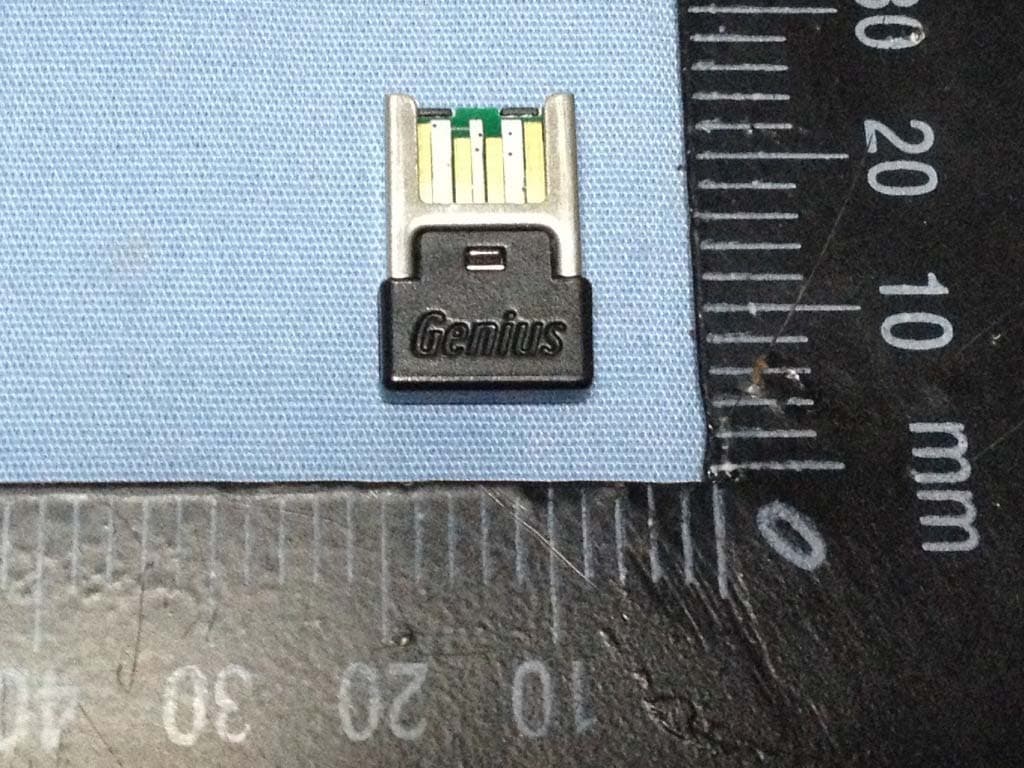
Click to zoom
Application Details
- Equipment Class
- DXX - Part 15 Low Power Communication Device Transmitter
- Date of Grant
- Jan 22, 2014
- Application Purpose
- Original Equipment
- Date of Application
- Jan 22, 2014
- Equipment Note
- EnergyMouse 2 (GM-130024/T)
- Frequency Range
- 2409.00000000 - 2476.00000000
- Company
- KYE SYSTEMS CORP.
- Country
- Taiwan
Documents & Files
Document Text
Text extracted from the exhibit documents filed with the FCC. Open a document above to read the original.
Users Manual
Energy Mouse 2 GM-130024/T English - 1 - Hardware Installation For Mouse use: 1. Plug the wireless pico receiver to a USB port of a PC. 2. Make sure the power switch located underneath the mouse is switched to "ON". For Mouse with power bank function charging: 1. How to start charge Energy Mouse 2 a. Plug the Micro USB cable into the Energy Mouse 2 Micro USB port, and then insert the other end of the cable into USB port of your power supply (e.g. AC charger, or computer USB port). The power level LED indicators will be flashing in sequence. b. When the charge is completed, the four LEDs will stay on for 6 minutes, and then turn off for power saving. 2. How to charge your mobile device using the Energy Mouse 2 a. Connect your device to the Energy Mouse 2 USB output port and the charging will start automatically. b. When your mobile device charge completed or just disconnect the cable; Energy Mouse 2 will automatically turn off in 10 seconds. 3. How to check power capacity of Energy Mouse 2 a. Press and hold button for two seconds for the power level. The four LEDs will show the power capacity. 4. How to turn off Energy Mouse 2 when charging is finished a. Just remove the charger cable. Energy Mouse 2 will automatically turn off automatic off in 10 seconds. Energy Mouse 2 GM-130024/T English - 2 - Mouse Button Assignments 1. Left Button: Provides traditional mouse functions like click, double click and drag. 2. Magic-Roller: Press the “Magic-Roller” to surf the Internet and Windows documents. 3. Right Button: Provides traditional mouse click functions. 4. Button: Press this button and release to turn it on. The power level LED indicators will display battery’s capacity. 5. Power Level LED indicators: When the charge is completed, the four LEDs will stay on for 6 minutes, and then turn off for power saving. Discharge: Charging: ● LED On ○ LED Off ⊙ LED Blinking Remark: Power level low indication If the LED is flashing four times, then the power level is low, and you need to recharge the mouse immediately. Note: Download the programmable driver from our website: www.geniusnet.com LED Indicators ●●●● ●●●○ ●●○○ ●○○○ ⊙⊙⊙⊙ Blinking Power Level 100-75% 75-50% 50-25% 25-5% 5% LED Indicators ⊙○○○ ●⊙○○ ●●⊙○ ●●●⊙ ●●●● Power Level 0-25% 25-50% 50-75% 75-100% 100% Energy Mouse 2 GM-130024/T English - 3 - Warning: (Troubleshooting) 1. Make sure the Energy Mouse 2 is completely charged before first usage. 2. Use the standard cable or it could cause damage to Energy Mouse 2. 3. Confirm the voltage of the mobile device is 5V before you use Energy Mouse 2 to charge it. 4. To maintain the life span and quality of Energy Mouse 2 battery, we recommend you unplug the power cable promptly after Energy Mouse 2 is fully charged and when not in use fully charge it every four months. 5. Do not drop, knock, disassemble or attempt to repair Energy Mouse 2 by yourself or you will void the warranty. If there is any problem, you can contact a service center for assistance. 6. Do not leave Energy Mouse 2 in a vehicle, expose it to sunlight or put it near any heat source for a long time as strong light and high temperature will lead to battery damage. 7. Store Energy Mouse 2 in a cool, dry place, and keep it away from fire and moisture. 8. Do not put any object (except the USB cable) into any of the Energy Mouse 2 micro USB input or USB output ports to avoid short circuit damage. 9. Keep Energy Mouse 2 away from children and pets. Do not use the wireless optical/laser mouse on a desk which is made of glass or mirror. 10. The connection of the wireless device is factory preset, so when you plug the USB receiver into any USB port, the connection between the micro receiver and the mouse will be established automatically. 11. In case your PC did not install the hardware successfully, remove the micro receiver from the USB port and go Human Interface Devices under Device Manager to remove the mouse, then plug in the micro receiver to a USB port again. Energy Mouse 2 GM-130024/T English - 4 - FCC Compliance and Advisory Statement This device complies with Part 15 of the FCC rules. Operation is subject to the following two conditions: (1) this device may not cause harmful interference, and (2) this device must accept any interference received, including interference that may cause undesired operation. This equipment has been tested and found to comply with the limits for a Class B digital device, according to Part 15 of the FCC rules. These limits are designed to provide reasonable protection against harmful interference in a residential installation. This equipment generates, uses and can radiate radio frequency energy and if not installed and used in accordance with the instructions, may cause harmful interference to radio communications. However, there is no guarantee that interference will not occur in a particular installation. If this equipment does cause harmful interference to radio or television reception, which can be determined by turning the equipment off and on, the user is encouraged to try correct the interference by one or more of the following measures: 1. Reorient the receiving antenna. 2. Increase the separation between the equipment and receiver. 3. Connect the equipment into and outlet on a circuit different from that to which the receiver is connected. 4. Consult the dealer or an experienced radio/TV technician for help. Any special accessories needed for compliance must be specified in the instruction manual. Warning: A shielded-type power cord is required in order to meet FCC emission limits and also to prevent interference to the nearby radio and television reception. It is essential that only the supplied power cord be used. Use only shielded cables to connect I/O devices to this equipment. CAUSION: Any changes or modifications not expressly approved by the party responsible for compliance could void your authority to operate the equipment. SAR compliance has been evaluated in the product(s), and con be …
Text truncated - open the document above for the full version.
Cover Letter(s)
Spectrum Research & Testing Lab., Inc. No.167,Ln. 780, Shan-Tong Rd. Ling 8, Shan-Tong Li, Chung-Li City, Taoyuan County 320, Taiwan (R.O.C.) Federal Communications Commission Authorization and Evaluation Division 1435 Oakland Mills Road Columbia, MD 21046 Subject: FCC Application for FCC ID: FSUGMZL2 To Whom It May Concern: We, the undersigned, hereby attest to the fact that we will apply the Declaration of Conformity procedure to the class B computer peripheral portion of this composite device. We understand that devices subject to the DoC procedure are required to be tested to show compliance with the FCC technical regulations by a recognized accredited testing laboratory. The testing laboratory must be accredited by a Commission approved accreditation body or designated under the terms of a government-to-government Mutual Recognition Agreement (MRA). A listing of those accredited testing laboratories that have been recognized by the Commission is published on the FCC Webpage: https://apps.fcc.gov/oetcf/eas/reports/TestFirmSearch.cfm Select the "accredited" option to search for FCC recognized accredited test firms. Test facilities located in countries, where the U.S. does not have an operational Telcom MRA are not recognized by the FCC to test for the DoC procedure. Sincerely yours, (P.C. Lee) 2014-1-21 (Date)
Cover Letter(s)
Confidentiality request letter Applicant Name: KYE SYSTEMS CORP.(Genius) Address: No. 492, Sec. 5, Chongxin Rd., Sanchong Dist., New Taipei City 24160, Taiwan (R.O.C.) To: Federal Communications Commission Authorization and Evaluation Division Subject: Confidentiality Request regarding application for certification of FCC ID: FSUGMZL3 Dear Sir or Madam: Pursuant to Sections 0.457 and 0.459 of the Commission’s Rules, we hereby request confidential treatment of information accompanying this application as outlined below: short term confidentiality for 180 days: ♦ PHOTOS OF EUT - External.pdf ♦ PHOTOS OF EUT - Internal.pdf ♦ PHOTOS OF TESTING.pdf ♦ USER MANUAL .pdf Long term exhibits can be: ♦ BLOCK DIAGRAM.pdf ♦ SCHEMATIC DIAGRAM.pdf We are aware that the documents that we are asking to be made confidential have been available to the public since they were certified. The above materials contain trade secrets and proprietary information not customarily released to the public. The public disclosure of these materials may be harmful to the applicant and provide unjustified benefits to its competitors. The applicant understands that pursuant to Section 0.457 of the Rules, disclosure of this application and all accompanying documentation will not be made before the date of the Grant for this application. Sincerely, __________________ (P.C. Lee / Project Manager)
External Photos
Spectrum Research & Testing Lab., Inc. No.167,Ln. 780, Shan-Tong Rd.,Ling 8, Shan-Tong Li, Chung-Li City, Taoyuan County 320, Taiwan (R.O.C.) PHOTOS OF EUT - External GM-130024/T: Spectrum Research & Testing Lab., Inc. No.167,Ln. 780, Shan-Tong Rd.,Ling 8, Shan-Tong Li, Chung-Li City, Taoyuan County 320, Taiwan (R.O.C.) Dongle:
Internal Photos
Spectrum Research & Testing Lab., Inc. No.167,Ln. 780, Shan-Tong Rd.,Ling 8, Shan-Tong Li, Chung-Li City, Taoyuan County 320, Taiwan (R.O.C.) PHOTOS OF EUT - Internal Front & Back Spectrum Research & Testing Lab., Inc. No.167,Ln. 780, Shan-Tong Rd.,Ling 8, Shan-Tong Li, Chung-Li City, Taoyuan County 320, Taiwan (R.O.C.) EUT PCB RF Antenna Spectrum Research & Testing Lab., Inc. No.167,Ln. 780, Shan-Tong Rd.,Ling 8, Shan-Tong Li, Chung-Li City, Taoyuan County 320, Taiwan (R.O.C.) Dongle PCB Spectrum Research & Testing Lab., Inc. No.167,Ln. 780, Shan-Tong Rd.,Ling 8, Shan-Tong Li, Chung-Li City, Taoyuan County 320, Taiwan (R.O.C.) EUT Casing Spectrum Research & Testing Lab., Inc. No.167,Ln. 780, Shan-Tong Rd.,Ling 8, Shan-Tong Li, Chung-Li City, Taoyuan County 320, Taiwan (R.O.C.) Dongle Casing
Operational Description
Operational Description To enter continuous transmission mode: First, make sure the EUT is turned off. Then hold on the 3 buttons (Left, right and the scrolling wheel) and turn on the EUT. Next release the scrolling wheel button and then press that button 5 more times to enter the continuos transmission mode. The EUT will first transmit at 2409MHz, press the right mouse button to select between the 3 channels (2409MHz, 2441MHz, 2475MHz). Å Ç É
Test Report
Spectrum Research & Testing Lab., Inc. No.167,Ln. 780, Shan-Tong Rd.,Ling 8, Shan-Tong Li, Chung-Li City, Taoyuan County 320, Taiwan (R.O.C.) TEST REPORT Reference No.: A13122302 Report No.:FCCA13122302 FCC ID : FSUGMZL3 Page: 1 of 51 Date: Jan. 17, 2014 FMNG-059.11 REPORT Product Name: Energy Mouse 2 Model No.: GM-130024/T Applicant: KYE SYSTEMS CORP (Genius) No. 492, Sec. 5, Chongxin Rd., Sanchong Dist. New Taipei, Taiwan R.O.C. Postal Code 24160 Date of Receipt: Dec. 23, 2013 Finished date of Test: Jan. 15, 2014 Applicable Standards: 47 CFR Part 15, Subpart C 47 CFR Part 15, Subpart B ANSI C63.4: 2003 EUT Description: This EUT is a 2.4G wireless mouse & a portable power bank We, Spectrum Research & Testing Laboratory Inc., hereby certify that one sample of the above was tested in our laboratory with positive results according to the above-mentioned standards. The records in the report are an accurate account of the results. Details of the results are given in the subsequent pages of this report. Tested By : , Date: Approved By : (Boris Lin) , Date: ( Johnson Ho, Director ) Spectrum Research & Testing Lab., Inc. No.167,Ln. 780, Shan-Tong Rd.,Ling 8, Shan-Tong Li, Chung-Li City, Taoyuan County 320, Taiwan (R.O.C.) TEST REPORT Reference No.: A13122302 Report No.:FCCA13122302 FCC ID : FSUGMZL3 Page: 2 of 51 Date: Dec. 18, 2013 Table of Contents 1. DOCUMENT POLICY AND TEST STATEMENT...................................................3 1.1 DOCUMENT POLICY.........................................................................................3 1.2 TEST STATEMENT............................................................................................3 1.3 EUT MODIFICATION..........................................................................................3 2. DESCRIPTION OF EUT AND TEST MODE.........................................................4 2.1 GENERAL DESCRIPTION OF EUT...................................................................4 2.2 DESCRIPTION OF CHANNEL TABLE...............................................................4 2.3 DESCRIPTION OF EUT INTERNAL DEVICE....................................................5 2.4 DESCRIPTION OF TEST MODES.....................................................................5 2.5 DESCRIPTION OF SUPPORT UNIT..................................................................6 2.6 EUT OPERATING CONDITION..........................................................................6 3. DESCRIPTION OF APPLIED STANDARDS.........................................................7 3.1 SUMMARY OF TEST RESULTS........................................................................7 4. TECHNICAL CHARACTERISTICS TEST.............................................................8 4.1 BAND EDGE TEST.............................................................................................8 4.1.1 LIMIT................................................................................................................8 4.1.2 TEST EQUIPMENT.........................................................................................9 4.1.3 TEST SETUP.................................................................................................10 4.1.4 TEST PROCEDURE......................................................................................11 4.1.5 EUT OPERATING CONDITION.....................................................................11 4.1.6 TEST RESULT...............................................................................................12 4.2 RADIATED EMISSION TEST...........................................................................16 4.2.1 LIMIT..............................................................................................................16 4.2.2 TEST EQUIPMENT.......................................................................................17 4.2.3 TEST SET-UP................................................................................................18 4.2.4 TEST PROCEDURE......................................................................................19 4.2.5 TEST RESULT...............................................................................................20 4.3 CONDUCTED EMISSION TEST......................................................................36 4.3.1 LIMIT..............................................................................................................36 4.3.2 TEST EQUIPMENT.......................................................................................36 4.3.3 TEST SET-UP................................................................................................37 4.3.4 TEST PROCEDURE......................................................................................37 4.3.5 TEST RESULT...............................................................................................38 5. ANTENNA APPLICATION...................................................................................43 5.1 ANTENNA REQUIREMENT.............................................................................43 5.2 RESULT............................................................................................................43 6. PHOTOS OF TESTING......................................................................................44 7. TERMS OF ABBREVIATION..............................................................................51 Spectrum Research & Testing Lab., Inc. No.167,Ln. 780, Shan-Tong Rd.,Ling 8, Shan-Tong Li, Chung-Li City, Taoyuan County 320, Taiwan (R.O.C.) TEST REPORT Reference No.: A13122302 Report No.:FCCA13122302 FCC ID : FSUGMZL3 Page: 3 of 51 Date: Dec. 18, 2013 1. DOCUMENT POLICY AND TEST STATEMENT 1.1 DOCUMENT POLICY - The report shall not be reproduced except in full, without the written approval of SRT Lab, Inc. 1.2 TEST STATEMENT - The test results in the report apply only to the unit tested by SRT Lab. - There was no deviation from the require…
Text truncated - open the document above for the full version.
Test Setup Photos
Spectrum Research & Testing Lab., Inc. No.167,Ln. 780, Shan-Tong Rd.,Ling 8, Shan-Tong Li, Chung-Li City, Taoyuan County 320, Taiwan (R.O.C.) PHOTOS OF TESTING - Conducted Emission Test Spectrum Research & Testing Lab., Inc. No.167,Ln. 780, Shan-Tong Rd.,Ling 8, Shan-Tong Li, Chung-Li City, Taoyuan County 320, Taiwan (R.O.C.) - Radiated Emission Test (below 30M , TX & Standby) Spectrum Research & Testing Lab., Inc. No.167,Ln. 780, Shan-Tong Rd.,Ling 8, Shan-Tong Li, Chung-Li City, Taoyuan County 320, Taiwan (R.O.C.) - Radiated Emission Test (below 30M , Link) Spectrum Research & Testing Lab., Inc. No.167,Ln. 780, Shan-Tong Rd.,Ling 8, Shan-Tong Li, Chung-Li City, Taoyuan County 320, Taiwan (R.O.C.) - Radiated Emission Test (below 1G , TX & Standby) Spectrum Research & Testing Lab., Inc. No.167,Ln. 780, Shan-Tong Rd.,Ling 8, Shan-Tong Li, Chung-Li City, Taoyuan County 320, Taiwan (R.O.C.) - Radiated Emission Test (below 1G , Link) Spectrum Research & Testing Lab., Inc. No.167,Ln. 780, Shan-Tong Rd.,Ling 8, Shan-Tong Li, Chung-Li City, Taoyuan County 320, Taiwan (R.O.C.) - Radiated Emission Test (above 1G , TX & Standby) Spectrum Research & Testing Lab., Inc. No.167,Ln. 780, Shan-Tong Rd.,Ling 8, Shan-Tong Li, Chung-Li City, Taoyuan County 320, Taiwan (R.O.C.) - Radiated Emission Test (above 1G , Link)
Contact Information
Applicant
Ricky Chen(Section Supervisor)
Test Firm
Spectrum Research & Testing Lab., Inc.Cheng-Yang Ho
Technical Specifications
| # | Rule Parts | Frequency Range | Power Output |
|---|---|---|---|
| 1 | 15C | 2.41 GHz - 2.48 GHz | - |
Other Applications from KYE SYSTEMS CORP.

FSUGG0AM
Aug 20, 2026Wireless Speaker
Equipment Class
DSS - Part 15 Spread Spectrum Transmitter
FSUGKZI2
May 23, 2026Wireless Keyboard
Equipment Class
DXX - Part 15 Low Power Communication Device TransmitterFSUGMZN6
Apr 20, 2026Wireless Mouse
Equipment Class
DTS - Digital Transmission SystemFSUGMZN4
Apr 03, 2026Wireless Mouse
Equipment Class
DXX - Part 15 Low Power Communication Device TransmitterFSUGMZN7
Apr 01, 2026Wireless Mouse
Equipment Class
DTS - Digital Transmission System