FSUKM016Dongle
KYE SYSTEMS CORP.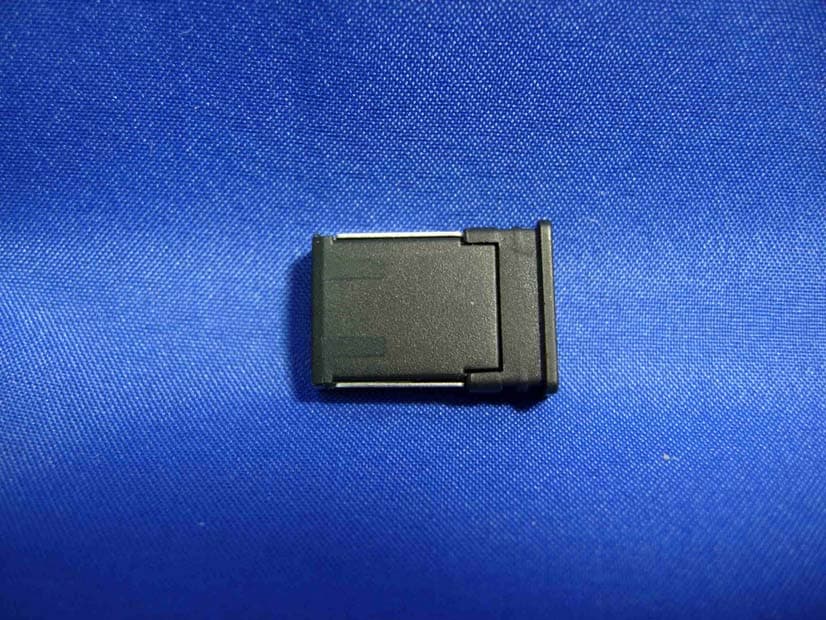
Click to zoom
Application Details
- Equipment Class
- DXX - Part 15 Low Power Communication Device Transmitter
- Date of Grant
- Jan 18, 2011
- Application Purpose
- Original Equipment
- Date of Application
- Jan 18, 2011
- Equipment Note
- Dongle
- Frequency Range
- 2402.00000000 - 2480.00000000
- Company
- KYE SYSTEMS CORP.
- Country
- Taiwan
Documents & Files
Document Text
Text extracted from the exhibit documents filed with the FCC. Open a document above to read the original.
Users Manual
WT410 Wireless Optical Mouse ENGLISH Installing the battery. Connecting to PC. Your package includes: a. 2.4GHz wireless optical mouse b. Nano USB 2.4 GHz receiver c. 1 x AA battery d. Quick Start Guide a b c d Quick Start Guide 1. Remove the cover. 2. Insert the battery into the slot, taking note of the correct polarity. 3. Replace the cover. CAUTION: • The bundled battery is not chargeable. • If you do not use the mouse for a long time, remove the battery. • Use a new and similar-type battery. 1 1. Insert the USB receiver into an available USB port. 2. Turn on the power switch. NOTES: • You can store the USB receiver inside the mouse. • To save power, turn off the power when you are not using the mouse. • When idle or not in use for 20 seconds, the mouse automatically goes to a low-power mode to save power. Move the mouse to return to normal mode. 1 ON 2 OFF Français Contenu de la boîte : a. Souris opti�ue sans��lSouris opti�ue sans ��l 2.4GHz b. R�cepteur USB Nano 2.4R�cepteur USB Nano 2.4 GHz c. 1 x pile AA d. Guide d�utilisationGuide d�utilisation Installer la pile 1. Retirez le couvercle du compartiment à pile. 2. Ins�rez la pile en prenant garde à bien respecter la polarit�. 3. Replacez le couvercle du compartiment à pile. ATTENTION : • La pile incluse n�est pas rechargeable. • Lors d�une inutilisation prolong�e, retirez la pile. • N�utilisez �ue des piles neuves et de même type. Connexion à un PC 1. Ins�rez le r�cepteur USB dans l�un des ports USB de votre ordinateur. 2. Allumez la souris. REMARQUES : • Vous pouvez ranger le r�cepteur USB à l�int�rieur de la souris. • Pour �conomiser de l��nergie, �teignez la souris si elle n�est pas utilis�e. • Après une p�riode d�inactivit� de 10 minutes, la souris basculera automati�uement en mode veille basse puissance pour �conomiser de l��nergie. D�placez la souris pour retourner en mode d�utilisation normal. Deutsch Verpackungsinhalt: a) 2.4GHz drahtlose optische Maus b) Nano-USB 2,4 GHz- Empfänger c) 1x AA-Batterie d) Schnellstartanleitung Einlegen der Batterien 1. Drücken Sie auf den Deckel und schieben Sie ihn zum Entfernen herunter. 2. Legen Sie die Batterien in das Fach ein und beachten Sie dabei die richtige Polung. 3. Schließen Sie den Deckel. VORSICHT: • Die mitgelieferte Batterie ist nicht wiederaufladbar. • Entfernen sie bitte die Batterie, wenn Sie die Maus für längere Zeit nicht benutzen. • Verwenden Sie eine neue Batterie der gleichen Art. Verbinden mit einem PC 1. Stecken Sie den USB- Empfänger in einen freien USB-Anschluss. 2. Schalten Sie den Schalter ein. HINWEISE: • Sie können den USB- Empfänger im Inneren der Maus aufbewahren. • Um Energie zu sparen, schalten Sie bitte den Schalter aus, wenn Sie die Maus nicht benutzen. • Falls im Ruhezustand oder für 2 Minuten nicht bewegt, wird die Maus automatisch in den Stromsparmodus versetzt. Bewegen Sie die Maus, um in den normalen Modus zurückzukehren Italiano Nella confezione sono compresi: a. Mouse ottico wireless da 2.4GHz b. Ricevitore Nano USB 2.4 GHz c. 1 x batteria AA d. Guida Rapida Installazione della batteria 1. Rimuovere la copertura. 2. Inserire la batteria nello slot,prestando attenzione alla corretta polarità. 3. Rimettere a posto il coperchio. ATTENZIONE: • La batteria in dotazione non è ricaricabile. • Se non si utilizza il mouse per lungo tempo, rimuovere la batteria. • Utilizzare una batteria nuova e dello stesso tipo. Connessione al PC 1. Inserire il ricevitore USB in una porta USB disponibile. 2. Accendere l�interruttore di alimentazione. NOTE: • Il ricevitore USB può essere riposto all�interno del mouse. • Per risparmiare energia, disattivare l�alimentazione �uando non si utilizza il mouse. • Quando a riposo o non utilizzato per 20 secondi, il mouse entra automaticamente in modalità a basso consumo per risparmiare energia. Per ripristinare la modalità normale, è sufficiente muovere il mouse. 日本語 パッケージに含まれるもの: a. 2.4GHz 光学式無線 マウス b. 超小型USBレシーバー c. 単3 乾電池 × 1 d. ユーザーマニュアル 電池を取り付ける 1. 底面の電池カバーを外 します。 2. 電池の向きを確認し、 電池を電池収納部に入 れます。 3. 電池カバーを元の位置 に戻します。 注意: • 付属の電池は試供品と なります。また、付属の 電池は充電式ではあり ません。液漏れや発火 する危険性があります ので、絶対に充電しな いでください。 • マウスを長時間使用し ない場合はマウスから 電池を取り外してくだ さい。 • 電池交換の際は、同じ タイプの電池をご使用 ください。 コンピューターに接続する 1. 超小型USBレシーバー をUSBポートに取り付 けます。 2. マウスの電源をONにし ます。 注意: • 超小型USBレシーバー は電池カバーの中に収 納することができます。 • 節電のため、マウスを 使用しない場合は電源 をOFFにしてください。 • マウスは一定時間(約 20秒)操作が行われな いと、自動的に節電モ ード移行します。節電モ ードはマウスを再度操 作することで解除され ます。 한국어 구입하신 패키지의 내용물 은 다음과 같습니다. a. 2.4GHz 무선 옵티컬 마 우스 b. Nano USB 2.4GHz 수 신기 c. 1개의 AA 배터리 d. 사용 설명서 배터리 설치하기 1. 커버를 분리해 주십시 오. 2. (+), (-)에 맞춰 배터리 를 슬롯에 설치해 주십 시오. 3. 커버를 다시 덮어 주십 시오. 주의: • 제품에 포함된 배터리 는 재충전이 불가능합 니다. • 장시간 마우스를 사용 하지 않을 경우 배터리 를 분리해 보관해 주십 시오. • 동일한 규격의 배터리 를 사용해 주십시오. PC에 연결하기 1. USB 수신기를 컴퓨터 의 USB 포트에 연결해 주십시오. 2. 마우스의 전원 스위치 를 켜 주십시오. 참고: • USB 수신기를 마우스 안쪽에 장착할 수 있습 니다. • 마우스를 사용하지 않 는 동안 전원을 꺼 두면 배터리 전원을 절약할 수 있습니다. • 20초 동안 사용하지 않 을 경우, 전원 절약을 위해 마우스는 대기 모 드로 자동 전환됩니다. 마우스를 움직이면 정 상 모드로 복귀합니다. Русский В комплект входят: a. 2.4ГГц беспроводная оптическая мышь b. USB приемник 2,4 ГГц c. 1 x элемент питания типа AA d. Руководство пользователя Установка элементов питания. 1. Снимите крышку. 2. Вставьте батарейки, соблюдая полярность. 3. Закройте крышку. ОСТОРОЖНО: • В комплекте поставляются обычные элементы питания. • Извлеките батарейки, если Вы не пользуетесь мышью длительное время. • Используйте однотипные элементы питания. Подключение к ПК 1. Подключите USB- приемник к свободному порту USB. 2. Включите переключатель питания. ПРИМЕЧАНИЯ: • Вы можете хранить USB-приемник внутри мыши. • Для экономии энергии, выключите питание, когда не используете мышь. • В в ждущем режиме или при неиспользовании мыши в течение 20 минут, мышь автоматически переключается в спящий режим. Переместите мышь для возврата в нормальный режим. Rating: 5V - - - 100mA 2 3 Čeština Obsah krabice: a. Bezdrátová optická myš 2,4 GHz b. Přijímač Nano USB 2,4 GHz c. 1 x baterie AA d. Stručná příručka Vložení baterie 1. Sejměte kryt. 2. Vložte baterii do přihrádky tak, aby…
Text truncated - open the document above for the full version.
Attestation Statements
KYE SYSTEMS CORP. FCC ID.: FSUKM016 No.492, Sec. 5, Chongxin Rd.Sanchong Dist., New Taipei City 24160, Taiwan (R.O.C.).Tel : +886-2-2995-6645 Federal Communications Commission Jan. 13, 2011 Authorization and Evaluation Division ATTESTATION FCC ID: FSUKM016 Product: Dongle Model: OM-100018/R We don't provide any controls or software to allow operation outside the USA frequency band when we sell this product in USA. Sincerely, ------------------------------------------------------- Ming Huang Lee / Section Supervisor KYE SYSTEMS CORP.
Cover Letter(s)
RF_160, Issue 02 KYE SYSTEMS CORP. No.492, Sec. 5, Chongxin Rd.Sanchong Dist., New Taipei City 24160, Taiwan (R.O.C.) Tel: 886-2-2995-6645 FAX: 886-2-2278-9520 Declaration of Authorization We Name: KYE SYSTEMS CORP. Address: No.492, Sec. 5, Chongxin Rd.Sanchong Dist., New Taipei City 24160, Taiwan (R.O.C.) City: Taipei ............................................................ . ......... Country: Taiwan ... R.O.C. ...................................................... Declare that: Name Representative of agent: Gene Chang (1) Agent Company name: QuieTek Corp. Address: Fl.2, No.345, Xin-hu 2 nd Rd., Nei-hu District City: Taipei Country Taiwan is authorized to apply for Certification of the following product(s): Product description: Dongle Type designation: OM-100018/R Trademark: Genius on our behalf. Date: ...... 2011/01/13 ... .. City: ...... Taipei ...... .. Name: ...... Ming Huang Lee ...... .. (2) Function: Section Supervisor Signature: -------------------------------------- Notes: (1): Required for FCC application RF_160, Issue 02 (2): For FCC it must be the Grantee Code “owner” or the authorized agent.
Cover Letter(s)
KYE SYSTEMS CORP. No.492, Sec. 5, Chongxin Rd.Sanchong Dist., New Taipei City 24160, Taiwan (R.O.C.) TEL No: 886-2-2995-6645 FAX No.: 886-2-2278-9520 Attestation for FCC Declaration of Conformity FCC ID: FSUKM016 Data: Jan. 13, 2011 Please be notified that we, the undersigned, KYE SYSTEMS CORP. declares that the product which bears the above FCC ID is also compliant with the FCC requirements for DoC. The test report number supporting the DoC is DOCTR0001 (10C327R-RFUSP24V02). Testing in regards to this report was done by QuieTek Corporation, located at 2F, No.345, Xinhu 2nd Rd., Neihu District,Taipei City 114,Taiwan,R.O.C. which has been accredited in accordance to all of the requirements of 47CFR 2.948 (d) and (e) of the FCC rules and KDB349827. Sincerely, Ming Huang Lee / Section Supervisor KYE SYSTEMS CORP. Tel: 886-2-2995-6645 Fax: 886-2-2278-9520 Email: [email protected]
Cover Letter(s)
KYE SYSTEMS CORP. FCC ID.: FSUKM016 No.492, Sec. 5, Chongxin Rd.Sanchong Dist., New Taipei City 24160, Taiwan (R.O.C.) Tel : +886-2-2995-6645 KYE SYSTEMS CORP. No.492, Sec. 5, Chongxin Rd.Sanchong Dist., New Taipei City 24160, Taiwan (R.O.C.) Tel : +886-2-2995-6645 Fax: +886-2-2278-9520 Federal Communications Commission Jan. 13, 2011 Authorization and Evaluation Division Confidentiality Request Pursuant to Sections 0.457 and 0.459 of the Commission’s Rules, the Applicant Hereby requests confidential treatment of information accompanying this Application As outlined below: Schematics: (OM-100018/R) Schem Block Diagram: (OM-100018/R) BlkDia The above materials contain trade secrets and proprietary information not customarily Released to the public. The public disclosure of these matters might be harmful to the Applicant and provide unjustified benefits to its competitors. The Applicant understands that pursuant to Rule 0.457, disclosure of this Application and all accompanying documentation will not be made before the date of the Grant for this application. Sincerely, ------------------------------------------------------- Ming Huang Lee / Section Supervisor KYE SYSTEMS CORP.
External Photos
Report No.: 10C327R-RFUSP30V01-A Page : 1 of 5 Attachment 2 : EUT Detailed Photographs (1) EUT Photo (2) EUT Photo
ID Label/Location Info
KYE SYSTEMS CORP. FCC ID.: FSUKM016 No.492, Sec. 5, Chongxin Rd.Sanchong Dist., New Taipei City 24160, Taiwan (R.O.C.).Tel : +886-2-2995-6645 FCC ID Label The FCC ID Label will be placed on the equipment as shown in the photograph below.
Internal Photos
Report No.: 10C327R-RFUSP30V01-A Page : 2 of 5 (3) EUT Photo (4) EUT Photo Report No.: 10C327R-RFUSP30V01-A Page : 3 of 5 (5) EUT Photo (6) EUT Photo Report No.: 10C327R-RFUSP30V01-A Page : 4 of 5 (7) EUT Photo (8) EUT Photo Report No.: 10C327R-RFUSP30V01-A Page : 5 of 5 (9) EUT Photo (10) EUT Photo
Operational Description
Report No. 10C327R-RFUSP30V01-A Page: 5 of 35 1.2. Operational Description The EUT is Dongle built-in 2.4GHz transceiver. The operation frequency is from 2402MHz to 2480MHz with GFSK modulation. The signal will be transmitted through 2.4GHz RF signal from the Printed on PCB antenna. DC 5V (Power by USB) shall be provided for EUT operation. Joy is a 3-button 2.4GHz wireless optical mouse with nano receiver. Equipped with Pixart Magic Lens, Joy delivers excellent tracking performance on not only the regular office tables but also on special surfaces such as glossy marble stones and ceramic tile. Joy is designed to be “plug & play”. Simply plug on the dongle to the computer and power on the mouse, the mouse will be detected automatically and start to work.
Test Report
Report No. 10C327R-RFUSP30V01-A Page: 1 of 35 Test Report Product Name Dongle Model No. OM-100018/R FCC ID FSUKM016 Applicant KYE SYSTEMS CORP. Address No.492, Sec. 5, Chongxin Rd.Sanchong Dist., New Taipei City 24160, Taiwan (R.O.C.) Date of Receipt Dec. 20, 2010 Issued Date Jan. 07, 2011 Report No. 10C327R-RFUSP30V01-A Report Version V1.0 The test results relate only to the samples tested. The test report shall not be reproduced except in full without the written approval of QuieTek Corporation. This report must not be used to claim product endorsement by NVLAP any agency of the U.S. Government Report No. 10C327R-RFUSP30V01-A Page: 2 of 35 Test Report Certification Issued Date: Jan. 07, 2011 Report No.: 10C327R-RFUSP30V01-A Test results relate only to the samples tested. The test report shall not be reproduced except in full without the written approval of QuieTek Corporation. This report must not be used to claim product endorsement by NVLAP any agency of the U.S. Government Product Name Dongle Applicant KYE SYSTEMS CORP. Address No.492, Sec. 5, Chongxin Rd.Sanchong Dist., New Taipei City 24160, Taiwan (R.O.C.) Manufacturer KYE SYSTEMS CORP. Model No. OM-100018/R EUT Rated Voltage DC 5V (Power by USB) EUT Test Voltage AC 120V/60Hz Trade Name Genius Applicable Standard FCC CFR Title 47 Part 15 Subpart C: 2009 ANSI C63.4: 2003 Test Result Complied Documented By : ( Senior Adm. Specialist / Rita Huang ) Tested By : ( Engineer / Eason Hung ) Approved By : ( Manager / Vincent Lin) Report No. 10C327R-RFUSP30V01-A Page: 3 of 35 TABLE OF CONTENTS Description Page 1. GENERAL INFORMATION .....................................................................................................4 1.1. EUT Description............................................................................................................................4 1.2. Operational Description ................................................................................................................5 1.3. Tested System Datails....................................................................................................................6 1.4. Configuration of Test System ........................................................................................................7 1.5. EUT Exercise Software .................................................................................................................7 1.6. Test Facility ...................................................................................................................................8 2. Conducted Emission....................................................................................................................9 2.1. Test Equipment..............................................................................................................................9 2.2. Test Setup ......................................................................................................................................9 2.3. Limits ............................................................................................................................................9 2.4. Test Procedure .............................................................................................................................10 2.5. Uncertainty ..................................................................................................................................10 2.6. Test Result of Conducted Emission.............................................................................................11 3. Radiated Emission .....................................................................................................................13 3.1. Test Equipment............................................................................................................................13 3.2. Test Setup ....................................................................................................................................14 3.3. Limits ..........................................................................................................................................15 3.4. Test Procedure .............................................................................................................................15 3.5. Uncertainty ..................................................................................................................................16 3.6. Test Result of Radiated Emission................................................................................................17 4. Band Edge ..................................................................................................................................26 4.1. Test Equipment............................................................................................................................26 4.2. Test Setup ....................................................................................................................................27 4.3. Limits ..........................................................................................................................................28 4.4. Test Procedure .............................................................................................................................28 4.5. Uncertainty ..................................................................................................................................28 4.6. Test Result of Band Edge ............................................................................................................29 5. EMI Reduction Method During Compliance Testing ............................................................33 Attachment 1: EUT Test Photographs Attachment 2: EUT Detailed Photographs Report No. 10C327R-RFUSP30V01-A Page: 4 of 35 1. GENERAL INFORMATION 1.1. EUT Description Product Name Dongle Trade Name Genius Model No. OM-100018/R F…
Text truncated - open the document above for the full version.
Test Setup Photos
Report No.: 10C327R-RFUSP30V01-A Page : 1 of 3 Attachment 1: EUT Test Setup Photographs Front View of Conducted Test Back View of Conducted Test Report No.: 10C327R-RFUSP30V01-A Page : 2 of 3 Front View of Radiated Test Back View of Radiated Test Report No.: 10C327R-RFUSP30V01-A Page : 3 of 3 Front View of Radiated Test (Horn) Back View of Radiated Test (Horn)
Contact Information
Applicant
Ricky Chen(Section Supervisor)
Technical Contact
QuieTek CorporationVincent Lin
No. 5-22, Ruishukeng, Linkou Dist. · New Taipei City · Taiwan
Test Firm
QUIETEKJames Chang
Technical Specifications
| # | Rule Parts | Frequency Range | Power Output |
|---|---|---|---|
| 1 | 15C | 2.40 GHz - 2.48 GHz | - |
Other Applications from KYE SYSTEMS CORP.

FSUGG0AM
Aug 20, 2026Wireless Speaker
Equipment Class
DSS - Part 15 Spread Spectrum Transmitter
FSUGKZI2
May 23, 2026Wireless Keyboard
Equipment Class
DXX - Part 15 Low Power Communication Device TransmitterFSUGMZN6
Apr 20, 2026Wireless Mouse
Equipment Class
DTS - Digital Transmission SystemFSUGMZN4
Apr 03, 2026Wireless Mouse
Equipment Class
DXX - Part 15 Low Power Communication Device TransmitterFSUGMZN7
Apr 01, 2026Wireless Mouse
Equipment Class
DTS - Digital Transmission System