G2R-5524Kidi Superstar Jr. Karaoke
VTech Electronics Limited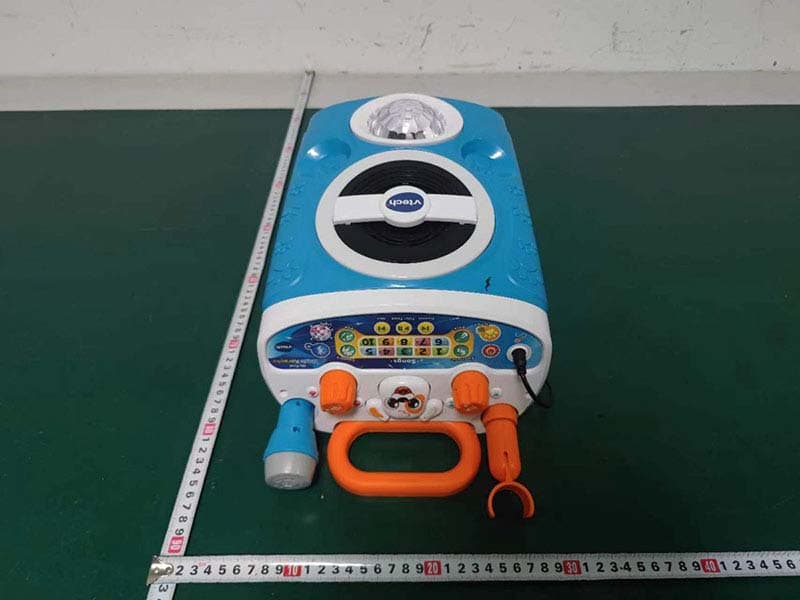
Click to zoom
Application Details
- Equipment Class
- DSS - Part 15 Spread Spectrum Transmitter
- Date of Grant
- Mar 06, 2023
- Application Purpose
- Original Equipment
- Date of Application
- Mar 06, 2023
- Equipment Note
- Kidi Superstar Jr. Karaoke
- Frequency Range
- 2402.00000000 - 2480.00000000
- Company
- VTech Electronics Limited
- Country
- Hong Kong
Documents & Files
Document Text
Text extracted from the exhibit documents filed with the FCC. Open a document above to read the original.
Users Manual
16 Supplier’s Declaration of Conformity 47 CFR § 2.1077 Compliance Information Trade Name: VTech ® Model: 5524 Product Name: Kidi Superstar Jr. Karaoke TM Responsible Party: VTech Electronics North America, L.L.C. Address: 1156 W. Shure Drive, Suite 200 Arlington Heights, IL 60004 Website: vtechkids.com THIS DEVICE COMPLIES WITH PART 15 OF THE FCC RULES. OPERATION IS SUBJECT TO THE FOLLOWING TWO CONDITIONS: (1) THIS DEVICE MAY NOT CAUSE HARMFUL INTERFERENCE, AND (2) THIS DEVICE MUST ACCEPT ANY INTERFERENCE RECEIVED, INCLUDING INTERFERENCE THAT MAY CAUSE UNDESIRED OPERATION. CAN ICES-003(B)/NMB-003(B) CHOKING HAZARD—Long cord. Not for children under 3 yrs. WARNING: DANGER DE STRANGULATION— Longue corde. Ne convient pas aux enfants de moins de 3 ans. AVERTISSEMENT: PRODUCT WARRANTY/ CONSUMER GUARANTEES Australian Customers: VTECH ELECTRONICS (AUSTRALIA) PTY LIMITED – CONSUMER GUARANTEES Under the Australian Consumer Law, a number of consumer guarantees apply to goods and services supplied by VTech Electronics (Australia) Pty Limited. Please refer to vtech.com.au/ consumerguarantees for further information. 17 Visit our website for more information about our products, downloads, resources and more. vtechkids.com vtechkids.ca vtech.com.au TM & © 2023 VTech Holdings Limited. All rights reserved. IM-552400-000 Version:0 Read our complete warranty policy online at vtechkids.com/warranty vtechkids.ca/warranty My Song Book Song 1 Believe in Yourself If you can dream it, You can do it. Just believe in yourself, Believe in yourself. If you can dream it, You can do it. Just believe in yourself, Believe in yourself ... yeah! Song 2 Muffin Man Oh, do you know the muffin man, The muffin man, the muffin man? Oh, do you know the muffin man, That lives on Drury Lane? Oh, yes, I know the muffin man, The muffin man, the muffin man. Oh, yes, I know the muffin man, That lives on Drury Lane. Song 3 Old MacDonald Old MacDonald had a farm E - I - E - I - O And on his farm he had a cow E - I - E - I - O With a moo-moo here, And a moo-moo there, Here a moo, there a moo Everywhere a moo-moo, Old MacDonald had a farm E - I - E - I - O Song 4 Skip to My Lou Skip, skip, skip to my Lou, Skip, skip, skip to my Lou, Skip, skip, skip to my Lou, Skip to my Lou, my darlin’. Sing, sing, sing with me, Sing, sing, sing with me, Sing, sing, sing with me, Sing with me, my darlin’! Song 5 Looby Loo Here we go looby loo, Here we go looby light, Here we go looby loo, All on a Saturday night. You put your right hand in, You take your right hand out, You give your hand A shake, shake, shake, And turn yourself about! Song 6 Mary Had a Little Lamb Mary had a little lamb, Little lamb, little lamb, Mary had a little lamb, Whose fleece was white as snow. And everywhere that Mary went, Mary went, Mary went, Everywhere that Mary went The lamb was sure to go. Song 7 London Bridge London Bridge is falling down, Falling down, falling down, London Bridge is falling down, My fair lady! Song 8 The Bear Went Over the Mountain The bear went over the mountain, The bear went over the mountain, The bear went over the mountain, To see what he could see. And all that he could see, And all that he could see, Was the other side of the mountain, The other side of the mountain, The other side of the mountain, Was all that he could see. Song 9 Twinkle, Twinkle, Little Star Twinkle, twinkle, little star, How I wonder what you are, Up above the world so high, Like a diamond in the sky, Twinkle, twinkle, little star, How I wonder what you are! Song 10 Take Me Out to the Ball Game Take me out to the ball game, Take me out with the crowd! Buy me some peanuts and Cracker Jack, I don’t care if I never get back. Let me root, root, root for the home team, If they don’t win, it’s a shame. For it’s one, two, three strikes, you’re out, At the old ball game!
Users Manual
Instruction Manual Kidi Superstar Jr. Karaoke TM 2 10 11 12131415 16 17 18 INTRODUCTION Thank you for purchasing the Kidi Superstar Jr. Karaoke™! Sing along to ten built-in songs and 20 popular melodies in four different music genres! You can also sing along to your favorite songs by connecting your own external music player via Bluetooth ® wireless technology. The multicolored lights add to the atmosphere, and you can adjust tempo and volume and create cute voice-changing effects. Let’s start the show! 1 3 2 4 5 6 7 8 9 3 INCLUDED IN THE PACKAGE • Kidi Superstar Jr. Karaoke TM • Left Wheel Bracket • Right Wheel Bracket • Microphone • Quick Start Guide WARNING All packing materials such as tape, plastic sheets, packaging locks, removable tags, cable ties, cords and packaging screws are not part of this toy, and should be discarded for your child’s safety. NOTE Please save this Instruction Manual as it contains important information. ATTENTION Pour la sécurité de votre enfant, débarrassez-vous de tous les produits d’emballage tels que rubans adhésifs, feuilles de plastique, attaches, étiquettes, cordons et vis d’emballage. Ils ne font pas partie du jouet. NOTE Il est conseillé de sauvegarder ce manuel d’instructions car il comporte des informations importantes. 2Volume Dial 1Extendable Microphone Stand 3Power Button 6Tempo Button 4Microphone Jack Microphone7 Puppy Button8 Voice Changer (Normal/High/Low/Robot) 9 13 Play & Pause Button 12 Previous Button 14 Next Button 11 Disco Light On/Off Button 17 Speaker 18Disco Light 15 Song Buttons 16Color Change Light Ring Bluetooth ® Button 10 5 Music Style Buttons (Electronic/Country/Rock/Pop) 4 WARNING: Adult assembly required for battery installation. Keep batteries out of reach of children. ATTENTION : Les piles ou accumulateurs doivent être installés par un adulte. Tenir les piles ou accumulateurs hors de portée des enfants. GETTING STARTED Battery Removal and Installation 1. Make sure the unit is turned Off. 2. Find the battery cover located on the back of the unit, use a screwdriver to loosen the screw, and then open the battery cover. 3. Remove old batteries by pulling up on one end of each battery. 4. Install 4 new AA (AM-3/LR6) batteries following the diagram inside the battery box. (For best performance, alkaline batteries or fully charged Ni-MH rechargeable batteries are recommended.) 5. Replace the battery cover and tighten the screw to secure. 5 IMPORTANT: BATTERY INFORMATION • Insert batteries with the correct polarity (+ and -). • Do not mix old and new batteries. • Do not mix alkaline, standard (carbon-zinc) or rechargeable batteries. • Only batteries of the same or equivalent type as recommended are to be used. • Do not short-circuit the supply terminals. • Remove batteries during long periods of non-use. • Remove exhausted batteries from the toy. • Dispose of batteries safely. Do not dispose of batteries in fire. RECHARGEABLE BATTERIES: • Remove rechargeable batteries (if removable) from toy before charging. • Rechargeable batteries are only to be charged under adult supervision. • Do not charge non-rechargeable batteries. 6 IMPORTANT : INFORMATIONS CONCERNANT LES PILES • Mettre en place les piles ou les accumulateurs en respectant les polarités + et –. • Ne pas mélanger des piles ou des accumulateurs neufs avec des usagés. • Ne pas mélanger différents types de piles : alcalines, zinc-carbone et rechargeables. • Seules des piles du type recommandé doivent être utilisées. • Ne pas mettre les bornes d’une pile ou d’un accumulateur en court-circuit (en reliant directement le + et le –). • Retirer les piles ou les accumulateurs en cas de non-utilisation prolongée. • Enlever les piles ou les accumulateurs usagés du jouet. • Ne les jeter ni au feu ni dans la nature. PILES RECHARGEABLES • Enlever, lorsque c’est possible, les accumulateurs du jouet pour les recharger. • Les accumulateurs ne doivent être chargés que sous la surveillance d’un adulte. • Ne pas tenter de recharger des piles non rechargeables. 7 1 2 1. Left Wheel Bracket 2. Right Wheel Bracket ASSEMBLY INSTRUCTIONS With the Kidi Superstar Jr. Karaoke TM , safety comes first. Adult assembly required. For your child’s safety, do not let them play with this toy until it is fully assembled. 1. Insert the Left Wheel Bracket into the left slot. 2. Insert the Right Wheel Bracket into the right slot. 8 PRODUCT FEATURES 1. Power Button Press the Power Button to turn the unit On. Press it again to turn the unit Off. 2. Microphone Plug the Microphone into the Microphone Jack, then speak or sing into the Microphone. The built-in speaker will amplify your voice. 3. Song Buttons Press a Song Button to play the built-in sing-along songs. 4. Music Style Buttons Press a Music Style Button to choose four types of melodies: Electronic , Country , Rock or Pop . 5. Previous Button Press the Previous Button to play the previous song or melody. Kidi Superstar Jr. Karaoke TM 9 6. Play & Pause Button Press the Play & Pause Button to play or pause the music. 7. Next Button Press the Next Button to play the next song or melody. 8. Tempo Button Press the Tempo Button to change the melody tempo. 9. Disco Light On/Off Button Press the Disco Light On/Off Button turn the light off or on. 10. Puppy Button Press the Puppy Button during a sing- along song to remove the vocals or add them back! Kidi Superstar Jr. Karaoke TM 10 11. Volume Dial Turn the Volume Dial clockwise to increase the volume or counter- clockwise to decrease it. 12. Voice Changer Turn the Voice Changer, then sing or speak into the Microphone to make your voice sound high-pitched, low- pitched, or robotic! 13. Bluetooth ® Button Press the Bluetooth Button to connect with other devices with Bluetooth ® wireless technology. NOTE See the Bluetooth ® Pairing section below for instructions. 14. AUTOMATIC SHUT-OFF To preserve battery life, the Kidi Superstar Jr. Karaoke™ will automatically shut off after several minutes without any button or voice …
Text truncated - open the document above for the full version.
External Photos
External Photos M/N: 5524 External Photos M/N: 5524 External Photos M/N: 5524
ID Label/Location Info
VTECH PO Box 10042, 6000 GA Weert, The Netherlands Napier Court, Abingdon, OX14 3YT, UK THIS DEVICE COMPLIES WITH PART 15 OF THE FCC RULES. OPERATION IS SUBJECT TO THE FOLLOWING TWO CONDITIONS: (1) THIS DEVICE MAY NOT CAUSE HARMFUL INTERFERENCE, AND (2) THIS DEVICE MUST ACCEPT ANY INTERFERENCE RECEIVED, INCLUDING INTERFERENCE THAT MAY CAUSE UNDESIRED OPERATION. CAN ICES-003(B)/NMB-003(B) IC: 1135D-5524 FCC ID: G2R-5524 TM & © 2023 VTech Model: US Version: 30-056886-000-004
Internal Photos
Internal Photos M/N: 5524 Internal Photos M/N: 5524
RF Exposure Info
FCC ID: G2R-5524 EST Technology Co. ,Ltd Report No. ESTE-R2302186 Page 1 of 4 FCC 47 CFR MPE REPORT VTech Electronics Limited Kidi Superstar Jr.Karaoke Model Number: 5524 Additional Model: 80-552400, 80-552403, 80-552404, 80-552405, 80-552422, 80-552423, 80-5524XX (XX=00~99) FCC ID: G2R-5524 Applicant: VTech Electronics Limited Address: 23F Tai Ping Industrial Center, Block 1, 57 Ting Kok Road, Tai Po, Hong Kong Prepared By: EST Technology Co., Ltd. Chilingxiang, Qishantou, Santun, Houjie, Dongguan, Guangdong, China Tel: 86-769-83081888-808 Report Number: ESTE-R2302186 Date of Test: Feb. 13~21, 2023 Date of Report: Feb. 22, 2023 FCC ID: G2R-5524 EST Technology Co. ,Ltd Report No. ESTE-R2302186 Page 2 of 4 Maximum Permissible Exposure 1. Applicable Standards Systems operating under the provisions of this section shall be operated in a manner that ensures that the public is not exposed to radio frequency energy level in excess limit for maximum permissible exposure. In accordance with 47 CFR FCC Part 2 Subpart J, section 2.1091 this device has been defined as a mobile device whereby a distance of 0.2m normally can be maintained between the user and the device. 1.1. Limits for Maximum Permissible Exposure (MPE) (a) Limits for Occupational/Controlled Exposure Frequency Range (MHz) Electric Field Strength (E) (V/m) Magnetic Field Strength (H) (A/m) Power Density (S) (mW/cm 2 ) Averaging Times ︱E︱ 2 ,︱H︱ 2 or S (minutes) 0.3-3.0 614 1.63 (100)* 6 3.0-30 1842/f 4.89/f (900/f)* 6 30-300 61.4 0.163 1.0 6 300-1500 F/300 6 1500-10000 5 6 (b) Limits for General Population / Uncontrolled Exposure Frequency Range (MHz) Electric Field Strength (E) (V/m) Magnetic Field Strength (H) (A/m) Power Density (S) (mW/cm 2 ) Averaging Times ︱E︱ 2 ,︱H︱ 2 or S (minutes) 0.3-1.34 614 1.63 (100)* 30 1.34-30 824/f 2.19/f (180/f)* 30 30-300 27.5 0.073 0.2 30 300-1500 F/1500 30 1500-10000 1.o 30 Note: f=frequency in MHz; *Plane-wave equivalent power density FCC ID: G2R-5524 EST Technology Co. ,Ltd Report No. ESTE-R2302186 Page 3 of 4 1.2. MPE Calculation Method E (V/m) = d G×P×30 Power Density: Pd (W/m 2 ) = 377 E 2 E = Electric Field (V/m) P = Peak RF output Power (W) G = EUT Antenna numeric gain (numeric) d = Separation distance between radiator and human body (m) The formula can be changed to Pd = 2 d×377 G×P×30 From the peak EUT RF output power, the minimum mobile separation distance, d=0.2m, as well as the gain of the used antenna, the RF power density can be obtained FCC ID: G2R-5524 EST Technology Co. ,Ltd Report No. ESTE-R2302186 Page 4 of 4 2. Conducted Power Result Mode Frequency (MHz) Peak output power (dBm)Peak output power (mW) GFSK 2402 -1.98 0.634 2441 -2.36 0.581 2480 -2.82 0.522 π/4-DQPSK 2402 0.47 1.114 2441 -0.07 0.984 2480 -0.60 0.871 3. Calculated Result and Limit Mode Peak output power (dBm) Target power (dBm) MAX Target power (dBm) Antenna gain Power Density (S) (mW /cm 2 ) Limited of Power Density (S) (mW /cm 2 ) Test Result (dBi) (Linear) GFSK -1.98 -1±1 0 0 1.000 0.0002 1 Complies π/4-DQPSK 0.47 0±1 1 0 1.000 0.0003 1 Complies End of Test Report
Test Report
[VTECH] [2.4GHz inverted F antenna] Model: 5524 Antenna description: This inverted F antenna is optimized and used in the Bluetooth speaker model. This antenna is integrated in main PCB. Ordering information: Model Description 5524 2.4GHz inverted F antenna Specification: Operation Frequency Range 2400-2480 MHz Maximum Gain 0 dBi Type inverted F antenna Operation bandwidth 80MHz Nominal Impedance ~50 ohms Connectors - Dimensions 14.7 x 5.7 mm Manufacturer Vtech Telecommunications Ltd Manufacturer address 23/F, Tai Ping Industrial Centre, Blk1, 57 Ting Kok Road, Tai Po, Hong Kong Model number ANT-5524-F-BT-1 [VTECH] [2.4GHz inverted F antenna] Antenna pattern (2436MHz) (the frequency with maximum gain) XY plane (gain theta) Coordination: [VTECH] [2.4GHz inverted F antenna] Physical Dimension: Figure 1 Physical dimension (mm)
Test Report
FCCID:G2R-5524 ESTTechnologyCo.,LtdReportNo.ESTE-R2302185Page1of65 FCCPART15CTESTREPORTFORCERTIFICATION OnBehalfof VTechElectronicsLimited KidiSuperstarJr.Karaoke ModelNumber:5524 AdditionalModel:80-552400,80-552403,80-552404,80-552405, 80-552422,80-552423,80-5524XX(XX=00~99) FCCID:G2R-5524 Applicant:VTechElectronicsLimited Address:23FTaiPingIndustrialCenter,Block1,57TingKokRoad, TaiPo,HongKong PreparedBy:ESTTechnologyCo.,Ltd. Chilingxiang,Qishantou,Santun,Houjie,Dongguan,Guangdong,China Tel:86-769-83081888-808 ReportNumber:ESTE-R2302185 DateofTest:Feb.13~21,2023 DateofReport:Feb.22,2023 FCCID:G2R-5524 ESTTechnologyCo.,LtdReportNo.ESTE-R2302185Page2of65 TABLEOFCONTENTS DescriptionPage TESTREPORTVERIFICATION........................................................................................................................3 1.GENERALINFORMATION.....................................................................................................................5 1.1.DescriptionofDevice(EUT).................................................................................................................5 1.2.AntennaInformation..............................................................................................................................5 1.3.InformationofRFCable........................................................................................................................5 2.SUMMARYOFTEST.............................................................................................................................6 2.1.Summaryoftestresult............................................................................................................................6 2.2.TestFacilities..........................................................................................................................................7 2.3.Measurementuncertainty.......................................................................................................................8 2.4.Assistantequipmentusedfortest...........................................................................................................8 2.5.BlockDiagram........................................................................................................................................8 2.6.Testmode...............................................................................................................................................9 2.7.ChannelList..........................................................................................................................................10 2.8.PowerSettingofTestSoftware............................................................................................................10 2.9.TestEquipment.....................................................................................................................................11 3.MAXIMUMPEAKOUTPUTPOWER.....................................................................................................12 3.1.Limit.....................................................................................................................................................12 3.2.TestSetup.............................................................................................................................................12 3.3.SpectrumAnalyzerSetting...................................................................................................................12 3.4.TestProcedure......................................................................................................................................12 3.5.TestResult............................................................................................................................................12 4.20DBBANDWIDTH...........................................................................................................................13 4.1.Limit.....................................................................................................................................................13 4.2.TestSetup.............................................................................................................................................13 4.3.SpectrumAnalyzerSetting...................................................................................................................13 4.4.TestProcedure......................................................................................................................................13 4.5.TestResult............................................................................................................................................13 5.CARRIERFREQUENCYSEPARATION..................................................................................................14 5.1.Limit.....................................................................................................................................................14 5.2.TestSetup.............................................................................................................................................14 5.3.SpectrumAnalyzerSetting...................................................................................................................14 5.4.TestProcedure......................................................................................................................................14 5.5.TestResult............................................................................................................................................14 6.NUMBEROFHOPPINGCHANNEL......................................................................................................15 6.1.Limit.....................................................................................................................................................15 6.2.TestSetup..............................................................…
Text truncated - open the document above for the full version.
Test Report
FCCID:G2R-5524 ESTTechnologyCo.,LtdReportNo.ESTE-R2302185Page50of65 AppendixF:Referencelevelmeasurement TestResult TestModeAntennaFreq(MHz)Max.Point[MHz]Result[dBm] DH5Ant1 24022402.07-2.97 24412440.87-3.06 24802480.04-3.82 2DH5Ant1 24022402.18-2.70 24412441.16-3.10 24802480.19-3.51 FCCID:G2R-5524 ESTTechnologyCo.,LtdReportNo.ESTE-R2302185Page51of65 TestGraphs DH5_Ant1_2402 DH5_Ant1_2441 DH5_Ant1_2480 FCCID:G2R-5524 ESTTechnologyCo.,LtdReportNo.ESTE-R2302185Page52of65 2DH5_Ant1_2402 2DH5_Ant1_2441 2DH5_Ant1_2480 FCCID:G2R-5524 ESTTechnologyCo.,LtdReportNo.ESTE-R2302185Page53of65 AppendixG:Bandedgemeasurements TestResult TestModeAntennaChNameFreq(MHz) RefLevel [dBm] Result [dBm] Limit [dBm] Verdict DH5Ant1 Low2402-2.97-49.61≤-22.97PASS High2480-3.82-51.16≤-23.82PASS LowHop_2402-3.04-49.5≤-23.04PASS HighHop_2480-3.81-51.13≤-23.81PASS 2DH5Ant1 Low2402-2.70-49.29≤-22.7PASS High2480-3.51-51.14≤-23.51PASS LowHop_2402-6.68-51.9≤-26.68PASS HighHop_2480-3.63-51.47≤-23.63PASS FCCID:G2R-5524 ESTTechnologyCo.,LtdReportNo.ESTE-R2302185Page54of65 TestGraphs DH5_Ant1_Low_2402 DH5_Ant1_High_2480 DH5_Ant1_Low_Hop_2402 FCCID:G2R-5524 ESTTechnologyCo.,LtdReportNo.ESTE-R2302185Page55of65 DH5_Ant1_High_Hop_2480 2DH5_Ant1_Low_2402 2DH5_Ant1_High_2480 FCCID:G2R-5524 ESTTechnologyCo.,LtdReportNo.ESTE-R2302185Page56of65 2DH5_Ant1_Low_Hop_2402 2DH5_Ant1_High_Hop_2480 FCCID:G2R-5524 ESTTechnologyCo.,LtdReportNo.ESTE-R2302185Page57of65 AppendixH:ConductedSpuriousEmission TestResult TestModeAntennaFreq(MHz) FreqRange [MHz] RefLevel [dBm] Result [dBm] Limit [dBm] Verdict DH5Ant1 240230~26500-2.97-43.03≤-22.97PASS 244130~26500-3.06-43.45≤-23.06PASS 248030~26500-3.82-42.91≤-23.82PASS 2DH5Ant1 240230~26500-2.70-42.89≤-22.7PASS 244130~26500-3.10-43.48≤-23.1PASS 248030~26500-3.51-43.44≤-23.51PASS FCCID:G2R-5524 ESTTechnologyCo.,LtdReportNo.ESTE-R2302185Page58of65 TestGraphs DH5_Ant1_2402_30~26500 DH5_Ant1_2441_30~26500 DH5_Ant1_2480_30~26500 FCCID:G2R-5524 ESTTechnologyCo.,LtdReportNo.ESTE-R2302185Page59of65 2DH5_Ant1_2402_30~26500 2DH5_Ant1_2441_30~26500 2DH5_Ant1_2480_30~26500 FCCID:G2R-5524 ESTTechnologyCo.,LtdReportNo.ESTE-R2302185Page60of65 13.TESTSETUPPHOTO RadiatedTest(Below1GHz) RadiatedTest(Above1GHz) FCCID:G2R-5524 ESTTechnologyCo.,LtdReportNo.ESTE-R2302185Page61of65 14.EUTPHOTO ExternalPhotos M/N:5524 FCCID:G2R-5524 ESTTechnologyCo.,LtdReportNo.ESTE-R2302185Page62of65 ExternalPhotos M/N:5524 FCCID:G2R-5524 ESTTechnologyCo.,LtdReportNo.ESTE-R2302185Page63of65 ExternalPhotos M/N:5524 FCCID:G2R-5524 ESTTechnologyCo.,LtdReportNo.ESTE-R2302185Page64of65 InternalPhotos M/N:5524 FCCID:G2R-5524 ESTTechnologyCo.,LtdReportNo.ESTE-R2302185Page65of65 InternalPhotos M/N:5524 EndofTestReport
Test Setup Photos
Radiated Test (Below 1GHz) Radiated Test (Above 1GHz)
Contact Information
Applicant
Antony Wong(Senior Manager)
Test Firm
EST Technology Co., Ltd.Iceman Hu
[email protected]+86 0769-83081888
Technical Specifications
| # | Rule Parts | Frequency Range | Power Output |
|---|---|---|---|
| 1 | 15C | 2.40 GHz - 2.48 GHz | 1.11 mW |
Other Applications from VTech Electronics Limited
G2R-5967
Sep 10, 2026Secret Safe Locker
Equipment Class
DSS - Part 15 Spread Spectrum TransmitterG2R-6250
Aug 03, 2026LET S RECORD LEARNING SPEAKER
Equipment Class
DSS - Part 15 Spread Spectrum TransmitterG2R-5909
Apr 08, 2026Microphone Pro
Equipment Class
DSS - Part 15 Spread Spectrum TransmitterG2R-5944
Mar 17, 2026My Mini Locker
Equipment Class
DSS - Part 15 Spread Spectrum TransmitterG2R-6150
Dec 30, 2025My Best Pal Scout, My Best Pal Violet
Equipment Class
DTS - Digital Transmission System