GV333384Short Range Low Power FM Transmitter for iPod
ACCO Brands, Inc.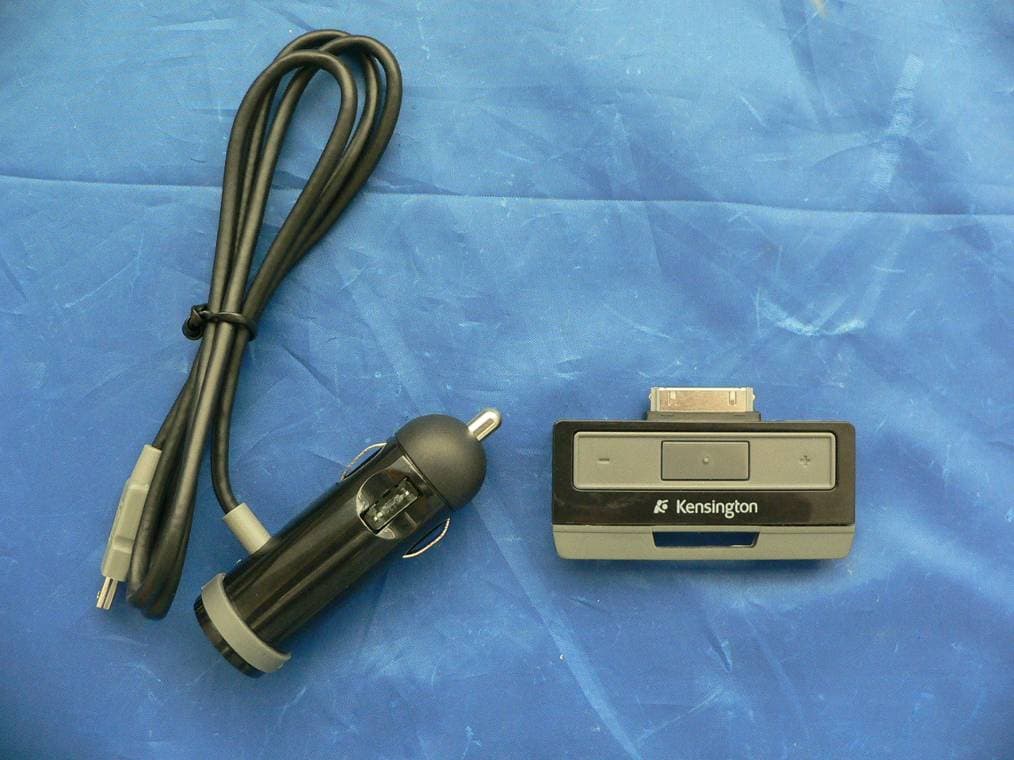
Click to zoom
Application Details
- Equipment Class
- DXX - Part 15 Low Power Communication Device Transmitter
- Date of Grant
- Apr 26, 2007
- Application Purpose
- Original Equipment
- Date of Application
- Apr 26, 2007
- Equipment Note
- Short Range Low Power FM Transmitter for iPod
- Frequency Range
- 88.10000000 - 107.90000000
- Company
- ACCO Brands, Inc.
- Country
- United States
Documents & Files
Document Text
Text extracted from the exhibit documents filed with the FCC. Open a document above to read the original.
Users Manual
Technical Support / Assistance technique / Technischer Support Technische ondersteuning / Assistenza tecnica / Asistencia técnica België / Belgique02 275 0684 Canada1 800 268 3447 Denmark35 25 87 62 Deutschland0211 6579 1159 España91 66 2 3833 Finland09 2290 6004 France01 70 20 00 41 Ireland01 601 1163 Italia02 4827 1154 México55 15 00 57 00 Nederland053 482 9868 Norway22 70 82 01 Österreich01 790 855 701 Portugal800 831 438 Schweiz / Suisse01 730 3830 Sweden08 5792 9009 United Kingdom0207 949 0119 United States1 800 535 4242 International Toll+31 53 484 91 901-2054-01 Kensington Computer Products Group A Division of ACCO Brands 333 Twin Dolphin Drive, Sixth floor Redwood Shores, CA 94065 Designed in California, U.S.A. by Kensington Made in China ACCO Brands Europe Oxford House Oxford Road Aylesbury Bucks, HP21 8SZ United Kingdom ACCO Brands Canada 5 Precidio Court Brampton Ontario, L6S 6B7 Canada 1313 Class 2 Radio Equipment ACCO Australia Level 2, 8 Lord St Botany NSW 2019 PO Box 311 Rosebery NSW 1445 Australia www.kensington.com N1368 For product marked as K33384US For product marked as K33384AU For product marked as K33384EU QuickSeek™FM Transmitter for iPod® Instruction Guide Guide d’instructions Bedienungsanleitung Handleiding Istruzioni Manual de instrucciones Contents/Contenu/Inhalt/Inhoud/Contenuto/Contenido Instruction Guide Guide d’instructions Bedienungsanleitung Handleiding Istruzioni Manual de instrucciones Using your QuickSeek Transmitter / Utilisation de votre transmetteur QuickSeek Verwendung des QuickSeek Transmitter / Gebruik van uw QuickSeek Transmitter Utilizzo del trasmettitore QuickSeek / Utilización del transmisor QuickSeek Find an optimal frequency using QuickSeek or use the +/- buttons. NOTE:The QuickSeek feature automatically selects the optimal frequency and operates at peak performance when connected to the car charger. Recherchez une fréquence optimale à l'aide de QuickSeek ou utilisez les touches +/-. REMARQUE :la fonction QuickSeek sélectionne automatiquement la meilleure fréquence et offre des performances optimales lorsque l'appareil est branché à l'allume-cigare de la voiture. Mit der QuickSeek-Funktion bzw. den Tasten für +/- finden Sie schnell die optimale Frequenz. HINWEIS:Bei der Verbindung mit dem Autoladegerät wählt die QuickSeek-Funktion automatisch die optimale Frequenz und sorgt so für beste Audioleistung. Zoek een optimale frequentie met behulp van QuickSeek of gebruik de knoppen +/-. OPMERKING:de eigenschap QuickSeek selecteert automatisch de optimale frequentie en levert de allerbeste prestaties bij aansluiting op de autovoeding. Trova la stazione ottimale grazie alla funzione QuickSeek oppure utilizza i pulsanti +/-. NOTA:la funzione QuickSeek seleziona automaticamente la frequenza radio ottimale e fornisce prestazioni straordinarie quando il trasmettitore è collegato al caricabatterie da auto. Busque una frecuencia óptima con QuickSeek o use los botones +/-. NOTA:la función QuickSeek selecciona de forma automática la frecuencia óptima y funciona con el máximo rendimiento al conectarse al cargador del coche. Using your car charger / Utilisation du chargeur allume-cigare / Verwendung mit dem Autoladegerät Gebruik van uw autovoeding / Utilizzo del caricabatterie da auto / Uso del cargador del coche NOTE:The QuickSeek FM Transmitter can be used without connecting to the car charger and will be powered off of your iPod. REMARQUE :vous pouvez utiliser le transmetteur FM QuickSeek sans le brancher à l'allume-cigare de votre voiture. Il sera alimenté par votre iPod. HINWEIS:Der QuickSeek FM Transmitter muss zur Verwendung nicht mit dem Autoladegerät verbunden sein; der Betrieb erfolgt in diesem Fall über Ihren iPod. OPMERKING:de QuickSeekFM Transmitter kan worden gebruikt zonder aansluiting op de autovoeding; in dit geval wordt de transmitter gevoed vanaf uw iPod. NOTA:è possibile utilizzare il trasmettitore FM QuickSeek senza collegarlo al caricabatterie da auto e alimentarlo tramite l'iPod. NOTA:el transmisor FM QuickSeek se puede usar sin conectarse al cargador del coche, conectado al iPod. 32 12 3 4 12 Tune your stereo to match / Réglez votre radio en fonction de la fréquence sélectionnée / Stellen Sie Ihr Radiogerät auf die angezeigte Frequenz ein / Uw stereo afstemmen op een overeenkomstige frequentie / Sintonizza lo stereo sulla stessa frequenza / Sintonice su estéreo para que se corresponda Store up to 3 Pre-sets / Enregistrez jusqu'à 3 présélections Bis zu 3 Voreinstellungen speichern / Max. 3 voorkeuze-instellingen opslaan Fino a 3 preselezioni in memoria / Memorizar hasta 3 valores predefinidos 54 1 2 Tune to a desired FM frequency using the +/- buttons Recherchez la fréquence FM de votre choix à l'aide des touches +/- Wählen Sie mit Hilfe der Tasten +/- die gewünschte FM-Frequenz aus Stem af op de gewenste FM-frequentie met behulp van de knoppen +/- Scegli la frequenza FM desiderata tramite i pulsanti +/- Sintonice la frecuencia FM deseada con los botones +/- Press and hold the center pre-set button Appuyez sur la touche centrale de présélection et maintenez-la enfoncée Halten Sie die mittlere Voreinstellungstaste gedrückt Houd de middelste voorkeuze knop ingedrukt Tieni premuto il pulsante centrale di preselezione Mantenga pulsado el botón de valores predefinidos del centro 3 4 Press and hold the center pre-set button to store into memory Appuyez sur la touche centrale de présélection et maintenez-la enfoncée pour enregistrer la station en mémoire Halten Sie zur Übernahme in den Speicher die mittlere Voreinstellungstaste gedrückt Houd de middelste voorkeuze knop ingedrukt om deze in het geheugen op te slaan Tieni premuto il pulsante centrale di preselezione per memorizzare Mantenga pulsado el botón de valores predefinidos del centro para memorizar Press the +/- buttons to select desired pre-set location Appuyez sur les touches +/- pour utiliser la présélection de votre choix Drücken Sie die Tasten +/-, um die gewünschte voreingestellt…
Text truncated - open the document above for the full version.
Cover Letter(s)
333 Twin Dolphin Drive, Sixth Floor, Redwood Shores, CA 94065 tel 650.572.2700 fax 650.267.2800 www.kensington.com Confidential Authorization Date: February 23, 2007 FEDERAL COMMUNICATIONS COMMISSIONS Authorization and Evaluation Division 7435 Oakland Mills Road Columbia, MD 21046 Subject: Confidentiality for certification of FCC ID: GV333384 To: whom it may concern, We, Kensington Computer Products Group, a division of ACCO Brands USA LLC, hereby requests permanent confidential treatment for the following materials submitted in support of FCC certification application for FCC ID# K33384US. Product Name: QuickSeek FM Transmitter Model #: K33384US • Detailed circuit schematics • Detailed Bill of Materials • Theory of Operation • Block Diagram • Product Specification Sincerely Yours, Raymon Hung Product Development Manager/RF Engineer Kensington Computer Products Group, a division of ACCO Brands USA LLC
Cover Letter(s)
From: Generic Office of Engineering Technology [mailto:[email protected]] Sent: Thursday, April 26, 2007 10:03 AM To: [email protected] Subject: Response to Inquiry to FCC (Tracking Number 794740) Inquiry: To whom it may concerns: \We are requesting to grant the FM Transmitters with testing following with FCC Section 15.239 rule and guidance. Base on the TCB conference call on September 12, 2006, TCB must contact FCC prior to grant issuing a grant and FCC wants to do a quick review of the test report for the following applicant. Company name: Kensington Computer Products Group FCCID: GV333384 model: K33384US Rule Part: FCC15.239 FM transmitter Please find the attached correspondence for the 10 Permit But Ask Questions. Please review the test report and the document.If there is any question or issue, please let me know as soon as you can. Tina Chu Documentation Control BACL 1274 Anvilwood Ave. Sunnyvale, CA 94089, USA Tel: 408-732-9162 x 3040 Response: Go ahead and file the grant. Submit a copy of this inquiry into the filing. Ensure all exhibits comply with FCC rules and policies. Do not reply to this message. Please select the Reply to an Inquiry Response link from the OET Inquiry System to add any additional information pertaining to this inquiry.
External Photos
Kensington Computer Products Group, a division of ACCO Brands, Inc. FCCID: GV333384 Report #: R0702223-239 Page 21 of 24 FCC Part 15.239 Test Report 9 EXHIBIT C – EUT EXTERNAL PHOTOGRAPHS 9.1 EUT – Front View 9.2 EUT –Rear View Kensington Computer Products Group, a division of ACCO Brands, Inc. FCCID: GV333384 Report #: R0702223-239 Page 22 of 24 FCC Part 15.239 Test Report 9.3 EUT and Car Cable Charger - Front View
ID Label/Location Info
Kensington Computer Products Group, a division of ACCO Brands, Inc. FCCID: GV333384 Report #: R0702223-239 Page 19 of 20 FCC Part 15.239 Test Report 7 EXHIBIT A - FCC ID LABEL INFORMATION 7.1 FCC § 2.925 Identification of equipment (a) Each equipment covered in an application for equipment authorization shall bear a nameplate or label listing the following: (1) FCC Identifier consisting of the two elements in the exact order specified in §2.926. The FCC Identifier shall be preceded by the term FCC ID in capital letters on a single line, and shall be of a type size large enough to be legible without the aid of magnification. Example: FCC ID XXX123. XXX—Grantee Code 123—Equipment Product Code 7.2 FCC ID Labeling Requirements as per FCC § 15.19 (a) In addition to the requirements in part 2 of this chapter, a device subject to certification, or verification shall be labeled as follows: (3) All other devices shall bear the following statement in a conspicuous location on the device: This device complies with part 15 of the FCC Rules. Operation is subject to the following two conditions: (1) This device may not cause harmful interference, and (2) this device must accept any interference received, including interference that may cause undesired operation. (5) When the device is so small or for such use that it is not practicable to place the statement specified under paragraph (a) of this section on it, the information required by this paragraph shall be placed in a prominent location in the instruction manual or pamphlet supplied to the user or, alternatively, shall be placed on the container in which the device is marketed. However, the FCC identifier or the unique identifier, as appropriate, must be displayed on the device. 7.3 Suggested FCC ID Label 7.4 Suggested Label Location on EUT Front View of EUT / Label Location Model: K33384US This device complies with part 15 of the FCC Rules. Operation is subject to the following two conditions: (1) This device may not cause harmful interference, and (2) this device must accept any interference received, including interference that may cause undesired operation. FCC ID: GV333384 IC: 6128A-33384 Kensington Computer Products Group, a division of ACCO Brands, Inc.
Internal Photos
Kensington Computer Products Group, a division of ACCO Brands, Inc. FCCID: GV333384 Report #: R0702223-239 Page 23 of 24 FCC Part 15.239 Test Report 10 EXHIBIT C – EUT INTERNAL PHOTOGRAPHS 10.1 EUT –Component View (1) 10.2 EUT –Component View (2)
Test Report
Note: This test report is for the customer shown above and their specific product only. It may not be duplicated or used in part without prior written consent from Bay Area Compliance Laboratories Corp. This report must not be used by the customer to claim product certification, approval, or endorsement by NVLAP, NIST, or any agency of the Federal Government (REV.1) FCC PART 15.239 MEASUREMENT AND TEST REPORT For Kensington Computer Products Group (A Division of ACCO Brands Inc.) 333 Twin Dolphin Drive, Sixth Floor, Redwood Shores, CA 94065, USA FCC ID: GV333384 Model: K33384US This Report Concerns: Original Report Product Type: Short Range Low Power FM Transmitter for iPod Test Engineer: Dan Coronia Report Number: R0702223-239 Report Date: 2007-03-12 Reviewed By: VP of Engineering: Hans Mellberg Prepared By: (ct) Bay Area Compliance Laboratories Corp. (BACL) 1274 Anvilwood Ave. Sunnyvale, CA 94089, U.S.A. Tel: (408) 732-9162 Fax: (408) 732 9164 Kensington Computer Products Group, a division of ACCO Brands, Inc. FCCID: GV333384 Report #: R0702223-239 Page 2 of 17 FCC Part 15.239 Test Report TABLE OF CONTENTS 1 GENERAL INFORMATION ..............................................................................................................................3 1.1 PRODUCT DESCRIPTION FOR EQUIPMENT UNDER TEST (EUT) .......................................................................3 1.2 MECHANICAL DESCRIPTION............................................................................................................................3 1.3 EUT PHOTO....................................................................................................................................................3 1.4 OBJECTIVE......................................................................................................................................................3 1.5 RELATED SUBMITTAL(S)/GRANT(S)................................................................................................................3 1.6 TEST METHODOLOGY.....................................................................................................................................4 1.7 MEASUREMENT UNCERTAINTY.......................................................................................................................4 1.8 TEST FACILITY................................................................................................................................................4 2 SYSTEM TEST CONFIGURATION .................................................................................................................5 2.1 JUSTIFICATION................................................................................................................................................5 2.2 EUT EXERCISE SOFTWARE.............................................................................................................................5 2.3 SPECIAL ACCESSORIES....................................................................................................................................5 2.4 EQUIPMENT MODIFICATIONS..........................................................................................................................5 2.5 LOCAL SUPPORT EQUIPMENT LIST AND DETAILS...........................................................................................5 2.6 INTERFACE PORTS AND CABLING....................................................................................................................5 2.7 CONFIGURATION OF TEST SETUP....................................................................................................................6 2.8 BLOCK DIAGRAM OF TEST SETUP...................................................................................................................6 3 SUMMARY OF TEST RESULTS ......................................................................................................................7 4 §15.203 - ANTENNA REQUIREMENT .............................................................................................................8 4.1 APPLICABLE STANDARD.................................................................................................................................8 4.2 RESULT...........................................................................................................................................................8 5 §15.239(A) – OCCUPIED BANDWIDTH AND TURN RANGE .....................................................................9 5.1 APPLICABLE STANDARD.................................................................................................................................9 5.2 TEST EQUIPMENT LIST AND DETAILS..............................................................................................................9 5.3 ENVIRONMENTAL CONDITIONS.......................................................................................................................9 5.4 TEST PROCEDURE...........................................................................................................................................9 5.5 PLOT(S) OF TEST DATA...................................................................................................................................9 5.6 TUNING RANGE.............................................................................................................................................10 5.7 SUMMARY OF TEST RESULT..........................................................................................................................10 6 §15.205, §15.209(A) AND §15.239(B), (C) - RADIATED EMISSION ...........................................................12 6.1 APPLICABLE STANDARD...............................................................................................................................12 6.2 TEST SETUP........................................................…
Text truncated - open the document above for the full version.
Test Setup Photos
Kensington Computer Products Group, a division of ACCO Brands, Inc. FCCID: GV333384 Report #: R0702223-239 Page 20 of 23 FCC Part 15.239 Test Report 8 EXHIBIT B - TEST SETUP PHOTOGRAPHS 8.1 Radiated Emissions – Front View 8.2 Radiated Emissions – Rear View
Contact Information
Applicant
Benjamin Hsu(Compliance Manager)
Test Firm
Bay Area Compliance LaboratoryJohn Chan
Technical Specifications
| # | Rule Parts | Frequency Range | Power Output |
|---|---|---|---|
| 1 | 15C | 88.1 MHz - 107.9 MHz | - |
Other Applications from ACCO Brands, Inc.
GV3M01709-K
Nov 28, 2024KB270 EQ Rechargeable Keyboard
Equipment Class
DTS - Digital Transmission SystemGV3M01500-MA
Jan 28, 2024Kensington Vertical Wireless Mouse
Equipment Class
DSS - Part 15 Spread Spectrum Transmitter
GV3M01687-M
Sep 17, 2023MY430 Rechargeable Mouse
Equipment Class
DTS - Digital Transmission System
GV3M01702-P
Sep 17, 2023Wireless Presenter with Red Laser-Nano Receiver
Equipment Class
DSS - Part 15 Spread Spectrum Transmitter
GV3M01440-KB
Aug 24, 2023Pro Fit Ergo Wireless Keyboard
Equipment Class
DSS - Part 15 Spread Spectrum Transmitter