GV372267Ci65m Wireless Notebook Optical Mouse
ACCO Brands, Inc.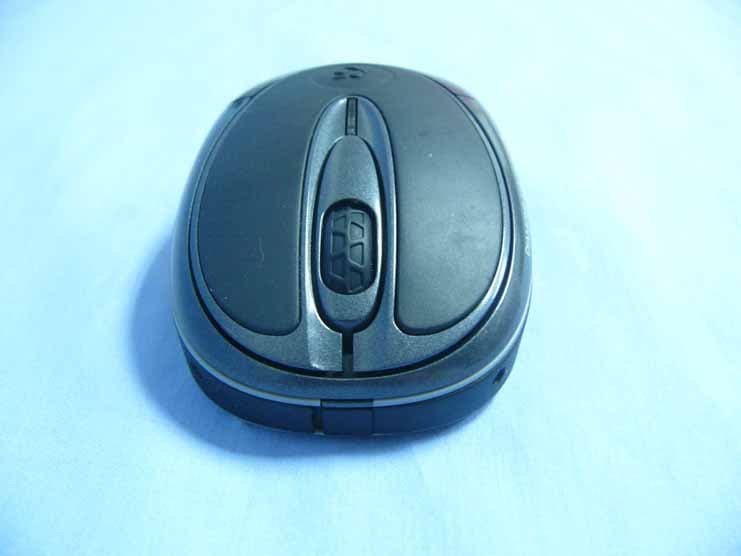
Click to zoom
Application Details
- Equipment Class
- DXX - Part 15 Low Power Communication Device Transmitter
- Date of Grant
- Aug 08, 2006
- Application Purpose
- Original Equipment
- Date of Application
- Aug 08, 2006
- Equipment Note
- Ci65m Wireless Notebook Optical Mouse
- Frequency Range
- 27.04500000 - 27.04500000
- Company
- ACCO Brands, Inc.
- Country
- United States
Documents & Files
Document Text
Text extracted from the exhibit documents filed with the FCC. Open a document above to read the original.
Users Manual
Getting Started Your Ci65m Wireless Notebook Optical Mouse provides unrivaled precision and convenience. The USB Wireless Receiver conveniently attaches securely to the underside of your mouse allowing you to pack it away and carry it anywhere you go. To begin using your mouse, you will need to: 1. Open the battery cover 2. Install the batteries 3. Plug the USB Wireless Receiver into a USB port on your computer. The mouse will then be ready to use. Opening the Battery Cover To open the battery cover (E), Press on the Battery Door Release Button (F). Battery Installation Your mouse requires two (2) AA Batteries (C). Insert the batteries as indicated and replace the cover. Battery Indicator Making a Connection Plug the USB Wireless Receiver into a USB port on your computer. Make sure that the On/Off switch on the underside of your mouse is in the “on” position Your mouse should now be ready to use. IMPORTANT: This wireless device is similar to an FM radio, the position of your computer and surrounding objects (especially metal objects) may effect your wireless reception and range (average range is approximately 10 meters or 30 feet). Programming Your Mouse (Optional) You may program your mouse buttons by downloading the latest version of MouseWorks® software available atwww.kensington.com. Receiver Storage & Extending Battery Life To save battery power, turn off the mouse when not in use by sliding the On/Off switch (G) located on the bottom of your mouse to the “off” position or slide the USB wireless receiver (B) onto the bottom of the mouse (H). Common Troubleshooting Steps 1.Un-plug and re-plug the receiver. 2. Install fresh Batteries in the mouse 3. Test the device on another USB port or computer. 4.Some surfaces may “trick” the sensor, such as reflective surfaces like glass or mirrors. As a result this product will not work well on glass or mirror surfaces. The sensor should perform well on all other surfaces. 5. To save battery power, unplug the receiver and store on the bottom of the mouse. Important: Computer User Health Information In recent years, medical attention on occupational injuries has identified normal, seemingly harmless activities as a potential cause of a wide range of problems collectively known as Repetitive Stress Injuries (RSI) or Cumulative Trauma Disorders (CTD). It is now recognized that any repetitive motion may contribute to these health problems. As a computer user, you might also be at risk. By paying attention to the way you perform your work, use your computer and phone, play sports, and work around the house, you can identify the behaviors that may be putting you at risk. If you experience pain, swelling, numbness, or weakness in your wrists or hands (especially during sleep), see your physician immediately. These symptoms could mean that you are developing a repetitive stress injury that requires prompt medical attention. For more detailed information, consult your doctor. Technical Support Technical support is available to all registered users of Kensington products. There is no charge for technical support except the cost of the phone call, and long distance charges where applicable. Technical Support Contact information can be found on the back page of this instruction guide. Technical Support Tips •You may find the answer to your problem in the Frequently Asked Questions (FAQ) section of the Support area on the Kensington Website: www.support.kensington.com. •Call from a phone where you have access to your computer •Be prepared to provide the following information: - Name, address, and telephone number -The name of the Kensington product -Make and model of your computer -Your system software and version -Symptoms of the problem and what led to them Five-Year Limited Warranty KENSINGTON COMPUTER PRODUCTS GROUP ("KENSINGTON") warrants this product against defects in material and workmanship under normal use and service for five years from the original date of purchase. KENSINGTON, at its option, shall repair or replace the defective unit covered by this warranty. Please retain the dated sales receipt as evidence of the date of purchase. You will need it for any warranty service. In order to keep this limited warranty in effect, the product must have been handled and used as prescribed in the instructions accompanying this warranty. This limited warranty does not cover any damage due to accident, misuse, abuse or negligence. This limited warranty is valid only if the product is used with the equipment specified on the product box. Please check product box for details or call KENSINGTON technical support. DISCLAIMER OF WARRANTY EXCEPT FOR THE LIMITED WARRANTY PROVIDED HEREIN, TO THE EXTENT PERMITTED BY LAW, KENSINGTON DISCLAIMS ALL WARRANTIES, EXPRESS OR IMPLIED, INCLUDING ALL WARRANTIES OF MERCHANTABILITY AND/OR FITNESS FOR A PARTICULAR PURPOSE. TO THE EXTENT THAT ANY IMPLIED WARRANTIES MAY NONETHELESS EXIST BY OPERATION OF LAW, ANY SUCH WARRANTIES ARE LIMITED TO THE FIVE-YEAR DURATION OF THIS WARRANTY. SOME STATES/PROVINCES DO NOT ALLOW LIMITATIONS ON HOW LONG AN IMPLIED WARRANTY LASTS, SO THE ABOVE LIMITATIONS MAY NOT APPLY TO YOU. LIMITATION OF LIABILITY REPAIR OR REPLACEMENT OF THIS PRODUCT, AS PROVIDED HEREIN, IS YOUR EXCLUSIVE REMEDY. KENSINGTON SHALL NOT BE LIABLE FOR ANY SPECIAL, INCIDENTAL OR CONSEQUENTIAL DAMAGES, INCLUDING, BUT NOT LIMITED TO, LOST REVENUES, LOST PROFITS, LOSS OF USE OF SOFTWARE, LOSS OR RECOVERY OF DATA, RENTAL OF REPLACEMENT EQUIPMENT, DOWNTIME, DAMAGE TO PROPERTY, AND THIRD-PARTY CLAIMS, ARISING OUT OF ANY THEORY OF RECOVERY, INCLUDING WARRANTY, CONTRACT, STATUTORY OR TORT. NOTWITHSTANDING THE TERM OF ANY LIMITED WARRANTY OR ANY WARRANTY IMPLIED BY LAW, OR IN THE EVENT THAT ANY LIMITED WARRANTY FAILS OF ITS ESSENTIAL PURPOSE, IN NO EVENT WILL KENSINGTON’S ENTIRE LIABILITY EXCEED THE PURCHASE PRICE OF THIS PRODUCT. SOME STATES/COUNTIES DO NOT ALLOW THE EXCLUSION OR LIMITATION OF INCIDENTAL OR CONSEQUENTIAL DAMAGES, SO THE…
Text truncated - open the document above for the full version.
Cover Letter(s)
Kensington Computer Products Group (ACCO BRANDS INC.) 333 Twin Dophin Drive, Sixth Floor, Redwood Shore, CA94065, US Kensington Computer Products Group (ACCO BRANDS INC.) 333 Twin Dophin Drive, Sixth Floor, Redwood Shore, CA94065, US
Cover Letter(s)
Kensington Computer Products Group (ACCO BRANDS INC.) 333 Twin Dophin Drive, Sixth Floor, Redwood Shore, CA94065, US
ID Label/Location Info
www.kensington.com FCC ID:GV372267 Designed in California,USA US 1-800-535-4242 900-1720-00 Assembled in China Model#72267 Ci65m Notebook Optical MouseWireless Serial #: A Y Y W W A X X X X X X 39.8 mm 2 8 . 4 m m Canada 310 Operating Frequency: 27.045MHz 304004723000 ONOFF LABEL LOCATION Label location
Test Report
Compliance Certification Services (Shenzhen) Inc. Report No.: SZ060721B02-RP FCC ID: GV372267 Date of Issue: July 26, 2006 Note: This report shall not be reproduced except in full, without the written approval of Compliance Certification Services Inc. This document may be altered or revised by Compliance Certification Services Inc. personnel only, and shall be noted in the revision section of the document. Page 1 Total Page: 17 Rev. 00 FCC 47 CFR PART 15 SUBPART C TEST REPORT For Ci65m Wireless Notebook Optical Mouse Model: 72267 / 72267US / 72267EU / 72267AU / 72267CA Trade Name: Kensington Issued to Kensington Computer Products Group (ACCO BRANDS INC.) 333 Twin Dophin Drive, Sixth Floor, Redwood Shore, CA94065, US Issued by COMPLIANCE CERTIFICATION SERVICES (SHENZHEN) INC. NO. 5, JINAO INDUSTRIAL PARK, NO. 35 JUKENG ROAD, DASHUIKENG VILLAGE, GUANLAN TOWN, BAOAN DISTRICT, SHENZHEN, CHINA TEL: 86-755-28055000 FAX: 86-755-28055221 LAB CODE:200577-0 Compliance Certification Services (Shenzhen) Inc. Report No.: SZ060721B02-RP FCC ID: GV372267 Date of Issue: July 26, 2006 Page 2 Rev. 00 TABLE OF CONTENTS 1. TEST RESULT CERTIFICATION............................................................................................. 3 2. EUT DESCRIPTION .................................................................................................................... 4 3. TEST METHODOLOGY ............................................................................................................. 5 3.1 EUT CONFIGURATION.............................................................................................................. 5 3.2 EUT EXERCISE......................................................................................................................... 5 3.3 GENERAL TEST PROCEDURES.................................................................................................. 5 3.4 FCC PART 15.205 RESTRICTED BANDS OF OPERATIONS .............................................. 6 3.5 DESCRIPTION OF TEST MODES................................................................................................. 6 4. INSTRUMENT CALIBRATION................................................................................................. 7 5. FACILITIES AND ACCREDITATIONS ................................................................................... 8 5.1 FACILITIES.............................................................................................................................. 8 5.2 EQUIPMENT............................................................................................................................. 8 5.3 LABORATORY ACCREDITATIONS AND LISTING....................................................................... 8 6. SETUP OF EQUIPMENT UNDER TEST .................................................................................. 9 6.1 SETUP CONFIGURATION OF EUT.............................................................................................. 9 6.2 SUPPORT EQUIPMENT....................................................................................................... 9 7. FCC PART 15.227 REQUIREMENTS...................................................................................... 10 7.1 26 DB BANDWIDTH .......................................................................................................... 10 7.2 RADIATED EMISSIONS........................................................................................................... 12 7.3 POWERLINE CONDUCTED EMISSIONS.................................................................................... 16 APPENDIX 1 PHOTOGRAPHS OF TEST SETUP....................................................................... 17 Compliance Certification Services (Shenzhen) Inc. Report No.: SZ060721B02-RP FCC ID: GV372267 Date of Issue: July 26, 2006 Page 3 Rev. 00 1. TEST RESULT CERTIFICATION Applicant: Kensington Computer Products Group (ACCO BRANDS INC.) 333 Twin Dophin Drive, Sixth Floor, Redwood Shore, CA94065, US Equipment Under Test: Ci65m Wireless Notebook Optical Mouse Tr a d e N a m e : Kensington Model: 72267 / 72267US / 72267EU / 72267AU / 72267CA Date of Test: July 21-26, 2006 APPLICABLE STANDARDS STANDARD TEST RESULT FCC 47 CFR Part 15 Subpart C No non-compliance noted We hereby certify that: The above equipment was tested by Compliance Certification Services (Shenzhen) Inc.. The test data, data evaluation, test procedures, and equipment configurations shown in this report were made in accordance with the procedures given in ANSI C63.4 and the energy emitted by the sample tested as described in this report is in compliance with the requirements of FCC Rules Part 15.227. The test results of this report relate only to the tested sample identified in this report. Approved by: Tested By: Henry Ding Reviewed By: Harris Lai / General Manager Eric Wong / Assistant manager COMPLIANCE CERTIFICATION COMPLIANCE CERTIFICATION SERVICES (SHENZHEN) INC. SERVICES (SHENZHEN) INC. Compliance Certification Services (Shenzhen) Inc. Report No.: SZ060721B02-RP FCC ID: GV372267 Date of Issue: July 26, 2006 Page 4 Rev. 00 2. EUT DESCRIPTION Product Ci65m Wireless Notebook Optical Mouse Trade Name Kensington Model Number 72267 / 72267US / 72267EU / 72267AU / 72267CA Model Difference Based on the same products Power Supply TX: Powered by AAA batteries × 2 (Rating: 2 × 1.5Vdc) RX: Powered by the notebook Frequency Range 27.045 MHz Modulation Technique FSK Remark: This submittal(s) (test report) is intended for FCC ID: GV372267 filing to comply with Section 15.227 of the FCC Part 15, Subpart C Rules. Compliance Certification Services (Shenzhen) Inc. Report No.: SZ060721B02-RP FCC ID: GV372267 Date of Issue: July 26, 2006 Page 5 Rev. 00 3. TEST METHODOLOGY The tests documented in this report were performed in accordance with ANSI C63.4 and FCC CFR 47 2.1046, 2.1047, 2.1049, 2.1051, 2.1053, 2.1055, 2.1057, and 15.227. 3.1 EUT CO…
Text truncated - open the document above for the full version.
Test Setup Photos
Compliance Certification Services (Shenzhen) Inc. Report No.: SZ060721B02-RP FCC ID: GV372267 Date of Issue: July 26, 2006 Page 17 Rev. 00 APPENDIX 1 PHOTOGRAPHS OF TEST SETUP RADIATED EMISSION TEST Below 30MHz Below 1GHz
Contact Information
Applicant
Benjamin Hsu(Compliance Manager)
Test Firm
Compliance Certification Services (Shenzhen) Inc.Clinton Kao
Technical Specifications
| # | Rule Parts | Frequency Range | Power Output |
|---|---|---|---|
| 1 | 15C | 27.045 MHz - 27.045 MHz | - |
Other Applications from ACCO Brands, Inc.
GV3M01709-K
Nov 28, 2024KB270 EQ Rechargeable Keyboard
Equipment Class
DTS - Digital Transmission SystemGV3M01500-MA
Jan 28, 2024Kensington Vertical Wireless Mouse
Equipment Class
DSS - Part 15 Spread Spectrum Transmitter
GV3M01687-M
Sep 17, 2023MY430 Rechargeable Mouse
Equipment Class
DTS - Digital Transmission System
GV3M01702-P
Sep 17, 2023Wireless Presenter with Red Laser-Nano Receiver
Equipment Class
DSS - Part 15 Spread Spectrum Transmitter
GV3M01440-KB
Aug 24, 2023Pro Fit Ergo Wireless Keyboard
Equipment Class
DSS - Part 15 Spread Spectrum Transmitter