GV3M01125-FWireless Tether and Battery - FOB
ACCO Brands, Inc.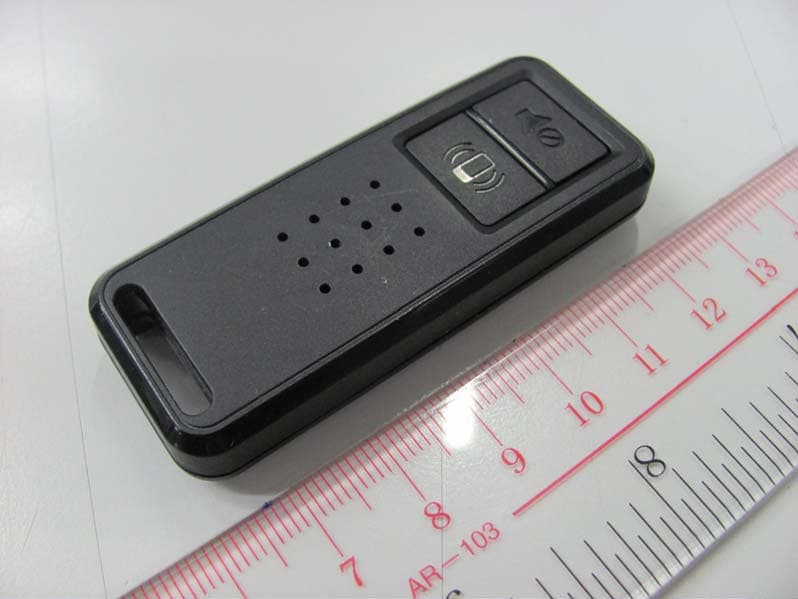
Click to zoom
Application Details
- Equipment Class
- DXX - Part 15 Low Power Communication Device Transmitter
- Date of Grant
- Jul 20, 2011
- Application Purpose
- Original Equipment
- Date of Application
- Jul 20, 2011
- Equipment Note
- Wireless Tether and Battery - FOB
- Frequency Range
- 2440.00000000 - 2440.00000000
- Company
- ACCO Brands, Inc.
- Country
- United States
Documents & Files
Document Text
Text extracted from the exhibit documents filed with the FCC. Open a document above to read the original.
Users Manual
2 Register Now!Enregistrer maintenant !Jetzt registrieren!Nu registreren Registrar ahoraRegistra adesso Registe-se agora! register.kensington.com BungeeAir ™ Power Wireless Security Tether ™ & Battery for iPhone ® Contents / Contenu / Inhalt / Inhoud / Contenuto / Contenido / Conteúdo QUICK START GUIDEGUIDE DE DEMARRAGE RAPIDEKURZANLEITUNGSNELSTARTGIDS GUIDA RAPIDAGUÍA RÁPIDAMANUAL DE INÍCIO RÁPIDO 3 Product Set-UpCongratulations on your purchaseYou are almost done. Follow these 3 simple steps to get the full functionality from your BungeeAir™ Power 1. Search on the App Store™ for: BungeeAir and download the free BungeeAir app. 2. Install your iPhone® 4 in to the case as detailed in the following pages. 3. Launch the BungeeAir app. The following steps are recommended. These steps will allow the BungeeAir app to trigger an immediate screen lock and require the entry of your unique passcode to unlock the screen thus providing optimum protection for your stored information. 1. On your iPhone 4 go to Settings -> General -> Passcode Lock . 2. Set the “Require Passcode” duration to: Immediately . 3. If not enabled press “Turn Passcode On” and input a passcode. Do not forget your passcode as you will need this if the iPhone 4 screen should lock.The following pages will guide you through the set-up, charging, tether, and “Find My” functionality of Kensington’s BungeeAir Power product. Configuration du produitNous vous remercions de votre achatVous avez presque terminé. Veuillez suivre ces trois étapes simples pour profiter de toutes les fonctionnalités de votre BungeeAir™ Power 1. Dans l’App Store™, recherchez : BungeeAir et téléchargez gratuitement l’app BungeeAir. 2. Installez votre iPhone® 4 dans le boîtier en suivant les indications dans les pages suivantes. 3. Lancez l’app BungeeAir. Nous vous recommandons de suivre les étapes suivantes. Ces étapes vont permettre à l’app BungeeAir de verrouiller immédiatement votre écran. Votre code secret unique vous permettra de le déverrouiller et vos informations seront protégées de façon optimale.1. Sur votre iPhone 4, accédez à Réglages -> Général -> Verrouillage par code . 2. Réglez la durée de « Exiger le code » sur : Immédiatement . 3. Si le code n’est pas activé, appuyez sur « Activer le code » et entrez un mot de passe. N’oubliez pas votre mot de passe. Vous en aurez besoin pour déverrouiller l’écran de votre iPhone 4. 5 4 Les pages suivantes vont vous aider à configurer, charger, relier et utiliser la fonctionnalité « Trouver mon » du produit BungeeAir Power de Kensington. Inbetriebnahme des ProduktsHerzlichen Glückwunsch zum ErwerbSie sind so gut wie fertig. Führen Sie die folgenden 3 einfachen Schritte aus und Sie können sämtliche Funktionen von BungeeAir™ Power nutzen1. Suchen Sie im App Store™ nach: „BungeeAir“ und laden Sie die kostenlose BungeeAir App herunter. 2. Platzieren Sie Ihr iPhone® 4 entsprechend der Anleitung auf den folgenden Seiten im Etui. 3. Starten Sie die BungeeAir App. Es empfiehlt sich, die folgenden Schritte auszuführen. Mit diesen Schritten wird die BungeeAir App in die Lage versetzt, eine sofortige Bildschirmsperre auszulösen, die nur mit Ihrem eindeutigen Code entsperrt werden kann, was für einen optimalen Schutz Ihrer gespeicherten Informationen sorgt.1. Wählen Sie auf dem iPhone 4 „Einstellungen“ -> „Allgemein“ -> „Code- Sperre“ aus. 2. Legen Sie unter „Code anfordern“ für die Dauer fest: Sofort . 3. Drücken Sie, sofern noch keine Aktivierung besteht, auf „Code aktivieren“ und geben Sie ein Kennwort ein. Vergessen Sie Ihr Kennwort nicht. Sie benötigen es, um den Bildschirm Ihres iPhone 4 zu entsperren.Auf den folgenden Seiten finden Sie eine Anleitung für das Einrichten, Laden, Verbinden und für die Verwendung der Suchfunktion des Kensington BungeeAir Power.ProductinstallatieGefeliciteerd met uw aankoopU bent bijna klaar. Voer de volgende 3 eenvoudige stappen uit om de volledige functionaliteit uit uw BungeeAir™-voeding te halen1. Zoek op de App Store™ naar BungeeAir en download de gratis BungeeAir-toepassing. 2. Installeer uw iPhone® 4 in de hoes volgens de aanwijzingen op de volgende pagina’s. 3. Start de BungeeAir-toepassing. De volgende stappen worden aanbevolen. Door deze stappen uit te voeren kan de BungeeAir-toepassing een onmiddellijke schermvergrendeling uitvoeren en de invoer van een unieke wachtwoordcode afdwingen om het scherm te ontgrendelen, waardoor uw opgeslagen informatie optimaal wordt beschermd. 1. Ga op uw iPhone 4 naar Instellingen -> Algemeen -> Codeslot . 2. Stel de duur van “Vraag om code” in op: Direct . 3. Druk bij niet-inschakeling op “ Zet code aan” en geef uw wachtwoord op. Zorg ervoor dat u uw wachtwoord niet vergeet, aangezien u dit nodig hebt als het iPhone 4-scherm wordt vergrendeld.De volgende pagina’s bieden een kennismaking met de installatie, het opladen, de band en de functionaliteit van “Zoek mijn” van uw BungeeAir-voedingsproduct van Kensington. Installazione del prodottoCongratulazioni per l’acquistoLe operazioni sono state quasi completate. Per usufruire di tutte le funzionalità di BungeeAir™ Power, seguire questi 3 semplici passaggi. 1. In App Store™ ricercare BungeeAir e scaricare l’applicazione gratuita BungeeAir. 2. Installare iPhone® 4 nel contenitore come descritto in dettaglio nelle pagine riportate di seguito. 3. Avviare l’applicazione BungeeAir. Si consiglia di eseguire i seguenti passaggi, che consentono di attivare un blocco di schermata immediato e richiedere l’immissione di un codice univoco per sbloccare lo schermo offrendo una protezione ottimale delle informazioni archiviate. 1. Nell’iPhone 4 passare a Impostazioni -> Generali -> Blocco con codice . 2. Impostare la durata “Richiedi codice” su: Subito . 3. Premere “Abilita codice” , se non è già abilitato e inserire una password. Memorizzare la password poiché verrà richiesta in caso di blocco dello schermo dell’iPhone 4.Nelle pagine successive viene illustrata la procedura di installazione, caricamento e bloc…
Text truncated - open the document above for the full version.
External Photos
FCC ID: GV3M01125-F External Photos Page 1 of 1 INTERTEK TESTING SERVICES External Photos
ID Label/Location Info
ACCO Brands, Inc. FCC ID: GV3M01125-F
ID Label/Location Info
S/N:A1123A000001 A1123A000001
Internal Photos
INTERTEK TESTING SERVICES Internal Photos FCC ID: GV3M01125-F Internal Photos Page 1 of 3 INTERTEK TESTING SERVICES Internal Photos FCC ID: GV3M01125-F Internal Photos Page 2 of 3 INTERTEK TESTING SERVICES Internal Photos FCC ID: GV3M01125-F Internal Photos Page 3 of 3
Test Report
FCC ID: GV3M01125-F be Page 1 of 1 INTERTEK TESTING SERVICES Bandedge plots At 2.4000GHz: 88.6-43.60 =45.0dBμV/m <54dBμV/m Pass At 2.4835GHz: 88.6-46.35 =42.25dBμV/m <54dBμV/m Pass
Test Report
- The test report only allows to be revised within the retention period unless further standard or the requirement was noticed. - This report is for the exclusive use of Intertek's Client and is provided pursuant to the agreement between Intertek and its Client. Intertek's responsibility and liability are limited to the terms and conditions of the agreement. Intertek assumes no liability to any party, other than to the Client in accordance with the agreement, for any loss, expense or damage occasioned by the use of this report. Only the Client is authorized to permit copying or distribution of this report and then only in its entirety. Any use of the Intertek name or one of its marks for the sale or advertisement of the tested material, product or service must first be approved in writing by Intertek. The observations and test results in this report are relevant only to the sample tested. This report by itself does not imply that the material, product, or service is or has ever been under an Intertek certification program. Intertek Testing Services Hong Kong Ltd. 2/F., Garment Centre, 576 Castle Peak Road, Kowloon, Hong Kong. Tel: (852) 2173 8888 Fax: (852) 2785 5487 Website: www.hk.intertek-etlsemko.com TEST REPORT Report No.: HK11060340-1 ACCO Brands, Inc. Application For Certification (Original Grant) (FCC ID: GV3M01125-F) Transceiver Prepared and Checked by: Approved by: Signed On File Yuen Ho Yin, Norton Senior Lead Engineer Chan Chi Hung, Terry Assistant Supervisor Date: July 20, 2011 INTERTEK TESTING SERVICES Report No.: HK11060340-1 FCC ID: GV3M01125-F i GENERAL INFORMATION ACCO Brands, Inc. BRAND NAME: BungeeAir™ Power, MODEL: M01125-F FCC ID: GV3M01125-F Grantee: ACCO Brands, Inc. Grantee Address: 333 Twin Dolphin Drive, 6th Floor, Redwood Shores, CA 94065, USA. Contact Person: Maggie Zhang Tel: 650-267-2711 Fax: 604-431-5155 e-mail: [email protected] Manufacturer: Beautiful Enterprise Co. Ltd. Manufacturer Address: 26th Floor, Beautiful Group Tower, 77 Connaught Road Central, Hong Kong. Brand Name: BungeeAir™ Power Model: M01125-F Type of EUT: Transceiver Description of EUT: Wireless Tether and Battery - FOB Serial Number: N/A FCC ID: GV3M01125-F Date of Sample Submitted: June 07, 2011 Date of Test: June 07 - 04 July, 2011 Report No.: HK11060340-1 Report Date: July 20, 2011 Environmental Conditions: Temperature: +10 to 40°C Humidity: 10 to 90% INTERTEK TESTING SERVICES Report No.: HK11060340-1 FCC ID: GV3M01125-F ii SUMMARY OF TEST RESULT ACCO Brands, Inc. BRAND NAME: BungeeAir™ Power, MODEL: M01125-F FCC ID: GV3M01125-F TEST SPECIFICATION REFERENCE RESULTS Maximum Peak Output Power 15.247(b), (c) / RSS-210 A8.4 N/A Hopping Channel Carrier Frequencies Separation 15.247(e) / RSS-210 A8.1 N/A 20dB Bandwidth of the Hopping Channel 15.247(a) / RSS-210 A8.1 N/A Number of Hopping Frequencies 15.247(e) / RSS-210 A8.1 N/A Average Time of Occupancy of Hopping Frequency 15.247(e) / RSS-210 A8.1 N/A Antenna Conducted Spurious Emissions 15.247(d) / RSS-210 A8.5 N/A Radiated Spurious Emissions 15.247(d) / RSS-210 A8.5 N/A RF Exposure Compliance 15.247(i) / RSS-Gen 5.5 N/A Transmitter Power Line Conducted Emissions 15.207 / RSS-Gen 7.2.2 N/A Transmitter Field Strength 15.227 / RSS-310 3.8 N/A Transmitter Field Strength 15.229 / RSS-210 A2.7 N/A Transmitter Field Strength, Bandwidth and Timing Requirement 15.231(a) / RSS-210 A1.1.1 N/A Transmitter Field Strength, Bandwidth and Timing Requirement 15.231(e) / RSS-210 A1.1.5 N/A Transmitter Field Strength and Bandwidth Requirement 15.239 / RSS-210 A2.8 N/A Transmitter Field Strength and Bandwidth Requirement 15.249 / RSS-210 A2.9 Pass Transmitter Field Strength and Bandwidth Requirement 15.235 / RSS-310 3.9 N/A Receiver Radiated Emissions 15.109 / RSS-210 A2.5 N/A Digital Device Conducted Emissions 15.107 / ICES-003 N/A Note: 1. The EUT uses a permanently attached antenna which, in accordance to section 15.203, is considered sufficient to comply with the pervisions of this section. 2. Pursuant to FCC part 15 Section 15.215(c), the 20 dB bandwidth of the emission was contained within the frequency band designated (mentioned as above) which the EUT operated. The effects, if any, from frequency sweeping, frequency hopping, other modulation techniques and frequency stability over excepted variations in temperature and supply voltage were considered. INTERTEK TESTING SERVICES Report No.: HK11060340-1 FCC ID: GV3M01125-F iii Table of Contents 1.0 General Description....................................................................................... 1 1.1 Product Description .......................................................................................... 1 1.2 Related Submittal(s) Grants.............................................................................. 1 1.3 Test Methodology............................................................................................. 1 1.4 Test Facility ...................................................................................................... 1 2.0 System Test Configuration ............................................................................ 2 2.1 Justification ...................................................................................................... 2 2.2 EUT Exercising Software.................................................................................. 2 2.3 Special Accessories ......................................................................................... 2 2.4 Equipment Modification .................................................................................... 2 2.5 Measurement Uncertainty................................................................................. 2 2.6 Support Equipment List and Description ........................................................... 2 3.0 Emission Results ........................................................................................... 3 3.1 Field Strength Calculation...........…
Text truncated - open the document above for the full version.
Test Setup Photos
FCC ID: GV3M01125-F Radiated Photos Page 1 of 1 INTERTEK TESTING SERVICES Radiated Photos
Contact Information
Applicant
Benjamin Hsu(Compliance Manager)
Technical Contact
Intertek Testing Services Hong Kong LtdTerry Chan
[email protected]2173 8503
2/F Garment Centre · Kowloon · Hong Kong
Non-Technical Contact
Intertek Testing Services Hong Kong LtdTerry Chan
[email protected]2173 8503
Test Firm
Intertek Testing Services Hong Kong Ltd.Billy Chow
Technical Specifications
| # | Rule Parts | Frequency Range | Power Output |
|---|---|---|---|
| 1 | 15C | 2.44 GHz - 2.44 GHz | - |
Other Applications from ACCO Brands, Inc.
GV3M01709-K
Nov 28, 2024KB270 EQ Rechargeable Keyboard
Equipment Class
DTS - Digital Transmission SystemGV3M01500-MA
Jan 28, 2024Kensington Vertical Wireless Mouse
Equipment Class
DSS - Part 15 Spread Spectrum Transmitter
GV3M01687-M
Sep 17, 2023MY430 Rechargeable Mouse
Equipment Class
DTS - Digital Transmission System
GV3M01702-P
Sep 17, 2023Wireless Presenter with Red Laser-Nano Receiver
Equipment Class
DSS - Part 15 Spread Spectrum Transmitter
GV3M01440-KB
Aug 24, 2023Pro Fit Ergo Wireless Keyboard
Equipment Class
DSS - Part 15 Spread Spectrum Transmitter