GV3M01497-DWireless Dongle
ACCO Brands, Inc.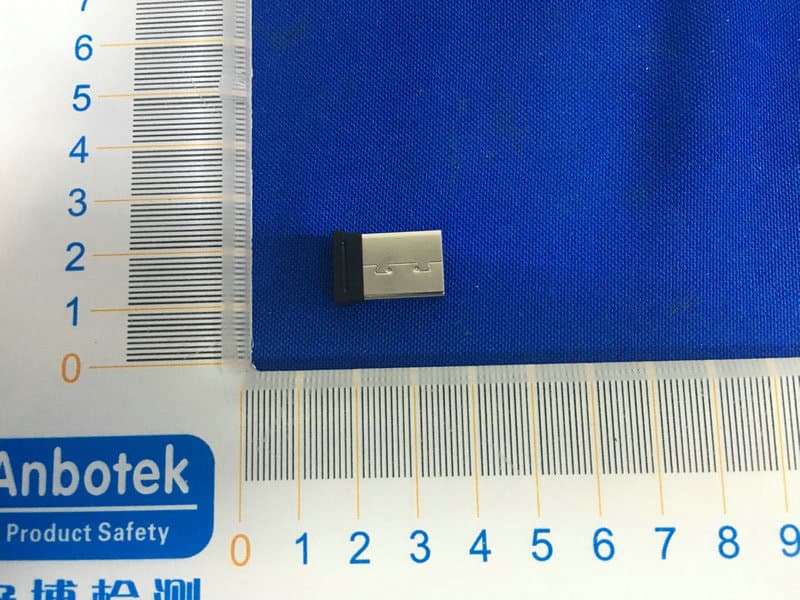
Click to zoom
Application Details
- Equipment Class
- DXT - Part 15 Low Power Transceiver, Rx Verified
- Date of Grant
- Jun 23, 2020
- Application Purpose
- Original Equipment
- Date of Application
- Jun 23, 2020
- Equipment Note
- Wireless Dongle
- Frequency Range
- 2403.00000000 - 2480.00000000
- Company
- ACCO Brands, Inc.
- Country
- United States
Documents & Files
Document Text
Text extracted from the exhibit documents filed with the FCC. Open a document above to read the original.
Users Manual
K72359901-4158-05 Kensington Computer Products Group A Division of ACCO Brands 1500 Fashion Island Blvd, 3rd Floor San Mateo, CA 94404 kensington.com/register Importer: LE ITZ ACCO Brands GmbH & Co KG Siemensstraße 64 70469 Stuttgart Germany ACCO Brands Chile S.A., Avda. Presidente Riesco # 5711, Las Condes, Santiago, Chile CP 7561114 www.accobrands.cl ACCO Brands Australia - Kensington 2 Coronation Avenue Kings Park NSW 2148 Australia Importado e Distribuído por: Tilibra Produtos De Papelaria Ltda. CNPJ: 44.990.901/0001- 43 Rua Aymorés, 6-9 – Bauru/SP – Brasil CEP 17013-900 [email protected] Dystrybutor: Esselte Polska Sp. z o.o., ul. Kozienice Forgalmazza: Esselte Kft, Váci út 76. V. torony I. emelet, 1133 Budapest, Magyarország Distribuitor: Esselte Sales SRL, România Distribútor: 142 00 Praha 4, Esselte Polska Sp. z o.o., ul. Kozienice +7(495)933-27- 63 ACCO Brands Canada Inc 7381 Bramalea Rd Mississauga, ON L5S 1C4 https://accobrandscanada.com/ 广州市爱珂贸易有限公司 广州市天河区林和西路159号 中泰国际北塔5楼, 501/701室 邮编: 510620 电话: 400 600 4599 网址:https://www.kensington.com/zh-CN 邮箱:[email protected] Expert Mouse® Wireless Trackball Kensington and the ACCO name and design are registered trademarks of ACCO Brands. All other registered and unregistered trademarks are the property of their respective owners. Covered by one or more of US Pat. No’s 6,081,974; 6,317,936; 6,360,405. ©2020 Kensington Computer Products Group, a division of ACCO Brands. Any unauthorized copying, duplicating, or other reproduction of the contents hereof is prohibited without written consent from Kensington Computer Products Group. All rights reserved. 06/20 The Bluetooth® word mark and logos are registered trademarks owned by Bluetooth SIG, Inc. and any use of such marks by Kensington Computer Products Group is under license, Model:M01497-D 1 2 kensinton.com/software/kensingtonworks/ 1 2 3 KensingtonWorks ™ 3 b a c i BT 3.0 BT 5.0 Windows 7 or later macOS X 10.8 or later Windows 7 ~ or later macOS 10.8 ~ or later 2 3 3 b c a BT 3.0 BT 5.0 ii Windows Click the Bluetooth tray icon , then click Add a Bluetooth Device./ Cliquez sur l’icône Bluetooth , dans la barre des tâches, puis cliquez sur Ajouter un périphérique Bluetooth. / Klicken Sie in der Taskleiste auf das Bluetooth-Symbol und dann auf Bluetooth-Gerät hinzufügen. / Klik op het Bluetooth-pictogram in het systeemvak en klik vervolgens op Een Bluetooth-apparaat toevoegen. / Fare clic sull’icona del Bluetooth nella barra delle applicazioni, quindi su Add a Bluetooth Device (Aggiungi dispositivo Bluetooth). / Haga clic en el icono Bluetooth en la bandeja y, a continuación, seleccione Agregar un dispositivo Bluetooth. / Kattintson a Bluetooth ikonra a tálcán , majd kattintson a Bluetooth eszköz hozzáadása lehetőségre. / Klikněte na ikonu Bluetooth v oznamovací oblasti a poté klikněte na možnost Přidat zařízení Bluetooth. / Kliknij ikonę Bluetooth na pasku systemowym , a następnie kliknij ikonę Dodaj urządzenie Bluetooth. / Щелкните значок Bluetooth на панели задач , затем выберите Добавление устройства Bluetooth. / Clique no ícone de tabuleiro Bluetooth , depois clique em Adicionar um dispositivo Bluetooth. / .Bluetooth الموجودة في علبة النظام، ثم انقر فوق إضافة جهاز Bluetoothانقر فوق أيقونة Blinks blue / Clignote bleu / Blinkt blau / Knippert blauw / Il LED lampeggia in blu / Parpadea en azul / Kéken villog / Bliká modře / Miga na niebiesko / Мигает синим цветом / Pisca a azul / وميض أزرق 3 secs d e On the screen, look for ExpertBT5.0 / ExpertBT3.0 and then click pair. / À l’écran, recherchez ExpertBT5.0 / ExpertBT3.0, puis cliquez sur Jumeler. / Suchen Sie auf dem Bildschirm die Angabe ExpertBT5.0 / ExpertBT3.0 und klicken Sie auf Koppeln. / Zoek op het scherm naar ExpertBT5.0 / ExpertBT3.0 (Kensington Expert draadloze trackball) en klik vervolgens op koppelen. / Cercare ExpertBT5.0 / ExpertBT3.0 sullo schermo, quindi fare clic su Pair (Associa). / Busque ExpertBT5.0 / ExpertBT3.0 en la pantalla y, a continuación, haga clic en Enlazar. / A képernyőn keresse meg a ExpertBT5.0 / ExpertBT3.0 elemet, és kattintson a párosítás lehetőségre. / Na zobrazené obrazovce vyhledejte zařízení ExpertBT5.0 / ExpertBT3.0 a poté klikněte na možnost Spárovat. / Znajdź na ekranie pozycję ExpertBT5.0 / ExpertBT3.0 i kliknij polecenie parowania. / На экране найдите пункт ExpertBT5.0 / ExpertBT3.0 и выберите связать. / Procure no ecrã por ExpertBT5.0 / ExpertBT3.0 e, em seguida, clique em emparelhar. / زوج ثم انقر فوق ExpertBT5.0 / ExpertBT3.0على الشاشة، ابحث عن Blinks red = Replace BOTH batteries with brand new batteries, then repeat Step C. / Clignote rouge = Remplacez les DEUX piles usagées par des piles neuves, puis répétez l’étape C. / Blinkt rot = Tauschen Sie beide BEIDE Batterien aus und wiederholen Sie Schritt C. / Knippert rood = Vervang BEIDE batterijen door nieuwe batterijen, herhaal dan Stap C. / Il LED lampeggia in rosso = Sostituire ENTRAMBE le batterie, quindi ripetere il passaggio C. / Parpadea en rojo = cambie AMBAS pilas por otras nuevas, después repita el paso C. / Pirosan villog = Cserélje ki MINDKÉT elemet újakra, majd ismételje meg a C lépést. / Bliká červeně = vyměňte OBĚ baterie za nové a poté opakujte krok C. / Miga na czerwono = Wymień OBIE baterie na nowe, a następnie powtórz krok C. / Мигает красным = замените ОБЕ батареи новыми и повторите шаг C. / Pisca a vermelho = Substitua AMBAS as pilhas por pilhas completamente novas e, em seguida, repita o passo C. / . ا، ثم كرر الخطوة ج ً وميض أحمر = استبدل البطاريتين ببطاريتين جديدتين تمام Windows 8 or later 45 3ii Mac On the screen, look for ExpertBT5.0 / ExpertBT3.0 and then click pair. / À l’écran, recherchez ExpertBT5.0 / ExpertBT3.0, puis cliquez sur Jumeler. / Suchen Sie auf dem Bildschirm die Angabe ExpertBT5.0 / ExpertBT3.0 und klicken Sie auf Koppeln. / Zoek op het scherm naar ExpertBT5.0 / ExpertBT3.0 (Kensington Expert draadloze trackball) en klik vervolgens op koppelen. / Cercare ExpertBT5.0 / ExpertBT3.0 sullo schermo…
Text truncated - open the document above for the full version.
External Photos
FCC ID: GV3M01497-D
ID Label/Location Info
Label Location On EUT Label FCC ID: GV3M01497-D
Internal Photos
FCC ID: GV3M01497-D ANT
Operational Description
version01 ACCO Brands, Inc. Declaration concerning Antenna Specification It is hereby declared that the product Model No.: M01497-D FCC ID : GV3M01497-D fulfills the requirement in FCC test relating to the antenna type. The device specified above confirms to the FCC recommendations for internal antenna type(s) described below: 2.4GHz Model No. of antenna: N/A Type of antenna:PCB Antenna Gain of the antenna: -1.66 dBi Frequency range:2403~2480MHz The mounting of the antenna is fixed to the radio module and no other antenna should be used. Company name: ACCO Brands, Inc. Address: 1500 Fashion Island Blvd., 3rd Floor, San Mateo, CA94404, United States City: San Mateo, CA94404 ZIP / Postal code: Country:United States Place:United StatesDate: 2020-06-22 Signature:
RF Exposure Info
RFEXPOSUREEVALUATION EUTSpecification EUTWirelessDongle ModelNameM01497-D Frequencyband (Operating) WLAN:2.412GHz~2.462GHz WLAN:5.18GHz~5.32GHz/5.50GHz~5.70GHz WLAN:5.745GHz~5825GHz Others:2403 ‐ 2480MHz DevicecategoryPortable(<20cmseparation) Mobile(>20cmseparation) Others___ AntennadiversitySingleantenna Multipleantennas Txdiversity Rxdiversity Tx/Rxdiversity Max.outputpower95.73dBuV/m(0.473dBm)(1.115mW) Antennagain-1.66dBi EvaluationappliedMPEEvaluation SAREvaluation StandardRequirement PortableDevice Accordingto§15.247(i)and§1.1307b(1),systemsoperatingundertheprovisionsofthissection shallbeoperatedinamannerthatensuresthatthepublicisnotexposedtoradiofrequency energylevelsinexcessoftheCommission’sguidelines.SeeKDB447498D01GeneralRF ExposureGuidanceV6,section4.3.1. The1-gand10-gSARtestexclusionthresholdsfor100MHzto6GHzattestseparation distances≤50mmaredeterminedby: [(max.powerofchannel,includingtune-uptolerance,mW)/(min.testseparationdistance, mm)]·[√f(GHz)]≤3.0for1-gSARand≤7.5for10-gextremitySAR, 16 where ·f(GHz)istheRFchanneltransmitfrequencyinGHz ·PoweranddistanceareroundedtothenearestmWandmmbeforecalculation17 ·Theresultisroundedtoonedecimalplaceforcomparison Thetestexclusionsareapplicableonlywhentheminimumtestseparationdistanceis≤50 mmandfortransmissionfrequenciesbetween100MHzand6GHz.Whentheminimumtest separationdistanceis<5mm,adistanceof5mmisappliedtodetermineSARtestexclusion. MeasurementResult Channel Frequency (MHz) MaxOutput power (dBm) Tuneup tolerance (dBm) MaxTune UpPower (dBm) Distanc e(mm) Calculati onValue (Note1) Threshold Value 24410.473±11.47350.4393.0 EIRP=E-104.8+20logD=95.73-104.8+20log3=0.473dbm Note1:CalculationValue=[(max.powerofchannel,includedTuneup tolerance,mW)/(min.testseparationdistance,mm)]·[√f(GHz)]. Foxexample:1.404/5*√2.441=0.439≤3.0 AccordingtoKDB447498D01V6,thresholdatwhichnoSARrequiredis≤3.0for1-gSAR, separationdistanceis5mm,andnosimultaneousSARmeasurementisrequired. TheSARmeasurementisnotnecessary.
Test Report
Report No.: 18220WC00065301FCC ID: GV3M01497-DPage 1 of 38 Code:AB-RF-05-a FCC TEST REPORT Client Name: ACCO Brands, Inc Address: 1500 Fashion Island Blvd., 3rd Floor, San Mateo, CA 94404, USA Product Name: Wireless Dongle Date: Jun. 22, 2020 Shenzhen Anbotek Compliance Laboratory Limited Report No.: 18220WC00065301FCC ID: GV3M01497-DPage 2 of 38 Code:AB-RF-05-a Contents 1. General Information ............................................................................................................................................... 4 1.1. Client Information ....................................................................................................................................... 4 1.2. Description of Device (EUT) ..................................................................................................................... 4 1.3. Auxiliary Equipment Used During Test ................................................................................................... 5 1.4. Description of Test Modes ........................................................................................................................ 5 1.5. List of Channels .......................................................................................................................................... 6 1.6. Description of Test Setup .......................................................................................................................... 7 1.7. Test Equipment List .................................................................................................................................... 8 1.8. Measurement Uncertainty ......................................................................................................................... 9 1.9. Description of Test Facility ........................................................................................................................ 9 2. Summary of Test Results ................................................................................................................................... 10 3. Conducted Emission Test ................................................................................................................................... 11 3.1. Test Standard and Limit .......................................................................................................................... 11 3.2. Test Setup .................................................................................................................................................. 11 3.3. Test Procedure .......................................................................................................................................... 11 3.4. Test Data .................................................................................................................................................... 12 4. Radiated Emission and Band Edge .................................................................................................................. 15 4.1. Test Standard and Limit .......................................................................................................................... 15 4.2. Test Setup .................................................................................................................................................. 16 4.3. Test Procedure .......................................................................................................................................... 17 4.4. Test Data .................................................................................................................................................... 18 5. 20dB Bandwidth Test .......................................................................................................................................... 28 5.1. Test Standard and Limit .......................................................................................................................... 28 5.2. Test Setup .................................................................................................................................................. 28 5.3. Test Procedure .......................................................................................................................................... 28 5.4. Test Data .................................................................................................................................................... 28 6. Antenna Requirement ......................................................................................................................................... 31 6.1. Test Standard and Requirement ............................................................................................................ 31 6.2. Antenna Connected Construction .......................................................................................................... 31 APPENDIX I -- TEST SETUP PHOTOGRAPH ................................................................................................... 32 APPENDIX II -- EXTERNAL PHOTOGRAPH ..................................................................................................... 34 APPENDIX III -- INTERNAL PHOTOGRAPH ..................................................................................................... 37 Report No.: 18220WC00065301FCC ID: GV3M01497-DPage 3 of 38 Code:AB-RF-05-a TEST REPORT Applicant: ACCO Brands, Inc Manufacturer: ACCO Brands, Inc Product Name: Wireless Dongle Model No.: M01497-D Trade Mark: Kensington Rating(s): Input: DC 5V, 50mA Test Standard(s) : FCC Part15 Subpart C, Paragraph 15.249 Test Method(s): ANSI C63.10: 2013 The device described above is tested by Shenzhen Anbotek Compliance Laboratory Limited to determine the maximum emission levels emanating from the device and the severe levels of the device can endure and its performance criterion. The measureme…
Text truncated - open the document above for the full version.
Test Setup Photos
FCC ID: GV3M01497-D Photo of Conducted Emission Test Photo of Radiation Emission Test
Contact Information
Applicant
Benjamin Hsu(Compliance Manager)
Test Firm
Shenzhen Anbotek Compliance Laboratory LimitedJeff Zhu
Technical Specifications
| # | Rule Parts | Frequency Range | Power Output |
|---|---|---|---|
| 1 | 15C | 2.40 GHz - 2.48 GHz | 1.12 mW |
Other Applications from ACCO Brands, Inc.
GV3M01709-K
Nov 28, 2024KB270 EQ Rechargeable Keyboard
Equipment Class
DTS - Digital Transmission SystemGV3M01500-MA
Jan 28, 2024Kensington Vertical Wireless Mouse
Equipment Class
DSS - Part 15 Spread Spectrum Transmitter
GV3M01687-M
Sep 17, 2023MY430 Rechargeable Mouse
Equipment Class
DTS - Digital Transmission System
GV3M01702-P
Sep 17, 2023Wireless Presenter with Red Laser-Nano Receiver
Equipment Class
DSS - Part 15 Spread Spectrum Transmitter
GV3M01440-KB
Aug 24, 2023Pro Fit Ergo Wireless Keyboard
Equipment Class
DSS - Part 15 Spread Spectrum Transmitter