H79DP3625WProjector
Delta Electronics Incorporated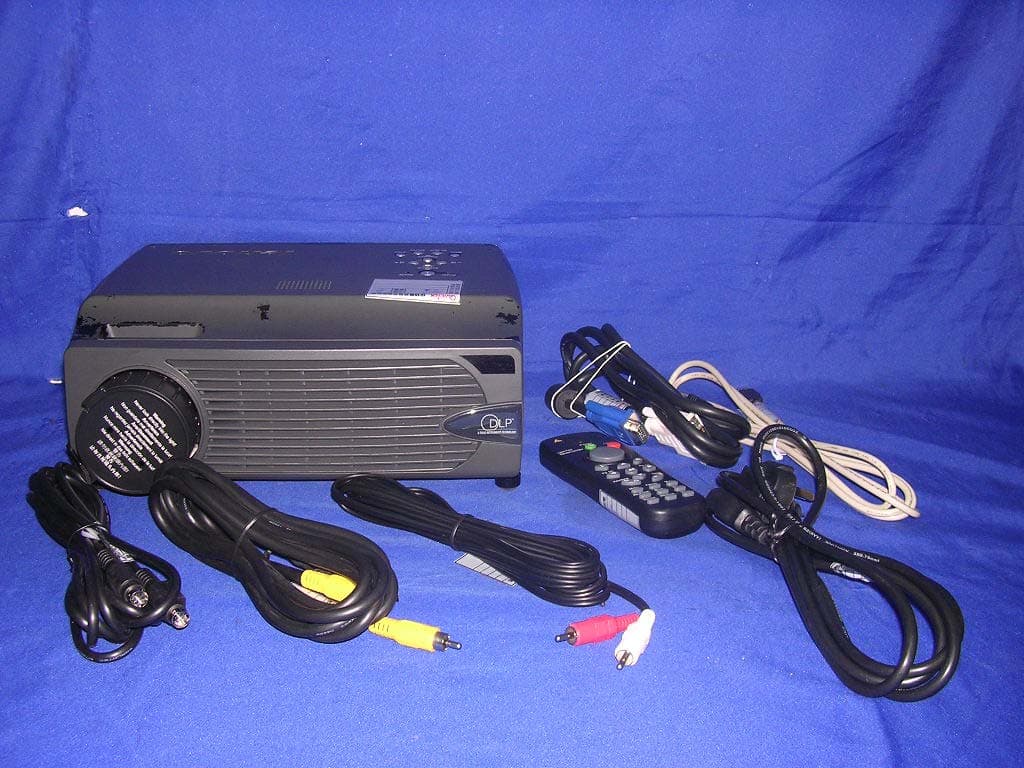
Click to zoom
Application Details
- Equipment Class
- DTS - Digital Transmission System
- Date of Grant
- Sep 20, 2005
- Application Purpose
- Original Equipment
- Date of Application
- Sep 20, 2005
- Equipment Note
- Projector
- Frequency Range
- 2462.00000000 - 2462.00000000
- Country
- Taiwan
Documents & Files
Document Text
Text extracted from the exhibit documents filed with the FCC. Open a document above to read the original.
Users Manual
ADDENDUM FOR THE DLP PROJECTOR About this Document This document is intended for network administrators. Copyright This publication, including all photographs, illustrations and software, is protected under international copy- right laws, with all rights reserved. Neither this document, nor any of the material contained herein, may be reproduced without written consent of the author. © Copyright July, 2004 Disclaimer The information in this document is subject to change without notice. The manufacturer makes no repre- sentations or warranties with respect to the contents hereof and specifically disclaims any implied warranties of merchantability or fitness for any particular purpose. The manufacturer reserves the right to revise this publication and to make changes from time to time in the content hereof without obligation of the manufacturer to notify any person of such revision or changes. Trademark Recognition All product names used in this document are the properties of their respective owners and are acknowl- edged. T T T D D D W W W 6 6 6 8 8 8 0 0 0 M M M a a a n n n u u u a a a l l l ( ( ( W W W i i i r r r e e e l l l e e e s s s s s s p p p o o o r r r t t t i i i o o o n n n ) ) ) I. OPERATING ENVIRONMENT Computer Configuration Recommended Hardware requirements: CPU: Intel Pentium II or higher Memory: 128M or more Wireless NIC: based on 802.11b protocol OS: Windows 2000 (Chinese/English version) Windows XP (Chinese/English version) Windows 98 is not supported. Recommended NIC models 802.11 Protocol Brand Model 11b CISCO AIR-PCM340 ORINOCO ORINOCO GOLD INTEL Centrino 11g NETGEAR WG511 LINKSYS WPC54G Projector Lenovo Wireless Projector TDW680 Lenovo Wireless Projector TDW660 T T T D D D W W W 6 6 6 8 8 8 0 0 0 M M M a a a n n n u u u a a a l l l ( ( ( W W W i i i r r r e e e l l l e e e s s s s s s p p p o o o r r r t t t i i i o o o n n n ) ) ) II. FUNCTIONAL OVERVIEW Wireless Projector Developed and manufactured by Lenovo independently, the wireless projectors has integrated the IGRS technology (automatic search, automatic identification and automatic configuration). Avoid the fussy setup process of the wireless projector you have experienced before. With Lenovo wireless pro- jector, you will get a rapid response plus smooth and natural projection. Wireless Projector has the Following Ten Unique Functions 1. Simple Wireless Solution With simple operation, Lenovo Wireless Projector never requires the user to master any particular knowledge on computer and network. The installation can be completed through easy operation. The “Setup-free wireless” feature sets the user free from the fussy operation on IP and network name set- tings. 2. Smart Automatic Search With the integrated IGRS protocol, Lenovo Wireless Projector can automatically search and find the wireless projection device. 3. Unique USB Device Play With the built-in USB port, Lenovo Wireless Projector can play the pictures stored in the flash disk without connecting to a computer. It supports the current popular five picture formats, which are JPG, BMP, GIF, PCX and PNG. 4. Personalized Controller After connecting to a computer, Lenovo Wireless Projector can be controlled through a controller in- terface on the computer side to conduct some operations such as shut down and parameter settings. 5. Convenient Remote Mouse Acting like a mouse, the remote controller of Lenovo Wireless Projector can operate the computer to open a file, or select a menu, and etc. In addition, it can end the wireless projection through its unique “Wireless” button. 6. Unrestricted Switch Over Lenovo Wireless Projector enable the user with unprecedented flexibility to start the projection any- time and anywhere. The user not only can freely switch between the wire and wireless mode, but also can switch among a number of notebook computers that are using the wireless projection program. This makes it possible that multiple projectors are wirelessly shared. 7. Excellent Wireless Transmission Besides the wireless convenience, high resolution, high refresh rate, and true color display, Lenovo Wireless Projector can play PPT, WORD and FLASH animation in a smooth way. 8. Quick Projection T T T D D D W W W 6 6 6 8 8 8 0 0 0 M M M a a a n n n u u u a a a l l l ( ( ( W W W i i i r r r e e e l l l e e e s s s s s s p p p o o o r r r t t t i i i o o o n n n ) ) ) TDW680 applications allow user to perform quick projection to the binding projector by using hotkeys (Ctrl+F5), making the projection more convenient. 9. NIC Management TDW680 allows user to select one of the wireless NICs to project, enjoying the fun of both Internet Surfing and projecting. 10. Compatible with TDW660 TDW680 application is compatible with TDW 660, which can not only realize the TDW 680 project, also support the TDW660 project. Solution with Lenovo Wireless Projector Lenovo has incorporated the software mirror and real-time compressing solution in its wireless pro- jector. The data to be displayed is obtained before reaching the display device through the software (can be regarded as a desktop mirror), and then is transferred through the wireless network to the built-in wireless processing board inside the projector after being compressed. In the end, the final decoded data is displayed. It has been proved by experiments that the overall effect of the solution is very satisfactory. The IGRS protocol is the key technology to enable the IGRS terminals. A number of technologies, such as secure access mechanism, basic protocol, and intelligent application frame, are both the key and difficult points to fulfill the IGRS. The wireless projector developed by Lenovo features PNP and automatic configuration and management of IP address, which avoids the complicated network and hardware settings and the bothering computer reboot process of the ordinary projectors. This has al- lowed the user to use the Lenovo Wireless Projector in an easier and quicker way. T T T D D D W W W 6 6 6 8 8 8 0 0…
Text truncated - open the document above for the full version.
Cover Letter(s)
DELTA ELECTRONICS, INC. FCC ID.: H79DP3625W 3, Tung Yuan Road, Chungli Industrial Zone, Taoyuan Hsien 320, Taiwan, R.O.C. . Tel : +886 3-452-6107 Federal Communications Commission Sep. 13 , 2005 Authorization and Evaluation Division ATTESTATION FCC ID: H79DP3625W Product: Projector Model: C400 Wireless We don't provide any controls or software to allow operation outside the USA frequency band when we sell this product in USA. Sincerely, Ray Chen/ Engineer DELTA ELECTRONICS, INC.
Cover Letter(s)
DELTA ELECTRONICS, INC. FCC ID.: H79DP3625W 3, Tung Yuan Road, Chungli Industrial Zone, Taoyuan Hsien 320, Taiwan, R.O.C. Tel : +886 3-452-6107 DELTA ELECTRONICS, INC. 3, Tung Yuan Road, Chungli Industrial Zone, Taoyuan Hsien 320, Taiwan, R.O.C. Tel : +886 3-452-6107 Fax: +886 3-462-1442 Federal Communications Commission Sep. 13 , 2005 Authorization and Evaluation Division Confidentiality Request Pursuant to Sections 0.457 and 0.459 of the Commission’s Rules, the Applicant hereby requests confidential treatment of information accompanying this Application. As outlined below: Schematics, Block Diagram The above materials contain trade secrets and proprietary information not customarily Released to the public. The public disclosure of these matters might be harmful to the Applicant and provide unjustified benefits to its competitors. The Applicant understands that pursuant to Rule 0.457, disclosure of this Application and all accompanying documentation will not be made before the date of the Grant for this application. Sincerely, Ray Chen/ Engineer DELTA ELECTRONICS, INC.
Cover Letter(s)
RF_160, Issue 01 Declaration of Authorization We Name: DELTA ELECTRONICS, INC.. Address: 3, Tung Yuan Road, Chungli Industrial Zone, Taoyuan Hsien 320,Taiwan,R.O.C. City: Taoyuan .................................................................. . Country: Taiwan, R.O.C ........................................................................... . Declare that: Name: QuieTek Corp. Address: Fl.2, No.345, Xin-hu 2 nd Rd., Nei-hu District, Taipei, Taiwan 114, R.O.C. City: Taipei Country Taiwan is authorized to apply for Certification of the following product(s): Product description: Projector ................................................... . Type designation: C400 Wireless ................................................ . Trademark: ThinkVision ................................................... . on our behalf. Date: .............................. .. City: .............................. .. Name: .............................. .. Signature:
External Photos
Report No.: 058L177FI Page : 1 of 7 Version:1.0 Attachment 2 : EUT Detailed Photographs (1) EUT Photo (2) EUT Photo
ID Label/Location Info
DELTA ELECTRONICS, INC. FCC ID.: H79DP3625W 3, Tung Yuan Road, Chungli Industrial Zone, Taoyuan Hsien 320, Taiwan, R.O.C. . Tel : +886 3-452-6107 FCC ID AND DoC Label The FCC ID and DoC Label will be placed on the equipment as shown in the photograph below. Projector Model No.: C400 Wireless Projector Model No.: C400 Wireless F F C C C C I I D D : : H H 7 7 9 9 D D P P 3 3 6 6 2 2 5 5 W W This device complies with Part 15 of the FCC Rules. Operation is subject to the following two conditions: (1) this device may not cause harmful interference and (2) this device must accept any interference received, including interference that may cause undesired operation. S/N: Made in Taiwan
Internal Photos
Report No.: 058L177FI Page : 2 of 7 Version:1.0 (3) EUT Photo (4) EUT Photo Report No.: 058L177FI Page : 3 of 7 Version:1.0 (5) EUT Photo (6) EUT Photo Report No.: 058L177FI Page : 4 of 7 Version:1.0 (7) EUT Photo (8) EUT Photo Report No.: 058L177FI Page : 5 of 7 Version:1.0 (9) EUT Photo (10) EUT Photo Report No.: 058L177FI Page : 6 of 7 Version:1.0 (11) EUT Photo (12) EUT Photo Report No.: 058L177FI Page : 7 of 7 Version:1.0 (13) EUT Photo
Operational Description
1.2. Operational Description The EUT is a wireless Projector with 1 channel. The device has the data speed of 11 Mbps (IEEE 802.11b) and 54 Mbps (IEEE 802.11g). The carrier uses direct sequence spread spectrum modulation. The diversity antenna is connected through the connector. The Projector complies with IEEE 802.11b and 802.11g. The data to be displayed is obtained before reaching the display device through the software (can be regarded as a desktop mirror), and then is transferred through the wireless network to the built-in wireless processing board inside the projector after being compressed.
RF Exposure Info
Report No. 058L177FI Page: 1 of 3 Version: 1.0 RF Exposure Evaluation declaration Product Name : Projector Model No. : C400 Wireless FCC ID H79DP3625W Applicant : DELTA ELECTRONICS, INC. Address : 3, Tung Yuan Road, Chungli Industrial Zone, Taoyuan Hsien 320, Taiwan, R.O.C. Date of Receipt : Aug. 25, 2005 Date of Declaration: Sep. 08, 2005 Report No. : 058L177FI The declaration results relate only to the samples calculated. The declaration shall not be reproduced except in full without the written approval of QuieTek Corporation. This report must not be used to claim product endorsement by NVLAP any agency of the U.S. Government Report No. 058L177FI Page: 2 of 3 Version: 1.0 1. RF Exposure Evaluation 1.1. Limits According to FCC 1.1310: The criteria listed in the following table shall be used to evaluate the environment impact of human exposure to radio frequency (RF) radiation as specified in 1.1307(b) LIMITS FOR MAXIMUM PERMISSIBLE EXPOSURE (MPE) Frequency Range (MHz) Electric Field Strength (V/m) Magnetic Field Strength (A/m) Power Density (mW/cm 2 ) Average Time (Minutes) (A) Limits for Occupational/ Control Exposures 300-1500 -- -- F/300 6 1500-100,000 -- -- 5 6 (B) Limits for General Population/ Uncontrolled Exposures 300-1500 -- -- F/1500 6 1500-100,000 -- -- 1 30 F= Frequency in MHz Friis Formula Friis transmission formula: Pd = (Pout*G)/(4*pi*r 2 ) Where Pd = power density in mW/cm 2 Pout = output power to antenna in mW G = gain of antenna in linear scale Pi = 3.1416 R = distance between observation point and center of the radiator in cm Pd id the limit of MPE, 1 mW/cm 2 . If we know the maximum gain of the antenna and the total power input to the antenna, through the calculation, we will know the distance r where the MPE limit is reached. 1.2. Test Procedure Software provided by client enabled the EUT to transmit and receive data at lowest, middle and highest channel individually. The temperature and related humidity: 18°Cand 78% RH. Report No. 058L177FI Page: 3 of 3 Version: 1.0 1.3. Test Result of RF Exposure Evaluation Product : Projector Test Item : RF Exposure Evaluation Test Site : No.3 OATS Antenna Gain Antenna Gain: The maximum Gain measured in fully anechoic chamber is –3.67Bi in linear scale. 802.11b Output Power Into Antenna & RF Exposure Evaluation Distance (-3.67dBi): Channel Frequency (MHz) Output Power to Antenna (mW) Power Density at R = 20 cm (mW/cm2) 11 2462.00 62.5173 0.0053 802.11g Output Power Into Antenna & RF Exposure Evaluation Distance (-3.67dBi): Channel Frequency (MHz) Output Power to Antenna (mW) Power Density at R = 20 cm (mW/cm2) 11 2462.00 56.4937 0.0048 The distance r (4 th column) calculated from the Fries transmission formula is far shorter than 20 cm separation requirement.
Test Report
Report No. 058L177FI Page: 1 of 40 Version:1.0 Test Report Product Name : Projector Model No. : C400 Wireless FCC ID : H79DP3625W Applicant : DELTA ELECTRONICS, INC. Address : 3, Tung Yuan Road, Chungli Industrial Zone, Taoyuan Hsien 320, Taiwan, R.O.C. Date of Receipt : Aug. 25, 2005 Issued Date : Sep. 08, 2005 Report No. : 058L177FI The test results relate only to the samples tested. The test report shall not be reproduced except in full without the written approval of QuieTek Corporation. This report must not be used to claim product endorsement by NVLAP any agency of the U.S. Government Report No. 058L177FI Page: 2 of 40 Version:1.0 Test Report Certification Issued Date : Sep. 08, 2005 Report No. : 058L177FI Test results relate only to the samples tested. The test report shall not be reproduced except in full without the written approval of QuieTek Corporation. This report must not be used to claim product endorsement by NVLAP any agency of the U.S. Government Product Name : Projector Applicant : DELTA ELECTRONICS, INC. Address : 3, Tung Yuan Road, Chungli Industrial Zone, Taoyuan Hsien 320, Taiwan, R.O.C. Manufacturer : DELTA ELECTRONICS, INC. Model No. : C400 Wireless Rated Voltage : AC 120V/60Hz Working Voltage : DC 3.3V (Powered by EUT) Trade Name : ThinkVision Applicable Standard : FCC CFR Title 47 Part 15 Subpart C Section 15.247:2005 ANSI C63.4: 2003 Test Result : Complied Documented By : ( Rebaca CHi ) Tested By : ( Tom Hsieh ) Approved By : ( Gene Chang ) Accredited by NIST (NVLAP) NVLAP Lab Code: 200533-0 0914 Report No. 058L177FI Page: 3 of 40 Version:1.0 TABLE OF CONTENTS Description Page 1. GENERAL INFORMATION .....................................................................................................5 1.1. EUT Description............................................................................................................................5 1.2. Operational Description ................................................................................................................6 1.3. Tested System Datails....................................................................................................................7 1.4. Configuration of tested System .....................................................................................................8 1.5. EUT Exercise Software .................................................................................................................8 1.6. Test Facility ...................................................................................................................................9 2. Conducted Emission..................................................................................................................10 2.1. Test Equipment............................................................................................................................10 2.2. Test Setup ....................................................................................................................................10 2.3. Limits ..........................................................................................................................................10 2.4. Test Procedure .............................................................................................................................11 2.5. Uncertainty ..................................................................................................................................11 2.6. Test Result of Conducted Emission.............................................................................................12 3. Peak Power Output ...................................................................................................................16 3.1. Test Equipment............................................................................................................................16 3.2. Test Setup ....................................................................................................................................16 3.3. Limits ..........................................................................................................................................16 3.4. Uncertainty ..................................................................................................................................16 3.5. Test Result of Peak Power Output...............................................................................................17 4. Radiated Emission .....................................................................................................................19 4.1. Test Equipment............................................................................................................................19 4.2. Test Setup ....................................................................................................................................19 4.3. Limits ..........................................................................................................................................20 4.4. Test Procedure .............................................................................................................................21 4.5. Uncertainty ..................................................................................................................................21 4.6. Test Result of Radiated Emission................................................................................................22 5. Band Edge ..................................................................................................................................26 5.1. Test Equipment............................................................................................................................26 5.2. Test Setup ....................................................................................................................................26 5.3. Limits ..…
Text truncated - open the document above for the full version.
Test Setup Photos
Report No.: 058L177FI Page : 1 of 3 Version:1.0 Attachment 1: EUT Test Setup Photographs Front View of Conducted Test Back View of Conducted Test Report No.: 058L177FI Page : 2 of 3 Version:1.0 Front View of Radiated Test Back View of Radiated Test Report No.: 058L177FI Page : 3 of 3 Version:1.0 Front View of Radiated Test (Horn) Back View of Radiated Test (Horn)
Contact Information
Applicant
Ray Chen(Manager)
Technical Contact
Quietek CorporationGeorge Chen
[email protected]+886-2-8601-3788
No. 5-22, Ruei-Shu Valley, Ruei-Ping Tsuen · Taipei · Taiwan
Test Firm
DEKRA Testing and Certification Co., Ltd.Sky Hsu
Technical Specifications
| # | Rule Parts | Frequency Range | Power Output |
|---|---|---|---|
| 1 | 15C | 2.46 GHz - 2.46 GHz | 63.00 mW |
Other Applications from Delta Electronics Incorporated

H79-023DS3
Jul 26, 2023NovoDS Digital Signage Solution
Equipment Class
DTS - Digital Transmission System
H79-023DS2
Jul 25, 2023NovoDS Digital Signage Solution
Equipment Class
DTS - Digital Transmission System
H79VFRU-25-46BT
Sep 27, 2022SIG Bluetooth speaker
Equipment Class
DSS - Part 15 Spread Spectrum Transmitter
H79-UNOC07X011
Nov 25, 2020UNOnext Indoor Air Quality Monitor
Equipment Class
DTS - Digital Transmission System
H79-019NC9
Jul 12, 2020NovoConnect Wireless Collaboration System
Equipment Class
NII - Unlicensed National Information Infrastructure TX