H79L19DAR19" LCD Monitor
Delta Electronics Incorporated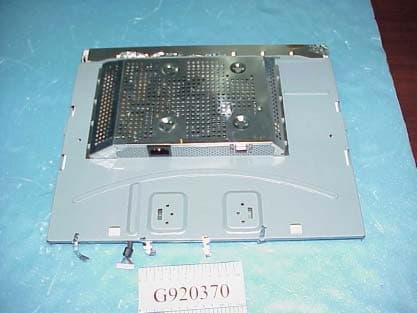
Click to zoom
Application Details
- Equipment Class
- JBP - Part 15 Class B Computing Device Peripheral
- Date of Grant
- May 27, 2003
- Application Purpose
- Original Equipment
- Date of Application
- May 27, 2003
- Equipment Note
- 19" LCD Monitor
- Country
- Taiwan
Documents & Files
Document Text
Text extracted from the exhibit documents filed with the FCC. Open a document above to read the original.
Users Manual
Safety and Troubleshooting Information Safety Precautions and Maintenance • Installation Locations • FAQs • Troubleshooting • Regulatory Information • Other Related Information Safety precautions and maintenance WARNING: Use of controls, adjustments, or procedures other than those specified in this documentation may result in exposure to shock, electrical hazards, and/or mechanical hazards. Read and follow these instructions when connecting and using your computer monitor: Unplug the monitor, if you are not going to use it for an extensive period of time.l Unplug the monitor, if you need to clean it with a slightly damp cloth. Wiping the screen with a dry cloth is possible when the power is off. However, never use alcohol, solvents, or ammonia-based liquids. l Consult a service technician if the monitor does not operate normally when following the instructions in this manual. l The casing cover should be opened only by qualified service personnel.l Keep the monitor out of direct sunlight and away from stoves or any other heat source.l Remove any object that could fall into the vents or prevent proper cooling of the monitor’s electronics.l Do not block the ventilation holes on the cabinet.l Keep the monitor dry. To avoid electric shock, do not expose it to rain or excessive moisture.l When positioning the monitor, make sure the power plug and outlet are easily accessible.l If turning off the monitor by detaching power cable or DC power cord, wait for 6 seconds, then attach the power cable or DC power cord for normal operation. l To avoid the risk of shock or permanent damage to the set, do not expose the monitor to rain or excessive moisture. l When positioning the monitor, make sure the power plug and outlet are easily accessible.l IMPORTANT: Always activate a screen saver program during your application . If a still image in high contrast remains on the screen for an extended period of time, it may leave a so called "after-image" or "ghost image" in front of the screen. This is a well-known phenomenon that is caused by the shortcomings inherent in the LCD technology. Most of the time the after-image will disappear gradually over a period of time after switching off the power. Be aware that the after-image symptom can not be repaired and is not covered under warranty. l Consult a service technician if the monitor does not operate normally when operating instructions of this manual are followed. RETURN TO TOP OF THE PAGE Safety & Troubleshooting file:///D|/M/english/190b4cgbs/safety/safety.htm (1 of 2) [4/16/2003 1:55:00 PM] Installation Locations Avoid Heat and Extreme Coldl Do not store or use the LCD monitor in locations exposed to heat, direct sunlight, or extreme cold.l Avoid moving the LCD monitor between locations with large temperature differences. Choose a site falling within the following temperature and humidity ranges. Temperature: 5-35°C 41-95°F m Humidity: 20-80% RHm l Do not subject the LCD monitor to severe vibration or high impact conditions. Do not place the LCD monitor inside a car trunk. l Take care not to mishandle this product by either knocking or dropping during operation or transportation. l Do not store or use the LCD monitor in locations exposed to high humidity or a dusty environment. Also do not allow water or other liquids to spill on or into the LCD monitor. l RETURN TO TOP OF THE PAGE Safety & Troubleshooting file:///D|/M/english/190b4cgbs/safety/safety.htm (2 of 2) [4/16/2003 1:55:00 PM] About This Manual About This Guide • Notational Descriptions About This Guide This electronic user's guide is intended for anyone who uses the Philips LCD Monitor. It describes the LCD monitor's features, setup, operation and other important information. Its contents are identical to the information in our printed version. It includes the following sections: Safety and Troubleshooting Information provides tips and solutions for common problems as well as other related information you may need. l About This Electronic User's Manual gives an overview of information included, along with notation icon descriptions and other documentation for your reference. l Product Information gives an overview of the monitor's features as well as the technical specifications for this monitor. l Installing Your Monitor describes the initial setup process and gives an overview of how to use the monitor. l On-Screen Display provides information on adjusting the settings on your monitor.l Customer Care and Warranty contains a list of worldwide Philips Consumer Information Centers along with help desk phone numbers and information on the warranty applicable to your product. l Glossary defines technical terms.l Download and Print Option transfers this entire manual to your hard drive for easy reference.l RETURN TO TOP OF THE PAGE Notational Descriptions The following subsections describe notational conventions used in this document. Notes, Cautions and Warnings Throughout this guide blocks of text may be accompanied by an icon and printed in bold or italic type. These blocks contain notes, cautions or warnings. They are used as follows: NOTE: This icon indicates important information and tips that help you make better use of your computer system. About This Electronic User's Manual file:///D|/M/english/190b4cgbs/about/about.htm (1 of 2) [4/16/2003 1:55:02 PM] CAUTION: This icon indicates information that tells you how to avoid either potential damage to hardware or loss of data. WARNING: This icon indicates the potential for bodily harm and tells you how to avoid the problem. Some warnings may appear in alternate formats and may not be accompanied by an icon. In such cases, the specific presentation of the warning is mandated by the relevant regulatory authority. RETURN TO TOP OF THE PAGE ©2003 Koninklijke Philips Electronics N.V. All rights reserved. Reproduction, copying, usage, modifying, hiring, renting, public performance, transmission and/or broadcasting in whole or in part is prohibited wi…
Text truncated - open the document above for the full version.
Cover Letter(s)
Page 3 Delta Electronics, Inc. 19" LCD Monitor FCC ID. : H79L19DAR Letter of Modification Date: May 14, 2003 Subject : RFI related modifications incorporated into unit with FCC ID. : H79L19DAR Dear Sir, This letter services as our declaration that all modifications listed below are implemented in the sample submitted for pre-grant testing. We further declare that the same modifications will be implemented into all production unit to enhance compliance of the unit to FCC limits. The modifications include the following : 1. Added 1pcs A1 tape (25*60mm) from panel to bracket. @ Refer to Page 16 (Figure 20) 2. Added 1pcs A1 tape (25*180mm) from panel to bracket. @ Refer to Page 16 (Figure 20) 3. Added 1pcs A1 tape (25*180mm) from panel to bracket. @ Refer to Page 9 (Figure 5) 4. Added 1pcs A1 tape (25*40mm) from panel to bracket. @ Refer to Page 9 (Figure 5) 5. Added 1pcs A1 tape (25*40mm) from panel shieldcan to edge. @ Refer to Page 9 (Figure 5) 6. Added 1pcs A1 tape (25*60mm) from panel shieldcan to edge. @ Refer to Page 17 (Figure 21) 7. Added a ferrite core on the FG wire. @ Refer to Page 9 (Figure 6) 8. Added a ferrite core on the AC I/P wire. @ Refer to Page 9 (Figure 6) 9. Added a ferrite core on the keyboard wire. @ Refer to Page 9 (Figure 6) 10. Added 2pcs screw on P/I board. @ Refer to Page 17 (Figure 22) 11. Added 1pcs gasket (10*10*30mm) from panel to bracket. @ Refer to Page 18 (Figure 23) 12. Added 1pcs gasket (5*10*15mm) from panel to bracket. @ Refer to Page 18 (Figure 24) 13. Added 1pcs gasket (10*3.5*100mm) from panel to bracket. @ Refer to Page 19 (Figure 25) 14. Added 2pcs gasket (10*10*50mm) from panel to bracket. @ Refer to Page 19 (Figure 26) 15. Added a ferrite core on the keyboard wire. @ Refer to Page 15 (Figure 18) 16. Added 2pcs ferrite cores on the D-Sub signal cable. @ Refer to Page 16 (Figure 19) If you have any questions or require any other information please do not hesitate to contact our agent. Sincerely Yours, Y.Y. Ford. Engineer Delta Electronics, Inc.
External Photos
Page 7 Delta Electronics, Inc. 19" LCD Monitor FCC ID. : H79L19DAR Photographs Figure 1 19" LCD Monitor Data Cable (Appearance) Figure 2 General Appearance (Rear View) Page 8 Delta Electronics, Inc. 19" LCD Monitor FCC ID. : H79L19DAR Figure 3 General Appearance (I/O Ports) Figure 4 Internal View (Removed Back Cover)
ID Label/Location Info
Page 5 Delta Electronics, Inc. 19" LCD Monitor FCC ID. : H79L19DAR Label Drawing
Internal Photos
Page 9 Delta Electronics, Inc. 19" LCD Monitor FCC ID. : H79L19DAR Figure 5 Internal View 3 5 4 Figure 6 Internal View (Main Board & Power Board) 7 9 8 Page 10 Delta Electronics, Inc. 19" LCD Monitor FCC ID. : H79L19DAR Figure 7 Internal View (Main Board/Component Side) Figure 8 Internal View (Main Board/Foil Side) Page 11 Delta Electronics, Inc. 19" LCD Monitor FCC ID. : H79L19DAR Figure 9 Internal View (Power Board/Component Side) Figure 10 Internal View (Power Board/Foil Side) Page 12 Delta Electronics, Inc. 19" LCD Monitor FCC ID. : H79L19DAR Figure 11 Front View of LCD Panel Figure 12 Internal View (Function Control Board/Foil Side) Page 13 Delta Electronics, Inc. 19" LCD Monitor FCC ID. : H79L19DAR Figure 13 Internal View (Function Control Board/Component Side) Figure 14 Rear View of LCD Panel Page 14 Delta Electronics, Inc. 19" LCD Monitor FCC ID. : H79L19DAR Figure 15 Label of LCD Panel Figure 16 PCB of LCD Panel (Component Side) Page 15 Delta Electronics, Inc. 19" LCD Monitor FCC ID. : H79L19DAR Figure 17 PCB of LCD Panel (Foil Side) Figure 18 Keyboard Wire 15 Page 16 Delta Electronics, Inc. 19" LCD Monitor FCC ID. : H79L19DAR Figure 19 Data Cable 16 16 Figure 20 Data Cable 1 2 Page 17 Delta Electronics, Inc. 19" LCD Monitor FCC ID. : H79L19DAR Figure 21 Internal View (EMI Solution) 6 Figure 22 Internal View (EMI Solution) 10 10 Page 18 Delta Electronics, Inc. 19" LCD Monitor FCC ID. : H79L19DAR Figure 23 Internal View (EMI Solution) 11 Figure 24 Internal View (EMI Solution) 12 Page 19 Delta Electronics, Inc. 19" LCD Monitor FCC ID. : H79L19DAR Figure 25 Internal View (EMI Solution) 13 Figure 26 Internal View (EMI Solution) 14 14
Test Report
FCC ID : H79L19DAR Page 1 of 26 APPLICATION FOR CERTIFICATION On Behalf of Delta Electronics, Inc. 19" LCD Monitor Models(1)190B4CB/00 (2)190B4CG/00 (3)190B4CS/00 BrandPHILIPS FCC IDH79L19DAR Prepared for : Delta Electronics, Inc. 3, Tung Yuan Road, Chungli Industrial Zone, Taoyuan Hsien 320, Taiwan, R.O.C. Prepared by : Audix Corporation. Technical Division EMC Department No. 53-11, Tin-Fu Tsun, Lin-Kou, Taipei Hsien, Taiwan, R.O.C. Tel : (02) 2609-9301, 2609-2133 File Number EM-G920370 Report Number TTEMC-F92085 Date of Test Apr. 28 ~ 30, 2003 Date of Report May 06, 2003 Audix Corporation Report No.: TTEMC-F92085 FCC ID : H79L19DAR Page 2 of 26 TABLE OF CONTENTS Description Page Test Report Certification.........................................................................................................................3 1. GENERAL INFORMATION .........................................................................................................4 1.1. Description of Device (EUT)......................................................................................................4 1.2. Tested Supporting System Details ..............................................................................................5 1.3. Description of Test Facility.........................................................................................................6 1.4. Measurement Uncertainty ...........................................................................................................7 2. POWERLINE CONDUCTED TEST.............................................................................................8 2.1. Test Equipment ...........................................................................................................................8 2.2. Block Diagram of Test Setup ......................................................................................................8 2.3. Powerline Conducted Emission Limit (CISPR 22, Class B) ......................................................8 2.4. EUT’s Configuration during Compliance Measurement ............................................................9 2.5. Operating Condition of EUT ......................................................................................................9 2.6. Test Procedure...........................................................................................................................10 2.7. Line Conducted RF Voltage Measurement Results ..................................................................10 3. RADIATED EMISSION TEST ....................................................................................................17 3.1. Test Equipment .........................................................................................................................17 3.2. Block Diagram of Test Setup ....................................................................................................17 3.3. Radiation Limit (CISPR 22, Class B) .......................................................................................18 3.4. EUT’s Configuration during Compliance Measurement ..........................................................18 3.5. Operating Condition of EUT ....................................................................................................18 3.6. Test Procedure...........................................................................................................................18 3.7. Test Results ...............................................................................................................................19 3.8. Radiated Emission Measurement Results .................................................................................20 4. DEVIATION TO TEST SPECIFICATIONS ..............................................................................23 5. PHOTOGRAPHS ..........................................................................................................................24 5.1. Photos of Powerline Conducted Measurement .........................................................................24 5.2. Photos of Radiated Measurement at Open Field Test Site........................................................25 Audix Corporation Report No.: TTEMC-F92085 FCC ID : H79L19DAR Page 3 of 26 TEST REPORT CERTIFICATION Applicant Delta Electronics, Inc. Manufacturer # 1 Delta Electronics (Dong Guan) Co., Ltd. Manufacturer # 2 Delta Electronics (Thailand) Public Company Limited. FCC ID H79L19DAR EUT Description 19" LCD Monitor (A) MODEL NO. (1)190B4CB/00 (2)190B4CG/00 (3)190B4CS/00 (B) SERIAL NO. N/A (C) BRAND PHILIPS (D) POWER SUPPLYAC 100-240V~, 60-50Hz (Test Voltage: AC 120V/60Hz) Measurement Procedure Used: FCC RULES AND CISPR 22 (DOCKET NO. 92-152, SEP. 1993) AND FCC / ANSI C63.4-1992 (FCC CFR 47 Part 15 Subpart B/2002 and CISPR 22/1997+A1/2000) (NOTE: These results are deemed satisfactory evidence of compliance with ICES-003 of the Canadian Interference-Causing Equipment Regulations.) The device described above was tested by AUDIX CORPORATION to determine the maximum emission levels emanating from the device. The maximum emission levels were compared to the CISPR 22 Class B limits both radiated and conducted emissions. The measurement results are contained in this test report and AUDIX CORPORATION is assumed full responsibility for the accuracy and completeness of these measurements. Also, this report shows that the EUT to be technically compliance with the FCC official limits. This report applies to above tested sample only. This report shall not be reproduced in part without written approval of AUDIX CORPORATION. Date of Test : Apr. 28 ~ 30, 2003 Prepared By: (Kitty Ni/Officer) Test Engineer: (Allen Wang/Deputy Manager) Approve & Authorized Signer: (Leon Liu/Manager) Audix Corporation Report No.: TTEMC-F92085 FCC ID : H79L19DAR Page 4 of 26 1. GENERAL INFORMATION 1.1. Description of Device (EUT) Description 19" LCD Mo…
Text truncated - open the document above for the full version.
Test Setup Photos
FCC ID : H79L19DAR Page 24 of 26 5. PHOTOGRAPHS 5.1. Photos of Powerline Conducted Measurement FRONT VIEW OF CONDUCTED TEST BACK VIEW OF CONDUCTED TEST Audix Corporation Report No.: TTEMC-F92085 FCC ID : H79L19DAR Page 25 of 26 5.2. Photos of Radiated Measurement at Open Field Test Site FRONT VIEW OF RADIATED TEST FRONT VIEW OF RADIATED TEST Audix Corporation Report No.: TTEMC-F92085 FCC ID : H79L19DAR Page 26 of 26 Audix Corporation Report No.: TTEMC-F92085 Test Mode1280*1024/75Hz, 80kHz SETUP WITH MAXIMUM DETECTED EMISSION AT HORIZONTAL POLARIZATION Test Mode1024*768/75Hz, 60kHz SETUP WITH MAXIMUM DETECTED EMISSION AT VERTICAL POLARIZATION
Contact Information
Applicant
Ray Chen(Manager)
Test Firm
Audix Technology CorporationJeff Chen
Technical Specifications
| # | Rule Parts | Frequency Range | Power Output |
|---|---|---|---|
| 1 | 15B | - | - |
Other Applications from Delta Electronics Incorporated

H79-023DS3
Jul 26, 2023NovoDS Digital Signage Solution
Equipment Class
DTS - Digital Transmission System
H79-023DS2
Jul 25, 2023NovoDS Digital Signage Solution
Equipment Class
DTS - Digital Transmission System
H79VFRU-25-46BT
Sep 27, 2022SIG Bluetooth speaker
Equipment Class
DSS - Part 15 Spread Spectrum Transmitter
H79-UNOC07X011
Nov 25, 2020UNOnext Indoor Air Quality Monitor
Equipment Class
DTS - Digital Transmission System
H79-019NC9
Jul 12, 2020NovoConnect Wireless Collaboration System
Equipment Class
NII - Unlicensed National Information Infrastructure TX