H8N-DPR2320WebSTAR Cable Resident Gateway
Askey Computer Corp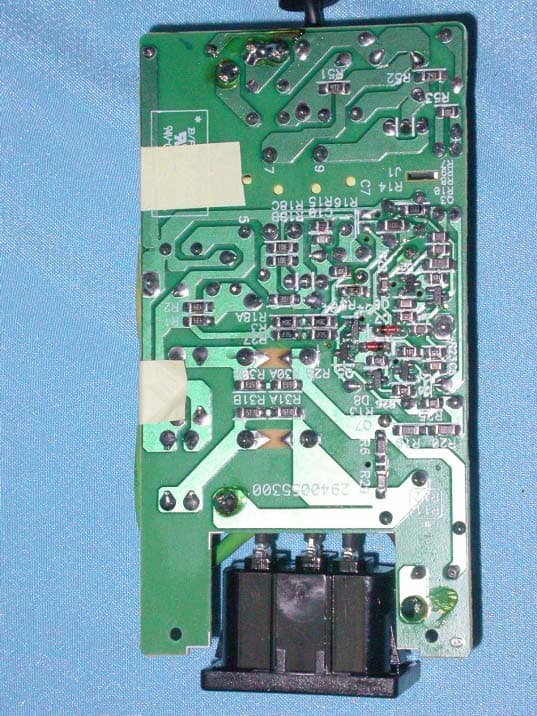
Click to zoom
Application Details
- Equipment Class
- DTS - Digital Transmission System
- Date of Grant
- Aug 17, 2003
- Application Purpose
- Original Equipment
- Date of Application
- Aug 17, 2003
- Equipment Note
- WebSTAR Cable Resident Gateway
- Frequency Range
- 2412.00000000 - 2462.00000000
- Company
- Askey Computer Corp
- Country
- Taiwan
Documents & Files
Document Text
Text extracted from the exhibit documents filed with the FCC. Open a document above to read the original.
Users Manual
WebSTAR Cable Resident Gateway User’s Manual WebSTAR Cable RG User Manual - ii - WebSTAR Cable RG User Manual - iii - Safety Notes For Installation Use only the type of power source indicated on the marking labels. Use only the power adapter supplied with the product. Do not overload wall outlet or extension cords as this may increase the risk of electric shock or file. If the power cord is frayed, replace it with a new one. Proper ventilation is necessary to prevent the product overheating. Do not block or cover the slots and openings on the device, which are intended for ventilation and proper operation. It is recommended to mount the product with a stack. Do not place the product near any source of heat or expose it to direct sunshine. Do not expose the product to moisture. Never spill any liquid on the product. Do not attempt to connect with any computer accessory or electronic product without instructions from qualified service personnel. This may result in risk of electronic shock or file. Do not place this product on an unstable stand or table. For Using Power off and unplug this product from the wall outlet when it is not in use or before cleaning. Pay attention to the temperature of the power adapter. The temperature might be high. After powering off the product, power on the product at least 15 seconds later. Do not block the ventilating openings of this product. When the product is expected to be not in use for a period of time, unplug the power cord of the product to prevent it from the damage of storm or sudden increases in rating. For Service Do not attempt to disassemble or open covers of this unit by yourself. Nor should you attempt to service the product yourself, which may void the user’s authority to operate it. Contact qualified service personnel under the following conditions: If the power cord or plug is damaged or frayed. If liquid has been spilled into the product. If the product has been exposed to rain or water. If the product does not operate normally when the operating instructions are followed. If the product has been dropped or the cabinet has been damaged. If the product exhibits a distinct change in performance. Warning This equipment must be installed and operated in accordance with provided instructions and a minimum 20 cm spacing must be provided between computer mounted antenna and person’s body (excluding extremities of hands, wrist and feet) during wireless modes of operation. This device complies with Part 15 of the FCC Rules. Operation is subject to the following two conditions: (1) this device may not cause harmful interference, and (2) this device must accept any interference received, including interference that may cause undesired operation. The antenna(s) used for this transmitter must be installed to provide a separation distance of at least 20 cm from all persons and must not be co-located or operating in conjunction with any other antenna or transmitter. " Caution Any changes or modifications not expressly approved by the party responsible for compliance could void the authority to operate equipment. WebSTAR Cable RG User Manual - iv - Contents Chapter 1: Overview .........................................................................................................................................1 1.1 Physical Outlook .................................................................................1 1.1-1 Front Panel ............................................................................1 1.1-2 Rear Panel .............................................................................2 Chapter 2: Installation......................................................................................................................................3 2.1 Connecting the Cable Modem to Your Computer ......................................3 2.1-1 Installation Procedure for Ethernet Interface .................................3 2.1-2 Installation Procedure for USB Interface.....................................4 2.1-3 Installation Procedure for Wireless ............................................5 Chapter 3: Software Installation and Configuration .....................................................................................6 3.1 USB Driver Installation ........................................................................6 3.1-1 For Windows 98/Me ................................................................6 3.1-2 For Windows 2000/XP .............................................................8 3.2 Uninstall USB Driver .......................................................................... 10 3.2-1 For Windows 98/ME .............................................................. 10 3.2-2 For Windows 2000/XP ........................................................... 10 3.3 Setting TCP/IP on Client PC ................................................................ 11 3.3-1 For Windows 98/Me .............................................................. 11 3.3-2 For Windows 2000/XP ........................................................... 15 3.4 DHCP Server .................................................................................... 18 3.4-1 For Windows 98/Me .............................................................. 18 3.4-2 For Windows NT/2000/XP ...................................................... 19 3.4-3 For Apple Macintosh .............................................................. 20 3.5 Renew PC IP Address......................................................................... 21 Chapter 4: Access Internet through Cable Modem .....................................................................................23 Chapter 5: Web Manager ...............................................................................................................................24 5.1 System............................................................................................ 2…
Text truncated - open the document above for the full version.
Attestation Statements
Askey Computer Corp. 10F, No.119,Chienkang Rd., Chung-Ho, Taipei, Taiwan, R.O.C. Attestation FCC ID H8N-DPR2320 Product WebSTAR Cable Resident Gateway Model DPR2320 Series Cable Modem/Gateway P/N:XXXXXXX Statements: We don’t provide with any controls or software to allow operation outside the USA frequency band for all future applications when we sell this product in USA. Sincerely, Signature: 08/14/2003 (Name / Date)
Cover Letter(s)
Askey Computer Corp. 10F, No.119,Chienkang Rd., Chung-Ho, Taipei, Taiwan, R.O.C. Confidentiality Request CompanyAskey Computer Corp. FCC ID H8N-DPR2320 Product WebSTAR Cable Resident Gateway Model DPR2320 Series Cable Modem/Gateway P/N:XXXXXXX Pursuant to Sections 0.457 and 0.459 of the Commission’s Rules, the Applicant hereby requests confidential treatment of information accompanying this Application as outlined below. Schematics / Block Diagram The above materials contain trade secrets and proprietary information not customarily released to the public. The public disclosure of these matters might be harmful to the Applicant and provide unjustified benefits to its competitors. The Applicant understands that pursuant to Rule 0.457, disclosure of this Application And all accompanying documentation will not be made before the date of the Grant for this application. Sincerely, Signature: 08/14/2003
External Photos
Company : Askey Computer Corp. Page : 1 of 23 Product : WebSTAR Cable Resident Gateway Model: DPR2320 Series Cable Modem/Gateway P/N:XXXXXXX Company : Askey Computer Corp. Page : 2 of 23 Product : WebSTAR Cable Resident Gateway Model: DPR2320 Series Cable Modem/Gateway P/N:XXXXXXX Company : Askey Computer Corp. Page : 3 of 23 Product : WebSTAR Cable Resident Gateway Model: DPR2320 Series Cable Modem/Gateway P/N:XXXXXXX Company : Askey Computer Corp. Page : 4 of 23 Product : WebSTAR Cable Resident Gateway Model: DPR2320 Series Cable Modem/Gateway P/N:XXXXXXX Company : Askey Computer Corp. Page : 5 of 23 Product : WebSTAR Cable Resident Gateway Model: DPR2320 Series Cable Modem/Gateway P/N:XXXXXXX Company : Askey Computer Corp. Page : 6 of 23 Product : WebSTAR Cable Resident Gateway Model: DPR2320 Series Cable Modem/Gateway P/N:XXXXXXX Company : Delta Page : 7 of 23 Product : WebSTAR Cable Resident Gateway Adapter(1) Model : ADP-12SB Rev:B Company : Delta Page : 8 of 23 Product : WebSTAR Cable Resident Gateway Adapter(1) Model : ADP-12SB Rev:B Company : Delta Page : 9 of 23 Product : WebSTAR Cable Resident Gateway Adapter(1) Model : ADP-12SB Rev:B Company : Delta Page : 10 of 23 Product : WebSTAR Cable Resident Gateway Adapter(1) Model : ADP-12SB Rev:B Company : Delta Page : 11 of 23 Product : WebSTAR Cable Resident Gateway Adapter(1) Model : ADP-12SB Rev:B Company : Delta Page : 12 of 23 Product : WebSTAR Cable Resident Gateway Adapter(1) Model : ADP-12SB Rev:B Company : Delta Page : 13 of 23 Product : WebSTAR Cable Resident Gateway Adapter(1) Model : ADP-12SB Rev:B Company : Delta Page : 14 of 23 Product : WebSTAR Cable Resident Gateway Adapter(1) Model : ADP-12SB Rev:B Company : Delta Page : 15 of 23 Product : WebSTAR Cable Resident Gateway Adapter(1) Model : ADP-12SB Rev:B Company : OEM Page : 16 of 23 Product : WebSTAR Cable Resident Gateway Adapter(2) Model : AD-121ANDT Company : OEM Page : 17 of 23 Product : WebSTAR Cable Resident Gateway Adapter(2) Model : AD-121ANDT Company : OEM Page : 18 of 23 Product : WebSTAR Cable Resident Gateway Adapter(2) Model : AD-121ANDT Company : OEM Page : 19 of 23 Product : WebSTAR Cable Resident Gateway Adapter(2) Model : AD-121ANDT Company : OEM Page : 20 of 23 Product : WebSTAR Cable Resident Gateway Adapter(2) Model : AD-121ANDT Company : OEM Page : 21 of 23 Product : WebSTAR Cable Resident Gateway Adapter(2) Model : AD-121ANDT Company : OEM Page : 22 of 23 Product : WebSTAR Cable Resident Gateway Adapter(2) Model : AD-121ANDT Company : OEM Page : 23 of 23 Product : WebSTAR Cable Resident Gateway Adapter(2) Model : AD-121ANDT
ID Label/Location Info
Company : Askey Computer Corp. Model: DPR2320 Series Cable Modem/Gateway P/N:XXXXXXX Product : WebSTAR Cable Resident Gateway WebSTAR Cable Resident Gateway Model No: DPR2320 Series Cable Modem/Gateway P/N:XXXXXXX FCC IDH8N-DPR2320 This device complies with part 15 of the FCC Rules. Operation is subject to the following two conditions: [1] this device may not cause harmful interference and [2] this device must accept any interference received, including interference that may cause undesired operation. S/N Made in Taiwan
Internal Photos
Company : Askey Computer Corp. Page : 1 of 6 Product : WebSTAR Cable Resident Gateway Model: DPR2320 Series Cable Modem/Gateway P/N:XXXXXXX Company : Askey Computer Corp. Page : 2 of 6 Product : WebSTAR Cable Resident Gateway Model: DPR2320 Series Cable Modem/Gateway P/N:XXXXXXX Company : Askey Computer Corp. Page : 3 of 6 Product : WebSTAR Cable Resident Gateway Model: DPR2320 Series Cable Modem/Gateway P/N:XXXXXXX Company : Askey Computer Corp. Page : 4 of 6 Product : WebSTAR Cable Resident Gateway Model: DPR2320 Series Cable Modem/Gateway P/N:XXXXXXX Company : Askey Computer Corp. Page : 5 of 6 Product : WebSTAR Cable Resident Gateway Model: DPR2320 Series Cable Modem/Gateway P/N:XXXXXXX Company : Askey Computer Corp. Page : 6 of 6 Product : WebSTAR Cable Resident Gateway Model: DPR2320 Series Cable Modem/Gateway P/N:XXXXXXX
Operational Description
Description of Operation EUT is a WebSTAR Cable Resident Gateway with 11 channels. This device provided four kind of transmitting speed 1,2,5.5 and 11Mbps. The device of RF carrier is DQPSK,DB PSK and CCK.The device adapts direct sequence spread spectrum modulation. The Connector antenna was scolded on PCB provided diversity function to improve the receiving function.This WebSTAR Cable Resident Gateway is an IEEE 802.11b Wireless LAN adapter. It allows your computer to connect to a wireless network and to share resources, such as files or printers without being bound to the network wires. Operation in 2.4GHz Direct Sequence Spread Spectrum (D.S.S.S) radio transmission, WebSTAR Cable Resident Gateway transfers data at speeds up to 64/128-bit Wired Equivalent Protection(WEP) algorithm is used. In addition, its standard compliance ensures that it can communicate with any 802.11b network.
RF Exposure Info
Ecom Sertech Corp. Rm. 258, Bldg. 17, NO.195, Sec. 4 Chung Hsing Rd.,Chu -Tung Chen, Hsinchu, Taiwan 310, R.O.C TEL:886 - 3 - 5918012 FAX : 886 - 3 - 5825720 FCC ID H8N-DPR2320 Report No.ER03-07-049FRF-1 Page 1 of 2 RF EXPOSURE EVALUATION According to FCC 1.1310 : The criteria listed in the following table shall be used to evaluate the environment impact of human exposure to radio frequency (RF) radiation as specified in 1.1307(b) LIMITS FOR MAXIMUM PERMISSIBLE EXPOSURE (MPE) Frequency Range (MHz) Electric Field Strength (V/m) Magnetic Field Strength (A/m) Power Density (mW/cm 2 ) Average Time (A) Limits for Occupational / Control Exposures 300-1,500 -- -- F/300 6 1,500-100,000 -- -- 5 6 (B) Limits for General Population / Uncontrol Exposures 300-1,500 -- -- F/1500 6 1,500-100,000 -- -- 1 30 Friis Formula Friis transmission formula : Pd = (Pout*G)/(4*pi*r 2 ) Where Pd = power density in mW/cm 2 Pout = output power to antenna in mW G = gain of antenna in linear scale Pi = 3.1416 R = distance between observation point and center of the radiator in cm Pd id the limit of MPE, 1 mW/cm2. If we know the maximum gain of the antenna and the total power input to the antenna, through the calculation, we will know the distance r where the MPE limit is reached. EUT Operating Condition A software provided by client enabled the EUT to transmit and receive data at lowest, middle and highest channel individually. Ecom Sertech Corp. Rm. 258, Bldg. 17, NO.195, Sec. 4 Chung Hsing Rd.,Chu -Tung Chen, Hsinchu, Taiwan 310, R.O.C TEL:886 - 3 - 5918012 FAX : 886 - 3 - 5825720 FCC ID H8N-DPR2320 Report No.ER03-07-049FRF-1 Page 2 of 2 Test Result of RF Exposure Evaluation Test Item RF Exposure Evaluation Data Test Mode Normal Operation Antenna Gain Antenna GainThe maximum Gain measured in fully anechoic chamber is 2.0dBi linear scale. Output Power into Antenna & RF Exposure Evaluation Distance Channel Channel Frequency (MHz) Output Power to Antenna (dBm) Power density in mW/cm2 at Friis formula when r=20cm(mW/cm2) LIMITS CH1 2412.00 17.68 0.018481 1 CH6 2437.00 17.37 0.017208 1 CH11 2462.00 16.90 0.015443 1 The power density Pd (4 th column) at a distance of 20cm calculated from the Friis transmission formula is far belowthe limit of 1 mW/cm 2 . So, RF exposure limit warning or SAR test are not required.
Test Report
Ecom Sertech Corp. Rm. 258, Bldg. 17, NO.195, Sec. 4 Chung Hsing Rd.,Chu -Tung Chen, Hsinchu, Taiwan 310, R.O.C TEL:886 - 3 - 5918012 FAX : 886 - 3 - 5825720 FCC ID :H8N-DPR2320 Report No.:ER03-07-049FRF-1 Page 1 of 46 TEST REPORT Product Name : WebSTAR Cable Resident Gateway Model Number : DPR2320 Series Cable Modem/Gateway P/N : XXXXXXX Brand Name : WebSTAR Applicant : Askey Computer Corp. Address : 10F, NO.119, Chienkang Rd., Chung-Ho, Taipei, Taiwan, R.O.C. Received Date : Jul. 17, 2003 Tested Date : Jul. 17~Aug. 05, 2003 Notes : 1. This report will be invalid if duplicated or photocopied in part. 2. This report refers only to the specimen(s) submitted to testing, and be invalid as seperately used. 3. This report is invalid without examination stamp and signature of this institute. 4. The tested specimen(s) will be preserved for thirty days from the data issued. 5. The report must not be used to claim product certification, approval, or endorsement by NVLAP, NIST, or any agency of the federal government. Ecom Sertech Corp. Rm. 258, Bldg. 17, NO.195, Sec. 4 Chung Hsing Rd.,Chu -Tung Chen, Hsinchu, Taiwan 310, R.O.C TEL:886 - 3 - 5918012 FAX : 886 - 3 - 5825720 FCC ID :H8N-DPR2320 Report No.:ER03-07-049FRF-1 Page 2 of 46 Test Report Certification Product Name : WebSTAR Cable Resident Gateway Model Number : DPR2320 Series Cable Modem/Gateway P/N : XXXXXXX Applicant : Askey Computer Corp. Measurement Standard : 47 CFR Part 15, Subpart B and Subpart C (Section 15.247), ANSI C63.4-2001 WE HEREBY CERTIFY THAT: The measurements shown in the attachment were made in accordance with the procedures indicated, and the energy emitted by the equipment was found to be within the limits applicable. We assume full responsibility for the accuracy and completeness of these measurements and vouch for the qualifications of all persons taking them. Ecom Sertech Corp. Rm. 258, Bldg. 17, NO.195, Sec. 4 Chung Hsing Rd.,Chu -Tung Chen, Hsinchu, Taiwan 310, R.O.C TEL:886 - 3 - 5918012 FAX : 886 - 3 - 5825720 FCC ID :H8N-DPR2320 Report No.:ER03-07-049FRF-1 Page 3 of 46 TABLE OF CONTENTS TITLE PAGE NO. 1. GENERAL INFORMATION ....................................................................................................................5 1.1 General Statement .................................................................................................................................5 1.2 General Description of EUT & Power ..................................................................................................5 1.3 Description of Peripherals.....................................................................................................................6 1.4 EUT & Peripherals Setup Diagram.......................................................................................................7 1.5 EUT Operating Condition.....................................................................................................................8 1.6 Description of Test Site ........................................................................................................................8 1.7 Summary of Test Results ......................................................................................................................9 2. CONDUCTED POWERLINE TEST .........................................................................................................10 2.1 Test Equipments ...................................................................................................................................10 2.2 Test Setup .............................................................................................................................................10 2.3 Conducted Power Line Emission Limit ................................................................................................11 2.4 Test Procedure ......................................................................................................................................11 2.5 Uncertainty of Conducted Emission .....................................................................................................11 2.6 Conducted Power Line Emission..........................................................................................................12-13 2.7 Photos of Conduction Test....................................................................................................................14 3. RADIATED EMISSION TEST .................................................................................................................15 3.1 Test Equipments ...................................................................................................................................15 3.2 Test Setup .............................................................................................................................................15 3.3 Radiation Limit .....................................................................................................................................16 3.4 Test Procedures.....................................................................................................................................17 3.5 Uncertainty of Radiated Emission ........................................................................................................17 3.6 Radiated Rf Noise Measurement ..........................................................................................................18-30 3.7 Photos of Open Site ..............................................................................................................................31-32 4. 6dB BANDWIDTH MEASUREMENT ....................................................................................................33 4.1 Test Equipments ...................................................................................................................................33 4.2 Test Setup ...........................…
Text truncated - open the document above for the full version.
Test Setup Photos
Ecom Sertech Corp. Rm. 258, Bldg. 17, NO.195, Sec. 4 Chung Hsing Rd.,Chu -Tung Chen, Hsinchu, Taiwan 310, R.O.C TEL:886 - 3 - 5918012 FAX : 886 - 3 - 5825720 FCC ID H8N-DPR2320 Report No.ER03-07-049FRF-1 Page 14 of 46 2.7 Photos of Conduction Test Ecom Sertech Corp. Rm. 258, Bldg. 17, NO.195, Sec. 4 Chung Hsing Rd.,Chu -Tung Chen, Hsinchu, Taiwan 310, R.O.C TEL:886 - 3 - 5918012 FAX : 886 - 3 - 5825720 FCC ID H8N-DPR2320 Report No.ER03-07-049FRF-1 Page 32 of 46 Ecom Sertech Corp. Rm. 258, Bldg. 17, NO.195, Sec. 4 Chung Hsing Rd.,Chu -Tung Chen, Hsinchu, Taiwan 310, R.O.C TEL:886 - 3 - 5918012 FAX : 886 - 3 - 5825720 FCC ID H8N-DPR2320 Report No.ER03-07-049FRF-1 Page 31 of 46 3.7 Photos of Open Site
Contact Information
Applicant
Jack Po(Manager)
Test Firm
Compliance Certification Services Inc.Paul Liau
Technical Specifications
| # | Rule Parts | Frequency Range | Power Output |
|---|---|---|---|
| 1 | 15C | 2.41 GHz - 2.46 GHz | 59.00 mW |
Other Applications from Askey Computer Corp
H8N-NUQ2006
Sep 11, 2026enterprise-grade 5G NR outdoor unit
Equipment Class
CBD - Citizens Band Category A and B DevicesH8NSCU5000
Jun 18, 20265G Small cell
Equipment Class
CBD - Citizens Band Category A and B DevicesH8N-EAI2620P
Jan 29, 2026Indoor Wi-Fi 7 Enterprise Access Point
Equipment Class
DTS - Digital Transmission SystemH8N-CTX0800
Oct 07, 2024OBU
Equipment Class
NII - Unlicensed National Information Infrastructure TX
H8NEAO2522P-2
Jul 04, 2024Outdoor WiFi6 AP
Equipment Class
DTS - Digital Transmission System