H8NNCM1120AT&T Internet AirTM for Business 5G Gateway
Askey Computer Corp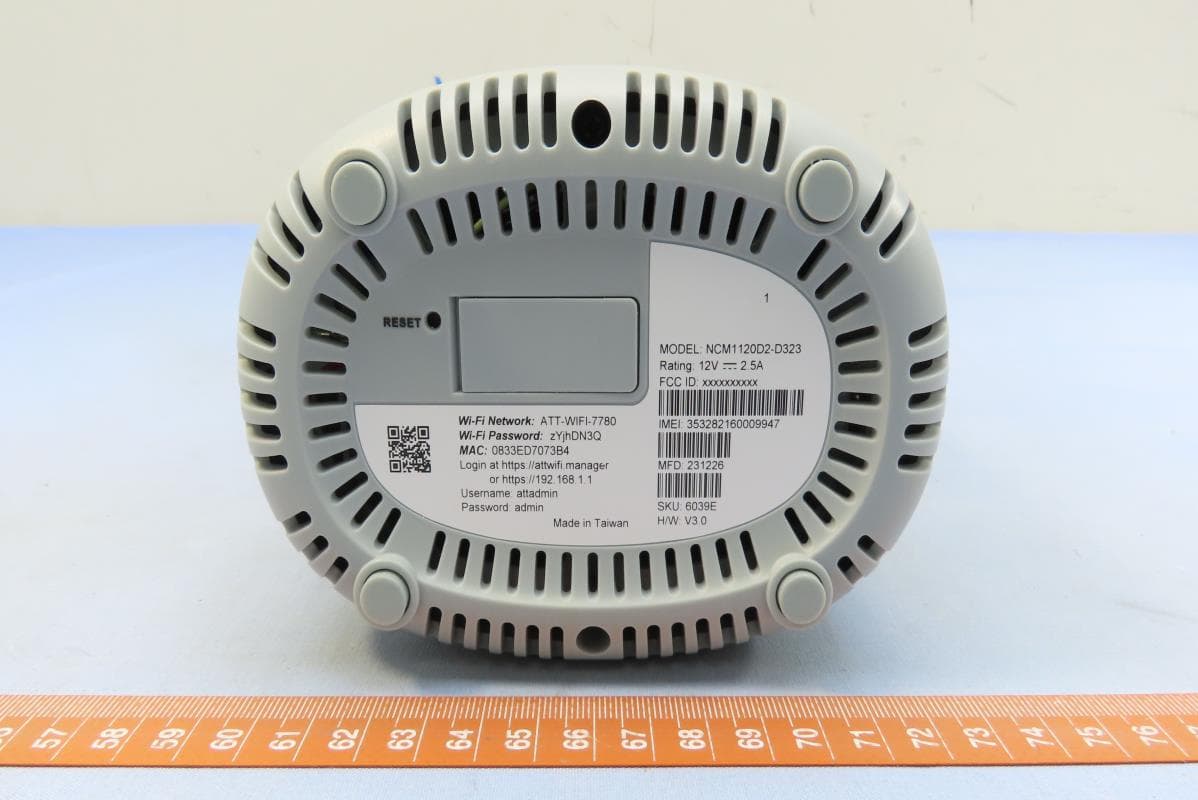
Click to zoom
Application Details
- Equipment Class
- DTS - Digital Transmission System
- Date of Grant
- Feb 14, 2024
- Application Purpose
- Original Equipment
- Date of Application
- Feb 07, 2024
- Equipment Note
- AT&T Internet AirTM for Business 5G Gateway
- Frequency Range
- 2412.00000000 - 2462.00000000
- Company
- Askey Computer Corp
- Country
- Taiwan
Documents & Files
Document Text
Text extracted from the exhibit documents filed with the FCC. Open a document above to read the original.
Users Manual
NCM1120D2 5GODUUserManual 2.GettingStarted -Setup 2.1LED Indicators 2.2Ethernet Cable 2.3ConnectYour Device 3.Using the System 3.1Web UI Login 3.2Dashboard 3.3Check Network Map 3.4Check Network Status 3.5Manage 4G/5G settings 3.6Manage LAN settings 3.7Manage Wi-Fi settings 3.8Security Control 3.9Security 3.10Diagnostic 3.11System Settings 3.12Firmware Update 3.13NAT Forwarding 1.In the Box 1.1Deviceand Accessories 1.2Device View Table of Contents 1.1Device and Accessories PSU Power AdapterODU Device 1.2Device View 200.2 95.6132.8 2.1LED Indicators LEDStateIndicationNote StrongGreen, Solid BRSRP>=-80dBm NormalBlue, Solid -80dBm>BRSRP>=-95dBm WeakRed, Solid BRSRP<-95dBm No 5G Connectedoff StrongGreen, Solid RSRP>=-80dBm NormalBlue, Solid -80dBm>RSRP>=-95dBm WeakRed, Solid RSRP<-95dBm No 4G Connected but SIM is readyoff SIM ErrorRed, Blink Wi-Fi Turn Offoff Wi-Fi Turn OnGreen, Solid Wi-Fi ErrorRed, Solid WPS QueryBlue, BlinkPress “WPS button” equal or more than 3 seconds WPS FinishBlue, SolidLasts 10 seconds and change to show the 'Wi-Fi turn on/off/error' status System Shutdownoff System BootingGreen, Blink System ResetGreen, BlinkBlinking 5 seconds and light off System ErrorRed, Solid System ReadyGreen, Solid Firmware UpgradingBlue, Blink 5G Wi-Fi 4G System TypeSpeed (Mb/s)(Gb/s) 10100110 CAT-5 ◎◎ CAT-5e ◎◎◎ CAT-6 ◎◎◎◎ CAT-6a ◎◎◎◎ •Recommend to use Ethernet cable (RJ45) with CAT-6or above for better stability of PoE. 2.2 Ethernet Cable Step1. PluginAC outlet. Step2. Connect Ethernet cable from computer to LAN port of IDU. PC should get IP from ODU. 2.3Connect Your Device Step1. Use a Web Browser to Access the ODU. Step2.Open URLhttp://192.168.1.1to access login page. Step3. Enter Username and Password. 3.1Web UILogin Step1. Login Web UI Step2. When the network status is Connected, it will show OKinternet status. Step3. Check detailed information regarding System Information. 3.2Dashboard Step1. Navigate to Network >Network Map Step2. Check information regarding Mobile-WAN, LAN and Wi-Fi icon. Step3. Navigate to Network >Status Step4. Check Overviewinformation. 3.3Check Network Map Step5. Check detailed information regarding Internet(v4), Internet(v6), Mobile, LAN, Wireless 2.4G, Wireless 5G, Monthly Usage and Weekly Usage. 3.4Check Network Status Step1. Navigate to Network >Mobile-WAN Step2. The SIM status and APN (active and inactive)related settings are here. 3.5Manage 4G/5G settings Step1. Navigate to Network >LAN Step2. IPV4(and IPV6)& DHCPrelated settings are here. 3.6.1Manage LAN settings Step3. Check information regarding Client List, and DHCP Lease. 3.6.2Manage LAN settings Step1. Navigate to Network >Wi-Fi Step2. Band Steering, Wi-Fi networkrelated settings are here. Note. Enabling Band steering will sync all wifisettings in the frequency list with the 5G band’s ones. 3.7.1Manage Wi-Fi settings Step3. WPS, Radio related settings are here. Note. ACL will only take effect when WPS is disabled. 3.7.2Manage Wi-Fi settings Step1. Navigate to Security Control >Devices Step2. Security control, add devices related settings are here. 3.8.1Security Control Step3. Navigate to Security Control >URL Filters Step4. URL Filters, add rules related settings are here. 3.8.2Security Control Step1. Navigate to Security >Firewall IPv4(or IPv6) Step2. Firewall, Ping Request from WAN, and NET Service Filter related settings are here. 3.9.1Security Step1. Navigate to Security >Access Control Step2. Enable Client ACL, Mode and Listrelated settings are here. 3.9.2Security click Step1. Navigate to Security >VPN Step2. VPN Client Listrelated settings are here. 3.9.3Security Step1. Navigate to Security >Diagnostic Tools Step2. Diagnostic related settings are here. 3.10Diagnostic Step1. Navigate to System Settings >Admin (Password) Step2. Username and new password settings are here. 3.11.1System Settings Step1. Navigate to System Settings >Backup / Restore Option1. To save the current settings, click Save. Option2. To restore settings,Click Select file, then Update. Option3. To load default settings,ClickReset,then ClickApplyto reboot the ODU. 3.11.2System Settings 1 2 3 Step1. Navigate to System Settings >System Log Step2. System Logs are here. 3.11.3System Settings Step1. Navigate to System Settings >Firmware Update Step2. Tap“Download and Update”, popup info will shows progress bar. When the bar shows 100%, it’ll redirect to login page. 3.12.1Firmware Update Step3. Select Upgrade Manually,Click Select fileand open file. Step4. Click Update. 3.12.2Firmware Update Step1. Navigate to NAT Forwarding >DMZ or UPnP Step2. DMZ and UPnP related settings are here. 3.13.1NAT Forwarding Step1. Navigate to NAT Forwarding >ALG or Virtual Servers Step2. ALG and Virtual Serversrelated settings are here. 3.13.2NAT Forwarding
Users Manual
FCC Declaration of Conformance This device complies with Part 15 of the FCC Rules. Operation is subject to the following two conditions: (1) This device may not cause harmful interference, and (2) this device must accept any interference received, including interference that may cause undesired operation. This equipment has been tested and found to comply with the limits for a Class B digital device, pursuant to Part 15 of the FCC Rules. These limits are designed to provide reasonable protection against harmful interference in a residential installation. This equipment generates, uses and can radiate radio frequency energy and, if not installed and used in accordance with the instructions, may cause harmful interference to radio communications. However, there is no guarantee that interference will not occur in a particular installation. If this equipment does cause harmful interference to radio or television reception, which can be determined by turning the equipment off and on, the user is encouraged to try to correct the interference by one of the following measures: Reorient or relocate the receiving antenna. Increase the separation between the equipment and receiver. Connect the equipment into an outlet on a circuit different from that to which the receiver is connected. Consult the dealer or an experienced radio/TV technician for help. FCC Caution: Any changes or modifications not expressly approved by the party responsible for compliance could void the user's authority to operate this equipment. Operations in the 5.15-5.25GHz band are restricted to indoor usage only. FCC RF Radiation Exposure Statement (SAR) This Transmitter must not be co-located or operating in conjunction with any other antenna or transmitter. This equipment complies with FCC RF radiation exposure limits set forth for an uncontrolled environment. This equipment should be installed and operated with a minimum distance of 24 centimeters between the transmitter and your body. Safety Warnings Caution Ensure to connect the power cord of power adapter to a socket-outlet with grounding connection. If any parts of your device, power adapters or any cables appear damaged, discontinue use immediately. Do not try to open your devices or power adapters. There are no serviceable parts and you risk an electrical shock. Adapter Do not use any other power adapter except the one that accompanies this unit or a power adapter identified in the list below. Use of another adapter could result in damage to the unit. The adapter should only be operated from the type of power source indicated on the adapter’s label. Power Supply DC: 12V /2.5A Safety and Compliance Read before Use We recommend you read the following sections thoroughly before use. AT&T is not liable for malfunctions or damages resulting from misuse of the handset. Safety Precaution Please observe the following safety precautions. Use the chargers, cables or accessories approved by the device manufacturer. Do NOT disassemble or modify the device. Doing so voids the warranty. Prevent wetness from penetrating internal parts. Using the device in wet or damp environment (for instance, charging it in a wet environment like bathtub or bathroom) may result in malfunctions, . Do NOT use this device near source of heat or fire, such as oven, microwave, stove, or heater. Keep your device away from cooking appliances. Do NOT place the device in places with heated atmosphere (dryer, sauna, hot water). Do NOT use the device and disconnect all cables at places with fire or explosion risks. Avoid strong physical impact (heavy objects or excessive force). Keep your device away from liquid or conductive materials. Do NOT power the device when either the device, the adapter, or the cable is wet. It may cause short-circuit. Power off the device when near medical equipment or high-precision control systems to avoid potential interference. Charge with specified voltage only. Place the device on a flat, stable surface for optimal use. Keep the device and adapter away from children and pets. The device must be disposed of in accordance with the locally applicable. environmental regulations. Keep the device away from magnetic items such as magnetic strip cards or items that generate strong electronic or magnetic fields, such as a microwave. Do NOT store the device in an overheated environment. Do NOT use the device when it is overheated. Disconnect all the cable connections when the device is not in use. Place the device in places with good signal strength. Make sure the adapter you use with the device meets the approved standards and specifications. Maintenance & Care Avoid extreme temperature or direct sunlight Clean router with soft, dry cloth. Do NOT use alcohol solvent (color may fade) Warranty does not cover malfunctions caused by misuse. Stop all the applications and shut down the device before cleaning it. Keep the device and its accessories dry at all times. If anomaly occurs, contact AT&T Support immediately. When storing the device, do NOT store it in a container with dampness or under extended heat. Avoid dropping the device or strong physical impact at all times. Legal Notices Copyright Statements Copyright ©2022 AT&T. All rights reserved. No part of this document may be duplicated, reproduced, shared, or used in any form, regardless written or electronically, without the prior written consent of AT&T and its affiliates (AT&T). The product described in this document contains software developed by AT&T and licensed third parties. Unless instructed or licensed otherwise by AT&T or other affiliated entities, you must NOT (1) modify, amend, translate, reverse-engineer or derive this product; (2) reproduce the software or any part of this; (3) rent, lease, transfer or re-license the software or any part of this, or transfer the rights of the software; (4) remove any statement or labeling information of the product and the software in this product; (5) tamper, change or replace the softw…
Text truncated - open the document above for the full version.
Users Manual
External Antenna setting 1 1.Connected external antenna 2.Login web GUI 3.Select internal Antenna External Antenna setting 2 Select 1.external Antenna 2.Save 3. exit External Antenna setting 3 •Check web page external Antenna •Set OK
Attestation Statements
Date: 2024-01-17 FCC ID: H8NNCM1120 To the attention of Federal Communications Commission Authorization and Evaluation Division Attestation Statements Attestation Statements Part 2.911(d)(5)(i) Filing Askey Computer Corp certifies that the equipment for which authorization is sought is not “covered” equipment prohibited from receivingan equipment authorization pursuant to section 2.903 of the FCC rules. Attestation Statements Part 2.911(d)(5)(ii) Filing Askey Computer Corp certifies that, as of the date of the filing of the application, the applicant is not identified on the Covered List (as a specifically named entity or any of its subsidiaries or affiliates) as an entity producing “covered” equipment. Sincerely yours, ----------------------------------- Jack Po, Manager Askey Computer Corp Tel: 886 2 2228-7588 #18734 Fax: 886 2 3234-9340 E-mail: [email protected]
Cover Letter(s)
Date: 2024-01-17 FCC ID: H8NNCM1120 A U T H O R I Z A T I O N L E T T E R To Whom It May Concern: Askey Computer Corp hereby authorizes Andrea Hsia / Assistant Manager of Bureau Veritas Consumer Products Services (H.K.) Ltd., Taoyuan Branch (“BV CPS Taoyuan”), to act on its behalf in all matters relating to the Federal Communication Commission (“FCC”) application for equipment authorization in connection with the FCC ID listed above, including signing of all documents relating to these matters. Any and all acts carried out by Andrea Hsia / Assistant Manager of BV CPS Taoyuan on Askey Computer Corp’s behalf, within the scope of the powers granted herein, shall have the same effect as acts of its own. If you have any questions regarding the authorization, please don’t hesitate to contact us. Sincerely yours, ----------------------------------- Jack Po, Manager Askey Computer Corp Tel: 886 2 2228-7588 #18734 Fax: 886 2 3234-9340 E-mail: [email protected]
Cover Letter(s)
Date: 2024-01-17 FCC ID: H8NNCM1120 To the attention of Federal Communications Commission Authorization and Evaluation Division Confidentiality Request Pursuant to Sections 0.457 and 0.459 of the commission’s rules, we request short-term confidential treatment for the following information until 180 days after the Grant Date of Equipment Authorization in order to ensure sensitive business information remains confidential until the actual marketing of the device: External photos Test Setup photos User’s manual Internal Photos Sincerely yours, ----------------------------------- Jack Po, Manager Askey Computer Corp Tel: 886 2 2228-7588 #18734 Fax: 886 2 3234-9340 E-mail: [email protected]
Cover Letter(s)
Date: 2024-01-17 FCC ID: H8NNCM1120 To the attention of Federal Communications Commission Authorization and Evaluation Division Permanent Confidentiality Request Pursuant to Sections 0.457 and 0.459 of the Commission’s Rules, the Applicant hereby requests confidential treatment of information accompanying this Application as outlined below: Schematics Block Diagram Operational Description Software Operational Description Tune-up Procedure Part list The above materials contain trade secrets and proprietary information not customarily released to the public. The public disclosure of these matters might be harmful to the Applicant and provide unjustified benefits to its competitors. The Applicant understands that pursuant to Rule 0.457, disclosure of this Application and all accompanying documentation will not be made before the date of the Grant for this application. Sincerely yours, ----------------------------------- Jack Po, Manager Askey Computer Corp Tel: 886 2 2228-7588 #18734 Fax: 886 2 3234-9340 E-mail: [email protected]
Cover Letter(s)
PROFESSIONAL INSTALLATION ATTESTATION Date: 2024-02-01 FCC ID: H8NNCM1120 We, Askey Computer Corp hereby declare that requirements of KDB 353028 D01 Antennas Part 15 Transmitters v01 have been met and shown on the following questions. Further we declare that the info listed below are correct and represent the product in consideration under this filing. 1. Professional installation must be justified. Description: Device is supported internal and external antenna for LTE function and must need special trained professional in configuring and installing the product, more details please refer to user manual exhibit. 2. Professional installation does not permit use of any antenna with the transmitter; the permitted types of antennas specified as below. Description: Below listed of Antennas has been compliance FCC Rule Part 15 requirement, more details please refer to test reports. 3. The applicant should address the following items when justifying professional installation. (1) To qualify for professional installation, please explain why the hardware is not readily available to average consumer. Description: Due to this product and will not be sold directly to the general public through retail store, therefore the hardware is not readily available to average consumer. (2) Marketing — Applicant must ensure device cannot be sold via retail to the general public or by mail order. Description: This product and will not be sold directly to the general public through retail store. It will be sold to authorized dealers or installers only. (3) Applicant must show that device intended use is not for consumers and general public. Description: Device is for industrial/commercial use. (4) Explain what is unique, sophisticated, complex, or specialized about the equipment that REQUIRES it to be installed by a professional installer? Description: Enter to the UI and change the int antenna to ext antenna. 4. Other professional installation requirements (1) Installation must be controlled. Description: The product will be distributed through controlled distribution channel which has special trained professional to install this product (2) Installed by licensed professionals. Description: Device sold to dealer who hires installers and need special trained professional in configuring and installing the product. (3) Installation requires special training. Description: The product need special programming, access to keypad, field strength measurements made, so must need special trained professional in configuring and installing the product. If you should have any question(s) regarding this declaration, please don’t hesitate to contact us. Thank you! ----------------------------------- Jack Po, Manager Askey Computer Corp Tel: 886 2 2228-7588 #18734 Fax: 886 2 3234-9340 E-mail: [email protected]
Cover Letter(s)
Date: January 17, 2024 We, Askey Computer Corp declare that the device does not support channel 12 ~ 13 in 2.4GHz band and any non-US channels in all the operational mode(s) for the following product. FCC ID: H8NNCM1120 If you should have any question(s) regarding this declaration, please don’t hesitate to contact us. Thank you! ----------------------------------- Jack Po, Manager Askey Computer Corp Tel: 886 2 2228-7588 #18734 Fax: 886 2 3234-9340 E-mail: [email protected]
External Photos
Reference No.: BCUN-WTW-P23110013_EXT Page 1 / 5 CONSTRUCTION PHOTOS OF EUT Brand :AT&T / Model:NCM1120D2-D323 Reference No.: BCUN-WTW-P23110013_EXT Page 2 / 5 Reference No.: BCUN-WTW-P23110013_EXT Page 3 / 5 Reference No.: BCUN-WTW-P23110013_EXT Page 4 / 5 Reference No.: BCUN-WTW-P23110013_EXT Page 5 / 5
ID Label/Location Info
200.2 95.6132.8 5
Internal Photos
Reference No.: BCUN-WTW-P23110013_INT Page 1 / 19 CONSTRUCTION PHOTOS OF EUT Brand :AT&T / Model:NCM1120D2-D323 Reference No.: BCUN-WTW-P23110013_INT Page 2 / 19 Reference No.: BCUN-WTW-P23110013_INT Page 3 / 19 Reference No.: BCUN-WTW-P23110013_INT Page 4 / 19 Reference No.: BCUN-WTW-P23110013_INT Page 5 / 19 Reference No.: BCUN-WTW-P23110013_INT Page 6 / 19 Reference No.: BCUN-WTW-P23110013_INT Page 7 / 19 Reference No.: BCUN-WTW-P23110013_INT Page 8 / 19 Reference No.: BCUN-WTW-P23110013_INT Page 9 / 19 Reference No.: BCUN-WTW-P23110013_INT Page 10 / 19 Reference No.: BCUN-WTW-P23110013_INT Page 11 / 19 Reference No.: BCUN-WTW-P23110013_INT Page 12 / 19 Reference No.: BCUN-WTW-P23110013_INT Page 13 / 19 Reference No.: BCUN-WTW-P23110013_INT Page 14 / 19 Reference No.: BCUN-WTW-P23110013_INT Page 15 / 19 Reference No.: BCUN-WTW-P23110013_INT Page 16 / 19 Reference No.: BCUN-WTW-P23110013_INT Page 17 / 19 Reference No.: BCUN-WTW-P23110013_INT Page 18 / 19 Reference No.: BCUN-WTW-P23110013_INT Page 19 / 19
RF Exposure Info
Report No.: MFBCUN-WTW-P23110013 Page No. 1/ 8Report Format Version: 6.1.1 RF Exposure Report Report No.:MFBCUN-WTW-P23110013 FCC ID:H8NNCM1120 Model No.:NCM1120D2-D323 Received Date:Nov. 01, 2023 Issued Date:Jan. 29, 2024 Applicant:ASKEY COMPUTER CORP. Address:10F, No. 119, Jiankang Rd., Zhonghe Dist., New Taipei City, Taiwan Issued By:Bureau Veritas Consumer Products Services (H.K.) Ltd., Taoyuan Branch Lin Kou Laboratories Lab Address:No. 47-2, 14th Ling, Chia Pau Vil., Lin Kou Dist., New Taipei City, Taiwan Test Location:No. 19, Hwa Ya 2nd Rd., Wen Hwa Vil., Kwei Shan Dist., Taoyuan City 33383, Taiwan FCC Registration / Desi gnation Number:788550 / TW0003 This report is governed by, and incorporates by reference, the Conditions of Testing as posted at the date of issuance of this report at http://www.bureauveritas.com/home/about-us/our-business/cps/about-us/terms-conditions/ and is intended for your exclusive use. Any copying or replication of this report to or for any other person or entity, or use of our name or trademark, is permitted only with our prior written permission. This report sets forth our findings solely with respect to the test samples identified herein. The results set forth in this report are not indicative or representative of the quality or characteristics of the lot from which a test sample was taken or any similar or identical product unless specifically and expressly noted. Our report includes all of the tests requested by you and the results thereof based upon the information that you provided to us. Measurement uncertainty is only provided upon request for accredited tests. Statements of conformity are based on simple acceptance criteria without taking measurement uncertainty into account, unless otherwise requested in writing. You have 60 days from date of issuance of this report to notify us of any material error or omission caused by our negligence or if you require measurement uncertainty; provided, however, that such notice shall be in writing and shall specifically address the issue you wish to raise. A failure to raise such issue within the prescribed time shall constitute your unqualified acceptance of the completeness of this report, the tests conducted and the correctness of the report contents. Report No.: MFBCUN-WTW-P23110013 Page No. 2/ 8Report Format Version: 6.1.1 Table of Contents Release Control Record .................................................................................................................................. 3 1 Certificate of Conformity ...................................................................................................................... 4 2 General Information .............................................................................................................................. 5 2.1 General Description of EUT ................................................................................................................ 5 3 RF Exposure .......................................................................................................................................... 6 3.1 Limits for Maximum Permissible Exposure (MPE) .............................................................................. 6 3.2 MPE Calculation Formula ................................................................................................................... 6 3.3 Classification ....................................................................................................................................... 6 4 Calculation Result of Maximum Conducted Power ........................................................................... 7 Report No.: MFBCUN-WTW-P23110013 Page No. 3/ 8Report Format Version: 6.1.1 Release Control Record Issue No. Description Date Issued MFBCUN-WTW-P23110013 Original release Jan. 29, 2024 Report No.: MFBCUN-WTW-P23110013 Page No. 4/ 8Report Format Version: 6.1.1 1 Certificate of Conformity Product: AT&T Internet Air™ for Business 5G Gateway Brand: AT&T Test Model: NCM1120D2-D323 Sample Status: Engineering sample Applicant: ASKEY COMPUTER CORP. FCC Rule Part: FCC Part 2 (Section 2.1091) Standards: KDB 447498 D01 General RF Exposure Guidance v06 The above equipment has been tested by Bureau Veritas Consumer Products Services (H.K.) Ltd., Taoyuan Branch, and found compliance with the requirement of the above standards. The test record, data evaluation & Equipment Under Test (EUT) configurations represented herein are true and accurate accounts of the measurements of the sample’s RF characteristics under the conditions specified in this report. Prepared by : , Date:Jan. 29, 2024 Pettie Chen / Senior Specialist Approved by : , Date:Jan. 29, 2024 Jeremy Lin / Project Engineer Report No.: MFBCUN-WTW-P23110013 Page No. 5/ 8Report Format Version: 6.1.1 2 General Information 2.1 General Description of EUT Product AT&T Internet Air™ for Business 5G Gateway Brand AT&T Test Model NCM1120D2-D323 Status of EUT Engineering sample Power Supply Rating 12Vdc from adapter Modulation Type WLAN CCK, DQPSK, DBPSK for DSSS 64QAM, 16QAM, QPSK, BPSK for OFDM 256QAM for OFDM in VHT mode 1024QAM for OFDMA in 11ax mode WWAN QPSK, 16QAM, 64QAM, 256QAM Operating Frequency WLAN 2.412 GHz ~ 2.462 GHz 5.18 GHz ~ 5.24 GHz 5.26 GHz ~ 5.32 GHz 5.745 GHz ~ 5.825 GHz WWAN LTE Band 2 1850-1910 MHz LTE Band 5 824-849 MHz LTE Band 12 698-716 MHz LTE Band 14 788-798 MHz LTE Band 29 717-728 MHz LTE Band 30 2305-2315 MHz LTE Band 66 1710-1780 MHz NR Band 2 1850-1910 MHz NR Band 5 824-849 MHz NR Band 14 788-798 MHz NR Band 30 2305-2310 MHz NR Band 66 1710-1780 MHz NR Band 77 3300-4200 MHz Note: 1. The EUT uses following accessory. Adapter Brand MASS POWER Model S030-1C120250VU Input Power 100-240Vac~ 50/60Hz 0.8A Output Power 12.0Vdc, 2.5A Report No.: MFBCUN-WTW-P23110013 Page No. 6/ 8Report Format Version: 6.1.1 3 RF Exposure 3.1 Limits for Maximum Permissible Exposure (MPE) Frequency Range (MHz) Electric Field Strength (V/…
Text truncated - open the document above for the full version.
Test Report
Report No.: RFBCUN-WTW-P23110013-3Page No. 1 / 69Report Format Version: 7.1.0 TEST REPORT CERTIFICATE OF CONFORMITY Standard: 47 CFR FCC Part 15, Subpart C (Section 15.247) Report No.: RFBCUN-WTW-P23110013-3 FCC ID: H8NNCM1120 Product: AT&T Internet Air™ for Business 5G Gateway Brand: AT&T Model No.: NCM1120D2-D323 Received Date: 2023/11/1 Test Date: 2023/11/15 ~ 2023/12/10 Issued Date: 2024/1/29 Applicant: ASKEY COMPUTER CORP. Address: 10F, No. 119, Jiankang Rd., Zhonghe Dist., New Taipei City, Taiwan Issued By: Bureau Veritas Consumer Products Services (H.K.) Ltd., Taoyuan Branch Lin Kou Laboratories Lab Address: No. 47-2, 14th Ling, Chia Pau Vil., Lin Kou Dist., New Taipei City, Taiwan Test Location: No. 19, Hwa Ya 2nd Rd., Wen Hwa Vil., Kewi Shan Dist., Taoyuan City 33383, Taiwan FCC Registration / Desi gnation Number: 788550 / TW0003 Approved by: , Date:2024/1/29 Jeremy Lin / Project Engineer This test report consists of 69 pages in total. It may be duplicated completely for legal use with the approval of the applicant. It should not be reproduced except in full, without the written approval of our laboratory. The test results in the report only apply to the tested sample. The test results in this report are traceable to the national or international standards. Prepared by : Pettie Chen / Senior Specialist This report is governed by, and incorporates by reference, the Conditions of Testing as posted at the date of issuance of this report at http://www.bureauveritas.com/home/about-us/our- business/cps/about-us/terms-conditions/ and is intended for your exclusive use. Any copying or replication of this report to or for any other person or entity, or use of our name or trademark, is permitted only with our prior written permission. This report sets forth our findings solely with respect to the test samples identified herein. The results set forth in this report are not indicative or representative of the quality or characteristics of the lot from which a test sample was taken or any similar or identical product unless specifically and expressly noted. Our report includes all of the tests requested by you and the results thereof based upon the information that you provided to us. Measurement uncertainty is only provided upon request for accredited tests. Statements of conformity are based on simple acceptance criteria without taking measurement uncertainty into account, unless otherwise requested in writing. You have 60 days from date of issuance of this report to notify us of any material error or omission caused by our negligence or if you require measurement uncertainty; provided, however, that such notice shall be in writing and shall specifically address the issue you wish to raise. A failure to raise such issue within the prescribed time shall constitute your unqualified acceptance of the completeness of this report, the tests conducted and the correctness of the report contents. Report No.: RFBCUN-WTW-P23110013-3Page No. 2 / 69Report Format Version: 7.1.0 Table of Contents Release Control Record ....................................................................................................................................................... 4 1 Certificate .................................................................................................................................................................... 5 2 Summary of Test Results .......................................................................................................................................... 6 2.1 Measurement Uncertainty ........................................................................................................................................ 6 2.2 Supplementary Information ...................................................................................................................................... 6 3 General Information ................................................................................................................................................... 7 3.1 General Description .................................................................................................................................................. 7 3.2 Antenna Description of EUT ..................................................................................................................................... 8 3.3 Channel List .............................................................................................................................................................. 9 3.4 Test Mode Applicability and Tested Channel Detail ................................................................................................ 10 3.5 Duty Cycle of Test Signal........…
Text truncated - open the document above for the full version.
Contact Information
Applicant
Jack Po(Manager)
Test Firm
Bureau Veritas CPS(H.K.) Ltd., Taoyuan BranchLiu Ken
Technical Specifications
| # | Rule Parts | Frequency Range | Power Output |
|---|---|---|---|
| 1 | 15C | 2.41 GHz - 2.46 GHz | 929.00 mW |
Other Applications from Askey Computer Corp
H8N-NUQ2006
Sep 11, 2026enterprise-grade 5G NR outdoor unit
Equipment Class
CBD - Citizens Band Category A and B DevicesH8NSCU5000
Jun 18, 20265G Small cell
Equipment Class
CBD - Citizens Band Category A and B DevicesH8N-EAI2620P
Jan 29, 2026Indoor Wi-Fi 7 Enterprise Access Point
Equipment Class
DTS - Digital Transmission SystemH8N-CTX0800
Oct 07, 2024OBU
Equipment Class
NII - Unlicensed National Information Infrastructure TX
H8NEAO2522P-2
Jul 04, 2024Outdoor WiFi6 AP
Equipment Class
DTS - Digital Transmission System