H8NRTW030Access Point
Askey Computer Corp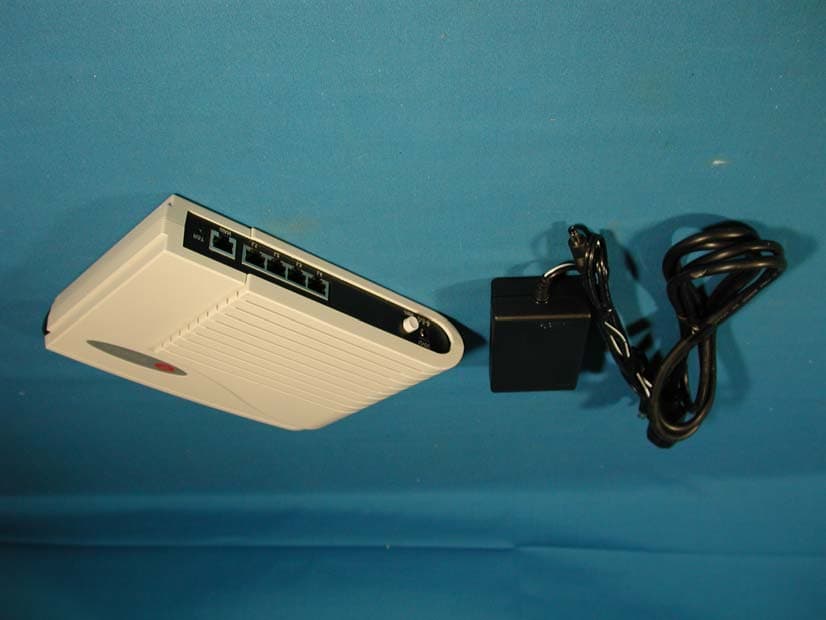
Click to zoom
Application Details
- Equipment Class
- DSS - Part 15 Spread Spectrum Transmitter
- Date of Grant
- Mar 21, 2002
- Application Purpose
- Original Equipment
- Date of Application
- Mar 21, 2002
- Equipment Note
- Access Point
- Frequency Range
- 2412.00000000 - 2462.00000000
- Company
- Askey Computer Corp
- Country
- Taiwan
Documents & Files
Document Text
Text extracted from the exhibit documents filed with the FCC. Open a document above to read the original.
Users Manual
ASKEY User Manual RTW030 Broadband AP Router 2 Note No part of this publication may be reproduced in any form by any means without the prior written permission. Other trademarks or brand names mentioned herein are trademarks or registered trademarks of their respective companies. February 2002, Rev01 Safety Instructions Installing - Use only the type of power source indicated on the marking labels. - Use only the power adapter supplied with the product. - Do not overload wall outlet or extension cords as this may increase the risk of electric shock or file, If the power cord is frayed, replace it with a new one. - Proper ventilation is necessary to prevent the product overheating. Do not block or cover the slots and openings on the device, which are intended for ventilation and proper operation. It is recommended to mount the product with a stack. - Do not place the product near any source of heat or expose it to direct sunshine. - Do not expose the product to moisture. Never spill any liquid on the product. - Do not attempt to connect with any computer accessory or electronic product without instructions from qualified service personnel. This may result in risk of electronic shock or file. - Do not place this product on an unstable stand or table. Using - Power off and unplug this product from the wall outlet when it is not in use or before cleaning. Pay attention to the temperature of the power adapter. The temperature might be high. - After powering off the product, power on the product at least 15 seconds later. - Do not block the ventilating openings of this product. - When the product is expected to be not in use for a period of time, unplug the power cord of the product to prevent it from the damage of storm or sudden increases in rating. Servicing Do not attempt to disassemble or open covers of this unit yourself. Nor should you attempt to service the product yourself, which may void the user’s authority to operate it. Contact qualified service personnel under the following conditions: - If the power cord or plug is damaged or frayed. - If liquid has been spilled into the product. - If the product has been exposed to rain or water. - If the product does not operate normally when the operating instructions are followed. - If the product has been dropped or the cabinet has been damaged. - If the product exhibits a distinct change in performance. FEDERAL COMMUNICATIONS COMMISSION INTERFERENCE STATEMENT This equipment has been tested and found to comply with the limits for a Class B digital device, pursuant to Part 15 of the FCC Rules. These limits are designed to provide reasonable protection against harmful interference in a residential installation. This equipment generates, uses and can radiate radio frequency energy and, if not installed and used in accordance with the instructions, may cause harmful interference to radio communications. However, there is no guarantee that interference will not occur in a particular installation. If this equipment does cause harmful interference to radio or television reception, which can be determined by turning the equipment off and on, the user is encouraged to try to correct the interference by one or more of the following measures: -- Reorient or relocate the receiving antenna. -- Increase the separation between the equipment and receiver. -- Connect the equipment into an outlet on a circuit different from that to which the receiver is connected. -- Consult the dealer or an experienced radio/TV technician for help. CAUTION: Any changes or modifications not expressly approved by the grantee of this device could void the user's authority to operate the equipment. FCC RF Radiation Exposure Statement This equipment complies with FCC RF radiation exposure limits set forth for an uncontrolled environment. This equipment should be installed and operated with a minimum distance of 20cm between the radiator and your body. 3 Contents SAFETY INSTRUCTIONS................................................................................................................... 2 Installing........................................................................................................................................... 2 Using ................................................................................................................................................ 2 Servicing........................................................................................................................................... 2 WHAT YOU CAN DO ........................................................................................................................... 7 Router feature ................................................................................................................................... 7 Bridging Features ............................................................................................................................. 8 Wireless LAN Features .................................................................................................................... 8 S YSTEM R EQUIREMENTS ....................................................................................................................... 8 For Wireless Clients ......................................................................................................................... 8 For Ethernet (wired) Clients............................................................................................................. 8 UNPACKING YOUR BROADBAND HOME ROUTER .................................................................. 9 INDICATORS AND CONNECTING ................................................................................................ 10 F RONT PANEL ...................................................................................................................................... 10 R EAR P ANEL ............................................................…
Text truncated - open the document above for the full version.
Block Diagram
Block Diagram Virata Helium210-80 SDRAM64Mbit x2 FlashAMD2Mb y te RTL8019AS WLAN PCMCIA Interface KS8995/E 4 p orts LAN Power Support 5V 3.3V2.5V1.8V 3V3P AC110V DC12V 3v3P
External Photos
Report No.: 022H041FI Page : 1 of 7 Version:1.0 Attachment 2 : EUT Detailed Photographs (1) EUT Photo (2) EUT Photo
ID Label/Location Info
ASKEY COMPUTER CORPORATION. 7F, No.22, TAI YUEN ST., CHUPEI, HSINCHU, TAIWAN 302, R.O.C. TEL: 886-3-552 6588 FAX: 886-3-552 6589 FCC ID.: H8NRTW030 FCC ID AND DoC Label The FCC ID and DoC Label will be placed on the equipment as shown in the photograph below. Access Point ASKEY Model No.: RTW030 TESTED TO COMPLY WITH FCC STANDARDS FOR HOME OR OFFICE USE S/N: Made in Taiwan Access Point Model No.: RTW030 F F C C C C I I D D : : H H 8 8 N N R R T T W W 0 0 3 3 0 0 This device complies with Part 15 of the FCC Rules. Operation is subject to the following two conditions: (1) this device may not cause harmful interference and (2) this device must accept any interference received, including interference that may cause undesired operation. S/N: Made in Taiwan
Internal Photos
Report No.: 022H041FI Page : 2 of 7 Version:1.0 (3) EUT Photo (4) EUT Photo Report No.: 022H041FI Page : 3 of 7 Version:1.0 (5) EUT Photo (6) EUT Photo Report No.: 022H041FI Page : 4 of 7 Version:1.0 (7) EUT Photo (8) EUT Photo Report No.: 022H041FI Page : 5 of 7 Version:1.0 (9) EUT Photo (10) EUT Photo Report No.: 022H041FI Page : 6 of 7 Version:1.0 (11) EUT Photo (12) EUT Photo Report No.: 022H041FI Page : 7 of 7 Version:1.0 (13) EUT Photo (14) EUT Photo
Operational Description
Report No. 022H041FI Page : 5 of 46 Version:1.0 1. GENERAL INFORMATION 1.1. EUT Description Product Name : Access Point Trade Name : ASKEY FCC ID. : H8NRTW030 Model No. : RTW030 Frequency Range : 2412MHz to 2462MHz Channel Number : 11 Chip Rate : 1Mbps, 2Mbps, 5.5Mbps, 11Mbps Type of Modulation : Direct Sequence Spread Spectrum Antenna type : Internal permanently on board. Operator Selection of Operating Frequency : By software Power Adapter : DELTA, ADP-12SB, URD0136053188 Non-shielded, 1.6m Power Cord : Non-shielded, 1.8m Frequency of Each Channel: Channel Frequency Channel Frequency Channel Frequency Channel 1: 2412 MHz Channel 2: 2417 MHz Channel 3: 2422 MHz Channel 4: 2427 MHz Channel 5: 2432 MHz Channel 6: 2437 MHz Channel 7: 2442 MHz Channel 8: 2447 MHz Channel 9: 2452 MHz Channel 10: 2457 MHz Channel 11: 2462 MHz Note: 1. This device is a 2.4GHz Access Point included a 2.4GHz receiving function, a 2.4GHz transmitting function for the desktop/ laptop computers. Direct Sequence device with 11 channels. 2. Regards to the frequency band operation; two rate that were included the lowest、middle and highest frequency of channel were selected to perform the test, then shown on this report. 3. These tests were conducted on a sample of the equipment for the purpose of demonstrating compliance with Part 15 Subpart C Paragraph 15.247 for spread spectrum devices. 4. This device is a composite device in accordance with Part 15 regulations. The function receiving was measured and made a test report that the report number is 022H041F under Declaration of Conformity. 1.2. Operational Description EUT is a spread spectrum 2.4 GHz wireless access point which follows IEEE 802.11b. 11 channels were provided by EUT. The max transmission speed is 11Mbps with CCK, DQPSK and DBPSK modulation. This device provided four kind of transmitting speed 1,2,5.5 and 11Mbps. The device adapts direct sequence spread spectrum modulation. The dual monopole antenna printed on PCB provides diversity function to improve the receiving function. Data can be transmitted by the radio signal connect to the Internet or Local network.
Test Report
Report No. 022H041FI Page : 1 of 46 Version:1.0 Test Report Product Name : Access Point Model No. : RTW030 FCC ID.: H8NRTW030 Applicant : ASKEY COMPUTER CORP. Address : 2/FL, No. 2, Lane 497 Chung Cheng Road, Hsin Tien, Taipei, Taiwan, R.O.C. Date of Receipt : Feb. 8, 2002 Date of Test : Feb. 23, 2002 Report No. : 022H041FI The test results relate only to the samples tested. The test report shall not be reproduced except in full without the written approval of QuieTek Corporation. This report must not be used to claim product endorsement by NVLAP any agency of the U.S. Government Report No. 022H041FI Page : 2 of 46 Version:1.0 Test Report Certification Test Date : Feb. 23, 2002 Report No. : 022H041FI The Test Results relate only to the samples tested. The test report shall not be reproduced except in full without the written approval of QuieTek Corporation. This report must not be used to claim product endorsement by NVLAP any agency of the U.S. Government Product Name : Access Point Applicant : ASKEY COMPUTER CORP. Address : 2/FL, No. 2, Lane 497 Chung Cheng Road, Hsin Tien, Taipei, Taiwan, R.O.C. Manufacturer : ASKEY COMPUTER CORP. Model No. : RTW030 FCC ID. : H8NRTW030 Rated Voltage : AC 120V/60Hz Trade Name : ASKEY Measurement Standard : FCC Part 15 Subpart C Paragraph 15.247 Measurement Procedure : ANSI C63.4:1992 Test Result : Complied Documented By : (Kim Hung ) Tested By : (Kenny Jwo ) Approved By : (Kevin Wang ) Accredited by NIST (NVLAP) NVLAP Lab Code: 200347-0 Report No. 022H041FI Page : 3 of 46 Version:1.0 TABLE OF CONTENTS Description Page 1. GENERAL INFORMATION .....................................................................................................5 1.1. EUT Description............................................................................................................................5 1.2. Operational Description ................................................................................................................5 1.3. Tested System Details....................................................................................................................6 1.4. Configuration of tested System .....................................................................................................6 1.5. EUT Exercise Software .................................................................................................................7 1.6. Test Facility ...................................................................................................................................7 2. Conducted Emission....................................................................................................................8 2.1. Test Equipment List.......................................................................................................................8 2.2. Test Setup ......................................................................................................................................8 2.3. Limits ............................................................................................................................................8 2.4. Test Procedure ...............................................................................................................................9 2.5. Test Result of Conducted Emission.............................................................................................10 3. Peak Power Output ................................................................................................................... 11 3.1. Test Equipment............................................................................................................................11 3.2. Test Setup ....................................................................................................................................11 3.3. Test Condition .............................................................................................................................11 3.4. Minimum Standard......................................................................................................................11 3.5. Test Result of Peak Power Output...............................................................................................12 4. RF Exposure Evaluation ...........................................................................................................13 4.1. Friis Formula ...............................................................................................................................13 4.2. EUT Operation condition ............................................................................................................13 4.3. Test Result of RF Exposure Evaluation.......................................................................................14 5. Radiated Emission .....................................................................................................................15 5.1. Test Equipment............................................................................................................................15 5.2. Test Setup ....................................................................................................................................15 5.3. Test Condition .............................................................................................................................16 5.4. Limits ..........................................................................................................................................16 5.5. Test Procedure .............................................................................................................................17 5.6. Test Result of Radiated Emission................................................................................................18 6. Band Edge ....................................................................................................…
Text truncated - open the document above for the full version.
Test Setup Photos
Report No.: 022H041FI Page : 1 of 3 Version:1.0 Attachment 1: EUT Test Setup Photographs Front View of Conducted Test Back View of Conducted Test Report No.: 022H041FI Page : 2 of 3 Version:1.0 Front View of Radiated Test Back View of Radiated Test Report No.: 022H041FI Page : 3 of 3 Version:1.0 Front View of Radiated Test (Horn)
Contact Information
Applicant
Jack Po(Manager)
Test Firm
DEKRA Testing and Certification Co., Ltd.Sky Hsu
Technical Specifications
| # | Rule Parts | Frequency Range | Power Output |
|---|---|---|---|
| 1 | 15C | 2.41 GHz - 2.46 GHz | 80.00 mW |
Other Applications from Askey Computer Corp
H8N-NUQ2006
Sep 11, 2026enterprise-grade 5G NR outdoor unit
Equipment Class
CBD - Citizens Band Category A and B DevicesH8NSCU5000
Jun 18, 20265G Small cell
Equipment Class
CBD - Citizens Band Category A and B DevicesH8N-EAI2620P
Jan 29, 2026Indoor Wi-Fi 7 Enterprise Access Point
Equipment Class
DTS - Digital Transmission SystemH8N-CTX0800
Oct 07, 2024OBU
Equipment Class
NII - Unlicensed National Information Infrastructure TX
H8NEAO2522P-2
Jul 04, 2024Outdoor WiFi6 AP
Equipment Class
DTS - Digital Transmission System