H8NWLC221-D4802.11 a/b WLAN Cardbus Module
Askey Computer Corp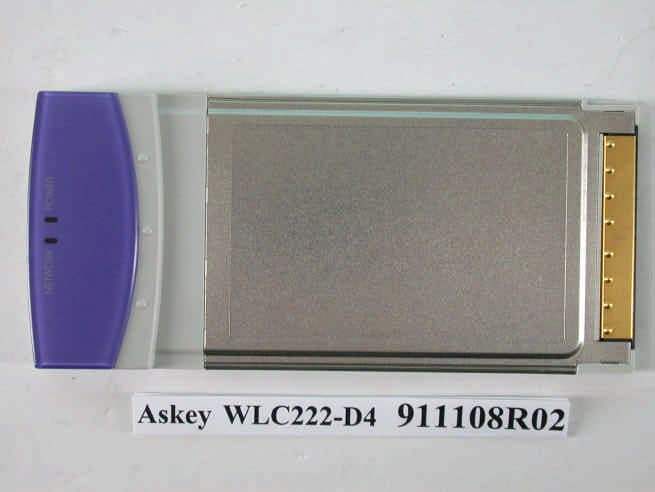
Click to zoom
Application Details
- Equipment Class
- DTS - Digital Transmission System
- Date of Grant
- Mar 25, 2003
- Application Purpose
- Original Equipment
- Date of Application
- Nov 07, 2002
- Equipment Note
- 802.11 a/b WLAN Cardbus Module
- Frequency Range
- 5745.00000000 - 5825.00000000
- Company
- Askey Computer Corp
- Country
- Taiwan
Documents & Files
Document Text
Text extracted from the exhibit documents filed with the FCC. Open a document above to read the original.
Users Manual
Wireless LAN Card User Guide No part of this publication may be reproduced in any form by any means without the prior written permission. Other trademarks or brand names mentioned herein are trademarks or registered trademarks of their respective companies. Nov 2002, Rev01 i Contents About this Document..................................................................iii Audience......................................................................................iv 1. Introduction........................................................5 Package Contents......................................................................5 System Requirements................................................................5 2. Windows 2000..................................................7 Driver Installation (First-Time Install).......................................7 Driver Installation (Previous Driver Installed).........................8 Driver Uninstallation...................................................................9 Device Configuration................................................................10 Selecting Encryption Types.....................................................12 Infrastructure Mode.........................................................13 Ad Hoc Mode...................................................................14 TCP/IP Setup...................................................................15 3. Windows Millennium Edition.........................17 Driver Installation......................................................................17 Driver Uninstallation.................................................................18 Device Configuration................................................................18 Selecting Encryption Types.....................................................19 TCP/IP Configuration...............................................................19 4. Windows XP....................................................21 Driver Installation (First-time Install)......................................21 Driver Uninstallation.................................................................21 Device Configuration................................................................22 Selecting Encryption Types.....................................................23 TCP/IP Setup.............................................................................23 Wireless Broadband Router User Manual ii Windows XP Wireless Network Configuration.....................24 Infrastructure Mode.........................................................25 Ad Hoc Mode...................................................................25 Connect to an Available Wireless Network.................26 5. Regulatory Compliance Information............28 Radio Frequency Interference Requirements......................28 DECLARATION OF CONFORMITY......................................28 FCC WARNING........................................................................28 RF Exposure..............................................................................29 iii Preface This user's guide provides the necessary information for first-time users to successfully install the Network Driver Interface Specification (NDIS) driver. This guide al o provides information for user who wish to upgrade the NDIS driver from previous releases. This guide describe the step required to Install NDIS driver for the Wireless Network Adapter in Windows 2000,Windows Millennium Edition, Windows 98 Second Edition, Windows XP, and Windows NT 4.0. This guide also includes detailed instruction for configuring the PC Card device, or IEEE 802.11a station (STA), to interact with an access point (AP) in infrastructure mode and with other STAs in ad hoc mode. You should also read this before proceeding to install the Wireless Network Adapter and NDIS driver in the targeted operating system (OS) environment. About this Document The document consists of the following chapters and appendix: Chapter 1 Introduction —Hardware, Software, and System Requirements. Chapter 2 Windows 2000 —Installation/Uninstallation Procedure and Device/Network Configuration for Windows 2000. Chapter 3 Windows 98 Second Edition —Installation/Uninstallation Procedures and Device/Network Configurations for Windows 98 Second Edition. Chapter 4 Windows XP —Installation/Uninstallation Procedure and Device/Network Configuration for Windows XP. Wireless Broadband Router User Manual iv Audience This document is intended for customers who wish to install and evaluate the Wireless Station in the supported Microsoft Window environments. 5 1. Introduction The Wireless Network Adapter is an IEEE 802.11a two-chip solution reference design based on the Atheros chipset. This reference design implements a half-duplex, Orthogonal Frequency Division Multiplexing (OFDM) baseband processor supporting all IEEE 802.11a data rates (6 to 54 Mbp) and 802.11b.It al o supports the Atheros Turbo Mode TM supporting data rates up to 108 Mbps .The host interface is compatible with the PC Card 7.1 standard. Package Contents Make sure the following materials are available before you begin: • Release CD, or electronic equivalent • Wireless Network Adapter System Requirements • Laptop PC containing: − 32-bit CardBus slot (or Desktop PC with PC Card-PCI adapter) − 32 MB memory or greater − 300 MHz processor or higher • Microsoft Window 2000/Windows Millennium Edition/Windows 98 Second Edition/Windows XP/Windows NT 4.0 (with Service Pack 6) 7 2. Windows 2000 This chapter describes the Windows 2000 driver installation. Driver Installation (First-Time Install) This section describes the first-time installation for the driver for Windows 2000. If you have a previously installed driver, refer to the section “Driver Installation (Previous Driver Installed)”. We recommend that you remove any existing drivers (NDIS, DK, or TDI) on the PC system before installing the Version 1.0 release o…
Text truncated - open the document above for the full version.
Users Manual
Wireless LAN Card User Guide No part of this publication may be reproduced in any form by any means without the prior written permission. Other trademarks or brand names mentioned herein are trademarks or registered trademarks of their respective companies. Nov 2002, Rev01 i Contents About this Document..................................................................iii Audience......................................................................................iv 1. Introduction........................................................5 Package Contents......................................................................5 System Requirements................................................................5 2. Windows 2000..................................................7 Driver Installation (First-Time Install).......................................7 Driver Installation (Previous Driver Installed).........................8 Driver Uninstallation...................................................................9 Device Configuration................................................................10 Selecting Encryption Types.....................................................12 Infrastructure Mode.........................................................13 Ad Hoc Mode...................................................................14 TCP/IP Setup...................................................................15 3. Windows Millennium Edition.........................17 Driver Installation......................................................................17 Driver Uninstallation.................................................................18 Device Configuration................................................................18 Selecting Encryption Types.....................................................19 TCP/IP Configuration...............................................................19 4. Windows XP....................................................21 Driver Installation (First-time Install)......................................21 Driver Uninstallation.................................................................21 Device Configuration................................................................22 Selecting Encryption Types.....................................................23 TCP/IP Setup.............................................................................23 Wireless Broadband Router User Manual ii Windows XP Wireless Network Configuration.....................24 Infrastructure Mode.........................................................25 Ad Hoc Mode...................................................................25 Connect to an Available Wireless Network.................26 5. Regulatory Compliance Information............28 Radio Frequency Interference Requirements......................28 DECLARATION OF CONFORMITY......................................28 FCC WARNING........................................................................28 RF Exposure..............................................................................29 iii Preface This user's guide provides the necessary information for first-time users to successfully install the Network Driver Interface Specification (NDIS) driver. This guide al o provides information for user who wish to upgrade the NDIS driver from previous releases. This guide describe the step required to Install NDIS driver for the Wireless Network Adapter in Windows 2000,Windows Millennium Edition, Windows 98 Second Edition, Windows XP, and Windows NT 4.0. This guide also includes detailed instruction for configuring the PC Card device, or IEEE 802.11a station (STA), to interact with an access point (AP) in infrastructure mode and with other STAs in ad hoc mode. You should also read this before proceeding to install the Wireless Network Adapter and NDIS driver in the targeted operating system (OS) environment. About this Document The document consists of the following chapters and appendix: Chapter 1 Introduction —Hardware, Software, and System Requirements. Chapter 2 Windows 2000 —Installation/Uninstallation Procedure and Device/Network Configuration for Windows 2000. Chapter 3 Windows 98 Second Edition —Installation/Uninstallation Procedures and Device/Network Configurations for Windows 98 Second Edition. Chapter 4 Windows XP —Installation/Uninstallation Procedure and Device/Network Configuration for Windows XP. Wireless Broadband Router User Manual iv Audience This document is intended for customers who wish to install and evaluate the Wireless Station in the supported Microsoft Window environments. 5 1. Introduction The Wireless Network Adapter is an IEEE 802.11a two-chip solution reference design based on the Atheros chipset. This reference design implements a half-duplex, Orthogonal Frequency Division Multiplexing (OFDM) baseband processor supporting all IEEE 802.11a data rates (6 to 54 Mbp) and 802.11b.It al o supports the Atheros Turbo Mode TM supporting data rates up to 108 Mbps .The host interface is compatible with the PC Card 7.1 standard. Package Contents Make sure the following materials are available before you begin: • Release CD, or electronic equivalent • Wireless Network Adapter System Requirements • Laptop PC containing: − 32-bit CardBus slot (or Desktop PC with PC Card-PCI adapter) − 32 MB memory or greater − 300 MHz processor or higher • Microsoft Window 2000/Windows Millennium Edition/Windows 98 Second Edition/Windows XP/Windows NT 4.0 (with Service Pack 6) 7 2. Windows 2000 This chapter describes the Windows 2000 driver installation. Driver Installation (First-Time Install) This section describes the first-time installation for the driver for Windows 2000. If you have a previously installed driver, refer to the section “Driver Installation (Previous Driver Installed)”. We recommend that you remove any existing drivers (NDIS, DK, or TDI) on the PC system before installing the Version 1.0 release o…
Text truncated - open the document above for the full version.
Users Manual
Wireless LAN Card User Guide No part of this publication may be reproduced in any form by any means without the prior written permission. Other trademarks or brand names mentioned herein are trademarks or registered trademarks of their respective companies. Feb 2003, Rev02 i Contents About this Document..................................................................iii Audience......................................................................................iv 1. Introduction........................................................5 Package Contents......................................................................5 System Requirements................................................................5 2. Windows 2000..................................................7 Driver Installation (First-Time Install).......................................7 Driver Installation (Previous Driver Installed).........................8 Driver Uninstallation...................................................................9 Device Configuration................................................................10 Selecting Encryption Types.....................................................12 Infrastructure Mode.........................................................13 Ad Hoc Mode...................................................................14 TCP/IP Setup...................................................................15 3. Windows Millennium Edition.........................17 Driver Installation......................................................................17 Driver Uninstallation.................................................................18 Device Configuration................................................................18 Selecting Encryption Types.....................................................19 TCP/IP Configuration...............................................................19 4. Windows XP....................................................21 Driver Installation (First-time Install)......................................21 Driver Uninstallation.................................................................21 Device Configuration................................................................22 Selecting Encryption Types.....................................................23 TCP/IP Setup.............................................................................23 Wireless Broadband Router User Manual ii Windows XP Wireless Network Configuration.....................24 Infrastructure Mode.........................................................25 Ad Hoc Mode...................................................................25 Connect to an Available Wireless Network.................26 5. Regulatory Compliance Information............28 Radio Frequency Interference Requirements......................28 DECLARATION OF CONFORMITY......................................28 FCC WARNING........................................................................28 RF Exposure..............................................................................29 iii Preface This user's guide provides the necessary information for first-time users to successfully install the Network Driver Interface Specification (NDIS) driver. This guide al o provides information for user who wish to upgrade the NDIS driver from previous releases. This guide describe the step required to Install NDIS driver for the Wireless Network Adapter in Windows 2000,Windows Millennium Edition, Windows 98 Second Edition, Windows XP, and Windows NT 4.0. This guide also includes detailed instruction for configuring the PC Card device, or IEEE 802.11a station (STA), to interact with an access point (AP) in infrastructure mode and with other STAs in ad hoc mode. You should also read this before proceeding to install the Wireless Network Adapter and NDIS driver in the targeted operating system (OS) environment. About this Document The document consists of the following chapters and appendix: Chapter 1 Introduction —Hardware, Software, and System Requirements. Chapter 2 Windows 2000 —Installation/Uninstallation Procedure and Device/Network Configuration for Windows 2000. Chapter 3 Windows 98 Second Edition —Installation/Uninstallation Procedures and Device/Network Configurations for Windows 98 Second Edition. Chapter 4 Windows XP —Installation/Uninstallation Procedure and Device/Network Configuration for Windows XP. Wireless Broadband Router User Manual iv Audience This document is intended for customers who wish to install and evaluate the Wireless Station in the supported Microsoft Window environments. 5 1. Introduction The Wireless Network Adapter is an IEEE 802.11a two-chip solution reference design based on the Atheros chipset. This reference design implements a half-duplex, Orthogonal Frequency Division Multiplexing (OFDM) baseband processor supporting all IEEE 802.11a data rates (6 to 54 Mbp) and 802.11b.It al o supports the Atheros Turbo Mode TM supporting data rates up to 108 Mbps .The host interface is compatible with the PC Card 7.1 standard. Package Contents Make sure the following materials are available before you begin: • Release CD, or electronic equivalent • Wireless Network Adapter System Requirements • IBM Thinkpad 2628 or Toshiba Satellite Pro 6100 Laptop PC containing: − 32-bit CardBus slot on either side of laptop computer − 32 MB memory or greater − 300 MHz processor or higher ß Desktop PC with PC card-PCI adapter − 32 MB memory or greater − 300 MHz processor or higher • Microsoft Window 2000/Windows Millennium Edition/Windows 98 Second Edition/Windows XP/Windows NT 4.0 (with Service Pack 6) 7 2. Windows 2000 This chapter describes the Windows 2000 driver installation. Driver Installation (First-Time Install) This section describes the first-time installation for the driver for Windows 2000. If you have a previously installed driver, refer to the section “Driver Installation (Previous Driver Install…
Text truncated - open the document above for the full version.
Users Manual
Wireless LAN Card User Guide No part of this publication may be reproduced in any form by any means without the prior written permission. Other trademarks or brand names mentioned herein are trademarks or registered trademarks of their respective companies. Feb 2003, Rev02 i Contents About this Document..............................................................iii Audience.................................................................................iv 1. Introduction...............................................5 Package Contents...................................................................5 System Requirements.............................................................5 2. Windows 2000..........................................7 Driver Installation (First-Time Install).....................................7 Driver Installation (Previous Driver Installed)........................8 Driver Uninstallation................................................................9 Device Configuration.............................................................10 Selecting Encryption Types..................................................12 Infrastructure Mode......................................................13 Ad Hoc Mode................................................................14 TCP/IP Setup...............................................................15 3. Windows Millennium Edition.....................17 Driver Installation..................................................................17 Driver Uninstallation..............................................................18 Device Configuration.............................................................18 Selecting Encryption Types..................................................19 TCP/IP Configuration............................................................19 4. Windows XP...........................................21 Driver Installation (First-time Install)....................................21 Driver Uninstallation..............................................................21 Device Configuration.............................................................22 Selecting Encryption Types..................................................23 TCP/IP Setup........................................................................23 Wireless Broadband Router User Manual ii Windows XP Wireless Network Configuration.....................24 Infrastructure Mode......................................................25 Ad Hoc Mode................................................................25 Connect to an Available Wireless Network.................26 5. Regulatory Compliance Information..........28 Radio Frequency Interference Requirements.....................28 DECLARATION OF CONFORMITY.....................................28 FCC WARNING.....................................................................28 RF Exposure..........................................................................29 iii Preface This user's guide provides the necessary information for first-time users to successfully install the Network Driver Interface Specification (NDIS) driver. This guide al o provides information for user who wish to upgrade the NDIS driver from previous releases. This guide describe the step required to Install NDIS driver for the Wireless Network Adapter in Windows 2000,Windows Millennium Edition, Windows 98 Second Edition, Windows XP, and Windows NT 4.0. This guide also includes detailed instruction for configuring the PC Card device, or IEEE 802.11a station (STA), to interact with an access point (AP) in infrastructure mode and with other STAs in ad hoc mode. You should also read this before proceeding to install the Wireless Network Adapter and NDIS driver in the targeted operating system (OS) environment. About this Document The document consists of the following chapters and appendix: Chapter 1 Introduction —Hardware, Software, and System Requirements. Chapter 2 Windows 2000 —Installation/Uninstallation Procedure and Device/Network Configuration for Windows 2000. Chapter 3 Windows 98 Second Edition —Installation/Uninstallation Procedures and Device/Network Configurations for Windows 98 Second Edition. Chapter 4 Windows XP —Installation/Uninstallation Procedure and Device/Network Configuration for Windows XP. Wireless Broadband Router User Manual iv Audience This document is intended for customers who wish to install and evaluate the Wireless Station in the supported Microsoft Window environments. 5 1. Introduction The Wireless Network Adapter is an IEEE 802.11a two-chip solution reference design based on the Atheros chipset. This reference design implements a half-duplex, Orthogonal Frequency Division Multiplexing (OFDM) baseband processor supporting all IEEE 802.11a data rates (6 to 54 Mbp) and 802.11b.It al o supports the Atheros Turbo Mode TM supporting data rates up to 108 Mbps .The host interface is compatible with the PC Card 7.1 standard. Package Contents Make sure the following materials are available before you begin: ??Release CD, or electronic equivalent ??Wireless Network Adapter System Requirements ??IBM Thinkpad 2628 or Toshiba Satellite Pro 6100 Laptop PC with PCMCIA slot on either side of the computer or other substantially similar laptop PCs containing: ??32-bit CardBus slot on either side of laptop computer ??32 MB memory or greater ??300 MHz processor or higher ?? Desktop PC with PC card-PCI adapter ??32 MB memory or greater ?? 300 MHz processor or higher ??Microsoft Window 2000/Windows Millennium Edition/Windows 98 Second Edition/Windows XP/Windows NT 4.0 (with Service Pack 6) 7 2. Windows 2000 This chapter describes the Windows 2000 driver installation. Driver Installation (First-Time Install) This section describes the first-time installation for the driver for Windows 2000. If you have a previously installed driver, refer to the section “Driver Installation (Previous Driver Installed)”. We recommend that …
Text truncated - open the document above for the full version.
Cover Letter(s)
Dear Stan, The response for the requested technical information in CRN: 24576 have been integrated into your original text below. Please review at your earliest convenient. Thanks. Best regards, Steve Cheng ************************************************************ Re: FCC ID H8NWLC221-D4 Applicant: Askey Computer Corp Correspondence Reference Number: 24576 731 Confirmation Number: EA282217 1.) Power is inconsistent throughout filing; please clarify, harmonize, revise any exhibits if needed, and repeat any SAR or EMC tests at maximum power if needed. Grant will not list higher than demonstrated SAR test power. Form 731: 2412-2462 95mW DTS 5180-5320 90mW NII 5745-5825 136mW DTS EMC: 2412-2462 54mW 5180-5320 29mW 5745-5825 121mW SAR: 2412-2462 44mW 5180-5320 36mW 5745-5825 36mW <CCS response> a) The power difference in between the EMC and SAR test is due to the different measurement method. In EMC report the reported value is according to the specific method required by the corresponding rule part, but, due to the lack of equipment in SAR lab, SAR lab usually reported the EUT power in average term. Below is the cross-reference table for same power in different power term. Frequency DTS peak UNII method 3 Average mW dB mW dB mW dB 2412-2462 54 17.29 44 16.45 5180-5320 29 14.6 36 15.56 5745-5825 121 20.81 36 15.63 b) The higher power indicated in 731 form is original targeted output power. But was reduced to meet the bandedge requirement during the test. Please revised 731 based upon EMC output power 2412-2462 54mW 5180-5320 29mW 5745-5825 121mW 2.) Please confirm that Operational Description exhibit is correct for antenna, or revise if needed. This does not look like other top-loaded monopoles on similar devices. <CCS response> As mentioned in the “Theory of Operation” The antenna is a monopole type over a finite ground plane. In order to shrink the antennae height, the monopole is bent (top loaded with fringing capacitance to the ground). The antenna radiates vertical polarization and is almost omni directional in the horizontal gain. The actual layout of the antenna could be found in the “Antenna Specification. PDF”. We believe that monopole is a proper name for the antenna used in the application. 3.) Additional SAR data as applicant desires. <CCS response> Client would like to include the TOSHIBA laptop model: PS610U- AAAA5 into the grant. So extra SAR test for this model in DTS and UNII bands have been uploaded. A) No additional data required. Grant is considered specific host. Proposed grant comment similar to The SAR data in this filing is applicable to demonstrate compliance for a final host product only as shown in this filing. Installation of this device into other host products requires the submission of a Class II permissive change application containing data demonstrating compliance for SAR, spurious emissions, and EIRP, or new application if appropriate. Compliance of this device in all final host configurations is the responsibility of the Grantee. End-users must be provided with specific information required to satisfy RF exposure compliance for the final host device. The antenna(s) used for this transmitter must not be co located or operating in conjunction with any other antenna or transmitter within a host device B) Testing with at least two additional host devices using the same test device at the same SAR lab. Grant will be limited to substantially similar laptop computers. Other host class types require three hosts testing. Proposed grant comment similar to SAR compliance has been established in the laptop computer(s) [or other host type defined] configurations with PCMCIA slot configurations (e.g., side near the rear) as tested in this filing, and can be used in laptop computers [or other host type device] with substantially similar physical dimensions, construction, and electrical and RF characteristics. Compliance of this device in all final host configurations is the responsibility of the Grantee. End-users must be provided with specific information required to satisfy RF exposure compliance for all final host devices. The antenna(s) used for this transmitter must not be co located or operating in conjunction with any other antenna or transmitter within a host device. 4.) Radiated power and spurious emissions to correspond to any additional SAR testing performed for #3. <CCS response> Since original EMC test is configured as a module device, i.e. EUT was tested outside the laptop and result is independent to the host. So we believe no extra test for the new laptop is necessary. 5.) Updated user manual RF safety statement. The statement "If the antenna is positioned less than 2.5 cm from the user, it is recommended that the user limit exposure time." is not appropriate since time averaging has not been defined. Also, please consider how the user is expected to maintain a 2.5 cm gap while in the lap held configuration. Please update statement accordingly. <CCS response> New revised user manual has been uploaded to the OET web. 6.) Clarification of device maximum power. Please justify large differences between form 731, EMC report and two SAR reports. Please provide SAR test results for maximum power. <CCS response> As explained in Q1, EUT was designed to output higher power original, but due to the band edge emission problem, the output power has been intentionally re-adjusted to the lower level to meet the limit. The new power will be set in the factory facility and is not end user adjustable. 7.) Justification of the phantom used for SAR testing. Supplement C recommends phantom to be twice the corresponding dimension of the device under test. Also, please provide SAR scans for all parts of the device under testing including the host. <CCS response> a) Supplement C recommends “The length and width of the phantom should be at least twice the corresponding dimensions of the test device, including its antenna.” In our case test device is 11a/b/g PCMCIA card its dimen…
Text truncated - open the document above for the full version.
Contact Information
Applicant
Jack Po(Manager)
Technical Contact
Compliance Certification ServicesSteve Cheng
[email protected]408-463-0885
561F Monterey Rd. · Morgan Hill, California · United States
Non-Technical Contact
Compliance Certification ServicesHelen Zhao
[email protected]408-463-0885
Test Firm
Compliance Certification Services IncSteve Cheng
Technical Specifications
| # | Rule Parts | Frequency Range | Power Output |
|---|---|---|---|
| 2 | 15C | 5.75 GHz - 5.83 GHz | 136.00 mW |
Other Applications from Askey Computer Corp
H8N-NUQ2006
Sep 11, 2026enterprise-grade 5G NR outdoor unit
Equipment Class
CBD - Citizens Band Category A and B DevicesH8NSCU5000
Jun 18, 20265G Small cell
Equipment Class
CBD - Citizens Band Category A and B DevicesH8N-EAI2620P
Jan 29, 2026Indoor Wi-Fi 7 Enterprise Access Point
Equipment Class
DTS - Digital Transmission SystemH8N-CTX0800
Oct 07, 2024OBU
Equipment Class
NII - Unlicensed National Information Infrastructure TX
H8NEAO2522P-2
Jul 04, 2024Outdoor WiFi6 AP
Equipment Class
DTS - Digital Transmission System