HLZA6001Tablet Computer
Acer Incorporated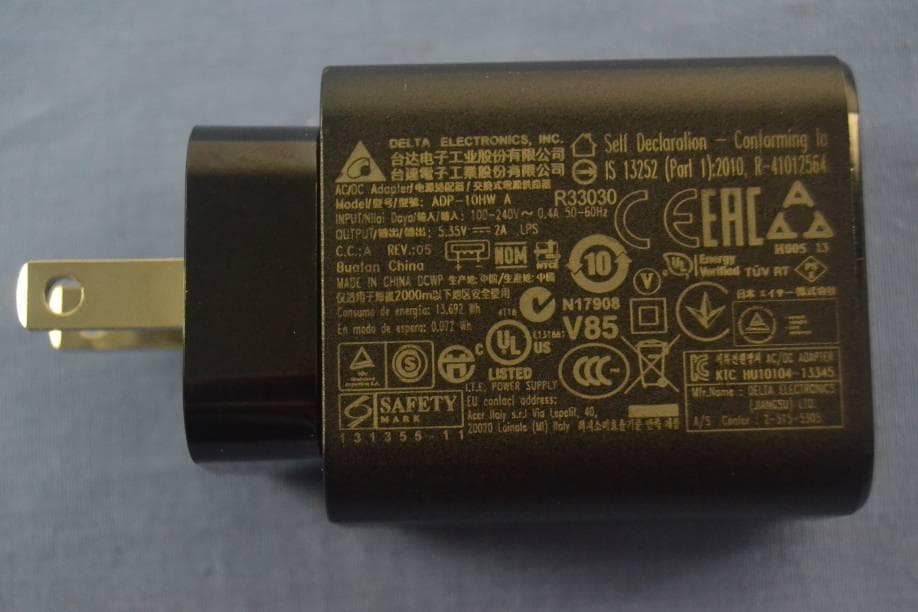
Click to zoom
Application Details
- Equipment Class
- NII - Unlicensed National Information Infrastructure TX
- Date of Grant
- Jan 03, 2016
- Application Purpose
- Original Equipment
- Date of Application
- Jan 03, 2016
- Equipment Note
- Tablet Computer
- Frequency Range
- 5745.00000000 - 5825.00000000
- Company
- Acer Incorporated
- Country
- Taiwan
Documents & Files
Document Text
Text extracted from the exhibit documents filed with the FCC. Open a document above to read the original.
Users Manual
*NC.LC311.003* NC.LC311.003 B1-850 acer.com IconiaOne 8 Product and safety information Informations sur le produit et la sécurité Información del producto y de seguridad Informações de segurança e do produto Product overview 1. microSD card slot 2. Microphone 3. Micro USB port 4. Audio jack 5. Power button 6. Volume button 7. Reset hole 8. Touchscreen 9. Front camera 10. Rear camera 11. Speaker 1234 5 9 6 7 8 10 11 * Components may vary. Acer Iconia One 8 B1-850 Home screen Note: Your tablet may have a different wallpaper to the one shown. 1. Notification bar 2. Search 3. Widgets 4. Application menu (also known as "Apps") 5. App shortcuts 6. Navigation (Back, Home, Recent) 4 1 2 3 6 5 5 Getting started Using your tablet 1. Connect the power adapter Charge your tablet for at least four hours. Note: It is normal for the device surface to become warm during charging or long periods of use. 2. Press the power button Hold until you see the Acer logo. Connecting to the Internet via Wi-Fi To connect to a Wi-Fi network, tap the Application menu , then tap Settings . Under Wireless & networks, tap Wi-Fi and ensure it is set to On. Tap a wireless network; if necessary enter a security password to access the network. How to register To register your Acer product, visit our website at registration.acer.com. After we receive your product registration, you will be sent a confirmation email with important data that you should keep in a safe place. Your tablet's User's Manual To download the User's Manual, go to www.acer.com and click Support > DRIVERS AND MANUALS. Select the appropriate items from Group > Series > Products. In the Documents tab, click Download next to the User’s Manual. Connecting a Bluetooth device To connect to a bluetooth device, tap the Application menu , then tap Settings . Under Wireless & networks, tap Bluetooth and ensure it is set to On. Your device automatically scans for available Bluetooth devices; tap an available device to connect. Note: A2DP stereo headsets are supported for playback only. Please check for updates to the tablet's software that may add support for additional Bluetooth devices. Restoring to factory settings Tap the Application menu , then tap Settings . Tap Backup & reset > Factory data reset; tap RESET TABLET and then ERASE EVERYTHING to format your tablet. Updating your tablet’s operating system To check for updates, tap the Application menu , then tap Settings . Tap About tablet > System updates > CHECK FOR UPDATE. Acer Iconia Suite Iconia Suite is a set of creativity and touch tools offering intuitive ways to simplify your tasks with touch gestures and quick access icons. Whether you want to take notes, call up handy gadgets, or multitask, Iconia Suite is optimized for tablets to save you time and do more. EZ Note EZ Note enables you to create notes and capture thoughts within virtual notebooks. For example, use EZ Note to quickly jot down meeting minutes, class notes, or even sketch ideas. Choose between different types of writing instruments and add audio recordings, photos, and bookmarks to your notes. Upload your notebooks to Google Drive or share them through various apps. EZ Snap Take a screenshot fast and intuitively with a three-finger pinch. Then, share your screenshot through various apps or crop a specific section with freehand capture. EZ WakeUp Wake up the device with a one-touch gesture and loads the user’s pre-selected app. EZ Gadget Multitask faster and easier with a movable and resizable pop-up window featuring a calendar, browser, calculator, and text memo. EZ Gadget appears on top of your most recent task when you long press the Recent apps icon. EZ Tasking EZ Tasking allows two apps to display in separate views on one screen simultaneously. You can adjust, resize, hide, or close the viewing area as needed. Safety and comfort Safety Instructions Read these instructions carefully. Keep this document for future reference. Follow all warnings and instructions marked on the product. Turning the product off before cleaning Unplug this product from the wall outlet before cleaning. Do not use liquid cleaners or aerosol cleaners. Use a damp cloth for cleaning. Warnings Accessing the power plug Be sure that the power outlet you plug the power cord into is easily accessible and located as close to the equipment operator as possible. When you need to disconnect power to the equipment, be sure to unplug the power plug from the electrical outlet. Mark sure the power plug is fixed at right position with the adaptor before plugging to the socket on the wall. Input rating: Refer to the rating label on the bottom of the computer and ensure that your power adapter complies with the specified rating. Under no circumstances should the user attempt to disassemble the power supply. The power supply has no user-replaceable parts. Inside the power supply are hazardous voltages that can cause serious personal injury. A defective power supply must be returned to your dealer. Using electrical power - If an extension cord is used with this product, make sure that the total ampere rating of the equipment plugged into the extension cord does not exceed the extension cord ampere rating. Also, make sure that the total rating of all products plugged into the wall outlet does not exceed the fuse rating. - Do not overload a power outlet, strip or receptacle by plugging in too many devices. The overall system load must not exceed 80% of the branch circuit rating. If power strips are used, the load should not exceed 80% of the power strip's input rating. General - Do not use this product near water. - Do not place this product on an unstable cart, stand or table. If the product falls, it could be seriously damaged. - Slots and openings are provided for ventilation to ensure reliable operation of the product and to protect it from overheating. These openings must not be blocked or covered. The openings should never be blocked by placing the product on a bed, sofa, rug or…
Text truncated - open the document above for the full version.
Cover Letter(s)
Acer Incorporated Federal Communication Commission Equipment Authorization Division, Application Processing Branch 7435 Oakland Mills Road Columbia, MD 21048 DATE: 2015-12-15 Attn: Office of Engineering and Technology Subject: Attestation Letter regarding UNII devices FCC ID: HLZA6001 Software security questions and answers per KDB 594280 D02: Software Security description – General Description 1 Describe how any software/firmware update will be obtained, downloaded, and installed. Software that is accessed through manufacturer’s website or device’s management system, must describe the different levels of security. We do not release the firmware on our website for downloading. Our direct host manufacturer (OEM) can request the firmware from us and it will be made available via secure server. 2 Describe all the radio frequency parameters that are modified by any software/firmware without any hardware changes. Are these parameters in some way limited, such that, it will not exceed the authorized parameters? Radio frequency parameters are limited by US regulatory domain and country code to limit frequency and transmit power levels. These limits are stored in non-volatile memory by the module manufacturer at the time of production. They will not exceed the authorized values. 3 Describe in detail the authentication protocols that are in place to ensure that the source of the software/firmware is legitimate. Describe in detail how the software is protected against modification The firmware is installed on each single module during manufacturing process. The correct firmware is verified and installed by the module manufacturer. In addition, the firmware binary is encrypted using Acer Incorporated open SSL encryption and the firmware updates can only be stored in non-volatile memory when the firmware is authenticated. The encryption key is known by the module manufacturer only. 4 Describe in detail the verification protocols in place to ensure that installed software/firmware is legitimate The firmware binary is encrypted. The process to flash a new firmware is using a secret key to decrypt the firmware, only correct decrypted firmware is stored in non-volatile memory . 5 Describe in detail the verification protocols in place to ensure that installed software/firmware is legitimate Standard open SSL encryption is used 6 For a device that can be configured as a master and client (with active or passive scanning), explain how the device ensures compliance for each mode? In particular if the device acts as master in some band of operation and client in another; how is compliance ensured in each band of operation? The device ensures the compliance by checking the configured parameter and operation values according to the regulatory domain and country code in each band. Software Security description – Third-Party Access Control 1 How is unauthorized software/firmware changes prevented? Unauthorized firmware is not accepted by the firmware update process. 2 Is it possible for third parties to load device drivers that could modify the RF parameters, country of operation or other parameters which impact device compliance? If so, describe procedures to ensure that only approved drivers are loaded. The embedded software is protected via the measures explained in the previous section. Distributions of host operating software are encrypted with a key. 3 Explain if any third parties have the capability to operate a US sold device on any other regulatory domain, frequencies, or in any manner that is in violation of the certification. No, third parties don’t have the capability to access and change radio parameters. US sold modules are factory configured to US. 4 What prevents third parties from loading non -US Only encrypted and Acer Incorporated versions of the software/firmware on the device? verified firmware is applied and stored in the non-volatile memory. 5 For modular devices, describe how authentication is achieved when used with different hosts. The module is not available for sale or installation outside of company licensing agreements. Modules are always installed in host systems in a factory by end integrators (OEM) responsible for loading authorized software. Software Security description – USER CONFIGURATION GUID 1 To whom is the UI accessible? (Professional installer, end user, other.) The UI is accessible to anyone using the device. a. What parameters are viewable to the professional installer/end user? Various device status information is made available like log information, connection status, operation mode, operation frequency, etc. Radio parameters are described in c.i b. What parameters are accessible or modifiable to the professional installer? i. Are the parameters in some way limited, so that the installers will not enter parameters that exceed those authorized? ii. What controls exist that the user cannot operate the device outside its authorization in the U.S.? This device is not subject to professional installation c. What configuration options are available to the end-user? The end user is able to configure the operation frequency, modulation, reduce the output power levels etc. The end user cannot change the antenna gain and country code, those settings are programmed at factory production time. Acer Incorporated i. Are the parameters in some way limited, so that the installers will not enter parameters that exceed those authorized? ii. What controls exist that the user cannot operate the device outside its authorization in the U.S.? Yes, the parameters can only be changed within the limits of country code US. The country code and regulatory domain control do limit all the parameters set by UI d. Is the country code factory set? Can it be changed in the UI? i. If so, what controls exist to ensure that the device can only operate within its authorization in the U.S.? The country code is factory set and is never changed by UI. The country code is factory set and is never changed by …
Text truncated - open the document above for the full version.
Cover Letter(s)
CONFIDENTIALITYREQUEST for CertificationService in USA FederalCommunicationCommission EquipmentAuthorizationDivision,ApplicationProcessingBranch 7435 OaklandMills Road Columbia,MD 21048 DAT E: 2015-12-15 TO WHOM IT MAY CONCERN Pursuantto Paragraphs§0. 457 and 0.459 of the Commission’s Rules (47 C.F.R.)and Section§552(b)(4)of the Freedomof InformationAct, we requestsconfidentialityfor the followingproducts: FCC ID Model name HLZA 600 1A6001 For the productstatedabove,we requestpermanentconfidentialityfor exhibitswhich containOperationalDescription,Block Diagram,Schematics,Parts Lists or Tune Up Information. The above exhibitscontainour trade secretsand proprietaryinformationthat could be of benefitto our competitors. If you have any questions,pleasefeel free to contactme at the addressshownbelow. Sincerely, (signed) Name: RU Jan Company:Acer Incorporated Address:8F,88, Sec 1, Hsin Tai Wu Rd Hsichih,Taipei Hsien, 221 Taiwan Phone:886-2-8691-3289 Fax: 886-2-8691-3120 Email:[email protected]
Cover Letter(s)
Acer Incorporated 8F, 88, Sec 1, Hsin Tai Wu Rd Hsichih, Taipei Hsien, 221 Taiwan Attestation for FCC Declaration of Conformity FCC ID: HLZA6001 Model Name: A6001 DATE: 2015-12-15 Please be notified that we, the undersigned, Acer Incorporated declare that the product which bears the above FCC ID is also compliant with the FCC requirements for DoC. Testing in regards to this report was done by Compliance Certification Services Inc. located at No. 11 Wugong 6 th Rd., Wugu Dist., New Taipei City 24891,Taiwan( R.O.C), which has been accredited in accordance to all of the requirements of 47CFR 2.948(d) and (e) of the FCC rules and KDB349827 Best Regards! (signed) Company: Acer Incorporated Contact Person: RU Jan Title: Sr. Manage Telephone: 886-2-8691-3289 Fax: 886-2-8691-3120 EMAIL:[email protected]
Cover Letter(s)
Federal Communication Commission Equipment Authorization Division, Application Processing Branch 7435 Oakland Mills Road Columbia, MD 21048 UNII Device Declaration Letter To whom it may concern: We have declared below featured for FCC equipment authorization, Device FCC ID: HLZA6001 (1) DFS Device: Master Client with Radar detection capability N/A Client without radar detection capability, (2) Active / Passive Scanning , adhoc mode access point capability Frequency Band (MHz) Active Scanning (the device can transmit a probe (beacon)) passive scanning (where the device is can listen only with no probes) Ad Hoc Mode Capability Access point Capability 2412-2462 Yes No Yes No Yes No Yes No 5745-5825 Yes No Yes No Yes No Yes No 5755-5795 Yes No Yes No Yes No Yes No 5180-5240 Yes No Yes No Yes No Yes No 5190-5230 Yes No Yes No Yes No Yes No 5260-5320 Yes No Yes No Yes No Yes No 5270-5310 Yes No Yes No Yes No Yes No 5500-5700 Yes No Yes No Yes No Yes No 5510-5670 Yes No Yes No Yes No Yes No (3) Country code selection ability Yes No If yes, pls explain how it was implemented: (4) Meet 15.202 requirement Yes No pls check below : A master device is defined as a device operating in a mode in which it has the capability to transmit without receiving an enabling signal. In this mode it is able to select a channel and initiate a network by sending enabling signals to other devices A client device is defined as a device operating in a mode in which the transmissions of the device are under control of the master. A device in client mode is not able to initiate a network. (5) For client devices that have software configuration control to operate in different modes (active scanning in some and passive scanning in others) in different bands (devices with multiple equipment classes or those that operate on non- DFS frequencies) or modular devices which configure the modes of operations through software, the application must provide software and operations description on how the software and / or hardware is implemented to ensure that proper operations modes cannot be modified by end user or an installer. Apply Does not apply (If apply, pls help to provide explanation on it was implement, and how software was controlled)
External Photos
Report No: C151202Z01 Page 1 / 6 External Photos of EUT Report No: C151202Z01 Page 2 / 6 Report No: C151202Z01 Page 3 / 6 Report No: C151202Z01 Page 4 / 6 Report No: C151202Z01 Page 5 / 6 Adapter 1: Delta / ADP-10HW A Report No: C151202Z01 Page 6 / 6 Adapter 2: Liteon / PA-1100-25
ID Label/Location Info
35*10mm ACER lconia One 8 B1-850 Model:A6001 FCC ID:HLZA6001 IC:1754F-A6001 CAN ICES-3(B)/NMB-3(B) Input: 5.35V 2A or 5.2V 2A 5150-5250Mhz for indoor use only ACER Italy s.r.l Via Lepetit, 40,20020 Lainate(MI) ltaly Tablet Computer Made in China 80mm 24mm 6mm 23.1mm 23.1mm 0.8mm WW WIFI only ACER lconia One 8 B1-850 Model:A6001 FCC ID:HLZA6001 IC:1754F-A6001 CAN ICES-3(B)/NMB-3(B) Input: 5.35V 2A or 5.2V 2A 5150-5250Mhz for indoor use only ACER Italy s.r.l Via Lepetit, 40,20020 Lainate(MI) ltaly Tablet Computer Made in China 35*10mm NTC Type Approved No.:xxx-xxxxxxxx 23.1mm 0.8mm 80mm 24mm 6mm 23.1mm Philippines WIFI only 11mm+-0.2 11.5mm+-0.2 12mm+-0.2 12mm+-0.2 6mm ACER lconia One 8 B1-850 Model:A6001 FCC ID:HLZA6001 IC:1754F-A6001 CAN ICES-3(B)/NMB-3(B) Input: 5.35V 2A or 5.2V 2A 5150-5250Mhz for indoor use only ACER Italy s.r.l Via Lepetit, 40,20020 Lainate(MI) ltaly Tablet Computer Made in China 35*10mm 23.1mm 0.8mm 24mm 23.1mm 80mm Malaysia WIFI only ACER lconia One 8 B1-850 Model:A6001 FCC ID:HLZA6001 IC:1754F-A6001 CAN ICES-3(B)/NMB-3(B) Input: 5.35V 2A or 5.2V 2A 5150-5250Mhz for indoor use only ACER Italy s.r.l Via Lepetit, 40,20020 Lainate(MI) ltaly Tablet Computer Made in China Consumo de Energia En Operacion: X.XX Wh En modo de espera: X.XXWh IFETEL NO: RCPACAXXX-XXXX 30+-0.2mm 35*10mm 6mm 23.1mm 0.8mm 24mm 23.1mm Mexico WIFI only 80mm 35*10mm 6mm ACER lconia One 8 B1-850 型號:A6001 宏碁股份有限公司 平板電腦 中國製造 警語:使用過恐傷害視力 xxxxxxxxxxxxxxxxxx 輸入: 5.2V 2A Taiwan WIFI only 23.1mm 0.8mm 24mm 23.1mm 80mm 6mm 35*10mm 型号:A6001 平板电脑(便携计算机) 中国制造ACER lconia One 8 B1-850 宏碁股份有限公司 CMIIT ID:2014XXXXXX 输入:5.35V 2A China WIFI only 6mm 23.1mm 0.8mm 24mm 23.1mm 80mm
Internal Photos
Report No: C151202Z01 Page 1 / 5 Internal Photos of EUT BT & WIFI Antenna Report No: C151202Z01 Page 2 / 5 Report No: C151202Z01 Page 3 / 5 Report No: C151202Z01 Page 4 / 5 Report No: C151202Z01 Page 5 / 5 BT & WIFI Module
RF Exposure Info
Compliance Certification Services Inc. Date of Issue: December 14, 2015 Report No .:C151204S02-SF Page 1 of 6 WiFi 802.11b -Body Front High CH11 .............................................................................................. 2 WiFi 802.11g -Body Rear Low CH1 ................................................................................................... 3 WIFI 802.11a-Body Rear CH64 ........................................................................................................... 4 WIFI 802.11n40-Body Rear CH102 .................................................................................................... 5 WIFI 802.11a-Body Rear CH157 ......................................................................................................... 6 Compliance Certification Services Inc. Date of Issue: December 14, 2015 Report No .:C151204S02-SF Page 2 of 6 Test Laboratory: Compliance Certification Services Inc. Date: 12/8/2015 WiFi 802.11b -Body Front High CH11 DUT: Tablet Computer; Type: A6001; Serial: N/A Communication System: UID 0, IEEE 802.11b (0); Communication System Band: ISM 2.4GHz Band; Frequency: 2462 MHz;Duty Cycle: 1:1 Medium parameters used: f = 2462 MHz; σ = 1.954 S/m; ε r = 51.703; ρ = 1000 kg/m 3 Room Ambient Temperature: 22°C; Liquid Temperature: 21.5°C Phantom section: Flat Section Measurement Standard: DASY5 (IEEE/IEC/ANSI C63.19-2007) DASY Configuration: • Probe: EX3DV4 - SN3798; ConvF(7.08, 7.08, 7.08); Calibrated: 7/24/2015; • Sensor-Surface: 2mm (Mechanical Surface Detection) • Electronics: DAE4 Sn1245; Calibrated: 7/22/2015 • Phantom: ELI v4.0; Type: QDOVA001BB; Serial: TP:xxxx • DASY52 52.8.8(1222); • SEMCAD X Version 14.6.10 (7331) WiFi/Body Front High CH11/Area Scan (11x10x1): Measurement grid: dx=12mm, dy=12mm Maximum value of SAR (measured) = 1.94 W/kg WiFi/Body Front High CH11/Zoom Scan (7x7x5)/Cube 0: Measurement grid: dx=5mm, dy=5mm, dz=5mm Reference Value = 0.6460 V/m; Power Drift = 0.14 dB Peak SAR (extrapolated) = 2.94 W/kg SAR(1 g) = 1.28 W/kg; SAR(10 g) = 0.548 W/kg Maximum value of SAR (measured) = 2.07 W/kg 0 dB = 2.07 W/kg = 3.16 dBW/kg Compliance Certification Services Inc. Date of Issue: December 14, 2015 Report No .:C151204S02-SF Page 3 of 6 Test Laboratory: Compliance Certification Services Inc. Date: 12/8/2015 WiFi 802.11g -Body Rear Low CH1 DUT: Tablet Computer; Type: A6001; Serial: N/A Communication System: UID 0, IEEE 820.11g (0); Communication System Band: ISM 2.4 GHz Band; Frequency: 2412 MHz;Duty Cycle: 1:1 Medium parameters used: f = 2412 MHz; σ = 1.897 S/m; ε r = 51.82; ρ = 1000 kg/m 3 Room Ambient Temperature: 22°C; Liquid Temperature: 21.5°C Phantom section: Flat Section Measurement Standard: DASY5 (IEEE/IEC/ANSI C63.19-2007) DASY Configuration: • Probe: EX3DV4 - SN3798; ConvF(7.08, 7.08, 7.08); Calibrated: 7/24/2015; • Sensor-Surface: 2mm (Mechanical Surface Detection) • Electronics: DAE4 Sn1245; Calibrated: 7/22/2015 • Phantom: ELI v4.0; Type: QDOVA001BB; Serial: TP:xxxx • DASY52 52.8.8(1222); • SEMCAD X Version 14.6.10 (7331) WiFi/Body Rear Low CH1/Area Scan (14x14x1): Measurement grid: dx=12mm, dy=12mm Maximum value of SAR (measured) = 0.925 W/kg WiFi/Body Rear Low CH1/Zoom Scan (7x7x5)/Cube 0: Measurement grid: dx=5mm, dy=5mm, dz=5mm Reference Value = 1.820 V/m; Power Drift = 0.10 dB Peak SAR (extrapolated) = 2.08 W/kg SAR(1 g) = 0.852 W/kg; SAR(10 g) = 0.363 W/kg Maximum value of SAR (measured) = 1.36 W/kg 0 dB = 1.36 W/kg = 1.34 dBW/kg Compliance Certification Services Inc. Date of Issue: December 14, 2015 Report No .:C151204S02-SF Page 4 of 6 Test Laboratory: Compliance Certification Services Inc. Date: 12/11/2015 WIFI 802.11a-Body Rear CH64 DUT: Tablet Computer; Type: A6001; Serial: N/A Communication System: UID 0, IEEE 802.11 a (0); Communication System Band: 5G Band II; Frequency: 5320 MHz;Duty Cycle: 1:1 Medium parameters used: f = 5320 MHz; σ = 5.496 S/m; ε r = 50.263; ρ = 1000 kg/m 3 Room Ambient Temperature: 22°C; Liquid Temperature: 21.5°C Phantom section: Flat Section Measurement Standard: DASY5 (IEEE/IEC/ANSI C63.19-2007) DASY Configuration: • Probe: EX3DV4 - SN3798; ConvF(4.42, 4.42, 4.42); Calibrated: 7/24/2015; • Sensor-Surface: 1.4mm (Mechanical Surface Detection) • Electronics: DAE4 Sn1245; Calibrated: 7/22/2015 • Phantom: ELI v4.0; Type: QDOVA001BB; Serial: TP:xxxx • DASY52 52.8.8(1222); • SEMCAD X Version 14.6.10 (7331) WIFI/IEEE802.11a Body Rear CH64/Area Scan (11x12x1): Measurement grid: dx=10mm, dy=10mm Maximum value of SAR (measured) = 2.92 W/kg WIFI/IEEE802.11a Body Rear CH64/Zoom Scan (7x7x7)/Cube 0: Measurement grid: dx=4mm, dy=4mm, dz=1.4mm Reference Value = 0 V/m; Power Drift = 0.00 dB Peak SAR (extrapolated) = 6.50 W/kg SAR(1 g) = 1.12 W/kg; SAR(10 g) = 0.248 W/kg Maximum value of SAR (measured) = 3.47 W/kg 0 dB = 3.47 W/kg = 5.40 dBW/kg Compliance Certification Services Inc. Date of Issue: December 14, 2015 Report No .:C151204S02-SF Page 5 of 6 Test Laboratory: Compliance Certification Services Inc. Date: 12/11/2015 WIFI 802.11n40-Body Rear CH102 DUT: Tablet Computer; Type: A6001; Serial: N/A Communication System: UID 0, IEEE802.11 n40 5G (0); Communication System Band: 5G Band III; Frequency: 5510 MHz;Duty Cycle: 1:1 Medium parameters used: f = 5510 MHz; σ = 5.494 S/m; ε r = 49.804; ρ = 1000 kg/m 3 Room Ambient Temperature: 22°C; Liquid Temperature: 21.5°C Phantom section: Flat Section Measurement Standard: DASY5 (IEEE/IEC/ANSI C63.19-2007) DASY Configuration: • Probe: EX3DV4 - SN3798; ConvF(4.01, 4.01, 4.01); Calibrated: 7/24/2015; • Sensor-Surface: 1.4mm (Mechanical Surface Detection) • Electronics: DAE4 Sn1245; Calibrated: 7/22/2015 • Phantom: ELI v4.0; Type: QDOVA001BB; Serial: TP:xxxx • DASY52 52.8.8(1222); • SEMCAD X Version 14.6.10 (7331) WIFI/IEEE802.11n40 Body Rear CH102/Area Scan (11x12x1): Measurement grid: dx=10mm, dy=10mm Maximum value of SAR (measured) = 2.04 W/kg WIFI/IEEE802.11n40 Body Rear CH102/Zoom Scan (7x7x7)/Cube 0: Measurement grid: dx=4mm, dy=4mm,…
Text truncated - open the document above for the full version.
RF Exposure Info
Compliance Certification Services Inc. Date of Issue: December 19, 2015 Report No .:C151204S02-SF Page 1 of 106 This report shall not be reproduced except in full, without the written approval of Compliance Certification Services. In accordance with the requirements of Report and Order: FCC 47 CFR Part 2 ( 2.1093) ; RSS102 issue 5; IEC62209-2 :2010 ;IEEE 1528 :2013 SAR TEST REPORT For Product Name: Tablet Computer Brand Name : acer Model No.: A6001 Series Model: N/A Test Report Number: C151204S02-SF Issued for Acer Incorporated 8F, 88, Sec 1, Hsin Tai Wu Rd Hsichih, Taipei Hsien, 221 Taiwan Issued by Compliance Certification Services Inc. Kun shan Laboratory No.10 Weiye Rd., Innovation park, Eco&Tec, Development Zone, Kunshan City, Jiangsu, China TEL: 86-512-57355888 FAX: 86-512-57370818 Note: This report shall not be reproduced except in full, without the written approval of Compliance Certification Services Inc. This document may be altered or revised by Compliance Certification Services Inc. personnel only, and shall be noted in the revision section of the document. The client should not use it to claim product endorsement by A2LA or any government agencies. The test results in the report only apply to the tested sample. Compliance Certification Services Inc. Date of Issue: December 19, 2015 Report No .:C151204S02-SF Page 2 of 106 This report shall not be reproduced except in full, without the written approval of Compliance Certification Services. Revision History Revision REPORT NO. Date Page Revised Contents Original C151204S02-SF December 14, 2015 N/A N/A 01 C151204S02-SF December 19, 2015 All report Add section 2.1 and update section 11.4 Compliance Certification Services Inc. Date of Issue: December 19, 2015 Report No .:C151204S02-SF Page 3 of 106 This report shall not be reproduced except in full, without the written approval of Compliance Certification Services. TABLE OF CONTENTS 1. CERTIFICATE OF COMPLIANCE (SAR EVALUATION) ........................................................... 4 2. EUT DESCRIPTION .................................................................................................................... 5 2.1 STATEMENT OF COMPLIANCE .................................................................................................................... 6 3. REQUIREMENTS FOR COMPLIANCE TESTING DEFINED BY THE FCC ................................ 7 4. TEST METHODOLOGY .............................................................................................................. 7 5. TEST CONFIGURATION ............................................................................................................ 7 6. DOSIMETRIC ASSESSMENT SETUP ........................................................................................ 8 6.1 MEASUREMENT SYSTEM DIAGRAM ........................................................................................................... 9 6.2 SYSTEM COMPONENTS ............................................................................................................................. 10 7. EVALUATION PROCEDURES ................................................................................................. 13 8. MEASUREMENT UNCERTAINTY ............................................................................................ 17 9. EXPOSURE LIMIT .................................................................................................................... 21 10. EUT ARRANGEMENT .............................................................................................................. 22 10.1 BODY WORN TEST .................................................................................................................................... 22 11. MEASUREMENT RESULTS ..................................................................................................... 23 11.1 TEST LIQUIDS CONFIRMATION ............................................................................................................... 23 11.2 LIQUID MEASUREMENT RESULTS .......................................................................................................... 24 11.3 SYSTEM PERFORMANCE CHECK ........................................................................................................... 25 11.4 EUT TUNE-UP PROCEDURES AND TEST MODE .................................................................................... 28 11.5 SAR TEST CONFIGURATIONS .................................................................................................................. 33 11.6 BODY TEST EXCLUSION THRESHOLDS ................................................................................................. 34 11.7 EUT SETUP PHOTOS ................................................................................................................................ 36 11.8 BODY SAR TEST CONFIGURATION ......................................................................................................... 36 11.9 REPEATED SAR MEASUREMENT ............................................................................................................ 40 11.10 SAR HANDSETS MULTI XMITER ASSESSMENT ................................................................................ 41 12. EUT PHOTO ............................................................................................................................. 42 13. EQUIPMENT LIST & CALIBRATION STATUS ........................................................................ 46 14. FACILITIES ....................................................................................................................…
Text truncated - open the document above for the full version.
Contact Information
Applicant
RU Jan(Sr. Manager)
Test Firm
Compliance Certification Services (Shenzhen) Inc.Harry Li
Technical Specifications
| # | Rule Parts | Frequency Range | Power Output |
|---|---|---|---|
| 4 | 15E | 5.75 GHz - 5.83 GHz | 23.00 mW |
Other Applications from Acer Incorporated
HLZA26007
Aug 07, 2026Tablet PC
Equipment Class
DTS - Digital Transmission SystemHLZA26003
Jul 28, 2026Tablet PC
Equipment Class
6XD - 15E 6 GHz Low Power Indoor ClientHLZAMR570
Apr 21, 2026Acer Wireless Mouse
Equipment Class
DTS - Digital Transmission SystemHLZ-NSK510
Apr 09, 2026Gaming sound bar
Equipment Class
DSS - Part 15 Spread Spectrum TransmitterHLZA26002
Apr 01, 2026Tablet PC
Equipment Class
NII - Unlicensed National Information Infrastructure TX