HLZAS1710Notebook Computer with WLAN Mini PCI Card
Acer Incorporated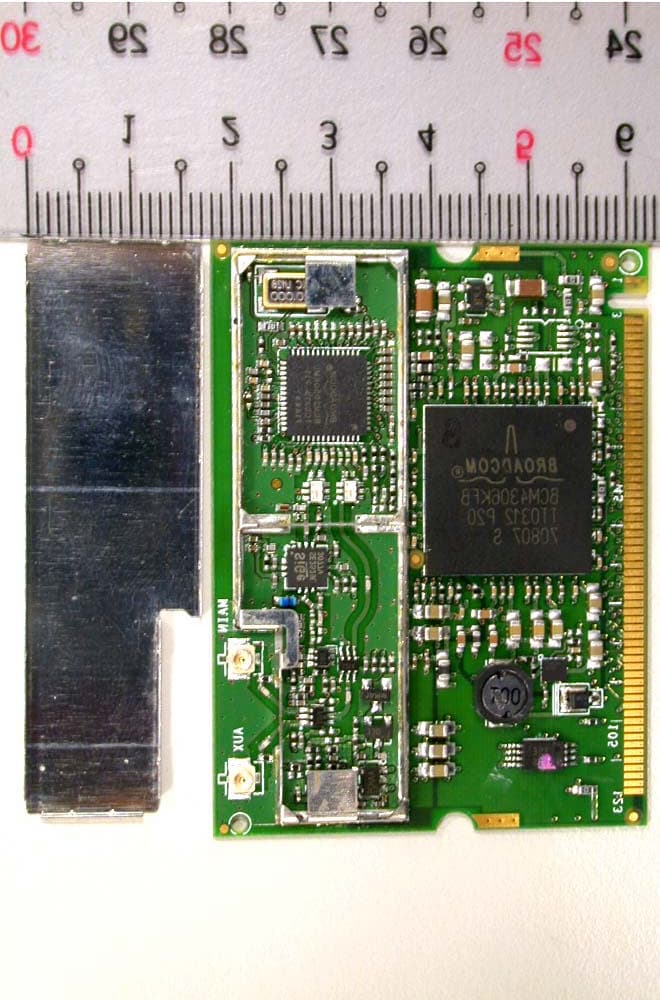
Click to zoom
Application Details
- Equipment Class
- DTS - Digital Transmission System
- Date of Grant
- Dec 22, 2003
- Application Purpose
- Original Equipment
- Date of Application
- Dec 22, 2003
- Equipment Note
- Notebook Computer with WLAN Mini PCI Card
- Frequency Range
- 2412.00000000 - 2462.00000000
- Company
- Acer Incorporated
- Country
- Taiwan
Documents & Files
Document Text
Text extracted from the exhibit documents filed with the FCC. Open a document above to read the original.
Users Manual
Acer Aspire 1710 series User’s Guide Changes may be made periodically to the information in this publication without obligation to notify any person of such revision or changes. Such changes will be incorporated in new editions of this manual or supplementary documents and publications. This company makes no representations or warranties, either expressed or implied, with respect to the contents hereof and specifically disclaims the implied warranties of merchantability or fitness for a particular purpose. Record the model number, serial number, purchase date, and place of purchase information in the space provided below. The serial number and model number are recorded on the label affixed to your computer. All correspondense concerning your unit should include the serial number, model number, and purchase information. No part of this publication may be reproduced, stored in a retrieval system, or transmitted, in any form or by any means, electronic, mechanical, photocopy, recording, or otherwise, without the prior written permission of Acer Incorporated. Model Number : _________________________________ Serial Number: ___________________________________ Purchase Date: ___________________________________ Place of Purchase: ________________________________ Copyright © 2003 All Rights Reserved Acer Aspire 1710 Series Computer User's Guide Original Issue: December 2003 Acer Aspire 1710 series computer All trademarks and registered trademarks are the properties of their respective companies. Contents First things firstvii Your guidesvii Basic care and tips for using your computervii Getting familiar with your computer1 A tour of your computer3 Opened front view3 Closed Front view5 5 Left view 6 Right view 7 Rear view8 Bottom view9 Features10 Display12 Indicators13 Keyboard15 Special keys15 Keyboard ergonomics19 Touchpad20 Touchpad basics20 Launch keys22 Storage23 Ejecting the optical drive tray23 Emergency ejection of the optical drive tray24 Connectivity options25 Ethernet and LAN25 Fax/data modem26 Audio27 Audio DJ28 Securing your computer30 Security slot30 Passwords31 Operating on battery power33 Battery pack (Optional)35 Battery pack characteristics35 Installing and removing the battery pack36 Charging the battery38 Checking the battery level38 Battery-low warning39 Power management40 iv English Peripherals and options41 External display devices43 External keypad44 External pointing device44 Printer45 Expansion devices46 PC Card46 USB devices47 Miscellaneous options48 Installing New Components49 Opening The Case49 CPU upgrade50 Hard disk upgrade52 Memory upgrade53 Moving with your computer55 Disconnecting from the desktop57 Moving around58 Preparing the computer58 What to bring to short meetings58 What to bring to long meetings58 Taking the computer home59 Preparing the computer59 What to bring with you59 Special considerations59 Setting up a home office60 traveling with the computer61 Preparing the computer61 What to take with you61 Special considerations61 traveling internationally with your computer62 Preparing the computer62 What to take with you62 Special considerations62 Software63 System software65 Launch Manager65 BIOS Setup Utility66 Troubleshooting67 Frequently asked questions69 v English English Appendix A Specifications73 Appendix B Notices79 Index89 vi English vii English English First things first Yo u r g u i d e s A set of guides is provided to help you set up and use your Aspire computer.: For more information on our products, services, and support, please visit our web site www.global.acer.com. Basic care and tips for using your computer Turning your computer on and off To turn on your computer, open the lid and press the power button above the keyboard. To turn the power off, you can do any of the following: •Click on the Start button in Windows, and then select Shut Down on the popup menu. •Push the power button. To use this method, you must first click on the Power Management icon in Windows Control Panel, and then check that the power button is set to shut down the computer when pressed. See Windows Help for more information. The Just for starters... poster shows you how to set up your computer. This User's Guide provides clear and concise information on using your computer productively. You are advised to read it thoroughly and keep it handy for future reference. viii English Note: if you are unable to shut down the computer in the usual way, press and hold the power switch for more than four seconds. You should then wait at least two seconds before turning the computer on again. Taking care of your computer Your computer will serve you well if you take care of it. •Do not expose the computer to direct sunlight. Do not place it near sources of heat, such as a radiator. •Do not expose the computer to temperatures below 0°C (32°F), or above 50°C (122°F). •Do not expose the computer to magnetic fields. •Do not expose the computer to rain or moisture. •Do not spill water or any liquid on the computer. •Do not subject the computer to heavy shock or vibration. •Do not expose the computer to dust or dirt. •Do not place objects on top of the computer. •Do not slam the lid shut. Close the computer gently. •Do not place the computer on unstable or uneven surfaces. Taking care of your AC adapter It is important that you look after your AC adapter. •Do not connect the adapter to any other device. •Do not step on the power cord or place heavy objects on it. Route the power cord away from areas where people might walk on it or trip over it. •Do not pull on the power cord when disconnecting from the mains power socket. Grasp and pull the plug instead. •The total ampere ratings of equipment plugged into a power strip should not exceed the ampere rating for that power strip. ix English English Taking care of your battery pack (Optional) It is also important that you look after your computer's battery pack. •Use the correct battery model for your computer. Do not use other kinds of b…
Text truncated - open the document above for the full version.
Users Manual
Getting familiar with your computer26 English Fa x / d a t a m o d e m Your computer features a software modem(V.92 56Kbps), enabling you to communicate over a phone line. This means that you can connect to the Internet via a dialup account with an ISP, log in to your network from a remote location, or send faxes. Warning: your modem is not compatible with digital phone lines. Plugging the computer into a digital phone system will damage the modem. To use the fax/data modem, plug a phone cable into your computer's modem jack, and then connect the other end to a telephone jack. 27 English English Audio Your computer includes an integrated stereo audio system. Built-in stereo speakers and a sub woofer are located at the front of the unit. Volume is adjusted using software, such as Volume Control in Windows, or any other application that provides a volume adjustment control. Two audio ports on the right side of the computer enable external devices to be connected. See “A tour of your computer” on page 3 for the location of the audio ports. For information on connecting external devices, See “Audio devices” on page 45. Getting familiar with your computer28 English Audio DJ Audio DJ offers all the convenience of an audio CD / MP3 player, enabling you to play your favorite music CDs or “My MP3” folder from the HDD even when your computer is in power-off mode. Operate Audio DJ as follows: •Press “Play” button to turn on the audio function. •Press both “Volume Up” & “Volume Down” buttons at the same time to select the “My MP3” folder from HDD. •Press the Stop/Eject button, and then load a CD into the CD/DVD drive. Push the drawer to close it. •Press the Play/Pause button to start playing the CD or the selected MP3. •Use the other buttons to control the playback of the CD or MP3. •Audio DJ can be shut down by: •pressing the system power button, or •pressing the Stop/Eject button to end playback, when inactive for 5 minutes, the system will power down automatically 29 English English Audio DJ features the following control buttons No.Description 1Volume Down 2Volume Up 3Previous Track 4Next Track 5Stop/Eject 6Play/Pause 7Shuffle On/Shuffle Off Getting familiar with your computer30 English Securing your computer Your computer features hardware and software security solutions, in the form of a slot for a Kensington lock and a password facility. Security slot A slot for a Kensington slot enables you to physically protect your computer from theft. Use this feature as follows: •Wrap a security lock cable around a heavy or immoveable object, such as a drawer handle on a file cabinet, or a table leg. •Insert the lock into the slot on the computer, turn it 90°, and then lock it in place. 31 English English Passwords You can protect your computer from unauthorized access by setting Windows password protection. The user must enter the password before beginning a Windows session. •First, open User Accounts in Windows Control Panel and select your account. •Click Create a Password, and then set your desired password. •Click Performance and Maintenance, Power Options in Control Panel. •On the Advanced tab, select the option to prompt for a password when your computer resumes from stand by. To cancel password protection, reset the password with a blank password. Getting familiar with your computer32 English O perating on battery power Your Aspire 1710 series computer operates on battery or AC power. This chapter provides information for operating on battery power, as well as information on how your computer manages and saves power. 35 English English Battery pack (O ptional) Your computer uses a re-chargeable 12-cell Li-ion 2.2Ah battery pack. Battery pack characteristics The battery pack has the following characteristics: •Employs current battery technology standards. •Delivers a battery-low warning. A Li-ion battery can be recharged at any time. The battery is recharged whenever you connect the computer to the mains power supply. Your computer supports charge-in-use, enabling you to recharge the battery while you continue to operate the computer. However, recharging with the computer turned off results in a significantly faster charge time. The battery will come in handy when you travel or during a power failure. It is advisable to have an extra fully charged battery pack available as backup. Contact your dealer for details on ordering a spare battery pack. Maximizing the battery's life Like all other batteries, your computer's battery will degrade over time. This means that the battery's performance will diminish with time and use. To maximize your battery's life, you are advised to adhere to the recommendations set out below. Conditioning a new battery pack Before you use a battery pack for the first time, there is a "conditioning" process that you should follow: 1Insert the new battery in the computer. Do not turn the computer on. 2Connect the AC adapter and fully charge the battery. 3Disconnect the AC adapter. 4Turn on the computer and operate using battery power. 5Fully deplete the battery until the battery-low warning appears. Operating on battery power36 English 6Reconnect the AC adapter and fully charge the battery again. Follow these steps again until the battery has been charged and discharged three times. Use this conditioning process for all new batteries, or if a battery hasn't been used for a long time. If the computer is to be stored for more than two weeks, you are advised to remove the battery pack from the unit. Warning: do not expose battery packs to temperatures below 0°C (32°F) or above 60°C (140°F). Extreme temperatures may adversely affect the battery pack. By following the battery conditioning process you condition your battery to accept the maximum possible charge. Failure to follow this procedure will prevent you from obtaining the maximum battery charge, and will also shorten the effective life span of the battery. In addition, the useful life span of the battery is adversely affect…
Text truncated - open the document above for the full version.
Attestation Statements
Acer Incorporated 8F, 88, Sec. 1, Hsin Tai Wu Rd., Hsichih Taipei Hsien 221, Taiwan, R.O.C. Tel : 886-2-2696-1234 Fax : 886-2-2696-3535 www.acer.com Date: Dec. 22, 2003 Federal Communications Commission Authorization and Evaluation Division 7435 Oakland Mills Road Columbia, MD. 21046 Attn: Equipment Authorization Branch Re: Declaration on Operating Frequency Band To Whom It May Concern: The Acer Notebook PC Aspire 1710 series (Brand: acer, Model: DT3) built in a 802.11b+g WLAN module inside (Brand: Wistron NeWeb, Model: RM8) should use the frequency band between 2412MHz to 2462MHz for the communication in US. Thank you for your attention to this matter. ________________ Easy Lai / Director Acer Incorporated
Cover Letter(s)
No. 65, Ku Dai Keng St., Hsichih, Taipei 221, R.O. C. Tel: 886-2-2646-2550 FAX: 886-2-26464641 No. 120, Lane 180, San Ho Tsuen, Hsin Ho Rd. Lung-Tan Hsiang, Tao Yuan County 325, Taiwan, R.O.C. Tel: 886-3-407-1718 FAX:886-3-407-1738 Rev 2 C:\tmp\03LR028 DT3 RM8\fcc\AP FORM.doc 02/08/02 Request for Confidentiality Date: Dec. 17, 2003 American Telecommunications Certification Body, Inc. 6731 Whittier Avenue Suite C110 McLean, VA 22101 RE: Certification Application FCC ID: HLZAS1710 Please be advised that the following information is to be held confidential on behalf of Quanta Computer Inc. : q Block Diagram q Schematics q Technical Spec The application contains technical information which Quanta Computer Inc. deems to be trade secrets and proprietary. If made public, the information might be used to the disadvantage of the applicant in the market place. Thank you for your attention to this matter. Sincerely, ___________________________ Eddy Hsiung / Director International Standards Laoboratory
Cover Letter(s)
American Telecommunications Certification Body Inc. 6731 Whittier Ave, McLean, VA 22101 December 19, 2003 RE: FCC ID: HLZAS1710_ATCB001003 Attention: James Cheng / Daphne Liu I have a few comments on this Application. 1. Please note that there is more than sufficient room on the outside of the laptop to place the 2- condition statement as required by the FCC. When there is sufficient room and when there are no other justifiable reasons, the FCC requires the label to be on the product not in the manual. Please provide a label with the 2-condition statement stated in 15.21. 2. Please note that the manual states that this device can be used in non-US counties. This indicates that it may operate on non-approved US frequencies. Please verify and confirm that when sold I the US, the user cannot make this device operate on non-US approved channels. Dennis Ward mailto:[email protected] The items indicated above must be submitted before processing can continue on the above referenced application. Failure to provide the requested information may result in application termination. Correspondence should be considered part of the permanent submission and may be viewed from the Internet after a Grant of Equipment Authorization is issued. Please do not respond to this correspondence using the email reply button. In order for your response to be processed expeditiously, you must submit your documents through the AmericanTCB.com website. Also, please note that partial responses increase processing time and should not be submitted. Any questions about the content of this correspondence should be directed to the sender.
Cover Letter(s)
No. 65, Ku Dai Keng St., Hsichih, Taipei 221, R.O. C. Tel: 886-2-2646-2550 FAX: 886-2-26464641 No. 120, Lane 180, San Ho Tsuen, Hsin Ho Rd. Lung-Tan Hsiang, Tao Yuan County 325, Taiwan, R.O.C. Tel: 886-3-407-1718 FAX:886-3-407-1738 American Telecommunications Certification Body Inc. 6731 Whittier Ave, McLean, VA 22101 December 22, 2003 RE: FCC ID: HLZAS1710_ATCB001003 Dear Dennis, Here are our answer: 1. Please note that there is more than sufficient room on the outside of the laptop to place the 2-condition statement as required by the FCC. When there is sufficient room and when there are no other justifiable reasons, the FCC requires the label to be on the product not in the manual. Please provide a label with the 2-condition statement stated in 15.21. Ans: I have notified my client to add this warning statment on the label, please see the updated label A. label update.jpg ........ B. label & location update.pdf 2. Please note that the manual states that this device can be used in non-US counties. This indicates that it may operate on non-approved US frequencies. Please verify and confirm that when sold I the US, the user cannot make this device operate on non-US approved channels. Ans: : I have updated the manual, and also the applicant has provided a declaration letter on frequency range. Please see attachemnt A. manual part 2 update.pdf B. frequency DOC letter.pdf If there is any info needed, please notify us. Thank you for your help. Sincerely, Daphne Liu International Standards Laoboratory
Cover Letter(s)
Acer Incorporated 8F, 88, Sec. 1, Hsin Tai Wu Rd., Hsichih Taipei Hsien 221, Taiwan, R.O.C. Tel : 886-2-2696-1234 Fax : 886-2-2696-3535 www.acer.com Letter Of Agency Date: Dec. 17, 2003 American Telecommunications Certification Body, Inc. 6731 Whittier Avenue Suite C110 McLean, VA 22101 To Whom It May Concern: Please be advised that Acer Incorporated authorizes International Standards Laboratory (ISL) to act on our behalf, until otherwise notified, for applications submitted to American Telecommunications Certification Body, Inc. (ATCB). We certify that we are not subject to denial of federal benefits that includes FCC benefits, pursuant to Section 5301 of the Anti-Drug Abuse ACT of 1988, U.S.C. 862. Further, no party as defined in 47 CFR 1.2002(b), for this application is subject to denial of federal benefits that includes FCC benefits. Thank you for your attention to this matter. ________________ Easy Lai / Director Acer Incorporated
ID Label/Location Info
Label Label Location Label Location
RF Exposure Info
Report Number: 03LR028MPE Test Date: 2003/12/09 NVLAP Lab. Code: 200234-0; VCCI: R-1435, C-1440; NEMKO Aut. No: ELA 113; BSMI Lab. Code: SL2-IN-E-0013 MPE Test Report FOR FCC Part 15 Subpart C of Notebook Personal Computer (with WLAN 802.11g Mini-PCI Module RM8 inside) Model DT3 (Brand: acer ) Applied by: Acer Inc. 8F, 88, Sec.1, Hsin Tai Wu Rd. , Hsichih, Taipei Hsien 221, Taiwan, R. O. C. Test Performed by: International Standards Laboratory No. 120, Lane 180, San Ho Tsuen, Hsin Ho Rd. Lung-Tan Hsiang, Tao Yuan County 325 Taiwan, R.O.C. Tel:(03)407-1718 Fax:(03)407-1738 FCC ID:HLZAS1710 International Standards Laboratory Report Number: 03LR028MPE NVLAP Lab. Code: 200234-0; VCCI: R-1435, C-1440; NEMKO Aut. No: ELA 113; BSMI Lab. Code: SL2-IN-E-0013 -i- Contents of Report 1. . General...............................................................................................1 1.1 Certification of Accuracy of Test Data.............................................................................1 2. Test Results Summary............................................................................2 2.1 Description of Equipment Under Test..............................................................................2 2.2 General Test Conditions..................................................................................................3 3. RF Exposure Measurement [Section 15.247(b)(4) & 1.1307(b)]................4 3.1 Applied Standards..........................................................................................................4 3.2 Test Procedure...............................................................................................................4 3.3 Test Setup......................................................................................................................4 3.4 Calculation for Maximum Permissible Exposure (MPE)....................................................4 4. Appendix : Test Equipment.....................................................................6 4.1 Test Equipment List........................................................................................................6 -1- FCC ID: HLZAS1710 International Standards Laboratory Report Number: 03LR028MPE NVLAP Lab. Code: 200234-0; VCCI: R-1435, C-1440; NEMKO Aut. No: ELA 113; BSMI Lab. Code: SL2-IN-E-0013 1. . General 1.1 Certification of Accuracy of Test Data The electromagnetic interference tests which this report describes were conducted by an independent electromagnetic compatibility consultant, International Standards Laboratory in accordance with the test procedure specified in CFR 47 Part 15 Subpart C (Section 15.247) , and ANSI C63.4 Rules. The test results contained in this report accurately represent the measurements of the EMC characteristics and the energy generated by sample equipment under test at the time of the test. Equipment Tested: Notebook Personal Computer (with WLAN 802.11g Mini-PCI Module RM8 inside) Model: DT3 Applied by Acer Inc. Sample received Date: 2003/11/22 Final test Date : 200312/09 Test Site: Chamber 02, Conduction 02 Temperature 23ºC(Conduction Test); 23ºC (Radiation Test) Humidity: 52% (Conduction Test); 51% (Radiation Test) Test Engineer: Jerry Chiou The results show that the sample equipment tested as described in this report is in compliance with the Class B conducted and radiated emission limits of FCC Rules Part 15 Subpart B, and the limit of Part Subpart C Sec. 15.247. Approve & Signature --------------------------------------- Eddy Hsiung/Director Test results given in this report apply only to the specific sample(s) tested under stated test conditions. This report shall not be reproduced other than in full without the explicit written consent of ISL. This report totally contains 8 pages, including 1 cover page , 1 contents page, and 6 pages for the test description. This report must not be use to claim product endorsement by NVLAP or any agency of the U.S. Government. This test data shown below is traceable to NIST or national or international standard. International Standards Laboratory certifies that no party to this application has been denied the FCC benefits pursuant to Section 5301 of the Anti-Drug Abuse Act of 1988, 21 U.S.C. 853(a). -2- FCC ID: HLZAS1710 International Standards Laboratory Report Number: 03LR028MPE NVLAP Lab. Code: 200234-0; VCCI: R-1435, C-1440; NEMKO Aut. No: ELA 113; BSMI Lab. Code: SL2-IN-E-0013 2. Test Results Summary 2.1 Description of Equipment Under Test EUT Description: Notebook Personal Computer (with WLAN 802.11g Mini-PCI Module RM8 inside) Model No.: DT3 FCC ID: HLZAS1710 Brand: acer Wireless LAN Module: Wistron NeWeb, Model: RM8 Frequency Range 802.11b/g: 2412 - 2462 MHz Support channel: 802.11b/g 11 Channels Modulation Skill: 802.11b DBPSK(1Mbps), DQPSK(2Mbps), CCK(5.5/11Mbps) 802.11g OFDM (6M - 54Mbps) Antennas Type: PIFA Type in Meta made by FOXCONN NWInG Antenna Connected: Connected to RF connector on the PCB of the 802.11b/g WLAN Adapter. The user is not possible to change the antenna without disassembling the notebook computer. Antenna peak Gain: Main antenna 1.40 dBi Aux antenna 1.36 dBi Power Type of LAN module: 3.3V DC from Notebook PC The channel and the operation frequency of 802.11b and 802.11g is listed below: Channel Frequency(MHz) Channel Frequency(MHz) 01 2412 07 2442 02 2417 08 2447 03 2422 09 2452 04 2427 10 2457 05 2432 11 2462 06 2437 -3- FCC ID: HLZAS1710 International Standards Laboratory Report Number: 03LR028MPE NVLAP Lab. Code: 200234-0; VCCI: R-1435, C-1440; NEMKO Aut. No: ELA 113; BSMI Lab. Code: SL2-IN-E-0013 Adapter Type: Auto Switch/ Lite-On (Model: PA-1181-08QA) 3 Pins Hard Disk Driver: Seagate HDD(ALPINE 120G)ST3120022A Seagate HDD(U9 80GB) ST380012A F/W:4.04 WD HDD (80GB) WD800EB-00DJF0 WD HDD (120GB) WD1200BB-00DWA0 LCD: QDI 17" SXGA ( QDI/ QD17EL07 ) DVD ROM Driver: QSI 8X DVD-ROM, Slim, SDR-083 CD-RW/DVD Driver: QSI 8X DVD- Combo, Slim, SBW-242 DVD Dual Driver: Pion…
Text truncated - open the document above for the full version.
Test Report
Report Number: 03LR028DGT Test Date: 2003/12/09 NVLAP Lab. Code: 200234-0; VCCI: R-1435, C-1440; NEMKO Aut. No: ELA 113; BSMI Lab. Code: SL2-IN-E-0013 Test Report FOR FCC Part 15 Subpart C of Notebook Personal Computer (with WLAN 802.11g Mini-PCI Module RM8 inside) Model DT3 (Brand: acer ) Applied by: Acer Inc. 8F, 88, Sec.1, Hsin Tai Wu Rd. ,Hsichih, Taipei Hsien 221, Taiwan, R. O. C. Test Performed by: International Standards Laboratory No. 120, Lane 180, San Ho Tsuen, Hsin Ho Rd. Lung-Tan Hsiang, Tao Yuan County 325 Taiwan, R.O.C. Tel:(03)407-1718 Fax:(03)407-1738 FCC ID:HLZAS1710 International Standards Laboratory Report Number: 03LR028FC NVLAP Lab. Code: 200234-0; VCCI: R-1435, C-1440; NEMKO Aut. No: ELA 113; BSMI Lab. Code: SL2-IN-E-0013 -i- Contents of Report 1. . General...............................................................................................1 1.1 Certification of Accuracy of Test Data.............................................................................1 2. Test Results Summary............................................................................2 3. Description of Equipment Under Test (EUT)...........................................3 3.1 Test Standards and Procedure........................................................................................5 3.2 General Test Conditions..................................................................................................5 4. TEST RESULTS (802.11b)....................................................................6 4.1 Powerline Conducted Emissions [Section 15.207]...........................................................6 4.1.1 EUT Configuration.........................................................................................................................................6 4.1.2 Test Procedure................................................................................................................................................6 4.1.3 EMI Receiver/Spectrum Analyzer Configuration (for the frequencies tested).....................................6 4.1.4 Test Data:.........................................................................................................................................................7 4.2 Bandwidth for DSSS [Section 15.247 (a)(2)]..................................................................9 4.2.1 Test Procedure................................................................................................................................................9 4.2.2 Test Setup........................................................................................................................................................9 4.2.3 Test Data..........................................................................................................................................................9 4.3 DSSS Maximum Peak Output Power [Section 15.247 (b)(1)].......................................13 4.3.1 Test Procedure..............................................................................................................................................13 4.3.2 Test Setup......................................................................................................................................................13 4.3.3 Test Data:.......................................................................................................................................................13 4.4 Radiated Emission Measurement [Section [15.247(c)(4)]..............................................14 4.4.1 EUT Configuration.......................................................................................................................................14 4.4.2 Test Procedure..............................................................................................................................................14 4.4.3 EMI Receiver/Spectrum Analyzer Configuration (for the frequencies tested)...................................14 4.4.4 Test Data (30MHz – 1GHz) :........................................................................................................................15 4.4.5 Test Data ( 1GHz – 25 GHz, Transmitting from Main antenna) .............................................................16 4.5 Band Edge Measurement..............................................................................................19 4.5.1 Test Procedure (Conducted).......................................................................................................................19 4.5.2 Test Setup (Conducted)..............................................................................................................................19 4.5.3 Test Data:.......................................................................................................................................................19 4.5.4 Band Edge measurement Test Procedure (Radiated)..............................................................................22 4.5.5 Test Setup (Radiated)..................................................................................................................................22 4.5.6 Test Data:.......................................................................................................................................................23 4.6 RF Exposure Measurement [Section 15.247(b)(4) & 1.1307(b)]...................................28 4.6.1 Applied Standards........................................................................................................................................28 4.6.2 Calculation for Maximum Permissible Exposure (MPE)..........................................................................28 4.7 DSSS Peak Power Spectral Density [Section 15.247(d) ].............................................29 4.7.1 Test Procedure......................................................................................…
Text truncated - open the document above for the full version.
Test Report
-38- FCC ID: HLZAS1710 International Standards Laboratory Report Number: 03LR028FC NVLAP Lab. Code: 200234-0; VCCI: R-1435, C-1440; NEMKO Aut.…
Text truncated - open the document above for the full version.
Contact Information
Applicant
RU Jan(Sr. Manager)
Technical Contact
International Stantards LaboratoryJames Cheng
[email protected]886-3-407-1718
No. 65, Ku Dai Keng Street, · Hsichih · Taiwan
Test Firm
International Standards LaboratoryDavid Wu
Technical Specifications
| # | Rule Parts | Frequency Range | Power Output |
|---|---|---|---|
| 1 | 15C | 2.41 GHz - 2.46 GHz | 69.00 mW |
Other Applications from Acer Incorporated
HLZA26007
Aug 07, 2026Tablet PC
Equipment Class
DTS - Digital Transmission SystemHLZA26003
Jul 28, 2026Tablet PC
Equipment Class
6XD - 15E 6 GHz Low Power Indoor ClientHLZAMR570
Apr 21, 2026Acer Wireless Mouse
Equipment Class
DTS - Digital Transmission SystemHLZ-NSK510
Apr 09, 2026Gaming sound bar
Equipment Class
DSS - Part 15 Spread Spectrum TransmitterHLZA26002
Apr 01, 2026Tablet PC
Equipment Class
NII - Unlicensed National Information Infrastructure TX